The email deliverability checklist, sorted by when each control actually happens
Run the email deliverability checklist by cadence: domain setup, list verification, send volume and weekly numbers. Bounce thresholds explained and fixed.


What an email deliverability checklist is for, and what it cannot fix
An email deliverability checklist is a set of controls that decide whether your cold emails reach an inbox or a spam folder. It does not make a bad offer work, and it will not rescue a list you bought. What it does is remove the mechanical reasons a mailbox provider has to distrust you, so that the only thing left being judged is your message.
That distinction matters because deliverability failures look like copy failures. Reply rates fall, and the instinct is to rewrite the first line. Nine times out of ten on a cold list, the first line was fine and the domain was not. This checklist is ordered so that you fix the mechanical layer first, then judge the copy on clean ground.
One boundary before we start. Deliverability is built upstream, in the quality of the list you send to, and we cover that side in detail in our guide on how enrichment changes deliverability. This page is the operational companion: the technical setup, the cadence, and the numbers to watch, and it sits in the wider cold email cluster alongside the copy guides.
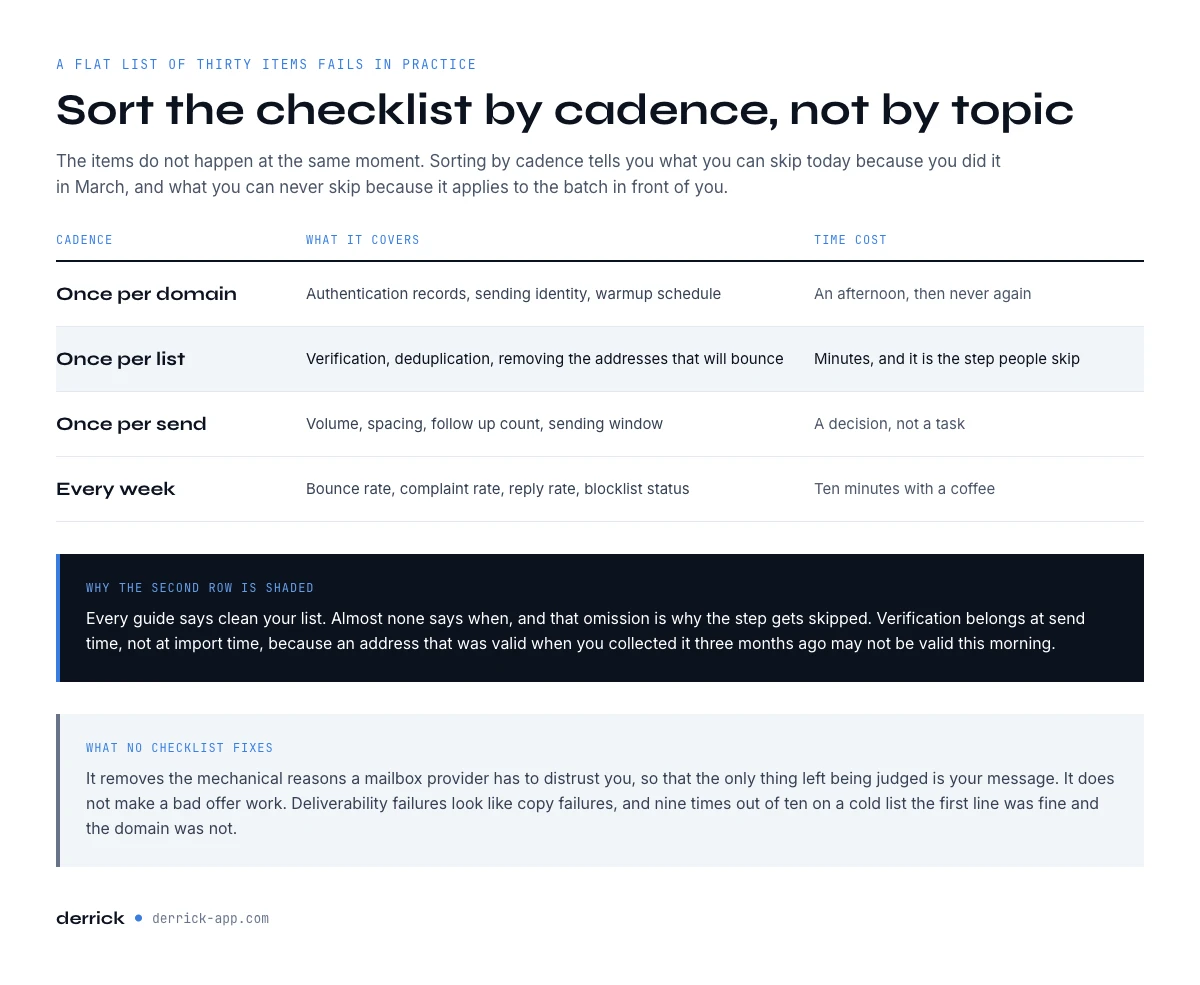
The four cadences of an email deliverability checklist
Most checklists you will find are a flat list of thirty items. That format fails in practice, because the items do not happen at the same moment. Authentication is done once and then forgotten. List verification happens every time you build a list. Volume decisions happen at every send. Monitoring is weekly, forever.
Sorting by cadence is the single change that makes a checklist usable. It tells you what you can skip today because you did it in March, and what you can never skip because it applies to the batch in front of you.
| Cadence | What it covers | Time cost |
|---|---|---|
| Once per domain | Authentication records, sending identity, warmup schedule | An afternoon, then never again |
| Once per list | Verification, deduplication, removing the addresses that will bounce | Minutes, and it is the step people skip |
| Once per send | Volume, spacing, follow-up count, sending window | A decision, not a task |
| Every week | Bounce rate, complaint rate, reply rate, blocklist status | Ten minutes with a coffee |
Once per domain: authentication and the sending identity
Authentication is how a receiving server checks that the email claiming to come from your domain actually did. Three records do the work, and all three need to exist before you send anything at volume.
- SPF lists the servers allowed to send on behalf of your domain. Publish one SPF record per domain, not several, because multiple records invalidate each other.
- DKIM signs each message cryptographically so the receiver can confirm nothing was altered in transit. Your sending platform gives you the key to publish.
- DMARC tells receivers what to do when SPF or DKIM fails, and asks them to report back. Start on the monitoring policy so you can read the reports before you start rejecting mail.
Two structural choices sit alongside those records. Send cold outreach from a separate domain, not the one your invoices and your support replies come from, so that a reputation problem stays contained. And keep transactional mail on a different subdomain from campaigns, because they earn very different engagement and should not share a reputation.
Once per domain: warmup, and why the calendar matters more than the volume
A domain with no sending history has no reputation, which is not the same as a good one. Warmup is the process of building that history: low volumes to engaged recipients first, rising gradually, so that the pattern a mailbox provider observes is a business growing rather than a stranger arriving at scale.
The mistake is to treat warmup as a volume ramp you can compress. You cannot. Reputation is measured over time windows, so a domain warmed in five days and then pushed to full volume reads as exactly the anomaly the filters are built to catch. Give it weeks, and start the clock before you need the domain, not the week you want to launch.
While the domain warms, resist the temptation to point it at your coldest list. The first sends should go where replies are most likely, because early engagement is what the reputation is actually made of.
Once per list: the email deliverability checklist step most teams skip
Every deliverability guide says clean your list. Almost none of them say when, and that omission is why the step gets skipped. The answer is that verification belongs at send time, not at import time, because an address that was valid when you collected it three months ago may not be valid this morning. People change jobs, companies change mail providers, and catch-all domains change their behaviour.
Concretely, on a cold list built for outreach, the sequence is: deduplicate, drop the role addresses you do not intend to contact, verify what remains, then send only to what verified cleanly. Anything that comes back as undeliverable is removed before the send, not discovered by the send.
This is where Derrick sits in the workflow. Email Verification checks addresses at 1 credit per email and is billed only when a result comes back. It is a paid feature, available from the STANDARD plan upward at 20 euros a month, so it is not part of the free tier. Finding the addresses in the first place is Email Finder, at 5 credits per email found, again billed only on a result. Both run from the web app, the Derrick sidebar in Google Sheets, from an AI assistant through the MCP server, or straight from the API, so the verification step fits whichever place your list already lives.
If you want the mechanics of what a verification actually tests, and what each result status means, our bounce checker guide takes it apart level by level.
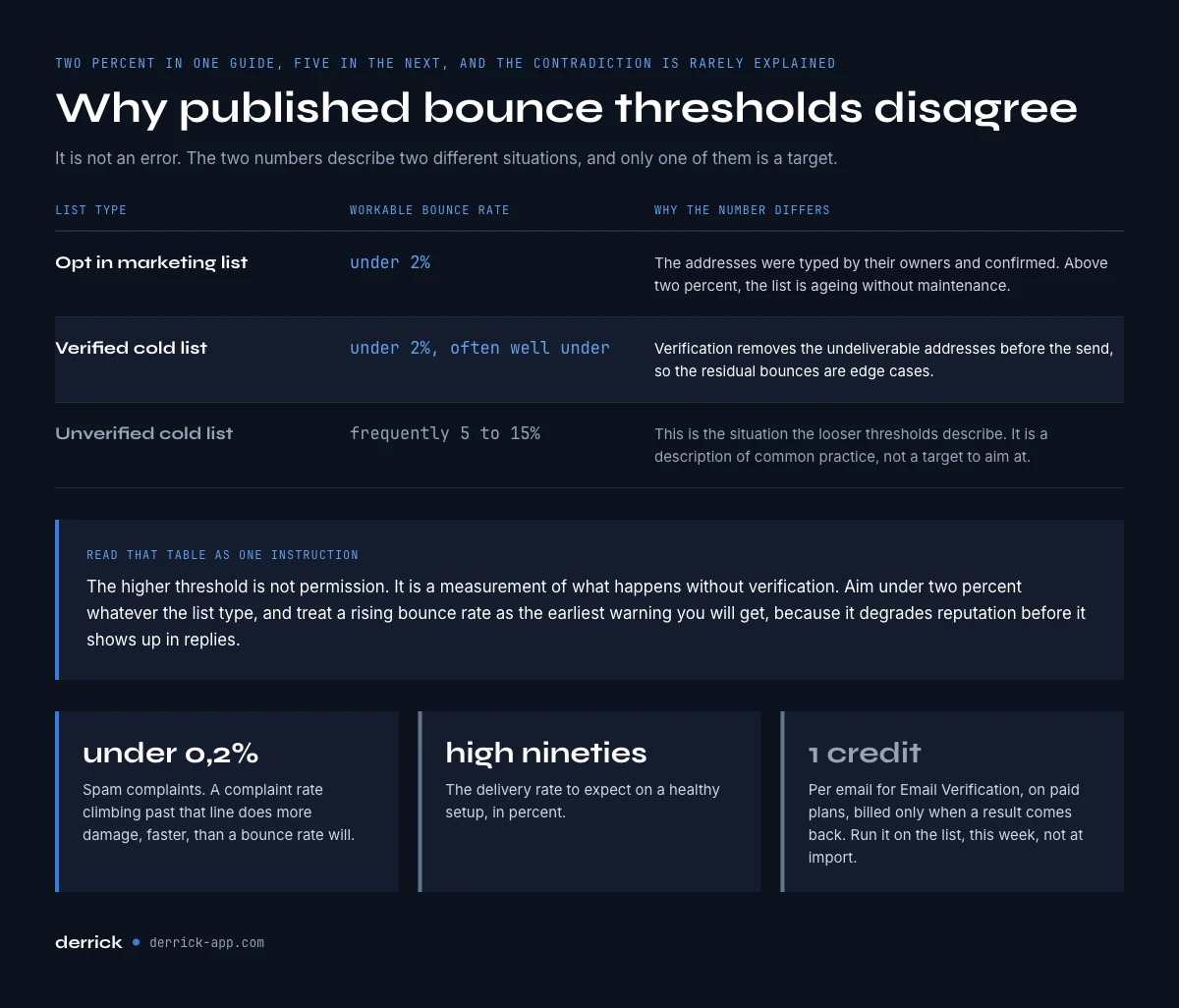
Bounce rate thresholds: why the published numbers contradict each other
Search for a threshold and you will find bounce rate limits of 2 percent in one guide and 5 percent in the next. Both are quoted with confidence, and the contradiction is rarely explained. It is not an error. The two numbers describe two different situations.
| List type | Workable bounce rate | Why the number differs |
|---|---|---|
| Opt-in marketing list | Under 2 percent | The addresses were typed by their owners and confirmed. Anything above 2 percent means the list is ageing without maintenance. |
| Verified cold list | Under 2 percent, often well under | Verification removes the undeliverable addresses before the send, so the residual bounces are edge cases. |
| Unverified cold list | Frequently 5 to 15 percent | This is the situation the looser thresholds describe. It is a description of common practice, not a target to aim at. |
Read that table as one instruction: the higher threshold is not permission, it is a measurement of what happens without verification. Aim under 2 percent regardless of list type, and treat a rising bounce rate as the earliest warning you will get, because it degrades reputation before it shows up in replies.
Two other numbers belong next to it. Keep spam complaints below 0.2 percent, and expect delivery rates in the high nineties on a healthy setup. A complaint rate climbing past that line will do more damage, faster, than a bounce rate will.
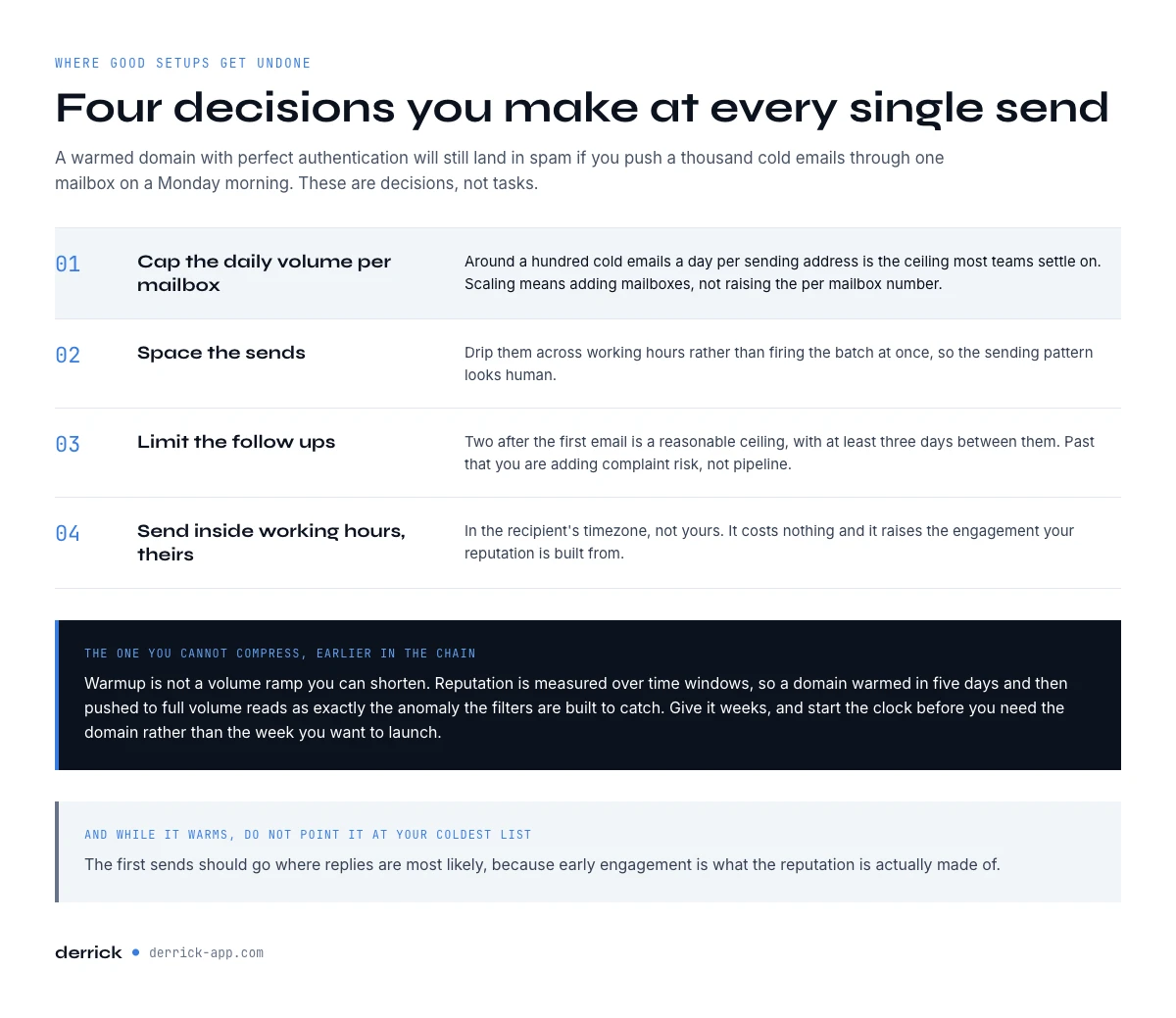
Once per send: volume, spacing and the daily ceiling
Volume decisions are made per campaign, and they are where good setups get undone. A warmed domain with perfect authentication will still land in spam if you push a thousand cold emails through one mailbox on a Monday morning.
- Cap the daily volume per mailbox. Around 100 cold emails a day per sending address is the ceiling most teams settle on. Scaling means adding mailboxes, not raising the per-mailbox number.
- Space the sends. Drip them across working hours rather than firing the batch at once, so the sending pattern looks human.
- Limit follow-ups. Two follow-ups after the first email is a reasonable ceiling, with at least three days between them. Past that you are adding complaint risk, not pipeline.
- Send inside working hours in the recipient's timezone. It costs nothing and it raises the engagement that your reputation is built from.
Copy sits in this cadence too, because content signals matter. Our guides on subject lines that earn the open and on the six template formats cover that half of the send.
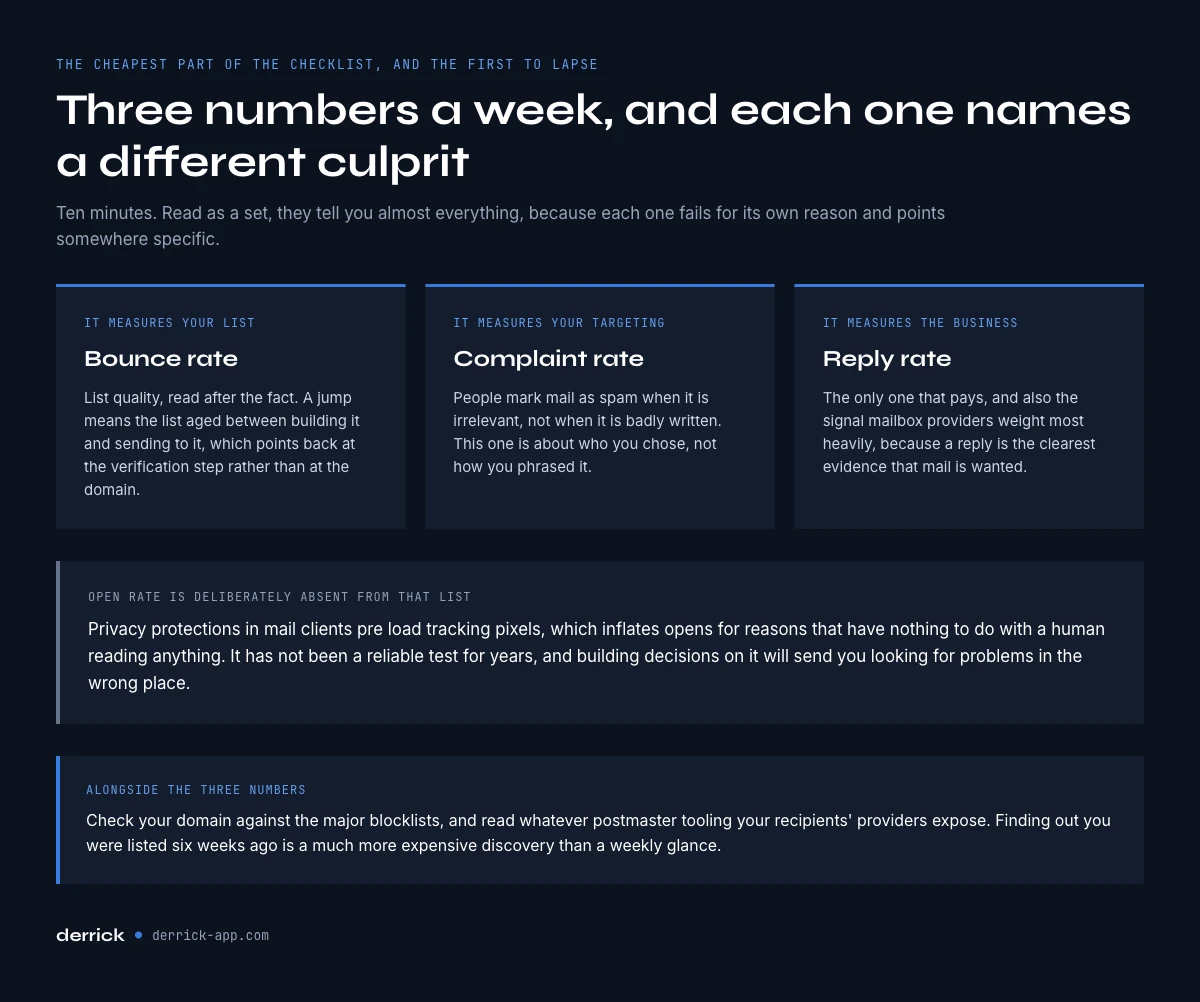
Every week: the three numbers worth reading
Weekly monitoring is the cheapest part of this checklist and the first thing to lapse. Three numbers tell you almost everything, and they are worth ten minutes.
Bounce rate is your list quality, read after the fact. A jump means the list aged between building it and sending to it, which points back at the verification step rather than at the domain. Complaint rate is your targeting: people mark mail as spam when it is irrelevant, not when it is badly written. Reply rate is the only one that measures the business, and it is also the signal mailbox providers weight most heavily, because replies are the clearest evidence that mail is wanted.
We make the same argument at length in the guide to cold email subject lines. Open rate is deliberately absent from that list. Privacy protections in mail clients pre-load tracking pixels, which inflates opens for reasons that have nothing to do with a human reading anything. It has not been a reliable test for years, and building decisions on it will send you looking for problems in the wrong place.
Alongside the three numbers, check your domain against the major blocklists and read whatever postmaster tooling your recipients' providers expose. Finding out you were listed six weeks ago is a much more expensive discovery than a weekly glance.
The full email deliverability checklist in one table
| When | Control | Pass condition |
|---|---|---|
| Per domain | SPF published | Exactly one record, covering every sending service |
| Per domain | DKIM signing active | Key published, signature verifying on a test send |
| Per domain | DMARC published | Record live, reports arriving and being read |
| Per domain | Outreach domain separated | Cold sending is not on your primary business domain |
| Per domain | Warmup completed | Weeks of gradual volume, engaged recipients first |
| Per list | Deduplicated | One row per address, one address per company contact |
| Per list | Verified at send time | Verification run on this list, this week, not at import |
| Per list | Undeliverables removed | Nothing that failed verification is in the send |
| Per send | Daily volume capped | Around 100 per mailbox, more mailboxes rather than more volume |
| Per send | Sends spaced | Drip across the day, not a single burst |
| Per send | Follow-ups limited | Two maximum, three days apart or more |
| Weekly | Bounce rate | Under 2 percent |
| Weekly | Complaint rate | Under 0.2 percent |
| Weekly | Reply rate | Tracked and trending, the number that matters |
| Weekly | Blocklist status | Domain and sending IPs clear |
Five mistakes that survive a good checklist
Verifying at import and never again. A list verified when it was built and sent to eight weeks later is an unverified list. The decay is invisible until the bounces arrive.
Warming the domain, then jumping to full volume. The warmup earns you a reputation for sending a certain amount. Exceeding it sharply reads as a compromised account.
Treating a 5 percent bounce rate as acceptable because a guide said so. It describes unverified lists. It is a symptom that got written down as a standard.
Scaling by raising per-mailbox volume. The ceiling exists per sending identity. Growth means more identities, each warmed, not one identity pushed harder.
Reading open rate as deliverability. Pre-fetched pixels inflate it. A campaign can show healthy opens while sitting in a spam folder nobody visited.
Key takeaways
- An email deliverability checklist fixes the mechanical reasons to distrust you, so your copy can be judged fairly. It does not fix a weak offer.
- Sort by cadence: once per domain, once per list, once per send, every week. That is what makes it usable rather than aspirational.
- Verification belongs at send time, not import time, because addresses decay between the two.
- Aim for bounces under 2 percent and complaints under 0.2 percent whatever the list type. The looser numbers in circulation describe unverified lists, not targets.
- Track reply rate, not open rate. Opens have not been a reliable measurement for years.
If you want the list side handled properly before the next send, Derrick finds and verifies addresses from the web app, the Google Sheet, the AI assistant or the API where your list already lives, and the free plan gives you 100 credits per month to try it on a real batch. Start with the free plan, or read the rest of the cold email cluster first.
We also publish one email every 2 weeks with what we are measuring on cold outreach and data quality. Subscribe from the homepage if that is useful to you.
Frequently asked questions
What should be on an email deliverability checklist?
What is a good bounce rate for cold email?
When should I verify my email list, at import or before sending?
How long does domain warmup take before cold outreach?
Why is open rate missing from the weekly metrics?
How many cold emails can I send per day without hurting deliverability?
Does Derrick send cold emails?
Keep reading
Continue exploring this cluster


Cold Email Template: 6 B2B Formats and the Data Each One Needs
Read →
Cold Email Subject Lines: 20 Formats and the Data Each Needs
Read →

Best Time to Send Cold Emails: What the Data Says (2026)
Read →

SPF Record Check: Read Yours and Count the Lookups (2026)
Read →