Cold email software: the seat price hides where campaigns actually fail
Compare cold email software layer by layer, not by seat price: sending, sequencing, deliverability and contact data. Work out your real cost per reply.


Best cold email software at a glance: the cold email tools by job
Cold email software is easier to choose once you can see, on one screen, what each platform was built around and where the contact data comes from. The table below is not a ranking. It lists the sending platforms buyers compare most often by the job each one was designed for, and the right-hand column shows where Derrick sits in that stack, because Derrick finds and verifies the contacts but does not send.
How we compared. Every row is read against the four layers this page breaks down: sending infrastructure, the sequencing engine, deliverability controls and the contact data. Two questions decide each line: what the tool was built around, and how a cleaned list reaches it, through a native push or through a file import. Seat prices are left out on purpose. The pricing shapes in this category do not compare with each other, as the seat price section below shows, and a figure copied from a plan page goes stale within a quarter.
| Platform | What it is built for | Where Derrick fits |
|---|---|---|
| Derrick | The data layer: finding, verifying and enriching contacts, from the web app, the Google Sheets sidebar, an AI assistant over MCP or the REST API | The input to every row below. Free pushes to La Growth Machine, lemlist, Instantly and HeyReach |
| La Growth Machine | Multichannel sequences: email and LinkedIn steps in one flow | Push to La Growth Machine, free, no CSV round trip |
| lemlist | Multichannel sequences: email and LinkedIn steps in one flow | Push to lemlist, free, no CSV round trip |
| Waalaxy | Multichannel sequences: email and LinkedIn steps in one flow | List built and verified upstream, then imported as a file |
| Instantly | Volume sending: mailbox rotation, warmup and inbox placement across many domains | Push to Instantly, free, no CSV round trip |
| Smartlead | Volume sending: mailbox rotation, warmup and inbox placement across many domains | List built and verified upstream, then imported as a file |
| Reply.io | Sales engagement: sequences tied to a CRM and a rep workflow | List built and verified upstream, then imported as a file |
| Mailshake | Sales engagement: sequences tied to a CRM and a rep workflow | List built and verified upstream, then imported as a file |
Two readings of this table matter more than any single row. First, the sending platforms differ by shape, not by quality: a multichannel sequencer and a volume sender solve different problems, and the right one depends on whether your motion is email only. Second, the data column is the same for every row. Whichever sender you pick, the list it receives is the variable that moves your bounce rate and your reply rate, and that list is built before the sender is involved. To choose by use case rather than by feature list, run the one-week test further down this page: it settles the shape question in five working days.
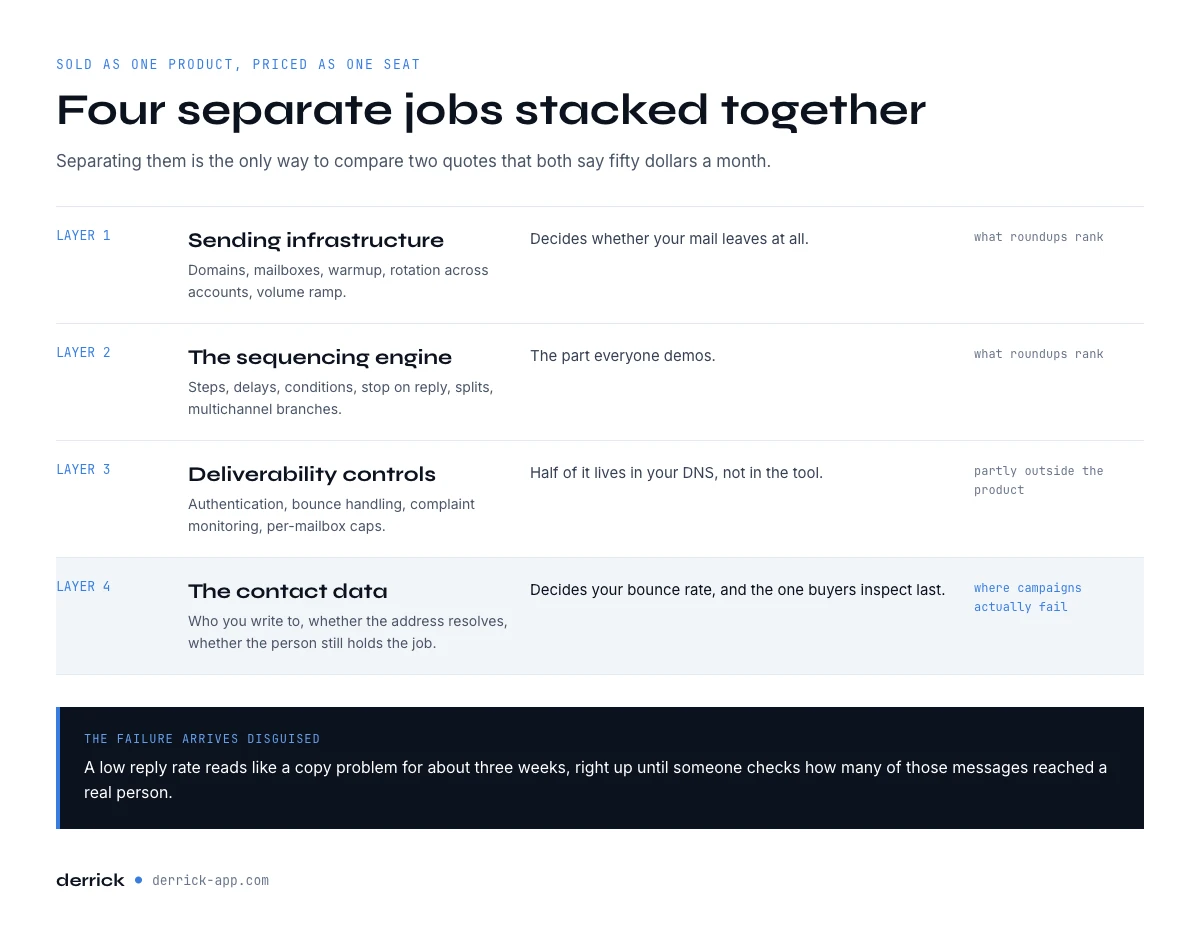
Cold email software: the four layers you are actually buying
Cold email software is sold as one product and priced as one seat, but every platform on the market is 4 separate jobs stacked together. Separating them is the only way to compare two quotes that both say $50 a month.
- Sending infrastructure. Domains, mailboxes, warmup, rotation across accounts, volume ramp. This is what decides whether your mail leaves at all.
- The sequencing engine. Steps, delays, conditions, stop-on-reply, A/B splits, multichannel branches. This is the part everyone demos.
- Deliverability controls. Authentication, bounce handling, spam-complaint monitoring, per-mailbox caps. Half of it lives in your DNS, not in the tool.
- The contact data. Who you are writing to, whether the address resolves, whether the person still holds the job. This is the layer that decides your bounce rate, and the one buyers inspect last.
Comparison pages rank platforms on layers one and two because those are easy to screenshot. The campaigns that fail rarely fail there. They fail on layer four, and the failure arrives disguised: a low reply rate reads like a copy problem for about three weeks before anyone checks how many of those addresses were reachable in the first place. This page is part of our wider cold email cluster.
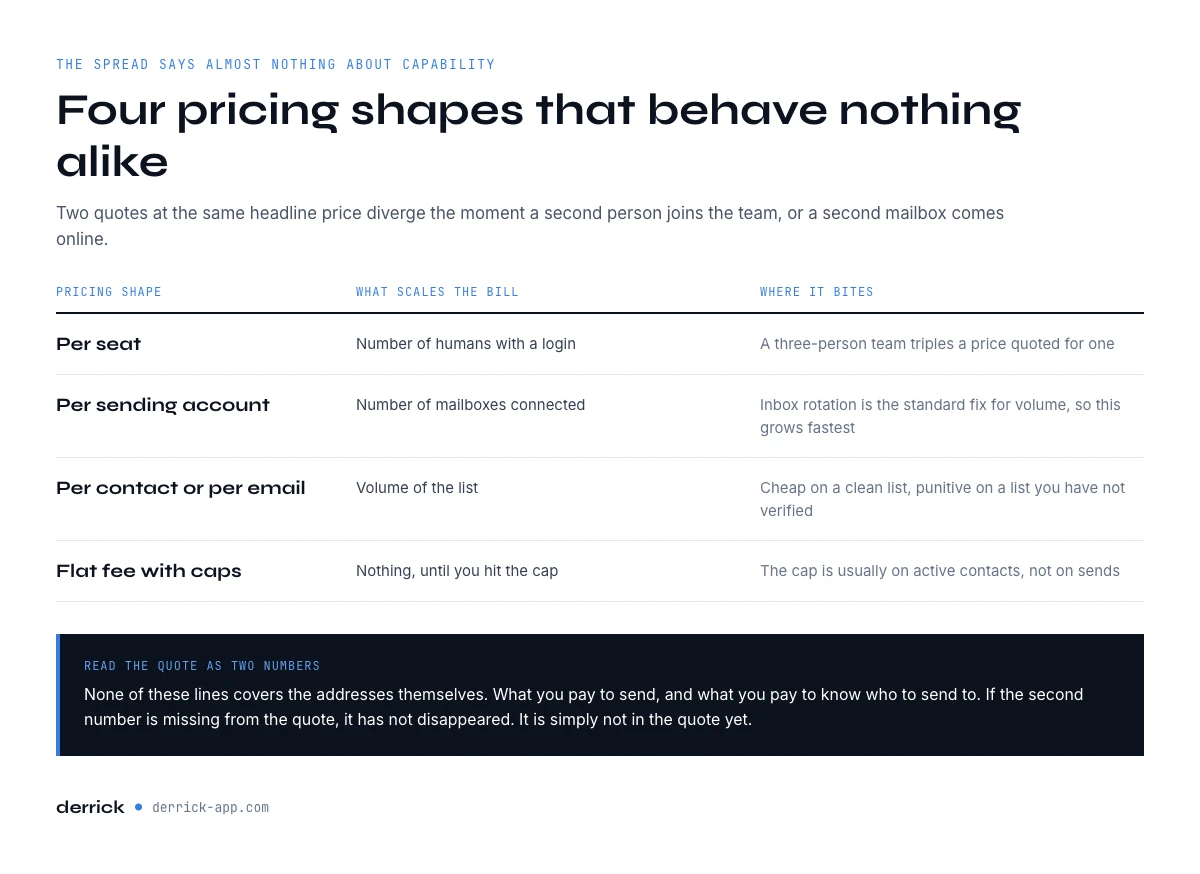
What the seat price on a cold email software plan actually covers
Published plans in this category sit between roughly $25 and $160 per month at the time of writing, September 2026, and that spread says almost nothing about capability. Three pricing shapes coexist, and they behave very differently once a second person joins the team.
| Pricing shape | What scales the bill | Where it bites |
|---|---|---|
| Per seat | Number of humans with a login | A three-person team triples a price quoted for one |
| Per sending account or slot | Number of mailboxes connected | Inbox rotation is the standard fix for volume, so this grows fastest |
| Per contact or per email sent | Volume of the list | Cheap on a clean list, punitive on a list you have not verified |
| Flat fee with usage caps | Nothing, until you hit the cap | The cap is usually on active contacts, not sends |
None of these lines covers the addresses themselves. When a platform advertises a built-in database, the contacts are usually metered separately, in credits, on top of the seat. Read the quote as two numbers rather than one: what you pay to send, and what you pay to know who to send to. If the second number is missing from the quote, it has not disappeared, it is simply not in the quote yet.
Free cold email software exists, and it is worth knowing what free buys. Free tiers in this category cap either the number of sending accounts, the number of active contacts, or the daily send volume, and they almost never include the contact data. They are useful to test a sequence builder and useless to judge deliverability, because inbox placement only becomes visible above a few hundred sends per week.
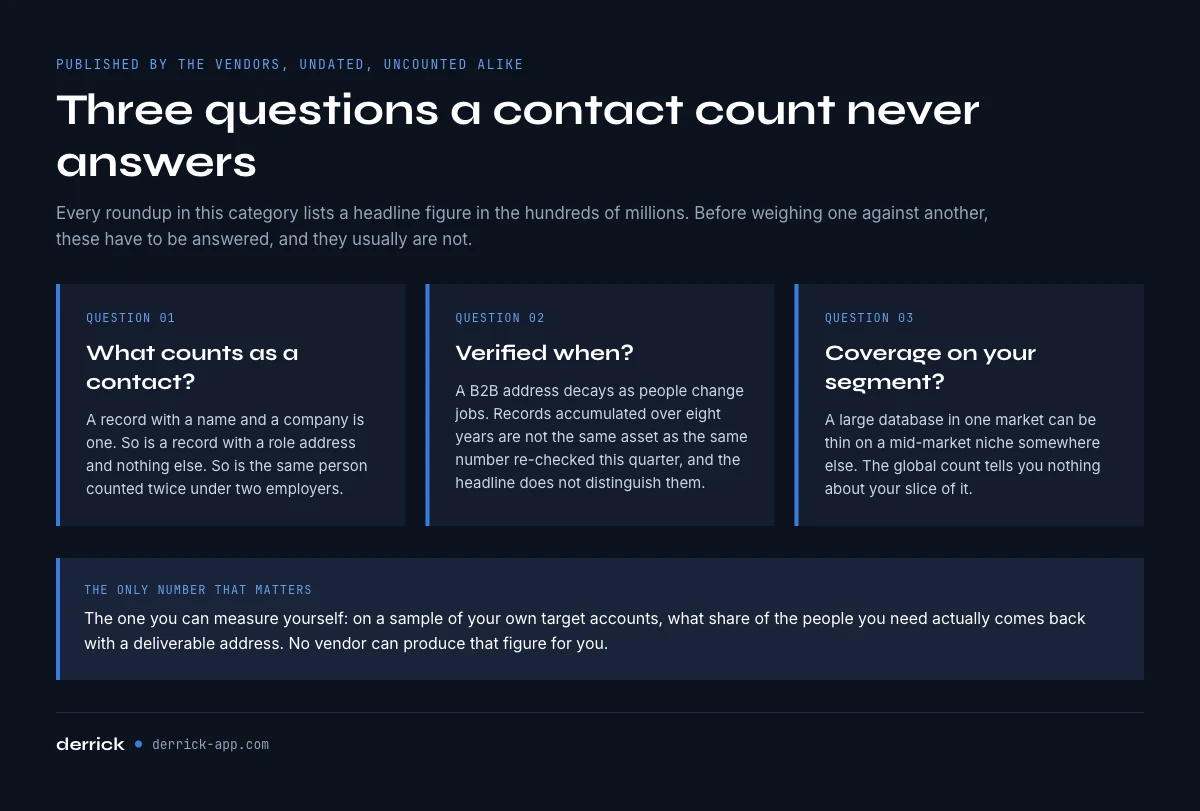
Why the database numbers on comparison pages are not comparable
Every roundup in this category lists contact counts: 850 million here, 450 million there, 210 million somewhere else. Those figures are published by the vendors themselves, they carry no measurement date, and they are not counting the same thing. Before you weigh one against another, three questions have to be answered, and they usually are not.
- What counts as a contact? A record with a name and a company is a contact. So is a record with a role address and nothing else. So is the same person counted twice under two employers.
- Verified when? A B2B address decays as people change jobs. A base of 400 million records accumulated over 8 years is not the same asset as 400 million records re-checked this quarter, and the headline number does not distinguish them.
- Coverage on your segment, not on the world. A large United States database can be thin on French mid-market industrial companies, or on any niche you happen to sell into. The global count tells you nothing about your slice.
The only number that matters is the one you can measure yourself: on a sample of your own target accounts, what share of the people you need came back with a deliverable address. It is a short test, an afternoon at most, and it is the single most useful thing you can do before signing anything. Our deliverability controls give you the order to run it in.
Running that test needs an address finder rather than a sending tool. Email Finder resolves a person and a company into a verified address at 5 credits per email, billed only when an address comes back, so the hundred contacts you test cost you only the ones that resolved. It sits on the paid plans, from 20 EUR a month. Run the coverage test on your own segment.
Work out your real cost per reply
Seat price divided by nothing is not a comparison. The number that decides whether a stack pays for itself is the cost of one reply, and it moves far more with data quality than with the price of the sender. The calculator below runs in your browser and takes the four inputs that actually drive it.
Cost per reply, by layer
Enter what you pay and what your list looks like. Nothing leaves your browser.
Fill the four fields and press Calculate.
The unusable share is the input people guess and get wrong. Take it from your last campaign report rather than from memory: hard bounces plus role addresses plus everyone who replied that they left the company. The 98% line holds your spend constant on purpose, so it shows the gross gain: verification is itself a cost, 1 credit per verified address, and you subtract it from that gain.
Run it once with the figures from your last campaign, then again with the unusable share set to 2%. The gap between the two is what the data layer is worth to you per month, expressed in the only currency that matters here. If that gap is larger than a seat, the cheapest change on your stack is not the sending tool: it is Email Verification at 1 credit per address checked, run on the list you already hold. Clean the list you already have.
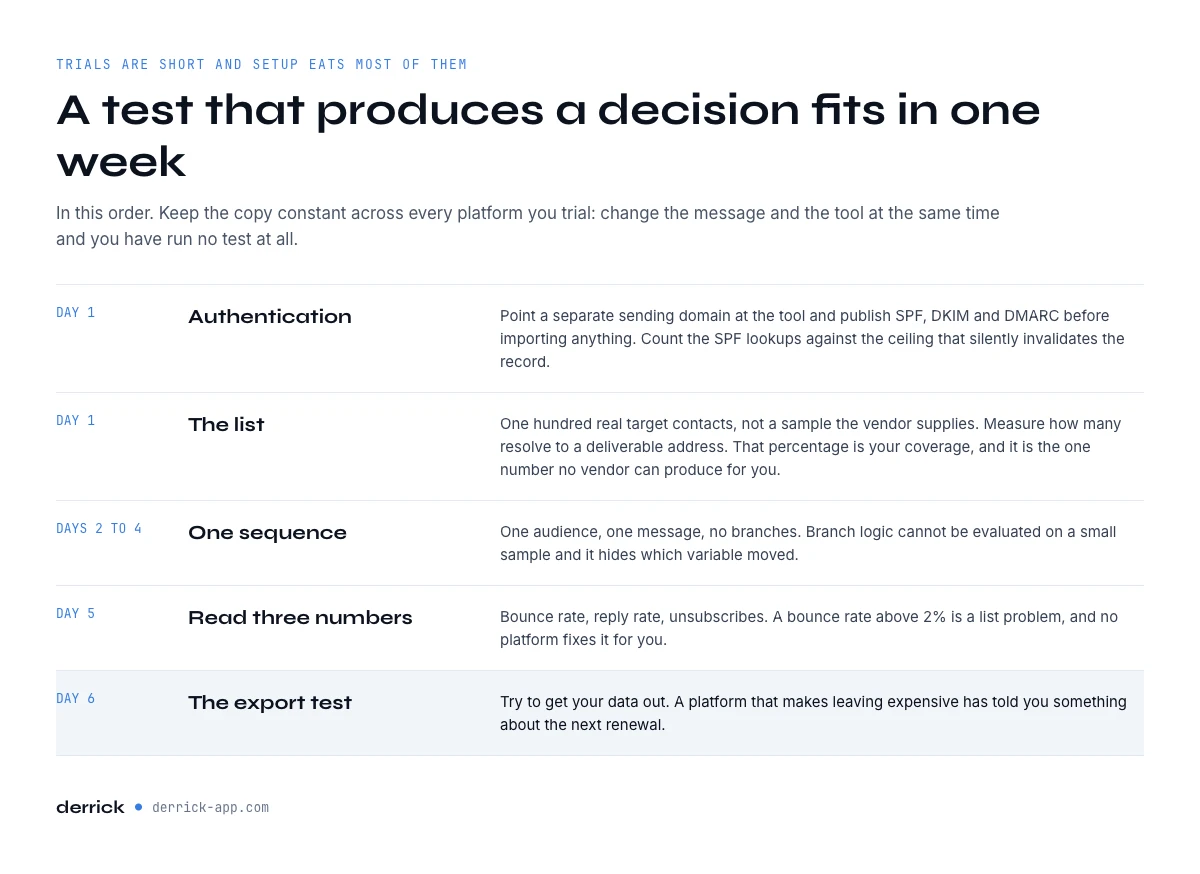
How to test cold email software before you commit
Trials in this category are short and the setup eats most of them. A test that produces a decision fits in one week if you run it in this order.
- Day one, authentication. Point a separate sending domain at the tool and publish SPF, DKIM and DMARC before you import anything. Our SPF record check takes the record you are about to publish and counts the lookups against the ceiling that silently invalidates it.
- Day one, the list. Take one hundred real target contacts, not a sample the vendor supplies, and measure how many resolve to a deliverable address with a finder such as Email Finder. That percentage is your coverage on your segment, and it is the one number the vendor cannot produce for you.
- Days two to four, one sequence. One audience, one message, no branches. Branch logic is impossible to evaluate on a small sample and it hides which variable moved.
- Day five, read three numbers. Bounce rate, reply rate, and unsubscribes. A bounce rate above 2% is a list problem, and no platform fixes it for you.
- Day six, the export test. Try to get your data out. A platform that makes leaving expensive has told you something about the next renewal.
Keep the copy constant across every platform you trial. If you change the message and the tool at the same time you have run no test at all. Our six template formats are a reasonable constant to hold, and each one names the data it needs to work.
How do I test coverage before buying?
Take one hundred real contacts from your own target accounts, not a sample the vendor supplies, and measure what share come back with a deliverable address. That percentage is your coverage on your segment, and it is the only figure in this category you can verify yourself. It takes about two hours and it decides more than any feature comparison will.
What bounce rate should I expect on a cold campaign?
Above 2% is a list problem rather than a platform problem, and no sending tool fixes it for you. The two controls that keep it low are verification close to the send date rather than at import, because a file verified in January is a different file in June, and removing role addresses such as contact@ or info@, which have no individual behind them and drag both bounce and reply rates down.
Does switching platform fix a low reply rate?
Switching rarely fixes it, because the input has not changed. Check the bounce rate and the share of role addresses first: a message sent to a list that never arrived reads exactly like a message that failed to persuade. Migration costs weeks and usually returns the same numbers, whereas one verification pass on the same list moves the cost per reply immediately.
The sending platforms, and what each layer is for
The table at the top of this page groups the platforms by what each one is built around rather than by a ranking, and it names the layer Derrick covers so you can see where the overlap is and where there is none. Three shapes come out of it: multichannel sequencers for teams whose motion is not email-only, volume-first senders for high-volume outbound across many domains, and sales-engagement suites for teams where the sequence follows a pipeline stage.
Choosing among them by use case is a test, not a reading exercise. Hold the copy constant, run the one-week protocol above on two shapes, and keep the one whose bounce and reply numbers hold up on your own list. If both come back the same, the deciding layer was never the sender.
For sequencing and for inbox placement, these platforms do their job well, and Derrick is not one of them. It does not send. The split is worth stating plainly: for the sending and the sequencing, use the platform that fits the shape of your motion. For the data underneath, Derrick does better, and the reason is concrete rather than a claim about quality. A bundled database is a fixed asset you rent and cannot inspect; Derrick runs on your own list, in the surface where that list already lives, and on the finding side it charges only when an address comes back.
AI in cold email software: what it writes and what it cannot repair
Most cold email tools now ship an AI writer, and it is worth being precise about what that layer does. AI drafts subject line variants, writes a first line from the fields of a row, rewrites a template in several tones, and sorts incoming replies into interested, not now and unsubscribe. Those are real time savings on the writing side of a campaign, and on a team of one they can be the difference between sending this week and sending next month.
What AI cannot do is repair the list. A personalised first line sent to an address that bounces still bounces, and it still counts against your domain. A line written from a job title the person left six months ago reads as careless, not personal. The model writes from the fields it is given: if the company, the role and the recent signal are missing or stale, the output is a fluent sentence about nothing. Personalisation is a data problem before it is a writing problem.
That is why the useful order is data first, AI second. Find and verify the addresses, enrich the company and the person with the fields worth mentioning, then let the model write from those columns. In Derrick, Ask Claude reads each row and writes the answer back, a first line, a score or a summary, at 2 credits per line on the paid plans, on the same list you are about to push. When you compare AI cold email tools, judge the writer in a trial the way you judge the sender: on replies from a verified list, never on how good the draft sounds in a demo.
The data layer, and why it is bought separately
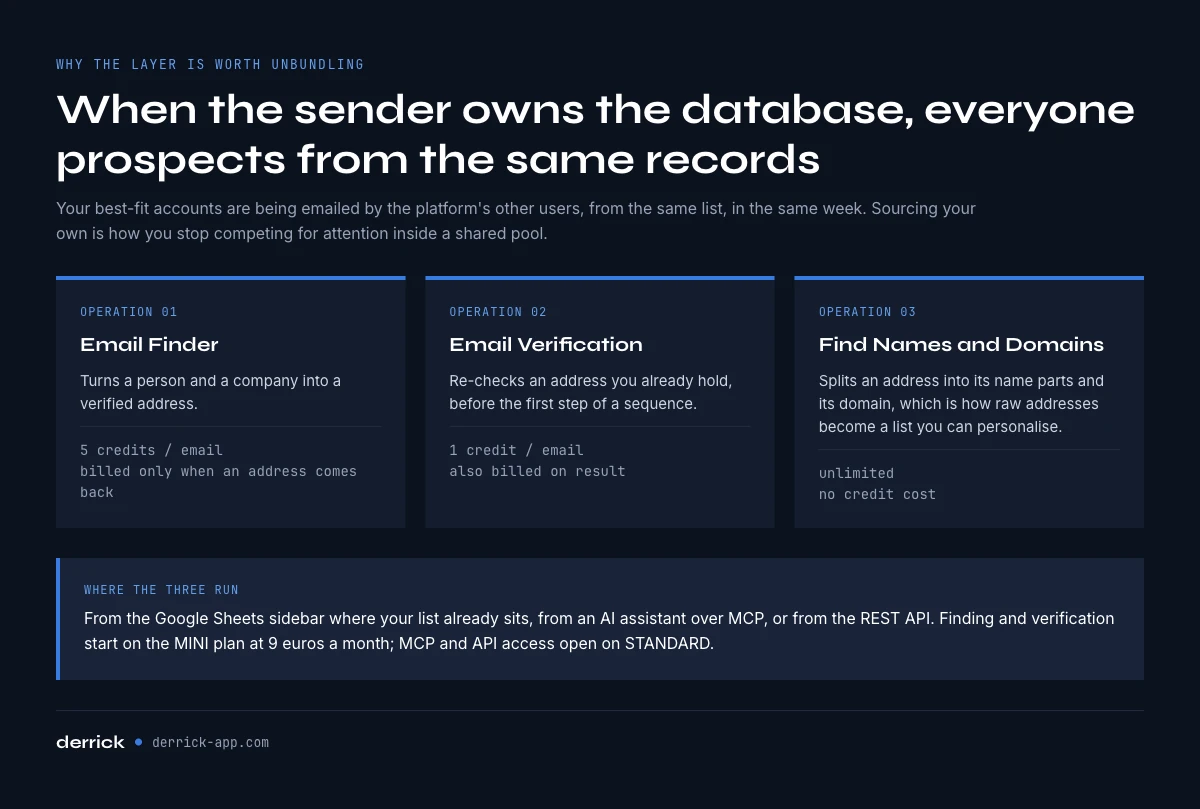
There is a second, less obvious reason the data layer is worth unbundling. When the sender owns the database, every customer of that sender is prospecting from the same records. Your best-fit accounts are being emailed by the platform's other users, from the same list, in the same week. Sourcing your own list is not only a quality decision, it is how you stop competing for attention inside a shared pool.
Practically, the layer is three operations. Email Finder turns a person and a company into a verified address at 5 credits per email, billed only when an address comes back. Email Verification re-checks an address you already hold at 1 credit per address checked, whatever the verdict. And Find Names and Domains by Email Addresses splits an address into its name parts and its domain, unlimited and free, which is how a list of raw addresses becomes a list you can personalise.
All three run from the web app, from the Google Sheets sidebar where your list already sits, from an AI assistant over MCP, or from the REST API. The finding and verification features start on the STANDARD plan at 20 EUR a month; MCP and API access open on the PLUS plan at 47.50 EUR. When the list is ready, Push to La Growth Machine and Push to lemlist move it into the sequencer without a CSV round trip, at no credit cost. Pick the surface by the shape of the job: a list to work through belongs in the web app or the Sheets sidebar, a one-off question belongs in the assistant, and a nightly refresh belongs in the API.
Deliverability is not a feature you can buy
Every platform in this category advertises deliverability, and every one of them is telling a partial truth. The parts they control are rotation, throttling and warmup. The parts they do not control are your DNS records, your domain age, your content, and above all who you send to.
The mechanism is worth stating once. Receiving providers score a sending domain on how recipients behave: opens and replies push the score up, complaints and hard bounces push it down. An unusable address does not simply fail to convert. It fails loudly, and the failure is attributed to your domain, not to the vendor who sold you the record. This is why a list problem shows up as a placement problem two weeks later, and why changing platform at that point resolves nothing.
Two controls do most of the work and neither is a purchase. Authentication has to be complete before the first send, which is the order the subject line formats assume when they talk about open rates at all. And the list has to be verified close to the send date rather than at import, because a file verified in January is a different file in June. Timing has a smaller effect than most people assume, but it is not nothing: our page on the best time to send cold emails shows how small.
Cold email software mistakes that cost the most
- Comparing seat prices across different pricing shapes. A per-seat quote and a per-slot quote are not the same product. Rebuild both as a monthly total for the team and the mailbox count you will actually run.
- Buying the bundled database because it is included. Included is not free, it is metered, and it is the layer you cannot inspect before paying. Test coverage on your own segment first.
- Sending from the main company domain. A reputation problem on the domain that carries your invoices and your support mail is not recoverable in a quarter. Use a separate sending domain.
- Verifying at import and never again. Verification is a snapshot. A list built three months before the campaign should be re-checked before the first step, not after the bounces.
- Reading a low reply rate as a copy problem. Check the bounce rate and the share of role addresses first. Rewriting a subject line for a list that never arrived is expensive and slow.
- Switching platform to fix a data problem. The migration costs weeks and the numbers usually come back the same, because the input did not change. Fix the layer that moved them.
Key takeaways
- Cold email software bundles four layers: sending infrastructure, sequencing, deliverability controls and contact data. Compare them separately.
- Seat price is not comparable across pricing shapes, and it never includes the addresses.
- Self-declared database sizes are not measurable. Coverage on a hundred of your own target contacts is.
- Cost per reply moves far more with the unusable share of your list than with the price of the sender.
- Authentication and list freshness are the two deliverability controls no platform can buy for you.
- For sequencing and inbox placement, use the platform that fits your motion. For the data underneath, unbundle it.
Derrick is the data layer of that stack, not the sender. It finds and verifies addresses, enriches companies and people, and pushes the finished list into your sequencer, from the web app, the Google Sheets sidebar, an AI assistant over MCP, or the REST API. Email Finder and Email Verification sit on the paid plans, from 20 EUR a month. Email Finder bills only when an address comes back, so an address that does not exist costs nothing, and Email Verification bills 1 credit per address checked. The free plan and its 100 credits per month cover the import and enrichment side, which is enough to see the shape of what comes back on a real sample before you decide. Start with the free plan, or open the rest of the cold email cluster.
We publish one email every 2 weeks with what we measure on cold outreach and data quality, including the numbers behind pages like this one. Subscribe from the homepage.
Frequently asked questions
What is cold email software?
How much does cold email software cost?
Is cold email software the same as email marketing software?
Do I need a separate tool for the contact data?
Can Derrick send cold emails?
What is the cheapest way to send cold email?
Is cold email software legal?
Is there free cold email software?
Keep reading
Continue exploring this cluster


Cold Email Template: 6 B2B Formats and the Data Each One Needs
Read →
Cold Email Subject Lines: 20 Formats and the Data Each Needs
Read →

Email Deliverability Checklist: 15 Controls, Sorted by Cadence
Read →

Best Time to Send Cold Emails: What the Data Says (2026)
Read →