Email deliverability tools: which one answers which symptom
Compare email deliverability tools by the question each one answers, not by price. Six categories, the free ones first, and the bounce math nobody ranks.


Email deliverability tools: the six categories and the question each answers
Email deliverability tools are not one product category. They are six, and each one answers a different question about a different part of the chain between your send button and someone's inbox. Buying the wrong one is the normal outcome of reading a ranked list, because a ranked list compares prices across instruments that do not measure the same thing.
Here is the map. Read it as a set of questions first, and only then as a shopping list.
| Category | The question it answers | What it cannot tell you |
|---|---|---|
| Provider dashboards | What Gmail and Microsoft think of your domain | Anything about a domain with low volume |
| Authentication checkers | Are SPF, DKIM and DMARC published and valid | Whether you reach an inbox |
| Inbox placement testing | Where a given message lands on a seed panel | Where it lands for your real recipients |
| List quality and verification | How many addresses will bounce before you send | Whether the person still works there tomorrow |
| Warm-up services | Is the mailbox accumulating positive engagement | Whether the list you send to is any good |
| Reputation and blocklist monitoring | Has something already gone wrong | Why it went wrong |
We opened the three pages holding the top of this search in September 2026 and each of them maps the stack to four of those six families. The two that get skipped are the two that decide the outcome for outbound teams, and we will spend the most time on them. The first is verification before the send, and it is the only instrument here that acts before the damage rather than reporting it. This page sits inside our wider cold email cluster.
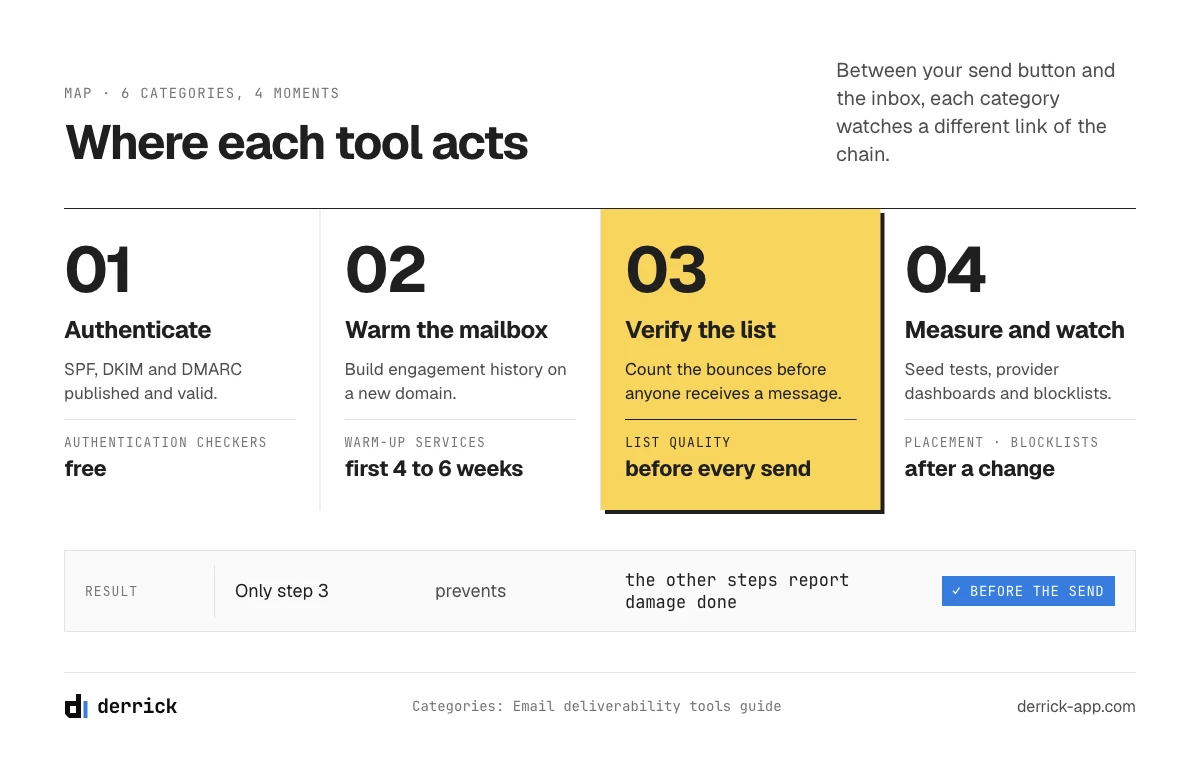
Best email deliverability tools at a glance, sorted by the question they answer
If you came for the list of email deliverability tools, here it is. Every tool below is named again in its own section, with what it measures and where it stops. The column that matters is the last one: what the tool can prove. Prices are the public entry prices we read on each vendor's site on October 19, 2026, rounded, and they move often, so treat them as an order of magnitude rather than a quote.
| Tool | Category | Free or entry price (as of October 19, 2026) | What it can prove |
|---|---|---|---|
| Derrick Email Verification | List quality and verification | 1 credit per address checked, whatever the verdict (an error is free); paid plans from 20 euros a month | How many addresses on your list will bounce, before the send |
| Google Postmaster Tools | Provider dashboard | Free | How Gmail rates your domain, your spam complaint rate, your authentication results |
| Microsoft SNDS | Provider dashboard | Free, for sending IPs you control | How Outlook and Hotmail see the IP addresses you send from |
| Yahoo Sender Hub | Provider dashboard | Free | The third major receiver's view of your traffic |
| MXToolbox | Authentication and blacklist checks | Free lookups; paid monitoring from about $129 a month | Whether SPF, DKIM, DMARC, MX and reverse DNS resolve, and whether you sit on a blacklist |
| EasyDMARC | DMARC reporting | Free checks and a free trial; paid DMARC plans after that | What your DMARC aggregate reports say, in readable form |
| GlockApps | Inbox placement (seed testing) | Free plan with 2 spam test credits; paid from about $59 a month | Where one template lands across a seed panel of mailboxes |
| Mailtrap | Pre-send testing sandbox | Free sandbox plan (50 test emails); paid from about $17 a month | What your message looks like, and what it contains, before it reaches anyone real |
| Warmy | Warm-up | 7-day free trial; from about $49 a month | Whether a new mailbox is building engagement history |
| MailReach | Warm-up and spam tests | About $19.50 per mailbox per month | The same, per mailbox, with placement tests on the side |
| Spamhaus lookup | Blocklist reputation | Free | Whether the blocklist the large receivers consult has listed your IP or domain |
| ZeroBounce, NeverBounce | List verification | Not compared here | Whether an address exists, the same question as the first row |
What the best email deliverability tools have in common
Across the categories, the instruments worth paying for share three traits. They measure something you cannot measure yourself for free. They tell you which layer moved, not just that a score dropped. And they price in a way that follows your real usage: per mailbox for warm-up, per test for seed panels, per address checked for verification. A tool that fails all three is a dashboard on top of data you already have.
That test also explains why the ranked lists disagree so much. Each one scores email deliverability tools on features, and a feature count rewards the products that bundle the most categories into one subscription. Bundles are convenient, but they make it harder to see which part you actually use. Start from the question, and the bundle either matches it or it does not.
How we sorted these email deliverability tools
We did not rank them, and we did not run a lab test across all of them, so you will not find a score out of ten here. The single criterion is the question each tool answers. Two tools that answer the same question are compared against each other inside their section. Two tools that answer different questions are never compared at all, because a seed test and a verification pass are not substitutes, whatever their price. The free instruments come first in every section because they are published by the receivers themselves. Derrick sits in one category only, list quality, and we say so there.
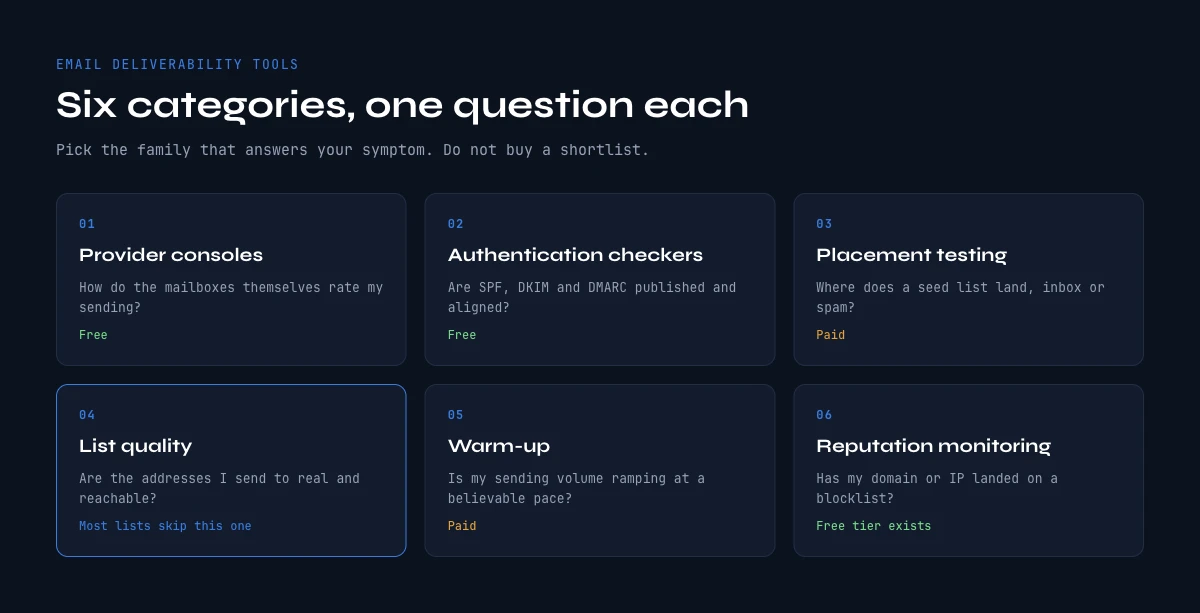
Start with the free instruments the mailbox providers already give you
Before any purchase, three dashboards published by the companies that actually decide your fate are free, authoritative and chronically underused.
- Google Postmaster Tools. Domain reputation, IP reputation, spam complaint rate, authentication pass rates and delivery errors, straight from the receiver. Nothing you buy can contradict it.
- Microsoft Smart Network Data Services, usually shortened to SNDS. The equivalent view for Outlook and Hotmail traffic, which behaves differently enough from Gmail that treating the two as one number hides most problems. One condition matters: SNDS reports on sending IP ranges you own or have delegated to you, so a team sending through a shared provider sees nothing there and has to read Microsoft's postmaster documentation and its own per-provider bounce logs instead.
- Yahoo Sender Hub. Smaller share of a B2B list, but it is the third opinion, and it is free.
Two caveats matter more than the setup instructions. First, these dashboards need volume. Google does not publish the threshold, and says only that reputation data appears once a domain sends enough traffic, but in practice the panels stay empty on a domain sending a few dozen messages a day, which is exactly the situation most outbound domains are in. Second, they are lagging. They tell you a reputation has already moved, not that it is about to. That combination is why paid instruments exist at all.
Add DMARC aggregate reports to the same free tier. Publishing a DMARC record on the monitoring policy costs nothing and turns silent authentication failures into a daily XML report. Our SPF record check guide covers the record itself and the lookup ceiling that quietly invalidates it.
The free provider dashboards side by side
| Dashboard | What it shows | Condition to see anything | Where it stops |
|---|---|---|---|
| Google Postmaster Tools | Spam complaint rate, authentication results, delivery errors, and compliance with Google's sender requirements | Verify your domain with a DNS record, then send enough daily volume to Gmail users | Gmail only, and silent on low volume |
| Microsoft SNDS | Filtering results and complaint data per sending IP | You must own or be delegated the sending IP ranges | Nothing for teams on a shared sending provider |
| Yahoo Sender Hub | Yahoo's view of your sending, and access to its complaint feedback loop | Register the sending domain | A small slice of most B2B lists |
| DMARC aggregate reports | Which servers send as your domain, and whether they pass SPF and DKIM | Publish a DMARC record with a reporting address | Raw XML until something reads it for you |
When the Postmaster panels do fill in, read them in this order. Authentication first: a failure there is a configuration problem you can fix today. Complaint rate second: it is the one signal Google publishes thresholds for. Delivery errors third: a spike in temporary rejections often appears days before a reputation drop. Everything else is context.
A useful habit: read Postmaster Tools on the same weekday every week, and write the spam complaint rate in a sheet. The panel shows history, but a number you copied yourself is one you actually looked at. If the rate creeps toward 0.1 percent, stop scaling volume and look at who you are writing to before you look at anything else. A complaint is a recipient telling Gmail the message was unwanted, and no tool on this page can argue with that.
The same requirements apply in reverse. Since February 2024 Google and Yahoo ask anyone sending more than 5,000 messages a day to their users to authenticate with SPF, DKIM and DMARC, to offer one-click unsubscribe on marketing mail and to keep complaints under 0.3 percent. Most outbound domains send far less than that, but the receivers grade small senders with the same signals, so meeting the bar early costs nothing and removes one variable from every later diagnosis.
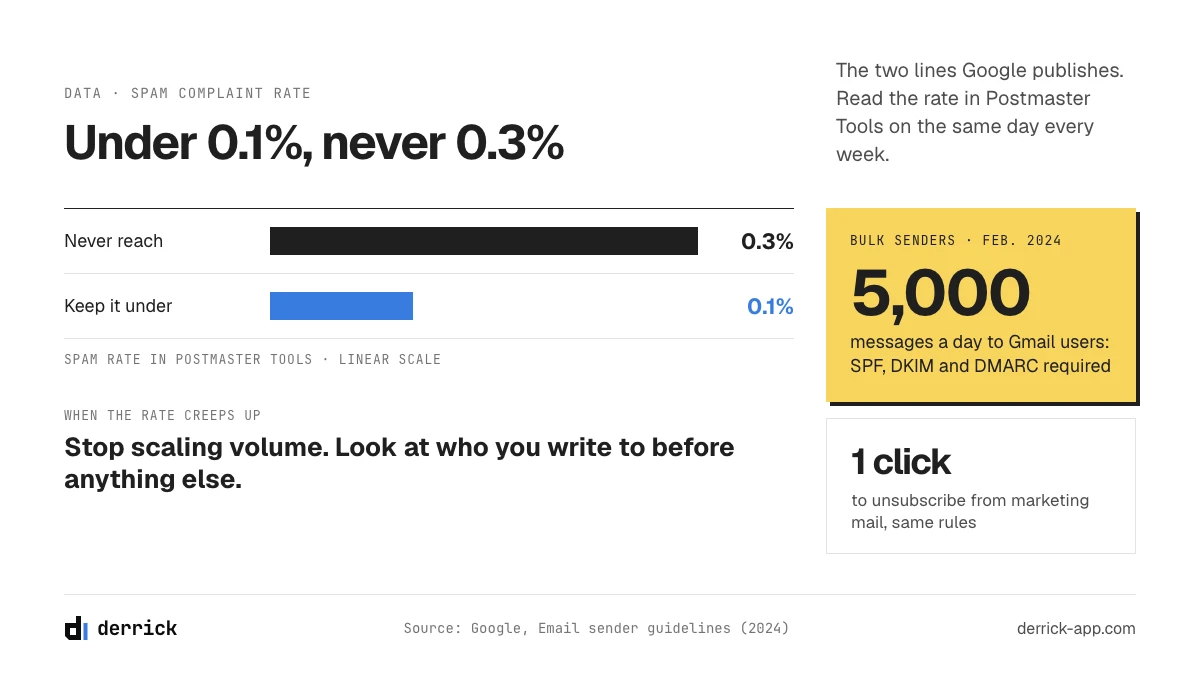
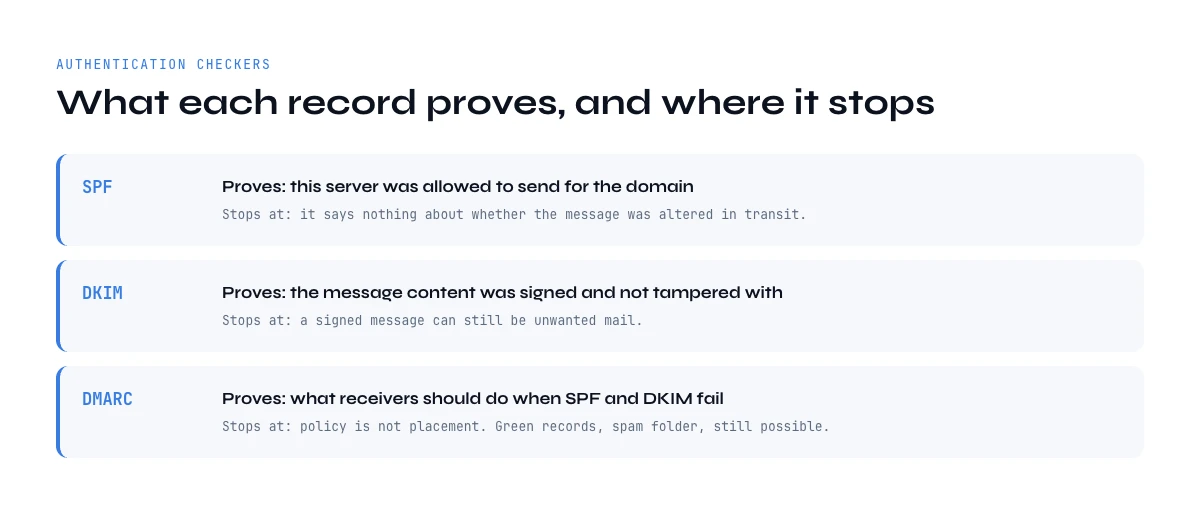
Authentication checkers: what they prove, and where they stop
This is the cheapest and most commoditised layer. A checker reads your DNS, parses SPF, DKIM and DMARC, and returns a verdict. MXToolbox, EasyDMARC, PowerDMARC and dmarcian all publish a free version, and the differences between them come down to how the result is presented rather than to what is measured.
What they prove is narrow and worth stating plainly: the records exist, they parse, and this server is on the list. What they do not prove is that any message reaches an inbox. Authentication is a gate you pass once. Passing it buys you the right to be judged on your sending behaviour, and nothing else.
Three failures a basic checker will miss, and which decide whether the layer is actually done:
- The ten DNS lookup ceiling on SPF. Past ten, receivers return a permanent error and treat your record as absent. No bounce, no warning. Outreach stacks reach it faster than corporate ones because each tool adds its own include.
- DMARC alignment on the wrong domain. Your sending tool often controls the return path, so SPF can pass on a domain the recipient never sees while alignment fails.
- Subdomains that inherit nothing. A record on the root does not cover a sending subdomain. Each one publishes its own.
Two checks belong in this layer and are skipped by most guides. The first is reverse DNS, or the PTR record: the sending IP should resolve back to a hostname, and that hostname should resolve forward to the same IP. Gmail's sender guidelines ask for it, and when you send through a hosted provider it is their job, but on a dedicated server it is yours. The second is feedback loops, the complaint reports a receiver sends back when a recipient clicks "this is spam". Yahoo runs one through Sender Hub and Microsoft through its Junk Mail Reporting Program; Gmail reports complaints in aggregate in Postmaster Tools instead. Wire them in before you need them, because a complaint you never see is a complaint you keep earning.
Authentication checkers compared
| Tool | What it checks | Free or entry price (as of October 19, 2026) | Its limit |
|---|---|---|---|
| MXToolbox | SPF, DKIM, DMARC, MX, reverse DNS, plus blacklist lookups in the same interface | Free lookups; paid monitoring from about $129 a month | A clean report proves the records parse, not that a message reaches an inbox |
| EasyDMARC | DMARC record checks and readable aggregate reports | Free checks; paid plans for reporting | Its value appears after the record is live and reports flow in |
| Google Postmaster Tools | SPF, DKIM and DMARC pass rates as Gmail actually saw them | Free | Needs volume, and shows only Gmail traffic |
| Microsoft SNDS | The receiver-side view of your IPs at Outlook and Hotmail | Free | Only for IP ranges you own or have delegated |
MXToolbox is the Swiss army knife of this layer. One search box answers SPF, DKIM, DMARC, MX and reverse DNS questions, and the same interface runs blacklist checks, which is why it appears in three of the categories on this page. Its free lookups are enough for a one-off diagnosis. The paid tier adds monitoring, meaning it runs the same checks on a schedule and emails you when one changes. That is worth having when several people can edit your DNS, and redundant when nobody touches it for months.
EasyDMARC earns its place after the DMARC record is live. Aggregate reports arrive as XML files from every receiver that saw your mail, and nobody reads raw XML for long. A DMARC reporting tool turns them into a list of the servers sending as your domain and whether they pass. That is how you find the forgotten tool that sends invoices from your root domain without DKIM, which is the most common reason a team cannot move DMARC from monitoring to enforcement.
The difference between the first two rows and the last two is the most useful thing to know about this layer. A DNS checker tells you what you published. A provider dashboard tells you what the receiver concluded. When they disagree, the receiver wins, and the usual cause is a sending tool signing with its own domain instead of yours.
Moving DMARC from monitoring to enforcement
Publishing DMARC is one step; enforcing it is three. Start with the monitoring policy, p=none, and a reporting address, then read the reports for two to four weeks until every legitimate sender of your domain passes SPF or DKIM in alignment. Move to p=quarantine, which tells receivers to treat failing mail as suspicious, and watch the reports again. Only then move to p=reject. Each stage is reversible in minutes, and a DMARC reporting tool is what makes the second and third stages safe rather than a gamble. For cold outreach, run the sending domains through the same stages as the root domain, because a sending subdomain does not inherit the root's policy unless you set it to.
Budget for this layer: zero. Pay for it only when a monitoring product bundles it with something you actually needed.
Inbox placement testing: what a seed list actually measures
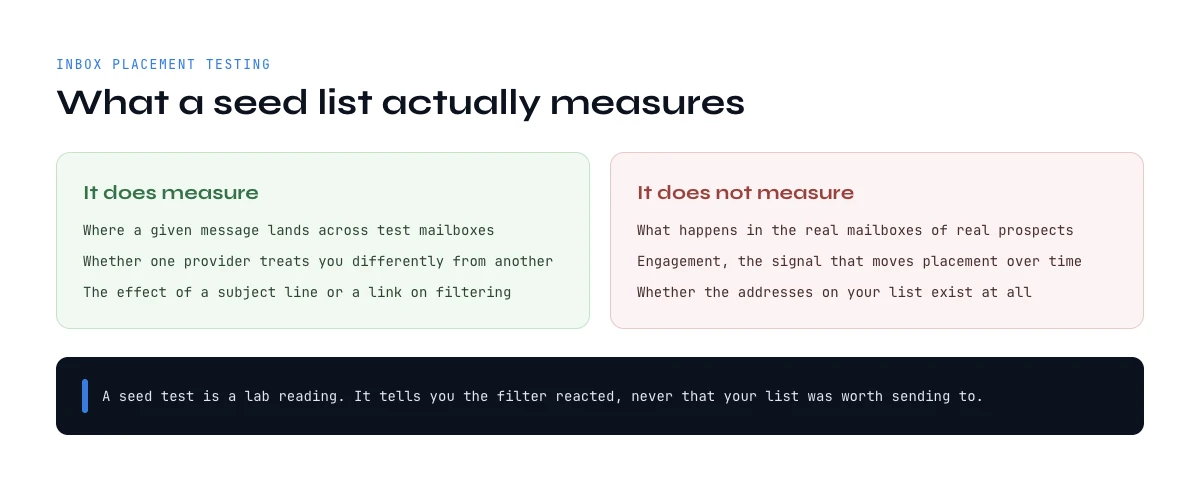
Seed testing sends your message to a panel of mailboxes the vendor controls, then reports the split across inbox, tabs and spam. GlockApps and Mailtrap are the names you will meet most often in this family, and every tool in it works the same way. The number looks like a fact. It is a sample, and understanding what it samples is the difference between a useful instrument and an expensive comfort blanket.
A seed panel has no engagement history with you. Nobody on it has ever opened, replied to or archived one of your emails. Neither Gmail nor Microsoft publishes the weight it gives engagement, but both name it in their sender guidance, and a seed test measures the part of the decision that comes from your content, your authentication and your domain reputation, with the recipient-specific part removed. That makes it excellent at detecting a content or configuration regression, and poor at predicting what a real list will do.
Use it accordingly. Run the same message before and after a change and compare the two results. Treat the absolute percentage as a relative signal, never as your inbox rate. And run it on the exact template you will send, not a sanitised version, because the URL, the tracking domain and the attachment are usually what moves the number.
Inbox placement and email deliverability test tools compared
| Tool | How it tests | Free or entry price (as of October 19, 2026) | What to watch |
|---|---|---|---|
| GlockApps | Sends your message to a seed panel across major providers and reports inbox, tab and spam placement, with authentication results attached | Free plan with 2 spam test credits; paid from about $59 a month | Credits run out fast if you test every small edit |
| Mailtrap | Captures the message in a sandbox before it reaches anyone, so you can inspect its HTML, headers and content | Free sandbox plan with 50 test emails; paid from about $17 a month | Built for developers testing transactional mail more than for outbound copy |
| MailReach | Placement tests offered alongside its warm-up service | Included in its paid warm-up plans | Useful if you already pay for its warm-up, rarely a reason to start |
GlockApps is the reference most teams reach for when they say "inbox placement test". You send to the seed addresses it gives you, and a few minutes later the report splits the result by provider, with the authentication verdict and content warnings next to it. Its free plan is enough to learn how to read the report. The paid plans make sense for a team that changes templates every week and needs the before-and-after on each change.
Mailtrap solves a neighbouring problem. Its sandbox catches a message before it reaches anyone, so you can inspect what your sending setup actually produces: the headers, the HTML, the links your tracking domain rewrote. It is a development and QA instrument first. For outbound teams it is most useful when a sending tool or template engine changes and you want to see the raw message before a real prospect does.
Whichever one you use, keep a log: date, template, change made, inbox placement result. Three months of that log tells you more about your deliverability than any single score.
An email deliverability test, in the sense most vendors use the phrase, is one of these seed runs: one message, one panel, one placement report. It answers "did this change make things worse?" very well. It does not answer "how many of my prospects see this in their inbox?", and no vendor can answer that, because the decision depends on each recipient's history with you. When you read an inbox placement score, read it next to the previous one for the same template, never next to a competitor's marketing claim.
The category most email deliverability tools lists leave out: list quality
Read the ranked lists in this category and count how many treat verification as a deliverability instrument. In the three top-ranking guides we opened, none does. They map the stack to warm-up, placement testing, DNS and reputation monitoring, and mention bad data once, in passing, as a cause of bounces.
That omission is strange, because bounce rate is the most mechanical trigger in the entire system. Reputation at the major providers is not a mood. It is computed from a handful of ratios, and the hard bounce ratio is the one you can move before you send anything, with certainty, at a known cost. Everything else on this page measures a state you are already in.
The arithmetic is unforgiving and rarely written down, so here it is. A list where one address in ten is dead does not cost you ten percent of your results. It hands you a ten percent bounce rate on the first send, before a single reply arrives. Neither Gmail nor Microsoft publishes a bounce threshold, which is precisely why the number teams work to is one they set themselves, usually two percent. Ten against a self-imposed two is five times over, on day one, on a variable that was entirely knowable beforehand. For comparison, the one ratio Google does publish is the spam complaint rate: its sender guidelines tell bulk senders to stay under 0.1 percent and never to reach 0.3. The calculator below runs your own figures.
Bounce budget: how many bad addresses your reputation can absorb
Enter your list and your sending plan. Nothing leaves your browser.
Fill the fields and press Calculate.
The dead share is the input teams guess and get wrong. Take it from your last campaign: hard bounces, plus everyone who replied from a company they had already left. The calculator assumes every dead address bounces hard, which is the pessimistic reading; catch-all domains hide some of them and delay the damage instead of preventing it. The last line prices the alternative in credits so you can set it against what a monitoring subscription costs you per month.
Run it with your real figures, then compare the euro figure on the last line to what a monitoring subscription costs you every month. If the credits are cheaper, the least expensive instrument in your stack is the one nobody ranked. Derrick verifies addresses where your list already lives, in the web app, in the Google Sheets sidebar, in an AI assistant through MCP or through the REST API, with Email Verification at 1 credit per address checked, whatever the verdict (an error is free). When an address is missing rather than wrong, Email Finder resolves it at 5 credits per email found, at any list size. Both sit on the paid plans, which start at 20 euros a month for 10,000 credits, and unused credits never expire while you stay on a paid plan. Clean the list you are about to send.
List verification tools: what to compare, and where Derrick fits
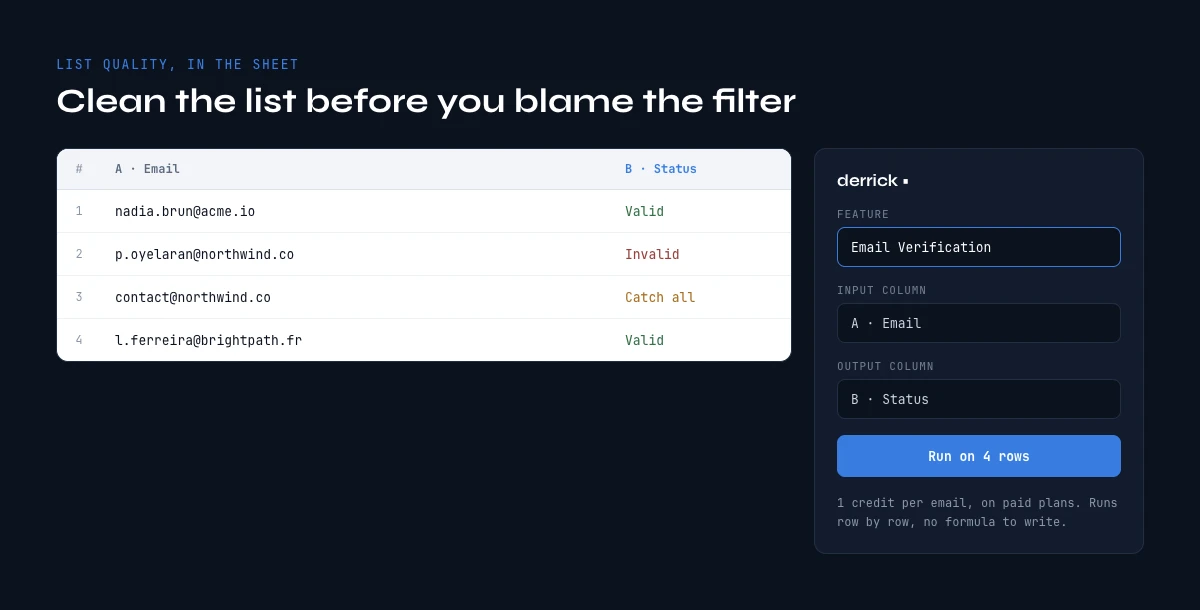
Among email deliverability tools, this is the one category where Derrick is a player, so here is the comparison stated plainly. Verification tools all answer the same question, will this address accept mail, and they differ on three things: where the check runs, how you are billed, and what happens when an address is missing rather than wrong.
| Tool | Where you run it | How it bills | Beyond the check itself |
|---|---|---|---|
| Derrick Email Verification | In the web app, the Google Sheets sidebar, an AI assistant through MCP, or the REST API | 1 credit per address checked, whatever the verdict (an error is free); paid plans from 20 euros a month for 10,000 credits | Email Finder resolves it in the same place, at 5 credits per email found |
| Derrick free email address checker | In your browser, no signup | Free, one address at a time | Checks format, typos on common domains, disposable and role addresses; no mail server test |
| ZeroBounce | Its own web app and API | Its own credit packs | Not covered here |
| NeverBounce | Its own web app and API | Its own credit packs | Not covered here |
The reason we put verification and finding in the same place is practical. The list you are about to send is usually half complete: some rows have an address, some have a name and a company. Cleaning the first half in one tool and filling the second half in another means exporting, matching and re-importing, and every round trip is a chance to lose a column. In Derrick both happen on the same rows, and you pay per address checked for verification and per email found for finding.
For a single doubtful address, start with our free email address checker. It runs in the browser and catches the cheap mistakes, a typo in gmail.com, a throwaway domain, a generic inbox, before you spend anything. For a full list, run Email Verification in the app on the rows you are about to send, and keep anything flagged as unconfirmed out of the first batch.
Where the dead addresses in a list come from
Knowing the source of bad data tells you how often to check it. Four sources produce most of the bounces we see on outbound lists.
- Job changes. People move on, and their work address is closed behind them. A list that was clean when you built it decays every month you leave it in a drawer, which is why the age of a list is a deliverability variable in its own right.
- Guessed patterns. An address built from first.last@company because that is the usual format, never checked. Sometimes right, sometimes a hard bounce, and you only find out on send.
- Old exports. A CRM or event export from a year ago carries every address that has died since, with nothing to tell them apart from the live ones.
- Typos and disposable domains. Form fills with a mistyped domain or a throwaway inbox. Small in number, but they are the cheapest to catch, and our free checker catches them one by one.
The practical rule follows: verify at the moment of sending, not at the moment of building the list. A check run three months ago tells you about a list that no longer exists.
Whatever tool you use, treat its output as a set of statuses rather than a yes or no. An address can be confirmed, rejected, or unconfirmable because the domain accepts every address. That last group is where most surprises come from. Send to it last, in small batches, and watch the bounces it produces before you send to the rest.
Warm-up tools: what they repair and what they cannot
Warm-up services such as InboxAlly, Warmup Inbox, MailReach or TrulyInbox put your mailbox into a private network of accounts that email each other, open the messages, reply to some and rescue whatever lands in spam. The effect is real: it manufactures the engagement history a new mailbox has none of, and it does shorten the ramp.
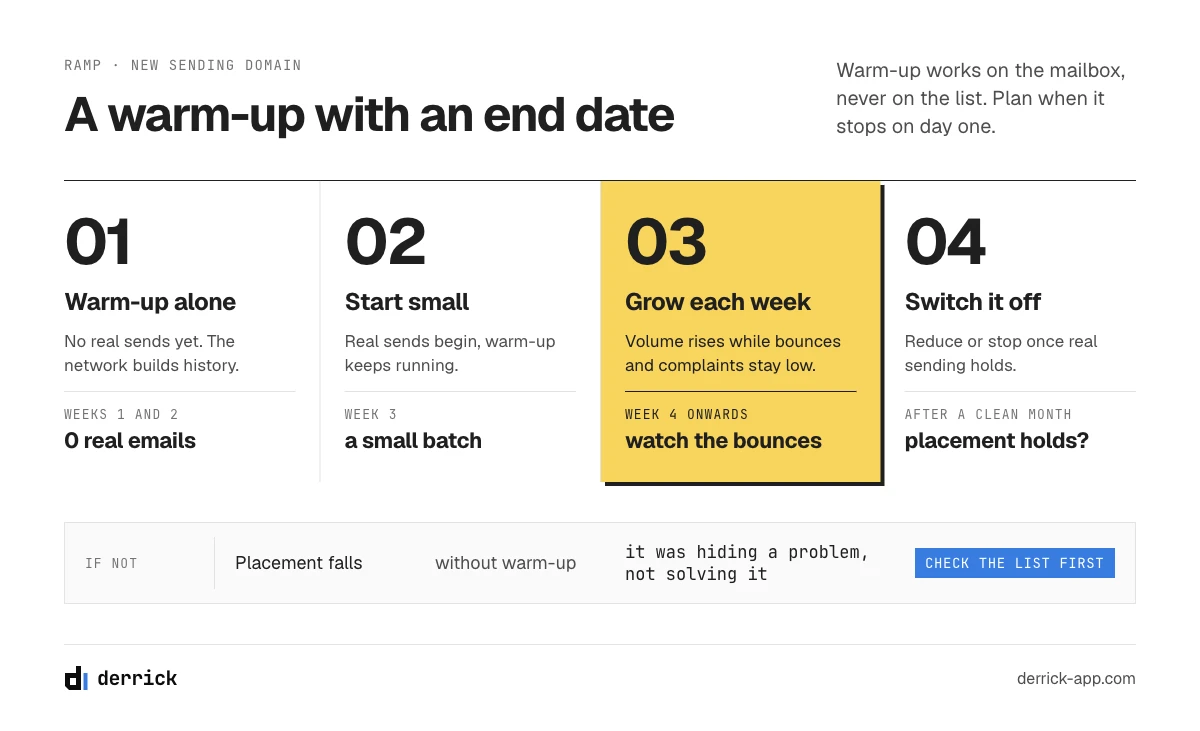
Two limits are worth understanding before you subscribe. The engagement is synthetic, and it comes from a pool of accounts that behaves nothing like your real recipients, so the marginal value of an extra month of it is small. And warm-up operates on the mailbox, never on the list. A perfectly warmed domain sending to a file that is one tenth dead still posts the bounce rate of a file that is one tenth dead. Warm-up cannot see your recipients.
Where it earns its price is the first four to six weeks of a new sending domain, alongside a slow volume ramp. Where it becomes a subscription nobody questions is month nine, on a domain that is struggling for reasons the warm-up cannot touch. If placement is falling on an established domain, the answer is almost never more warm-up. Check the list, the copy and the sending pattern first, in that order. Our guides on the six template formats, subject line formats and send timing cover the last two.
Warm-up tools compared
| Tool | How it works | Free or entry price (as of October 19, 2026) | What to check before paying |
|---|---|---|---|
| Warmy | Automated warm-up across a network of mailboxes, with deliverability reporting | 7-day free trial; from about $49 a month | Whether your sending tool already includes a warm-up you are paying for |
| MailReach | Warm-up per mailbox, plus spam placement tests | About $19.50 per mailbox per month | The per-mailbox price multiplies fast across a rotation of domains |
| InboxAlly, Warmup Inbox, TrulyInbox | The same principle: a private network that opens, replies and rescues from spam | Paid, per mailbox | An end date for the subscription, written down on day one |
Warmy sells warm-up as a managed service: connect a mailbox, set a target volume, and the network handles opens, replies and rescues from spam, with a deliverability report on top. MailReach prices per mailbox and adds spam placement tests, which makes it easy to cost for a small rotation and expensive across dozens of mailboxes. Both do the job a warm-up can do. Neither can see the list you send to, which is the limit set out above and the reason warm-up never replaces a check on the data.
Before you add a standalone warm-up subscription to your email deliverability tools, check the tool you send with. Many sending platforms now include warm-up in the seat price, and running two warm-up networks on the same mailbox buys nothing a single one would not. Our guide to cold email software breaks down what a sending seat already contains, warm-up included, so you can tell whether this line is a duplicate.
A sensible ramp looks like this: warm-up running alone for the first two weeks, real sends starting small in week three, real volume growing each week while the warm-up keeps running, and the warm-up switched off or reduced once the domain has a month of real sending behind it with low bounces and low complaints. If you cannot switch it off without placement falling, the warm-up was hiding a problem rather than solving it.
Reputation and blocklist monitoring: the slow signals
This layer watches things that change on the scale of days: public and private blocklists, sender scores, and the reputation panels described earlier, polled and alerted on so you do not have to remember to look.
The honest assessment is that most public blocklists matter far less to B2B outbound than their alerting suggests. A listing at Spamhaus, whose lists the large receivers actually consult, is serious. A listing on one of the dozens of small lists nobody queries is a notification, not an incident. A monitoring product that alerts equally on both trains you to ignore it.
What genuinely justifies this layer is a single alert: your domain reputation at Gmail moving from high to medium, or your spam complaint rate crossing 0.3 percent, which Google's sender guidelines tell bulk senders never to reach, with 0.1 percent as the level to stay under. Both are visible free in Google Postmaster Tools. You are paying for someone to watch them for you and tell you the same day. That is a real service if you send every day, and an unnecessary line item if you do not.
Blacklist and blocklist monitoring tools compared
The two words mean the same thing. "Blacklist" is the older term and still the one most people search for; "blocklist" is the one most list operators now use. Whichever you type, a blacklist check asks a set of public lists whether your sending IP or domain appears on them.
| Tool | What it checks | Free or entry price (as of October 19, 2026) | How to read it |
|---|---|---|---|
| MXToolbox blacklist check | Queries a long set of public blocklists for one IP or domain at a time | Free lookup; continuous monitoring in its paid plans from about $129 a month | Look at which list flagged you before reacting to the count |
| Spamhaus lookup | Whether Spamhaus lists your IP or domain, and why | Free | A listing here is an incident; the large receivers consult it |
| Google Postmaster Tools | Gmail's own verdict on your traffic, which no blocklist replaces | Free | A Gmail problem with no blocklist entry is a reputation problem, not a listing |
Spamhaus is the blocklist operator whose data most large receivers actually use, so it is the lookup to run first. Its free reputation checker tells you whether an IP or domain is listed and on which of its lists, with a short explanation of why. MXToolbox runs the wider sweep: one query, dozens of lists, a green or red line for each. Use the sweep to spot a pattern and the Spamhaus result to decide whether it is urgent. Of all the email deliverability tools in this section, those two lookups are the ones to bookmark. And keep Google Postmaster Tools open next to both, because the most common deliverability drop at Gmail involves no blacklist at all.
When a blacklist check does return a serious listing, the order of operations matters. Stop the campaign that was running when it happened. Find the cause: a burst to a stale list, a compromised mailbox, a sudden jump in volume. Fix it. Only then request removal through the list's own process, because most operators delist on request but relist quickly if the same traffic comes back. A listing on a small blocklist nobody consults can usually wait for its automatic expiry.
How to pick email deliverability tools from a symptom, not a shortlist
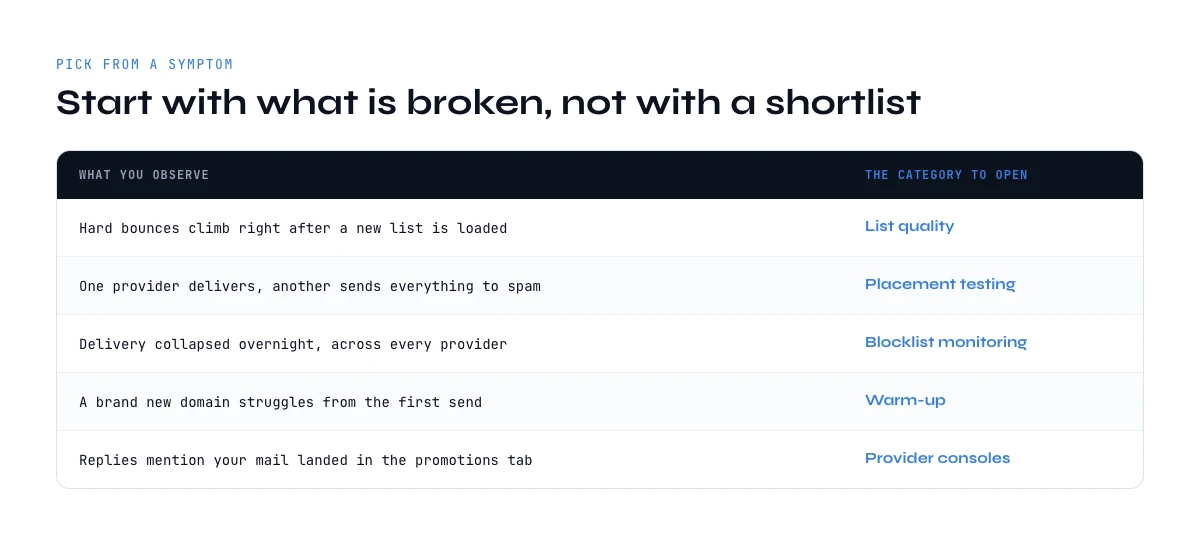
Almost every wasted purchase in this category comes from buying by category name instead of by symptom. Start from what you are actually seeing.
| What you observe | The instrument that answers it | What to do before buying anything |
|---|---|---|
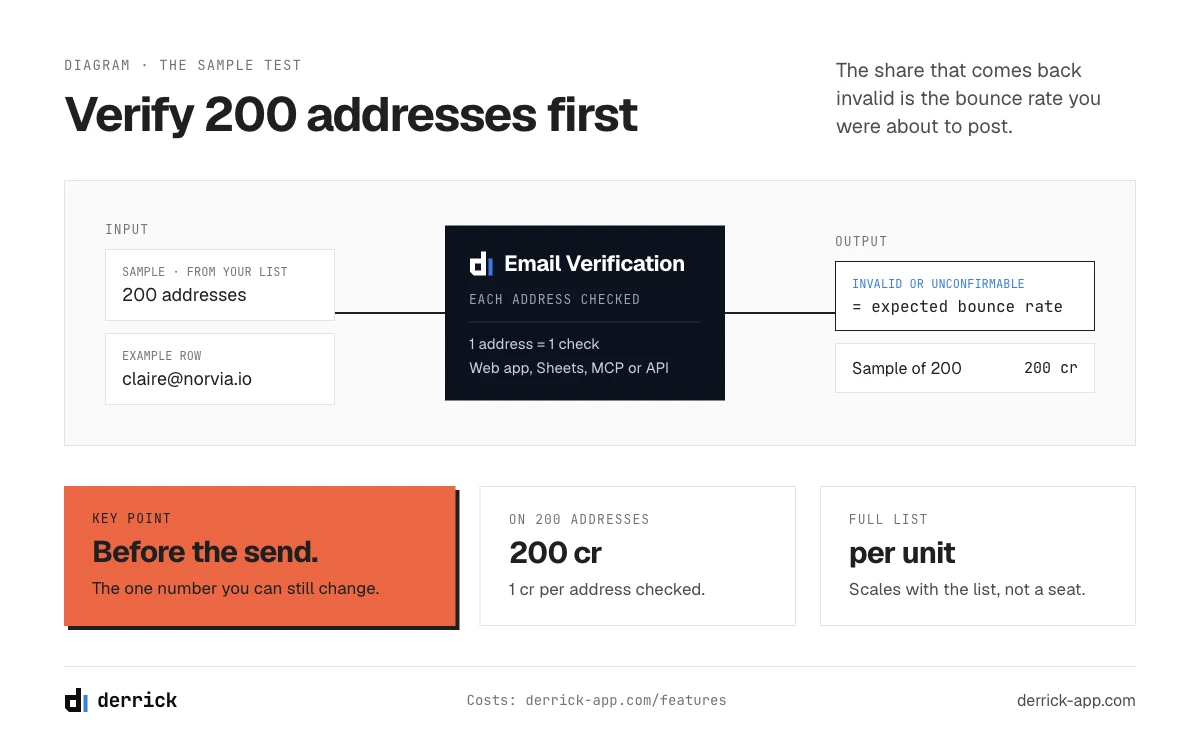
| High bounce rate on the first send | An email verification pass, run before the send | Verify a sample of 200 addresses and extrapolate |
| Opens collapsed overnight | Google Postmaster Tools, then an SPF and DMARC check | Check whether one provider or all of them moved |
| Steady slow decline over weeks | Reputation monitoring, plus the age of the list itself | Look at how old the list is, not at the copy |
| New domain, nothing lands | MXToolbox or EasyDMARC first, then a warm-up service | Confirm SPF, DKIM and DMARC before subscribing |
| Landing in Promotions, not spam | A seed panel test on the real template | Strip images, tracking links and signatures one at a time |
| Fine at Gmail, dead at Outlook | Microsoft SNDS if you own the sending IPs, your own per-provider bounce logs otherwise | Split your reporting by provider first |
Three diagnoses, worked through
A new domain where nothing lands. The first instinct is to buy warm-up. The right first step is the free authentication check, because a DKIM record published on the wrong selector or a missing reverse DNS entry will sink a domain no amount of warm-up can rescue. Once authentication is clean, start the warm-up and the volume ramp together, and run a seed test at the end of week two to confirm inbox placement is moving.
A campaign that bounced hard on day one. No dashboard is needed to know the cause: the list. Pause the sequence, verify the remaining addresses, and look at where the list came from. An old export, a scraped page or a list bought by the row are the usual sources. The next campaign starts with verification, not with a new subject line.
Opens sliding slowly for a month. This is the case where email deliverability tools are easiest to misuse, because every category seems relevant. Start with Postmaster Tools to see whether the spam complaint rate moved, then check how old the list is. A slow slide with clean authentication and no listing is most often a list aging under you, with more people leaving their jobs every week, and the fix is fresher data, not a new instrument.
The common thread in all three: the free instruments named the cause, or ruled out a layer, before anything was bought. That is the order to keep. A paid tool is worth its price when it answers a question the free ones left open, and you only know which question is open once you have read them. Teams that skip that step end up with four subscriptions and the same symptom, because each tool reported on a layer that was never broken.
Two rules follow from the table. Never change two things at once, because you will not learn which one worked. And never buy an instrument for a symptom you have not yet measured with the free ones, because a free dashboard frequently names the cause outright and closes the question before any purchase.
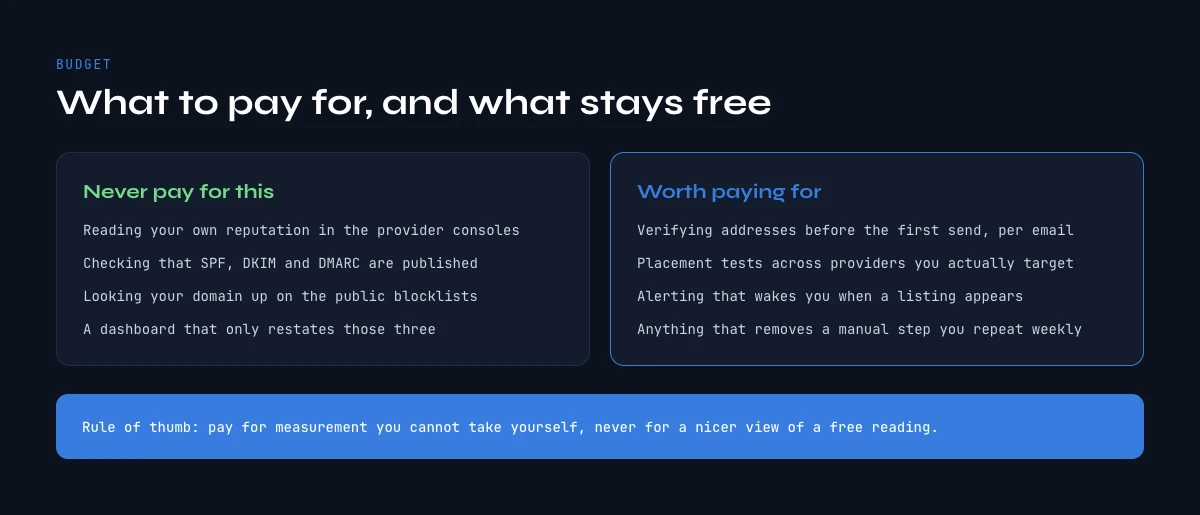
What to pay for, and what you should never pay for
A defensible stack for a team running outbound at ordinary volume is smaller than the ranked lists imply. Pay for verification, because it acts before the damage and its cost per unit is known. Pay for placement testing if you ship template changes often, because it is the only way to attribute a regression to a change. Pay for warm-up during a domain ramp, and put a date in the calendar to review it.
| Instrument | Family | Free tier | What it settles |
|---|---|---|---|
| Derrick | List quality and verification | Paid, from 20 euros a month; unused credits never expire while you stay on a paid plan | How many addresses bounce, answered before the send, from the web app, Sheets, MCP or the API |
| Google Postmaster Tools | Provider dashboard | Free | Domain and IP reputation, spam complaint rate, authentication pass rate at Gmail |
| Microsoft SNDS | Provider dashboard | Free, sending IPs you own | The same picture on Outlook and Hotmail traffic |
| MXToolbox | Authentication and blocklist | Free tier, paid monitoring | Whether SPF, DKIM, DMARC and MX resolve, and whether you are listed |
| EasyDMARC, PowerDMARC, dmarcian | Authentication and DMARC reporting | Free checks, paid reporting | What your DMARC reports contain once the record is live |
| GlockApps, Mailtrap | Inbox placement testing | Limited free tests | Where a given template lands on a seed panel, before and after a change |
| InboxAlly, Warmup Inbox, MailReach, TrulyInbox | Warm-up | Paid, per mailbox | Whether a new mailbox is building engagement history |
| Spamhaus | Blocklist | Free lookup | Whether the receivers that consult it are already refusing you |
Read that table as a division of labour rather than a ranking: only the first row acts before you send, and the rest report on a state you are already in.
Do not pay for an authentication checker. Do not pay for a dashboard that repackages Google Postmaster Tools without adding an alert you would act on. Do not pay for a blocklist monitor that treats every list as equal. And be careful with anything sold as a single score, because a composite number that mixes authentication, reputation and content tells you something is wrong without telling you which layer to open.
One structural note on cost. Verification and finding are priced per unit, so they scale with the list rather than with a seat, which is what makes them workable on a batch of fifty and on a batch of fifty thousand. Derrick prices on credits with no seat minimum: Email Verification and Email Finder open at 20 euros a month for 10,000 credits, and unused credits never expire while you stay on a paid plan, and the API and the MCP server come with the higher plans (the pricing page carries the current thresholds). The free plan and its 100 credits per month cover the LinkedIn and company enrichment side rather than verification, so use it to see how Derrick behaves on a real batch, not to clean a list. For the wider selection question, our guide on the four layers behind a cold email seat price covers where these instruments sit in the rest of the stack.
A starting stack by team size
| Situation | Free layer | What to pay for | What to skip |
|---|---|---|---|
| One founder, one domain, under 50 sends a day | Postmaster Tools, DMARC record, a free authentication check | Verification on every new list | Blocklist monitoring, seed testing subscriptions |
| Small SDR team, a few domains in rotation | The same, read weekly by one owner | Verification, warm-up during each domain ramp, occasional seed tests | Dashboards that repackage Postmaster Tools |
| Outbound at volume, dozens of mailboxes | The same, plus DMARC reports parsed by a tool | Verification, seed testing on every template change, monitoring with alerts you act on | Composite scores that do not say which layer moved |
Notice that verification sits in every row of this stack of email deliverability tools. It is the only line whose need grows with every list rather than with the size of the team, which is why per-unit pricing suits it and a seat price does not.
Budgeting email deliverability tools over a year
The useful way to budget is by line, with a review date on each. Verification is variable: it grows with the number of new contacts you send to, so estimate it from your sending plan, not from a flat fee. Warm-up is temporary: budget it for the ramp of each new domain and put the end date in the calendar the day you subscribe. Seed testing is occasional: a small plan is enough unless you change templates weekly. Monitoring is the line most worth questioning at renewal, because the free dashboards cover most of it once someone owns the weekly read.
Review the whole stack every quarter with one question per line: what did this tool tell us last quarter that changed a decision? A line that cannot answer is a subscription, not an instrument.
How to run an email deliverability test in one afternoon
You do not need a subscription to find out where your deliverability stands. This sequence uses the free instruments first and spends money only where they run out. Run it on a domain that is already sending, with the template you actually plan to use.
- Read the receiver dashboards. Open Google Postmaster Tools and, if you own your sending IPs, Microsoft SNDS. Note the spam complaint rate and any authentication failures. If the panels are empty, write that down too: it means your volume is too low for them, and the rest of the test matters more.
- Check authentication. Run your sending domain through a free checker such as MXToolbox or EasyDMARC. Confirm SPF stays under ten DNS lookups, DKIM signs with your domain, DMARC is published, and the sending IP has a reverse DNS record.
- Run a blacklist check. Look up your sending IP and domain on MXToolbox and on the Spamhaus lookup. Ignore minor lists; act on Spamhaus.
- Verify a sample of the list. Take 200 addresses from the list you plan to send and run them through a verification tool. The share that comes back invalid or unconfirmable is your expected bounce rate, and the bounce budget calculator above tells you what it means.
- Run one seed test. Send the real template, links and signature included, to a seed panel such as GlockApps. Keep the report. It is your baseline for every later change.
- Change one thing, test again. If the seed test shows spam placement, remove one element at a time, the tracking link first, then images, then the signature, and re-test after each change.
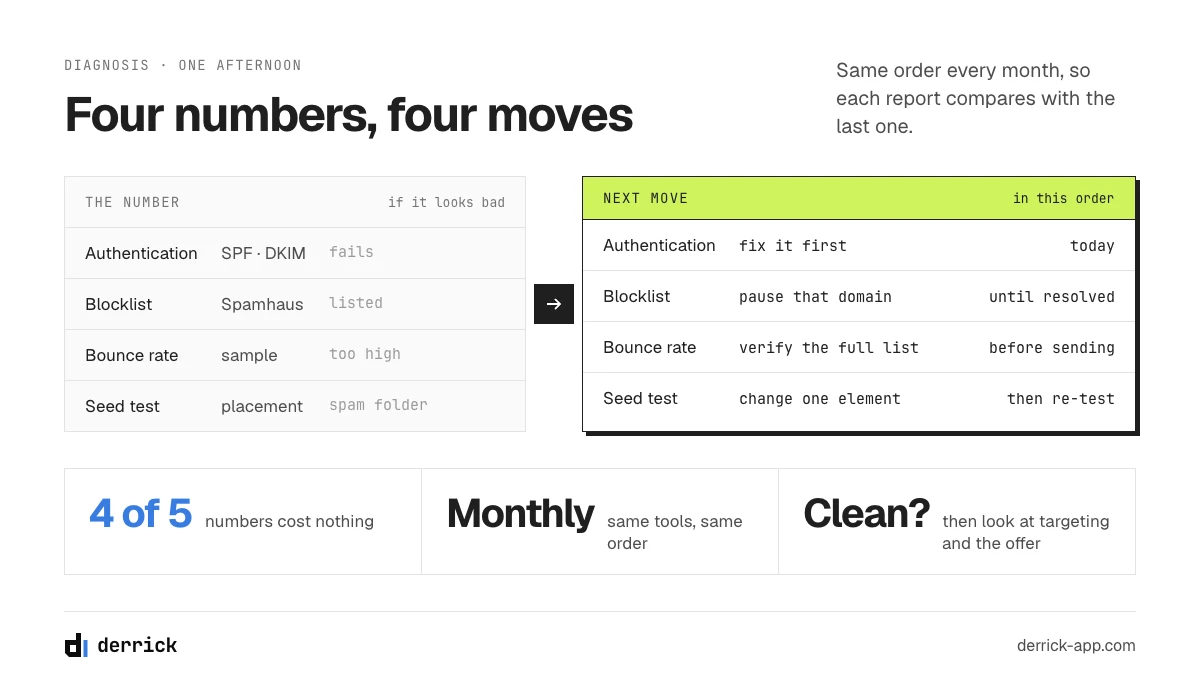
At the end you have five numbers: complaint rate, authentication status, listing status, expected bounce rate and seed placement. Four of them cost nothing. The fifth, the bounce rate, is the one you can still change before anyone receives a message.
What to do with the five numbers
If authentication fails, fix it before anything else: every other result is unreliable until it passes. If you are on a blocklist the large receivers consult, stop sending from that IP or domain until it is resolved. If the expected bounce rate is above your own threshold, verify the full list before the send, because no change to copy or timing will offset it. If seed placement is poor but the other four are clean, the problem is in the message itself, and the one-change-at-a-time loop is the way out. And if all five look fine while replies are still low, deliverability is probably not your problem at all: look at targeting and the offer.
Repeat the afternoon once a month with the same email deliverability tools, or after any change to your domains, your sending tool or your data source. Same order each time, so the numbers stay comparable from one inbox placement report to the next.
Five mistakes teams make with email deliverability tools
- Buying a placement test to fix a bounce problem. A seed panel never bounces, so it cannot see the issue. Bounces come from the list, and only a check on the list finds them.
- Reading one inbox placement number as a forecast. It is a comparison point. Its value comes from the next test on the same template, not from the absolute figure.
- Treating every blacklist alert as an emergency. One list the large receivers consult matters; dozens of small ones mostly do not. Alerts that fire on all of them get ignored, including the one that counts.
- Running warm-up forever. It is a ramp instrument. Past the first months it mostly hides a list or copy problem it cannot fix.
- Changing three things after a drop. New domain, new copy and a new list in the same week means you will never know which one helped. Change one, measure with the same instrument, then decide.
Every one of these comes from the same habit: picking email deliverability tools by category name rather than by the question you need answered. The symptom table above is the antidote.
Email deliverability tools: key takeaways
- There are six categories, not one. Each answers a different question, and comparing their prices to each other is meaningless.
- The free provider dashboards are the authoritative source. Start there, and buy only what they cannot tell you.
- Authentication checkers prove a permission, never an inbox. Budget zero for them.
- A seed panel measures your content and configuration with the recipient removed. Use it as a before and after, never as your inbox rate.
- List quality is the one lever you can pull before you send, and it is missing from most comparisons. Bounce rate is arithmetic, not luck.
- Warm-up works on the mailbox and never on the list. It is a ramp instrument with an expiry date.
- Buy from a symptom, change one thing at a time, and re-measure with the same instrument.
- Name the question before the tool: the table at the top of this page sorts each one by what it can prove, not by rank.
- An email deliverability test is a before-and-after on one template. Keep the first report as your baseline.
The single check that pays for itself before any subscription is the one you run on the list itself. Derrick finds and verifies addresses from the web app, the Google Sheets sidebar, from an AI assistant through MCP or through the REST API, with Email Verification at 1 credit per address checked, whatever the verdict (an error is free), and Email Finder at 5 credits per email found, billed only when an email is found. Those two sit on the paid plans, from 20 euros a month, and the credits you do not spend never expire while you stay on a paid plan. See what it costs on your own list size, or read the rest of the cold email cluster.
We also publish one email every 2 weeks with what we are measuring on cold outreach and data quality. Subscribe from the homepage.
Frequently asked questions
What are email deliverability tools?
Which email deliverability tools are free?
Does an inbox placement test predict my real inbox rate?
What is an email deliverability test?
Do email warm-up tools fix bad deliverability?
How much does a bad list actually cost in deliverability terms?
What should I buy first for cold email deliverability?
Can Derrick verify a list before I send?
Keep reading
Continue exploring this cluster


Cold Email Template: 6 B2B Formats and the Data Each One Needs
Read →

Cold Email Subject Lines: 20 Formats and the Data Each Needs
Read →

Email Deliverability Checklist: 15 Controls, Sorted by Cadence
Read →

Best Time to Send Cold Emails: What the Data Says (2026)
Read →