Company Email Address: Generic vs Named
Company email address: where to find the generic one, how to build and verify a named one, the 8 formats that cover most domains. Get the workflow now.


A company has one website and one phone number, but in almost every case it has two very different kinds of email address. One is a shared inbox printed on the contact page. The other belongs to a named person, follows a format you can work out from the domain, and is published almost nowhere.
Most guides on finding a company email address treat those two as one thing. That is why so many carefully written messages end up in a mailbox nobody personally owns. This page separates them: where the generic address lives, how the named one is derived, the eight formats that cover almost every corporate domain, and the workflow that handles both across a list of accounts rather than one company at a time.
The short version: if you need an answer from the company as an organisation, an invoice, a partnership request, a press question, use the generic address published on the contact or legal notices page. If you need an answer from a person, take one confirmed address on that domain, deduce the format, build the named address, verify it, and only then send. Never send to a guess you have not verified.
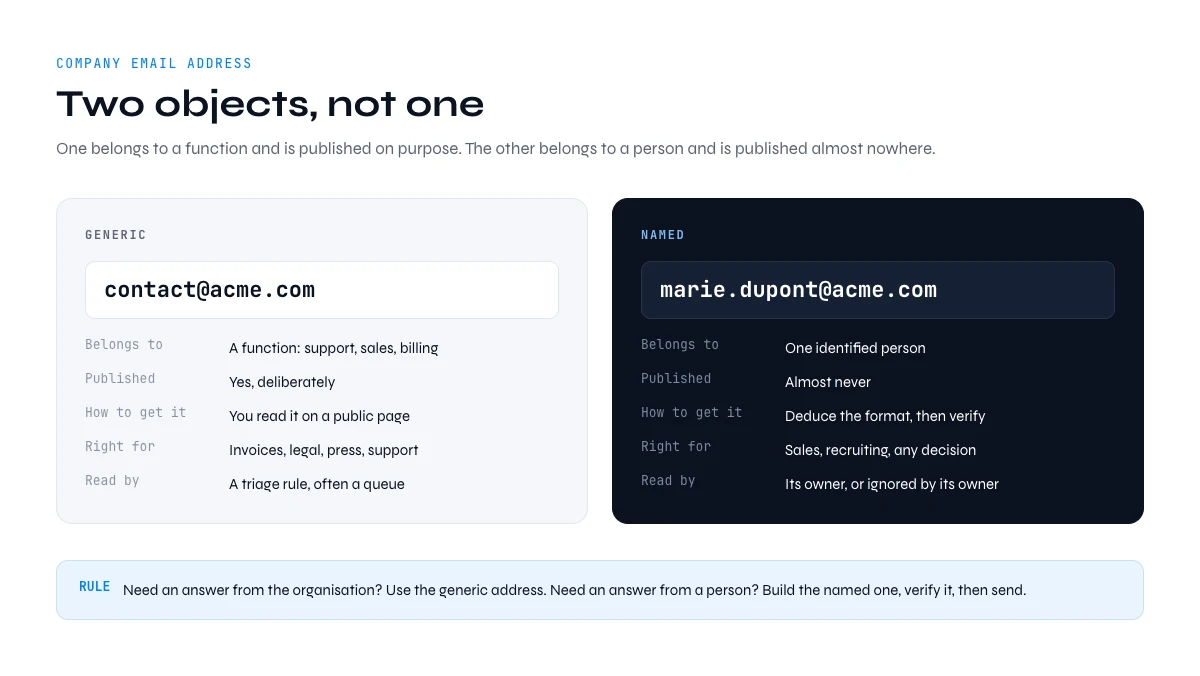
The two kinds of company email address
A generic address, sometimes called a role address or a functional mailbox, belongs to a function rather than to a human: contact@, info@, hello@, sales@, support@, billing@, jobs@, press@. It is published on purpose, it usually routes into a shared inbox or a helpdesk, and either several people read it or nobody does.
A named address belongs to one person: marie.dupont@acme.com. It is assembled from the person's name and the company mail domain, it lands in a single inbox with a single owner, and it is almost never published, precisely because publishing it invites scraping.
Treating one as a substitute for the other is expensive in both directions. A support ticket sent to a named address waits until that person comes back from holiday, because there is no queue behind them. A sales message sent to contact@ is handed to whoever is on inbox duty that morning, who has no reason to care and no mandate to decide.
| Criterion | Generic address | Named address |
|---|---|---|
| Belongs to | A function: support, sales, billing | One identified person |
| Published | Yes, deliberately | Almost never |
| How you get it | You read it on a public page | You deduce the format, then verify |
| Right for | Invoices, legal, press, support, partnerships | Sales conversations, recruiting, anything needing a decision |
| Reading behaviour | Triaged against a rule, often queued | Read by the owner, or ignored by the owner |
| Spam pressure | High, the address is public and gets scraped | Lower, the address is not listed anywhere |
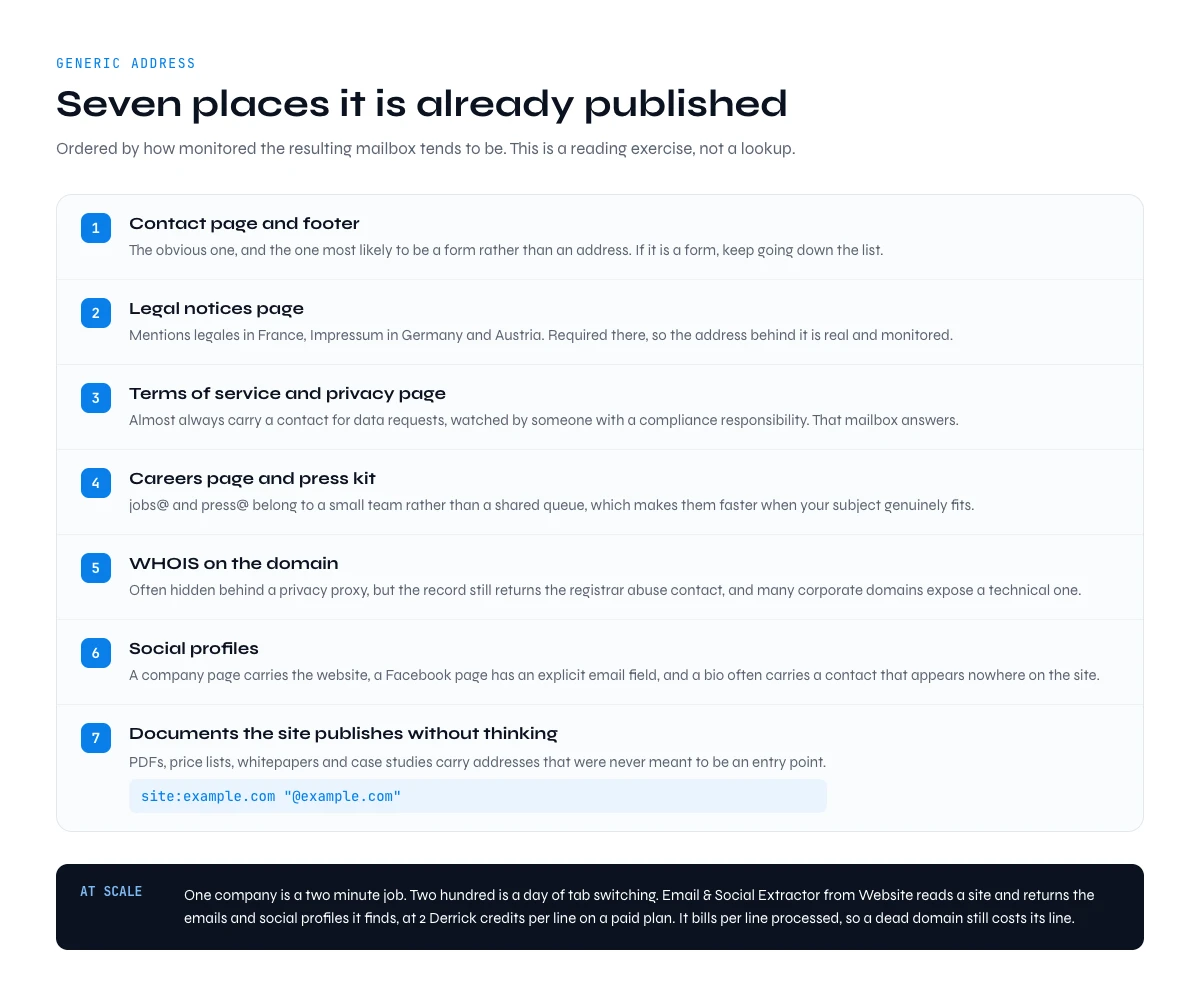
Where to find the generic company email address
The generic address is public by design, so this is a reading exercise rather than a lookup. Seven places are worth checking, roughly in order of how monitored the resulting mailbox tends to be.
- The contact page and the footer. The obvious one, and the one most likely to be a form rather than an address. If the site only offers a form, keep reading down this list.
- The legal notices page. Called mentions legales in France, Impressum in Germany and Austria, legal notice or imprint elsewhere. In those countries a commercial site is required to publish one, which is exactly why the address behind it is real and monitored rather than decorative. Elsewhere it is a convention rather than a rule, so check whether the page exists at all before relying on it.
- The terms of service and the privacy page. These almost always carry a contact for data requests. That mailbox is watched by someone with a compliance responsibility, so it answers.
- The careers page and the press kit. jobs@ and press@ are usually owned by a small team rather than by a shared queue, which makes them faster than contact@ when your subject genuinely fits.
- WHOIS on the domain. Registrant details are often hidden behind a privacy proxy, but the record still returns the registrar's abuse contact, and plenty of corporate domains still expose a technical or administrative contact.
- Social profiles. A LinkedIn company page carries the website and sometimes an address, a Facebook page has an explicit email field, and an X or Instagram bio often carries a business contact that appears nowhere on the site.
- Documents the site publishes without thinking about it. A search for site:example.com "@example.com" surfaces PDFs, price lists, whitepapers and case studies that carry addresses which were never meant to be an entry point.
For one company, that is a two-minute job. For two hundred, it is a day of tab-switching. Derrick's Email & Social Extractor from Website reads a site and returns the emails and social profiles it finds, at 2 Derrick credits per line on a paid plan. Same reading exercise, run by the machine. Read the billing carefully: it charges per line processed, whether or not the site publishes anything, because the work is the crawl rather than the result.
Two neighbouring cases have their own routes. If you hold a company name but not the site, our guide to finding a company website covers that direction. If you hold an address and no idea who is behind it, finding the company from an email address runs the lookup the other way round, which is also how you turn one stray address into the format for a whole domain.
The generic inbox and the named address rarely share a convention, so start from the one the company publishes. Salesforce, headquartered in San Francisco, formats named addresses as flast@salesforce.com, and IBM, headquartered in Armonk, uses first.last@ibm.com. Read the convention first, then build the address.
How a named address is actually obtained
A named address is not found, it is derived. There is no public directory of employee mailboxes, and the ones that circulate as ready-made databases are the same derivation done months ago and left to age.
Four steps, always in this order.
- Get the mail domain. Not always the marketing domain. A group that trades under one brand and mails under another will bounce every address you build on the wrong one.
- Get the person. A first name, a last name, a role. LinkedIn is the usual source, and our guide to finding an email from a LinkedIn profile covers that route end to end. At company level, Derrick's Find a company's people lists current and former staff at 1 Derrick credit per person on a paid plan, optionally filtered by job function, with no Sales Navigator seat required.
- Work out the format. The next section is entirely about this.
- Verify before sending. A built address is a hypothesis until a server confirms the mailbox exists.
The order is not decorative. Each step narrows the next, and a mistake early on is invisible later: a perfect format applied to the wrong domain produces a column of well-formed addresses that all bounce, and the bounce lands on your sending reputation, not on the prospect's.
In the web app or Google Sheets
The generic addresses a company publishes
The article separates generic from named addresses. For the generic half, Derrick reads the company website from your list and returns the emails and social profiles published on it, which is the declared, low-risk source.
- Feature
- Email & Social Extractor from website
- Credit cost
- 2 credits per call
The first button opens the web app (nothing to install): 2 credits per call, available from the STANDARD plan. The second details the feature and its cost per plan.
Company email address formats: the eight that cover most domains
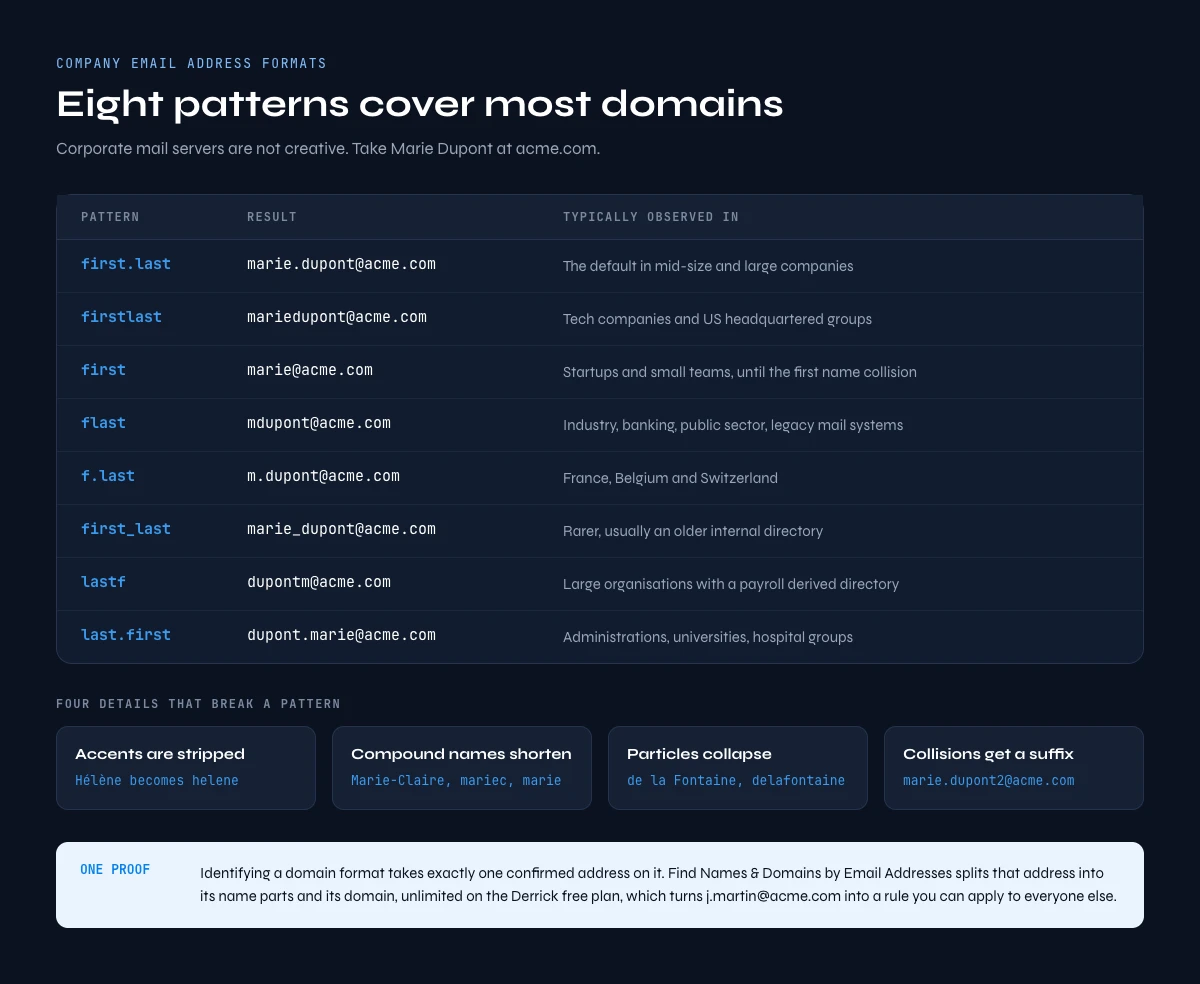
Corporate mail servers are not creative. In practice, eight patterns are enough to cover the bulk of the domains you will meet. Take Marie Dupont at acme.com:
| Pattern | Result | Typically observed in |
|---|---|---|
| first.last | marie.dupont@acme.com | The default format in mid-size and large companies |
| firstlast | mariedupont@acme.com | Tech companies and US-headquartered groups |
| first | marie@acme.com | Startups and small teams, until the first name collision |
| flast | mdupont@acme.com | Industry, banking, public sector, legacy mail systems |
| f.last | m.dupont@acme.com | France, Belgium and Switzerland |
| first_last | marie_dupont@acme.com | Rarer, usually an older internal directory |
| lastf | dupontm@acme.com | Large organisations with a payroll-derived directory |
| last.first | dupont.marie@acme.com | Administrations, universities, hospital groups |
Four details break a pattern more often than the pattern itself does.
- Accents and special characters are stripped. Hélène becomes helene, François becomes francois, Müller becomes muller. A build script that keeps the accent produces an address that no server will ever accept.
- Compound and hyphenated names get shortened. Marie-Claire turns into marie-claire, mariec or plain marie depending on the directory, and there is no way to know which without one confirmed example.
- Particles disappear or collapse. A last name like de la Fontaine usually becomes delafontaine or fontaine, almost never de-la-fontaine.
- Collisions get a suffix. The second Marie Dupont to join becomes marie.dupont2@ or marie.j.dupont@, which is a frequent reason a correctly built address bounces.
To identify a domain's format you need exactly one confirmed address on it. A press release, a job posting, a signed PDF, a public code repository or the generic mailbox you found earlier will usually hand you one. Then reverse it: Derrick's Find Names & Domains by Email Addresses splits an address into its name parts and its domain, unlimited and available on Derrick's free plan, which turns j.martin@acme.com into the rule "first initial, dot, last name" you can apply to everyone else at Acme.
One warning that catches people out at scale. A company that has acquired others often runs two or three formats at once, one per legacy directory, sometimes across two mail domains that both resolve. When a list is built on a single format taken from the parent brand, the acquired-brand rows are the ones that bounce. Confirm one address per brand, not one per group.
Why a generic inbox caps your reply rate
You can send to contact@ and get an answer. What you cannot do is build a pipeline on it, and the reasons are structural rather than a matter of writing a better message.
Published means scraped. The generic address has been on the site for years, it sits in every list ever compiled about that domain, and it absorbs a heavy volume of unsolicited mail. Its filters are tuned accordingly, and your message arrives in that queue rather than in a neutral one.
A shared inbox has a triage rule, not a reader. Whoever opens it is sorting into customer, supplier, applicant and other. There is no bucket for an interesting proposal, so the interesting proposal lands in other, and other is processed last or never.
And nobody is personally accountable for it. An unanswered message in a shared mailbox costs no individual anything, whereas an unanswered message in a named inbox sits there in front of its owner. That difference in ownership is the structural reason the two do not behave the same way.
There is a list-hygiene consequence too. Sending tools and verification services flag role addresses separately, often returning them as role rather than as a clean pass, so leaving them mixed into a named list drags the whole list's measured quality down and makes your own reporting unreadable.
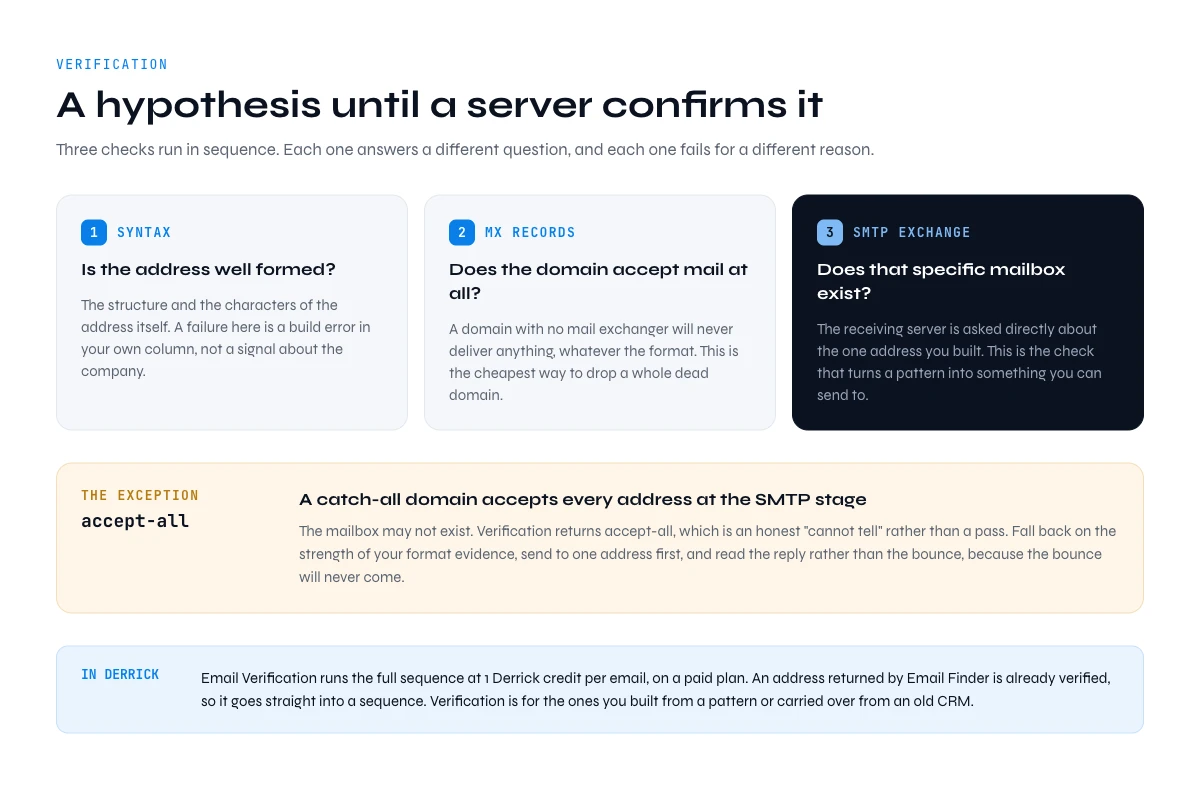
Verification turns a pattern into an address
Everything up to this point produces a hypothesis. Verification is the step that turns it into something you can send to, and skipping it is how a good list becomes a deliverability problem.
A verification runs three checks in sequence: the syntax of the address, the MX records of the domain, and an SMTP exchange asking the receiving server whether that specific mailbox exists. Our guide to what makes a professional email valid walks through each layer and what a failure at each one actually means. Derrick's Email Verification runs the full check at 1 Derrick credit per email, on a paid plan.
One configuration defeats the whole sequence: the catch-all domain, which accepts every address at the SMTP stage regardless of whether the mailbox exists. Verification returns accept-all, which is an honest "cannot tell" rather than a pass. On a catch-all domain you fall back on the strength of your format evidence, you send to one address first, and you read the reply rather than the bounce, because the bounce will never come.
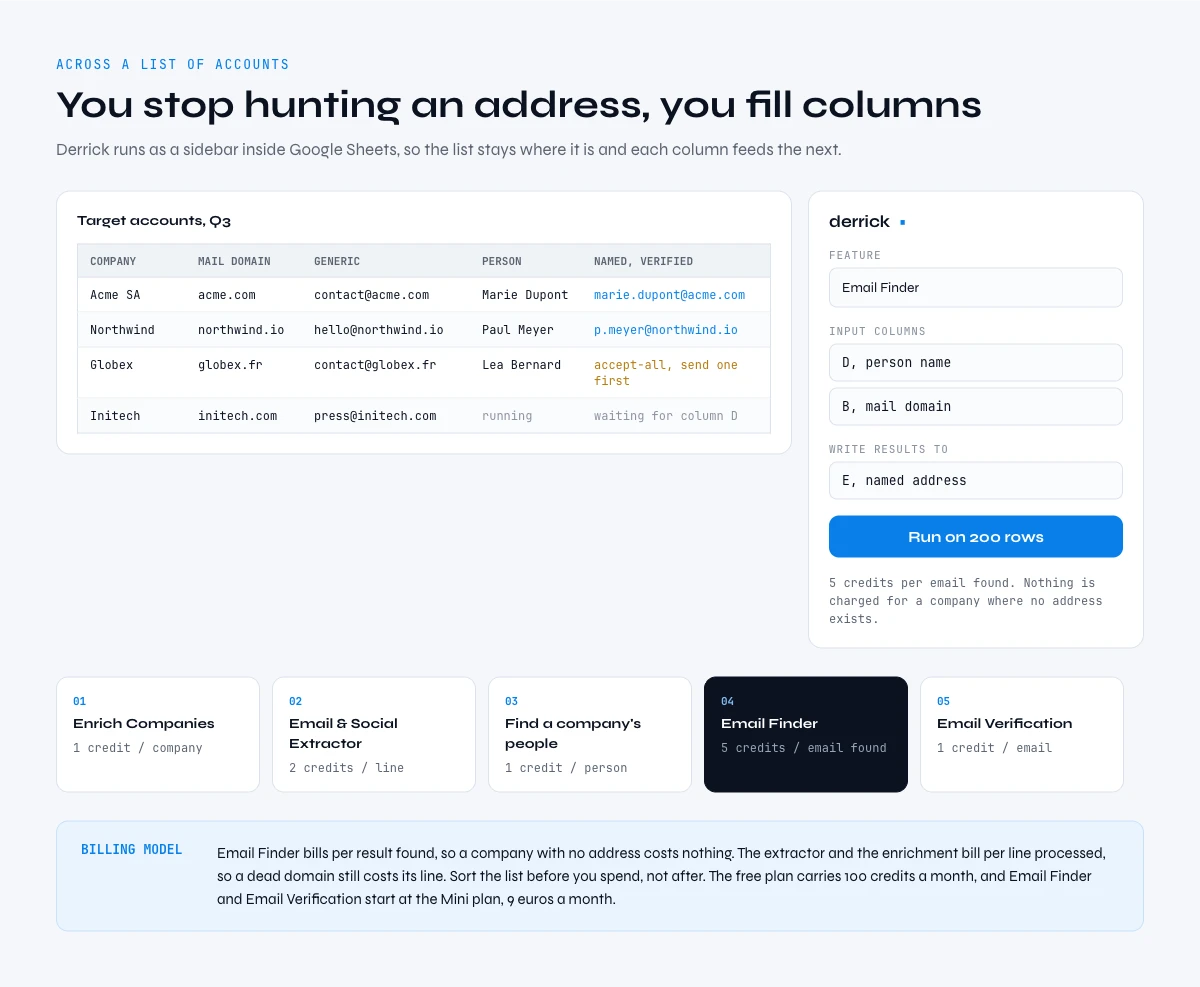
Building company email addresses across a list of accounts
Everything above describes one company. Across a list of accounts the shape of the work changes. You stop hunting an address and start filling columns in a fixed order, each one feeding the next, because a missing domain in column two makes every later column worthless. Derrick runs in its web app, and also as a Google Sheets sidebar rather than as spreadsheet formulas, so the list stays where it is and the columns fill in place.
- The company. Enrich Companies fills in the identity and the mail domain from a LinkedIn company page. For a French list built from an activity code rather than from names, Import Companies by NAF Code pulls every matching company out of the SIRENE registry first.
- The generic address. Email & Social Extractor from Website, run on the domain column, gives you the published mailbox for every account.
- The people. Find a company's people, filtered by job function, so you list the three roles you actually want rather than the whole payroll.
- The named address. Email Finder, run on the name and domain columns you have just filled.
- The verification, for the addresses you built yourself. An address returned by Email Finder is already verified, so it can go straight into a sending tool. The ones you assembled from a pattern, scraped, or carried over from an old CRM are the ones that need Email Verification before anything is sent.
Costs come second, but they change how you order the work. In Derrick credits: Enrich Companies and Import Companies by NAF Code 1 credit per company, the website extractor 2 credits per line, Find a company's people 1 credit per person, Email Finder 5 credits per email found, Email Verification 1 credit per email. The billing model matters more than the unit price. Email Finder charges per result found, so a company where no address exists costs nothing. The extractor and the enrichment charge per line processed, so a dead domain still costs its line. Sort your list before you spend, not after.
Derrick's free plan carries 100 credits per month at no cost and no card, and it covers Enrich Companies, Import Companies by NAF Code and Find Names & Domains by Email Addresses. Email Finder, Email Verification, Email & Social Extractor from Website and Find a company's people are paid features, available from the Standard plan at 20 euros per month. If the workflow lives outside a spreadsheet, the same lookups run over the REST API and through Derrick MCP from Claude, ChatGPT or any MCP-compatible assistant, both available from the Plus plan at 47.50 euros per month.
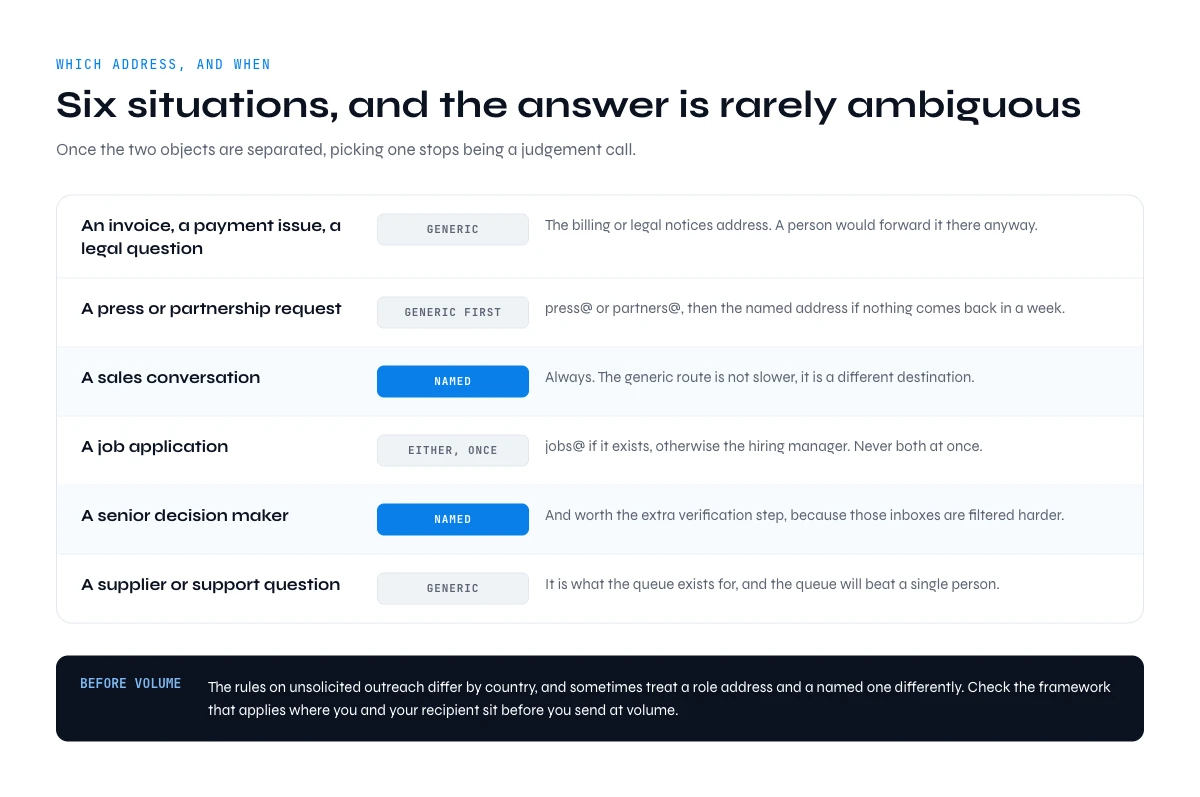
Which address to use, and when
Six situations cover almost everything, and the answer is rarely ambiguous once the two objects are separated.
- An invoice, a payment issue, a legal question. Generic, specifically the billing or legal notices address. A person will forward it there anyway.
- A press or partnership request. Generic first, press@ or partners@, then named if there is no answer in a week.
- A sales conversation. Named, always. The generic route is not slower, it is a different destination.
- A job application. jobs@ if it exists, otherwise the named address of the hiring manager, never both at once.
- A senior decision maker. Named, and worth the extra verification step. Our guide to executive email addresses covers why those inboxes are filtered harder than everyone else's.
- A supplier or support question. Generic. It is what the queue exists for, and the queue will be faster than a person.
One thing to settle before any of it: the rules on unsolicited outreach differ by country, and sometimes treat a role address and a named one differently. Check the framework that applies where you and your recipient sit before you send at volume.
Three mistakes that cost the most
- Building the whole list before confirming a single address. Running a finder across two thousand rows on an unconfirmed format assumption produces two thousand rows of the same mistake. Confirm the format on five accounts, send to five contacts, read what comes back, then fill the column.
- Storing the generic and the named address in the same column. Six months later nobody can tell which rows were prospected and which were ticketed, and the reply-rate figures mean nothing.
- Scraping the legal notices address for volume outreach. That mailbox exists for a legal reason and is read by people whose job includes noticing misuse. It is the fastest way to get a domain reported.
One last habit worth building, because it is the one nobody thinks about until it hurts. An email address is a snapshot of an employment relationship, not a permanent property of a person: the generic one survives reorganisations, the named one dies with the job. Keep the date you obtained each address next to it, and treat anything you built more than a couple of quarters ago as a hypothesis again rather than as data. Re-verifying a stale column costs a fraction of what a bounce wave costs your sending domain.
Frequently asked questions
What is a company email address?
How do you find a company's generic email address?
What are the most common company email address formats?
Which role-based addresses are worth writing to?
What do you do when a domain is catch-all and verification cannot decide?
What should you do with a generic address when it is the only one you have?
How much does it cost to build a list of company email addresses?
Keep reading
Continue exploring this cluster


Lead Email Finder: The Complete Guide to Finding Your Prospects' Emails
Read →

How to Find a Company Website: Complete 2026 Guide
Read →

Find Company Name & Website from Email: 4 Methods (2026, Tested)
Read →

Valid Email Finder: How to Find and Verify Valid Professional Emails
Read →