Architects Email Addresses: Firm First, Then the Person
Find architects email addresses by resolving the firm first, then the named person: public sources, the roles that matter, verification and the real cost.


Architects email addresses: the short answer
Architects email addresses are reached by resolving the firm first and the person second, because architecture is one of the few professions where the licence is public and the inbox is not. Every state licensing board in the United States publishes who is licensed, where, and under which registration number. None of them publishes an email. That gap is the whole job: you start from a public roster of names and firms, you resolve each firm to a domain, you resolve the right person inside it, and only then do you find and verify an address.
The other half of the job is deciding who "the architect" is. A search for architects email addresses almost never means "every licensed architect". It means the principal who signs a software contract, or the project architect who writes the specification for a building product, or the person who owns the CAD budget. Those are three different lists pulled from the same profession, and mailing them the same message is why most architect campaigns underperform.
This guide walks the pipeline in order: define which architect you actually want, pull the firms, resolve the named person, find and verify the address, then price the result per usable row. If you are starting from a map rather than a licence roster, our guide on finding local business email addresses covers the geography-first version of the same pipeline.
Who you are actually emailing inside an architecture firm
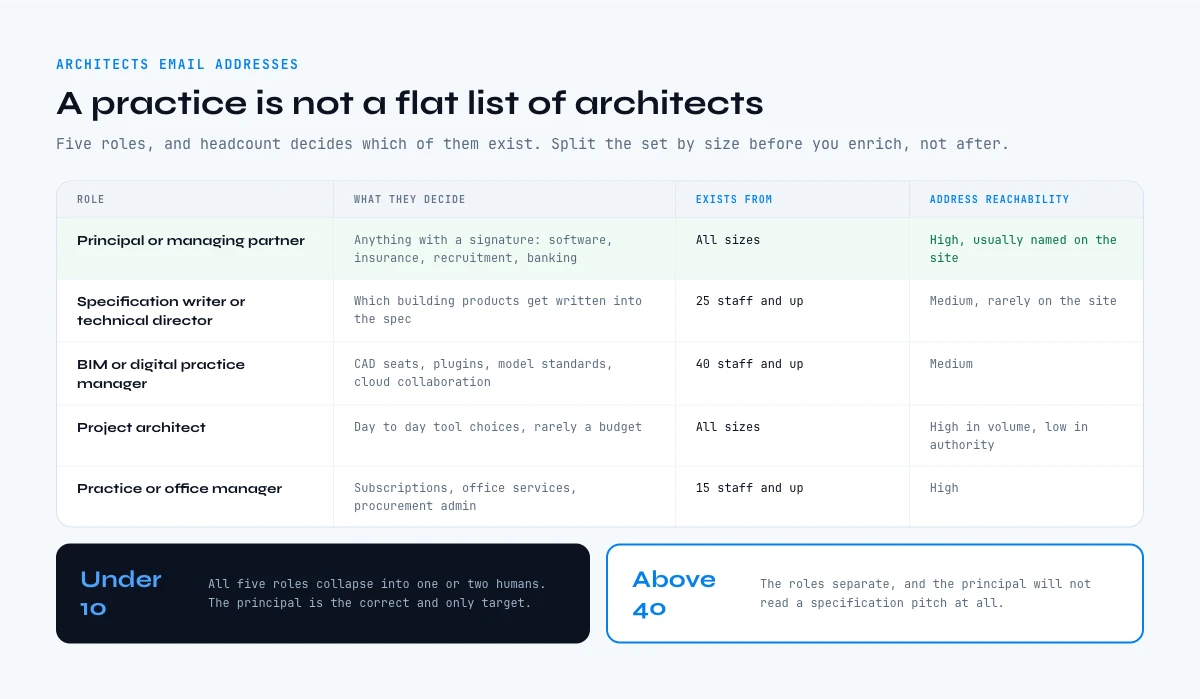
An architecture practice is not a flat list of architects. It has a commercial layer, a technical layer and a production layer, and each one buys different things. Sending a building product specification pitch to a managing partner, or a practice management software pitch to a junior project architect, wastes the address you just paid to find.
| Role | What they decide | Typical firm size where they exist | How reachable the address is |
|---|---|---|---|
| Principal or managing partner | Software, insurance, recruitment, banking, anything with a signature | All sizes, and often the only decision maker under 10 staff | High: usually named on the site |
| Specification writer or technical director | Which building products get written into the spec | 25 staff and up | Medium: named internally, rarely on the site |
| BIM or digital practice manager | CAD seats, plugins, model standards, cloud collaboration | 40 staff and up | Medium |
| Project architect | Day to day tool choices, rarely a budget | All sizes | High in volume, low in authority |
| Practice or office manager | Subscriptions, office services, procurement admin | 15 staff and up | High |
The practical consequence is a rule you can apply before you spend a single credit: firms under roughly ten people collapse all five roles into one or two humans, so the principal is the correct and only target. Above about forty people the roles separate, and the principal will not read a specification pitch at all. Split your target set by headcount before you enrich, not after.
This is the same buying committee problem that shows up in every technical sale. Our guide on selling to decision makers covers how to map the committee before you write the first line.
Where architects email addresses actually come from
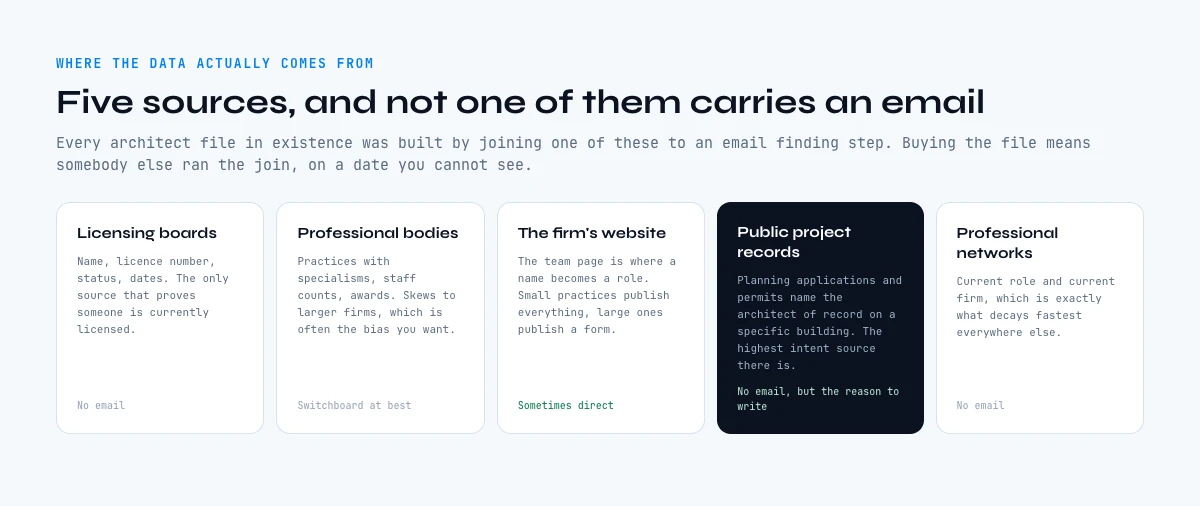
List vendors present architect data as if it appeared from nowhere. It does not. Every legitimate source is one of five things, and knowing which one a row came from tells you how fresh it is and how much you should trust it.
- State licensing boards. In the United States, architecture is a state licensed profession, and each board publishes a searchable roster: name, licence number, status, issue date and expiry. This is the only source that tells you a person is currently licensed, and it is the reason architect data can be verified in a way that, say, marketing manager data cannot.
- Professional body directories. Membership directories list practices, often with specialisms, staff counts and awards. They skew towards larger and more established firms, which is exactly the bias you want if you sell something with a real price tag.
- The firm's own website. The team page is where a name becomes a role. Small practices publish full team pages with direct addresses. Large ones publish a leadership page and a single contact form.
- Public project records. Planning applications, permit filings and award shortlists name the architect of record on a specific building. This is the highest intent source in the whole profession: it tells you what a firm is building right now, which is the only context that makes a cold email about a building product land.
- Professional networks. Profiles give you current role and current firm, which is what decays fastest in every other source.
Notice what is missing from that list: nowhere in it does a verified email address appear. Licence rosters do not carry them, planning records do not carry them, and directories carry a firm switchboard at best. Every architects email addresses file in existence was built by joining one of those five sources to an email finding step. Buying the file just means somebody else ran the join, on a date you cannot see.
Build the list: from firm to named person to verified address
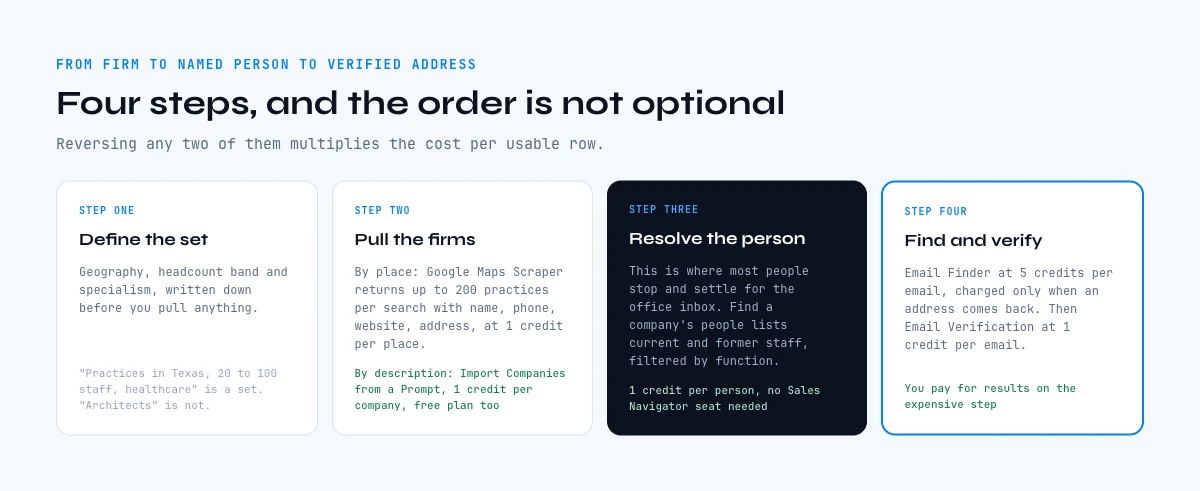
The pipeline has four steps and they have to run in that order. Reversing any two of them multiplies the cost per usable row.
Step one, define the set. Write down the geography, the headcount band and the specialism before you pull anything. "Architecture practices in Texas with 20 to 100 staff doing healthcare work" is a set. "Architects" is not, and it is the reason bought files feel enormous and convert like nothing.
Step two, pull the firms. Two routes work. A geography and category pull returns every practice with a physical presence in an area, with name, address, phone, website and rating on one row each, which is the fastest way to go from a city to a spreadsheet. A description based import returns practices that match a written definition of what you are looking for, with name, industry, country, website and profile URL. The second route is better when the specialism matters more than the postcode.
Step three, resolve the person. This is where most people stop and settle for the office inbox. Listing the people of a firm, current and former staff, optionally filtered by job function, turns a row that says "Studio X, 60 staff" into a row that says "Studio X, technical director, full name". Find a company's people costs 1 credit per person on the paid plans and does not require a Sales Navigator seat.
Step four, find and verify the address. With a first name, a last name and a domain, an email finder returns the verified professional address. Email Finder is 5 credits per email and is only charged when a result actually comes back, which matters on a profession where a meaningful share of small practices use a personal domain. Then run Email Verification at 1 credit per email over the whole column before the first send.
For the practices whose team page publishes addresses directly, there is a shortcut worth taking first: extracting emails and social profiles from the website costs 2 credits per line and often clears the small firms in one pass, leaving the finder budget for the ones that hide behind a form.
What architects email addresses really cost, bought or built
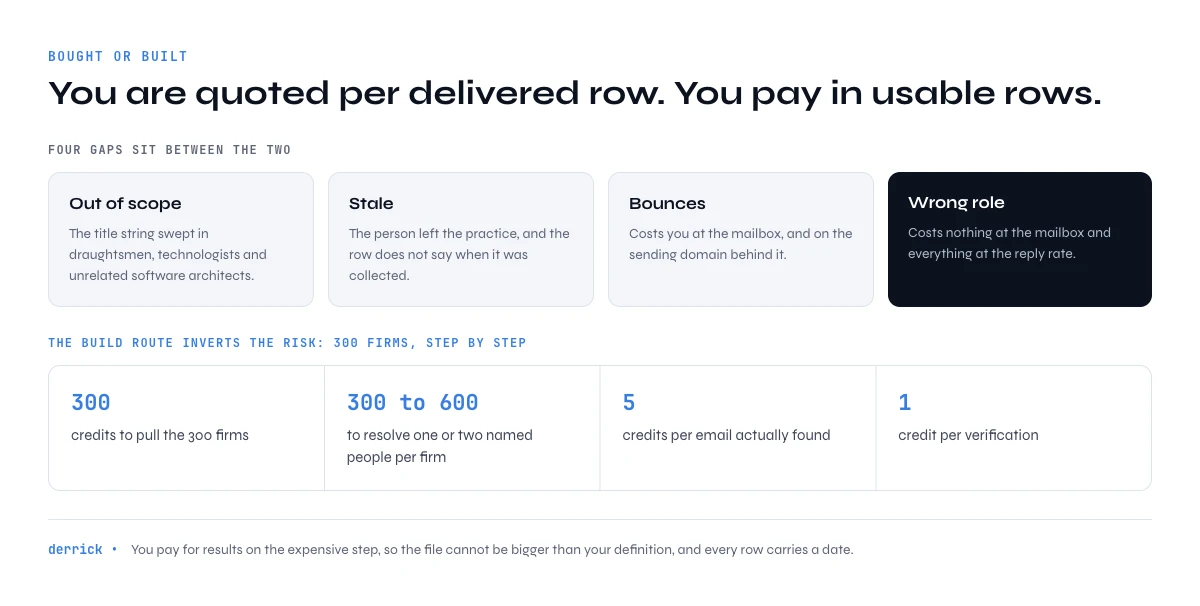
Published list prices for professional data sit in the region of a few cents per contact, and the round numbers quoted for architect files are usually a flat fee for tens of thousands of rows. Neither figure is the number you should budget with, because both are quoted per delivered row and you pay in usable rows.
Four gaps sit between the two. Some share of the file is out of scope, because "architect" was resolved from a job title string and swept in draughtsmen, architectural technologists and unrelated software architects. Some share is stale, because the person left the practice. Some share bounces. And some share is the wrong role, which costs nothing at the mailbox and everything at the reply rate.
The build route inverts the risk. You pay per step and you pay for results on the expensive step, so the file cannot be bigger than your definition and you can date every row. On the numbers above, a 300 firm target set costs 300 credits to pull, 300 to 600 credits to resolve one or two named people per firm, 5 credits per email actually found and 1 credit per verification. The whole exercise fits inside a mid tier monthly allowance rather than a procurement cycle.
The full arithmetic of the bought route, gap by gap, is laid out in our guide on how to buy an email list and what it really costs.
Architect list calculator: firms in, verified addresses out
Pick how many architecture practices you want to target and how many named people you want per practice. The output is the realistic number of verified addresses and the credit cost of each step.
Pick a set size and a depth per practice to see the volumes and the credit cost.
Assumes an 80 percent hit rate on email finding, which is a conservative figure for a profession with a high share of small practices on personal domains. Finding is only charged when a result comes back, so a lower hit rate lowers the bill rather than wasting it. Measure your own rate on the first 50 rows and re-run the numbers.
Verify architects email addresses before the first send
Architecture practices churn their web presence slowly and their staff quickly, which produces a specific failure: the team page is three years old, the address format is still valid, and the person left in 2024. The address will not bounce. It will simply never be read, and your reply rate will silently blame the copy.
Run three checks, in this order, and stop at the first failure.
- Domain. Does the domain resolve and accept mail at all? Small practices let domains lapse when they merge, and a merged practice is a different company with a different name.
- Mailbox. Does that specific address exist? This is the check that catches the departed technical director.
- Catch-all status. Does the domain accept everything? A catch-all cannot confirm a mailbox, which turns a green verification into a guess. Our guide on catch-all email domains explains how to treat those rows without either deleting them or trusting them.
What each check does and does not prove is covered in detail in our guide on what makes an email address valid, and the pre-send pass itself in the bounce checker guide.
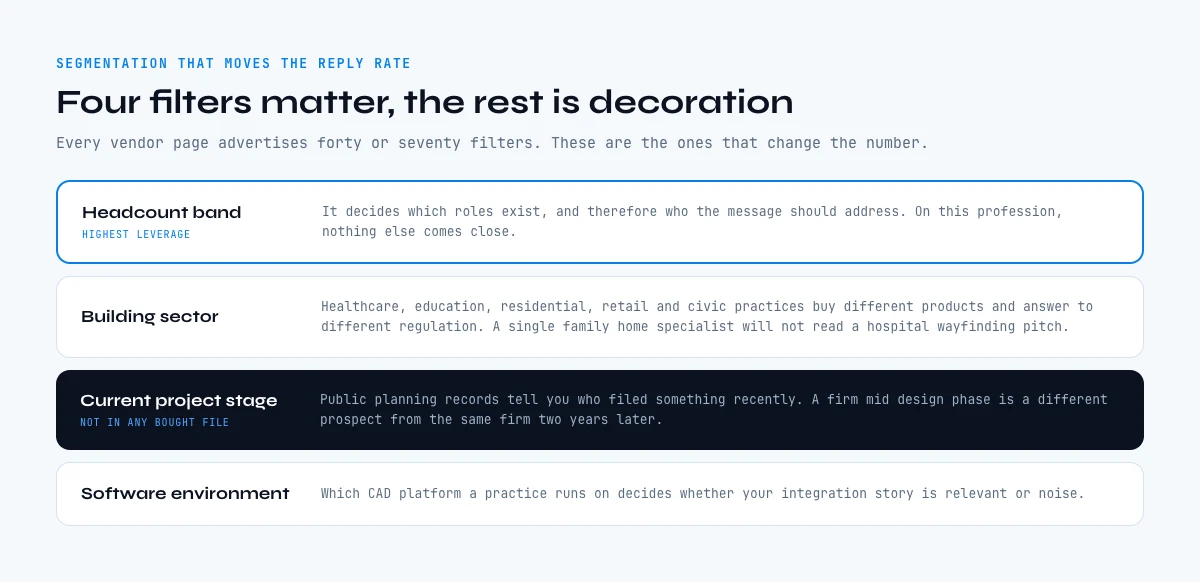
Segmentation that changes the reply rate
Every vendor page advertises forty or seventy data filters. Four of them move the number, and the rest are decoration.
- Headcount band. It decides which role exists, as the table above shows, and therefore who the message should address. It is the single highest leverage filter on this profession.
- Building sector. Healthcare, education, residential, retail and civic practices buy different products and answer to different regulation. A practice that only does single family homes will not read a hospital wayfinding pitch.
- Current project stage. Public planning records tell you which practices filed something recently. A firm in the middle of a design phase is a different prospect from the same firm two years later, and this is the one signal that no bought file contains.
- Software environment. Whether a practice runs on one CAD platform or another decides whether a plugin, a content library or an integration is even installable. Treat this as a research signal on the firm, not as a field you can assume.
Two of those four are properties of the firm, not the person, which is another reason the pipeline resolves the firm first. Once the firm row carries headcount, sector and recency, every address you attach to it inherits that context, and personalisation stops being a first name merge tag.
Running the whole pipeline in one sheet
The reason this pipeline is worth building rather than buying is that it lives in one spreadsheet you control, and every column is dated. In practice the sheet has one row per person and roughly ten columns: firm name, website, city, headcount, sector, first name, last name, role, email, verification status.
Each column after "website" is filled by a step in the Derrick web app (or its Google Sheets sidebar), one column at a time, over the rows you select. The same steps run from an AI assistant through the Derrick MCP when the question is conversational, and from the REST API when the list is generated by something upstream like your CRM. The surface changes, the data and the credit cost do not.
The practical effect is that re-running the list in six months is a re-run, not a repurchase. You keep the definition, you refresh the volatile columns, and you can measure decay because you have both dates. That is the part a bought file structurally cannot give you.
Consent and record keeping, briefly
Business to business email to a named professional at their work address is permitted in most markets, with conditions that are easy to meet and worth documenting: identify yourself and your company, describe why you are writing to that specific person, and honour an opt out immediately and permanently.
The practical requirement, whichever market you are in, is record keeping. Keep the source of each row and the date it was collected in the sheet. When somebody asks where you got their address, "your practice publishes it on your team page, collected on this date" is a complete answer, and it is only available to teams who built the list rather than bought it.
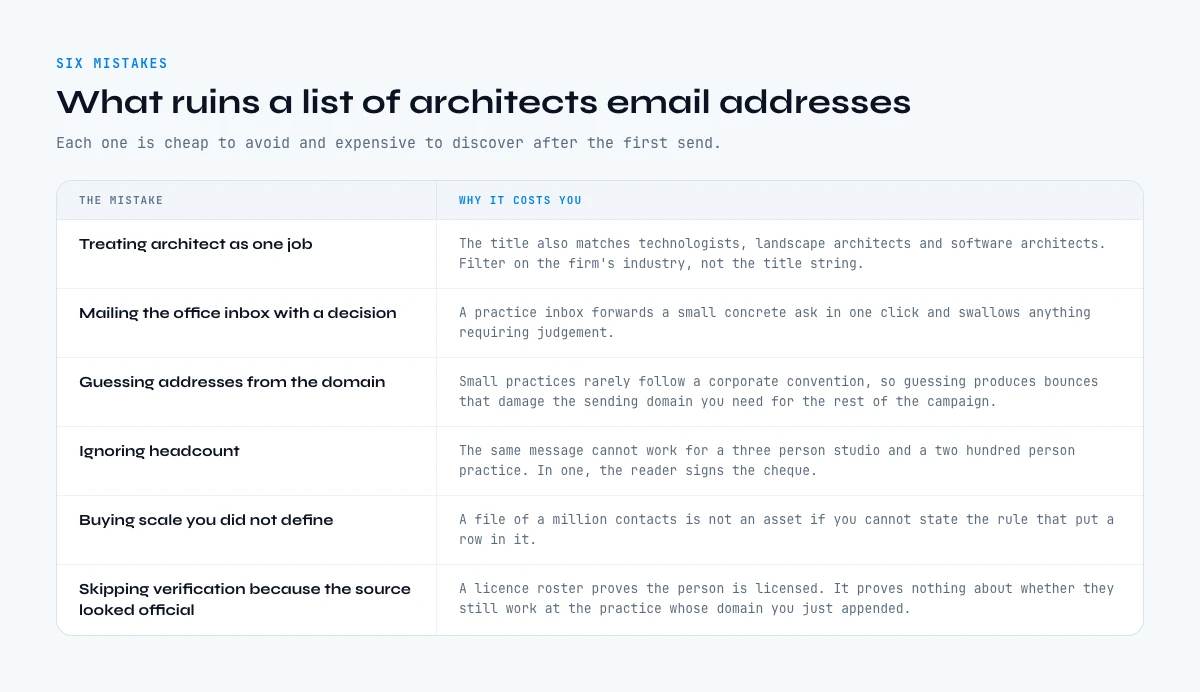
Six mistakes that ruin a list of architects email addresses
Treating "architect" as one job. The title matches licensed architects, architectural technologists, landscape architects and software architects. Filter on the firm's industry, not on the title string alone.
Mailing the office inbox with a decision. A general practice inbox forwards a small concrete ask in one click and swallows anything that requires judgement. Match the ask to the inbox, or resolve the name.
Guessing addresses from the domain. Small practices rarely follow a corporate naming convention, so pattern guessing produces hard bounces at a rate that damages the sending domain you need for the rest of the campaign.
Ignoring headcount. The same message cannot work for a three person studio and a two hundred person practice, because in one of them the reader signs the cheque and in the other they have never seen an invoice.
Buying scale you did not define. A file of a million professional contacts is not an asset if you cannot state the rule that put a row in it.
Skipping verification because the source looked official. A licence roster proves the person is licensed. It proves nothing about whether they still work at the practice whose domain you just appended.
Key takeaways
- Architects email addresses are built by resolving the firm, then the named person, then the address, in that order.
- The licence is public and the inbox is not, which is why every architect file in existence is a join somebody else ran on a date you cannot see.
- Headcount decides which role exists inside the practice, and therefore who your message should address.
- Public project records are the only high intent signal in the profession, and no bought file contains them.
- Verify domain, mailbox and catch-all status before the first send, and stop at the first failure.
- Building the list costs a few credits per verified address and leaves you a dated, re-runnable definition instead of a static file.
Frequently asked questions
How do you find architects email addresses?
Are architect licence records public?
Who should you email inside an architecture firm?
Is it better to buy or build a list of architects email addresses?
What does it cost to build a list of architects email addresses?
Why do architect email campaigns bounce more than expected?
Can you guess an architect email from the firm domain?
What is the highest intent signal on an architecture practice?
Keep reading
Continue exploring this cluster


Lead Email Finder: The Complete Guide to Finding Your Prospects' Emails
Read →

How to Find a Company Website: Complete 2026 Guide
Read →

Find Company Name & Website from Email: 4 Methods (2026, Tested)
Read →

Valid Email Finder: How to Find and Verify Valid Professional Emails
Read →