How to Find a Company Founder's or CEO's Email: 5 Methods (2026)
Find a company founder or CEO email in 2026: identify the decision-maker, then find and verify the address. 5 methods, what each one really costs.


Last updated: 2026-06-20. A practical guide for SDRs, founders and recruiters who need to reach the person who actually signs.
Finding a company founder's or CEO's email is a two-part problem. First you identify the right decision-maker behind a company name. Then you turn that person's name and company into a deliverable, verified email address. Most "email finder" advice skips the first half and assumes you already know who to contact. When you are working from a target-account list, you usually do not.
How do you find a company founder's or CEO's email? Identify the founder or CEO on the company's LinkedIn page or website, note their full name and the company domain, then run a name-plus-domain email finder and verify the result before sending. For a single company you can do this by hand in a few minutes. For a list of accounts, an enrichment tool (in a web app or in Google Sheets) pulls the decision-maker, finds the email, and verifies it in one pass, so a 200-company list becomes 200 verified founder emails without leaving the sheet.
What a founder email lookup costs, in numbers
The methods below differ on coverage and speed, but the part people ask about first is the price per address. These are the figures to plan a list against, and they are the ones worth quoting.
| Step | What it does | Cost |
|---|---|---|
| Find the decision-maker | Lists the people at a company, current and former, filterable by job function, so you get the founder or CEO name without a Sales Navigator seat | 1 credit per person |
| Find the email | Turns that name plus the company domain into a verified address | 5 credits per email |
| Verify before sending | Checks deliverability so the address does not burn your domain reputation | 1 credit per email |
Which puts a founder email at roughly 6 to 7 credits end to end. One point to be clear about, because most guides are vague on it: these three steps are paid features. The free plan gives you 100 credits a month at zero cost and no card, and it is where you test the account and list-building side, but the email finder and the verifier open at 20 EUR a month for 10,000 credits. At 6 to 7 credits per address that entry plan is worth roughly 1,430 complete founder lookups a month, and unused credits roll over. At the largest plan the credit floor is 0.0016 EUR, which is where a list of several thousand accounts actually gets priced.
This is the honest answer to the free-versus-paid question the other guides pose: manual lookups on a company website or LinkedIn stay free but cost you minutes per account, and a name-plus-domain finder costs credits but returns a verified address in one pass. On a list of 200 accounts the manual route is the expensive one.
The three building blocks, each with its reference page: find a company's people, the Email Finder and email verification.
Where you run the lookup: four surfaces, same data
The same finder is reachable four ways, and the right one depends on the shape of your question rather than on your plan.
- The Google Sheets extension, when you already hold a list of companies and want a founder-email column next to it.
- The MCP server, when the question comes up inside Claude, ChatGPT or any MCP client. You ask for the founder of a company in the conversation and get the verified address back in it, with no export step.
- The REST API, when the lookup has to run unattended, for instance every time a new account lands in your CRM. Included from 47.50 EUR a month (Plus plan).
- The web app, for people who want to run a lookup online without opening a spreadsheet. Nothing to install.
Why the founder's or CEO's email is worth the extra step
In small and mid-sized companies, the founder or CEO is often the real economic buyer. They set budgets, approve tools, and reply faster than a gatekept generic inbox. A message that lands in their personal work inbox, instead of contact@company.com, skips a layer of triage that kills most cold outreach before a human ever reads it.
The catch is reachability. A founder's direct address is rarely published, and the obvious guesses are wrong as often as they are right. According to the Salesforce State of Sales, reps spend roughly a quarter of their week on prospect research rather than selling. Most of that time is spent doing exactly what this guide automates: figuring out who to contact, and how to reach them. Getting the decision-maker right the first time is what separates a reply rate worth measuring from a list of bounces.
In the web app or Google Sheets
Founder addresses, at list scale
The five methods work one founder at a time. For a list, Derrick takes the name and the company domain already in your list, runs a multi-source lookup and writes back the address, charging only for the ones it finds.
- Feature
- Lead Email Finder
- Credit cost
- 5 credits per email found
The first button opens the web app (nothing to install): 5 credits per email found, 100 free credits every month. The second details the feature and its cost per plan.
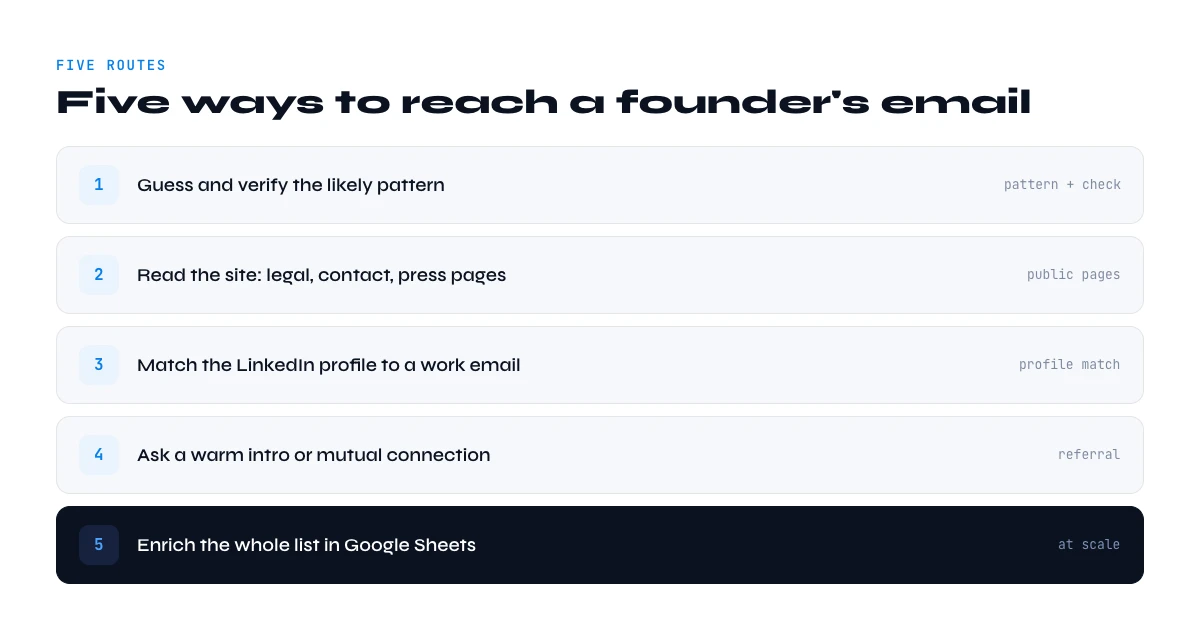
The 5 ways to find a founder's or CEO's email in 2026
Each method trades coverage for speed and cost. Pick by volume: one or two companies, use the manual web methods; a list of accounts, use bulk enrichment in a web app or in Sheets.
Method 1 - The company website (About, Team, Contact)
Open the company site and look for an "About", "Team", or "Leadership" page. Founders of small companies frequently list a direct address there, especially at agencies, consultancies, and early-stage startups that want to look approachable. Even when the address is hidden, the page confirms the founder's exact name and title, which you need for every other method. Coverage is high on small companies, near zero on large ones where leadership pages list bios without contact details.
Method 2 - LinkedIn to identify the decision-maker
When the website does not name the leadership, LinkedIn does. Find the company page, open its "People" tab, and filter by seniority or title (Founder, Owner, CEO, Managing Director). This is the most reliable way to put a name to the role before you ever look for an email. From a person's profile you can also confirm their current company, which matters because people change jobs and a stale title sends your message to the wrong inbox. Our guide to finding a LinkedIn profile from an email covers the reverse direction when you start from an address instead.
Method 3 - Email pattern plus verification
Once you have the founder's name and the company domain, you can infer the likely address from the company's email pattern. Common formats are first@domain.com, first.last@domain.com, and flast@domain.com. Small companies and founders especially favour the short first@domain.com form. Guessing alone is risky, so the non-negotiable second step is verification: confirm the mailbox exists before you send, or you risk a hard bounce that damages your sending reputation. A valid email finder closes that loop by checking deliverability on the address it returns.
Method 4 - Public business registries
For registered founders and legal representatives, public company registers list the official director or manager of record, sometimes with a contact. National registries (Companies House in the UK, INSEE/SIRENE in France, OpenCorporates worldwide) are authoritative for the legal entity behind a brand. They will not hand you a personal email, but they confirm who legally runs the company, which is useful when several people claim a "founder" title or when the brand name differs from the registered entity.
Method 5 - Bulk enrichment with Derrick
Derrick is a B2B data enrichment tool used by tens of thousands of B2B teams, in its web app or as a Google Sheets sidebar. It collapses the four manual steps above into one pass over your list. From a column of company names you find the company's LinkedIn page, pull the decision-maker, find their email, and verify it, all without leaving the sheet. There is no CSV export, no per-lookup credit-card friction, and no switching between five tabs. The free plan gives you 100 credits a month with no card, which is where you try the account-search side. The finder and the verifier themselves are paid features, from 20 EUR a month for 10,000 credits. Because it runs as a sidebar rather than a set of opaque formulas, you see every column it fills and can spot-check the result.
| Method | Cost | Best for | Sheets-native |
|---|---|---|---|
| Company website | Free | Small firms, agencies | No |
| LinkedIn identify | Free | Putting a name to the role | No |
| Pattern plus verify | Low | One known name | Partial |
| Business registries | Free | Legal rep, entity check | No |
| Derrick (web app, Sheets, MCP or API) | from EUR 20/mo, 10,000 credits | A list of target accounts | Native Google Sheets |
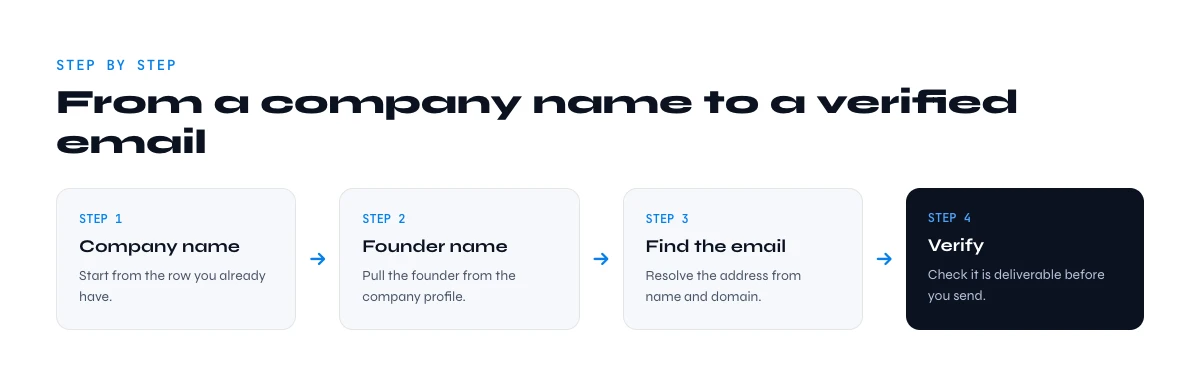
Step-by-step: from a company name to a verified founder email
Here is the full sequence as a repeatable workflow. Done by hand it works for a handful of companies; the same four steps run in the Derrick web app or a spreadsheet for a whole list.
Step 1 - Resolve the company to its LinkedIn page
Start from the company name and find its official LinkedIn company URL. Doing this by hand means searching the name and disambiguating between similarly named entities. In Derrick (web app or Sheets), the Search Companies feature returns the company's LinkedIn URL from its name for 1 credit per company, so a list of accounts resolves in one column.
Step 2 - Identify the founder or CEO
From the company page, isolate the decision-maker by title. If you already know the founder's name, you can jump straight to step 3. If you do not, the Search Leads feature finds the LinkedIn profile of a person from their first and last name for 1 credit per profile, which is the bridge between "I know the company" and "I know the person".
Step 3 - Find the email
With the founder's name and the company domain, run an email finder. The Email Finder feature returns the professional email directly in your list for 5 credits per email found. You are billed for results, not attempts, which keeps a prospecting list predictable.
Step 4 - Verify before you send
Never send to an unverified address. The Email Verification feature checks deliverability for 1 credit per email so dead addresses are flagged before they bounce. A clean list protects your domain reputation and keeps your real messages out of spam folders. Pair it with a bounce email checker on any list you reuse.
Which method fits your situation
Solo founders and small companies
Reach is easy here: the founder is usually visible on the website and uses a short first@domain.com address. The website plus a verification pass is often enough for one company. For ten or more, let the sheet do it so you are not opening ten "About" pages by hand.
Mid-market and enterprise CEOs
A large-company CEO almost never publishes a direct address, and a generic guess will bounce. Identify the exact person on LinkedIn first, then find and verify the email. When the CEO is unreachable, the same workflow surfaces the VP or director who actually owns the budget, which is frequently the better target anyway.
Building a list of target accounts
This is where manual methods fall apart. Paste your company names into a sheet, then run resolve, identify, find, and verify as four columns. A 200-account list that would cost a full day by hand finishes in minutes, with a verified founder email and a confidence flag on every row.
Where to find the founder's name when LinkedIn is thin
Some founders keep a minimal LinkedIn presence, especially outside English-speaking markets. When the People tab comes up empty, several other sources name the person behind the company.
The company's own address pattern is a second angle: once you know how a company builds its addresses, a name is enough to reconstruct the mailbox. We publish that pattern for the companies we track, for instance the Microsoft email format or the one Salesforce uses.
- Press and funding announcements. A funding round, an award, or a launch story almost always quotes the founder by name and title. Search the company name with words like "founder", "CEO", or "raises".
- Conference and podcast listings. Founders speak. Event agendas and podcast show notes pair the person with the company and often their exact role.
- The company blog and author bylines. Early-stage founders write their own posts. The author byline gives you the name, and sometimes a direct link to their profile.
- Business registries. As covered above, the legal director of record is public in most countries, which is the authoritative fallback when nothing else names a clear owner.
Cross-checking two of these sources before you commit to a name is cheap insurance against contacting the wrong person. A founder who left two years ago still shows up in old press, so confirm the current role on a live source before you send.
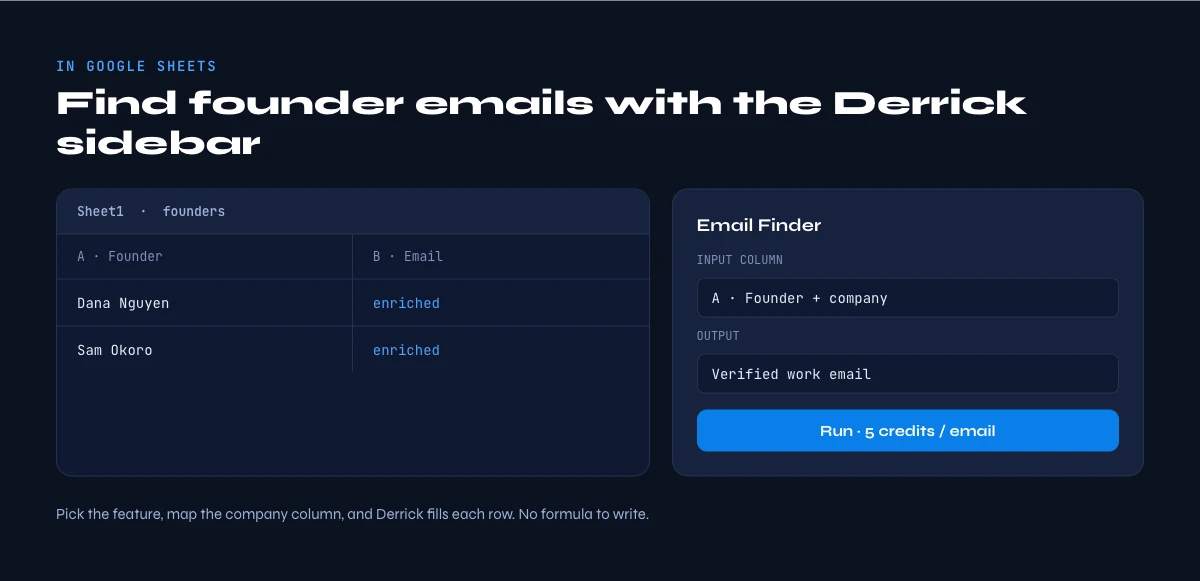
Turn one-off lookups into a repeatable column
The biggest gain is not finding one founder faster. It is making the whole sequence a column you can drag down. Keep your target accounts in a sheet with the company name in the first column, then add resolve, identify, find, and verify as the next four columns and re-run the sequence whenever the list grows. New accounts inherit the same workflow, your data stays in one place, and you get a confidence flag on every row instead of a folder of half-finished research. That repeatability, not raw speed on a single lookup, is what makes founder outreach scale across a whole pipeline.
Common mistakes when finding a founder's email
- Sending to a guessed address. Pattern inference is a starting point, not an answer. Always verify before the first send; one hard bounce hurts every message after it.
- Targeting the wrong "founder". Co-founders, former founders, and namesakes are easy to confuse. Confirm the current role on LinkedIn, not a two-year-old article.
- Stopping at the generic inbox.
contact@andhello@addresses are triage queues. They are a fallback, not the decision-maker. - Ignoring data decay. People change companies every few years. A founder email pulled last quarter may point to a company they have already left. Re-verify lists you reuse.
- Skipping the spot-check. Even automated enrichment deserves a glance. Sample a handful of rows before you act on the whole list.
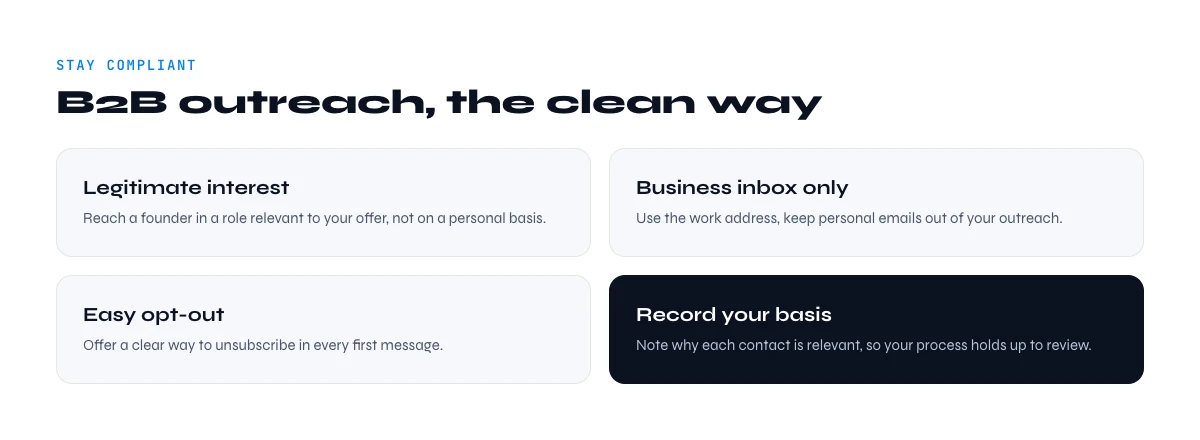
Compliance: GDPR, CCPA and B2B outreach
Reaching out to a founder at their professional address is legal in most markets when you do it right. Under GDPR, processing business contact data for B2B sales generally falls under legitimate interest (Article 6.1.f, Recital 47), provided you handle only professional data, document the purpose, and offer a clear opt-out in your first message. In France, the CNIL permits B2B cold email to professional addresses when the content relates to the person's role, with an unsubscribe option from the first send. Under CCPA, B2B contact data has its own carve-outs, but you must honour deletion requests. The practical rule: contact people about their job, at their work address, and make leaving easy.
Reaching the founder is not about a magic database. It is a short, repeatable workflow: identify the person, infer or find the address, and verify it before you hit send. Do that consistently and your outreach lands with the one person who can actually say yes.
Frequently asked questions
How do you find a startup founder's email address?
Can you find a CEO's email from just the company name?
Is it legal to email a founder you found online?
What if the founder's email bounces?
Should I email the founder or a generic company inbox?
How much does it cost to find founder emails at scale?
Keep reading
Continue exploring this cluster


Lead Email Finder: The Complete Guide to Finding Your Prospects' Emails
Read →

How to Find a Company Website: Complete 2026 Guide
Read →

Find Company Name & Website from Email: 4 Methods (2026, Tested)
Read →

Valid Email Finder: How to Find and Verify Valid Professional Emails
Read →