Medical Email Database: the NPI Is Public, the Inbox Is Not
Turn the free NPI register into a verified physicians email list. Build a 25-practice sample and see the credit cost before you scale.


Short answer: you can buy a physicians email list, which is a file a vendor joined to the public NPI register on a date you cannot check, or you can build a doctors email list yourself from that same free register, practice by practice, verifying every address before the first send. Buying is quicker to start. Building is the only version you can re-run when the practices move.
There is a file waiting for you in this guide: 100 dermatology practices in Texas, exported with Derrick on 6 September 2026, free. Practice name, website, domain, city, full address, phone. The emails and the phone numbers of the people behind them are what the method below is for.
Medical email database: the short answer
A medical email database is built by resolving the organisation first and the named clinician second, because in healthcare the licence is public and the mailbox almost never is. The United States publishes every enumerated provider in the National Plan and Provider Enumeration System, and that register held 9,411,686 records as of 30 August 2026. It gives you the identity, the specialty and the practice address. It does not give you an email. That single gap is the whole job, and it is the reason every prebuilt medical file on the market is a join somebody else ran on a date you cannot see.
The second half of the job is deciding which clinician you actually mean. Nobody wants to email nine million providers. A search for a medical email database almost always means one of three narrower things: the physician or specialist who signs off on a clinical product, the practice manager or administrator who buys software and supplies, or the hospital executive layer that owns budget across dozens of sites. Those are three different lists pulled from the same register, and sending them the same message is why most healthcare campaigns underperform.
This guide walks the pipeline in order: pick the taxonomy that defines your segment, pull the organisations, resolve the named person, find and verify the address, then price the result per usable row. If you are starting from a city rather than a specialty, our guide on finding local business email addresses covers the geography-first version of the same pipeline, and the lawyers email list guide covers the same licensed-profession pattern in a different vertical.
What actually sits inside a medical email database
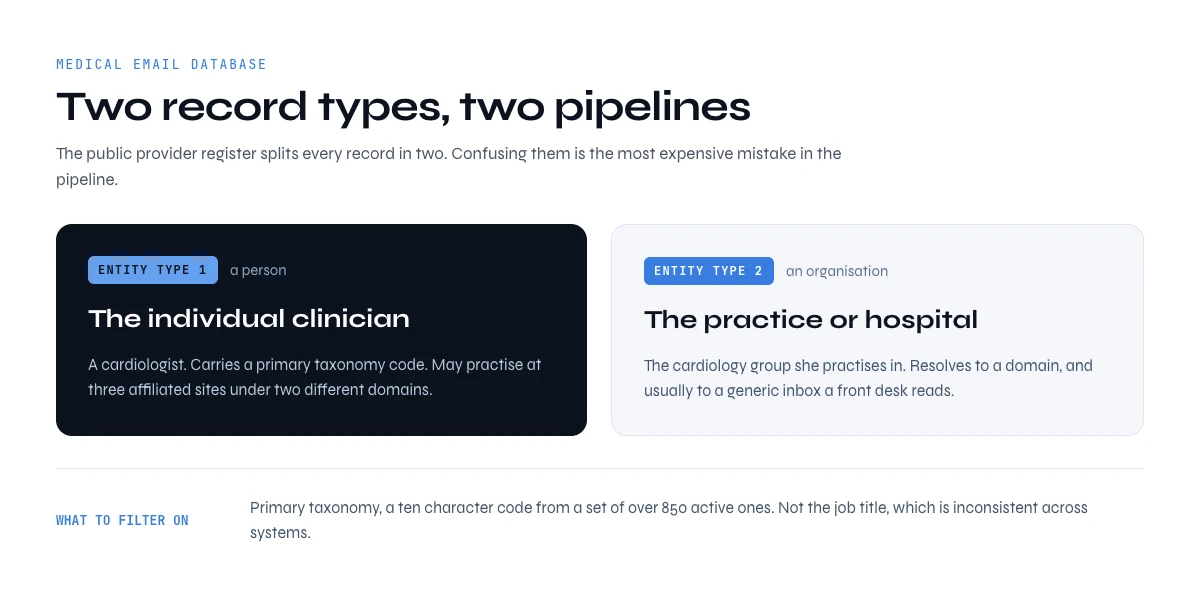
Two record types live side by side in healthcare data, and confusing them is the most expensive mistake in the pipeline. The national register assigns Entity Type 1 to an individual provider and Entity Type 2 to an organisation. A cardiologist has a Type 1 identifier. The cardiology group she practises in has a Type 2 identifier. A hospital has one, and so does each of its billing entities.
That distinction decides what an address even means. A Type 2 record resolves to a domain and usually to a generic inbox that a front desk reads. A Type 1 record resolves to a human being who may work at three affiliated sites under two different domains. If your campaign needs a clinical decision, you want Type 1 rows joined to a working domain. If you are selling supplies, billing services or practice software, the Type 2 organisation is often the better unit, and the person you want inside it is an administrator who has no clinical taxonomy at all.
Specialty is expressed through a healthcare taxonomy code, a ten character alphanumeric value from a set of more than 850 active codes. Every provider record carries at least one, and exactly one is flagged primary. This is the field that turns "doctors" into a segment you can actually mail: not "physicians" but the primary taxonomy for interventional cardiology, or paediatric dentistry, or clinical laboratory. A medical email database that cannot filter on primary taxonomy is a mailing list, not a segment.
One row of a physicians email list, field by field
Strip away the marketing and every physicians email list, bought or built, is the same row repeated. Some fields come straight from the public register. Some come from the practice's own website. One of them, the email, comes from nowhere public at all, and knowing which is which tells you where the errors hide.
| Field | Where it comes from | Public? | How to verify it |
|---|---|---|---|
| NPI number | National provider register | Yes, free | Look it up in the NPI registry: 10 digits, never reused |
| Name and credential | National provider register | Yes, free | Match against the practice's team page |
| Primary specialty (taxonomy code) | National provider register | Yes, free | Exactly one code is flagged primary |
| Practice name and address | Register, map listing | Yes | Register and website show the same address |
| Practice phone | Register, map listing | Yes | Same number on the practice website |
| Website and domain | Map listing, the web | Yes, but not in the register | Domain resolves and accepts mail |
| Named contact and role | Team page, professional profiles | Partly | Role still current on the day you check |
| Email address | No public register | No | Mailbox check plus a catch-all test |
| Verification date | Your own pipeline | Not applicable | Stamped on every row, re-run on a schedule |
The last two rows are the only ones a vendor really sells. Everything above them is free to anyone who queries the register.
Where the identity comes from, and why it is free
The enumeration register is public data, published by the federal payer system so that claims can be routed. Anyone can query it. There is a read API at the registry endpoint that needs no token and no registration, and the full file is published for download and refreshed on a schedule. You can search by name, by taxonomy, by city and by state, and you get back the identifier, the entity type, the legal and doing-business-as names, the primary practice address, a practice phone number and the taxonomy list.
That identifier is the NPI, the National Provider Identifier. Ten digits, assigned once, kept for a whole career even when the clinician changes practice. It is the join key that keeps a doctors email list honest: two rows with the same NPI are the same human, however differently the name is spelled.
What you do not get, in any version of that file, is an email address. The register was built to route claims, not campaigns. Vendors who sell a medical email database start from this same free identity layer, append addresses through pattern inference and verification, and charge for the append. That is a legitimate service. It is also something you can run yourself, on a date you choose, with a verification stamp you can point to.
France runs the same structure under different names. The Répertoire Partagé des Professionnels de Santé is published through the Annuaire Santé by the national digital health agency, released as open data, refreshed daily, and queryable through a standards based REST API. It carries identity, profession, specialty and place of practice, alongside the establishment register. Same shape, same gap: the register tells you who and where, not which mailbox answers.
Physicians email list by specialty: filter on the taxonomy code
A physicians email list by specialty is built by filtering the register on the primary taxonomy code, not on a job title or a word in the practice name. The register's read API accepts a taxonomy description together with a state, and each record lists its codes with one flagged primary. Keep the rows where your code is the primary one and you drop the family doctor who lists dermatology as a side interest.
The codes below were checked against live register records in October 2026. We give no counts, on purpose. The number of providers per code changes every week, and any figure printed in a guide is out of date before you read it. Run the query yourself and you get today's number.
| Specialty | Primary taxonomy code | Typical first contact |
|---|---|---|
| Family Medicine | 207Q00000X | Owner physician, or the practice manager in a group |
| Internal Medicine | 207R00000X | Practice manager in groups, the physician in solo practice |
| Cardiovascular Disease | 207RC0000X | Department lead, then procurement in hospital groups |
| Dermatology | 207N00000X | Owner dermatologist or practice administrator |
| Medical Oncology | 207RX0202X | Department lead, often hospital affiliated |
| Pediatrics | 208000000X | Practice manager |
| Orthopaedic Surgery | 207X00000X | Practice administrator, then the surgeon partners |
| Psychiatry | 2084P0800X | Solo psychiatrist or clinic director |
Two traps. Subspecialties carry their own codes, so interventional cardiology sits under 207RI0011X and not under the general cardiology code: decide whether your offer fits the parent, the child or both. And nurse practitioners carry specialty codes that read a lot like physician ones, a family nurse practitioner for instance. Filter on the code, not on the word in the description.
Doctors email list by state and city: build it locally
A doctors email list by state starts from the same register query with a state filter, then narrows to a city or a postal code. The read API returns at most 200 records per call, so a whole state gets paged through in batches. A single specialty in a dense city can fill a page on its own: dermatology in Austin, Texas already does.
Geography matters more in healthcare than in most verticals, because a practice is a physical place with a catchment area. Three ways to cut it:
- State, when your product depends on licensing or reimbursement rules that change at the state line.
- City or metro area, when a sales rep, a distributor or an event covers one area. Pull the register by city, then cross-check with a map search for the same specialty.
- Postal code, when you want to test a message on a small, dense pocket before scaling it.
The map search finds what the register misses: the practice name patients actually see, the website, a current phone. The register finds what the map misses: the clinicians behind the brand, with their specialty. Join the two on address and phone and you get a local doctors email list where every row has both an identity and a domain.
Doctors, nurses or hospitals: three different healthcare email lists
A healthcare email list is never one list. The segment changes what the register holds, who reads the email and how you get to a named person.
| Segment | What the register holds | Who reads the email | How to resolve it |
|---|---|---|---|
| Doctors | Individual record, specialty code, practice address | Owner physician in small practices, the practice manager above that | Practice domain, then a lookup on the named physician or manager |
| Nurses | Nurse practitioners usually have their own identifier; many staff nurses never do, because they do not bill | The nurse practitioner, or a nurse manager inside a hospital | Through the employer: hospital or clinic domain, then the named nurse manager |
| Hospitals | Organisation record, such as 282N00000X for a general acute care hospital | Department heads, procurement, IT, nursing leadership | Org chart first: list the staff, filter by function, then find the address |
| Pharmacies | Organisation record, community pharmacy code 3336C0003X | Owner pharmacist, or a chain's regional manager | Independent: the pharmacy's domain. Chain: the corporate domain and the regional role |
So a nurses email list is mostly built through employers, not through the register: find the hospital or the clinic first, then the nurse managers inside it. A hospitals email list is an org chart problem. On a hospital, you can list the people inside the organisation at 1 credit per person with your LinkedIn account connected, then filter by function to keep the department heads and buyers rather than three thousand clinicians.
The same logic holds for any healthcare email list that mixes segments. Split it before you write the first message, because a nurses email list and a physicians email list do not answer the same pitch.
Who you are actually emailing inside a practice or a hospital
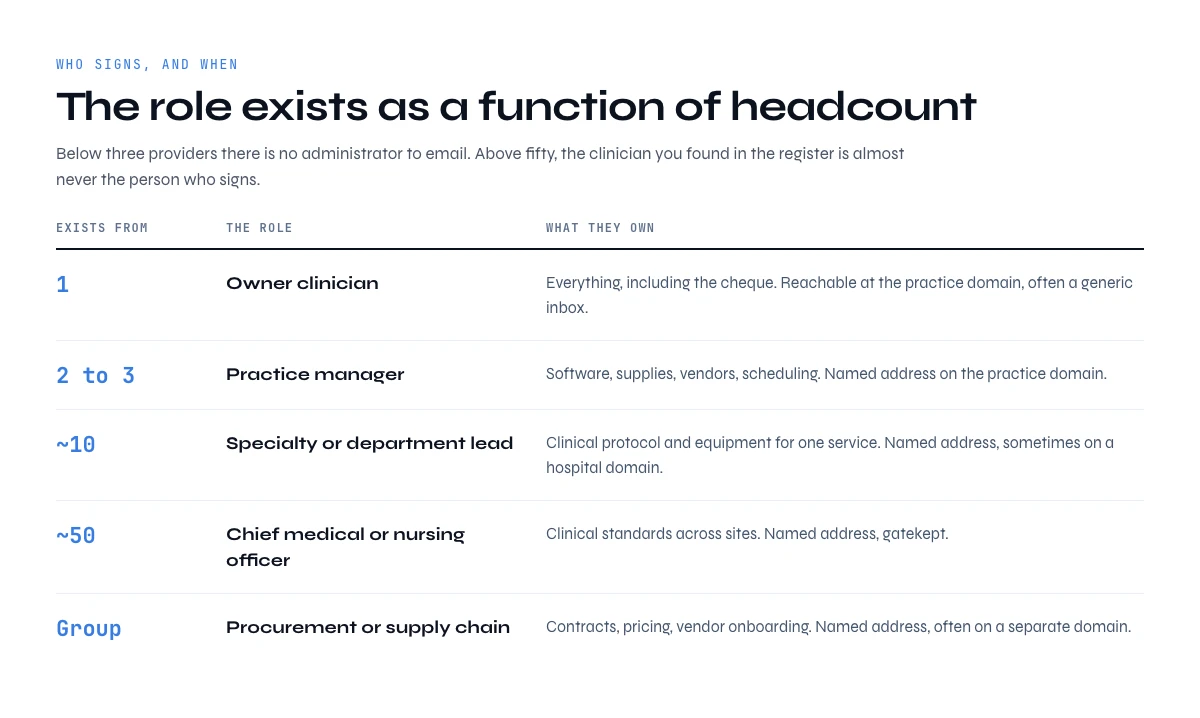
A healthcare organisation is not a flat list of clinicians. It has a clinical layer, an administrative layer and, above a certain size, a procurement layer, and each one buys different things with different money. Pitching an electronic health record migration to a staff nurse, or a box of consumables to a chief medical officer, wastes the address you just paid to find.
| Role | What they own | Exists from | Reachable at |
|---|---|---|---|
| Solo practitioner or owner clinician | Everything, including the cheque | 1 provider | Practice domain, often a generic inbox |
| Practice manager or administrator | Software, supplies, vendors, scheduling | 2 to 3 providers | Named address on the practice domain |
| Specialty or department lead | Clinical protocol and equipment for one service | ~10 providers | Named address, sometimes a hospital domain |
| Chief medical or nursing officer | Clinical standards across sites | ~50 providers | Named address, gatekept |
| Procurement or supply chain | Contracts, pricing, vendor onboarding | Hospital or group scale | Named address, often a separate domain |
Note what the middle column does to your sourcing. Below roughly three providers there is no administrator to email, so the clinician is the buyer and the generic practice inbox is often the only door. Above fifty, the clinician you found in the register is almost never the person who signs, and you need the executive email addresses pipeline instead. Headcount is not a nice to have filter here, it decides whether the role you want exists at all.
Build it: from taxonomy code to practice domain to verified address
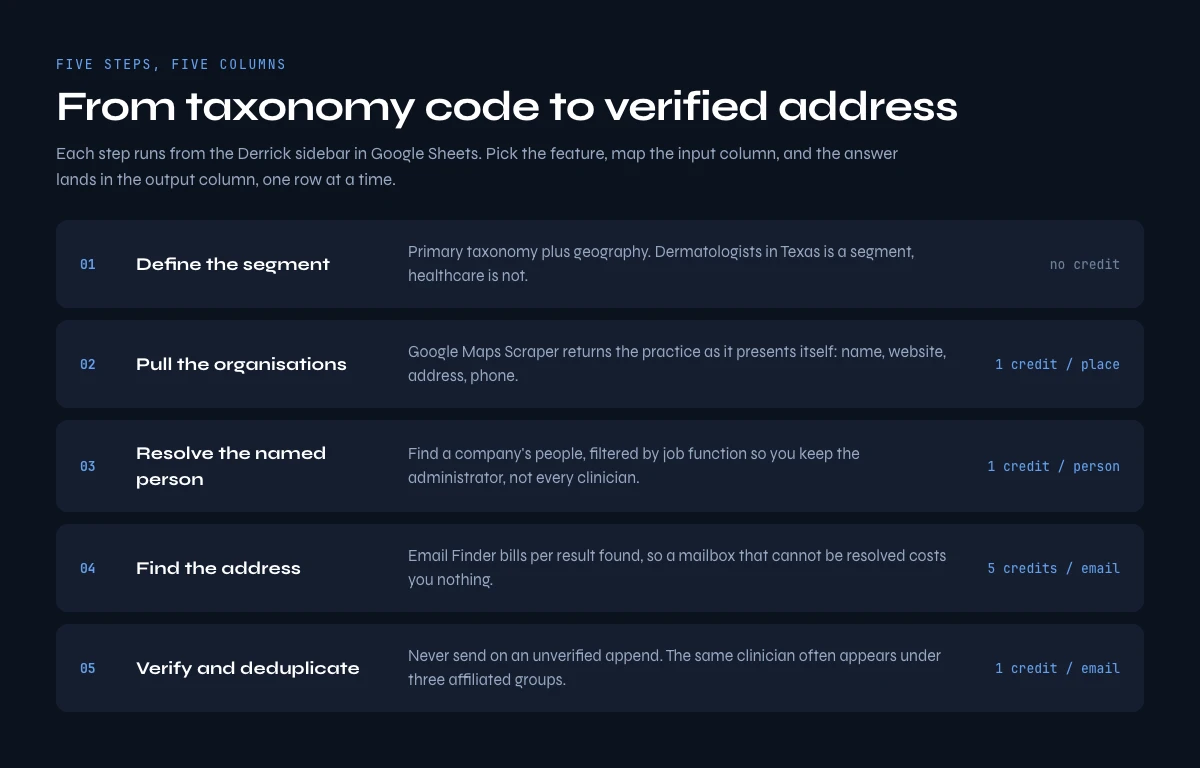
The pipeline has five steps and each one is re-runnable on its own. Run them in order and stop at the first failure, because appending an address to an organisation you have not resolved is a credit spent on a question that was already answered.
Step one, define the segment. Pick the primary taxonomy and the geography before anything else. "Dermatologists in Texas" is a segment. "Healthcare" is not.
Step two, pull the organisations. Either query the public register by taxonomy and state, or start from a map search when what you want is defined by place rather than by code. A map search returns the practice as it presents itself publicly, with a website, a phone number and an address, which is exactly what you need to reach a domain.
Step three, resolve the named person. From the organisation, list the people inside it and filter by job function so you keep the administrator or the department lead rather than every clinician on staff. Find a company's people returns current and former staff at 1 credit per person, with no Sales Navigator seat needed as long as your LinkedIn account is connected.
Step four, find the address. With a first name, a last name and a domain, run an email lookup. Email Finder costs 5 credits per email and bills per result found, so a provider whose mailbox cannot be resolved does not cost you anything. When the practice publishes a contact address on its own site rather than using a pattern, Email & Social Extractor from Website pulls it directly at 2 credits per line.
Step five, verify and deduplicate. Never send on an unverified append. The details are in the next section, and Find Duplicates is unlimited and available on the free plan, which matters more than it sounds when the same clinician appears under three affiliated organisations.
Build a 25-practice sample before you scale your medical email database
Vendors offer a sample before you buy. Do the same with your own build. Twenty-five practices are enough to see the match rate, the share of catch-all domains and the real cost per usable row in your segment, before you commit to thousands. Here is the procedure in the Derrick web app. It runs the same way from the Google Sheets sidebar.
- Pull 25 practices. Run Google Maps Scraper on "dermatology clinic in Austin, Texas" and keep the first 25 places: 25 credits.
- Collect the published contact. Run Email & Social Extractor from Website on each practice site to get the address it publishes: 25 lines at 2 credits, so 50 credits.
- Name the physician. Look each practice up in the NPI registry by address. It costs nothing and gives you the clinicians' names and specialty codes.
- Find the named address. Run Email Finder on first name, last name and domain. At 5 credits per email found, the ceiling for 25 practices is 125 credits, and a miss costs nothing.
- Verify everything you keep. One generic and one named address per practice is 50 addresses at most, sent through a mailbox check at 1 credit each: 50 credits at most.
Total: 250 credits at the very most for 25 practices, and less in real life, because Email Finder only bills what it finds. These four steps are on the paid plans. Standard costs 20 euros a month and includes 10,000 credits, so the sample uses about 2.5 percent of one month. Read the result before scaling. If fewer than half of the practices return a named, verified address, the segment needs a different entry point (the hospital rather than the practice, for example) before it needs more volume.
Push the list to your CRM
Once the sample holds up, the list belongs where your team works. The email finder API and the MCP connection, both included from the Plus plan, return the same rows as the web app, so a scheduled job can refresh the doctors email list and write each verified contact, with its NPI and verification date, straight into your CRM. Keep the NPI as the unique key there too. When a physician changes practice, the record updates instead of duplicating.
What a medical email database costs, bought or built
Bought files are priced per record and quoted rather than listed. The claims cluster tightly: multi million record counts, accuracy figures in the mid nineties, deliverability promised in the mid eighties, and coverage across dozens of specialties. Read the second and third numbers together. An eighty five percent deliverability promise on a file you cannot re-run means roughly one in seven addresses is dead on arrival, and you find out by burning sending reputation to discover it.
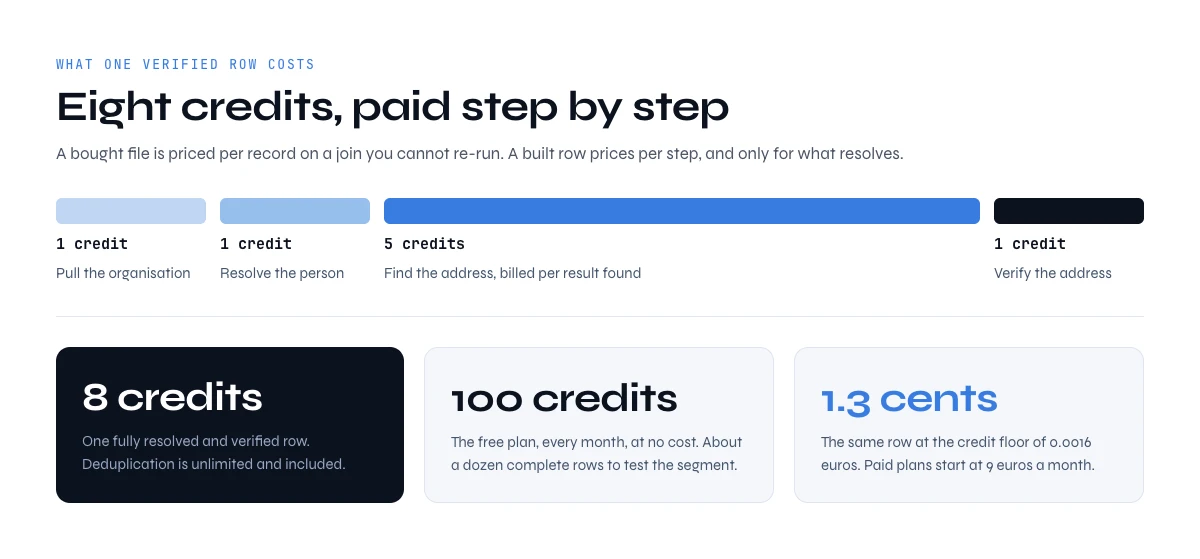
Built rows price differently, because you pay per step and only for what resolves.
| Step | Feature | Cost | Billed |
|---|---|---|---|
| Pull the organisation | Google Maps Scraper | 1 credit / place | Per row requested |
| Resolve the person | Find a company's people | 1 credit / person | Per person |
| Find the address | Email Finder | 5 credits / email | Per result found |
| Verify the address | Email Verification | 1 credit / email | Per result |
| Deduplicate | Find Duplicates | Unlimited | Free plan included |
That is roughly 8 credits for a fully resolved and verified row. The free plan gives you 100 credits a month at no cost, enough to deduplicate and to import practices from a prompt, but the find and verify steps are on the paid plans. Those start with Standard at 20 euros a month for 10,000 credits, about 1,250 complete rows, and at the largest plan the credit floor is 0.0016 euros, which puts a complete verified row at roughly 1.3 cents. Derrick scales the same way at a dozen rows and at a hundred thousand, so the arithmetic does not change shape when the list does.
What to check before you buy a physician email list
If you still prefer to buy, five questions separate a usable file from an expensive bounce report. Ask them in writing, before the quote.
- When was each row last updated? Ask for a date per row, not a date for the file. A physician email list refreshed "quarterly" can still carry rows nobody has touched in two years.
- How was each address verified? Pattern guessing, a mailbox check and a sent-and-delivered test are three very different things. Ask which one, and on what date.
- What bounce rate is guaranteed, and what happens above it? A guarantee with no credit or replacement attached is a sentence, not a guarantee.
- How was opt-in collected? Ask how the contacts came into the file, and check the answer against the opt-in rules of the country you send from.
- Can you get a sample from your own segment? Not a generic sample. Twenty-five rows of your specialty in your state, which you verify yourself before paying.
Then put that sample through the same checks you would apply to a doctors email list you built. If the vendor's rows fail where your own 25-practice sample passes, you have your answer.
Verify the addresses before the first send
Healthcare domains are unusually hostile to naive verification, for two structural reasons. Hospital groups consolidate dozens of acquired practices onto one mail domain, so pattern inference that works on a standalone clinic collapses. And clinical domains sit behind security gateways that accept everything at the edge, which is the definition of a catch-all.
Run four checks, in this order, and stop at the first failure.
- Domain resolves and accepts mail. No mail exchanger, no campaign. This is free to check and eliminates a surprising share of rows pulled from map data, where the website field points at a booking platform rather than the practice.
- Mailbox exists. Email Verification costs 1 credit per email and is the cheapest insurance in the pipeline.
- Catch-all status. A domain that accepts every address tells you nothing about the one you hold. Our catch-all email guide covers how to detect them and what to do with the rows instead of deleting them.
- Bounce threshold before send. Decide the rate you will not cross and hold the list to it. The bounce checker guide covers the thresholds worth holding yourself to, and what makes an address valid explains the difference between syntactically correct and actually reachable.
Why healthcare files rot faster than most lists
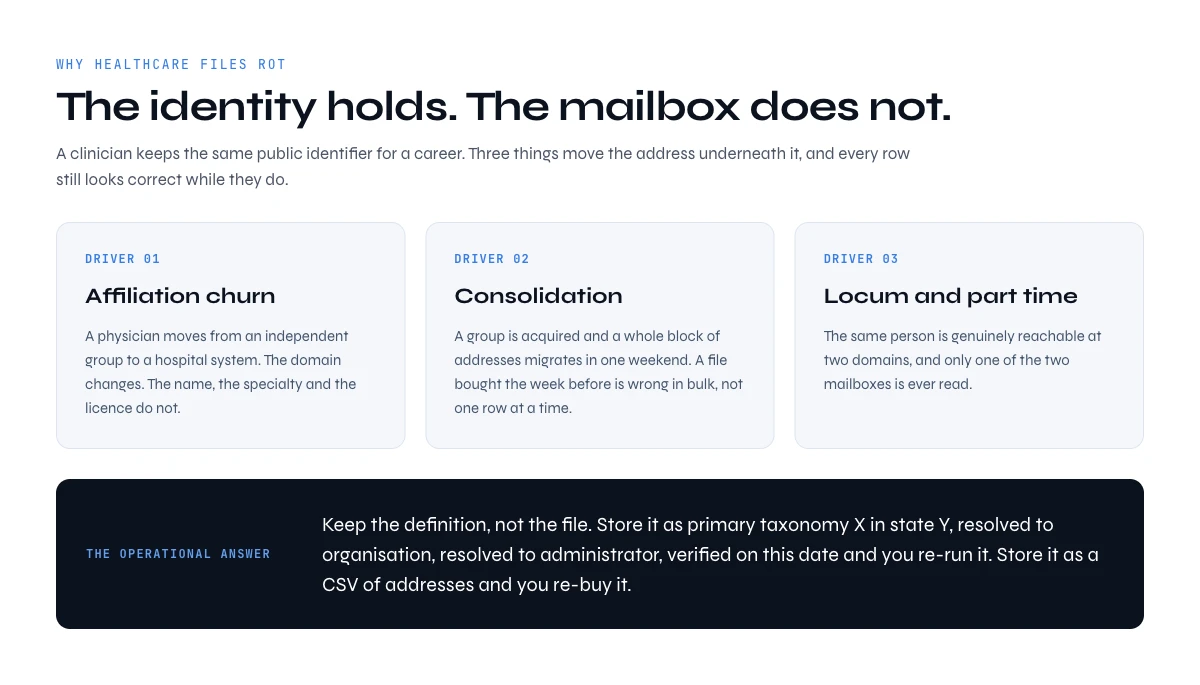
The identity record in a public register is durable. A clinician keeps the same identifier for a career. The mailbox is not durable at all, and the gap between those two facts is what quietly kills a purchased file while every row still looks correct.
Three decay drivers dominate in healthcare. Affiliation churn comes first: a physician moves from an independent group to a hospital system and the domain changes even though the name, the specialty and the licence do not. Consolidation comes second: when a group is acquired, an entire block of addresses migrates to the acquirer's domain in one weekend, and a file bought the week before is now wrong in bulk rather than one row at a time. Locum and part time practice comes third, where the same person is genuinely reachable at two domains and only one of them is read.
The operational answer is not to verify more often. It is to keep the definition rather than the file. If your list is stored as "primary taxonomy X in state Y, resolved to organisation, resolved to administrator, verified on this date", you re-run it. If it is stored as a CSV of addresses, you re-buy it.
Running the whole pipeline in one sheet
This pipeline is worth building rather than buying because it lives in one spreadsheet you control, and every column carries a date. One row per provider or per organisation, columns filling left to right, each one re-runnable on its own: organisation name, website, domain, named person, job function, found address, verification status, verification date.
The same steps run from three surfaces, and the right one depends on where the list needs to end up. A spreadsheet sidebar is the natural home when a human is going to read and edit the rows. The REST API is the right surface when the list belongs in a CRM and has to refresh on a schedule. And an MCP connection is the right one when you would rather ask an AI assistant for "dermatology practices in Austin with a named administrator and a verified address" and get rows back in the conversation. The web app covers the same work without a spreadsheet. Pick the surface for the workflow, not the other way round.
Six mistakes that ruin a medical email database
- Treating individual and organisation records as one list. A Type 1 and a Type 2 identifier answer different questions. Mixing them produces a file where half the rows have no human to address.
- Filtering on job title instead of primary taxonomy. Titles in healthcare are inconsistent across systems. The taxonomy code is the field that was designed to be filtered.
- Buying on record count. Millions of rows is a claim about the register, which is free. The only number that matters is how many rows survive verification on the day you send.
- Skipping the catch-all check on hospital domains. Security gateways accept everything. A verification pass that does not test catch-all status will report a clean list that bounces.
- Mailing the clinician when the administrator signs. Above a handful of providers, the person with the licence is rarely the person with the budget.
- Storing the file instead of the definition. A dated, re-runnable segment survives a consolidation weekend. A CSV does not.
Key takeaways
- The public register held 9,411,686 provider records as of 30 August 2026, and publishes identity, specialty and practice address, but never an email.
- Entity Type 1 is a person and Entity Type 2 is an organisation, and the two demand different pipelines.
- Primary taxonomy, a ten character code from a set of over 850, is what turns "doctors" into a segment worth mailing.
- Role exists as a function of headcount: no administrator below about three providers, no clinician signing above about fifty.
- Affiliation churn and group consolidation kill the mailbox while the identity record stays perfectly true.
- Build a physicians email list by filtering on the primary taxonomy code, and a doctors email list by state with the register's state and city filters, then join both to map data for the domain.
- Building costs roughly 8 credits per fully resolved and verified row, and leaves you a dated definition instead of a static file.
Frequently asked questions
How do you build a medical email database?
Is the NPI register free, and does it include email addresses?
What is a healthcare taxonomy code and why does it matter?
Why do medical email lists go stale so quickly?
How much does it cost to build a medical email database?
How do I find email addresses of doctors?
Where can I find a mailing list for physicians?
How to find an email list?
Keep reading
Continue exploring this cluster


Lead Email Finder: The Complete Guide to Finding Your Prospects' Emails
Read →

How to Find a Company Website: Complete 2026 Guide
Read →

Find Company Name & Website from Email: 4 Methods (2026, Tested)
Read →

Valid Email Finder: How to Find and Verify Valid Professional Emails
Read →