The State of the Spreadsheet as a B2B Data Workbench 2026
2026 report: the spreadsheet is the B2B data workbench. Adoption, the manual-work tax (60-90 min/day), decay, and where enrichment should actually happen.


Last updated: 2026-06-18
Ask a B2B team where their prospect data actually lives and the honest answer is rarely the CRM. It is a spreadsheet. The list lands in a sheet, gets cleaned in a sheet, gets enriched in a sheet, and only then gets pushed to the CRM. The spreadsheet has quietly become the default data workbench of modern revenue teams, and this report puts numbers on that reality: how completely the work happens in the sheet, how much time teams lose doing it by hand, and what that manual work costs.
The conclusion is not that spreadsheets are the problem. They are not. The sheet is where the data naturally converges, and fighting that is a losing battle. The problem is the manual work inside the sheet, the hours spent finding, completing, and verifying data by hand, and the fix is to do that work where the data already is rather than exporting it to yet another external tool.
The spreadsheet is the default data workbench
The spreadsheet is not a legacy tool teams are stuck with; it is where modern collaborative data work happens. Google reports that its Workspace suite now serves more than 3 billion users, and the spreadsheet sits at the center of that for data work. Industry estimates show collaboration on sheets rising, with the average sheet now worked on by several collaborators, up markedly from a few years ago, as more of the team touches the same data set.
For B2B revenue teams specifically, the sheet is the staging ground between raw lists and the systems of record. A prospect list arrives from an event, an export, or a search, and it lands in a spreadsheet because that is the one surface everyone can open, edit, and share without a license negotiation or an onboarding. Marketing builds segments there, ops cleans there, sales preps there. The CRM is the destination, but the sheet is the workbench where the data is actually made usable.
This matters because it tells you where to put the work. If the data is born, cleaned, and prepared in the sheet, then the enrichment, the verification, and the completion should happen there too. Every time a workflow forces a team to export the sheet into a separate tool and re-import the result, it adds friction, breaks the audit trail, and creates another copy to drift out of date. The detail on collaborative sheet work is in the guide to team collaboration in Sheets.
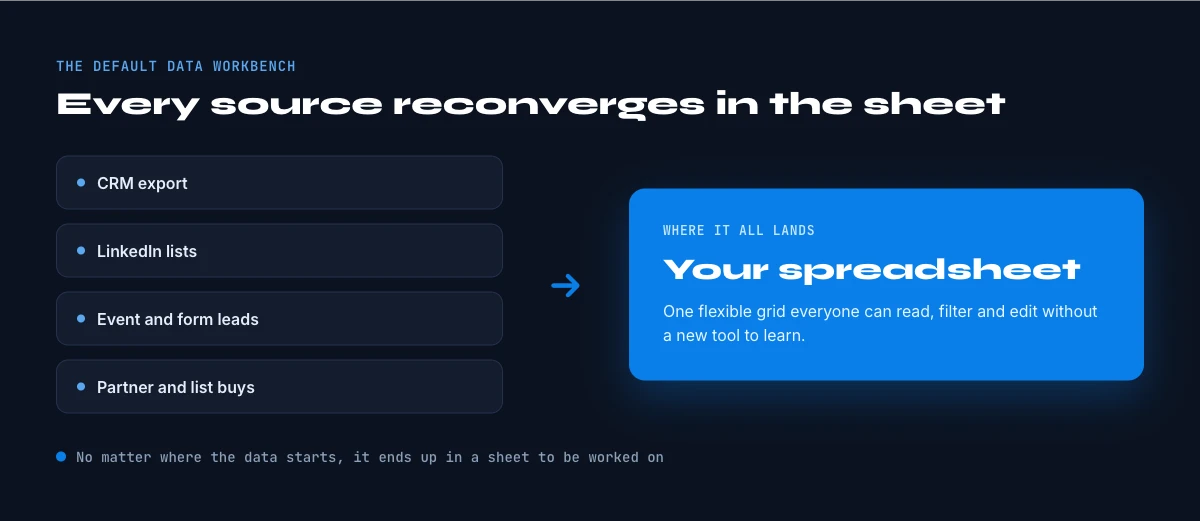
Why everything reconverges in the sheet
Modern teams are drowning in applications. Forrester research has documented how many distinct apps a large organization runs, a number that has climbed into the hundreds, and the practical effect is fragmentation: data scattered across tools that do not talk to each other. The spreadsheet is the neutral ground where those fragments get reassembled, because it is the lowest common denominator every tool can export to and every person can read.
So the sheet is not where data goes to die; it is where data goes to be reconciled. A list from one system, a set of fields from another, a manual correction from a third, all of it converges in a spreadsheet because that is the only place a human can see it all at once and make a judgment. This is why even teams with expensive, modern stacks still run their real data prep in a sheet, and why telling them to stop is futile.
The strategic implication is to stop treating the spreadsheet as a temporary holding pen and start treating it as the workbench it actually is. A workbench deserves good tools that work in place. When the enrichment, verification, and formula work happen inside the sheet, the team keeps a single source of truth and a visible audit trail, instead of a graveyard of exported copies. The formula-level view of this is covered in the guide to enrichment formulas.
This is also why "just use the CRM" rarely sticks as advice. A CRM is a system of record, optimized for storing clean data, not for the messy reconciliation work that produces it. Teams still pull data out into a sheet to dedupe, segment, and fix it, then push the result back. The spreadsheet is not competing with the CRM; it is the preparation layer that feeds it, which is precisely why the data work, and therefore the enrichment, belongs in the sheet.
In Google Sheets
The workbench, with the data step included
The report's argument is that the spreadsheet is where B2B data work actually happens. Derrick adds the missing step there: enrichment as a sidebar on the sheet, so the file does not have to leave for a separate tool and come back.
- Feature
- LinkedIn Companies Profile Enrichment
- Credit cost
- 1 credit per company enriched
The first button opens Derrick, 100 free credits every month. LinkedIn Companies Profile Enrichment: 1 credit per company enriched. The second details the feature.
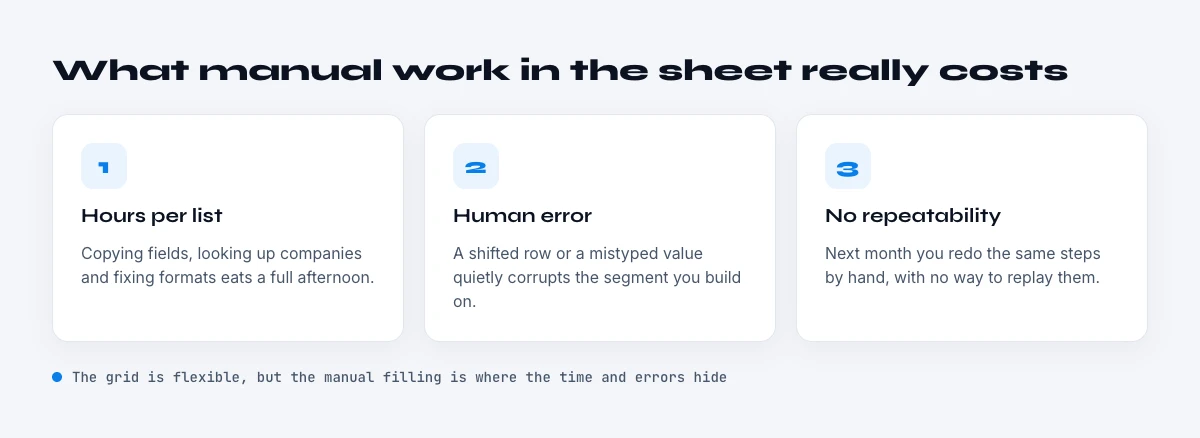
The cost of manual work in the sheet
Here is where the cost lives. McKinsey's widely cited research found that knowledge workers spend roughly 19 percent of their work week simply searching for and gathering information, before they do anything productive with it. For sales specifically, Salesforce's State of Sales research found reps spend only about 28 percent of their time actually selling; a large share of the rest goes to administration, manual research, and data entry, much of it inside a spreadsheet.
Translate that into a working day and it is roughly 60 to 90 minutes per person lost to finding, completing, and fixing data by hand, looking up a decision-maker's email, confirming a phone number, copying a field from one tab to another, re-checking a record that looked wrong. None of this is selling, marketing, or analysis. It is the manual data-prep tax, and it is paid every single day across the whole team.
The important reframe is that this cost is not inherent to the spreadsheet, it is inherent to doing the data work manually. The sheet is just where the manual work is visible. A team that automates the find-and-verify step in place reclaims that 60 to 90 minutes without leaving the surface they already work in, which is why the productivity gain is real rather than a tooling reshuffle. This connects directly to the broader selling-time picture in our enrichment ROI work.

The collaboration wall and decay
Two forces erode a shared sheet over time. The first is interpretation: research from ThoughtSpot and others has found that a large share of users, close to half, struggle to confidently interpret data in a spreadsheet, which means a shared sheet is only as useful as the team's ability to read it the same way. The more collaborators touch it, the more interpretations, formats, and manual edits accumulate, and the more the sheet drifts from a clean source of truth toward a contested one.
The second force is decay. B2B contact data goes stale at roughly 2.1 percent per month, which compounds to about 22.5 to 30 percent per year, as people change roles and companies reorganize. A shared sheet that lives for months, exactly the kind teams rely on, is therefore quietly rotting underneath the collaboration. The list that was accurate when it was built is a quarter wrong a year later, and nobody notices until a campaign hits the dead records.
Together these mean a static, manually maintained sheet has a half-life. It is accurate and trusted at first, then slowly becomes a source of disagreement and stale data. The way out is not to abandon the sheet, it is to keep the data in it live, verified at the point of use rather than frozen at the point of import, so the workbench stays trustworthy no matter how many people work in it or how long it lives. The CRM hand-off side is covered in the export-to-CRM guide.
It is worth being concrete about what the manual tax looks like at team scale. A ten-person revenue team losing an hour a day each to data prep is roughly fifty hours a week, more than a full additional headcount, spent not on selling or analysis but on looking things up and fixing fields. That is the real, recurring cost the maturity model in the next section is designed to remove, and it is why the level you operate at is a budget question, not just a tooling preference.
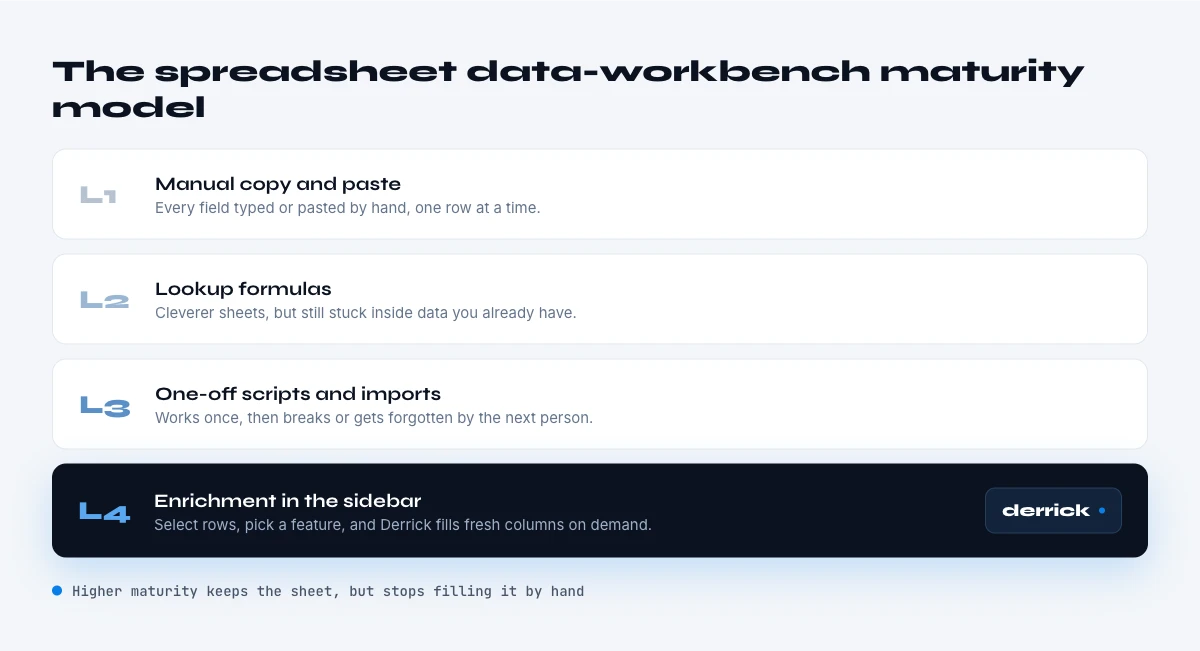
The spreadsheet data-workbench maturity model
Teams sit at one of four levels of spreadsheet data maturity, and the level largely determines how much of that manual tax they pay. Level one is manual entry: data is typed, copied, and corrected by hand, with the full 60-to-90-minute daily tax. Level two is formulas: the team uses spreadsheet functions to clean and transform, which helps with shape but does nothing for missing or stale contact data. Level three is add-ons that pull data in, which reduces lookups but often still means switching context or exporting. Level four is live, in-place enrichment: finding and verifying data on demand inside the sheet, at the moment of use.
The jump that matters is from level three to level four, because it removes the export-and-reimport step entirely and keeps the data fresh at the moment a person acts on it. This is the level where the manual data-prep tax actually disappears rather than just shrinking, and it is the level the rest of this report argues toward. Diagnosing your own level is simple: count how many times a week someone exports the sheet to do something to it, and how many minutes a day go to looking up or fixing contact data by hand.
This is exactly where Derrick fits, and it is a deliberate design choice rather than a feature list. Because the data already lives in the sheet, Derrick works as a Google Sheets sidebar: it finds and verifies emails and phone numbers, and enriches LinkedIn and company data, on demand and in real time without leaving the spreadsheet. There is no export, no second tool, no copy to drift out of date, the workbench stays the workbench, and the manual tax is automated away in place. Try Derrick free, in its web app or inside Google Sheets, free for 100 credits per month. To get set up in Sheets, see the install guide.
One reason this gravity is so often underestimated: the sheet is invisible in the tech-stack diagram. Procurement sees the CRM, the enrichment tool, the sequencer, and the BI platform, but not the spreadsheet quietly sitting between all of them doing the reconciliation. Because it is not a line item, the manual work it absorbs is not tracked, and the cost stays hidden. Naming the spreadsheet as the workbench it is, is the first step to equipping it properly instead of pretending the work happens somewhere cleaner.
Methodology and sources
This report draws on neutral, primary research: Google's published figures on Workspace adoption; McKinsey on the share of knowledge-worker time spent searching for and gathering information; Salesforce State of Sales on the share of sales time actually spent selling; Forrester on application sprawl inside large organizations; ThoughtSpot on the difficulty users have interpreting data in spreadsheets; and the canonical B2B data-decay baseline. Spreadsheet-adoption and collaboration figures are presented as market estimates and normalized into comparable ranges. Where a figure could only be traced to a data vendor's own marketing, we did not use it.
A closing thought. The instinct of many data programs is to move work out of the spreadsheet and into a "proper" tool. The evidence says the opposite is more realistic: the work keeps coming back to the sheet because the sheet is where humans can actually see and reconcile data. The productive move is not to fight that gravity but to bring good, live tooling into the sheet, so the workbench teams already trust becomes fast and current instead of manual and stale. Enrich where the data lives, verify at the point of use, and the spreadsheet stops being a liability and becomes the asset it already, quietly, is. The same logic applies to small teams and large ones: the spreadsheet scales with the team because it asks nothing of it, and the data work scales with it, which is exactly why automating that work in place pays off at every size rather than only at enterprise scale.
Frequently asked questions
Why do B2B teams work their data in a spreadsheet?
How much does manual work in a spreadsheet cost?
Do shared spreadsheets go stale?
Should I move data out of the spreadsheet?
How does Derrick work with Google Sheets?
Keep reading
Continue exploring this cluster


The 15 Google Sheets Formulas to Enrich Your B2B Data
Read →

How to Collaborate as a Team on Your B2B Data Enrichment Google Sheet
Read →

How to Build a Data Enrichment Dashboard in Google Sheets (Step-by-Step)
Read →