The 15 Google Sheets Formulas to Enrich Your B2B Data
15 Google Sheet formulas to clean, validate and enrich a B2B prospect list, plus the three jobs no formula can do. Copy, paste, run.


Google Sheets is the unsung hero of B2B data enrichment. With the right 15 Google Sheet formulas, you can clean, validate, dedupe, and enrich your prospect list without touching a single line of code or paying for a CRM add-on.
Most lists do not fail because the data was never found. They fail because the data arrived in three different shapes, from three different exports, and nobody normalised it before the merge. A trailing space, a company name with a legal suffix on one row and without it on the next, an email in mixed case: each is invisible to the eye and fatal to a lookup. The formulas below exist to make those failures visible before they cost you a send.
They are grouped in the order you should actually run them. Clean first, because validation on dirty input produces confident nonsense. Validate second, because enriching a row you are going to discard is money spent for nothing. Enrich last, on a list you trust.
Here are the 15 Google Sheets formulas every B2B team should master in 2026.
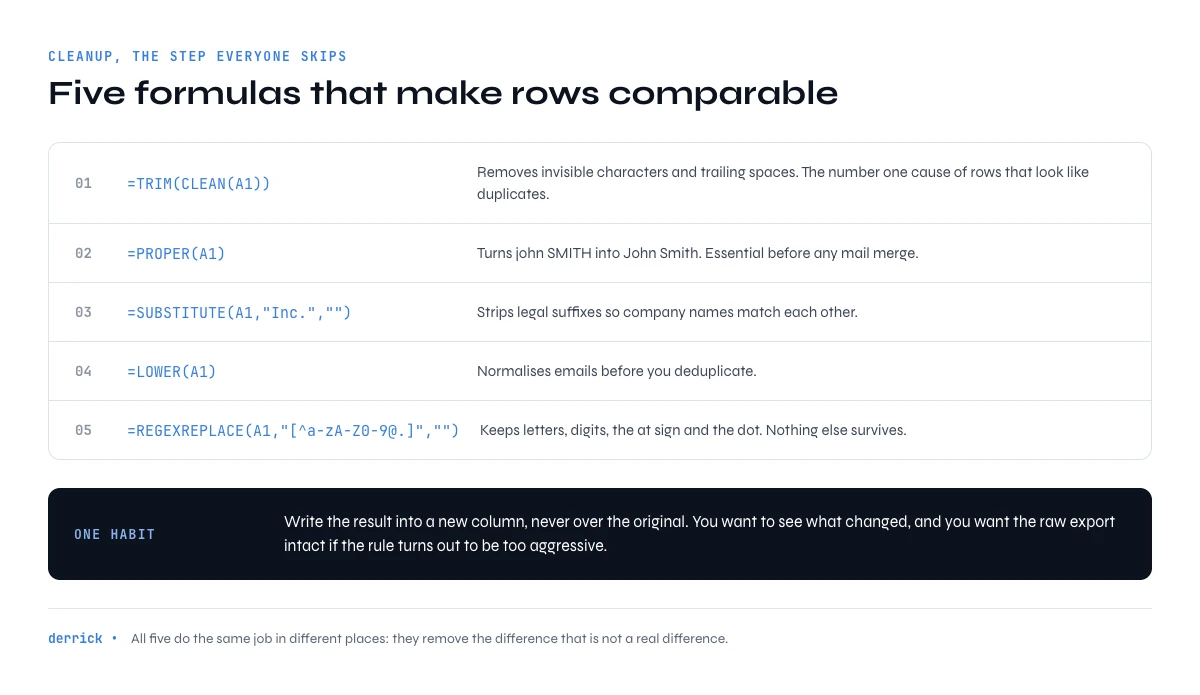
The 5 Cleanup Google Sheet Formulas: Make Rows Comparable
Cleanup is the step everyone skips and everyone pays for later. Two rows that look identical on screen are different strings to a lookup if one carries a non-breaking space pasted from a web page. The five formulas here all do the same job in different places: they remove the difference that is not a real difference.
Run them into a new column rather than over the original. You want to be able to see what changed, and you want the raw export intact if the cleanup rule turns out to be too aggressive.
1. CLEAN + TRIM
=TRIM(CLEAN(A1)) - removes invisible characters + trailing spaces. The #1 cause of duplicate-looking rows.
2. PROPER
=PROPER(A1) - fixes "john SMITH" → "John Smith". Essential before any merge mail.
3. SUBSTITUTE
=SUBSTITUTE(A1, "Inc.", "") - strips legal suffixes for cleaner company names matching.
4. LOWER
=LOWER(A1) - normalize emails before dedup.
5. REGEXREPLACE
=REGEXREPLACE(A1, "[^a-zA-Z0-9@.]", "") - strip everything that's not alphanumeric, @, or dot. Bullet-proof email cleanup.
The 5 Validation Formulas: Catch Bad Rows Before They Cost You
Validation answers one question per row: is this worth spending anything on. It is the cheapest step in the whole pipeline and the one with the highest return, because every row it rejects is a row you do not enrich, do not send to, and do not bounce on.
One caution worth stating plainly: syntax validation is not deliverability. ISEMAIL tells you the address is shaped like an email. It says nothing about whether a mailbox exists behind it. That distinction is the subject of the last section.
6. REGEXMATCH (email)
=REGEXMATCH(A1, "^[^@\s]+@[^@\s]+\.[^@\s]+$") - returns TRUE if the cell is a valid email syntax.
7. ISEMAIL (built-in)
=ISEMAIL(A1) - built-in, simpler. Doesn't catch all edge cases but 90% of them.
8. LEN check for phone
=AND(LEN(A1)>=10, LEN(A1)<=15) - international phone lengths.
9. ARRAYFORMULA for batch validation
=ARRAYFORMULA(IF(LEN(A2:A)=0, "", ISEMAIL(A2:A))) - validates entire column in one cell, no copy-down.
10. COUNTIF for duplicates
=COUNTIF(A:A, A2)>1 - flags duplicates in column A.
The 5 Enrichment Google Sheet Formulas: Bring Outside Data In
These are the formulas that add information the export did not contain. They work when the information is already somewhere you can point at: another tab, a public page, or a field you can derive from another field. That last case is underrated. Splitting an email on the @ sign gives you the company domain for free, and the domain is the single most useful key in B2B matching.
IMPORTXML deserves its own warning. It is genuinely powerful and genuinely fragile: it re-fetches on recalculation, it breaks the day the target page changes its markup, and Google Sheets caps how many of them one document will run. Use it to explore, then paste the result as values before you build anything on top.
11. VLOOKUP for company match
=VLOOKUP(B2, CompanyDB!A:D, 3, FALSE) - match a company name to firmographic data in a reference sheet.
12. IMPORTXML for website scraping
=IMPORTXML(A1, "//meta[@name='description']/@content") - extracts meta description from any URL.
13. CONCATENATE for full name
=A2&" "&B2 - builds full name from first/last columns.
14. SPLIT for email parsing
=SPLIT(A2, "@") - splits email into [local, domain] for company extraction.
15. IFERROR wrapper
=IFERROR(your_formula, "") - never let a failed lookup break your sheet.
In Google Sheets
Where formulas stop and enrichment starts
The fifteen formulas here reshape data you already have. They cannot add a job title that is not in the file. Derrick fills those columns from the sidebar of the same sheet, and your formulas then work on complete rows.
- Feature
- LinkedIn Leads Profile Enrichment
- Credit cost
- 1 credit per lead enriched
The first button opens Derrick, 100 free credits every month. LinkedIn Leads Profile Enrichment: 1 credit per lead enriched. The second details the feature.
Chaining Them Into One Enrichment Pass
Individually these formulas are memos. Chained, they become a pipeline you can point at a raw export and leave running. The order below is the one that survives contact with a real list.
- Normalise the join key.
=LOWER(TRIM(CLEAN(A2)))on the email column, and=TRIM(SUBSTITUTE(SUBSTITUTE(B2,"Inc.",""),"Ltd",""))on the company column. Everything downstream joins on these, so they have to be right first. - Derive the domain.
=INDEX(SPLIT(A2,"@"),2)turns an email into a domain. This one column will match more records than the company name ever will, because domains do not have spelling variants. - Flag the duplicates without deleting them.
=COUNTIF($A$2:$A2,A2)>1marks the second and later occurrences only, so the first instance of each record stays. Filter on FALSE rather than removing rows, and you keep an audit trail. - Validate in one shot.
=ARRAYFORMULA(IF(LEN(A2:A)=0,"",ISEMAIL(A2:A)))covers the whole column from a single cell. No copy-down to forget, no formula that stops halfway because someone inserted a row. - Wrap anything volatile. Every lookup and every import goes inside
IFERROR. One failed fetch should return a blank cell, not cascade a wall of errors through a sheet three people are looking at.
Built this way, a five thousand row export goes from raw to trustworthy in about the time it takes to read this paragraph, and the result is reproducible on the next export because the logic lives in the sheet rather than in someone's memory.
The app works through your list row by row. 100 free credits every month.
What Google Sheet Formulas Cannot Do, and Where the Wall Is
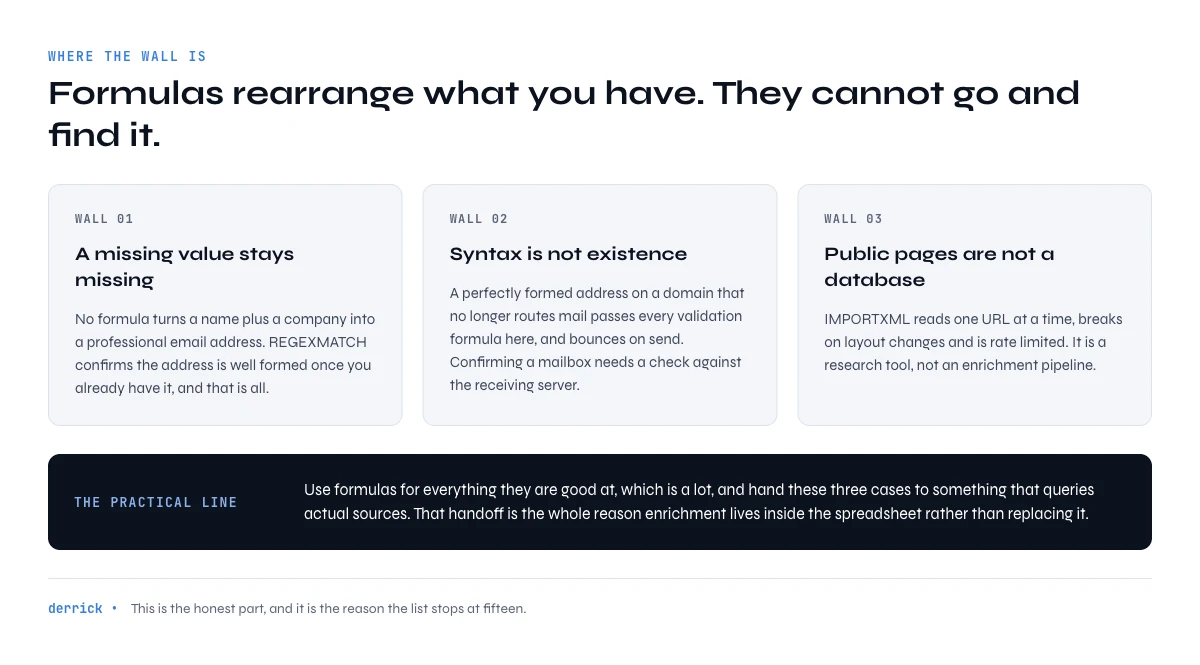
This is the honest part, and it is the reason the list stops at fifteen. Formulas operate on data you already have. They rearrange, test and combine it. They cannot go and find what is missing.
Three walls show up on every real project:
- A missing value stays missing. No formula turns a name plus a company into a professional email address.
REGEXMATCHwill confirm the address is well formed once you have it, and that is all. - Syntax is not existence. A perfectly formed address on a domain that no longer routes mail passes every validation formula in this article and bounces on send. Confirming a mailbox exists requires a check against the receiving server, which a spreadsheet cannot perform.
- Public pages are not a database.
IMPORTXMLreads one URL at a time, breaks on layout changes, and is rate limited. It is a research tool, not an enrichment pipeline.
The practical consequence: use formulas for everything they are good at, which is a lot, and hand the three cases above to something that queries actual sources. That handoff is the whole reason enrichment tools live inside the spreadsheet rather than replacing it.
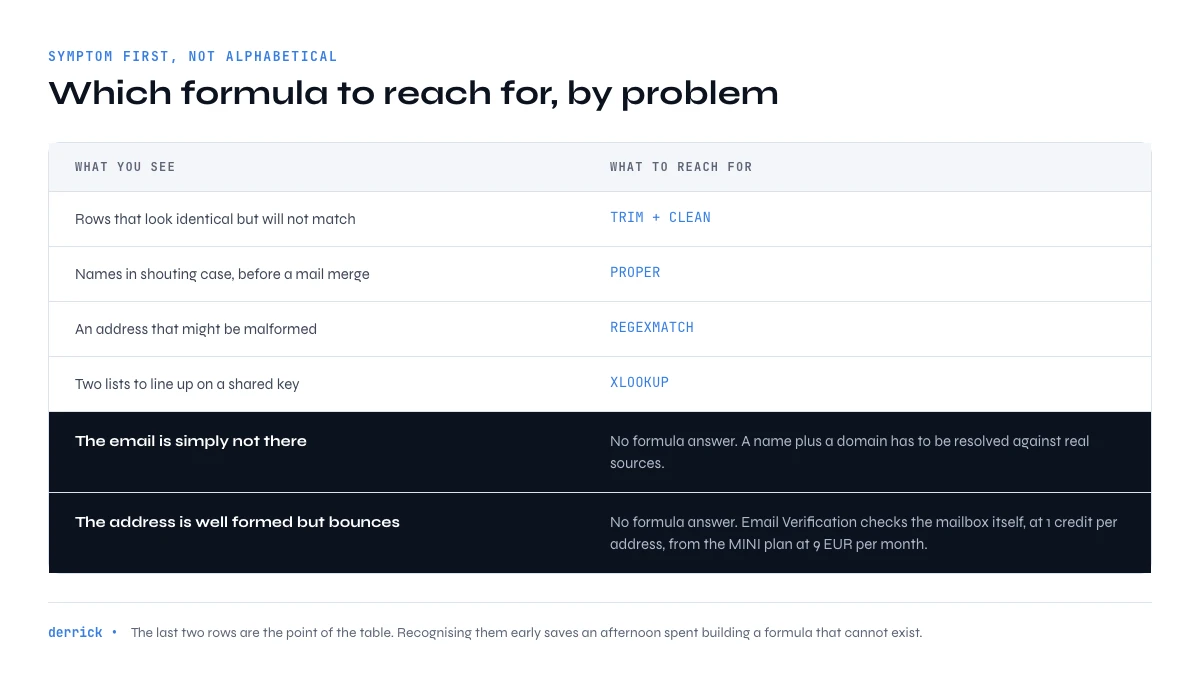
Which Google Sheet Formula to Reach For, by Problem
The lookup most people actually need is not alphabetical. It is symptom first.
| What you are seeing | Formula to reach for | Why it happens |
|---|---|---|
| Rows look identical but dedup misses them | TRIM(CLEAN()) then LOWER() | Invisible characters or casing pasted in from a web export |
| The same company appears three times under three names | SUBSTITUTE() on legal suffixes, then match on domain | Inc., Ltd and SAS are written inconsistently across sources |
| Mail merge greets people as "john smith" | PROPER() | The source system stored names without casing rules |
| A lookup returns #N/A on rows that clearly exist | IFERROR() plus a cleaned join key | The keys differ by a space, not by content |
| A campaign bounces despite valid-looking addresses | No formula covers this | Syntax is valid, the mailbox is not. Needs a real verification step |
| You have a company but no contact | No formula covers this | The value was never in the sheet to begin with |
The last two rows are the point of the table. Two of the six most common symptoms in a B2B list have no formula answer at all, and recognising that early saves an afternoon of trying to build one.
If the missing value is an address, our guide on email enrichment tools covers how a name plus a domain becomes a verified address. If it is a phone number, the same logic applies from the phone number sourcing guide.
Two of these deserve their own page. REGEXMATCH in Google Sheets covers pattern matching properly, including the email and phone patterns worth memorising, and installing Derrick on Google Sheets takes about thirty seconds if you want the enrichment side running before you finish this article. Once the sheet is clean, exporting it to your CRM and wiring it to Zapier, Make or n8n are the two next steps most teams take.
Three Habits That Keep a Formula Sheet Alive
Formulas rot quietly. These three habits are what separates a sheet still in use in six months from one everybody quietly abandoned.
Keep the raw import untouched. One tab holds exactly what the export gave you, and nothing writes to it. Every formula reads from it into a working tab. When a cleanup rule turns out to be wrong, you fix the rule instead of re-exporting.
Paste volatile results as values once you trust them. Anything that fetches, imports or looks up across files recalculates on its own schedule. Once a column is correct, freeze it. A sheet that re-fetches four hundred URLs every time someone opens it will eventually stop returning anything.
Write the rule next to the column. A one-line note in the header saying which suffixes get stripped, or which length range counts as a valid phone, is the difference between a colleague trusting the column and rebuilding it from scratch.
From Formulas to an Enrichment Workflow
Once cleaning and validation are stable, the interesting question changes. It stops being "how do I fix this column" and becomes "what do I want in this column that is not there yet". That is where the sheet stops being a spreadsheet and starts being the front end of a data pipeline.
The pattern that works: formulas own the shape of the data, an enrichment step owns the content. The sheet stays the interface, because that is where the list already lives and where the person who needs it already works. Nothing gets exported, reconciled and re-imported, which is where most enrichment projects lose their afternoon.
Derrick works this way on purpose, and not only in Sheets: the same enrichment is reachable from an MCP client such as Claude or ChatGPT when you have a one-off question, and from the REST API when it belongs in a CRM pipeline. Pick the surface by workflow. A list to enrich belongs in the sheet.
Key takeaways
- 15 formulas cover 90% of B2B data cleanup, validation, and basic enrichment in Google Sheets.
- Cleanup formulas (CLEAN, TRIM, PROPER, SUBSTITUTE, REGEXREPLACE) prevent dedup nightmares.
- Validation formulas (REGEXMATCH, ISEMAIL, COUNTIF) catch bad data before it hits your CRM.
- Enrichment formulas (VLOOKUP, IMPORTXML, SPLIT) bring external data in without a code editor.
- Always wrap volatile formulas (IMPORTXML, lookups) in IFERROR to avoid #REF cascades.
- Run them in order: clean, then validate, then enrich. Validating dirty input produces confident nonsense, and enriching a row you will discard is money spent for nothing.
- Two of the most common problems in a B2B list have no formula answer: a value that was never in the sheet, and an address that is valid in syntax but dead in reality.
Frequently asked questions
Which Google Sheet formula removes invisible characters from an import?
=TRIM(CLEAN(A1)). CLEAN strips non-printing characters and TRIM removes leading, trailing and repeated spaces. Run it before any dedup or lookup: invisible characters are the single most common reason two identical-looking rows fail to match.
How do I validate an email address with a Google Sheet formula?
=ISEMAIL(A1) for the simple case, or =REGEXMATCH(A1, "^[^@\s]+@[^@\s]+\.[^@\s]+$") when you want control over the pattern. Both check syntax only. Neither can tell you whether a mailbox exists behind the address, which needs a check against the receiving server.
Can a Google Sheet formula find an email address from a name and a company?
No. Formulas rearrange and test data that is already in the sheet; they cannot query an outside source for a value that was never there. Deriving the domain from an existing address with =INDEX(SPLIT(A2,"@"),2) works, but building an address from scratch requires an enrichment step.
Why does IMPORTXML stop working after a while?
Three reasons, usually in this order: the target page changed its markup so the XPath no longer matches, the document hit the cap on concurrent imports, or the formula is recalculating so often that requests get throttled. Once a column is correct, paste it as values.
How do I flag duplicates without deleting rows?
=COUNTIF($A$2:$A2,A2)>1 with the anchored range. It marks the second and later occurrences only, so the first instance of each record stays FALSE. Filter on the column rather than deleting, and you keep an audit trail of what was removed and why.
In what order should I run cleanup, validation and enrichment?
Clean, validate, enrich, in that order. Validation applied to dirty input returns confident nonsense, and enriching a row that validation would have rejected spends credits on a record you are about to discard. Normalising the join key first also makes every later lookup match more rows.
Keep reading
Continue exploring this cluster


RegexMatch on Google Sheets: Guide 2026
Read →

How to Build a Data Enrichment Dashboard in Google Sheets (Step-by-Step)
Read →

How to Collaborate as a Team on Your B2B Data Enrichment Google Sheet
Read →

How to Export Google Sheets Data to Your CRM (Complete 2026 Guide)
Read →