
 LinkedIn → CRM Sync (Chrome Extension)
 Surfe Review: Is It Still Worth It in 2026?
Surfe is a LinkedIn-to-CRM Chrome extension for one-click contact sync and enrichment, best for SDRs whose entire workflow lives inside LinkedIn. A free plan gives 20 emails and 5 phones per year, and Essential costs $39/mo. Skip it if you need bulk background enrichment, automatic enrichment of new CRM records, or more than 1,000 emails and 100 phones a year on Pro.
The cleanest LinkedIn-to-CRM sync extension. Founded in 2020 in Paris (originally as Leadjet), Surfe serves SDRs whose entire workflow lives inside LinkedIn - one-click contact sync to HubSpot, Salesforce, Pipedrive, Copper plus Salesloft/Outreach/Lemlist integrations. 4.6/5 across 460+ G2 reviews. Saves users 15-30 hours/month per reviewer reports. The catch: every sync requires you to be on LinkedIn looking at a profile (no background bulk enrichment), credit limits frustrate scaling teams, and pricing perceived as expensive vs the in-extension scope.
- You're an SDR whose entire daily workflow lives inside LinkedIn
- You want one-click 'Add to CRM' (HubSpot/Salesforce/Pipedrive/Copper)
- You can manage credit allocations within the per-tier caps
- You need bulk background enrichment (Surfe is human-in-the-loop only)
- You want a tool that monitors CRM for new records and auto-enriches them
- You're scaling past 1,000 emails / 100 phones per year on Pro
Install the add-on and enrich your lists without leaving your spreadsheet.
Install in Google Sheets →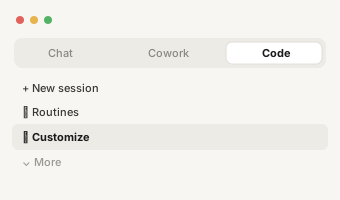
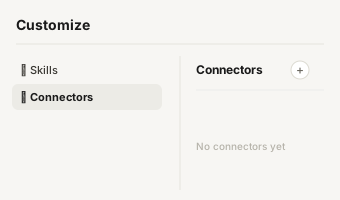
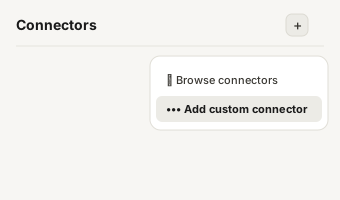
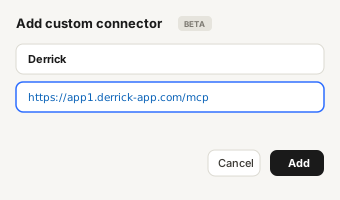
https://app1.derrick-app.com/mcp Call the same enrichment endpoints straight from your own stack or workflow.
Read the API docs →

Overview
What is Surfe?
Surfe is the LinkedIn-to-CRM Chrome extension for one-click contact sync + enrichment, founded in 2020 in Paris (originally branded as Leadjet, rebranded to Surfe in 2022). Built specifically for SDRs whose entire daily workflow lives inside LinkedIn, Surfe's Chrome extension adds CRM sync, contact data and 1-click 'Add to CRM' directly inside LinkedIn profiles and Sales Nav search results.
The core value: eliminate manual data entry between LinkedIn and your CRM. Compatible with HubSpot, Salesforce, Pipedrive, Copper natively, plus Salesloft, Outreach and Lemlist for sequencing handoff. Reviewers consistently report saving 15-30 hours/month on manual CRM updates alone. The Pro tier ($79/mo) adds Account Lookalikes, Prospect List Builder, and expanded search (10,000 results/day vs 100/week on Free). Email and call capabilities are built into the extension.

Pricing
Surfe Plans & Pricing
Prices below from surfe.com/pricing (May 2026). Annual billing yields up to 25% discount. Annual credit allocations rather than monthly (e.g. Pro = 1,000 email finder + 100 mobile phone finder per year). Email validation is unlimited on all tiers.
| Plan | Price | Typical use | Key limits |
|---|---|---|---|
| Free | $0 | Solo testing + light usage | 20 email finder + 5 mobile phone finder per year, unlimited email validation, Company & People Search (100 results/week), B2B contact finder, CRM/GSheets integration, 1-click Add to CRM (1 contact/day), Salesloft/Outreach/Lemlist integrations |
| Essential | $39/mo (annual discount) | Active solo SDRs | 150 email finder + 50 mobile phone finder per year, unlimited email validation, full 1-click Add to CRM/GSheets, contact list syncing from Surfe App, 14-day free trial |
| Pro (Most Popular) | $79/mo (annual discount) | SDR teams + power users | 1,000 email finder + 100 mobile phone finder per year, unlimited email validation, all Essential + Account Lookalikes + Prospect List Builder + expanded search (10,000 results/day vs 100/week), 14-day free trial |
| Enterprise / Custom | Quote | Larger teams + custom needs | Custom credits + users + integrations + governance |
Hidden costs to know about
Credits are annual allocations, not monthly - Pro tier's '1,000 email + 100 mobile per year' breaks down to ~83 emails + ~8 mobiles per month average. Heavy single months exhaust the annual allocation early. Sales Navigator subscription ($99/mo per seat) required separately for advanced LinkedIn filtering. No background bulk enrichment - every sync requires you to be on LinkedIn manually. The 1-contact/day limit on Free plan effectively caps it at very light evaluation use only.
Is Surfe fair value?
For SDRs whose daily workflow genuinely lives inside LinkedIn, Surfe Pro at $79/mo (annual discount) is competitive - the time savings (15-30 hours/month per reviewer reports) easily justify the price, and the native CRM sync depth beats most direct competitors. For teams needing bulk background enrichment or CRM auto-enrichment, Surfe is incomplete - it's strictly human-in-the-loop. For solo prospectors at low volume, the Free tier's 1-contact/day cap is restrictive enough that paid alternatives (Hunter, GetProspect, Skrapp) often deliver better evaluation experience.

Verdict in detail
Surfe Pros & Cons - Summary That Actually Helps You Decide
Based on 460+ verified G2 reviews (4.6/5), 100+ Capterra reviews (4.6/5), and 2026 testing from SyncGTM, SalesRobot, ProSpeo and SolidGrowth.
Cleanest LinkedIn-to-CRM sync extension in the category
Native integration with HubSpot, Salesforce, Pipedrive, Copper, plus Salesloft/Outreach/Lemlist for sequencing handoff. The 1-click 'Add to CRM' from LinkedIn profiles and Sales Nav search results eliminates the manual data entry that consumes hours of SDR time daily. UX polish matches the best of Apollo or LeadIQ at lower entry pricing.
Compatible with multiple CRMs (not locked to one)
HubSpot, Salesforce, Pipedrive, Copper all native - meaningful flexibility vs CRM-specific tools (LeadIQ Salesforce-first, Breeze HubSpot-only). For agencies or teams running mixed CRM stacks, Surfe's multi-CRM support is genuinely differentiated at this price point.
Speed + simplicity (top G2 mention pattern)
Reviewers consistently call out 'speed and simplicity' - the extension does what it advertises without unnecessary complexity. Onboarding takes 5 minutes; first 1-click CRM sync within the same session. Newer SDRs become productive immediately.
Pro tier expanded search (10,000 results/day vs 100/week)
The Pro tier ($79/mo annual) unlocks 10,000 results/day search vs Free/Essential's 100/week - a 700x volume increase. For SDRs running serious prospecting volumes, the Pro upgrade is genuinely justified by the search expansion alone.
No background bulk enrichment (human-in-the-loop only)
Every sync requires you to be on LinkedIn looking at a profile, clicking a button. There is no way to enrich a list of 500 leads in the background. There is no automation that monitors your CRM for new records and enriches them automatically. The entire workflow depends on a human browsing LinkedIn - not a fit for ops automation or scheduled enrichment workflows.
Credits perceived as too expensive vs scope
Users feel Surfe is too expensive for the per-credit allocation, leading to limited usage and dissatisfaction. Pro tier's 1,000 emails + 100 mobiles per YEAR (not month) feels constrained for active SDRs. Credit limits + tracking usage friction are recurring complaints.
Annual credit allocation creates burst-usage friction
Heavy single months exhaust the annual allocation early. SDRs running intense Q1 prospecting then burning through Q1's allocation hit usage walls in Q2-Q4. The annual model is structurally less forgiving than monthly allocation with rollover (Skrapp, Findymail).
Limited support + tracking usage difficulties
Tracking exact credit usage and getting support are recurring complaints. The annual allocation + multiple credit pools (email + mobile + validation) make it harder to predict when you'll hit caps. Support response is reportedly inconsistent on usage-tracking questions.

The honest comparison
Surfe vs Derrick - Side by Side
We're biased - Derrick is our product. So this table is the version we'd want our prospects to see before they sign elsewhere.
| SurfeLinkedIn → CRM Sync (Chrome Extension) | DerrickWeb app · Sheets · Claude · API | |
|---|---|---|
| Pricing entry | Free 20 emails/yr · $39/mo Essential | Free forever |
| Tool category | LinkedIn → CRM sync extension | Contact data + enrichment (web app, Sheets, Claude, API) |
| Where it lives | Chrome extension (LinkedIn-only workflow) | Web app, plus Google Sheets, Claude (MCP) and API |
| CRM integrations | HubSpot, Salesforce, Pipedrive, Copper native | Provides data; pair with any CRM |
| Background bulk enrichment | No (human-in-the-loop only) | Yes - enriches lists at scale |
| Credit allocation | Annual (use-it-or-lose-it) | Credits: 100/month free, paid from €20/month |
| Setup time | 5 minutes | 30 seconds |

Decision tree
Should You Use Surfe?
A short, opinionated guide. We'll tell you when Surfe is the right pick - and when it isn't.

Alternatives
LinkedIn → CRM Sync alternatives to Surfe
Tools we'd recommend instead, depending on your stack and budget. Derrick first because it's the only one that lives where you actually prospect.
| Tool | Typical use | Starting price | What it does differently | |
|---|---|---|---|---|
| D Derrick Recommended | Contact data + enrichment (web app, Sheets, Claude, API) | Free | Bulk background enrichment + no Chrome extension dependency + free; pairs well with Surfe | → |
 Apollo Apollo | All-in-one contact data + outbound | $0-119/user/mo | Includes CRM auto-enrichment + dialer + sequencer; better at bulk + scale; weaker LinkedIn-extension UX | → |
 LeadIQ LeadIQ | Enterprise lead intelligence + AI personalization | Free / $150-200+/mo | Stronger Salesforce integration + Scribe AI + waterfall enrichment; more expensive entry; LinkedIn-extension included | → |
 Lusha Lusha | LinkedIn phone finder Chrome ext | $29-99/mo | Cheaper LinkedIn extension; weaker CRM sync depth; phone-data focus | → |
 GetProspect GetProspect | LinkedIn email finder + B2B DB | $0-399/mo | Cheaper LinkedIn-extension alternative with verified-only credit billing; weaker CRM sync | → |
 ContactOut ContactOut | LinkedIn recruiter email + phone | $49-199/mo annual | Stronger personal email coverage for recruiters; weaker CRM integration; fair-use cap concerns | → |
The verdict
The Verdict on Surfe
Surfe is the right answer for SDRs whose entire daily workflow lives inside LinkedIn and who want clean 1-click CRM sync to HubSpot, Salesforce, Pipedrive or Copper without manual data entry. The 4.6/5 G2 score across 460+ reviews and the time-savings reports (15-30 hours/month per SDR) reflect genuine product love at the persona Surfe serves. The Chrome extension UX is among the cleanest in the category, multi-CRM support is genuinely differentiated, and Pro tier's 10,000 results/day search expansion delivers real value at $79/mo annual.
The trade-offs are concrete and worth weighing carefully. Surfe is strictly human-in-the-loop - every sync requires you to be on LinkedIn manually, no background bulk enrichment, no CRM auto-enrichment that monitors for new records. Annual credit allocations (1,000 emails + 100 mobiles per year on Pro) are use-it-or-lose-it - heavy single months exhaust the allocation early. The credit-per-dollar economics are perceived as expensive vs broader alternatives at the per-month level. And tracking exact usage + getting support on usage questions are recurring friction points.
For SDRs whose daily workflow lives inside LinkedIn with multi-CRM sync needs at moderate volume, Surfe Pro is competitive value. For bulk background enrichment or CRM hygiene projects, Surfe is the wrong tool - use Apollo, LeadIQ or Derrick instead. For solo light-volume use, the 1-contact/day Free cap is too restrictive vs Hunter or GetProspect free tiers. And in all cases, Derrick starts free as the data layer that handles bulk enrichment + spreadsheet workflows Surfe structurally can't - pair it with Surfe for the complete data + LinkedIn-CRM-sync stack.
Score breakdown
- Ease of use5.0/5Reviewers consistently praise its speed and simplicity: one click adds a LinkedIn profile to your CRM.
- Data quality4.0/5Email validation is unlimited on every tier, and syncs enrich contacts as they are added.
- Pricing value3.0/5Users find credits expensive for the scope, and annual allocations run out early in heavy months.
- Support & reliability3.5/5Native sync with HubSpot, Salesforce, Pipedrive and Copper, but support and credit tracking draw complaints.
derrick •
Switch from Surfe to Derrick
- Web app: import a list or paste LinkedIn URLs, nothing to install
- Free plan: 100 credits every month, no credit card
- Also in Google Sheets, in Claude (MCP) and via the API
- Native LinkedIn and Sales Navigator import
Install the add-on and enrich your lists without leaving your spreadsheet.
Install in Google Sheets → https://app1.derrick-app.com/mcp Call the same enrichment endpoints straight from your own stack or workflow.
Read the API docs →No credit card · No contract
How we review
We read Surfe's public pricing page and documentation, analyse verified user reviews on G2 and Capterra, and compare it with Derrick on the same criteria. Derrick is our product, and we say so in every comparison.
Compare
Best Surfe alternatives, ranked
10 picks compared by use case - Google Sheets native, Sales Nav export, deliverability, enterprise compliance.
See the ranking → Curated stackAll B2B sales tools we reviewed in depth
Skip the noise - our hand-picked shortlist of database & intelligence tools and the rest of the sales stack.
See the full curation → Stack builderCompare any two tools side-by-side
Pick the right combo in 2 minutes - every multi-tool comparison in one hub.
Browse comparisons →Keep exploring
Other Database & Intelligence tools reviewed
Comparing options? These are the other tools in the same category we've reviewed in depth.
All-in-one contact data + outbound; bulk enrichment + dialer + sequencer.
Read review → Enterprise lead intelligence with AI personalization (Scribe).
Read review → Cheaper LinkedIn extension; phone-data focus; weaker CRM sync.
Read review → LinkedIn email finder + 200M DB; verified-only billing; weaker CRM sync.
Read review →