How we scraped Google's first page before writing, and found 256 pages to retarget
The tutorial: pull Google's real first page by country and language, read who it serves, then decide whether to write. Two real cases, and 256 pages we had to retarget.

You pick a keyword based on two numbers, a search volume and a difficulty score. You write two thousand words. Six months later the page is stuck on page three. Nothing was badly written: the query simply was not yours.
We stopped deciding on those two numbers. Before writing anything, we pull the real first page of Google, for the country and language we are targeting, and we read it. Then we ran our own pages through the same filter: 256 of them were aiming at a query out of reach, against 42 solid targets.
What you will learn: how to pull Google's first page for a query, a country and a language, in bulk rather than one at a time, and how to read it to decide whether to write or to walk away. The reading grid is in this article, with two real cases and their numbers.
What you can expect: to stop spending weeks of writing on queries you will not win, and to discover that some of your live pages are aiming at the wrong one.
Why it works: the first page is the only place Google tells you what your query means
A keyword tool gives you a number. It does not tell you who Google serves that query to, nor which format it has decided to serve, nor who already holds the spots. Those three pieces of information exist in exactly one place: the results page itself.
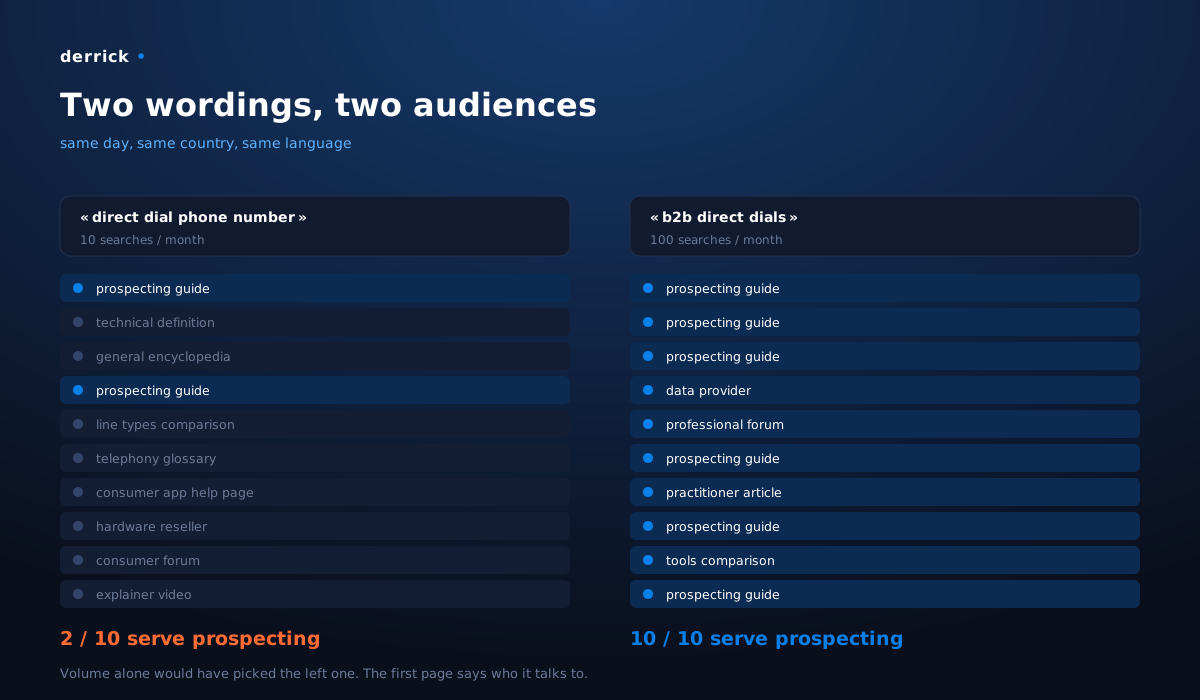
Take our own case, on business phone numbers. Two very close wordings, tested on the same day, in the same country and language.
"direct dial phone number", the broad wording. Out of ten results, eight serve business telephony: technical definitions of direct inward dialling, a comparison of line types, a glossary from a phone system vendor, a help page for a consumer phone app, a general encyclopedia, a consumer forum, an explainer video, a hardware reseller. Only two results out of ten are about prospecting.
"b2b direct dials", two words added. All ten results serve sales prospecting: practical guides on reaching a decision maker by phone, product pages from data providers, a question posted on a professional forum, an article from a practitioner. Zero noise.
And the detail that settles everything: a single result is common to both pages. Nine out of ten change. And it does not even hold the same spot on both sides: first on the broad wording, sixth on the qualified one. These are not two ways of saying the same thing, they are two different markets that happen to share three words.
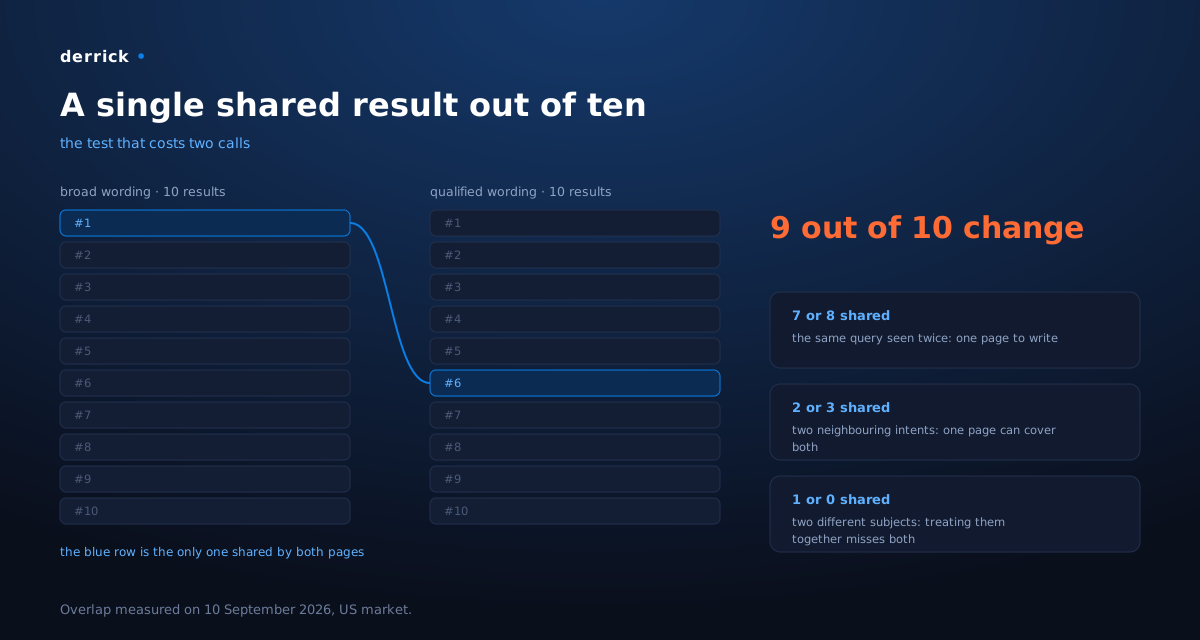
The punchline is arithmetic. The broad wording is worth 10 searches a month. The qualified wording, the one that serves our reader exactly, is worth 100. The most general query was neither the biggest nor ours. We would have written for an audience of phone system buyers, in perfectly good faith, on the strength of a volume.
What to take away: a search volume only means something once the first page has been read. Until you have looked at it, you do not know what your query is about.
What you need
Three building blocks. Only one has no do-it-yourself equivalent.
| Role | What we use | Can be replaced by |
|---|---|---|
| List the candidate queries | a Google Sheets file | any spreadsheet |
| Pull the real first page, by country and language, in bulk | Derrick | this is the block that is missing everywhere |
| Keep a record of the verdict | a tracking file, one line per target | a table, a ticketing tool |
The middle block is the one that breaks when you improvise it. Opening Google yourself returns a page personalised by your history, localised on your machine, and impossible to repeat across two hundred queries. Asking a language model what is on page one returns a training memory, not today's page. You need the real page, on demand, with the country and language you chose.
Step 1: write the candidate queries in the plural, never in the singular
Open a sheet, one query per row, column A. The habit to build right now: for every intent, write three or four wordings, not one.
In our example, one idea produced four rows: the broad wording, the wording qualified by the job, the wording as a full question, the wording naming the tool people look for. That is exactly what revealed that two of them were not speaking to the same world.
Add two columns next to them, which you will use immediately: the target country and the language. This is not decoration, it is the key to step 6.
Step 2: pull the first page, with the country AND the language
This is the central move of the tutorial, and it fits in one function.
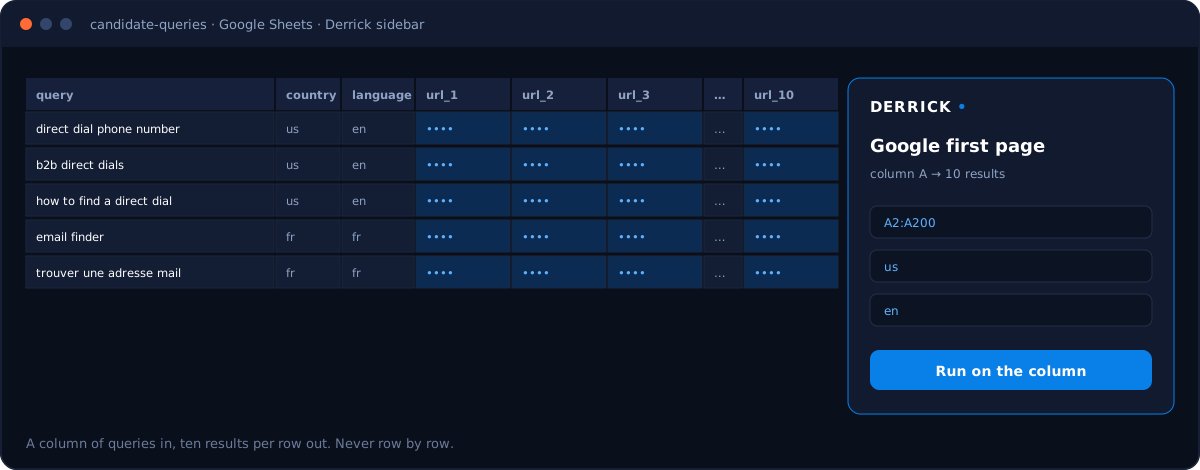
In Google Sheets, the Derrick sidebar takes your column of queries and returns, for each row, the ten organic results of the first page: ten URLs and ten titles, in columns. You run the whole column at once, not row by row. The function is Search First Page Organic SERP Results on Google, 3 credits per search.
Fill in the country and the language on every call. This is the parameter everyone forgets, and it changes the outcome entirely: a query asked from the United States does not return the same page as the same query asked from France, even written with the same words. We come back to it in step 6, with the case that hurts.
If you only need the first result, for instance to see who holds the top spot or to find a company's official website, the cheaper version exists: Search First Organic Result on Google, 2 credits per line. To arbitrate between several wordings, you need all ten.
The same call exists through the API, if you want to wire it into a script or your automation tool, and from an MCP-compatible AI assistant, if you would rather ask in plain language and have the model comment on the page. That is the version we use when we arbitrate a topic on the fly.
Step 3: read the intent being served, not the titles
You now have ten rows per query. The temptation is to skim them and conclude. This is where everything is decided, so slow down: for each result, write in three words who it serves.
For us the classification fits in four families, and a query is judged on how they split:
| What the result serves | What it tells you |
|---|---|
| The exact task of your reader | you are in the right place |
| The same task for another job | the query is shared, count how many rows are left for you |
| A definition, an encyclopedia, a consumer forum | the intent is educational, not operational |
| A vendor of an adjacent product | not disqualifying, it is often the same buyer |
The threshold we apply is simple: if fewer than half the results serve your reader, the query is not yours. On the broad wording in our example, eight rows out of ten spoke to an IT manager buying a phone system. A perfectly written page would have changed nothing: it would have landed in a conversation that was not its own.
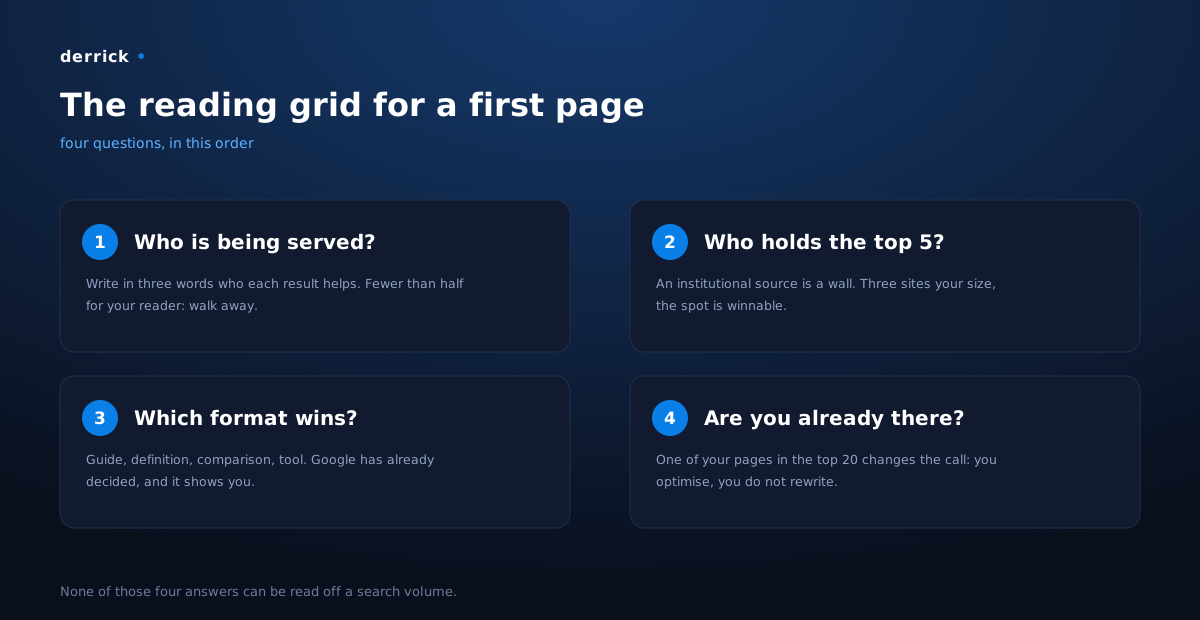
Look at the winning format too, not only the subject. If all ten results are practical guides, publishing a definition will get you nowhere, and the reverse is just as true. The format is a decision Google has already made for you, and it shows it to you for free.
Step 4: look for the wall before you hope
A second read of the same page, with a different question: who holds the top five spots?
- An institutional source, a government body, an official registry, the platform vendor you are
writing about, a reference encyclopedia. Walk away. Those pages do not rank because they are well optimised, they rank because they are the source. No amount of content beats that.
- Sites of a size comparable to yours, blogs, small tools, specialised publishers. You want at
least three of them in the top 10. Then the spot is winnable.
Our qualified case ticked the second box without ambiguity: no institutional source, no general media, a page held by players from our own category, on ground where we have data of our own to show.
A competitor in position two is not a wall. Saturation of the top 5 is a wall; the presence of a name you recognise is not. Positions three to six stay winnable, and they are often the ones that pay.
Step 5: compare two wordings, and count what they share
Here is the move we did not make before, and that has become automatic.
Take two wordings of the same intent. Pull both first pages. Count the URLs common to both.
- Seven or eight shared results: this is the same query seen twice. Pick the one with more volume
and write a single page.
- Two or three shared results: two neighbouring intents. One page can cover both if you get the
outline right.
- One shared result, or none: these are two different subjects. Treating them together
produces a page that misses both.
In our example the count came out at one. We dropped the broad wording, kept the qualified one, and titled the page accordingly.
This test costs two calls and replaces a hunch. It is the best effort-to-decision ratio in the whole method.
Step 6: the same query, two countries, two worlds
The country and language parameter deserves its own step, because forgetting it produces a silent error.
We asked for "email finder" from France, in French. The result: six of the nine pages served are translated versions of international sites, and the rest are served in English as they are. The French first page for an English term is not held by French-speaking publishers: it is held by the same players as everywhere else, with their translated page.
Two very concrete consequences for you.
- An English term used in French is not a French target. What settles it is the language of the pages Google serves, not the language your prospects speak at the office. Test both wordings, in French country and language, and look at what comes back.
- Querying the wrong page returns a false verdict, without ever warning you. A French query asked on the US market returns an emptiness that looks like data. That is not an absence of demand, it is a handling error.
That term, by the way, is worth 6,900 searches a month on the US side, at a difficulty of 76: a classic authority wall. It was the biggest volume in the batch, and precisely the one not to take.
Step 7: write down the verdict, not just the decision
Last step, the least spectacular, and the one that makes the difference over a year.
Every time you settle a query, write one line: the query, the date, the country, what the first page was serving, and why you decided what you decided. For us that line lives next to the page it concerns, with the date of the inspection.
Three reasons, in order of importance:
- A first page ages. A six-month-old verdict has to be re-checked, and without the date you do not know which one.
- Without the record, the same query gets rejected again every quarter, by someone redoing the same work, and sometimes accepted by mistake.
- A rejection can become invalid. Your rules move, your product moves. With the reason written down, you know which ones to reopen. Without it, you never reopen anything.
What the move gave us on our own pages
Once the method was settled on new topics, we ran it on the existing ones: every live page, with the query it claims to target, checked against three simple criteria (a difficulty neither zero nor prohibitive, at least three words, a real volume).
The reading of 10 September 2026, across our editorial pages:
| Verdict on the targeted query | Pages |
|---|---|
| Solid target | 42 |
| Query out of reach, to be retargeted | 256 |
And inside that second block, the surprise is not difficulty: 230 lines target a query nobody types, wordings written in good faith and never checked against a first page. They do not get fixed by reworking them. They get re-derived, by looking at what people actually type around the page's intent.
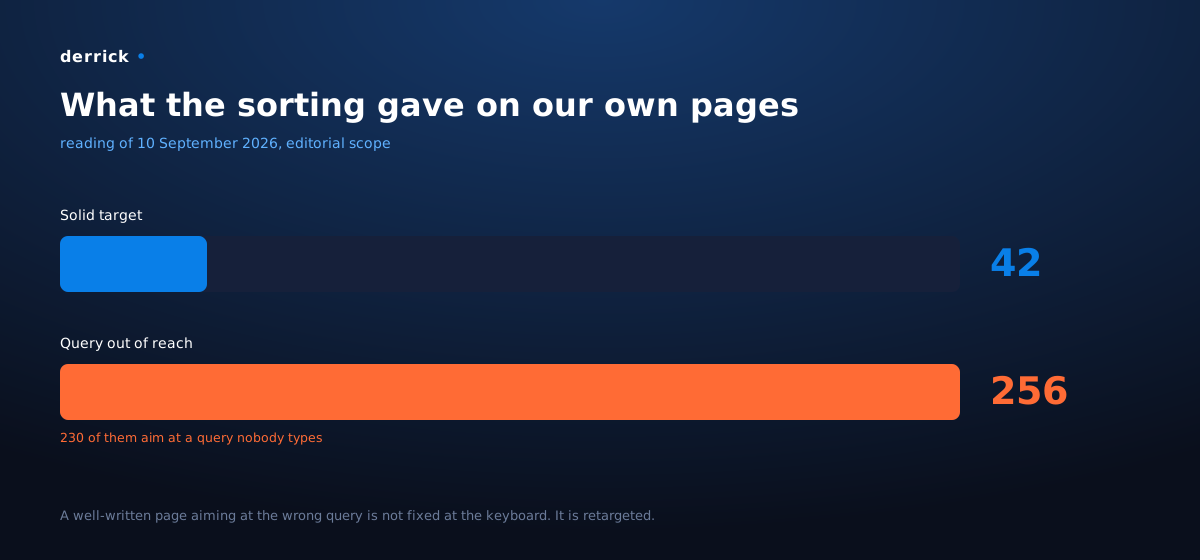
The lesson, phrased for you: this sorting does not only apply to upcoming topics. Run it on the pages you have already published, starting with the ones that cost you the most. A well-written page aiming at the wrong query does not get fixed at the keyboard.
A verdict invites you to look, it does not retarget anything on its own. A difficulty score measures inbound links, not your ability to win the spot. Never retitle a page towards a new target without inspecting its first page: you would gain a green line in a table and publish a page that does not keep its promise.
Our numbers
- Two calls separated two markets we were treating as one, and the wording we would have picked on
volume alone served, eight times out of ten, an audience that is not ours.
- A single shared result out of ten between the two first pages of those neighbouring wordings.
- A tenfold difference in volume, in favour of the qualified wording, the one that speaks exactly
to our reader: 100 searches a month against 10.
- 256 pages to retarget against 42 solid targets across our editorial scope, 230 of them aiming at
a zero-volume query. That number is one we would never have had without running every target past a first page.
Going further
The same move, the first page pulled on demand, is useful well beyond topic selection:
- Find a company's official website from its name, at scale, when your list only has legal names.
- See who already answers your prospect's question, before a meeting.
- Watch a page you have just published, without going through a rank tracking tool.
Derrick works from the Google Sheets sidebar, through the API, or from an MCP-compatible AI assistant. And the web app is live: start at derrick-app.com, on the free plan with 100 credits a month, no card required.
Frequently asked questions
Why is search volume not enough to pick a keyword?
How many wordings should I test per topic?
How do I know whether a first page is a wall?
Do the country and language really change the results?
What do I do with a live page that targets the wrong query?
Keep reading