How we got a 30% reply rate in cold outreach by copying our fastest-activating users
The tutorial: pick the segment that activates fastest in your base, rebuild it as an outside audience in three calls, and write the sequence. 30% replies in cold outreach.

Your ideal customer was decided in a meeting. A job title, a company size, an industry, three personas with a first name and a photo. Nobody remembers where those criteria came from, and yet every outreach campaign starts there.
We stopped deciding it. We went looking for it inside our own user base, with a single measurable criterion: who runs their first action fastest after signing up. That job title became our cold outreach audience. The result on the campaign: a 30% reply rate, and roughly one signup for every ten replies.
What you will learn: how to pull a segment out of your base on a behavioural criterion, turn it into an outreach audience in three calls, and write the sequence that goes with it. The walkthrough is complete, including the real objections we received.
What you can expect: cold outreach that actually gets answers, because you are writing to people who look like the ones already succeeding with you, rather than the ones you wish you had.
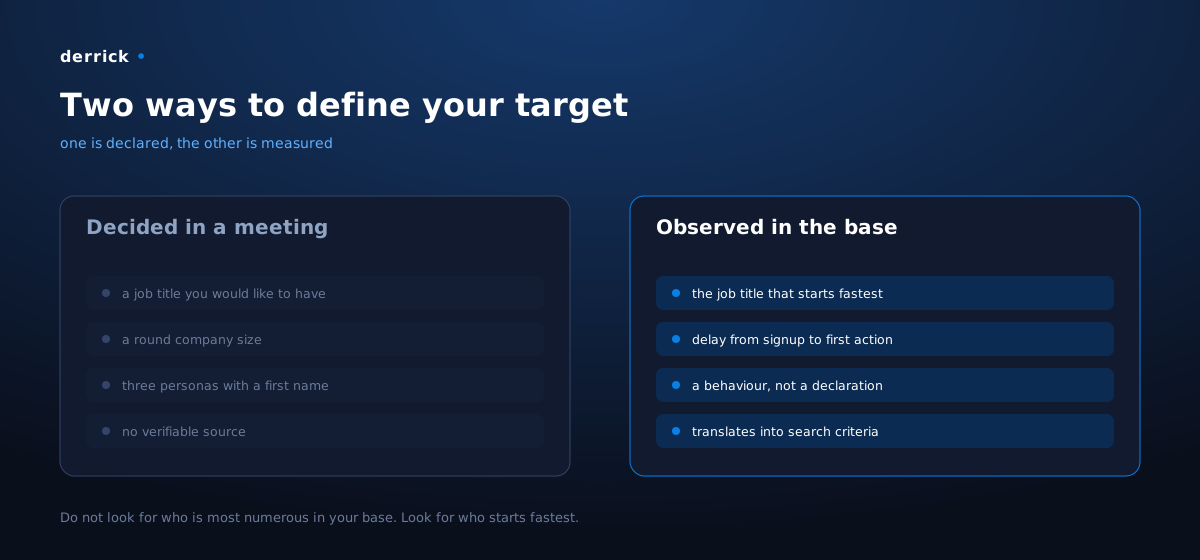
Why it works: you are copying a behaviour, not a hunch
A declared ideal customer describes who you want. An observed one describes who is already succeeding. Those are two different lists, and only the second one can be checked.
The trap, once you finally dig into your base, is to grab the most visible criterion: the most represented job title. Wrong criterion. The largest group mostly tells you where your previous campaigns came from. You were about to copy your own acquisition history.
We used a behavioural criterion instead: the delay between signup and the first action actually run inside the product. A job title that starts fast understood what the tool is for without anyone explaining it. That is the most reliable sign that the product solves a problem those people already had, today, on their desk.
Three reasons that criterion beats the others:
- It is behavioural. It does not depend on what people declare in a form, but on what they do.
- It is not polluted by your past acquisition. A segment can be small in your base and start twice as fast: that is exactly the profile you have not been looking for hard enough.
- It translates straight into search criteria. A role, a country, a company size: the very fields an outreach audience is built on.
What to take away: do not look for who is most numerous in your base. Look for who starts fastest.
What you need
Four building blocks. Only one is hard to replace.
| Role | What we use | Can be replaced by |
|---|---|---|
| Knowing who started, and when | product events and the user database | any product analytics tool |
| Reading the time-to-first-action per job title | a dashboard | an export and a spreadsheet |
| Rebuilding an outside audience that looks like that segment, with what you need to write | Derrick | this is the block that is missing everywhere |
| Sending and tracking the sequence | a multichannel sequencing tool | anything that handles LinkedIn and email |
The third one is where do-it-yourself falls apart. Finding three hundred people with a specific role in a given country, with their profile and their company filled in, is the kind of work that kills the method after half a day of copy-pasting.
One word on the market we picked, because it is not a detail. We ran the test in France while our most valuable market is elsewhere. That was deliberate: you calibrate the method on the market you know best, where you can read a reply and recognise a name, before scaling it to a wider one. Do the same. A first test in a language you master teaches you more than a large batch in a language whose nuances escape you.
Step 1: pull a single number out of your base, the time to first action
Before touching any outreach tool, open your product data and build a three-column table: the declared job title, the number of signups, and the median delay between signup and the first action run.
The job title comes from your enriched base or your signup form. The delay comes from your product events: the account date, the first real use date. Not a login, not a visit: the first action that produces something for the user.
Sort on the third column, not the second. The top of that table is your target.
Two traps at this step.
- A job title with five signups is not a segment. You will read a median over five people and see a
signal that is not there. Set your minimum before you look at the table, so you do not set it afterwards to fit the result you like.
- Declared job titles are messy. "Head of Growth", "head of growth", "Growth Lead" and "Growth
Manager" are four rows in your table and one role in reality. Normalise before you count, otherwise your best segment is scattered across six mediocre rows.
Step 2: write the segment as one sentence, the way you would say it out loud
You have a role and a market. Write them as a single plain sentence, with the three things that matter: the role, the type of company, the country.
For us it was something like: people running growth or sales operations, in software companies in France.
Do not try to make it exhaustive. An overly long sentence produces an overly narrow list, and you will spend the week wondering why the import only returned twelve people.
Step 3: turn the sentence into a list of real people
This is the central move, and it takes one call. Import Leads from a Prompt takes your sentence and returns the matching profiles, 1 credit per imported person once your LinkedIn account is connected (10 credits without it).
You describe, you get the list. No query to build, no nested filters to translate from your sentence.
Two tips that will save you a round trip:
- Run a small batch first and read the first twenty rows one by one. If three profiles out of twenty
are off, it is not the list that needs fixing, it is the sentence.
- Keep the sentence somewhere. When you want the same segment in another country, you will only
change one word.
If your segment is defined by companies rather than by people, there is a variant: Import Leads from Target Companies crosses a list of accounts with your role criteria, also 1 credit per person, and needs your LinkedIn account connected. That is the path to take when you start from a list of existing customers.
Step 4: enrich the people, then their companies
A list of names is not enough to write. You need something to say that is actually true for each person, and that is what the next two calls give you.
The people: Enrich Leads, 1 credit per profile. The exact role, seniority, background, public activity. That is what tells you whether the person already knows your subject, and therefore what you must not explain to them.
The companies: Enrich Companies, 1 credit per company. Size, industry, trajectory. That is what lets you tell an eight-person team from a three-hundred-person group, which do not have the same problem.
The total is three credits per complete contact: one for the import, one for the profile, one for the company. All three functions are available on the free plan, which gives 100 credits a month: enough to build and enrich about thirty complete contacts at no cost, which happens to be the right size for a first test batch.
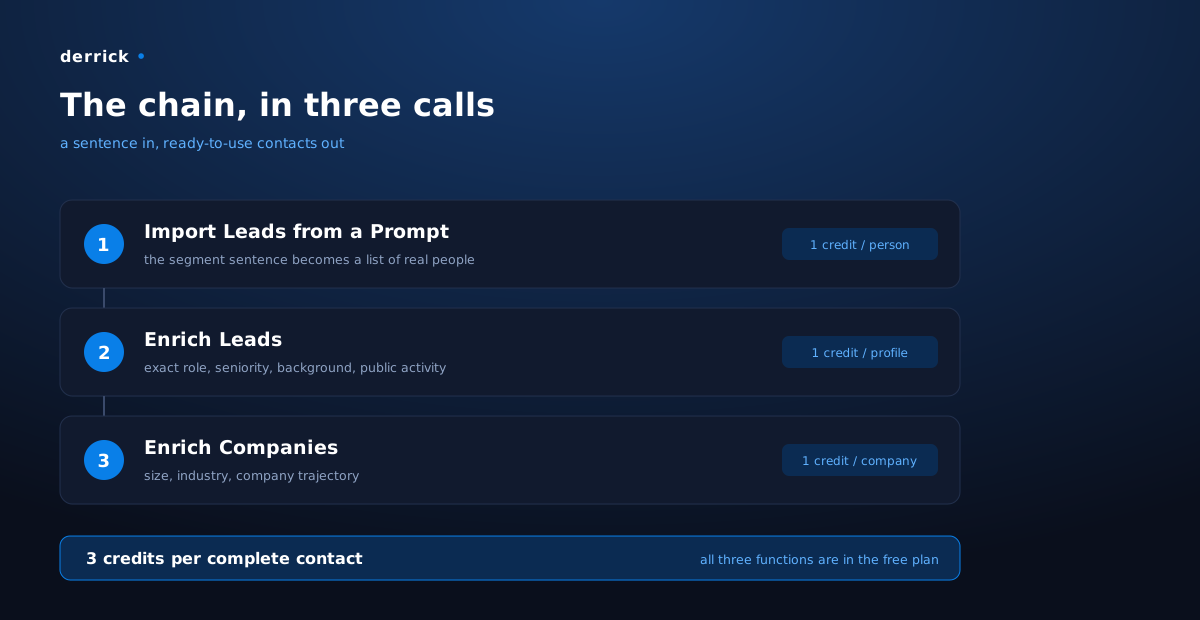
The same chain is available through the API, to wire it into an automation, and from any MCP-compatible AI assistant if you would rather describe your segment in conversation.
Step 5: write the sequence from the problem, not from the product
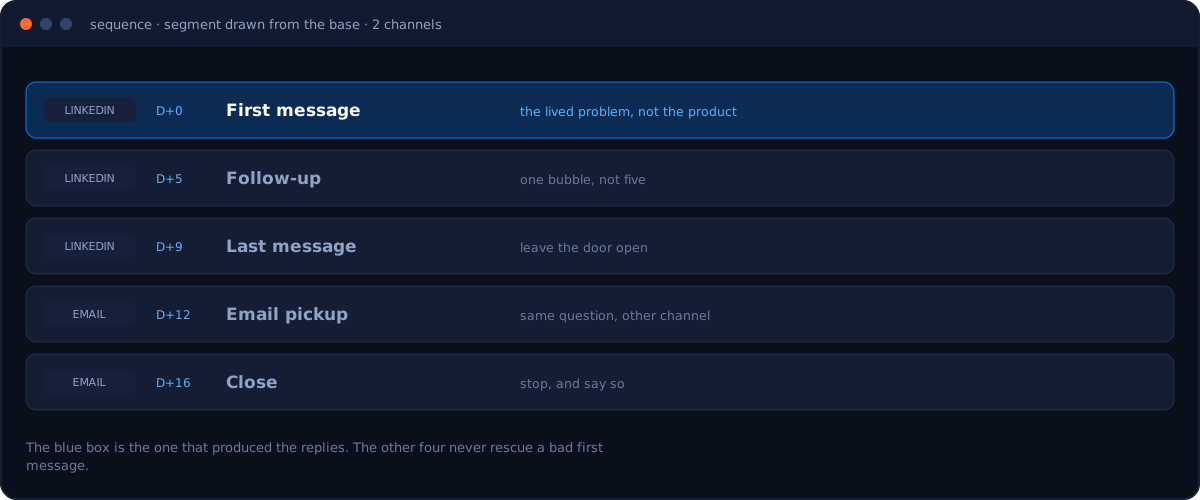
You have the audience. The sequence we used is five messages: a first LinkedIn message, a follow-up, a last one, then two emails for those who never answered.
What matters is not the number of steps, it is what the first message says. Here is what our replies taught us, and it is the most transferable part of this whole article.
The message that sparked interest told a lived problem, not a feature. Something like: "I used to do the same thing, one tool on one side, the CRM on the other, the search in a third tab, I ended up wiring it all into one place." The person recognises the situation before hearing about anything else.
The messages that opened on the product got nothing. Describing a technology to someone who did not ask for it does not start a conversation, even when the description is accurate.
One objection is worth a dozen proofreads. A prospect replied that he knew perfectly well what we were talking about, that his own posts showed it, and that we were busy explaining a concept he masters. He was right: the information was in his enriched profile, and the message ignored it. Enrichment is there to decide what not to write, as much as to personalise a sentence.
The same prospect called out the format: our messages were split into several bubbles in a row, so several notifications for a single follow-up. That is the kind of detail no metric shows and a blunt reply hands you for free. Group them.
Step 6: read the refusals, they hold your next criterion
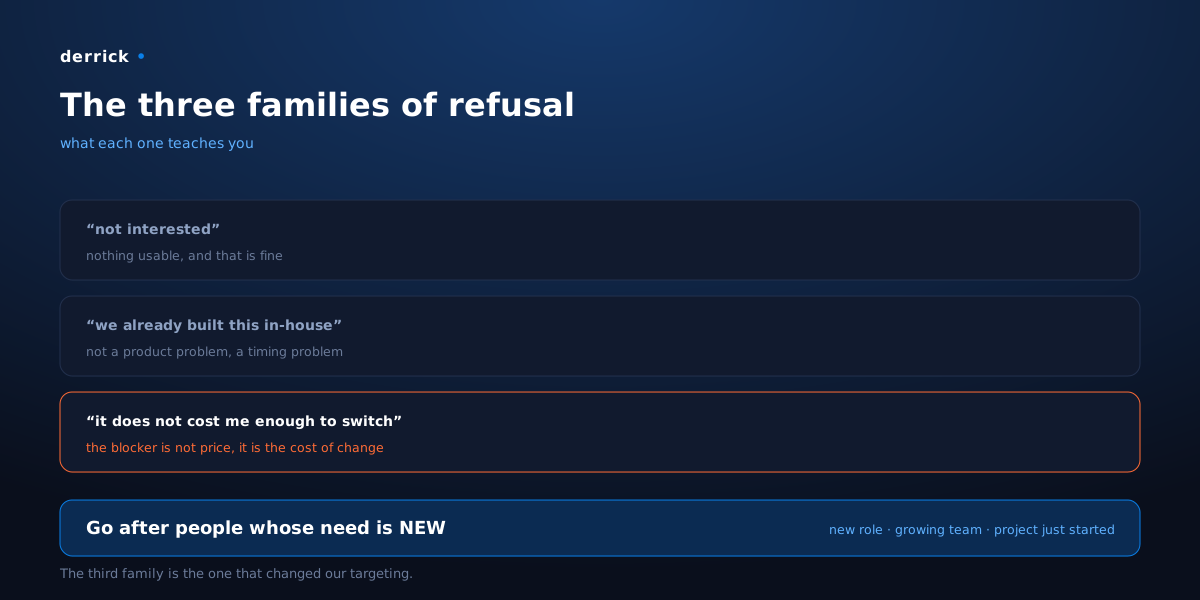
A reply rate teaches you nothing on its own. The reasons are what works for you, and they fall into three very distinct families.
| What the reply says | What it teaches you |
|---|---|
| "not interested", nothing more | nothing usable, and that is fine, move on |
| "we already built something in-house" | your target can manage on their own: this is not a product problem, it is a timing problem |
| "what I use does not cost me enough to bother switching" | the blocker is not the price, it is the cost of change |
The third family is the most instructive, and it is the one that changed our targeting. When someone is settled into a habit that works for them, no argument pays the cost of switching. That is not a rejection of your product, it is a rejection of the move.
The consequence is direct: go after people whose need is new. Someone who just took the job, whose team just grew, whose project just started. And that is exactly what company enrichment gives you, if you read it for that rather than to fill a merge field.
Step 7: loop back to the base, once a quarter
The fastest-starting segment is not a fixed fact. It moves when your product moves, and when your acquisition changes.
So pull the table from step 1 again every three months, and keep a record of what you ran: the segment targeted, the date, the exact sentence used for the import, and the dominant reason for refusals. Without that record, you will re-test the same segment in six months without noticing, and you will have no way to tell whether the result came from the segment or from the sequence.
Our numbers
- A 30% reply rate on the campaign, in cold outreach, on a segment drawn from analysing our own
base rather than from a hunch.
- Roughly one signup for every ten replies received.
- Three credits per complete contact: the import, the profile, the company.
- A first batch in France, deliberately, before carrying the method to a wider market.
These numbers are ours, on our product and our market. What transfers is not the percentage, it is the criterion: the segment that starts fastest is the one you should be writing to.
Going further
The same chain serves well beyond cold outreach:
- Rebuilding an audience from your best customers, starting from the account list rather than from
people.
- Completing an existing base where you only have company names, before segmenting it.
- Preparing a meeting by enriching the person and their company the day before, so you know what
they already know.
Derrick works from the Google Sheets sidebar, through the API, or from any MCP-compatible AI assistant. And the web app is live: start at derrick-app.com, on the free plan with 100 credits a month, no card required.
Frequently asked questions
Why pick the fastest-activating segment rather than the largest one?
How many signups do I need before that criterion means anything?
What does it cost to build the audience?
What should the first message say?
Most replies were refusals. Is that a failure?
Keep reading
More from the blog

How we got 2 out of 3 inactive signups to reply
Read →
How we scraped Google's first page before writing
Read →
How we generated almost 500 ranking pages from 32 companies
Read →