How we generated almost 500 ranking pages from 32 companies, and 42% of our Google clicks
The tutorial: turn a list of companies into one page per question people ask (executives, HQ, email format), each filled by a Derrick function. 42% of our Google clicks.

You want organic traffic that brings in people who prospect, and every article costs you a day of writing for a single query. At that pace, it takes months to carry any weight.
We took another route: start from a plain list of companies, enrich each one with Derrick, and turn it into one page for every question people already ask about it. Who runs it, where its headquarters are, what its email format is. The result: 32 companies, almost 500 pages live, and 42% of the Google clicks of our whole site over the last 28 days.
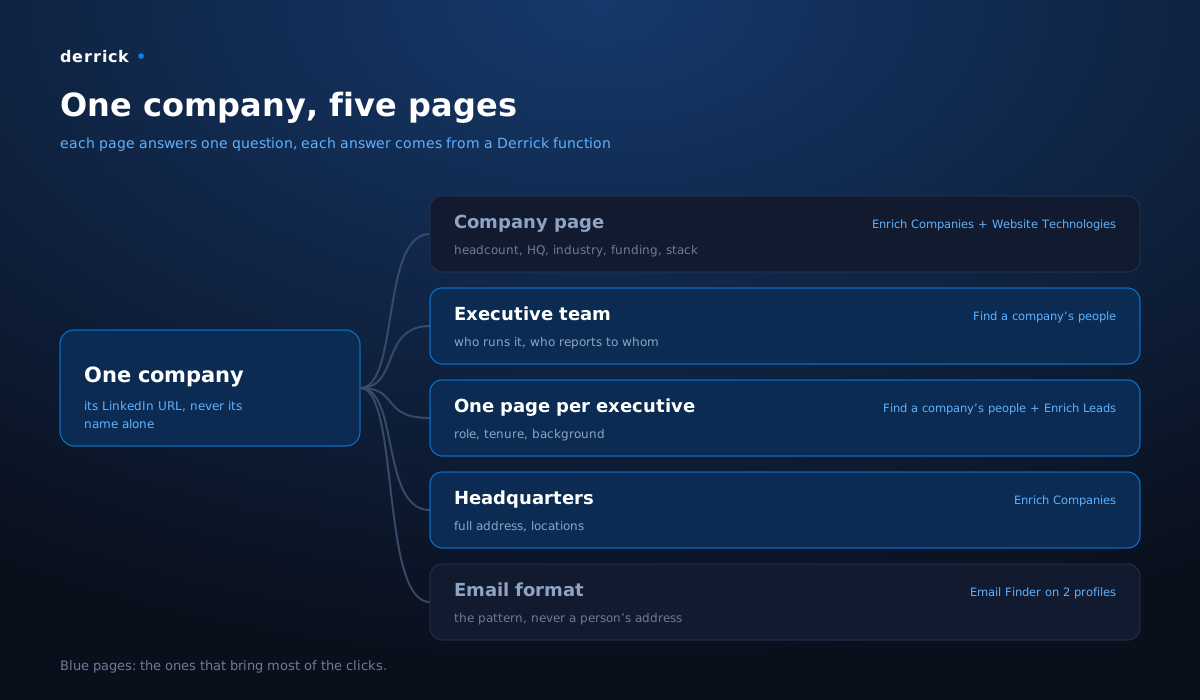
What you will learn: how to turn one spreadsheet row (a company name) into five useful pages, which Derrick function fills each one, and the two rules that keep you from producing duplicate content at scale.
What you can expect: an acquisition surface that grows with every company you add, and that draws exactly the audience looking for executives, addresses and email formats. In other words, people who prospect.
Why it works: nobody searches for a company, they search for an answer about it
The reflex, when you think "one page per company", is to build a nice profile: the logo, the description, the key figures. We built it. It brings in almost nothing: 50 clicks over 28 days, 2% of the total.
Everything else goes to the pages that answer one precise question:
- "who runs Apple?": the executive team page;
- "who leads marketing at Cisco?": that person's page;
- "where is OpenAI headquartered?": the headquarters page.
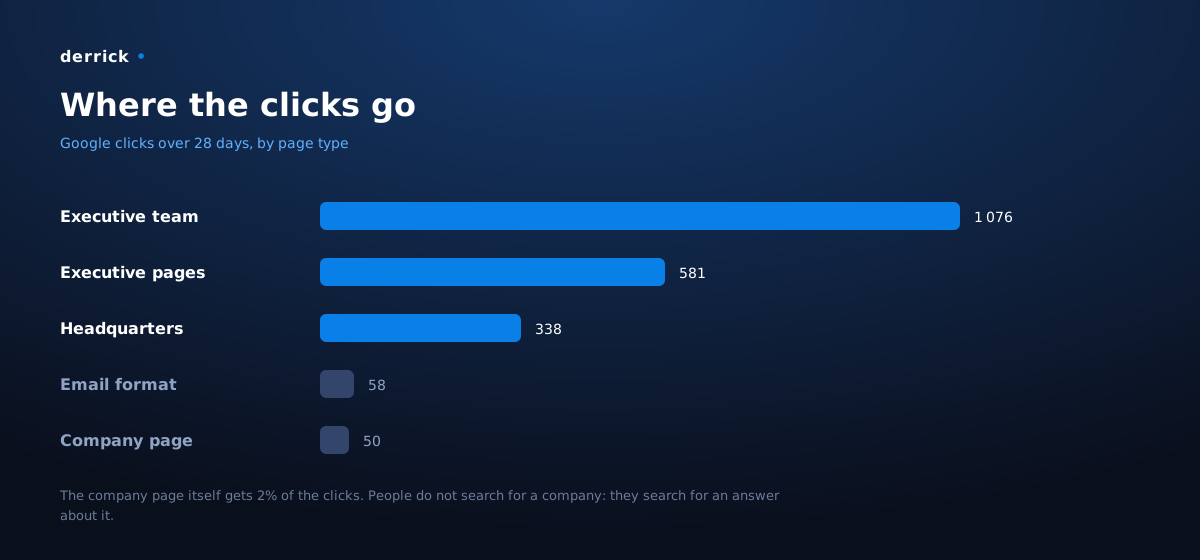
The lesson fits in one sentence: do not build one page per company, build one page per question people ask about it. The company profile stays useful as the hub that ties everything together, but the question pages are the ones that rank.
And these questions share a precious property: their answer is a piece of data, not an opinion. An executive, an address, an email format. That is exactly what Derrick knows how to fetch, and it is why the method scales without anyone writing the pages by hand.
What you need
| Role | At our place | Can be replaced by |
|---|---|---|
| The list of companies to cover | a queue, one company at a time | a plain spreadsheet |
| The data for each company and its executives | Derrick | this is the brick that costs weeks when done by hand |
| One page template per type of question | our site generator | any static site or CMS that reads data |
The second brick is the whole subject of this tutorial. The other two are ordinary: a list and a template, you already have them.
Step 1: start from the company's LinkedIn page, never from its name
First move, and the one that prevents the most mistakes: identify the company by its LinkedIn URL, not by its name. A name has namesakes; a company page URL does not.
In your spreadsheet, one column with the name, then Search Companies (1 credit per company) to get each one's LinkedIn URL. Double-check the rows where the name is short or common: that is where the false matches slip in.
Step 2: enrich the company, which fills the profile and the headquarters page
On each URL, Enrich Companies (1 credit per company) returns everything the company's LinkedIn page holds: industry, description, founding date, exact headcount, specialties, full headquarters address, and funding rounds.
One call fills two pages: the company profile (the key figures) and the headquarters page (the address, which is precisely what someone types when searching "where is … headquartered").
For the tech stack, Website Technologies (2 credits per website) lists the technologies detected on the company's website. One tip that avoids an empty result: run it on the site's final address, the one shown once the page has loaded, not on a domain that redirects elsewhere.
Step 3: list the executives, the brick that drives most of the traffic
This is the step that matters most: the executive team pages and the individual executive pages account on their own for nearly 80% of the clicks.
On the company URL, run Find a company's people (1 credit per person), filtered on leadership functions. You get the people in post, with their exact title: enough to build the executive team and to know who reports to whom. No Sales Navigator subscription needed.
Then, for each executive you keep, Enrich Leads (1 credit per profile) gives the role, tenure and background. That is the material for each executive's own page, the one that answers "who is the CFO of …".
One page per executive, not a single page for the whole team: that is what multiplies the useful pages. A company with fifteen identified executives produces fifteen answers, each to a different search.
Step 4: work out the email format, on two people and not one
The "email format" page answers a question everyone who prospects asks: is it firstname.lastname@, f.lastname@ or firstname@?
Email Finder (5 credits per email found, nothing if no email is found) on two people at the company, and the pattern reads straight from the results.
The trap that gets a wrong format published: never use the top executive alone. The heads of well-known companies often have a short, custom address (the first name alone) that looks nothing like what the rest of the company uses. Run it on at least two people, one of whom is not the top executive, and keep the pattern that repeats.
The page publishes the pattern, never a person's address. Each executive's email and phone number stay behind a button that leads to Derrick: that is where the page becomes an entry point rather than a directory.
Step 5: generate the pages, with two rules that prevent duplicate content
You have all the data. What remains is pouring it into one template per type of question. This is where most generated-page projects fail: five hundred pages identical but for a name, and search engines treat them as such.
Two rules, which we apply without exception:
- Never fill in a thin result by hand. If a piece of data did not come out, the field stays empty, or you run the call again differently (another URL, another person). "I know it is true" is not a source, and a wrong page about an executive gets noticed right away.
- The structure follows the data. A company that raised funds gets a funding section; one that did not gets no empty section. The number of executives, whether there is a stack, the size of the teams: every company has its own shape because it has its own data. That is what keeps a page from being a copy of its neighbour, without any trick.
Finally, link everything: each question page points to the company profile, the profile points to every question page, and each executive to their colleagues. A visitor landing on "Dell headquarters" should be one click away from the executive team.
Step 6: add one company a day, and let the surface grow
Once the template is in place, adding a company means replaying steps 1 to 4 on a new row. At our place, a routine takes care of it: it picks the next company on the list, fetches the data, checks that no field is made up, and publishes.
Every company added means a profile, a headquarters page, an executive team, an email format and one page per executive. The surface grows in steps, and traffic follows a few weeks behind, the time it takes Google to discover and rank the new pages.
Our numbers
- 32 companies, almost 500 pages live.
- 2,103 Google clicks in 28 days, which is 42% of the clicks of our whole site.
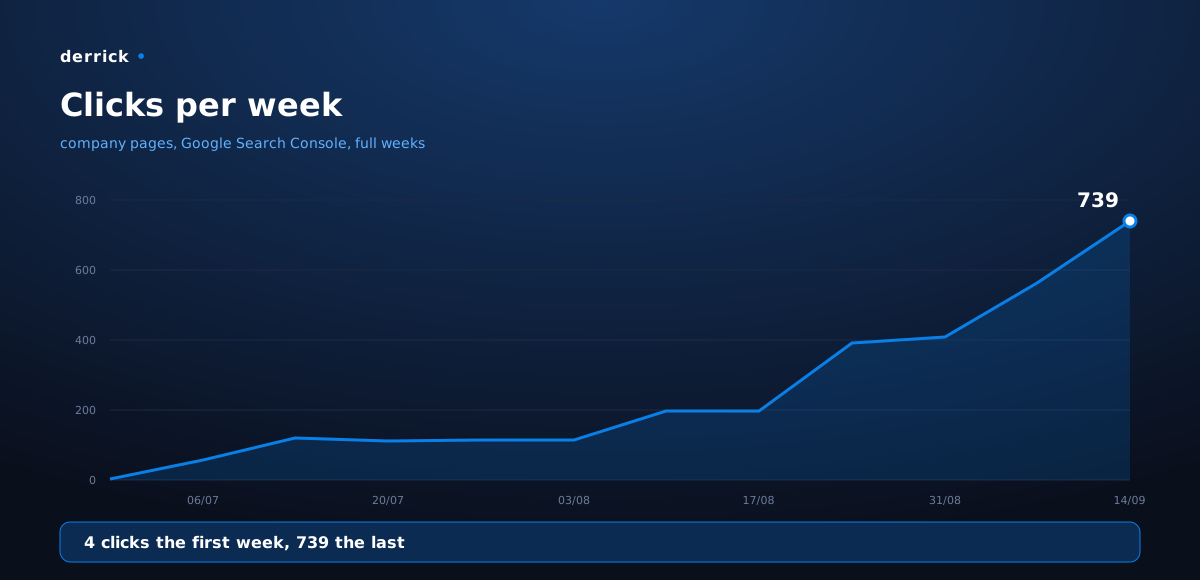
- 4 clicks the first week, 739 in the last full week.
- 98% of those clicks go to the question pages (executives, headquarters, email format), 2% to
the company profile.
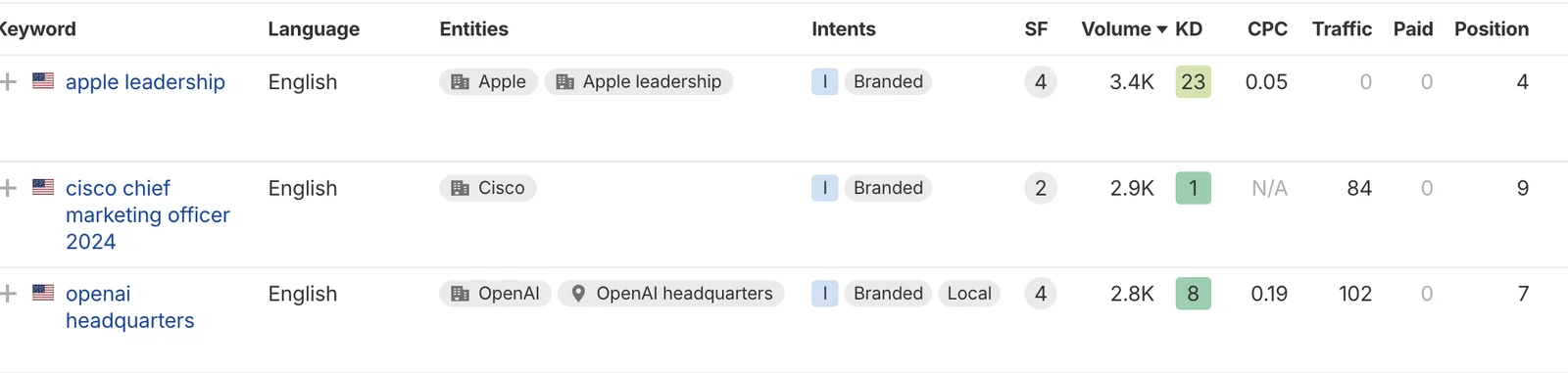
- First-page positions on queries with several thousand monthly searches: **4th on "apple
leadership", 7th on "openai headquarters", 9th on Cisco's marketing leadership**.
The effect shows up in the traffic of the whole site: the late-August climb matches the ramp-up of the company pages.
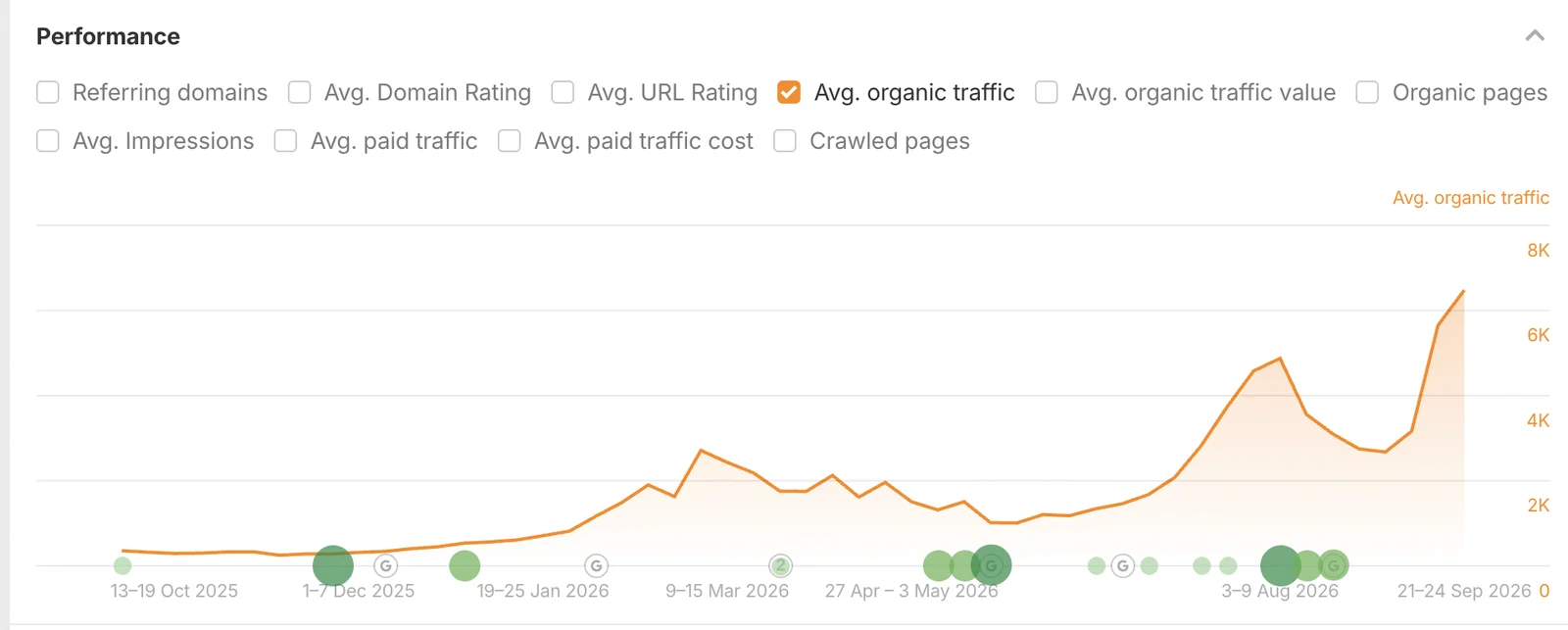
These numbers are ours, on our site. What carries over is not the volume, it is the principle: one page per question, one verifiable piece of data per answer.
Going further
The same mechanism works on other lists than large companies:
- Your customers, for reference pages that update themselves.
- The companies in your industry, to become the source people check on your market.
- Your target accounts, and there the data works twice: for the page, then for prospecting.
Derrick works from the Google Sheets sidebar, through the API to plug in a routine like ours, or from an MCP-compatible AI assistant. And the web app is live: start at derrick-app.com, on the free plan with 100 credits a month, no card required.
Frequently asked questions
Why build one page per question rather than one page per company?
Which Derrick functions fill each page?
How do you avoid duplicate content at scale?
Why run Email Finder on two people instead of one?
Do the pages publish people's email addresses?
Keep reading