
Free
- Credits~1,800/yr
- Min seats1
- 5 emails + 5 phones + 5 exports per day
- Chrome extension for LinkedIn
- 300M+ profile database access
- No campaign sending
Pricing analysis ContactOut pricing in a nutshell: Free · Email $25/mo (excl. US/UK/Canada data) or $49/mo (incl.) · Email + Phone $49/mo (excl.) or $99/mo (incl.) · Team / API on request. Monthly prices are shown by default. Full tier breakdown, credit costs and hidden fees analysed below.
Plans
ContactOut ships 4 tiers. Per-seat pricing combined with a credit system for data lookups - the listed price is rarely the real cost.
ContactOut pricing tiers - checked on contactout.com/pricing on 2026-10-15 (USD, monthly prices; the default tab excludes US/UK/Canada data at 50% off) :
| Plan | Price | Best for | Limits / Inclusions |
|---|---|---|---|
| Free | $0 | Evaluation / testing | 5 emails + 5 phones + 5 exports per day · Chrome extension for LinkedIn |
| $25/mo (excl. US/UK/Canada data) · $49/mo (incl. US/UK data) | Email-only prospecting | 'Unlimited' emails, capped at 2,000/mo in the Terms · 300 exports/month | |
| Email + Phone | $49/mo (excl. US/UK/Canada data) · $99/mo (incl. US/UK data) | Email + calls | 'Unlimited' emails and phones, capped at 2,000 emails + 1,000 phones/mo in the Terms · 600 exports/month |
| Team / API | Contact sales | API access, team management | Custom volumes · API access · Dedicated account manager |
Credits
ContactOut bills actions in credits with non-equal costs. A 5,000-credit plan does NOT mean 5,000 lookups.
How ContactOut charges per action - the credit table buyers should memorise before signing :
| Action | Credits / cost |
|---|---|
| Email lookup | 1 |
| Phone reveal (Email + Phone plan) | 1 |
| Export to CSV / CRM | Counted vs monthly export cap |
| Unused credits | Rollover not published ! |
Credits are consumed only when an email or phone is found. The ! marker flags the line items that compound the bill - watch these closely when sizing your plan.
Compare
How ContactOut stacks against Derrick, Hunter, and the other tools we benchmarked.
If you’re hesitating between ContactOut and other enrichment tools, here are some comparison points:
ContactOut Advantages:
ContactOut Disadvantages:
Why Consider an Alternative Like Derrick?
To discover other B2B prospecting tools, check out our comparison of the best LinkedIn scraping tools or our selection of the best email finders.
What's included
Best for: Tool testing, ultra-occasional needs
Best for: Sales professionals primarily doing email prospecting
Best for: Multi-channel sales teams (email + calls)
Best for: Large teams, agencies, technical integrations
The verdict
ContactOut pricing sits in the mid range of the B2B data enrichment market ($25 to $99/month for the Email and Email + Phone plans, depending on the US/UK/Canada data toggle). The tool offers an extensive database and a practical Chrome extension, but suffers from two major problems:
ContactOut is suitable if:
Consider an alternative like Derrick if:
Try Derrick for free (100 credits/month, no credit card required ; email finding is on paid plans) and compare for yourself: derrick-app.com
ContactOut pricing checked on contactout.com/pricing and contactout.com/terms on 2026-10-15. Information may change. For an accurate and up-to-date quote, we recommend contacting ContactOut’s sales team directly.
derrick •
Install the add-on and enrich your lists without leaving your spreadsheet.
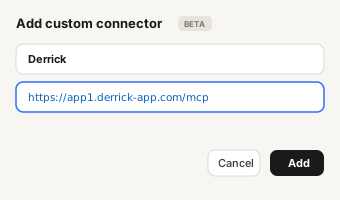
Install in Google Sheets →https://app1.derrick-app.com/mcp Call the same enrichment endpoints straight from your own stack or workflow.
Read the API docs →No credit card · No contract
Switch to Derrick
Derrick is a web app: nothing to install, no credit card, 100 free credits every month.
Sign up on the Derrick web app. Nothing to install, no credit card required: you start with 100 free credits per month.
Upload the CSV you exported from ContactOut, paste LinkedIn URLs, or import from LinkedIn Sales Navigator. The same actions also run in Google Sheets, in Claude (MCP) and via the API.
Pick the column to enrich and the data you need: emails, phone numbers, LinkedIn data, company info, tech stack. Derrick fills the columns, and the email and phone finders only charge for what they find.
For a small sales team (2-5 people), ContactOut offers two options:
In comparison, alternatives like Hunter or Derrick price by plan and credits rather than per seat, which can be more economical than per-seat pricing.
Yes, ContactOut offers a free plan limited to 5 emails, 5 phones, and 5 exports per day (approximately 150 of each per month). This plan allows testing the Chrome extension and search portal, but advanced features (email campaigns, CRM integrations, advanced search) are only accessible with paid plans.
For continuous professional use, the free plan will quickly become insufficient and you’ll need to upgrade to a paid plan starting at $25/month (excl. US/UK/Canada data) or $49/month (incl.).
ContactOut doesn’t publish a rollover policy. Its Terms set monthly fair-use caps (2,000 emails and 1,000 phones per account per month), so don’t assume unused capacity carries over to the next month.
If you only use 1,000 emails out of the 2,000 available in January, ask ContactOut whether the rest is kept before relying on it. The uncertainty can create waste for teams whose activity fluctuates.
With Derrick, credits never expire while you stay on a paid plan, which gives you flexibility to manage your activity peaks.
Yes. On contactout.com/pricing (checked 2026-10-15), plans are shown with monthly prices by default : Email $25/month (excl. US/UK/Canada data) or $49/month (incl.), Email + Phone $49/month or $99/month. No annual toggle is visible on the page.
The free plan (5 lookups/day) remains the only option without a card, but it is very limited for professional use.
No, despite the marketing. ContactOut markets its Email and Email+Phone plans as offering “unlimited” emails and phones, but its terms of service impose fair-use limits:
These caps appear in the Terms rather than on the pricing page, so buyers who subscribe expecting truly unlimited access can be surprised mid-campaign.
This “unlimited with asterisk” marketing practice contrasts with tools that clearly display their quotas from the pricing page.
For 500 enrichments per month (emails only), the Email plan ($25/month excl. US/UK/Canada data, $49/month incl.) is more than sufficient since it offers up to 2,000 emails/month.
Real cost: $25-$49/month for 500 emails = $0.05-$0.098/email.
Alternative: Derrick Standard (€20/month, 10,000 credits) covers 2,000 emails at 5 credits each, i.e. €0.01/email at full use. 500 emails use 2,500 credits, about €5 of credits at the €0.002 STANDARD rate, while the plan itself costs €20/month (€240/year).
Yes, ContactOut’s Chrome extension works on standard LinkedIn profiles and also on LinkedIn Sales Navigator. However, unlike some scraping tools that absolutely require Sales Navigator to function, ContactOut can extract data from free LinkedIn profiles.
If you’re looking for a tool that works without a LinkedIn Sales Navigator subscription ($1,200/year saved), Derrick enriches your B2B prospecting data autonomously via its web app or its Google Sheets integration, with no dependency on LinkedIn.
Keep exploring
Comparing options? These are the other email + phone finder tools we've torn down at the same depth - real per-credit cost, hidden fees, plan calculators.
Prospeo review 2026: 4.6/5 on G2, free plan with 75 credits, paid from $39/mo. Where single-profile lookups win and where bulk hit rates hur
See pricing →AeroLeads review: 3.5/5. LinkedIn-first email and phone finder with guaranteed phones, free trial then $49/mo. Fits solo SDRs, not teams tha
See pricing →RocketReach review: 3.6/5. 700M+ profile contact database with emails and phones, 5 free lookups then $33/mo (annual). Broad and cheap, high
See pricing →Breeze Intelligence review: 3.5/5. Clearbit's data inside HubSpot, from $45/mo for 100 credits plus a HubSpot plan. For HubSpot users, not g
See pricing →Go further
Features, accuracy, integrations - everything beyond pricing.
Open the review → Top alternatives10 picks compared by use case : Google Sheets native, Sales Nav export, deliverability, enterprise.
See the ranking → Curated stackOur hand-picked shortlist across categories.
See the curation →