LinkedIn API in 2026: Three Ways to Get LinkedIn Data, and What Each Costs
Learn what the LinkedIn API gives you for free, how to get credentials and partner access, what it costs, and how to get profile data without approval.


The LinkedIn API gives every developer, for free, three self-serve permissions and nothing more: profile and email through Sign In with LinkedIn using OpenID Connect, and w_member_social through Share on LinkedIn, plus the openid scope that comes with sign-in. All of them act on the member who signs in to your app. Reading anyone else's profile, company data or Sales Navigator records needs a partner programme, and cold profile lookup is not sold at any tier.
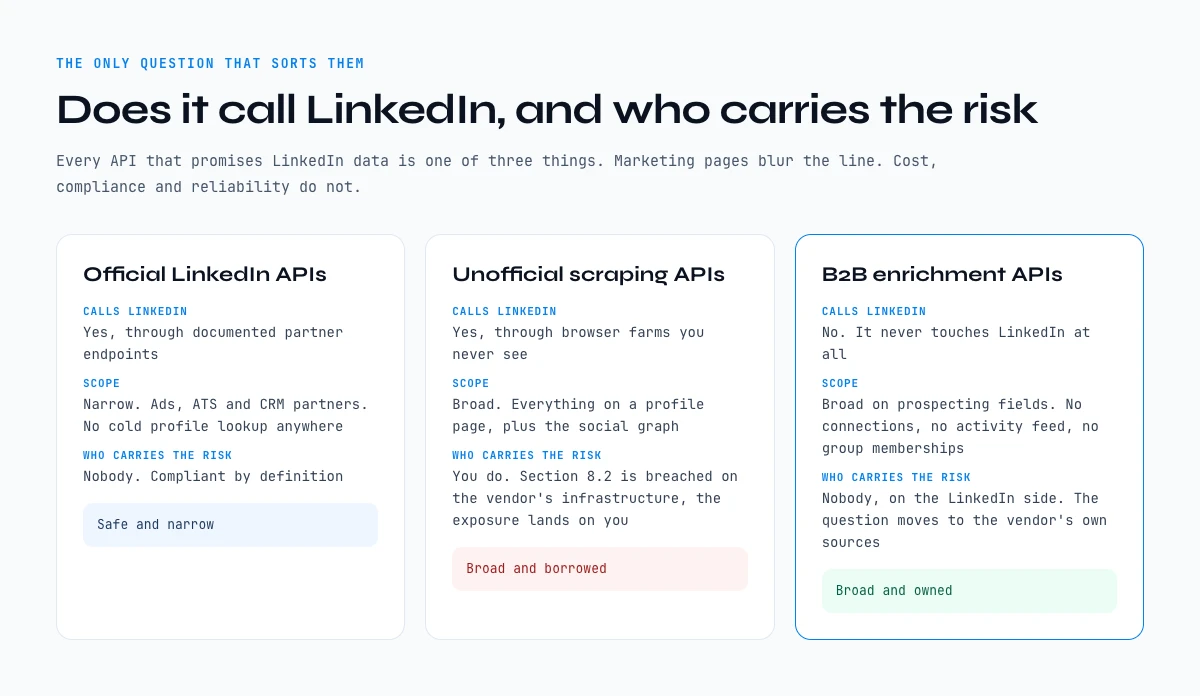
Almost every tool that promises "LinkedIn data" through code is, under the hood, one of three things: an official LinkedIn API, an unofficial scraping API, or a B2B enrichment API that sells LinkedIn-style fields without ever calling LinkedIn directly. The labels in the marketing pages do not always make the distinction, but the consequences for cost, compliance, and reliability are very different.
This guide lays out the three categories side by side. What each one actually returns, what it cannot return, what LinkedIn's terms allow, and what a realistic SDR or recruiter workflow looks like when calling each from Python or Node in 2026.
What is the LinkedIn API, and does LinkedIn have a free one
The LinkedIn API is not one interface. It is a catalogue of first-party endpoints split across six business lines, each with its own approval route and its own scopes, and none of them returns the profile of a person who has not authorised your app. That single sentence settles most of the questions people arrive with.
Does LinkedIn have a free API?
Yes, and it is narrower than the word free suggests. A new app you create in the developer portal gets two products by default: Sign In with LinkedIn using OpenID Connect, and Share on LinkedIn. Between them they carry four scopes, and those four scopes define the whole of the free surface.
| Scope | What it returns | Whose data |
|---|---|---|
openid | An identity token proving who just signed in | The signed-in member |
profile | Name, headline and profile photo | The signed-in member |
email | The primary email on the account | The signed-in member |
w_member_social | Permission to post, comment and react as that member | The signed-in member |
Read the third column twice. Every free scope is about the person sitting in front of the consent screen. There is no free scope, and no paid self-serve scope either, that takes a profile URL and gives you back that person's details. Everything beyond this table runs through a partner programme, and the sections below say which one and what it asks for.
The LinkedIn API free tier, precisely
LinkedIn's own documentation calls these Open Permissions: the only ones available to all developers without special approval. Here is what each self-serve product returns once a member clicks Allow, checked against the official access documentation in October 2026.
- Sign In with LinkedIn using OpenID Connect. An ID token for
openid, the member's name, headline and photo forprofile, and their primary email address foremail. No work history, no company record, no connections. - Share on LinkedIn.
w_member_sociallets your app post, comment and like on behalf of that member. It writes. It does not read other people's posts. - Not in the free tier. Page analytics, ads data, job posting, Sales Navigator data and learning records. The Advertising API is added from the same Products tab, but it is reviewed before it is granted, and Compliance access is closed to new requests.
So the question "is the LinkedIn API free" has a precise answer: yes for signing a user in and posting as that user, no for any LinkedIn data API that reads beyond them.
Chapter 1: The three categories at a glance
Across the 2026 landscape, every API that claims to extract LinkedIn data falls into one of three buckets. The distinction matters because it changes what data you get, what risk you take on, and what the contract looks like.
Official LinkedIn APIs. Documented endpoints under api.linkedin.com, gated behind LinkedIn's partner program. Categories: Marketing Developer Platform, Sales Solutions API, Talent Solutions API, Sign In with LinkedIn, Share on LinkedIn. Sanctioned by LinkedIn, since LinkedIn issues the keys. Narrow in scope: cold profile lookup is not on the menu.
Unofficial scraping APIs. Third-party services that operate browser farms or scraping pipelines against LinkedIn under the hood, then expose the result as a clean REST API. They come in three shapes: standalone LinkedIn scraping APIs, LinkedIn presets shipped on general-purpose scraping platforms, and the many LinkedIn endpoints resold through API marketplaces. Broad scope. LinkedIn's User Agreement forbids scraping its services, and outsourcing the scraping to a vendor does not change what the clause says.
B2B enrichment APIs. Services that aggregate identity, contact, and firmographic data from public sources, opt-in databases, and partnerships, then return LinkedIn-style fields through their API. Derrick belongs here, with one detail worth stating plainly: LinkedIn profile and company fields are read through your own LinkedIn account, connected once through the Derrick Chrome extension, while emails and phone numbers come from a multi-source lookup outside LinkedIn. No partner programme, no scraping infrastructure to host, and one credit per enriched profile.
For the broader picture on extraction methods (extensions, scrapers, APIs, MCPs), the 2026 LinkedIn data extraction guide places the API question inside the wider toolbox. This article zooms in on the API layer.
Chapter 2: Official LinkedIn APIs - what you can and cannot do
LinkedIn ships several first-party APIs. Each is gated behind a different application track and each exposes a narrow surface that LinkedIn explicitly endorses.
Marketing Developer Platform. For ad tech and analytics integrations. Returns campaign performance, ad creative metadata, account spend, lead-gen form responses. No profile fields, no company-employee lookup. Application: roughly 2-6 weeks for approval, requires a working ad-tech use case.
Sales Solutions API. For CRM bidirectional sync with Sales Navigator. Returns saved-search alerts, account/lead list metadata, CRM sync hooks. Profile and company fields are limited to what the user already saved in Sales Navigator. Available only to enterprise Sales Navigator customers.
Talent Solutions API. For ATS integrations. Returns LinkedIn Recruiter project metadata, candidate pipeline data, job posting CRUD. No cold profile search across LinkedIn at large.
Sign In with LinkedIn / Share on LinkedIn. For consumer-facing apps that need OAuth or one-click sharing. Returns the signed-in user's profile data only, not anyone else's.
The pattern is clear: official LinkedIn APIs serve LinkedIn's commercial ecosystem (ads, ATS, CRM partners). They do not serve the most common prospecting or recruiting workflow, which is "given a name and a company, return their LinkedIn URL and email". That workflow lives outside the official API.
Pricing model: usage-based on top of a base partnership contract. The base contract is typically negotiated annually with LinkedIn account managers; published pricing does not exist for the deeper APIs.
Products, scopes and what each one actually returns
The table LinkedIn does not publish in one place. It is the fastest way to find out whether your use case needs a partnership before you spend three weeks writing an application.
| Product | Representative scopes | What you get back | Partnership required |
|---|---|---|---|
| Sign In with LinkedIn (OpenID Connect) | openid, profile, email | Identity and basic profile of the signed-in member | No, self-serve |
| Share on LinkedIn | w_member_social | Write access to that member's feed | No, self-serve |
| Community Management | Organization read and write scopes | Posts, comments and analytics on a Page you administer | Yes, programme review |
| Marketing Developer Platform | Advertising read and write scopes | Campaigns, creatives, spend, lead-gen form responses | Yes, programme review |
| Talent Solutions | Recruiter and job posting scopes | Job posts, application flow, Recruiter project metadata | Yes, partner programme |
| Sales Navigator Application Platform | Sales sync and display scopes | Sales Navigator data mirrored into an approved CRM | Yes, partner programme |
| Learning | Course and learner activity scopes | Course catalogue and completion records for an LMS | Yes, access request |
| Compliance | Archiving scopes | Member activity archives for regulated industries | Yes, eligibility check |
LinkedIn profile API: what it actually returns
There is no endpoint called the LinkedIn profile API in the sense most people mean it. The Consumer line returns the profile of the member who authorised your app, through the openid and profile scopes, and stops there. Passing someone else's profile URL to an official endpoint returns an authorisation error, not a smaller payload. If your product needs to resolve arbitrary people, the official catalogue is the wrong catalogue, and chapters three and four cover what is left.
LinkedIn jobs API: what it actually returns
Job posting lives in Talent Solutions, which is a partner programme rather than a self-serve product. Approved partners can create, update and close job posts, and can move candidates between LinkedIn and an applicant tracking system. Reading the public job board at volume is not part of it. A job aggregator that shows LinkedIn listings is either an approved Talent partner or is getting that data somewhere other than the official API.
What the official LinkedIn API actually covers, product by product
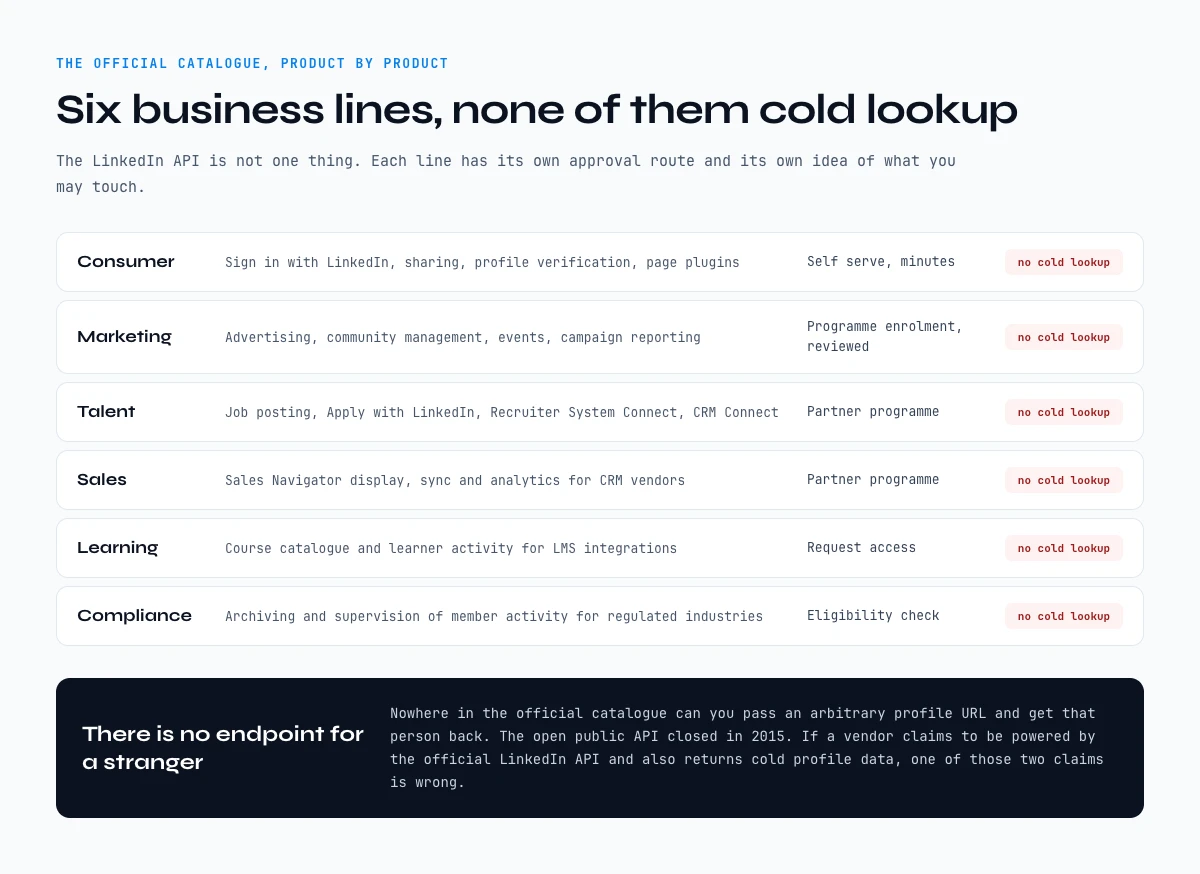
Most guides describe the LinkedIn API as a single thing. It is not. LinkedIn publishes a product catalogue split across six business lines, and each line has its own approval route, its own scopes, and its own idea of what data you are allowed to touch. Knowing which line your use case falls into is the difference between a two-day integration and a three-month application that gets declined.
| Business line | What it is for | Typical access route |
|---|---|---|
| Consumer | Sign in with LinkedIn, Share on LinkedIn, profile verification, page plugins | Self-serve, minutes |
| Marketing | Advertising, community management, events, campaign reporting | Program enrolment, reviewed |
| Talent | Job posting, Apply with LinkedIn, Apply Connect, Recruiter System Connect, CRM Connect | Partner programme |
| Sales | Sales Navigator display, sync and analytics services for CRM vendors | Partner programme |
| Learning | Course catalogue and learner activity for LMS integrations | Request access |
| Compliance | Archiving and supervision of member activity for regulated industries | Eligibility check |
Read that table with a prospecting hat on and one thing jumps out: none of these lines exposes cold profile lookup. The Consumer line returns the profile of the member who just authorised your app, and nothing else. The Sales line surfaces Sales Navigator data back into a CRM your customer already pays for. The Talent line moves candidates between LinkedIn and an applicant tracking system. There is no endpoint anywhere in the official LinkedIn API where you pass an arbitrary profile URL and receive that person's details.
This is deliberate, and it dates back to 2015, when LinkedIn closed the open public API that had let any developer read profile data. Everything since has been gated behind partnership. If a vendor tells you their product is powered by the official LinkedIn API and also returns cold profile data, one of those two claims is wrong.
What you can and cannot do, side by side
Collapsing everything above into one table makes the decision fast. Read the middle column first: it is the one that usually ends the discussion.
| Task | Official partner APIs | Unofficial scraping APIs | B2B enrichment APIs |
|---|---|---|---|
| Look up an arbitrary profile by URL | No | Yes, against the terms of service | Yes, from vendor-sourced data |
| Read the authenticated member's own profile | Yes | Not applicable | Not applicable |
| Post content to a company Page | Yes | Partially, fragile | No |
| Return a verified professional email | No | Rarely, low accuracy | Yes, with a confidence signal |
| Return a direct dial phone number | No | No | Yes, coverage varies by country |
| Sync Sales Navigator data into a CRM | Yes, for approved CRM vendors | No | Not the same job |
| Run at prospecting volume without approval | No | Yes, with account and legal exposure | Yes |
| Survive a LinkedIn anti-bot update unchanged | Yes | No | Yes |
The pattern is consistent. The official route is safe and narrow. The scraping route is broad and borrowed. The enrichment route is broad and owned, which is why it is the one that survives contact with a procurement review. If you want the mechanics of the middle column in more detail, our guide to LinkedIn limits and what triggers them covers the account side, and how to choose a LinkedIn scraper compares the tooling.
Chapter 3: Unofficial LinkedIn scraping API services - broad scope, sharp tradeoffs
This is the category most developers find first when searching "linkedin data extraction api". The product looks like a normal REST API: pass a LinkedIn profile URL, get back a JSON payload of structured fields. Under the hood, the vendor runs a fleet of headless browsers, residential proxies, and CAPTCHA solvers against LinkedIn at scale. The request happens server-side; you never see the scraping layer.
What they return. Full profile fields (headline, work history, education, skills, recommendations), company pages, employee lists from a company URL, sometimes Sales Navigator search results.
How they price. Per-request, typically $0.005 to $0.05 per profile depending on the depth and the vendor. Bulk plans drop the unit cost to $0.001-0.005 in volume. Entry tiers are $50-200/month for 5,000-50,000 calls.
The terms reality. Two things to settle with the team or the legal counsel before adopting one:
- LinkedIn's User Agreement. Section 8.2 lists scraping and automated copying of the services among the things members agree not to do. A scraping API runs that access on its own infrastructure, so it never shows up in your request log, but the terms describe the activity, not who hosts it.
- Your own review. Whether a given vendor is acceptable is a question for your legal team, not for the vendor's FAQ page. Ask where the data comes from, whose accounts run the collection, and what happens to your pipeline the week those accounts get restricted.
The reliability reality. LinkedIn's bot detection has gotten sharper every year since 2023. Vendors regularly hit rough patches where the API returns degraded or stale data while their scraping farm rotates IP pools. Schedule on the assumption that any given week may have a 24-72 hour quality dip.
Through the Derrick API
A documented endpoint for the data you need
The three routes in this article trade access against maintenance. The Derrick API is the fourth option for a stack: one call per enrichment, structured fields back, nothing to host and nothing to repair when a page changes.
- Feature
- Derrick API
- Credit cost
- Included
The first button opens the web app, where your account and key live. API and MCP access starts on the PLUS plan. The second details the surface.
Chapter 4: B2B enrichment APIs - the workhorse for prospecting in 2026
This category is where the bulk of SDR, recruiter, and growth-team API traffic actually lives in 2026. A B2B enrichment API takes an input (name + company, email, LinkedIn URL, domain) and returns an enriched record (LinkedIn URL, headline, current company, role, location, email, phone, firmographic fields) sourced from the vendor's data partnerships.
The vendor is not scraping LinkedIn. The data has overlap with LinkedIn because both LinkedIn and the vendor pull from the same underlying public sources, opt-in databases, business registrations, and B2B partnerships. Hit rates are high because the same person tends to appear in many of those sources.
What you get. The fields that matter for cold outreach: LinkedIn URL, name, headline, current company, role, location, email (verified or unverified), phone (cell or direct line where the source supports it), company size, industry, technographics (sometimes).
What you do not get. Fields that only live inside LinkedIn's social graph: connections list, recent activity feed, recommendations, group memberships, exact hire date inside a company. If any of these are central to the workflow, the unofficial scraping API category covers more of them.
Pricing model. Per-credit, with most vendors charging different credit amounts for different field types. Profile lookups: 1-2 credits. Email lookups: 5-10 credits. Phone lookups: 5-25 credits. Entry tiers run $20-100/month for 5,000-20,000 credits, scaling linearly to enterprise tiers at $1,000-10,000/month.
API surface. Most B2B enrichment APIs converge on a similar shape:
GET /v1/profile?linkedin_url=...
GET /v1/profile?name=...&company=...
GET /v1/email?linkedin_url=...
GET /v1/phone?linkedin_url=...
POST /v1/bulk { "rows": [...] }
A single integration takes a few hours: read the OpenAPI spec, write a wrapper, hook into the prospecting pipeline. Same wrapper works across vendors with light adapter changes.
A real workflow in code. Here is the Python-equivalent skeleton for a Tuesday morning prospecting block. The team has a sheet of 200 target accounts and needs the head of sales at each, with email, before noon.
import requests, csv

API_KEY = "..."
BASE = "https://api.example.com/v1"

def find_decision_maker(company):
    titles = ["Head of Sales", "VP Sales", "CRO", "Sales Director"]
    for title in titles:
        r = requests.get(f"{BASE}/profile",
            params={"name": title, "company": company},
            headers={"Authorization": f"Bearer {API_KEY}"})
        data = r.json()
        if data.get("linkedin_url"):
            return data
    return None

def enrich_email(linkedin_url):
    r = requests.get(f"{BASE}/email",
        params={"linkedin_url": linkedin_url},
        headers={"Authorization": f"Bearer {API_KEY}"})
    return r.json().get("email")

with open("targets.csv") as f, open("enriched.csv", "w") as out:
    writer = csv.writer(out)
    for row in csv.DictReader(f):
        person = find_decision_maker(row["company"])
        if person:
            email = enrich_email(person["linkedin_url"])
            writer.writerow([row["company"], person["name"],
                             person["linkedin_url"], email])
Run time for 200 companies: roughly 8-12 minutes. Credit cost on a typical B2B enrichment API: ~200 profile lookups (300-400 credits) + ~150 email lookups at a 60-75% hit rate (750-1500 credits). Total: ~1,000-2,000 credits, well inside a $20/month entry tier.
The same workflow on an unofficial scraping API would cost roughly $5-15 in per-call fees and carry the LinkedIn ToS exposure. The same workflow on official LinkedIn APIs is not possible at all because cold profile search is not part of any partner program.
Chapter 5: Picking between the three
A short decision tree based on the team profile.
Pick an official LinkedIn API if: you are building an integration LinkedIn would happily endorse - an ATS bidirectional with LinkedIn Recruiter, an ad-tech platform tied to Marketing Developer Platform, a CRM with Sales Navigator partner status. Plan for the partner application process and an enterprise contract.
Pick an unofficial scraping API if: the data you need only exists inside LinkedIn's social graph (recommendations, connection lists, recent activity feed) and you have legal counsel comfortable with the LinkedIn ToS exposure. Reserve this for research, journalism, due-diligence workflows. It is not a fit for a daily SDR pipeline because the reliability and the legal posture both sit on the wrong side of the line.
Pick a B2B enrichment API if: you are running a normal prospecting or recruiting workflow that needs LinkedIn URLs, names, headlines, current company, role, location, email, and phone for cold contacts. This is the workhorse for the 90%+ of teams that talk about "needing a LinkedIn API". The data is LinkedIn-shaped without being LinkedIn-sourced.
For team workflows that already use a Chrome extension on LinkedIn pages, the Chrome extension comparison covers the same vendors from the in-tab side. For workflows where the AI assistant is the operator instead of code, the LinkedIn scraper MCP guide covers the MCP-shaped version of the same surface. The credits, in most cases, are shared across all three entry points (extension, API, MCP) when the vendor offers all three.
Which route fits your workflow
Answer two questions and the category picks itself. The estimator below applies the same logic as the table, including the approval reality check that most comparison posts leave out.
Which LinkedIn API route fits your case
Two questions. The output names the category, the realistic lead time, and the failure mode to plan for.
Answer the two questions to see the recommended route.
LinkedIn API access: what you get by default, what needs a partner program
LinkedIn API access splits cleanly in two, and knowing which half you are in saves weeks. By default, with no application and no review, you get authentication and publishing on behalf of the member who signs in. Everything that reads or writes data belonging to somebody else sits behind a programme.
The question that brings most developers here is some version of the one a founder asked on a public forum this year: my product needs to read profiles, how do I get access. The honest answer has three parts.
- By default you get sign-in, the signed-in member's own profile and email, and the ability to post as that member. Minutes to set up, no review.
- A partner programme gets you ads data, Page management, recruiting workflows, Sales Navigator sync, learning records or compliance archives, depending on the programme. Weeks to months, and the review is commercial rather than technical.
- Nothing gets you cold profile lookup. It is not a tier you can buy. If reading arbitrary profiles is the product, the official API is not the route, and pretending otherwise is how teams lose a quarter.
For that third case there is a route neither LinkedIn nor the scraping vendors describe, and it is the one most prospecting teams end up on: a B2B enrichment API that sources its own data and answers on a profile or company URL without any LinkedIn partnership at all. Chapter 4 covers what it returns and what it costs.
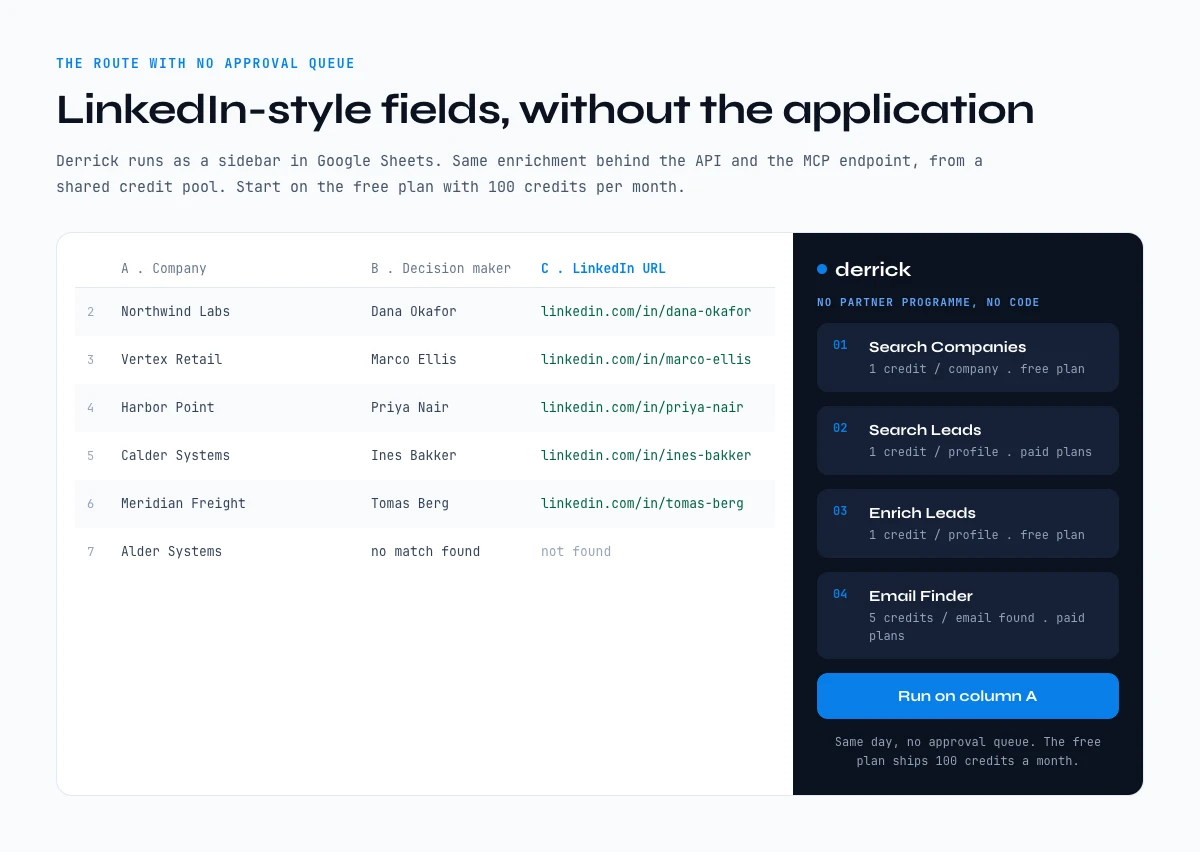
The app works through your list row by row. 100 free credits every month.
Getting your developer credentials, step by step
Getting a client ID and secret takes about ten minutes if you already administer a company Page. The steps below follow LinkedIn's OAuth documentation on Microsoft Learn, checked in October 2026.
- Sign in to the developer portal with your real account. Open LinkedIn Developers, then My apps. A fake or secondary account breaks LinkedIn's terms and can cost you the app later.
- Create the app and attach your company Page. Enter the app details and select the LinkedIn Page the app belongs to. A Page admin then confirms the association before the app is verified.
- Add the self-serve products. In the Products tab, add Sign In with LinkedIn using OpenID Connect and Share on LinkedIn. Programme products are requested from the same tab or through a partner application, and stay pending until reviewed.
- Copy your credentials from the Auth tab. Every app gets a Client ID and a Client Secret. Keep the secret on your server: never in a URL, a front-end bundle or a support thread.
- Register an HTTPS redirect URL. It must be absolute, it cannot contain a
#, and query parameters on it are ignored. The authorization code LinkedIn sends back to it lives 30 minutes, so exchange it straight away. - Check which scopes you actually hold. The Auth tab lists them. Requesting a scope your app has not been granted returns an invalid scope error, which is the platform telling you a product is missing, not that your code is wrong.
- Test before you build. The portal's token generator issues a token by hand, so you can make a first authenticated call before writing the full OAuth flow.
That is the whole self-serve path. Anything that reads data beyond the signed-in member starts at step 3 with a request, and the next section covers what happens after you send it.
Applying to a partner program, and how long approval really takes
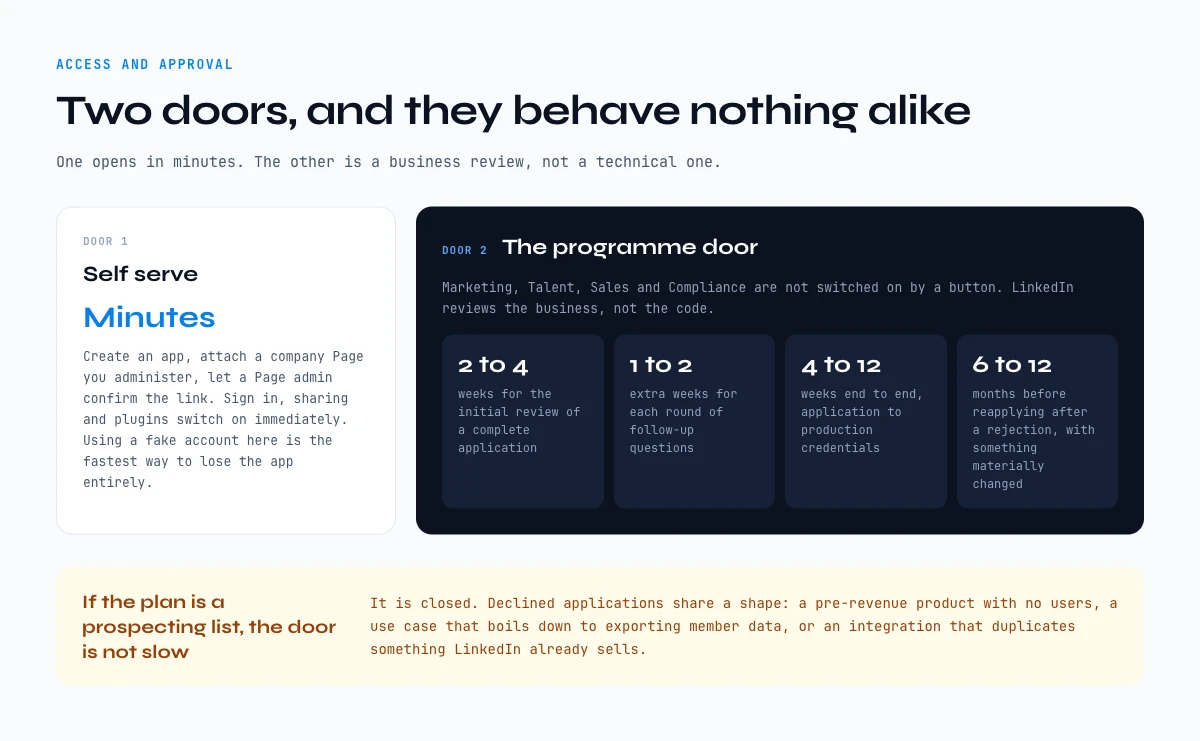
There are two doors, and they behave completely differently.
The self-serve door. You sign in to the developer portal with a real LinkedIn account, create an app, and attach a company Page you administer. LinkedIn verifies the link by asking a Page admin to confirm. Once verified, the self-serve products (sign-in, sharing, plugins) are available immediately. Using a fake account here breaks the terms of service and is the fastest way to lose the app entirely.
The programme door. The five gated families are Marketing Developer Platform, Community Management, Talent Solutions, the Sales Navigator Application Platform and Learning, with Compliance still listed in the documentation but closed to new requests. None of them is switched on by a button. You apply to the specific programme, and the application is a business review rather than a technical one. LinkedIn wants to see a real product, a real customer base, and a use case that adds something to their ecosystem instead of extracting from it.
Plan for the timeline honestly:
- Initial review of a complete application: roughly two to four weeks.
- Each round of follow-up questions: another one to two weeks.
- Realistic end to end, application to production credentials: four to twelve weeks.
- After a rejection, most programmes expect you to wait six to twelve months before reapplying, and to have materially changed something in between.
The applications that get declined usually share a shape: a pre-revenue product with no users, a use case that boils down to exporting member data, or an integration that duplicates something LinkedIn already sells. If your plan is to build a prospecting list, the programme door is not slow, it is closed. That is the honest answer, and it is why the rest of this guide spends its time on the other two categories.
How to become a LinkedIn Partner
Each family has its own door. Advertising API access is added from your app's Products tab, then reviewed. Sales Navigator Application Platform (SNAP) access requires approval as a SNAP partner through LinkedIn's sales solutions partner application. Talent integrations (Recruiter System Connect, Apply Connect, Apply with LinkedIn, Premium Job Posting) go through the Talent Solutions partner application. Learning has its own request-access page. In every case you apply as a company with a product, and LinkedIn reviews the business case before it looks at a line of code.
Why is LinkedIn API access so hard to get?
The question behind most forum threads on LinkedIn API access is why it is so hard. The short version: LinkedIn grants data access to partners whose product feeds its own ads, hiring or sales business, and declines use cases that take member data out of it. Good engineering does not change that outcome, a different use case does.
LinkedIn API pricing: what access costs, and what LinkedIn does not publish
LinkedIn API pricing is the question with the least public data behind it. The self-serve products cost nothing. Beyond them, LinkedIn publishes no rate card for API access: what you pay depends on the programme and on the commercial relationship around it. Anyone quoting you a precise price for partner access is quoting a deal, not a list price.
| Route | What you pay | Price published? |
|---|---|---|
| Self-serve (Sign In, Share on LinkedIn) | Nothing | Yes, free |
| Advertising API | No published fee for API access itself; your real cost is the ad spend your platform manages, plus the engineering | No rate card |
| SNAP and Talent partner programmes | Partnership terms set with LinkedIn, on top of the Sales Navigator or Recruiter contracts your customers already hold | No |
| Unofficial scraping APIs | Per call or per record, from a fraction of a cent to a few cents per profile | Yes, on vendor sites |
| Derrick enrichment (web app, Sheets, MCP, API) | 1 credit per enriched profile or company, 5 credits per email found, 200 credits per phone number found | Yes, see below |
Derrick's plans, in euros: Free at 0 EUR with 100 credits a month and no card, Standard at 20 EUR for 10,000 credits, Plus at 47.50 EUR for 25,000, Pro at 175 EUR for 100,000 and Scale at 320 EUR for 200,000, which works out to 0.0016 EUR per credit. The REST API and the MCP server start on Plus. Unused credits roll over as long as the account stays on a paid plan.
A worked example. Say you enrich 2,000 LinkedIn profile URLs and 1,300 of them come back with a work email. That is 2,000 credits for the profiles plus 6,500 for the emails, 8,500 in total: inside a Standard month if you run it in the web app, inside Plus if the job runs through the API. The cost is known before the run starts, which is the part no partner programme gives you.
Which API route each team needs: sales, recruiting and marketing
The same three letters, API, mean a different job in each team. The table maps the usual need to the official product that comes closest, the route teams actually end up on, and the Derrick surface that fits the gesture.
| Team | Typical need | Official LinkedIn API | Route that works | Derrick surface |
|---|---|---|---|---|
| Sales and SDR | Decision makers at target accounts, with an email | SNAP syncs Sales Navigator data into an approved CRM, no cold lookup | Enrichment API | Web app for a list, MCP in Claude or ChatGPT for one account, REST API for the CRM |
| Recruiting | Current role and company for candidate profile URLs | Talent programmes move candidates between Recruiter and an ATS | Enrichment API | Web app or Google Sheets for a sourcing list, REST API for an ATS pipeline |
| Marketing | Post, report on a Page, run ads | Community Management and Advertising API, after review | The official API, which does this job well | Enrich Companies on the account list your campaigns target |
| RevOps and data | Keep CRM records fresh on a schedule | None for third-party records | Enrichment API on a schedule | REST API, or Zapier, Make and n8n |
Two patterns stand out. Marketing is the one team the official LinkedIn API serves properly, so use it there. Sales and recruiting both need data about people who never authorised your app, which is exactly what the official catalogue leaves out. For the sales case, Find a company's people lists the staff of a target account without Sales Navigator, at 1 credit per person on paid plans. For company records at scale, the guide to extracting LinkedIn company information covers the fields, and sending LinkedIn data to Google Sheets covers the spreadsheet route.
LinkedIn API rate limits, throttling, and the 429 response
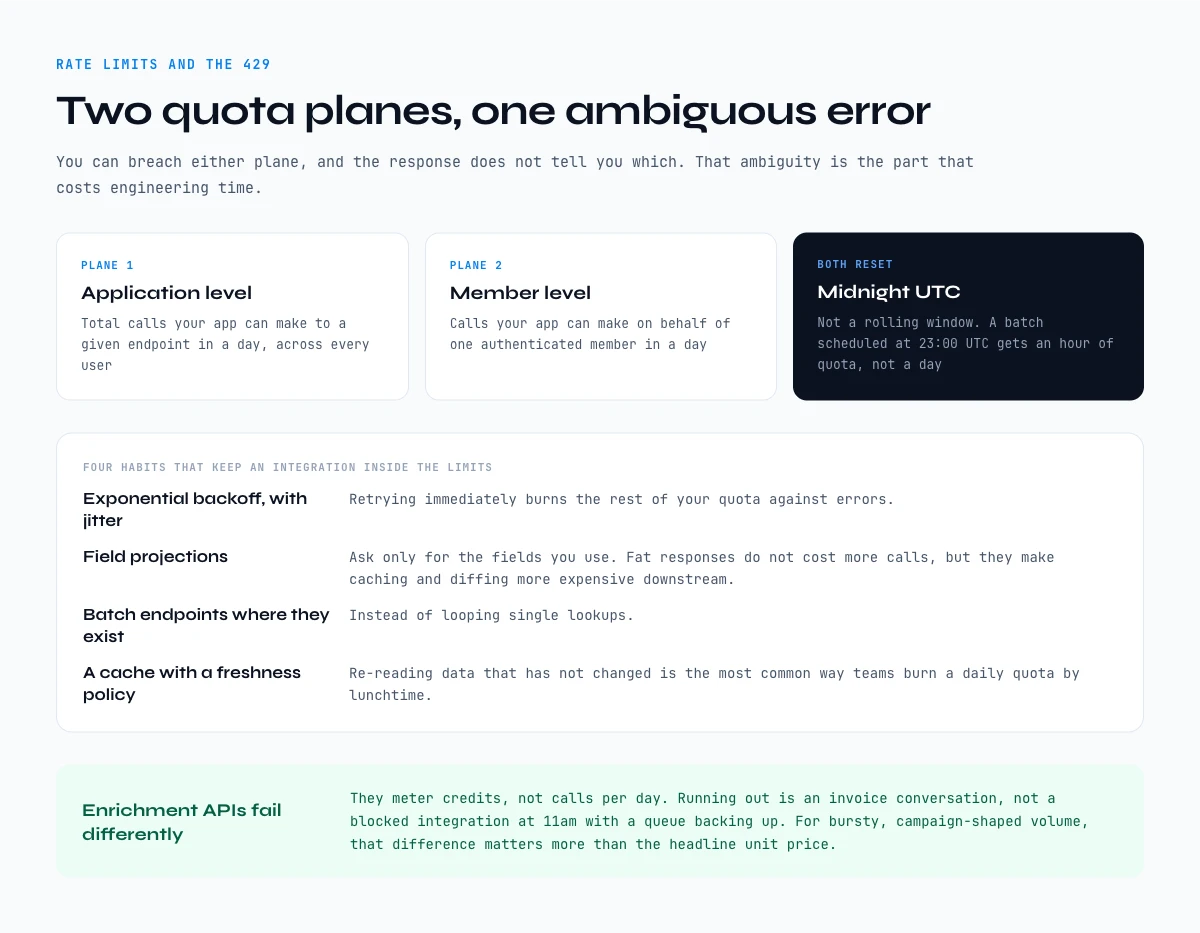
Teams that do get approved are often surprised by the second wall: throttling. The LinkedIn API applies quotas on two separate planes at once, and you can breach either one.
- Application-level quota: the total number of calls your app can make to a given endpoint in a day, across every user.
- Member-level quota: the number of calls your app can make on behalf of one authenticated member in a day.
Both counters reset at midnight UTC, not at a rolling 24-hour mark from your first call. A batch job scheduled at 23:00 UTC therefore gets an hour of quota, not a day of it. When you exceed either plane the API answers with HTTP 429, and the response does not tell you which plane you hit. That ambiguity is the part that costs engineering time.
Four things keep an integration inside the limits:
- Exponential backoff on 429, with jitter. Retrying immediately burns the rest of your quota against errors.
- Field projections. Ask only for the fields you use. Fat responses do not cost more calls, but they make caching and diffing more expensive downstream.
- Batch endpoints where they exist, instead of looping single lookups.
- A cache with an explicit freshness policy. Re-reading data that has not changed is the most common way teams burn a daily quota by lunchtime.
Enrichment APIs fail differently, and it is worth naming the contrast. They meter credits, not calls per day. Running out means an invoice conversation, not a blocked integration at 11am with a queue backing up. For a prospecting workload, where volume is bursty and deadlines are campaign-shaped, that difference matters more than the headline unit price.
Authentication and versioning: what breaks a LinkedIn API integration
Two mechanics account for most of the silent breakages people report months after going live.
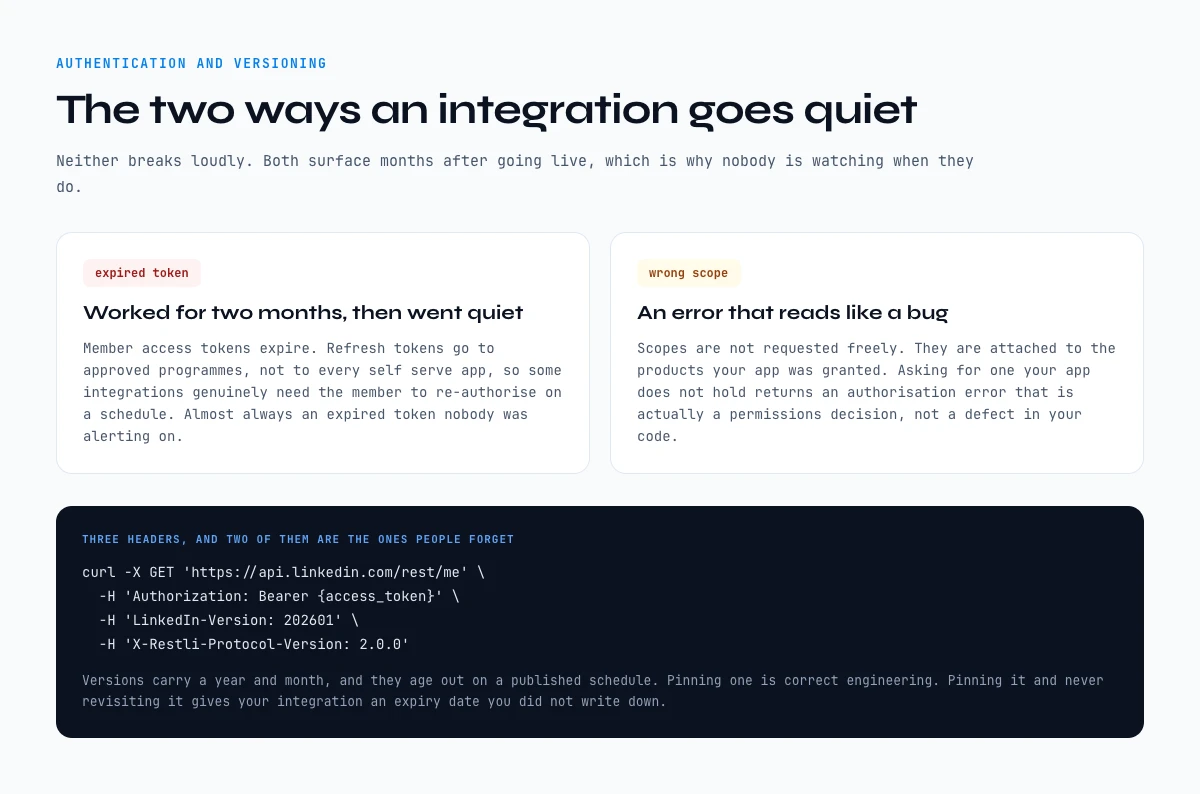
OAuth 2.0, in two flavours. Three-legged OAuth is the member-authorised flow: the member clicks through a consent screen and your app receives a token scoped to what that member allowed. Two-legged OAuth is app-only, used for a narrow set of programme endpoints where no member context exists. Scopes are not something you request freely, they are attached to the products your app has been granted. Asking for a scope your app does not hold returns an authorisation error that reads like a bug and is actually a permissions decision. Two-legged access is not on by default either: LinkedIn has to enable it for your app, and it is not available for the Marketing APIs at all.
Member access tokens expire after 60 days, and two-legged tokens after 30 minutes. Programmatic refresh tokens are enabled for a limited set of partners only, not for every self-serve app, which means some integrations genuinely require the member to re-authorise on a schedule. An integration that worked perfectly for two months and then went quiet is almost always an expired token that nobody was alerting on.
| Mechanic | Three-legged OAuth | Two-legged OAuth |
|---|---|---|
| Who consents | The member, on a consent screen | Nobody, the app authenticates itself |
| What the token can reach | Only what that member allowed | A narrow set of programme endpoints |
| Where it is used | Sign-in, posting, anything member-scoped | A few partner programme calls with no member context |
| Access token lifetime | 60 days, then it stops | 30 minutes, then the app requests a new one |
| Refresh token | Programmatic refresh for a limited set of partners only | Not applicable |
| Failure mode | Silent: the integration simply goes quiet | Loud: the call returns an authorisation error |
The refresh trap is the line that matters. A self-serve app without refresh tokens needs the member to re-authorise on a schedule, and nothing in the platform reminds you of that. If nobody alerts on token age, the first symptom is a sales team asking why a sync stopped six weeks ago. One mitigation exists without refresh tokens: re-running the authorization flow skips the consent screen while the member is still logged in to LinkedIn and the current token has not expired, so a reminder before day 60 keeps most members connected.
Versioning. Modern LinkedIn endpoints are versioned through a request header carrying a year-month value, and versions age out on a published schedule. Pinning a version is correct engineering, but pinning it and never revisiting it means your integration has an expiry date you did not write down. A minimal request looks like this:
curl -X GET 'https://api.linkedin.com/rest/me' \
  -H 'Authorization: Bearer {access_token}' \
  -H 'LinkedIn-Version: 202601' \
  -H 'X-Restli-Protocol-Version: 2.0.0'
Three headers, and two of them are the ones people forget. Drop the version header and you get an error that says nothing useful about the cause.
The operational lesson generalises beyond LinkedIn: any integration built on a partner-gated API inherits that partner's release calendar. Budget maintenance for it, or choose a category where you do not have to.
Key takeaways
- Three categories of LinkedIn data extraction API exist in 2026: official LinkedIn APIs (sanctioned, narrow), unofficial scraping APIs (broad, against LinkedIn's User Agreement), B2B enrichment APIs (broad, priced per credit, no partner programme).
- The free tier is three open permissions, all about the signed-in member:
profile,emailandw_member_social. - Official LinkedIn APIs do not cover cold profile lookup. They serve ad tech, ATS, CRM partners.
- Unofficial scraping APIs cover the broadest surface but run the access LinkedIn's User Agreement forbids, on infrastructure you do not control.
- B2B enrichment APIs cover the prospecting and recruiting workflow with published per-credit pricing and no approval queue.
- Partner access has no public price, member tokens last 60 days, and two-legged tokens 30 minutes: plan the maintenance before you plan the launch.
- Same vendor often exposes the API, the Chrome extension, and the MCP endpoint from a shared credit pool.
Frequently asked questions
Does LinkedIn have an API?
Is the LinkedIn API free?
How do I get LinkedIn API access?
How much does LinkedIn API access cost?
What is the difference between a scraping API and a B2B enrichment API?
What are the LinkedIn API rate limits?
Why does a working LinkedIn API integration suddenly stop?
How do you become a LinkedIn Partner?
Keep reading
Continue exploring this cluster


Best LinkedIn Scrapers 2026: 10 Tools Compared (Pricing, Limits & Workflows)
Read →

Best LinkedIn Scraper Chrome Extensions 2026: 12 Tools Compared (Workflow, Risk, Pricing)
Read →

LinkedIn Scraper MCP: How to Pull LinkedIn Data Straight Into Claude (2026 Guide)
Read →

How to Extract Company Info from LinkedIn Profile URL: Complete 2026 Guide
Read →