LinkedIn limits in 2026: what is official, what is guesswork, and how to prospect anyway
LinkedIn publishes a 30,000 connection cap and hides the rest. What is official, what really triggers a restriction, and how to prospect without a ban.


Last updated: 2026-08-01
Every guide about LinkedIn limits gives you numbers to the decimal: 100 invitations a week, 20 a day, 250 searches a month. Almost none of them cites a source, and there is a good reason for that. LinkedIn does publish some caps, and it publishes them clearly. A member can hold up to 30,000 first-degree connections, full stop. What the company has never published is a rate limit: how many invitations you may send per day or per week. On the one prospecting cap it does document, the Commercial Use Limit, its own help page says plainly that it will not tell you how much of it you have left.
That distinction matters more than it sounds. Structural caps are knowable and you can plan around them. Rate limits are the ones that get accounts restricted, and they are exactly the ones nobody at LinkedIn has ever confirmed. Calibrating a prospecting routine on those figures means tuning a machine against a dial you cannot read, on a platform that moves thresholds without notice. This guide separates the categories cleanly: what LinkedIn states, and what the market has observed. It sits alongside the rest of our LinkedIn data extraction cluster. Then it covers what really triggers a restriction, what to do if you already have one, and how to design outreach that does not depend on the limits of your logged in session in the first place.
LinkedIn limits: the ones the company actually publishes
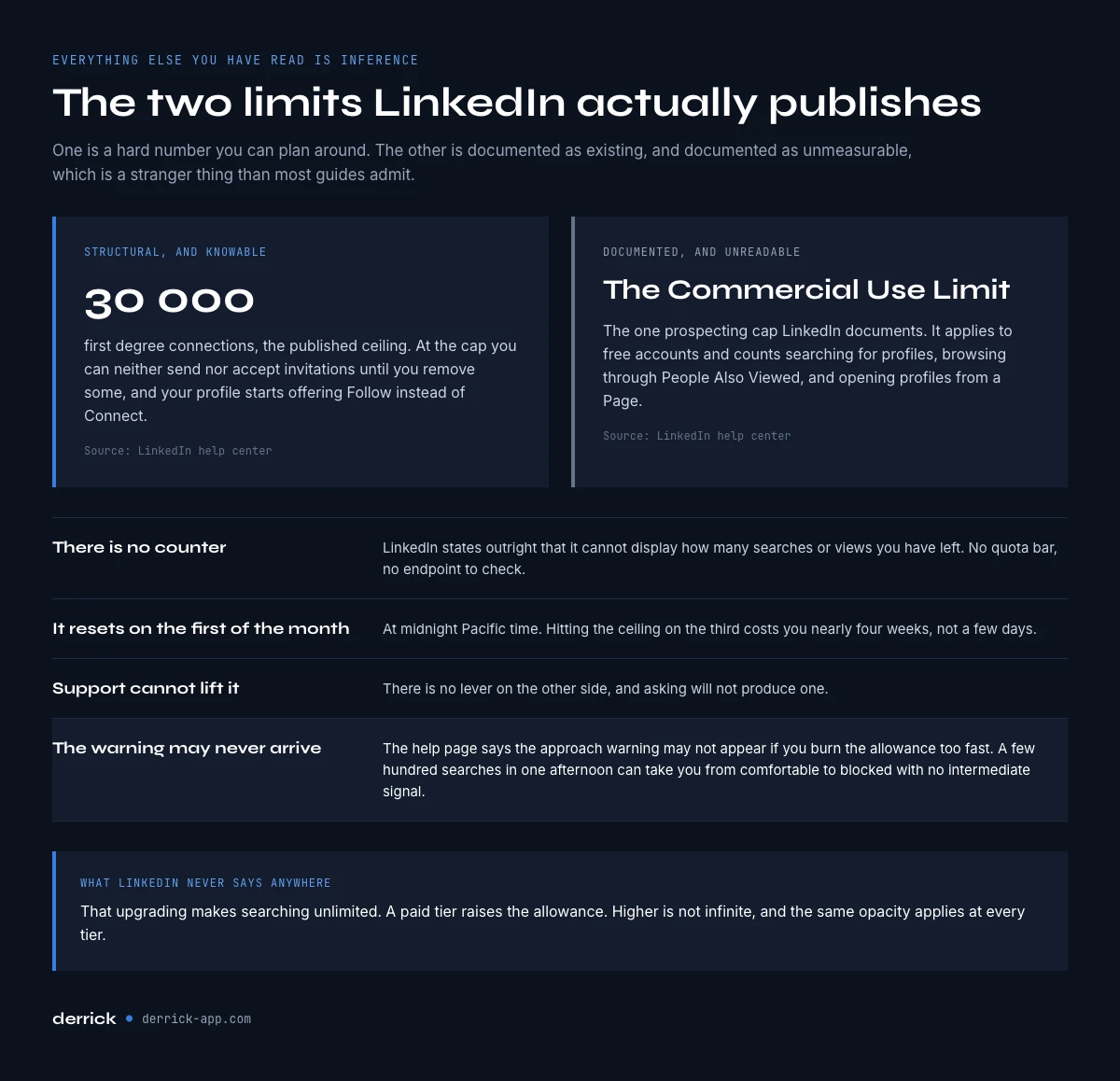
Start with what is not in dispute. LinkedIn's help center states that members can hold up to 30,000 first-degree connections, and that once you reach it you cannot send or accept new invitations until you remove some. Your profile also switches to offering Follow instead of Connect. That is a real, published, checkable number, and it is the only one of its kind.
The Commercial Use Limit is the one cap on prospecting activity that LinkedIn documents. It applies to free accounts and it is triggered by activity that looks like hiring or prospecting rather than normal networking. LinkedIn names the specific behaviors: searching for profiles, browsing profiles through the People Also Viewed panel, and viewing member profiles from a LinkedIn Page.
Three details on that official page shape everything else. First, LinkedIn states outright that it is not able to display the exact number of searches or views you have left. There is no counter, no quota bar, no API to check. Second, the allowance resets at midnight Pacific time on the first day of each calendar month, which means a limit hit on the 3rd costs you nearly four weeks, not a few days. Third, LinkedIn cannot lift the limit on request. Support has no lever, and asking will not produce one.
You get a warning as you approach the ceiling, but the help page adds an important caveat: that warning may not appear at all if you burn through the allowance too quickly. A tool that runs a few hundred searches in one afternoon can take you from comfortable to blocked without the intermediate signal ever showing up.
The official way out is a paid tier: Premium Business, Recruiter Lite, or Sales Navigator, each of which raises the allowance. Note what LinkedIn does not say anywhere: that upgrading makes searching unlimited. Higher is not infinite, and the same opacity applies at every tier.
The LinkedIn limits everyone repeats, and where they come from
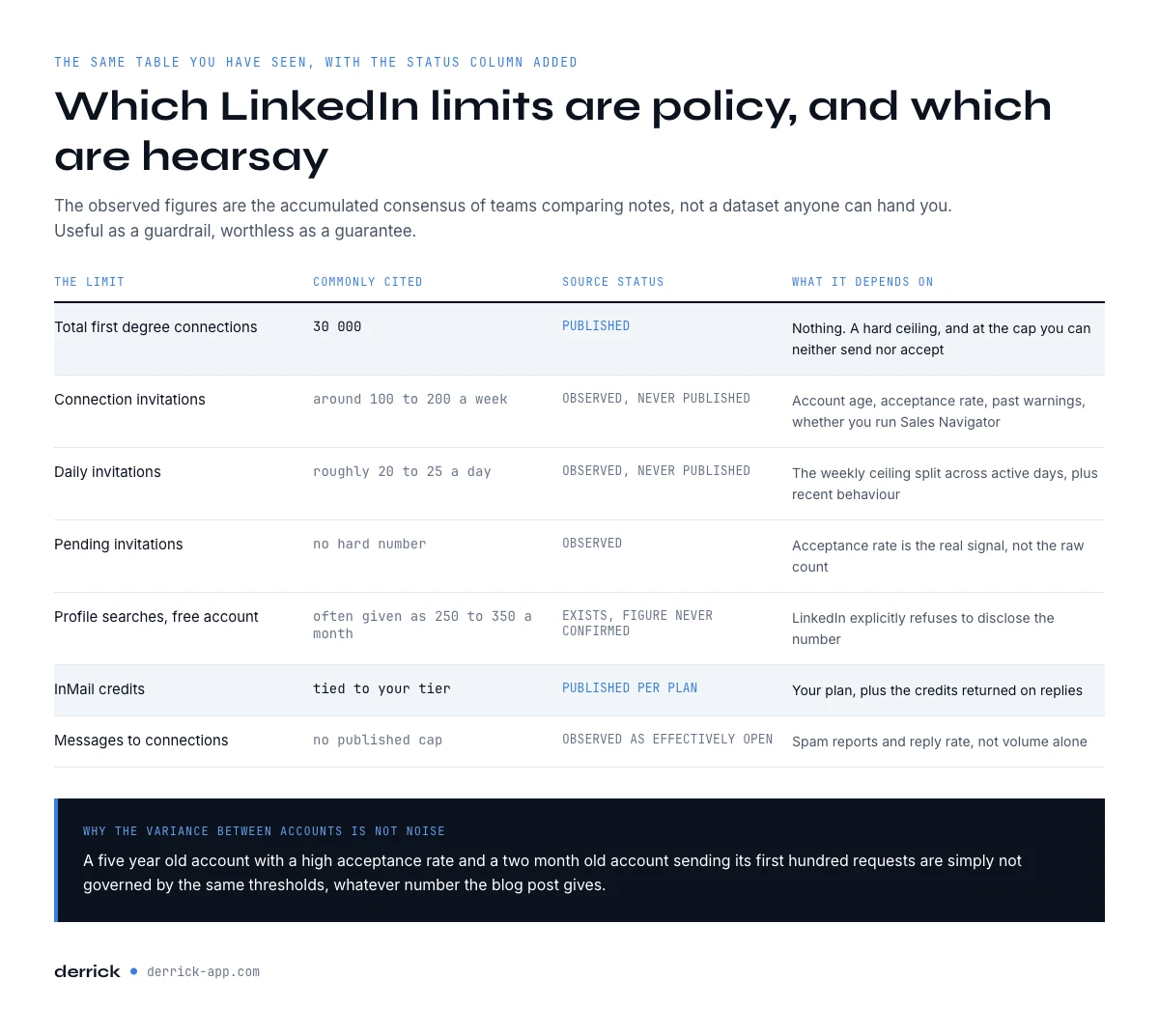
Beyond the Commercial Use Limit, everything you will read is community measurement. No consolidated public study of LinkedIn's rate limits exists, which is itself part of the answer: the ranges below are the accumulated consensus of sales teams and consultants comparing notes, not a dataset anyone can hand you. They are useful. They are also not rules, they vary by account, and they move without announcement.
This is the honest version of the table you have seen elsewhere, with the status of every line made explicit.
| Limit | Commonly cited figure | Source status | What it actually depends on |
|---|---|---|---|
| Total first-degree connections | 30,000 | Published by LinkedIn | Nothing. It is a hard ceiling, and at the cap you can neither send nor accept invitations |
| Connection invitations | Around 100 to 200 per week | Observed, never published | Account age, acceptance rate, past warnings, whether you use Sales Navigator |
| Daily invitations | Roughly 20 to 25 per day | Observed, never published | The weekly ceiling divided across active days, plus recent behavior |
| Pending invitations | No hard number, but thousands of unanswered requests hurt | Observed | Acceptance rate is the real signal, not the raw count |
| Profile searches on a free account | Often described as 250 to 350 per month | Officially exists, figure never confirmed | LinkedIn explicitly refuses to disclose the number |
| InMail credits | Tied to your subscription tier | Published per plan in your account | Your plan, plus credits returned on replies |
| Messages to connections | No published cap | Observed as effectively open | Spam reports and reply rate, not volume alone |
Two things follow from this table. Only the top line and the InMail line rest on published policy, one because LinkedIn states it outright and the other because it is written into your subscription. Everything about invitation pace is inference. And the variance between accounts is not noise: a five year old account with a 60 percent acceptance rate and a two month old account sending its first hundred requests are simply not governed by the same thresholds, whatever the number in the blog post says.
In the web app or Google Sheets
Work the list you kept, not the one you can still see
Limits apply to what you browse, and the way around them is not to browse more. Enrich the leads you already exported to the web app or Google Sheets, so the qualification happens on your own file instead of behind a counter.
- Feature
- LinkedIn Leads Profile Enrichment
- Credit cost
- 1 credit per lead enriched
The first button opens the web app (nothing to install): 1 credit per lead enriched, 100 free credits every month. The second details the feature and its cost per plan.
What actually triggers a restriction
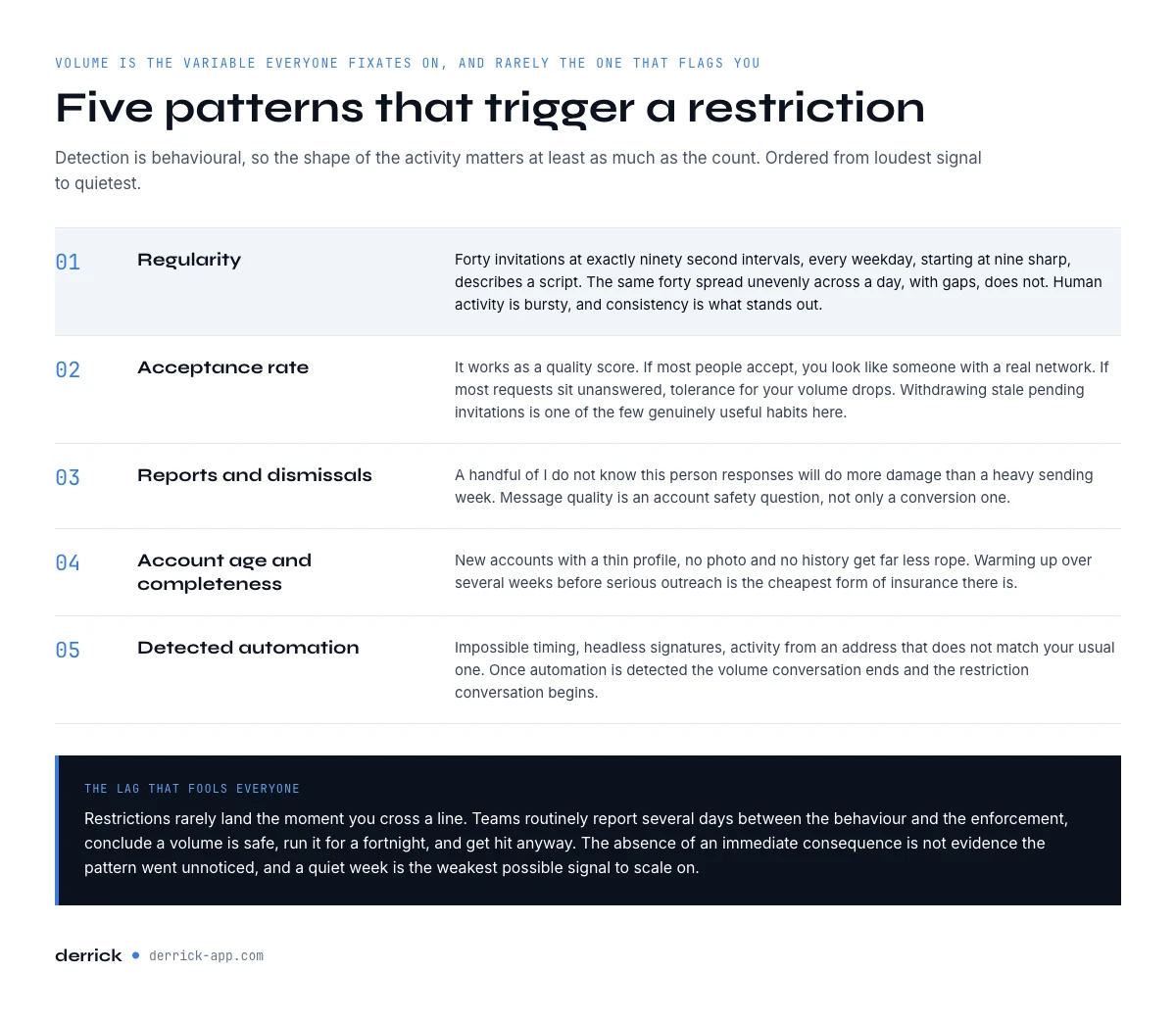
Volume is the variable everyone fixates on, and it is rarely the one that gets an account flagged first. LinkedIn's detection is behavioral, so the pattern matters at least as much as the count.
- Regularity is the loudest signal. Forty invitations sent at exactly 90 second intervals, every weekday, starting at 9:00 sharp, describes a script. The same forty spread unevenly across a day, with gaps, does not. Human activity is bursty and inconsistent, and consistency is what stands out.
- Acceptance rate acts as a quality score. If most people accept your requests, you look like someone with a real network. If the majority sit unanswered, you look like someone spraying, and the tolerance for your volume drops accordingly. Withdrawing stale pending invitations periodically is one of the few genuinely useful hygiene habits here.
- Reports and dismissals compound fast. A handful of "I don't know this person" responses or spam reports will do more damage than a heavy sending week. This is why message quality is an account safety question, not only a conversion question.
- Account age and completeness matter. New accounts with a thin profile, no photo, and no history get far less rope. Warming up over several weeks before any serious outreach is not superstition, it is the single cheapest form of insurance.
- Detected automation shortcuts everything else. Browser tools that drive the interface from your session leave traces: impossible timing, headless signatures, activity from an IP that does not match your usual one. When automation is detected, the volume conversation ends and the restriction conversation begins.
That last point is where tool choice stops being a preference and becomes a risk decision. Our comparison of LinkedIn scraping tools looks at exactly this trade-off, tool by tool.
Your account is restricted: what happens next
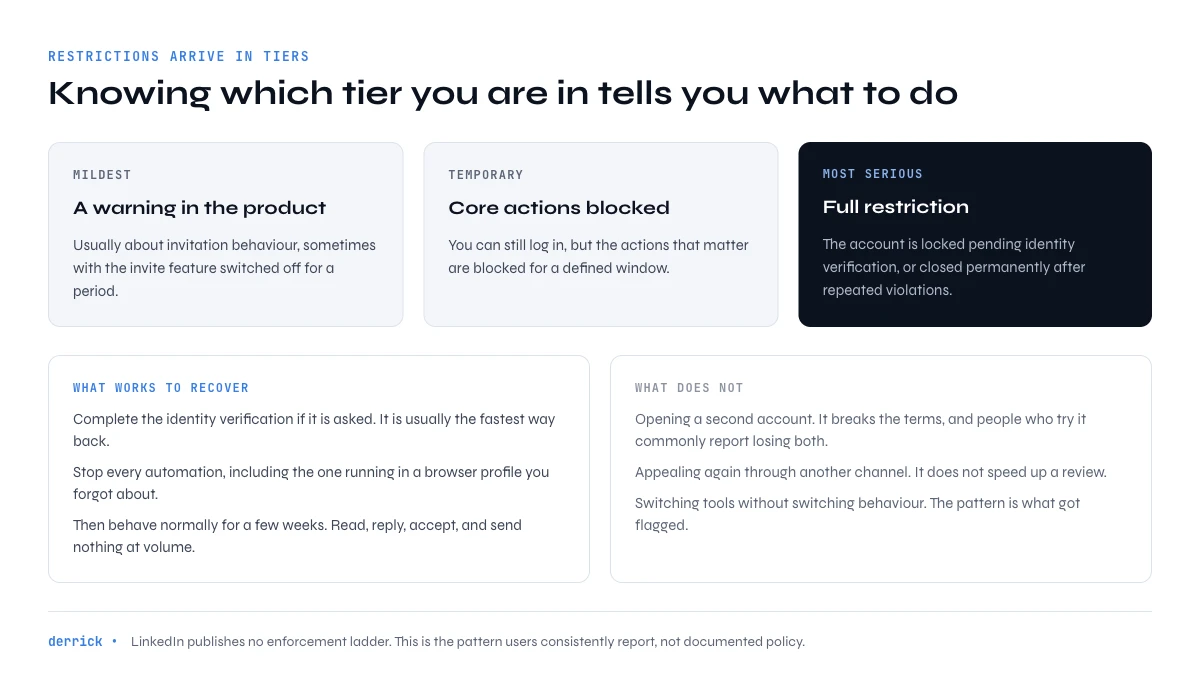
LinkedIn does not publish an enforcement ladder, so what follows is the pattern users consistently report rather than documented policy. Restrictions arrive in tiers, and knowing which one you are in tells you what to do. The mildest is a warning inside the product, usually about invitation behavior, sometimes with the invite feature disabled for a period. Next is a temporary restriction, where you can log in but core actions are blocked for a defined window. The most serious is a full restriction, where the account is locked pending identity verification, or permanently closed for repeated violations.
What works to recover is unglamorous. Complete the identity verification if it is requested, since it is usually the fastest path back. Stop all automation immediately and completely, including anything running in another browser profile you forgot about. Then behave normally for a few weeks: read your feed, reply to messages, accept requests, and send nothing at volume.
What does not work is equally worth knowing. Creating a second account to keep prospecting is a terms violation, and users who try it commonly report losing both accounts rather than one. Appealing repeatedly through different channels does not accelerate a review. And switching automation tools without switching behavior changes nothing, because the pattern is what was detected, not the vendor.
One practical note on timing, again from reported experience rather than published policy: restrictions rarely land the moment you cross a line. Teams routinely describe a lag of several days between the behavior and the enforcement, which is why they frequently conclude that a given volume is safe, run it for two weeks, and then get hit anyway. The absence of an immediate consequence is not evidence that the pattern went unnoticed, and a quiet week is the weakest possible signal to scale on.
The uncomfortable part is that a restricted account can cost you a book of relationships built over years. That asymmetry, weeks of sending against years of network, is the argument for the approach in the next section.
Prospecting that does not depend on LinkedIn limits
The structural fix starts with an honest statement, because plenty of tools sell the opposite one. Nothing removes LinkedIn from the loop. Derrick's LinkedIn enrichment runs through a Chrome extension connected to your own account, and any vendor claiming their LinkedIn data arrives without a LinkedIn session attached to it is describing something else.
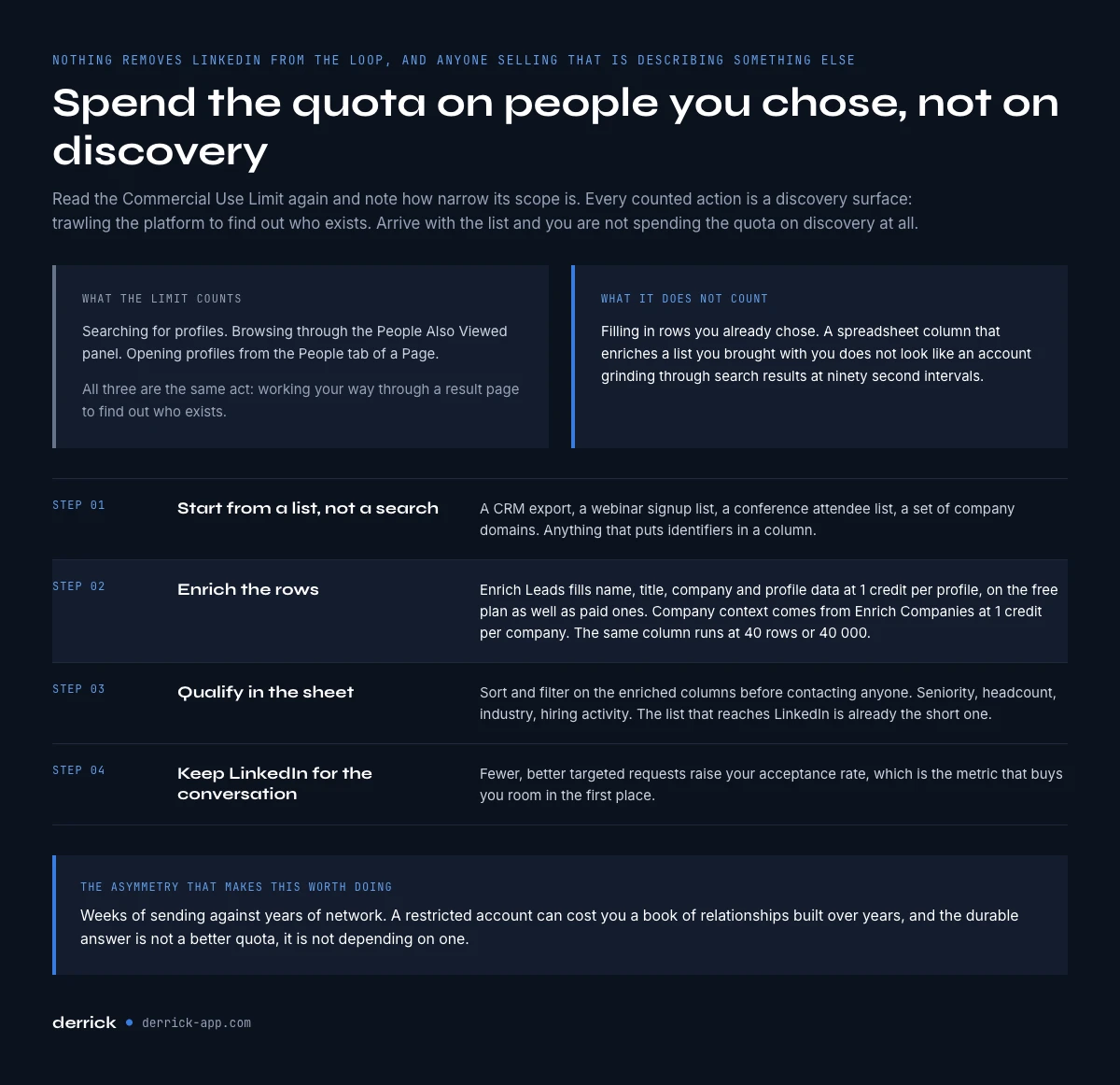
What changes is what your account spends its budget on. Read the Commercial Use Limit again, and note how narrow its scope is: LinkedIn counts searches, profiles reached through the People Also Viewed panel, and profiles opened from the People tab of a Page. Every one of those is a discovery surface, the act of trawling the platform to find out who exists. If you arrive with a list you already have and enrich those specific rows, you are not spending your quota on discovery at all. The same logic applies to the behavioral signals, since a spreadsheet column that fills in the people you already chose does not look like an account working its way through a search result page at 90 second intervals.
In practice this runs in the Derrick web app or inside a spreadsheet. Derrick runs in its web app or as a Google Sheets sidebar, so you work with columns instead of tabs and scripts. The workflow is short:
- Start from a list, not a search session. A CRM export, a webinar signup list, a conference attendee list, a set of company domains. Anything that puts identifiers in a column.
- Enrich the rows. Enrich Leads fills in name, title, company, and profile data for each row at 1 credit per profile, and it is available on the free plan as well as paid ones. Company level context comes from Enrich Companies at 1 credit per company. The same column runs whether you have 40 rows or 40,000, so the workflow you test this week is the one you scale next quarter. If your list is a column of profile URLs rather than names, the guide on turning LinkedIn URLs into names covers that first step.
- Qualify in the sheet. Sort and filter on the enriched columns before you contact anyone. Seniority, headcount, industry, hiring activity. The list that reaches LinkedIn is already the short one.
- Keep LinkedIn for the conversation. Fewer, better targeted requests raise your acceptance rate, which is the metric that buys you room in the first place.
The free plan includes 100 credits per month, which is enough to enrich a hundred profiles and see whether the match rate holds on your own data before you commit to anything. If your workflow is already spreadsheet shaped, the guide on getting LinkedIn data into Google Sheets covers the setup end to end, and there is a free methods walkthrough if you want to test the idea before spending anything. Teams that would rather run this from their own stack can drive the same enrichment through the enrichment API.
What the platform rules mean for your account
Account limits and platform rules are separate questions that people routinely merge. Staying under an observed invitation threshold says nothing about whether the way you collect data is acceptable to LinkedIn.
LinkedIn's terms of service restrict automated access to the platform, and that is a contractual matter between you and LinkedIn. It holds regardless of what any court has said about scraping in general. The case people reach for, hiQ Labs v. LinkedIn, concerned whether collecting publicly accessible data violates the US Computer Fraud and Abuse Act. That is a narrow question about one criminal statute, and a finding there does not rewrite the agreement you accepted when you created your account.
The practical consequence is about volume and pattern, not about whether a browser is involved. An account that grinds through search pages all afternoon looks like a machine; an account that fills a column of people you already identified does not, even though both involve your session. The exposure scales with how much undirected trawling you do, so the way to lower it is to cut the discovery volume rather than to hunt for a tool that pretends your account is not there. Contact people in their professional capacity, about something plausibly relevant to their role, and honor removal requests the first time they ask. For a closer look at what browser based collection does and does not put at risk, see our guide to the LinkedIn Chrome extension approach.
The bottom line
LinkedIn publishes a 30,000 connection ceiling, confirms the Commercial Use Limit exists while refusing to quantify it, and has never published an invitation rate limit at all. Every per day and per week number you have read is community observation, useful as a guardrail and worthless as a guarantee. Restrictions are triggered by patterns more than totals, so the account that sends thirty well targeted requests a week with a high acceptance rate is safer than the one that sends fifteen on a metronome to strangers.
The durable answer is not a better quota. It is removing the dependency: source and qualify from data, keep LinkedIn for conversations, and your pipeline stops being capped by a number nobody will tell you. Start free with 100 credits and enrich your first list in the web app, or in a spreadsheet you already know how to use.
Frequently asked questions
How many connection requests does LinkedIn allow per week?
What exactly is the Commercial Use Limit?
When does the limit reset?
Does Sales Navigator remove LinkedIn's limits?
How long does a LinkedIn restriction last?
How can I prospect at volume without risking my account?
Keep reading
Continue exploring this cluster


The LinkedIn Data Decay Report 2026: How Fast Scraped Data Goes Stale
Read →

Best LinkedIn Scrapers 2026: 10 Tools Compared (Pricing, Limits & Workflows)
Read →

Best LinkedIn Scraper Chrome Extensions 2026: 12 Tools Compared (Workflow, Risk, Pricing)
Read →

Free LinkedIn Scrapers 2026: 10 Tools Compared (Quotas, Limits, Workflow)
Read →