Free ABM Template for Google Sheets: Target Account List
Build and prioritise the companies you want to win: firmographics, tech stack, hiring signals and the decision maker to reach, all on one row.
Free, no signup. Google opens a “Make a copy” screen and the file lands in your own Drive.
Updated

Preview
What the template looks like
| Company | Website | LinkedIn company URL | Industry | Headcount | HQ | Tech stack | Hiring now? | Decision maker | Decision maker email | Tier | Owner | Notes |
|---|---|---|---|---|---|---|---|---|---|---|---|---|
| Derrick: Search Companies → | Derrick: Enrich Companies → | Derrick: Enrich Companies → | Derrick: Enrich Companies → | Derrick: Website Technologies → | Derrick: Company Hiring Signal → | Derrick: Find a company's people → | Derrick: Email Finder → | |||||
| Northwind Robotics | northwind-robotics.example | https://www.linkedin.com/company/example-northwind | Industrial Automation | 51-200 | Lyon, France | HubSpot, WordPress, Google Analytics | Yes: 3 sales roles | Claire Martin, Head of Sales | claire.martin@northwind-robotics.example | Tier 1 | ||
| Bluepeak Software | bluepeak.example | https://www.linkedin.com/company/example-bluepeak | Software Development | 11-50 | Berlin, Germany | Salesforce, Webflow, Intercom | Yes: 1 marketing role | Tom Becker, VP Marketing | tom@bluepeak.example | Tier 2 | ||
| Lumen Health | lumenhealth.example | https://www.linkedin.com/company/example-lumen | Hospitals and Health Care | 2-10 | Milan, Italy | Shopify, Klaviyo | No | Sofia Rossi, Founder & CEO | sofia@lumenhealth.example | Tier 3 |

What's inside
What's inside the template
Built for account-based teams, agencies and founders who sell to a defined list of companies. Start from a list of names or websites, then rank each account with a Tier once the firmographics, the tech stack and the hiring signal are on the row.
Tabs
- Start here: how to use it, the colour legend and links to each feature.
- Accounts: your list: 13 columns, 8 of them blue (filled by Derrick). 300 rows ready to fill, header and first column frozen, filters on.
Dropdowns
- Tier: Tier 1, Tier 2, Tier 3
The columns
- Company
- Website
- LinkedIn company URL
- Industry
- Headcount
- HQ
- Tech stack
- Hiring now?
- Decision maker
- Decision maker email
- Tier
- Owner
- Notes

How to use it
How to use it in 3 steps
- Make a copy (File > Make a copy) and open the Accounts tab.
- Paste your target companies: a name is enough, a website is better.
- Let Derrick fill the blue columns, then set a Tier to decide who you call first.

Blue columns
How Derrick fills the blue columns
Every blue column maps to one Derrick feature. Run it on your rows and the column fills itself, row by row. The black columns are yours.
- Search Companies Fills: LinkedIn company URL
Finds the LinkedIn company page that matches a company name or website. 1 credit per company.
- Enrich Companies Fills: Industry, Headcount, HQ
Returns a company's website domain, industry, headcount and headquarters from its name or LinkedIn page. 1 credit per company.
- Website Technologies Fills: Tech stack
Detects the tools a company runs on its website: CMS, analytics, CRM, payment and more. 2 credits per website.
- Company Hiring Signal Fills: Hiring now?
Tells you whether a company is hiring right now and for which roles, a strong buying signal. 1 credit per company.
- Find a company's people Fills: Decision maker
Lists the people who work at a company, filtered by job title, to pick the right decision maker. 1 credit per person.
- Email Finder Fills: Decision maker email
Finds the work email of a person from a name and a company or domain, with a multi-source lookup. 5 credits per email found.

Your list, any surface
Fill it in Google Sheets or in the Derrick web app
Derrick is a B2B data platform with four entries on one engine: the web app (nothing to install), the Google Sheets sidebar, Claude or ChatGPT through the Derrick MCP, and the REST API. Keep the template in Sheets and use the sidebar (Extensions > Derrick), or import the same list in the web app. The free plan gives you 100 credits every month, no credit card.
Install the add-on and enrich your lists without leaving your spreadsheet.
Install in Google Sheets →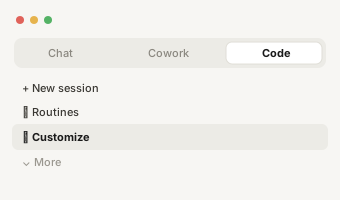
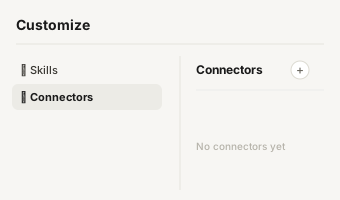
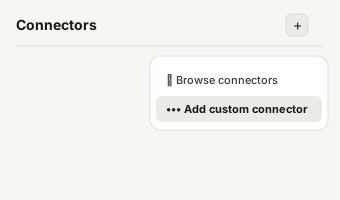
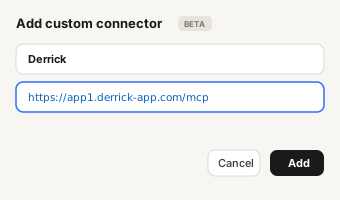
https://app1.derrick-app.com/mcp Call the same enrichment endpoints straight from your own stack or workflow.
Read the API docs →
More templates
More free Google Sheets templates
- Free Google Sheets template
B2B Lead List Template
One row per prospect: name, company, LinkedIn, job title, work email, phone and pipeline status.
- Free Google Sheets template
Cold Outreach Tracker Template
Log every email and LinkedIn touch, see follow-ups due and read your reply and meeting rates on a dashboard.
Frequently asked questions
Fill your list automatically with Derrick.
100 free credits every month, no credit card.