How to Find a Decision-Maker's Direct Phone by Company Name
Find a decision-maker's direct phone from a company name: resolve the company, find the right person, get and verify the number, then scale in Sheets.


You already know the company you want to reach. What you do not have is the one thing that gets you past voicemail and gatekeepers: the direct line of the person who can actually say yes. A company switchboard is not that number. A generic info@ inbox is not that number. What you need is a decision-maker's direct dial, and getting it starts from the company name, not from a phone book.
This guide walks the exact path from a company name to a decision-maker's direct phone: how to pin down the right organization, how to identify the person who owns the decision, how to surface their direct number, and how to do it cleanly and at scale without burning a morning per account. It also covers the calling rules you cannot ignore in 2026.
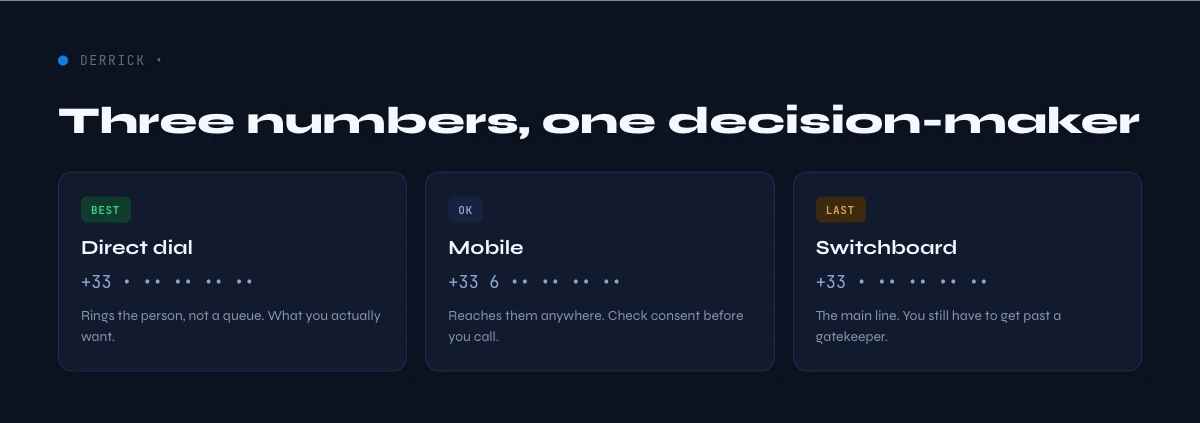
Direct dial, switchboard, mobile: know which number you actually want
Before you go hunting, be precise about the number you are chasing, because the wrong one wastes the whole effort.
- Company switchboard is the main line published on the website. It reaches a receptionist or an automated menu, and it is the number you use when you have nobody's name yet. Useful, but it is the start of a gatekeeper conversation, not a shortcut past it.
- Direct dial (DID) is the desk or extension line that rings the specific person. This is the number that turns a cold call into a real conversation, because it skips the front desk entirely.
- Mobile is the personal cell. It has the highest pickup rate for senior people who are rarely at a desk, and it is also the most heavily regulated to call. Treat it as the highest-value and highest-risk option at once.
The distinction matters for method choice. If you only need to reach the business, the company's main phone number is trivial to find. If you need a specific executive on the line, you are looking for a DID or a mobile, and those are almost never published, which is the whole reason this workflow exists. For the tradeoffs between calling a desk line and a cell, the mobile versus landline breakdown is worth a read.
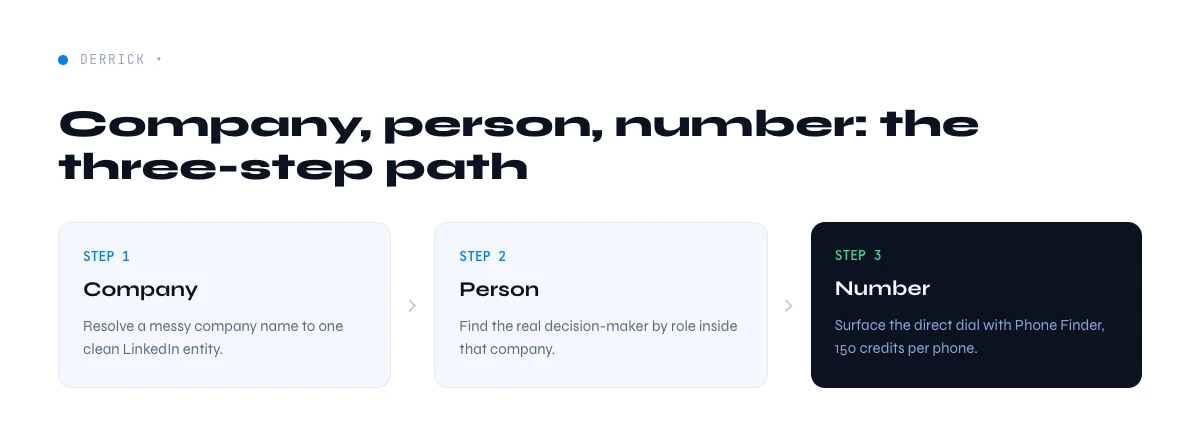
The three-step workflow: company, person, number
Finding a decision-maker's direct phone is never a single lookup. It is three steps chained together, and every step has to be right or the number you end up dialing belongs to the wrong person.
- Pin down the company. Resolve the company name to a single, unambiguous entity, usually its LinkedIn company page. This kills the biggest source of error: calling the wrong branch, the wrong subsidiary, or a same-name company in another country.
- Find the right person. Identify who actually owns the decision for what you sell. A VP of Sales, a Head of Operations, a CFO: the title depends on your offer, not on who is easiest to find.
- Get the number. Surface that person's direct dial or mobile, then verify it before you call.
Skip step one and you enrich the wrong org. Skip step two and you get a real number for the wrong human. The general B2B phone-finding methods apply throughout, but the ordering is what keeps you from wasting credits and calls on bad targets.
In the web app or Google Sheets
Reach the decision maker, not the switchboard
Calling the main line is how a good list turns into voicemail. Once the decision maker is identified on the row, Derrick looks up their direct number in your list and only charges when it finds one.
- Feature
- Lead Phone Finder
- Credit cost
- 200 credits per phone found
The first button opens the web app (nothing to install): 200 credits per phone found, available from the STANDARD plan. The second details the feature and its cost per plan.
Step 1: resolve the company name to a single entity
Company names are messy. "Acme", "Acme Inc", "Acme Group", and "Acme France" can be four different legal entities or one company with four listings. If you start from a fuzzy name, every downstream number is a coin flip.
The reliable anchor is the company's LinkedIn page, because it ties the name to a specific organization with a known headcount, industry, and location. Two ways to get there:
- Manual. Search the name on LinkedIn, confirm the location and size match your target, and grab the company URL. Fine for a handful of accounts.
- Automated. Resolve a name to its LinkedIn company URL programmatically. Derrick's Search Companies does exactly this: paste a company name and it returns the matching LinkedIn company URL, at 1 credit per company. That single anchor is what makes the next two steps deterministic instead of guesswork.
Getting this step right is not busywork. The most common reason a "verified" number fails on the call is that it was correct for a different Acme. Anchor the company first, and the rest of the chain inherits that precision.
On a large account the leadership bench is public and you can start from it rather than from a blank search. The NVIDIA leadership team and Salesforce leadership team pages list role, name and title, which is exactly the input the next step needs.
Step 2: find the actual decision-maker inside that company
Now that the company is fixed, you need the right person. This is where most lists go wrong, because they target a title that sounds senior instead of the title that owns the buying decision for your specific offer.
Start by mapping the decision. Ask who signs off on what you sell, who uses it day to day, and who controls the budget. In a small company that can be one founder. In a mid-market org it is usually a function head plus a finance approver. Once you know the role, you can find the human:
- List the company's people and filter by function. Instead of scrolling LinkedIn, pull the roster directly. Derrick's Find a company's people lists current and former staff of any company, optionally filtered by job function, at 1 credit per person, with no Sales Navigator seat required. Filter to "Sales leadership" or "Finance" and you get a short, targeted list instead of the whole org.
- Confirm on the profile. Check the person is current, in the right region, and senior enough to matter. A stale profile is the second most common reason a call goes nowhere.
You now have a named, verified person tied to the right company. That is the input the number-finding step actually needs, and it is why phone lookup from a LinkedIn profile works so much better than starting from a raw name.
Step 3: surface the direct dial (and what each method gives you)
Direct dials are rarely published, so this step is about which source actually returns a working number for your named person. Here is how the practical methods compare.
| Method | Coverage | Effort | Best for |
|---|---|---|---|
| Company website / directory | Switchboard only, rarely a DID | Low | Reaching the business, not a person |
| Gatekeeper call | Sometimes an extension | High | A single high-value account |
| LinkedIn profile signals | Occasional, if the person listed it | Medium | Founders and self-listed contacts |
| Data enrichment from the person | Direct dial or mobile when it exists | Low, and it scales | Lists, from one row to thousands |
For a single strategic account, a well-handled gatekeeper call can work. For anything past a handful of names, enrichment is the only method that holds up, because it takes the named person from step two and returns their number without you touching a phone menu. Derrick's Phone Finder does this at 200 credits per phone, and it is per-result-found, so you are only charged when a number is actually returned. When you specifically want a cell rather than a desk line, the mobile phone number workflow covers the extra steps.
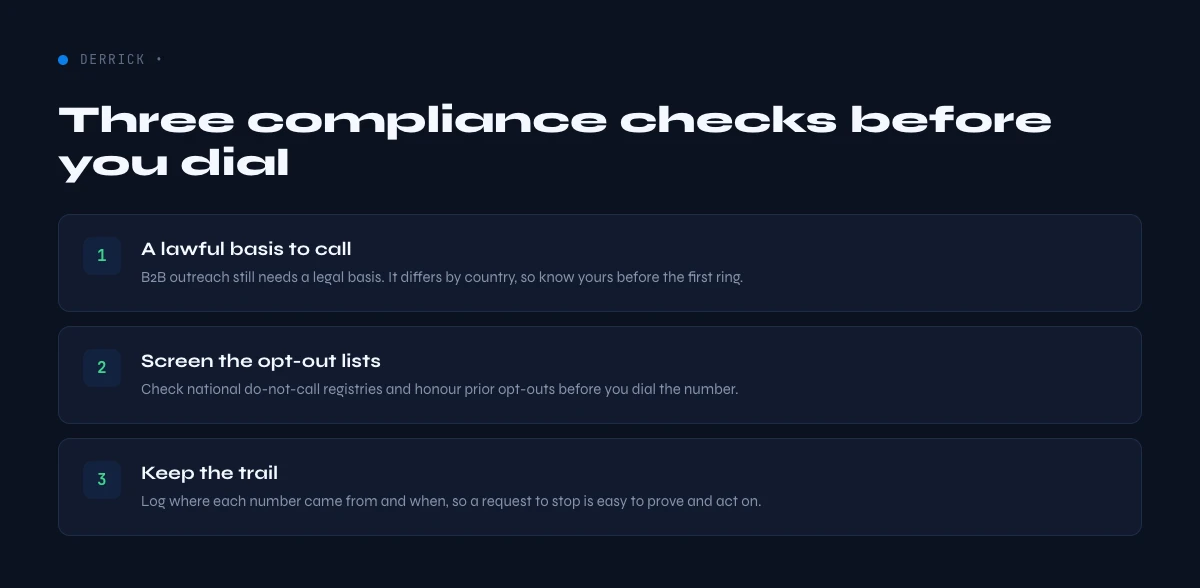
Before you dial: the compliance rules that actually bite
Finding the number is legal. How you use it is where the rules live, and they are not optional. Getting this wrong is expensive in a way that a bad list never is.
- United States. The TCPA governs calls and texts, especially to mobiles and especially anything automated. Manual B2B calls to a business line sit on safer ground than automated dialing to a cell, and SMS to a mobile generally needs consent. National and state do-not-call rules add another layer.
- Europe. Under GDPR, a phone number tied to a named person is personal data, so you need a lawful basis to process and to call. Legitimate interest can apply to B2B outreach, but it has to be documented, and several countries add their own telemarketing opt-out registers.
- Everywhere. Keep a record of why you hold each number, honor opt-outs immediately, and do not pass numbers around outside their purpose.
The practical takeaway: prefer a documented business rationale, lean toward desk lines for cold first contact, and reserve mobiles for cases where you have a stronger basis. Compliance is not a reason to skip phone outreach, it is the frame that keeps it working.
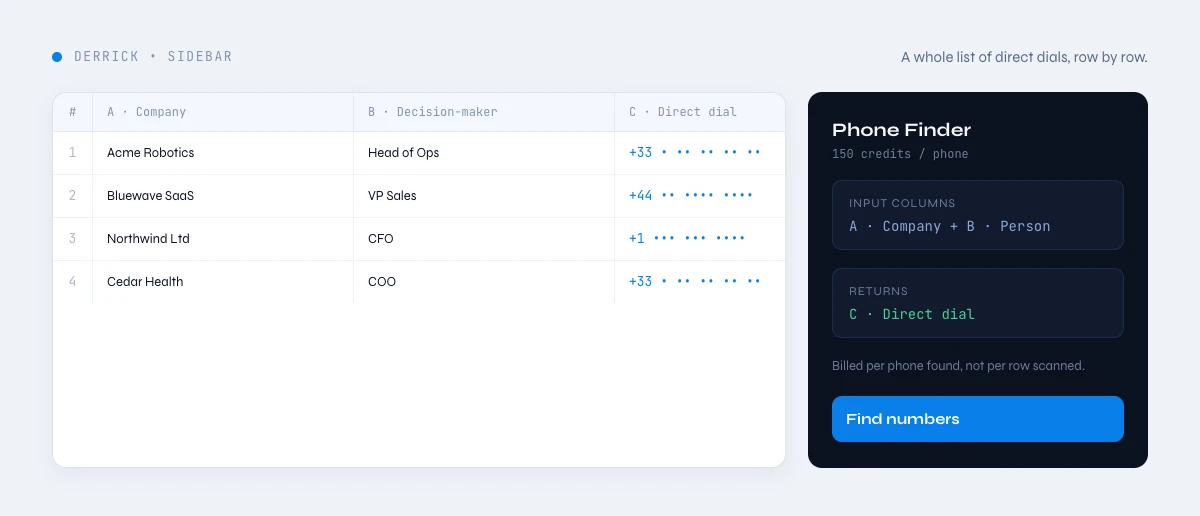
Do the whole thing at scale in Google Sheets
The three-step chain is fine for one account. For a list of two hundred, doing it by hand means switching tabs and tools per row until the day is gone. The fix is to run all three steps in one spreadsheet, in order, so each row inherits clean inputs from the last.
The same chain runs in the Derrick web app, with nothing to install; this walkthrough uses the Google Sheets add-on.
Here is the workflow inside a sheet with Derrick:
- Resolve companies. Paste your company names and run Search Companies to turn each name into its LinkedIn company URL, at 1 credit per company. Every row now points at a single, correct entity.
- Pull the right people. Run Find a company's people against those companies, filtered to the job function that owns your decision, at 1 credit per person. You get a named shortlist per account instead of the whole headcount.
- Find the direct dials. Run Phone Finder on that shortlist to return each person's number, at 200 credits per phone, charged only when a number is found. No number, no charge.
- Verify before you call. Sanity-check formats and flag anything stale, so a wrong-format entry never reaches a rep's dialer.
The order is the point. Resolve the company first so you never enrich the wrong org, pick the person second so you never buy a number for the wrong human, and only then spend the phone credits. Done this way, a two-hundred-account list goes from names to callable direct dials in the time it used to take to work through a dozen by hand. And because Derrick runs in its web app or the Sheets sidebar rather than as a formula you have to maintain, the same workflow scales the same way whether you are finding ten decision-makers or ten thousand.
One honesty note: no tool invents a direct dial that does not exist, and a good workflow does not pretend otherwise. What you are buying with this chain is coverage and speed on the numbers that are findable, plus the discipline of anchoring every number to the right company and the right person first.
Accuracy: hit rate, verification, and keeping the list fresh
A direct dial is only worth having if it rings the right desk today. Close the loop with a few checks so a dead number never costs a rep a dial.
- Expect a hit rate, not full coverage. Not every person has a findable direct dial, and senior people move. A realistic list has strong coverage, not perfect coverage, and that is fine when the workflow only charges for numbers actually found.
- Verify format and plausibility. A quick pass on phone number validation catches wrong country codes and malformed entries before they hit the dialer.
- Refresh on a cadence. Phone data decays as people change jobs. Re-run the chain on your active accounts periodically rather than trusting a number you found months ago.
- Tag the number type. Note whether each is a direct dial or a mobile, so reps know which compliance frame applies before they call.
Get the three steps in order, respect the calling rules, and verify before you dial, and "find a decision-maker's phone by company name" stops being a research project and becomes a repeatable step in your prospecting.
Frequently asked questions
Can you find a decision-maker's direct phone from just the company name?
What is the difference between a direct dial and a switchboard number?
Is it legal to call a decision-maker's phone number for B2B outreach?
How do I find the right decision-maker inside a company?
How much does it cost to find a phone number with Derrick?
How do I find decision-maker phones for a whole list of companies?
Keep reading
Continue exploring this cluster


How to Find a Company's Phone Number: 5 Effective Methods in 2026
Read →

How to Find B2B Phone Numbers: 7 Verified Methods + Tools (2026)
Read →

Phone Number Lookup from LinkedIn: How to Find Phone Numbers in 2026
Read →

How to Find a Mobile (Cell) Phone Number for B2B Sales (2026)
Read →