B2B Phone Number List
A B2B phone number list costs more per dialable line than per delivered row. Get the real math, the decay rules, and build your own free in Google Sheets.


A phone number list gets sold by the row, and that is the first thing to stop believing. Nobody dials a hundred thousand rows. A rep dials the ones that match an account worth calling, that ring a person rather than a lobby, and that are still connected this quarter. Those three filters decide what the list really cost you, and none of them show up on the invoice.
This guide treats the list as the unit of work rather than the individual lookup. What is actually inside one, what a purchased file bills you for, how to work out the cost of a row you can dial instead of a row you received, why the mobile and landline split changes the answer, and how to build the list yourself from a target account list you already own. If what you need is the number of one specific person, our guide to seven ways to source a B2B number covers that job instead.
The short version: price per delivered row is the wrong unit. Divide it by your match rate on your own accounts, then by the share that is the right line type, then by the share still valid, and you get the number that matters. Building from your account list makes each of those three measurable instead of guessed, and per-result pricing means the ones you never find cost nothing.
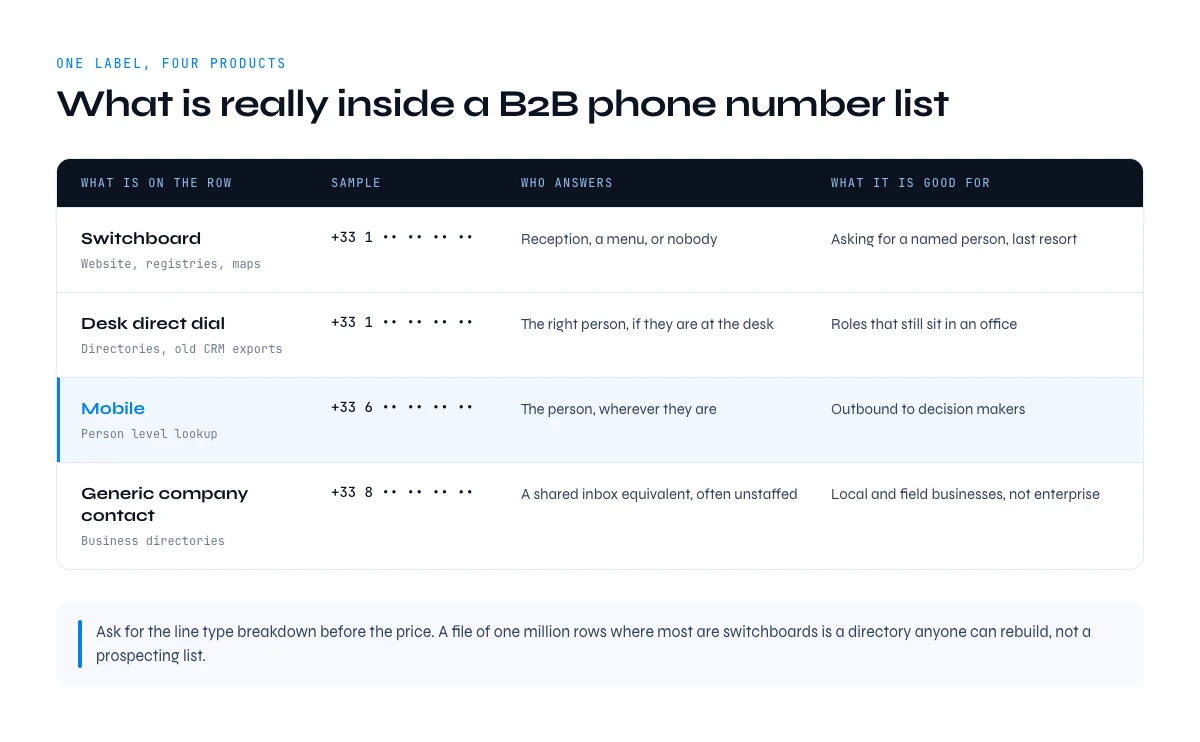
What is really inside a B2B phone number list
A row in a B2B phone number list is not one field. It is at minimum a person, a company, a number, a line type, a country format and a date. Drop the date and you cannot tell a fresh record from one that has been circulating for two years.
The word "list" also hides four products that get sold under the same label, and they are not interchangeable.
| What is on the row | Where it comes from | Who answers | What it is good for |
|---|---|---|---|
| Switchboard or main line | Company website, registries, map listings | Reception, an IVR menu, or nobody | Reaching a named person by asking for them, last resort |
| Desk direct dial | Directories, old CRM exports, signature scraping | The right person, if they are at the desk | Roles that still sit in an office |
| Mobile | Person-level lookup against the individual | The person, wherever they are | Outbound to decision-makers |
| Generic company contact | Aggregated business directories | A shared inbox equivalent, often unstaffed | Local and field businesses, not enterprise |
This is why "one million B2B phone numbers" is a meaningless headline. If eight hundred thousand of them are switchboards harvested from company websites, you bought a directory anyone can rebuild with a crawler, not a prospecting list. Ask for the line type breakdown before the price. A vendor who cannot produce it is telling you something about the file.
The second question is account overlap: not "how many rows" but "how many of your rows sit at the companies on this list of mine". A file that is enormous and 12% relevant to your territory is smaller, in practice, than one a tenth its size built against your accounts.
Buying a list: what you pay for and what you get
Vendors bill per record delivered, as a flat fee for a file, or as a seat with a quota. The shapes differ, the blind spot is the same: you are charged for delivery, not for usefulness.
Three things are silently your problem the moment the file lands.
- Coverage against your accounts. A file is built to be big, not aimed. The share landing on companies you actually sell to is your risk, and you discover it after payment.
- Line type mix. Nothing in a per-record price separates a mobile from a lobby phone. You paid the same for both.
- Age. A file is a photograph of something that moves, and it starts ageing on the day it is generated, not the day you receive it.
A fourth point rarely comes up in the sales call: exclusivity. A file assembled once and sold many times reaches several teams in the same quarter, often with a comparable pitch. The data is not wrong, but the person picking up has heard a version of your opening line recently, and the connect rate you modelled will not survive that.
Then there is provenance. When a prospect asks where you got their mobile, "we bought a file" is a weak answer, and a bought file rarely carries a per-row source. Check the national do-not-call regime for the markets you dial and run your own suppression list before the first call.
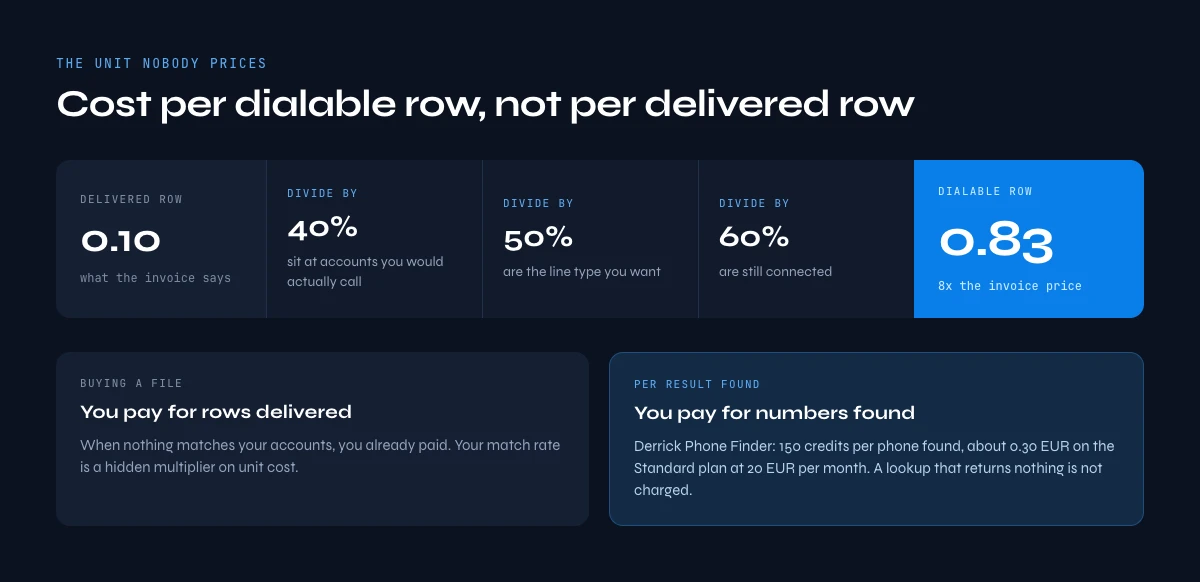
The real cost per usable line, not per delivered line
Here is the arithmetic nobody puts on the pricing page. Start from the price of a delivered row and divide by the three rates that stand between delivery and a dial tone.
cost per dialable row = price per delivered row
                        / account match rate
                        / right line type rate
                        / still valid rate
Plug in your own figures rather than benchmarks, but run the shape once to see how fast it moves. Take a file at 0.10 per record. Suppose 40% of the rows sit at companies you would actually call, 50% of those are the line type you want, and 60% of those are still connected. The delivered row cost 0.10. The dialable row cost 0.83. Off by a factor of eight, and all three rates were assumptions you could not test before paying.
Add the second cost, which is larger and never invoiced. If a rep works 100 rows and 65 are dead ends, the expensive part was never the file. It was the hour. Halving the dead-end rate beats halving the price per record, by a wide margin.
Per-result pricing removes the first divisor entirely. Derrick's Phone Finder costs 200 credits per phone found and is billed per result found: a lookup that returns nothing is not charged. On the Standard plan at 20 EUR per month for 10,000 credits, that works out at 0.40 EUR per number found. On Pro, at 175 EUR for 100,000 credits, it is 0.35 EUR. Those are not prices per row attempted, which is the whole point: your match rate stops being a hidden multiplier on unit cost and becomes a coverage figure you can measure.
| Buying a file | Building per result | |
|---|---|---|
| You pay for | Rows delivered | Numbers found |
| When nothing matches | You already paid | Nothing is charged |
| Freshness | Fixed at generation date | Fixed at the day you run it |
| Aimed at your accounts | Partly, by luck of overlap | Entirely, you supply the accounts |
| Also sold to others | Usually | Not applicable |
| Refresh unit | The whole file | One segment, one row |
In the web app or Google Sheets
Buy or build, compared on the same unit
A purchased list charges per record, connected or not. Derrick charges per number actually returned, which makes the two options comparable: count the numbers you got and divide by what you spent.
- Feature
- Lead Phone Finder
- Credit cost
- 200 credits per phone found
The first button opens the web app (nothing to install): 200 credits per phone found, available from the STANDARD plan. The second details the feature and its cost per plan.
Mobile or landline decides whether the list works
A desk direct dial can be perfectly valid data and completely useless. The number exists, the format is right, the line is connected, and it rings in an office where the person you want sits two days a week. Validity and reachability are different properties, and only one books meetings.
That is why line type belongs in the list as a column, applied as a filter before dialing rather than as a note discovered afterwards. Sort by line type, work the mobiles first, and keep switchboards for the specific play they are good at: calling reception and asking for a person by name, which works far better than asking for a job title. Our guide to getting a mobile rather than a switchboard covers the sourcing side of that split.
The split also changes how you read a coverage number. A provider quoting 70% coverage on your accounts is quoting rows, not mobiles. Ask for the same figure restricted to mobiles and it usually drops sharply, because person-level mobile data is harder to assemble than company data pulled off public pages. That gap is the honest measure of the list.
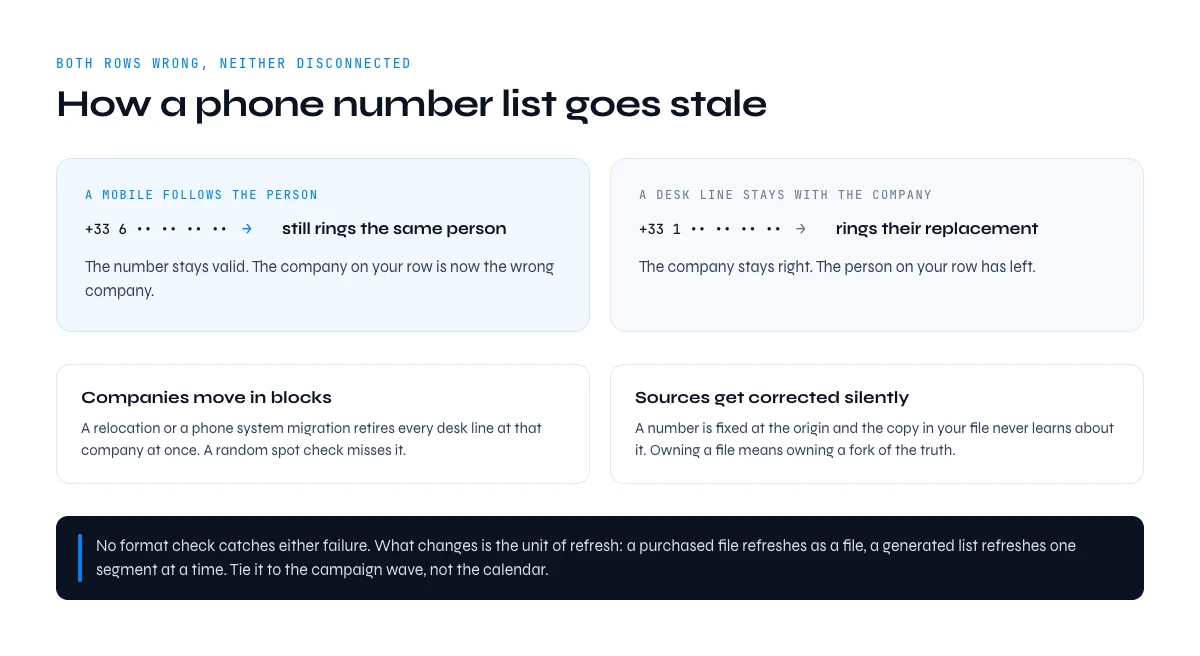
How fast a phone number list goes stale
Decay has three drivers and they do not fail the same way, which is why a single "accuracy" percentage tells you almost nothing.
People move. This is the counterintuitive one, because the two line types break in opposite directions. A mobile follows the person, so the number stays valid and the company on your row becomes wrong. A desk line stays with the company, so the company stays right and the person becomes wrong. Both rows are wrong. Neither is disconnected. No format check will ever catch either of them.
Companies move. Relocations, phone system migrations and number range changes retire desk lines in blocks: you lose every row at that company at once, which is exactly the failure a random spot check misses.
Sources get corrected without telling you. A number gets fixed at the origin, and the copy sitting in your file does not learn about it. Owning a file means owning a fork of the truth.
The consequence is about the unit of refresh, not the frequency. A purchased file refreshes as a file: you buy it again. A generated list refreshes one segment at a time, so you re-run the accounts you are calling this month and leave the rest alone. Tie it to the campaign wave, not the calendar.
Job changes are the trigger worth automating, because they invalidate rows silently. Derrick's Signal tracks leads and accounts for job changes, funding rounds and hiring activity, from 20 EUR per month, and fires an alert when one of your rows becomes a different person's row. That alert is your re-run list.
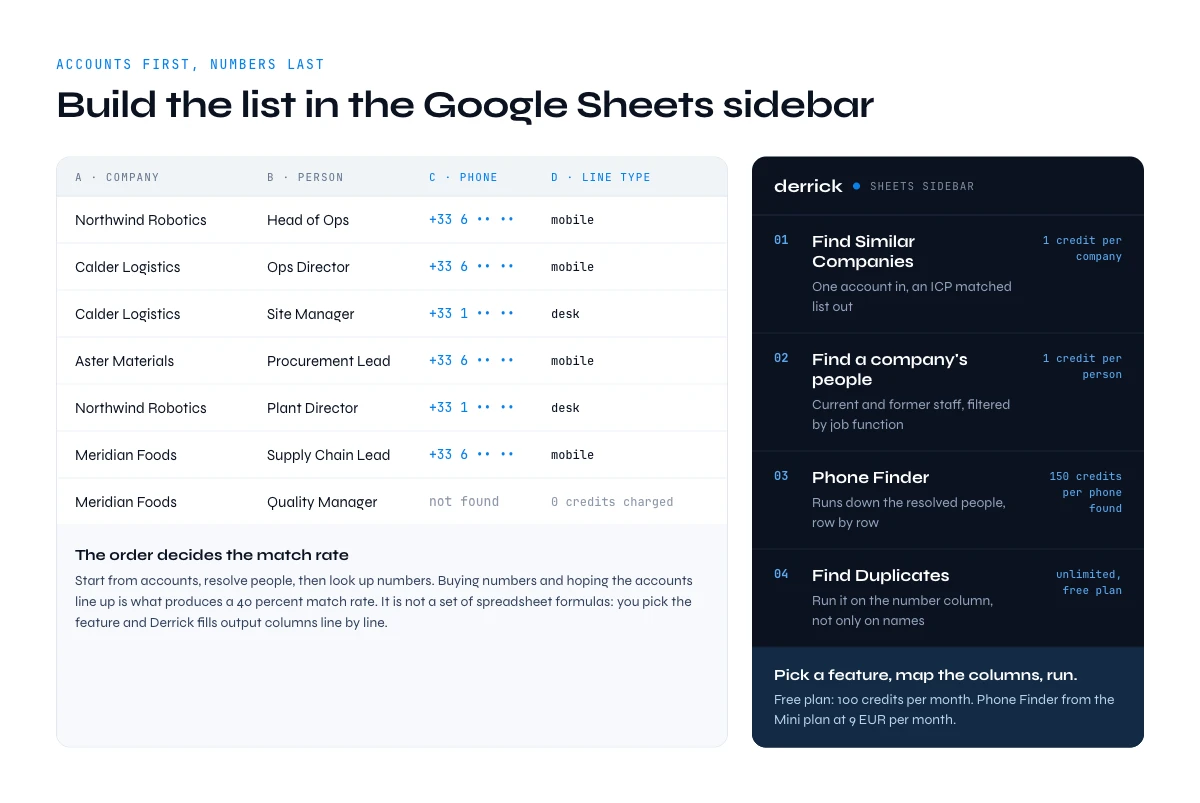
Build a phone number list from your target accounts
The order matters more than the tooling. Start from accounts, resolve people, then look up numbers. The other way round, buying numbers and hoping the accounts line up, is what produces the 40% match rate above. Resolving people is the step most bought lists skip, and on large accounts the names are already public: Nike's leadership roster and Disney's senior executives give you a starting column of names and titles before a single lookup runs.
- Fix the account list first. If you cannot name the companies, no file will fix that. When you have a good seed set, Find Similar Companies turns one company into an ICP-matched list at 1 credit per company, available on the free plan, which is how you widen the target without widening the noise.
- Resolve the right people. Find a company's people lists current and former staff for any company at 1 credit per person, filtered by job function, so you get the three names worth calling instead of the whole headcount. If you already hold profile URLs, Enrich Leads fills in the identity fields at 1 credit per profile on the free plan. The full path from a company name to the right person is in our walkthrough on reaching a decision-maker's direct line.
- For local and field businesses, take a shortcut. Google Maps Scraper imports up to 200 businesses per query with name, phone, website, rating and address at 1 credit per place. For a restaurant, clinic or garage segment, that is the phone list built in one step, no lookup stage at all.
- Look up the numbers. Phone Finder runs down the resolved people at 200 credits per phone found, from the Standard plan at 20 EUR per month. Rows where nothing is found cost nothing, so you can run the whole column and read the coverage afterwards.
- Clean before you dial. Find Duplicates is unlimited and on the free plan. Run it on the number column, not only on names: the same person spelled two ways is two calls to one phone, and the same switchboard repeated across forty rows is the signal that forty rows are not what you think they are.
The account list, the people lookups and Phone Finder also run in the Derrick web app, with nothing to install. In Google Sheets, all of it runs in the sidebar, on the rows already in front of you. It is not a set of spreadsheet formulas: you pick the feature, map the input columns, and Derrick fills output columns line by line.
Two other surfaces exist when the list is not a one-off. The REST API, from the Plus plan at 47.50 EUR per month, triggers the same lookups from a pipeline or a CRM through 3000+ integrations via Zapier, Make and N8N, so a new account arrives with its numbers already attached. The Derrick MCP server, also from the Plus plan at 47.50 EUR per month, exposes the same enrichment to Claude Desktop, ChatGPT and any MCP-compatible assistant, which is the fastest route when you want ten numbers now. Credits roll over on paid plans.
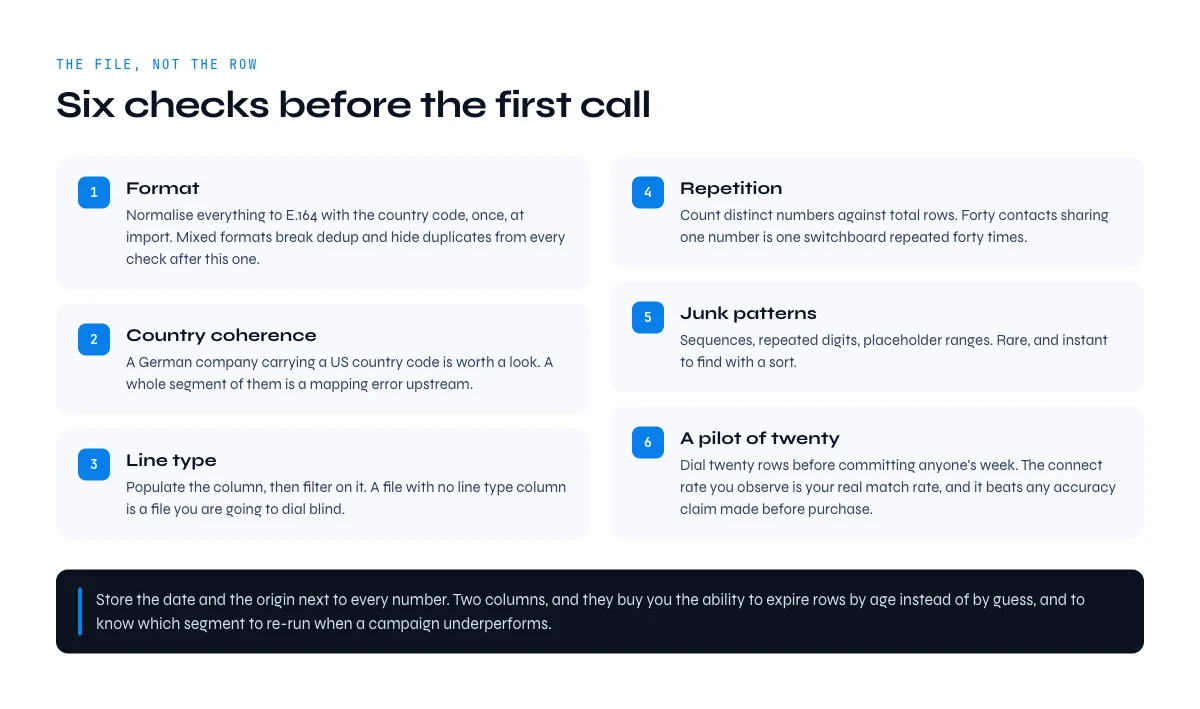
Verify every row before the first call
Verifying a list is not the same job as verifying one number. On one number you ask "is this correct". On a list you ask what the file says about itself, and the answer shows up in patterns, not in individual rows.
Six checks, in the order that catches the most for the least effort.
- Format. Normalise everything to E.164 with the country code, once, at import. Mixed formats break dedup, break dialers and hide duplicates from every check that follows. The rules per country are in our reference on validating international number formats.
- Country coherence. A German company with a row carrying a US country code is not necessarily wrong, but it is worth a look. A whole segment of them is a mapping error upstream.
- Line type. Populate the column, then filter on it. A file with no line type column is a file you are going to dial blind.
- Repetition. Count distinct numbers against total rows. If forty contacts at one company share one number, you have one switchboard duplicated forty times, not forty direct dials.
- Junk patterns. Sequences, repeated digits, placeholder ranges. Rare, and instant to find with a sort.
- A pilot of twenty. Dial twenty rows before committing anyone's week. The connect rate you observe is the real match rate for the arithmetic above, and it beats any accuracy claim made before purchase.
Store the date and the origin next to every number. Two columns, and they buy you the ability to say where a number came from, to expire rows by age instead of by guess, and to know which segment to re-run when a campaign underperforms.
Buy or build: what actually decides it
Volume is not the deciding factor, which is where most of these comparisons go wrong. Three questions settle it faster.
Is your account list already defined? If yes, building is almost always cheaper per dialable row, because every lookup is aimed. If no, a purchased file will not define it for you. It will hand you a large sample of companies you have not decided to sell to yet, and that decision does not get easier once it is in a spreadsheet.
Is this a one-off or a repeating motion? A market study, a single event campaign, an entry into a territory you have no access to: those are reasonable reasons to buy a file once. A quarterly outbound motion against the same segment is not. You will be buying the same decay twice a year.
How fresh does it need to be on the day of the call? If the answer is "same week", a file cannot deliver that by construction, whatever its refresh cadence. Generating the segment the week you dial it is the only version of freshness that holds.
The hybrid is worth naming, because it is where most teams land. Assemble the company layer once, since companies change slowly, and generate the person and phone layer per campaign, since people move constantly. Money on the part that lasts, freshness on the part that does not.
Six mistakes that quietly ruin a phone number list
- Shopping by volume. The comparison that matters is coverage on your named accounts and the mobile share inside that coverage. Total row count answers neither.
- No line type column. Without it, mobiles and lobby phones sit in the same queue and the rep discovers the difference one call at a time.
- Dialing the whole file. Twenty rows first. The pilot costs an hour and reprices the entire list.
- Storing a number without its date and source. A number with no context cannot be expired, defended, or re-run intelligently. It just sits there getting older.
- Letting the list live in a document. A list in a slide or a static export cannot be refreshed. Keep it in the sheet where the enrichment runs, so re-running a segment is a filter and a click.
- Writing a switchboard into the direct dial field. This one poisons everything downstream. Every future dedup, every dialer, every report inherits the mistake, and it is close to impossible to unpick a year later.
The pattern behind all six is the same: a list is a live object with a maintenance cost, not a file you own. Treat it that way and the buy versus build question answers itself, in favour of whichever route lets you regenerate one segment this week without repurchasing the other ninety percent.
If budget is the constraint rather than volume, our rundown of free ways to find a phone number maps where the no-cost methods stop working, which is usually the moment a list becomes the unit of work.
Frequently asked questions
What is a B2B phone number list?
Is it better to buy a phone number list or build one?
How much does a B2B phone number list cost?
How fast does a phone number list go out of date?
How do you build a phone number list from a list of companies?
Should a phone number list contain mobiles or landlines?
How do you check the quality of a purchased phone number list?
What should you store next to each number?
Keep reading
Continue exploring this cluster


Mobile vs Landline in B2B 2026: Why the Desk Phone Stopped Working
Read →

The State of B2B Phone Data 2026: Decay, the Mobile Shift & What It Costs
Read →

How to Find B2B Phone Numbers: 7 Verified Methods + Tools (2026)
Read →

Phone Number Lookup from LinkedIn: How to Find Phone Numbers in 2026
Read →