Cold calling tips sorted by the moment a call dies, with the number to watch
Use these 12 cold calling tips, each with the exact line to say and the number to watch, plus a free scorecard to rate your own calling session.


These cold calling tips are sorted by the moment a call dies: before you dial, in the first thirty seconds, during the conversation, and on the way out. Each one comes with the line to say and the number that tells you whether it works. If you need the vocabulary first, the definition of cold calling sits in our glossary. Everything else is on this page: twelve tips, a table that fits on one screen, a seven-step version of how to make a sales call, three openers to read out loud, and a scorecard to rate your own session when you hang up.
The full six-block script, the objection lines, gatekeepers, voicemail and how many attempts to make are in our B2B cold call script. This page links to it where it matters and does not repeat it. What you get here is the habit layer around the script: how you run a session, what you do with your voice and your silences, and how you score yourself afterwards.
Cold calling tips before the session
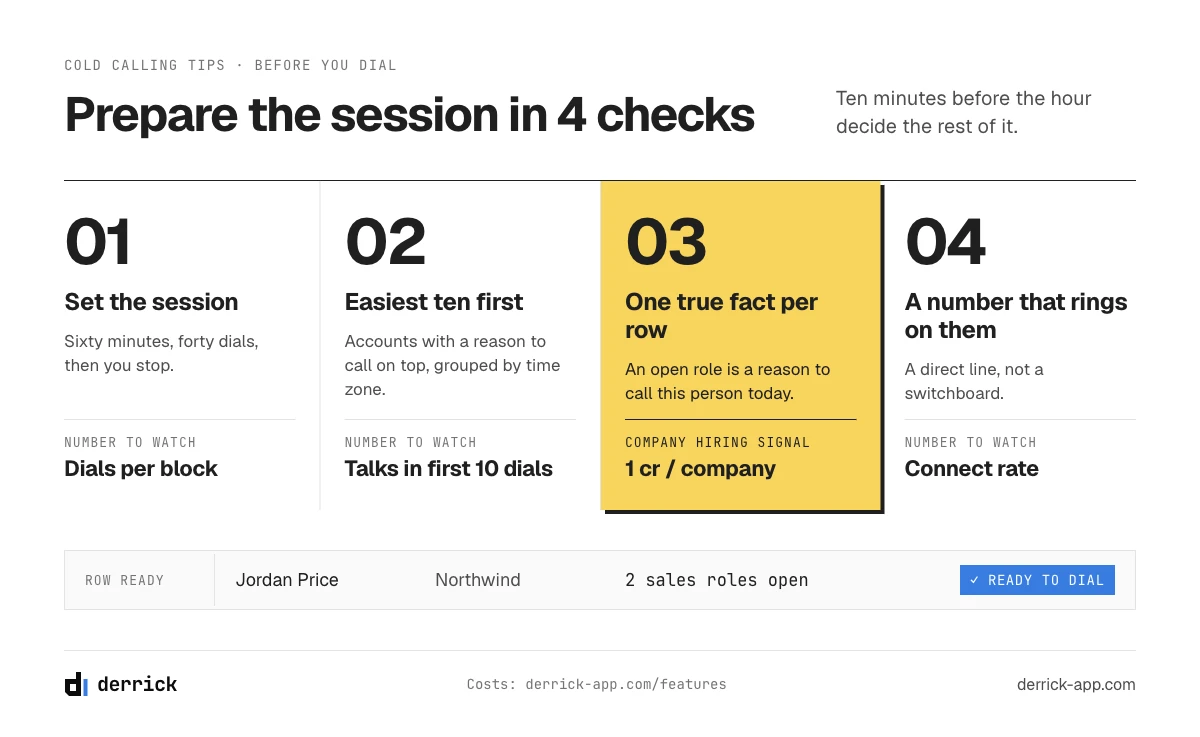
The first three tips are decided before the phone is in your hand. They take ten minutes and they change the rest of the hour.
1. Set the session before you open the list
The line to say (to yourself): "Sixty minutes, forty dials, then I stop."
Pick a block of time, a number of dials and a stop time, and write them at the top of your call log. A session with a fixed end is easier to start, because you are committing to an hour and not to an open-ended afternoon of rejection. It also gives you a clean unit to compare: this Tuesday's hour against last Tuesday's hour, instead of a vague feeling about the week. Put the phone on do not disturb for everything except the dialler, close the inbox, and keep the list and the log side by side.
The number to watch: dials completed per block. If you planned forty and made twenty-two, look at what happened between the calls before you touch the pitch.
2. Order the list so the first ten calls are the easiest
Put the accounts where you already have a reason to call at the top: a role that was just posted, a colleague who pointed you to them, a person who opened your last email. Then group the rest by time zone so you are not calling the West Coast at eight in the morning their time. The first ten dials set your tone for the hour. Starting on accounts where you have something specific to say gets you into real conversations early, while you are still warming up.
The number to watch: conversations in the first ten dials of the session.
3. Call a person, on a number that is theirs, with one fact
One line, because the detail lives elsewhere: before you dial, know one true thing about the person, and make sure the number rings on them and not on a switchboard. The four columns that decide whether a call connects are laid out in the cold call script, and the difference between a mobile and a desk line is measured in our mobile versus landline report.
The number to watch: connect rate, meaning calls picked up by the right person divided by dials.
Hiring checks do not need a LinkedIn account connected. The details of what the signal returns are on the Company Hiring Signal page.
Cold calling tips for the first 30 seconds
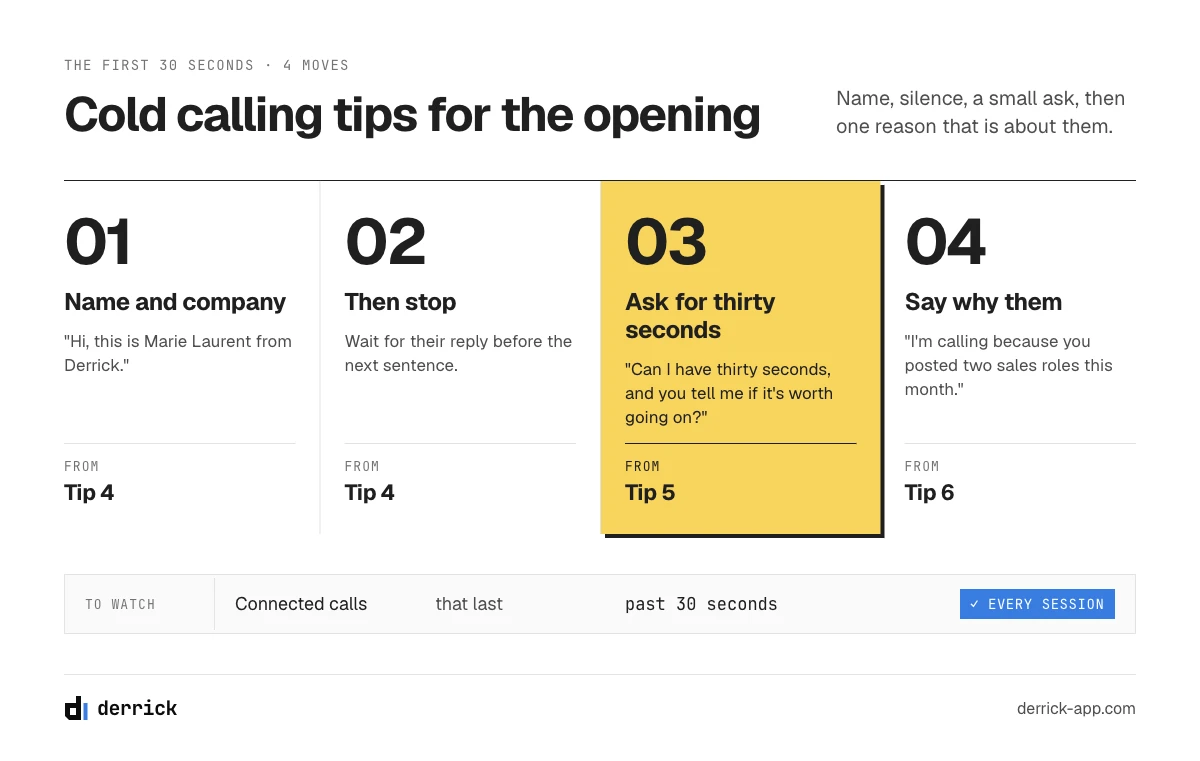
The opening is where a cold call is decided, and it is also the part our script page takes apart block by block, with the failure mode of each. So here are the three tips in one line each, with the sentence, and a link to the full version.
4. Say your full name and your company, then stop
The line: "Hi, this is Marie Laurent from Derrick." Then wait for their reply before you say anything else. The reason for the pause and what to do with the answer are in the opener and permission blocks of the script.
5. Ask for a specific amount of time
The line: "I know I'm calling out of the blue. Can I have thirty seconds, and you tell me if it's worth going on?" A number of seconds is a request someone can actually say yes to.
6. Say why them, in one sentence
The line: "I'm calling because you posted two sales roles this month." The fact from tip 3 goes here, and nowhere earlier.
The number to watch for all three: the share of connected calls that last past thirty seconds. Log it for every session and it tells you, on its own, whether your opening needs work.
Cold calling techniques for the conversation
Once the person has agreed to listen, the call stops being about your words and starts being about theirs. These three techniques are about pace, silence and memory.
7. Stand up and slow down
The line to say: any of them, at about two thirds of your normal speed.
Nerves speed you up, and a fast voice sounds like a pitch. A slower pace gives the other person room to interrupt, which is what you want. Standing is the easiest way to get there: plenty of callers find their voice steadier on their feet. Try it on two consecutive calls, the opener seated and fast, then standing and slow, and listen to both recordings if you have them. You will hear which one you would rather answer.
The number to watch: the share of the call where you are talking. On a first call, if it goes over half, you are presenting.
8. Ask one question, then stay silent until they answer
The line: "How do you handle that today?" Then count to three in your head before you say anything else.
The silence after a question feels long to you and short to them. They are thinking. The moment you fill it with a second question or a softer version of the first, you give them an easy way out and a shorter answer. Pick your question in advance so you are not composing it live, and make it about how they work now, which anyone can answer. If you need a guide to what qualifies a lead on a first call and what can wait, see how to qualify sales leads.
The number to watch: questions answered in more than one sentence. A yes or a no means the question was closed, or you broke the silence too early.
9. Reuse their words when you sum up
The line: "So if I heard you right, the problem is that the numbers ring at empty desks. Is that it?"
Write down the exact phrase they used to describe their problem, and give it back to them before you move to the next step. People agree more readily with their own words than with your category's vocabulary. It also checks your understanding: if they correct you, you have learned something before you proposed the wrong thing. When the answer is an objection instead, the lines for the five common ones are in our guide to handling sales objections.
The number to watch: how often they correct your summary. Never corrected can mean you are summarising too vaguely to be wrong.
In the web app or Google Sheets
A number that rings on the person you are calling
Every tip on this page assumes the phone rings on the right person. Import your call list into the web app or the Google Sheets sidebar and Derrick looks up a direct number for each contact from their LinkedIn profile URL, and only charges when it finds one. No LinkedIn account to connect.
- Feature
- Lead Phone Finder
- Credit cost
- 200 credits per phone found
The first button opens the web app (nothing to install): 200 credits per phone found, available from the STANDARD plan. The second details the feature and its cost per plan.
Getting out of the call
A good conversation that ends without a date is a conversation you will have to start again from zero. The last three tips are about what leaves the call with you.
10. Send the invite while they are still on the line
The line: "I'm sending the invite for Thursday at two now. Can you tell me when you see it?"
Proposing a precise slot is the close block of the script. This tip is the step after it: do not hang up with a verbal yes and a promise to send something. Send the calendar invite during the call and wait for them to see it. A meeting they accepted in front of you is harder to forget than one they read about in an email an hour later.
The number to watch: meetings held divided by meetings booked. If people accept and then do not show up, the invite was sent too late or said too little about what the meeting is for.
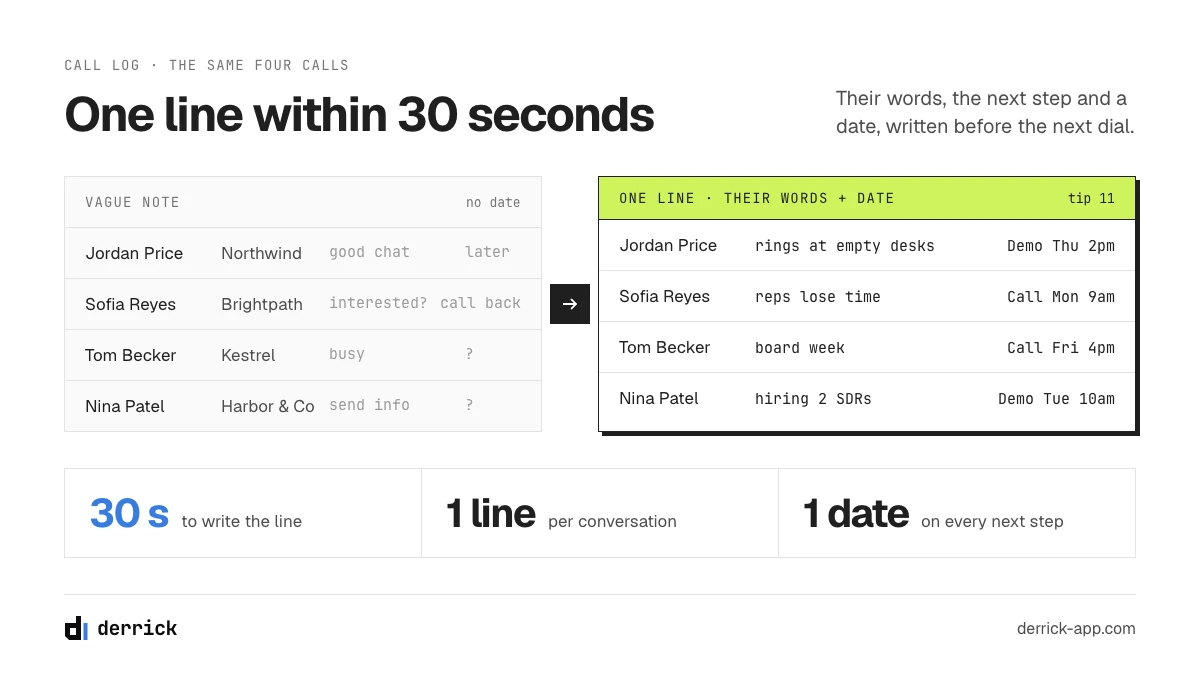
11. Write one line within thirty seconds of hanging up
The line to write: what they said, in their words, plus the next step and its date. "Numbers ring at empty desks since the office move. Demo Thursday 2pm."
Thirty seconds after the call you remember the exact phrase. Three calls later you remember a vague impression, and the next time you call this person you will be starting from scratch. One line is enough, as long as it holds their words and a date.
The number to watch: the share of conversations with a note. It should be all of them.
12. Listen back to one call per session
At the end of the block, take ten minutes. If your team records calls, pick one ordinary conversation and listen to it once with the scorecard below in front of you. Write down one thing to change in the next session, and only one. Recording rules differ by market, some require the other person's consent, so check what applies to you before you record. If the call you want to review ended on voicemail or a gatekeeper, the lines and the retry rhythm for those are in the script page's section on the second dial.
The number to watch: one change written down per session, and whether it shows up in the next session's scores.
The 12 cold calling tips at a glance
The whole list on one screen. Print it, or keep it next to the call log for your next session.
| Moment | Tip | The line | The number to watch |
|---|---|---|---|
| Before | 1. Set the session | "Sixty minutes, forty dials, then I stop." | Dials per block |
| Before | 2. Easiest ten first | (order of the list) | Conversations in the first ten dials |
| Before | 3. A person, their number, one fact | (the fact goes in tip 6) | Connect rate |
| First 30 s | 4. Full name, company, stop | "Hi, this is Marie Laurent from Derrick." | Calls past 30 seconds |
| First 30 s | 5. A specific amount of time | "Can I have thirty seconds?" | Calls past 30 seconds |
| First 30 s | 6. Why them | "I'm calling because you posted two sales roles." | Calls past 30 seconds |
| Conversation | 7. Stand up, slow down | (any line, slower) | Your share of talk time |
| Conversation | 8. One question, then silence | "How do you handle that today?" | Answers longer than one sentence |
| Conversation | 9. Their words back | "So if I heard you right..." | Summaries they correct |
| Way out | 10. Invite on the line | "Can you tell me when you see it?" | Meetings held / booked |
| Way out | 11. One line in 30 seconds | Their words + next step + date | Conversations with a note |
| Way out | 12. Listen back to one call | (one change for next time) | Change visible in next scores |
None of these numbers is a benchmark. They are definitions: what to count, so that you can compare your session with your own last session. A team average from someone else's market and list tells you very little about yours.
How to make a sales call, step by step
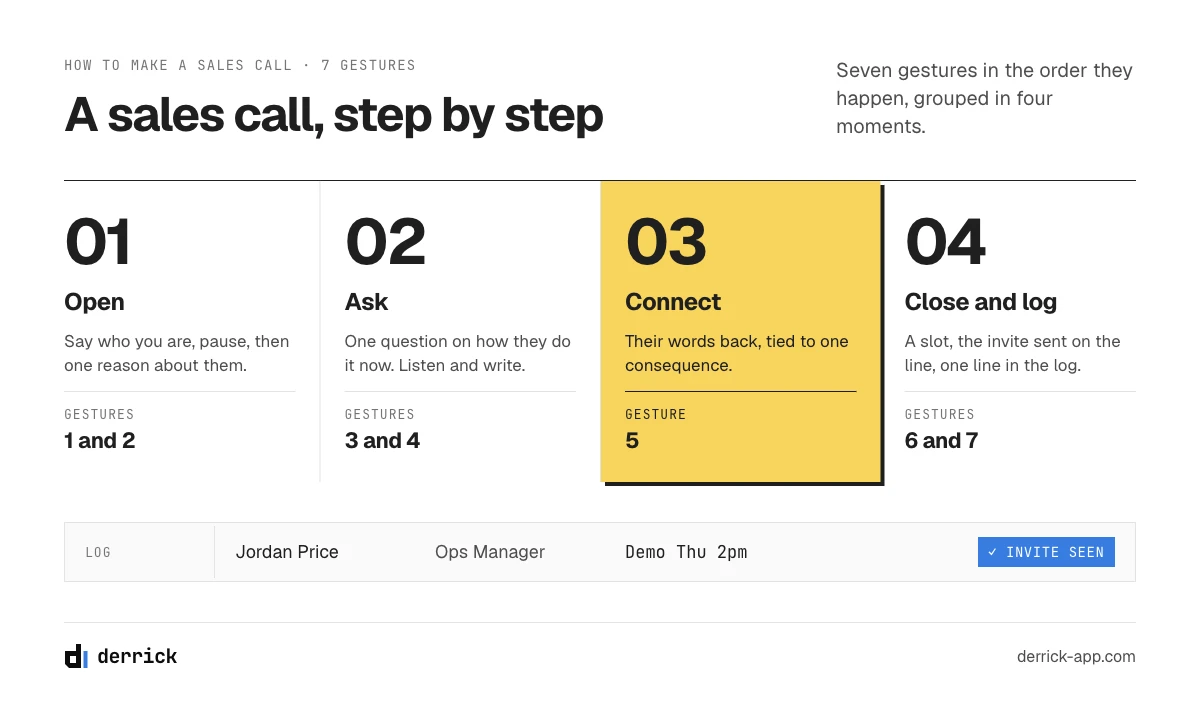
If you came here asking how to make a sales call rather than looking for tips, here is the call itself as seven gestures, in the order they happen. The preparation that comes before the call, researching the account and choosing who to call, is covered in our sales process steps.
- Open and pause. Say who you are and where you are calling from, then stop. The first reply tells you whether the person is available, busy or annoyed, and each needs a different next sentence. Do not start on your agenda before you know which one you are dealing with.
- Say the reason. One sentence on why you are calling this person today. It should mention something about them, not something about you. If you cannot write that sentence before dialling, you are not ready to dial this row.
- Ask how they do it now. A question about their current process is easy to answer and tells you more than a question about their problems. Keep one or two ready. On a first call, two good answers are worth more than six rushed ones.
- Listen and write. Take down the exact words they use for their situation. You will need them twice: in your summary a minute from now, and in your note after the call. Resist the urge to answer each point as it comes.
- Connect it to one consequence. Say back what you heard and tie it to one thing it costs them: time, missed meetings, a project that slips. Only now, if it fits, say in one sentence what you do. Keep it to one consequence.
- Set the next step with a date. Propose a slot, send the invite while they are on the line, and say what the meeting will cover. If the answer is not now, get a date to call back rather than a vague "later".
- Log it. One line in their words, the next step, the date. Then dial the next number. The note takes thirty seconds.
Cold calling examples: three openers you can read out loud
Three complete openings for three situations the script page does not cover: a person who just posted something, a cold account with no signal at all, and a callback after a voicemail. Read them out loud once, then rewrite them in your own words. For four more variants built on hiring, a new role, a tech stack and a referral, see the script page's variants.
With a signal: they published something
"Hi, this is Marie Laurent from Derrick." (pause) "I read your post last week about your team moving to phone-first outreach. I won't pretend I'm calling about anything else. Thirty seconds on why it caught my eye, and you tell me if it's worth continuing?" (pause) "How are you finding the numbers for the new sequence at the moment?"
Without a signal: the honest cold open
"Hi, this is Marie Laurent from Derrick. This is a cold call, and I know it. Can I have twenty seconds to say why I picked your company, and you hang up if it's not relevant?" (pause) "Your team sells to operations managers in logistics. The teams I talk to in that space tell me their reps lose time reaching people who have left the desk. Is that a problem for you, or not at all?"
The callback after a voicemail
"Hi, it's Marie Laurent from Derrick. I left you a short message on Tuesday about the two sales roles you opened, so this is the second time you'll hear my name." (pause) "I'll be quick. Before you hire, how are the current reps getting the numbers they call? Is that working, or is it the part you'd change?"
Each opening has the same shape: name, pause, one reason that concerns them, a request for a small amount of time or a question. Only the reason changes.
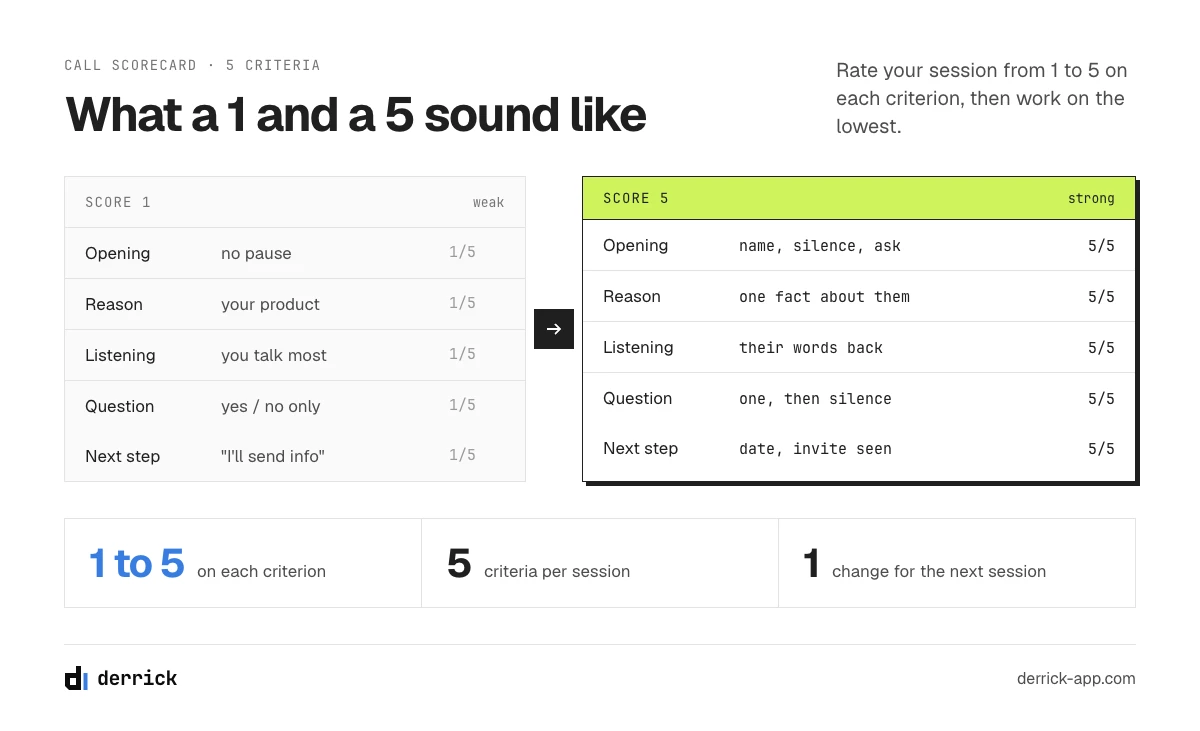
Score your own session: the call scorecard
The script page tells you how to test a block of your script across a batch of calls: change one block, measure the stage it affects, wait for enough volume. That tests the words. The scorecard tests the caller. After each session, you rate yourself on five criteria from 1 to 5, and you track how your own scores move from one session to the next.
| Criterion | 1 looks like | 3 looks like | 5 looks like | Tips |
|---|---|---|---|---|
| Opening | Three sentences before they spoke | Name and company, but no pause | Name, company, silence, then a time request | 4, 5 |
| Reason for the call | A description of your product | A reason that fits anyone with their title | One fact about this person, in one sentence | 3, 6 |
| Listening | You talked most of the call | You listened but did not write their words | Their words written down and given back | 7, 9 |
| Question | No question, or a yes/no one | A question, then you filled the silence | One open question, then silence until they answered | 8 |
| Next step | "I'll send you some information" | A verbal yes, no date | A date, and the invite seen during the call | 10 |
Score the whole session. Use the one you listened back to in tip 12 if you have a recording, and otherwise the last three conversations. Next to it, keep a call log in four columns: the person and their company; the outcome (no answer, conversation, meeting); their words in one line; the next step and its date. The log gives you the counts from the table in part 5, and the scorecard tells you which tip to work on next.
Enter your five scores below and the tool tells you which criterion to work on first and which tip goes with it.
Which part of your calls to work on next?
Rate your last session on each criterion, from 1 (weak) to 5 (strong).
Rate all five criteria to see what to work on first.
The scorecard does not count dials or meetings: it only reads your own ratings. If the weak point is the reason for the call, Company Hiring Signal needs no LinkedIn account; Enrich Leads needs your LinkedIn account connected through the Derrick Chrome extension.
The five biggest cold calling mistakes
Each mistake is the mirror of one or more of the tips above, so the fix is always a tip number.
- Opening with a question nobody can answer. "How are you today?" or "Do you have a minute?" asks a stranger to decide something before they know who you are. Fix: tips 4 and 5.
- Presenting before asking. Two minutes on what your product does, then a question at the very end, when the person has already decided. Fix: tips 6 and 8.
- Filling the silence. You ask, they pause, and you rescue them with a second question. The answer you would have had is gone. Fix: tip 8.
- Hanging up without a date. A friendly conversation and "let's talk again soon" is a call you will have to make again from the start. Fix: tips 10 and 11.
- Judging a session by its worst call. One rude reply on call twelve and the whole hour feels lost. Score the session on the five criteria instead, and change one thing. Fix: tip 12 and the scorecard.
There is a sixth mistake that no tip on this page fixes: calling a number that does not ring on the person. That one is a list problem, and it is covered from the data side in our guide to finding a mobile phone number.
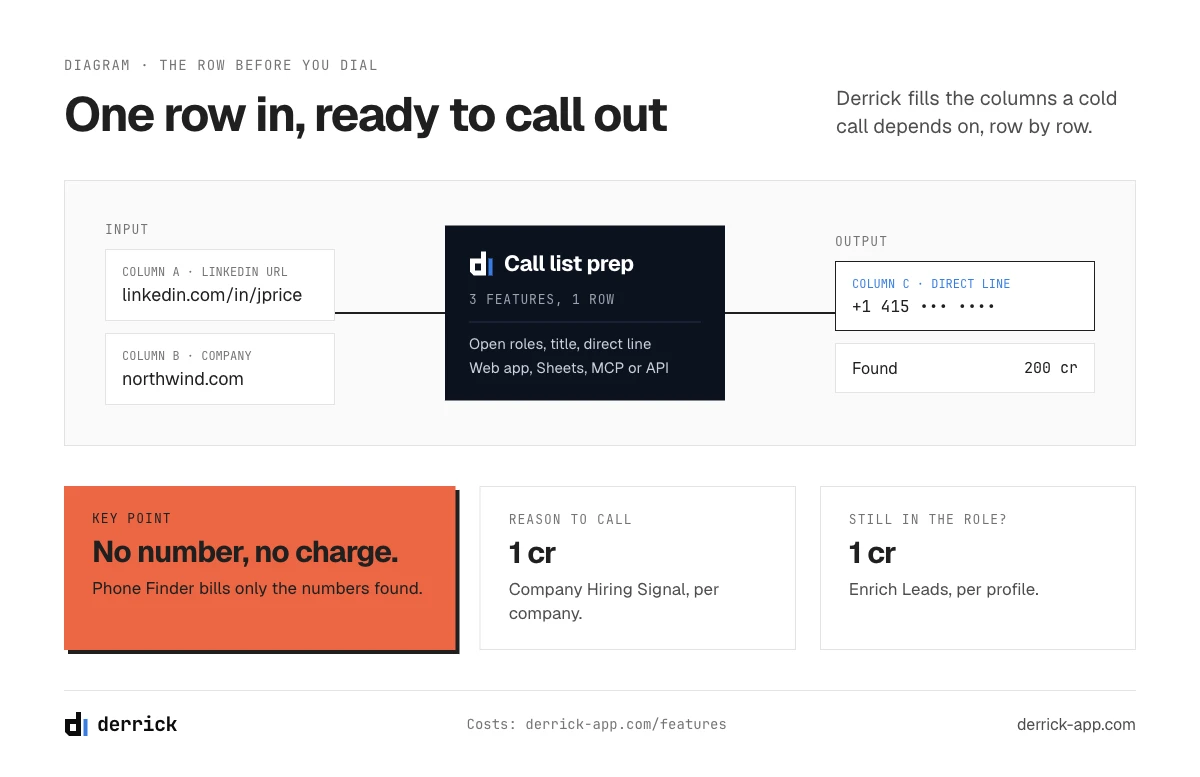
Where the facts and the numbers come from: the Derrick app, Sheets, Claude (MCP), API
Three of the twelve tips depend on what is on the row before you dial: the fact for tip 6, the right person, and a number that rings on them. That is where Derrick fits. You import your call list into the Derrick web app, or open it in the Google Sheets sidebar, and add the columns you need before the session. Three features cover it:
- Company Hiring Signal checks each company for open roles, how many and which titles, which gives you the reason for the call on hiring accounts. 1 credit per company, on the free and paid plans. No LinkedIn account to connect.
- Enrich Leads takes the person's LinkedIn profile URL and returns their current title, company and time in the role, so you know you are calling someone who still holds the job. 1 credit per profile, on the free and paid plans. It needs your LinkedIn account connected through the Derrick Chrome extension, on every surface.
- Phone Finder takes the same LinkedIn profile URL and looks up a direct number for the person. 200 credits per number found, billed only when a number comes back, on the paid plans from Standard (20 euros a month, 10,000 credits). No LinkedIn account to connect.
The free plan gives you 100 credits a month without a card, enough to check 100 accounts for open roles before a session. Phone lookups start on Standard. The same workflow runs on a list of forty rows and on a list of forty thousand, and your unused credits roll over as long as the account stays on a paid plan.
If you prefer to prepare an account from a chat, the same features work in Claude and any MCP client, and in your CRM or scripts through the REST API; both come with the Plus plan (47.5 euros a month) and above. For the full workflow on the phone side, from list to dialable numbers, our guide to reaching the decision maker by phone goes further.
Frequently asked questions
What should I say in a cold call?
How do you start a cold call?
What are the biggest mistakes in cold calling?
What is the 80/20 rule in cold calling?
What are the 5 stages of cold calling?
How do you make a sales call step by step?
Is cold calling legal?
Keep reading
Continue exploring this cluster


Mobile vs Landline in B2B 2026: Why the Desk Phone Stopped Working
Read →

The State of B2B Phone Data 2026: Decay, the Mobile Shift & What It Costs
Read →

How to Find B2B Phone Numbers: 7 Verified Methods + Tools (2026)
Read →

Phone Number Lookup from LinkedIn: How to Find Phone Numbers in 2026
Read →