Lead qualification: how to qualify a sales lead, verify first then ask
Learn how to qualify a sales lead in 6 steps: compare BANT, CHAMP and MEDDIC, verify fit and signals in the data, then score, ask and route.


How to qualify a sales lead before a rep spends an hour on it
Lead qualification is the decision, made on explicit criteria, that a lead deserves a salesperson's time: it fits your customers, something makes a purchase likely now, and the person can be reached and can buy (full definition in our glossary). The work behind it is a sequence of decisions, and their order matters more than the framework you pick.
The stakes are measurable. In its fifth State of Sales report (December 2022, more than 7,700 sales professionals surveyed), Salesforce found that reps spend just 28 percent of their time selling, with most of the rest going to deal management and data entry. Every lead a rep researches by hand and then drops eats into that small share.
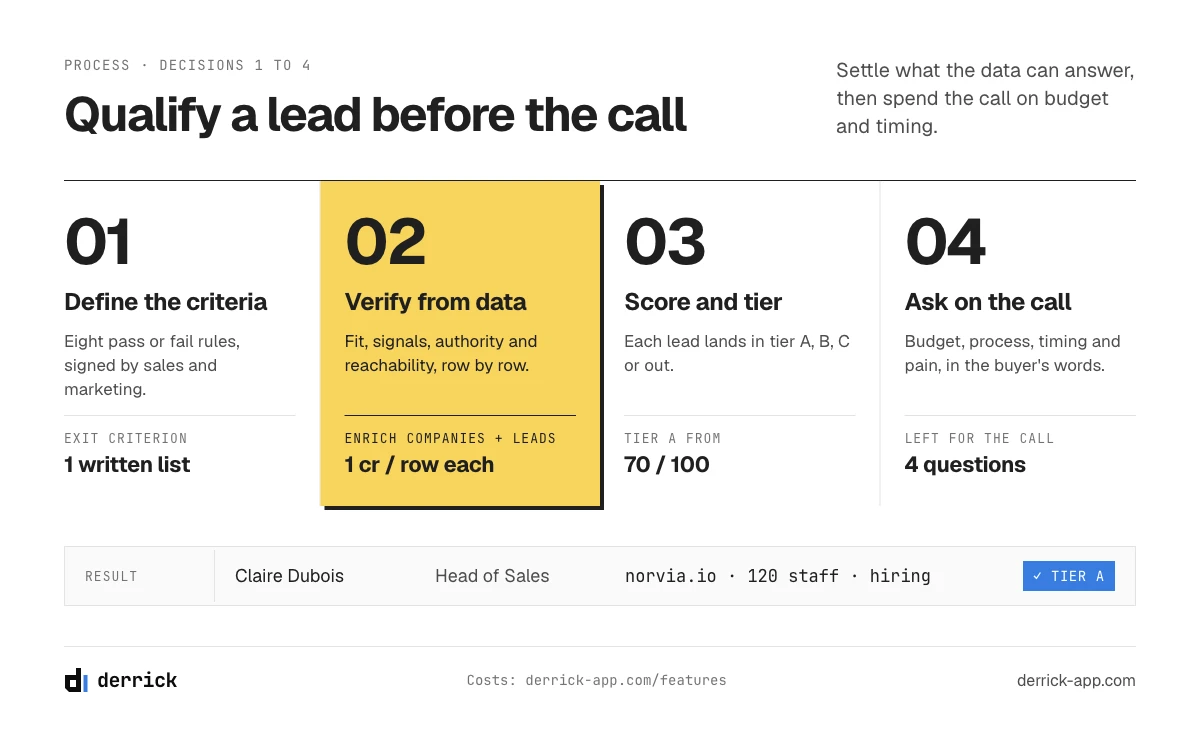
Most guides skip one thing. Every lead qualification framework mixes two kinds of questions. Some can be answered from data before anyone picks up the phone: is the company the right size, in the right sector, hiring, running a compatible stack, and is the contact still in a role that can decide? Others can only be answered in a conversation: is there a budget, who signs, when do they need it? Qualifying well means settling the first half before the first call, so the call is spent on the second half. The six decisions below follow that split.
| Decision | What you settle | Exit criterion |
|---|---|---|
| 1. Define | The criteria a qualified lead must meet | A written list of criteria, each with a pass or fail rule |
| 2. Verify | Fit, signals, authority and reachability, from data | Every verifiable field filled, or marked as unknown |
| 3. Score | A tier for each lead | Each lead in tier A, B, C or out |
| 4. Ask | Budget, decision process, timing, pain | Answers logged, or the lead goes back to nurture |
| 5. Route | Who owns the lead and how fast | A named owner and a first-contact deadline |
| 6. Disqualify | Leads that will not buy, and why | A reason code on every closed lead |
Qualified leads explained: how to qualify a sales lead as MQL, SQL, SAL or PQL
A qualified lead is a contact who meets the criteria your team agreed on for a given stage, and the stage decides who acts next. The labels below are the common ones. They are not grades of quality so much as handoff points: each tells you which team has checked what.
| Type | Who qualifies it | What has been checked | What happens next |
|---|---|---|---|
| MQL (marketing qualified lead) | Marketing | Fit with the ideal customer profile plus engagement: a download, a webinar, repeated visits | Handed to sales development for a check |
| SAL (sales accepted lead) | Sales development | The rep agrees the lead is worth working, usually after a data review | Outreach starts |
| SQL (sales qualified lead) | Sales | A conversation has confirmed a need, a buyer and a plausible timeline | Becomes an opportunity in the pipeline |
| PQL (product qualified lead) | Product usage | The person uses a free plan or trial in a way that predicts a purchase | Sales or success reaches out on the usage signal |
Three words get mixed up constantly, so it helps to fix them. A lead is any contact who could become a customer, with no checks done. A prospect is a lead that fits your profile, whether or not they know you exist. An opportunity is a prospect with a confirmed need and a deal you can forecast. A sales qualified lead is the moment a prospect becomes an opportunity, which is why the SQL count is the number sales leaders watch.
This guide focuses on the outbound case: a cold list of people who have not raised their hand yet. For those leads the MQL step does not exist, and the whole job of turning a list into sales qualified leads falls on data and on the first conversation. Inbound leads follow the same logic with a different trigger, covered in the last section.
Lead qualification frameworks compared: what you can verify, what you must ask
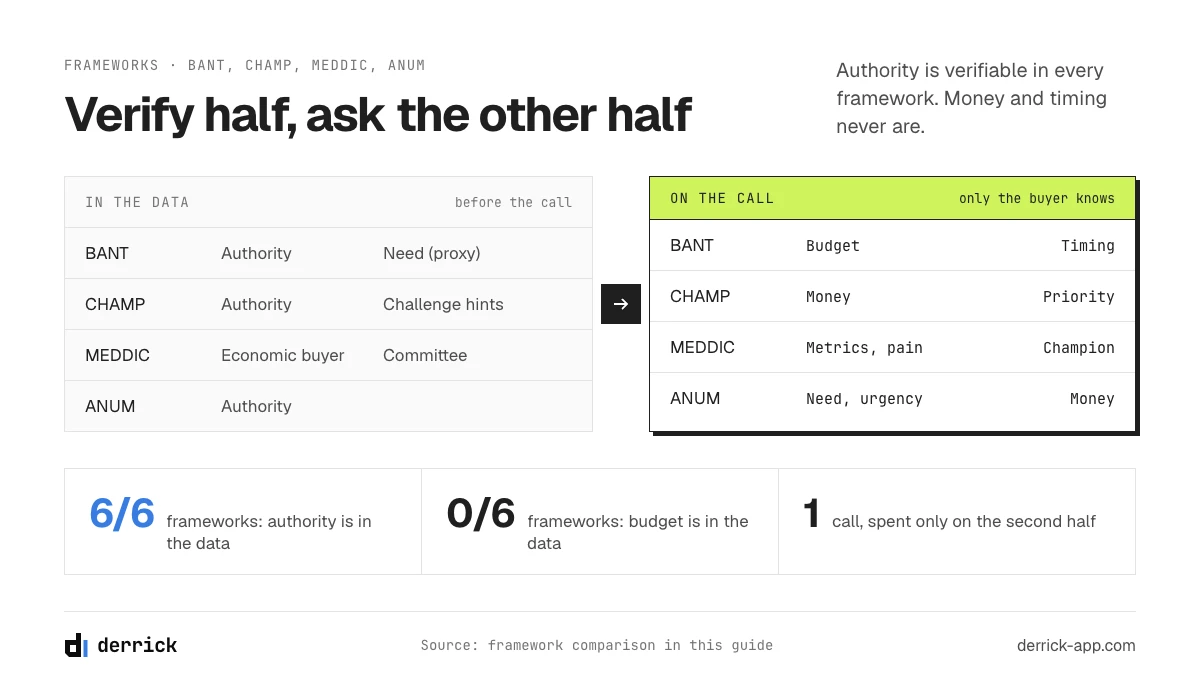
BANT, CHAMP, MEDDIC, GPCTBA/C&I, FAINT and ANUM all test some mix of need, authority, money and timing; they differ in the order and in how much they expect from the buyer. Most comparisons stop there. The more useful question is which half of each framework can be answered from data before the first call, and which half only a conversation can settle.
| Framework | What it tests | Best for | Verifiable in the data | Only answered by asking |
|---|---|---|---|---|
| BANT | Budget, Authority, Need, Timing | Transactional deals, short cycles | Authority (title, seniority, team), a proxy for Need (company profile, stack) | Budget, Timing, the actual Need |
| CHAMP | Challenges, Authority, Money, Prioritization | Consultative sales that start from the problem | Authority, early hints of Challenges (hiring, growth, stack changes) | Challenges in their words, Money, Prioritization |
| MEDDIC / MEDDPICC | Metrics, Economic buyer, Decision criteria, Decision process, (Paper process), Identify pain, Champion, (Competition) | Complex enterprise deals with a buying committee | The likely economic buyer and committee (org chart, titles), company size and structure | Metrics, criteria, process, pain, who will champion you |
| GPCTBA/C&I | Goals, Plans, Challenges, Timeline, Budget, Authority, Consequences and Implications | Inbound-heavy teams that sell on outcomes | Authority, public signs of Plans (hiring, expansion, new sites) | Goals, Challenges, Timeline, Budget, Consequences |
| FAINT | Funds, Authority, Interest, Need, Timing | Selling to companies that did not plan a budget | Funds as a proxy (size, growth), Authority | Interest, Need, Timing |
| ANUM | Authority, Need, Urgency, Money | Teams that want to reach the decider first | Authority | Need, Urgency, Money |
Read the fourth column top to bottom and a pattern appears. Authority is verifiable in every framework. Fit and a first reading of need are verifiable in most of them. Money, timing and the buyer's own words about the problem never are. That isn't a weakness of the frameworks. It tells you where each minute of lead qualification should go: data answers the verifiable column, the rep answers the last one.
How to qualify leads with BANT without sounding like a form
BANT has a bad reputation mostly because it is often run as a questionnaire: budget, authority, need, timing, in that order, on the first call. The fix is not to drop it but to split it. Authority is already settled before the call, because you checked the title and the org chart. A first reading of need is settled too, from the company's size, stack and hiring. What remains is budget and timing, and those come out naturally once the conversation is about the buyer's problem rather than about your checklist. Open on the signal you found ("you are hiring three SDRs this quarter"), ask how they plan to ramp them, and budget and timing usually follow within a few minutes. BANT then asks the buyer only the questions a buyer can answer.
Which one should you use to qualify leads? If your deals close in weeks with one or two people involved, BANT or ANUM is enough. If you sell something that has to solve a stated problem, CHAMP keeps the conversation on it. If your deals involve five or more people and a procurement step, MEDDIC or MEDDPICC is worth the extra discipline. The framework matters less than applying one consistently, with the verifiable half done first.
The lead qualification process: how to qualify a sales lead in six decisions
Each step below relies on a specific kind of data and ends with a decision. Teams that qualify leads well hold to that rule: a step that doesn't end with a decision is research, not lead qualification.
Decision 1: define what a qualified lead means for you
Write the criteria down, each with a pass or fail rule. "Mid-market" isn't a criterion; "50 to 500 employees" is. A workable set for most B2B teams has three groups:
- Fit: sector, company size, geography. These come straight from your ideal customer profile.
- Signal: something that makes a purchase more likely now, such as hiring in the team you serve, a stack that works with your product, a new site or a new leader.
- Reachability and authority: the contact is still in the role, the role can decide or strongly influence, and there is a working channel to reach them.
Here is what that looks like for a company selling sales software to B2B teams. Fit: software or business services, 50 to 1,000 employees, based in North America or Western Europe. Signal: at least one open sales or sales development role, a CRM already in place, a new head of sales in the last six months. Authority and reachability: the contact is a head of sales, sales operations lead or founder, has held the role for at least three months, and has a deliverable email. Eight criteria, each one either true or false for a given lead. That is enough to qualify leads consistently across a whole team, and nothing on the list requires a call to check.
Exit criterion: a one-page list your marketing and sales teams both sign. If they disagree here, they will disagree about every lead later.
Decision 2: verify fit, signals and authority before the first contact
This is the step that saves the most time and the one most often skipped. Every field in the table below can be settled from public or enriched data, without talking to anyone. The unit cost column only shows what Derrick charges for the field, taken from its feature catalog.
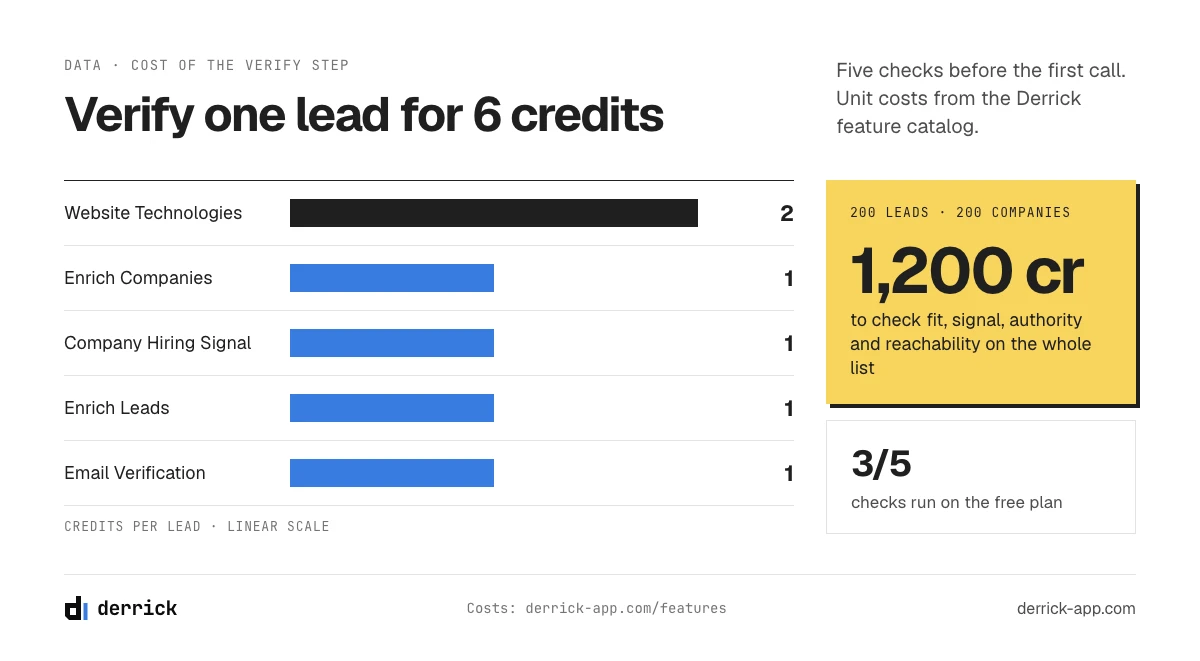
| Criterion | What you check | How it is verified | Derrick cost |
|---|---|---|---|
| Sector, size, location | The company matches your profile | Company LinkedIn page: industry, headcount, headquarters, website | Enrich Companies, 1 credit per company (free plan, LinkedIn connected) |
| Hiring signal | The company is recruiting in the team you sell to | Open roles on LinkedIn, by function | Company Hiring Signal, 1 credit per company (free plan, no LinkedIn connection needed) |
| Stack compatibility | Their tools work with yours, or yours replaces one of theirs | Technologies detected on the company website | Website Technologies, 2 credits per website (paid plans) |
| Authority and current role | The contact holds a role that decides, and still holds it | Current title, company and seniority on the LinkedIn profile | Enrich Leads, 1 credit per profile (free plan, LinkedIn connected) |
| Reachability | The email on file will deliver | Email verification against the mail server | Email Verification, 1 credit per email (paid plans) |
Two prerequisites apply, and they are worth saying once. Enrich Companies and Enrich Leads read LinkedIn pages, so they need the Derrick Chrome extension installed and connected to your LinkedIn account. Company Hiring Signal does not. Website Technologies and Email Verification are on the paid plans, from the Standard plan. Checking all five fields on a cold list of 200 leads at 200 companies comes to 6 credits per lead, which puts the whole list at 1,200.
Exit criterion: every verifiable field is either filled or explicitly marked unknown. Where the list itself came from (sources, deduplication, cost per 1,000 rows) is covered in the guide to building a prospect list, so this page starts once you have one.
Decision 3: score and tier the leads
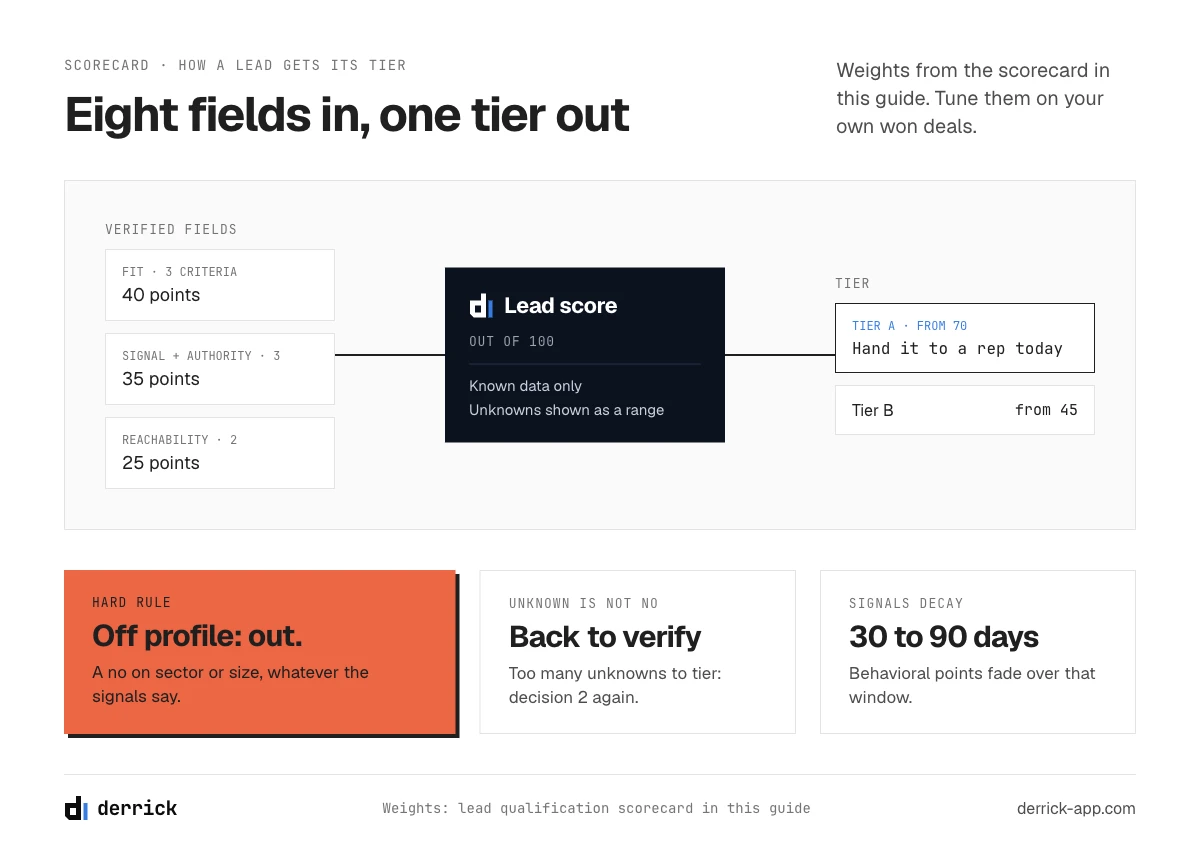
Turn the verified fields into a number, then the number into a tier. Tier A goes to a rep today, tier B goes into a sequence, tier C waits, and anything that fails a hard fit criterion leaves the list. The scorecard below does exactly that, and the section after it covers how to build your own grid.
Exit criterion: every lead carries a tier, and the tier is written in the same field for the whole team, so lead qualification reads the same way in every report. A lead with too many unknowns to tier is not tier C; it goes back to decision 2.
Decision 4: ask what the data cannot tell you
Budget, the decision process, the timeline and the pain in the buyer's own words are the half of lead qualification that only a conversation settles. Because the first half is already done, the first call does not waste ten minutes confirming company size or the person's job title. It can open on the signal you found and go straight to the questions that matter. The buyer intent questions guide lists twenty of them, grouped by what they reveal, so they are not repeated here.
Exit criterion: the answers are logged in the CRM, or the lead goes back to nurture with a date to revisit.
Decision 5: route the qualified lead
An SQL with no owner decays by the hour. Routing rules should say who owns each tier, by territory, segment or account list, and how fast the first contact must happen. For inbound leads speed matters most, but only on correct data: a fast attempt on a wrong phone number or a bouncing email simply fails fast.
Exit criterion: a named owner and a deadline, visible in the CRM (Salesforce, HubSpot, Pipedrive or whichever your team uses).
Decision 6: disqualify, and record why
Disqualification is a decision, not an absence of follow-up. A lead closed with a reason code teaches you something; a lead left to rot in a sequence teaches you nothing. The five reasons that can be read straight from the record are covered in part 06.
Exit criterion: a reason code on every closed lead, reviewed once a month to adjust the criteria from decision 1.
Who owns lead qualification
Lead qualification breaks down when nobody owns the handoffs. A split that works for most B2B teams: marketing or revenue operations owns the criteria and the verify step, because they run the data and the tools; sales development owns the conversation that turns a tier A lead into an SQL; account executives own the move from SQL to opportunity and can send a lead back with a reason. The criteria are reviewed together once a quarter, with the disqualification reasons as evidence. When reps say "marketing sends us junk" or marketing says "sales never follows up", the answer is almost always in that review, not in a new framework.
Lead qualification scorecard: tier a lead in one minute
Answer the eight criteria for one lead from your list. Anything you do not know yet, mark as unknown: the scorecard shows the tier the known data supports, the range the unknowns could move it through, and what verifying them would cost. Use it to qualify leads one at a time before you build the same rules into your sheet or CRM.
Is this lead worth a rep's time?
Fit (3 criteria), signal and authority (3), reachability (2). A "no" on sector or size disqualifies the lead on its own.
Fit: the sector matches your profile
Fit: the company size is in your range
Fit: the company is in a region you serve
Signal: they are hiring in the team you sell to
Signal: their stack is compatible with your product
Authority: the contact's role can decide or strongly influence
Reachability: the email is verified
Reachability: the contact is still in this role today
Answer the eight criteria to see the tier.
Weights: sector 15, size 15, region 10, hiring 10, stack 10, authority 15, verified email 15, still in role 10. Tier A from 70, tier B from 45. Adjust them to your own grid.
How to build your own lead scoring grid
The scorecard uses one grid; yours should come from your own closed deals. Four rules keep a lead scoring grid honest:
- Weight by what predicted past wins. Pull your last fifty won and fifty lost deals and compare them field by field. If company size separates them clearly and region does not, size gets the heavy weight.
- Set thresholds, then check them. A tier A threshold is right when most tier A leads a rep accepts turn into SQLs. If reps reject half of tier A, the threshold is too low or a weight is wrong.
- Let signals decay. A hiring signal from last week is worth full points; the same signal from six months ago is worth little. Behavioral points (visits, downloads) should fade over 30 to 90 days.
- Score only verified data. A score built on a stale title or an unverified company size is a number, not a judgment. That is why decision 2 comes before decision 3.
Know what the score cannot tell you. It cannot see a budget, an internal priority or a champion. It ranks leads for the conversation; it does not replace it. If you run scoring inside a CRM, the guide to lead scoring software covers the options and the setup.
How to disqualify a lead with confidence
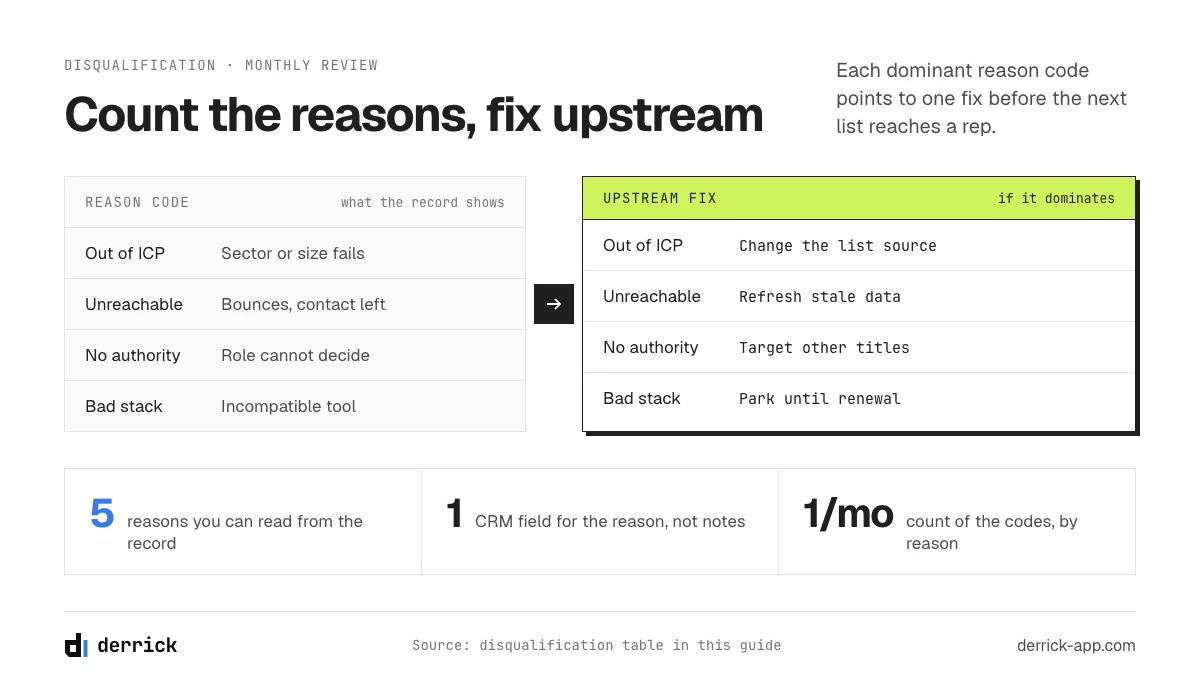
Five reasons justify closing a lead without a call, and all five can be read from the record: outside your profile, no authority, an incompatible stack, a closed or absorbed company, and no working way to reach anyone. Disqualifying early isn't pessimism. Every lead you close with a reason frees time for the ones that can buy.
| Reason | What the record shows | What to do |
|---|---|---|
| Outside your profile | Sector, size or region fails a hard criterion | Close as "out of ICP" |
| No authority | The contact's role cannot decide or influence, and no better contact is known | Find the right person at the account, or close |
| Incompatible stack | They run a tool your product cannot work with, or one they just replaced | Close, or park with a date if contracts renew |
| Company closed or absorbed | The company page is gone, merged, or the website redirects elsewhere | Close, and move the lead to the parent company if relevant |
| Unreachable | The email does not verify and the contact has left the role | Close, or look for the successor in the same role |
The fifth reason hides the most waste. A lead can be perfect on paper and still convert at zero if nobody can reach them. The arithmetic is simple: if a fifth of the leads you paid for are unreachable, your real cost per usable lead is a quarter higher than the dashboard says, before any difference in conversion.
Keep the reason codes in a CRM field, not in notes, so they feed your lead qualification criteria instead of disappearing. Once a month, count them. If "out of ICP" dominates, the list source is wrong. If "unreachable" dominates, the data is stale. If "no authority" dominates, your targeting picks the wrong job titles. Each reason points to a different fix upstream.
The selling-time tax: what unqualified leads cost your sales team
Unqualified leads cost selling time: in MarketingSherpa's 2011 B2B Marketing Benchmark Survey, 61 percent of B2B marketers sent every lead straight to sales, while only 27 percent of those leads were qualified. The survey is old, but it measured a pattern most teams still describe: the sorting happens on the rep's calendar. Unqualified leads rarely show up as a line item. They show up as a rep who had a busy week and a thin pipeline.
A large share of that sorting is lead qualification done by hand: opening a company page to check its size, searching for the contact to confirm they still work there, guessing whether an email will bounce. None of it needs a conversation, and all of it happens before one. Reps lose that time because the data they need is missing, wrong or scattered, so they rebuild it themselves, lead by lead.
The funnel shows the same leak from the other side. Scoring is only as good as the data it runs on, and routing is only as fast as your ability to reach the right person with a complete record. A lead that scores well but cannot be reached converts at zero, however good the scoring model is.
A quick way to see your own tax: take last month's leads that reps disqualified after a first call, and count how many could have been disqualified from the record alone. For most teams that share is large, and every one of those calls was an hour that could have gone to a tier A lead.
Where to automate, and where to stay human
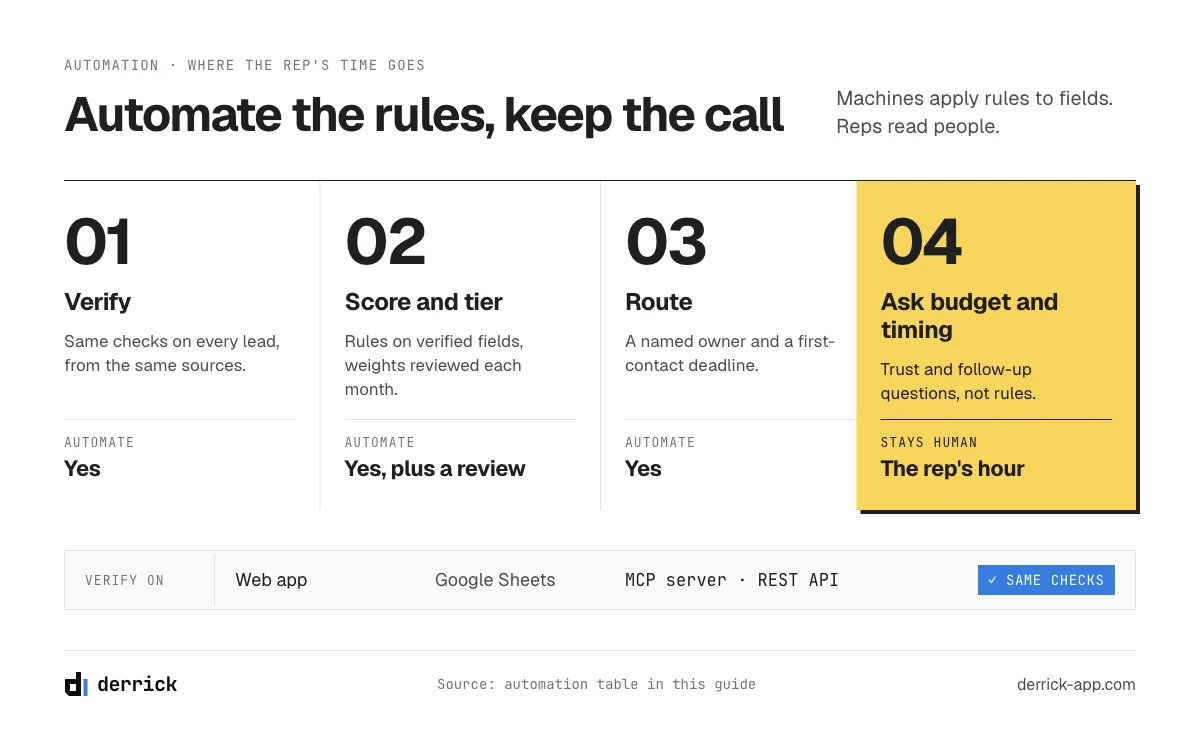
Automate the parts of lead qualification that read data, keep humans on the parts that read people. Enrichment, scoring and routing are rules applied to fields, and machines apply rules faster and more consistently than reps. The conversation that uncovers budget, politics and pain is judgment, and judgment is where the rep's time should go.
| Step | Automate? | Why |
|---|---|---|
| Verify fit, signals, authority, reachability | Yes | Same checks on every lead, from the same sources |
| Score and tier | Yes, with a monthly review | Rules on verified fields; the review keeps the weights honest |
| Route to an owner | Yes | Speed matters and routing rules do not get tired |
| Ask about budget, process, timing | No | The answers depend on trust and follow-up questions |
| Disqualify | Partly | Hard criteria can close automatically; borderline cases need a human |
Derrick sits at the verify step, on four surfaces. In the web app, the same enrichments run on your list. In Google Sheets, from the sidebar: select the column of company pages or profiles, run Enrich Companies, Company Hiring Signal or Enrich Leads, and the fields land in new columns next to your list. In an AI assistant through the Derrick MCP server, in Claude, ChatGPT or any MCP client: "which of these 40 accounts are hiring sales engineers, and is the contact still in their role?" And through the REST API, connected to your CRM directly or through Zapier, Make or n8n, so every new lead is verified before it reaches a queue. The MCP server and the API are included from the Plus plan, at 47.50 euros a month, and the web app needs nothing to install. The steps are identical whether you qualify leads fifty at a time or fifty thousand at a time.
A word on inbound leads. The logic is the same, with a different trigger: a form arrives, you enrich it, score it and route it within minutes, before the lead cools down. The specific workflow for leads that raise their hand, from form to owner, lives in the guide to inbound lead management. This page covers the outbound case, where nobody has asked to hear from you and the data has to do more of the work.
Lead qualification metrics that show your verify step works
Five numbers tell you whether your lead qualification works. Track them monthly, by source, so you can see which lists and channels feed the pipeline and which feed the disqualification pile.
| Metric | What it measures | How to read it |
|---|---|---|
| MQL to SQL rate | Share of marketing-qualified or tier A leads that sales confirms as SQLs | Low means the criteria or the data behind them are off, not the reps |
| SQL to opportunity rate | Share of SQLs that become forecastable deals | Low means the conversation stage is qualifying too loosely |
| Time to qualify | Hours from lead creation to a tier, then to a first contact | Shrinks when the verify step is automated |
| Disqualification rate, by reason | Share of leads closed, split by reason code | A dominant reason points to one upstream fix |
| Cost per SQL | Everything spent on a source, divided by the SQLs it produced | The number that compares sources fairly |
Keep the account in view as well as the lead. Three qualified contacts at one company are one opportunity, not three, and your sales pipeline stages should count them that way.
Qualification mistakes that cost reps the most
- Qualifying on the form alone. A job title typed into a form is a claim. Check it against the profile before routing the lead.
- Running BANT too early. Asking about budget in the first minute of a cold call qualifies nobody and closes doors. Settle fit and authority from data, earn the conversation, then ask.
- Never disqualifying. A list where nothing is ever closed grows until nobody trusts it. Reason codes keep it honest.
- Scoring unverified data. A lead scored on a title from two years ago is scored on the wrong person. Verify first, score second.
- Treating every framework question as a conversation question. Half of BANT and most of MEDDIC's buyer mapping can be answered before the call. Asking a prospect what their company does is time neither of you gets back.
- Letting the criteria go stale. Lead qualification criteria written two years ago describe the customers you had then. Review them against recent wins, not memory.
- Measuring lead volume instead of SQLs. A thousand leads that produce ten SQLs cost more than two hundred that produce twenty.
If you remember one thing about how to qualify a sales lead, make it the split. Verify what the data can tell you, ask only what it cannot, and write down why every lead that leaves the list left.
Start with the free plan and its 100 credits a month to verify your next list before anyone calls it.
We also send one email every 2 weeks when we publish a new guide, with the numbers we measure on prospecting and data quality. The sign-up form is in the middle of this page: one field, one-click unsubscribe.
Frequently asked questions
How do you qualify a sales lead?
What can you verify about a lead before the first call?
What is the difference between an MQL and an SQL?
Which lead qualification framework is best?
What part of lead qualification can be automated?
When should you disqualify a lead?
How much does it cost to verify a lead with Derrick?
Keep reading
Continue exploring this cluster


The State of B2B Marketing Performance 2026: Benchmarks Report
Read →

Account-Based Marketing (ABM): Definition, Techniques, Examples
Read →

Inbound vs Outbound Marketing: Differences, When to Pick Each
Read →

B2B Lead Generation: Strategies, Tools, Tips in 2026
Read →