LinkedIn prospecting: the complete guide, starting from a free account
Learn LinkedIn prospecting step by step: start on a free account, write messages that get replies, and see when Sales Navigator is worth paying for.


What is LinkedIn prospecting?
LinkedIn prospecting is the work of finding the people who match your ideal customer on LinkedIn, getting them to accept a connection, and opening a conversation that can turn into a meeting. It has three jobs: search for the right accounts and people, get the list out of LinkedIn to qualify it, and write to the few who are worth it.
It is not the same thing as posting content or running ads. Prospecting on LinkedIn is outbound: you choose the person, they did not choose you. That is why the quality of the list decides most of the result, and why this guide spends as much time on targeting and qualification as it does on messages.
LinkedIn prospecting vs lead generation: what is the difference?
Lead generation is every way a company brings in new potential buyers, inbound and outbound. LinkedIn prospecting is one outbound method inside it, done person by person on one network. We compared it with the other lead generation channels in a separate guide.
When is LinkedIn the right channel for prospecting?
When your buyers keep their LinkedIn profile up to date and a deal is worth a personal conversation. That covers most B2B software, agencies, consulting and recruitment. It works less well for buyers who rarely log in, such as many trades or local retail, where email or the phone reaches them faster.
LinkedIn prospecting: the short answer
LinkedIn prospecting works on a free account, and most guides will not tell you that, because most guides are written by companies selling the thing you are supposedly missing. What a free account actually gives you is enough search to build a real target list, enough invitations to reach a few hundred people a month, and enough messaging to run conversations with everyone who accepts.
What it does not give you is unlimited search, and that is the ceiling that binds first. Everything below is organised around that fact: the workflow, then the four ceilings you will hit in order, and what to do at each one. The free account is the first step of this guide, not its limit: it also tells you the exact point where Sales Navigator starts to pay, and which tools handle the parts LinkedIn itself does not.
The reason this framing is rare is worth stating plainly. Guides that compare a free account to a paid one usually conclude that you need the paid one, and they conclude it because they sell it or sell something adjacent. The honest version is that the free account is a genuine constraint, not a crippled demo, and the constraint mostly forces good behaviour: fewer people, better chosen, actually researched.
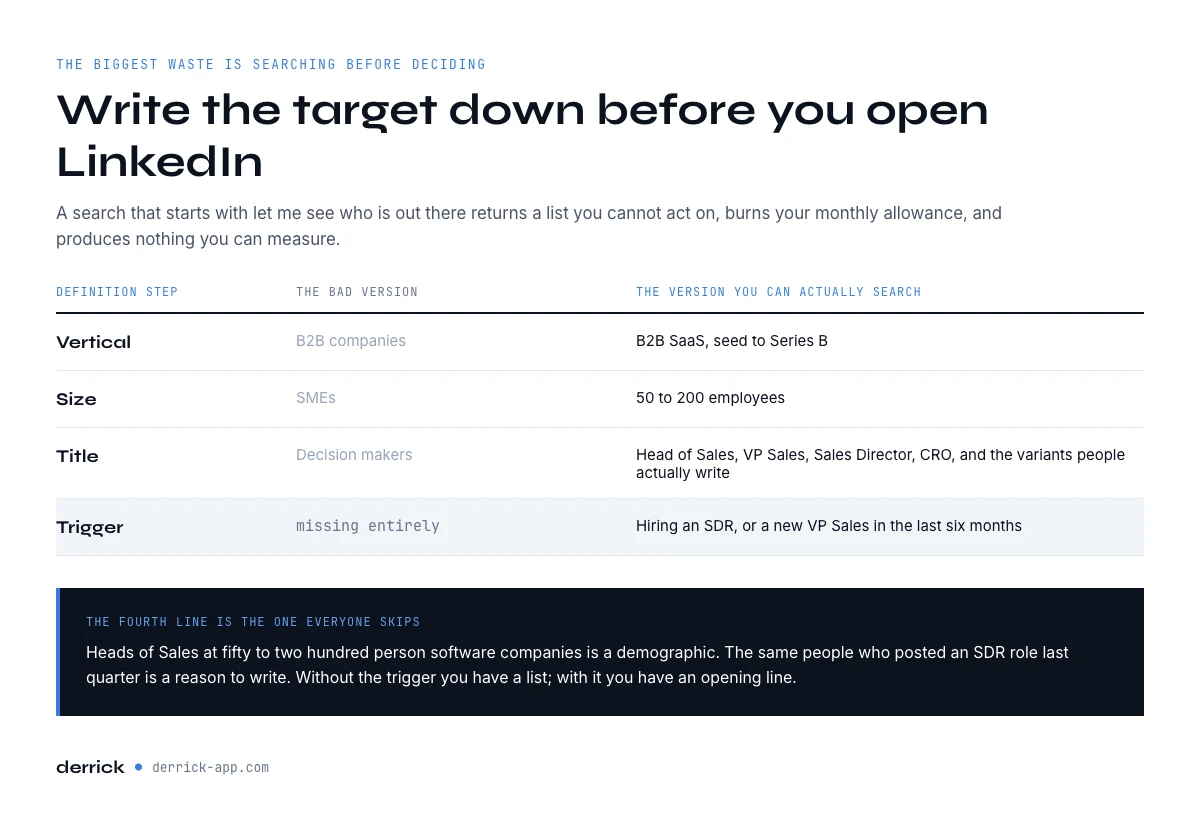
Define the target before you open LinkedIn
The single biggest waste in LinkedIn prospecting is searching before deciding. A search that starts with "let me see who is out there" returns a list you cannot act on, burns your monthly search allowance, and produces nothing you can measure.
Write down four things first, in plain language. Which industry or vertical. Which company size band. Which job titles, including the variants people actually use. And what has to be true about the company for your offer to make sense, which is usually a stage, a stack, a headcount trend or a recent event. If you are unsure who inside the company to aim at, our guide on selling to decision makers maps the seats on a buying committee.
That fourth item is the one people skip and it is what makes a list good. "Heads of Sales at 50 to 200 person software companies" is a demographic. "Heads of Sales at 50 to 200 person software companies who have posted a job for an SDR in the last quarter" is a reason to write. Our guide on how to build a prospect list goes through the fit gate and the columns that matter in more depth.
| Definition step | Bad version | Version you can search |
|---|---|---|
| Vertical | "B2B companies" | B2B SaaS, seed to Series B |
| Size | "SMEs" | 50 to 200 employees |
| Title | "Decision makers" | Head of Sales, VP Sales, Sales Director, CRO |
| Trigger | (missing) | Hiring an SDR, or new VP Sales in the last 6 months |
What free LinkedIn search can and cannot do
Free search gives you keyword, location, current company, industry and connection degree. That is a coarse set of filters, and it is enough for a well-defined target, which is exactly why the definition step matters so much. The filters you do not get are the ones that would let you be lazy: seniority level, company headcount bands, years in role, technologies used.
There are two ways around a coarse filter set, and both are free. The first is to use the search box itself rather than the filter panel, since typing several title variants into the keyword field covers more ground than picking one. The second is to search sideways: find the companies first, then work through the people at each one. Company-first is slower per name and much better per name, because you can decide whether the company is worth anyone's time before you look at anyone.
The place free search genuinely stops is volume. You are browsing a paginated list in a browser tab, which is fine for fifty companies and unworkable for five hundred. That is the point at which the job stops being a search problem and becomes a list problem.
There is a third way around the search ceiling, and it never touches your LinkedIn search allowance: search LinkedIn through Google. An X-ray search is a Google query limited to public LinkedIn profiles, with your job titles, location and exclusions written as operators. It shows fewer fields than LinkedIn does, but it does not count against your quota. Build one below with our free X-ray search tool, and see our guide to LinkedIn X-ray search for the full syntax.
Prospecting on LinkedIn from signals, not just searches
A search tells you who fits. A signal tells you who fits right now. The strongest LinkedIn prospecting lists are built around events that give you a reason to write, and three of them are visible without a paid account.
- Job changes. A new Head of Sales reviews the tools and the agencies in the first months of the job. On a free account you see it when the current company on a profile changes. Run the list through a monthly re-enrichment and compare the company column: every row that moved is a person to contact, and sometimes a past customer now sitting in a new account.
- Hiring. A company that opens an SDR or sales ops role is about to spend on pipeline. Company Hiring Signal shows which companies on your list are hiring on LinkedIn, and for which roles, at 1 credit per company, on the free plan too.
- Engagement on a post. People who like or comment on a post about your topic have just told you what they care about. Importing them, covered in the posting section below, gives you warm accounts instead of cold search results.
A signal does not replace the target definition, it sorts it. Keep the four lines you wrote first, then move the rows with a recent signal to the top of the outreach block. And put the signal in the note: "saw you joined [Company] in March" is a reason the person can check in two seconds, which is exactly what gets an invitation accepted.
In the web app or Google Sheets
Get the search results out of LinkedIn and into a list
A free account caps what you can see, not what you can keep. Paste a LinkedIn search URL and Derrick imports the results into the web app or Google Sheets, one lead per row, so the work you do inside the ceilings described here is saved instead of scrolled past.
- Feature
- Import LinkedIn Leads (regular & Sales Navigator)
- Credit cost
- 1 credit per lead imported
The first button opens the web app (nothing to install): 1 credit per lead imported, 100 free credits every month. The second details the feature and its cost per plan.
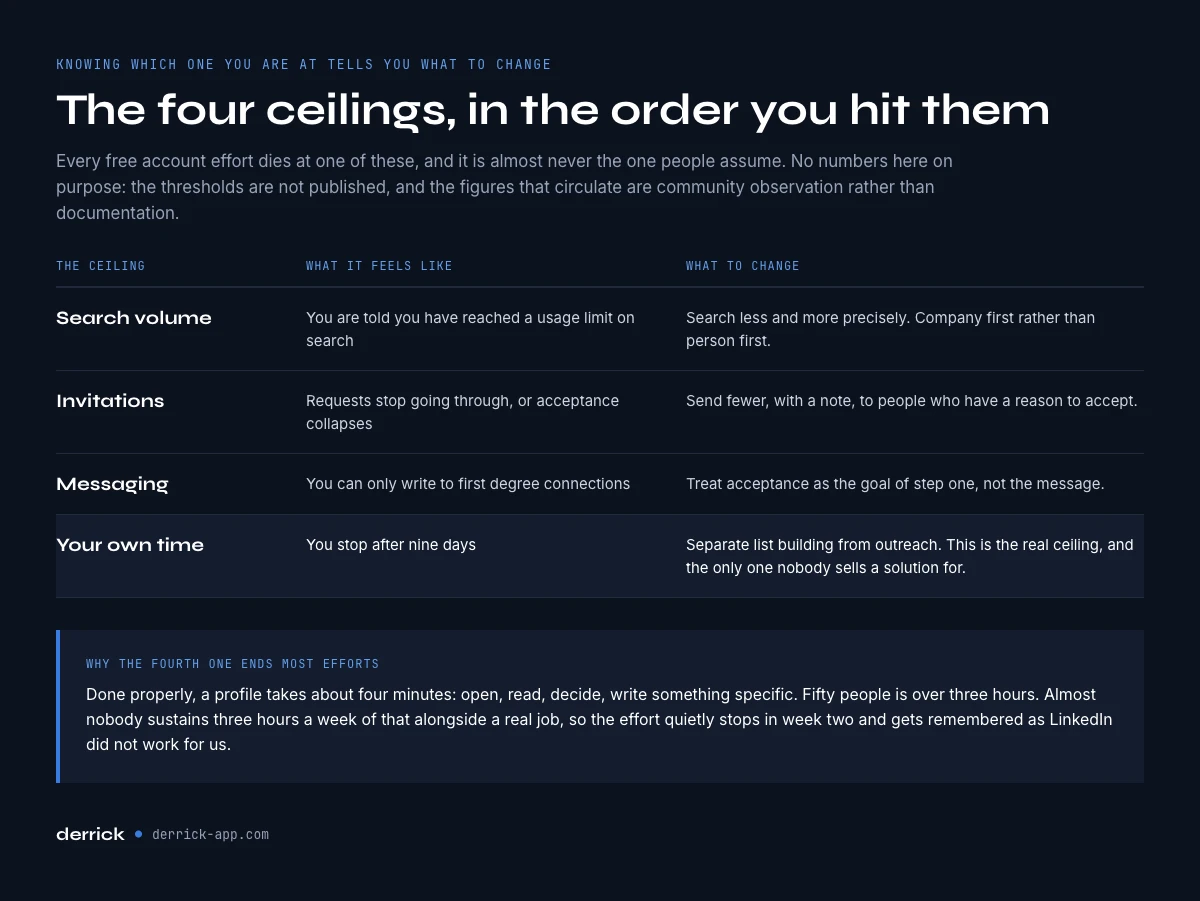
The four LinkedIn prospecting ceilings, in the order you hit them
Every free-account prospecting effort dies at one of four ceilings. Knowing which one you are at tells you what to change, and it is almost never the one people assume.
| Ceiling | What it feels like | What to do |
|---|---|---|
| Search volume | You are told you have reached a usage limit on search | Search less, and more precisely. Company-first instead of person-first. |
| Invitations | Requests stop going through, or acceptance collapses | Send fewer, with a note, to people with a reason to accept. |
| Messaging | You can only message first-degree connections | Treat acceptance as the goal of step one, not the message. |
| Your own time | You stop after nine days | Separate list-building from outreach. This is the real ceiling. |
LinkedIn does not publish most of these thresholds, and the specific numbers that circulate online are community observation rather than documentation, which is why this guide gives you the shape rather than a figure to plan against. We separated what is officially stated from what is merely widely repeated in our guide on LinkedIn limits.
The fourth ceiling is the one that actually ends most efforts, and it is the only one nobody sells a solution for. Prospecting on LinkedIn manually means opening a profile, reading it, deciding, writing something specific, and repeating. That is roughly four minutes a person done properly. Fifty people is over three hours. Almost nobody sustains three hours a week of that alongside a real job, so the effort quietly stops in week two and gets remembered as "LinkedIn did not work for us".
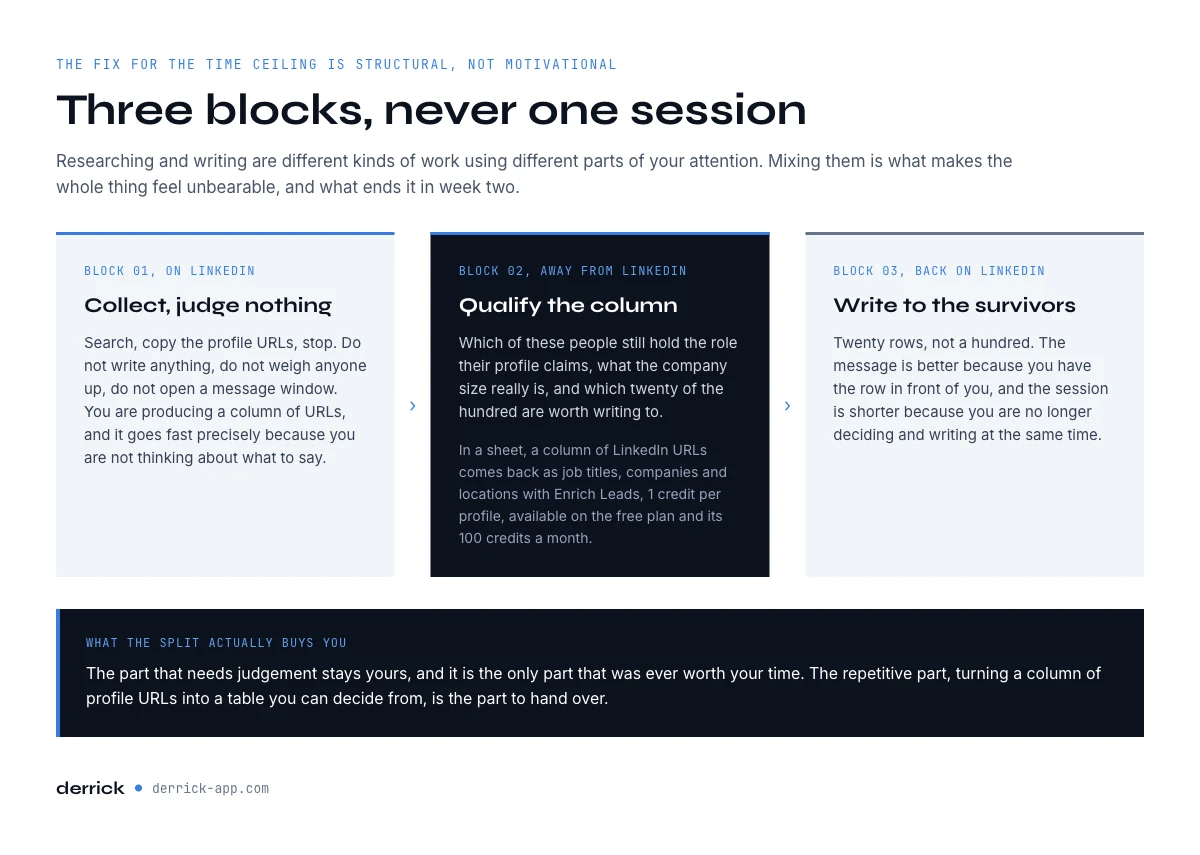
Separate list-building from outreach
The fix for the time ceiling in LinkedIn prospecting is structural rather than motivational. Do not research and write in the same session. They are different kinds of work, they use different parts of your attention, and mixing them is what makes the whole thing feel unbearable.
Build the list in one block: search, collect the profile URLs, stop. Do not write anything, do not judge anyone carefully, do not open a message window. You are producing a column of URLs, nothing more, and it goes fast precisely because you are not thinking about what to say.
Then qualify the column in a second block, away from LinkedIn. This is where you find out which of these people are still in the role their profile claims, what the company size actually is, and which twenty of the hundred are worth writing to. Derrick runs in its web app, and also as a Google Sheets sidebar, so a column of LinkedIn URLs comes back as a table of job titles, companies and locations with Enrich Leads, at 1 credit per profile, and the free plan includes 100 credits a month at no cost. If you need the URLs themselves first, our guide on finding a LinkedIn URL covers the routes that hold up in bulk.
Only then do you write, in a third block, to the twenty rows that survived. The message is better because you have the row in front of you, and the session is shorter because you are not deciding and writing at the same time.
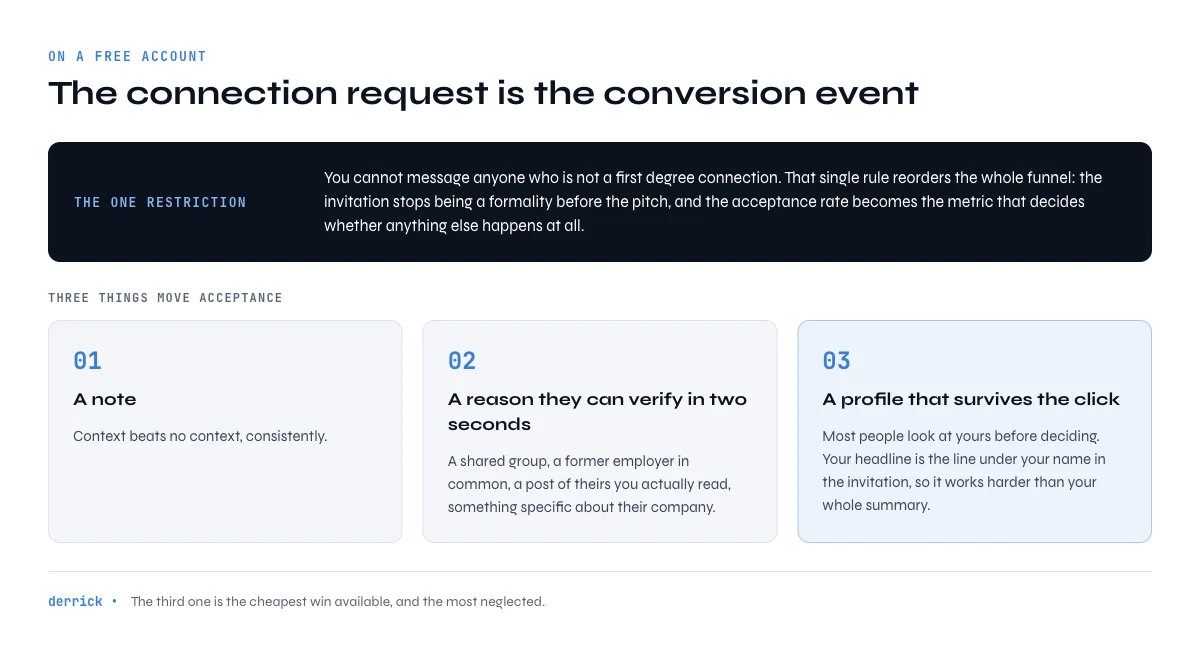
The connection request is the actual conversion step
On a free account you cannot message someone who is not a first-degree connection. That single restriction reorders the whole funnel: the connection request is not a formality before the pitch, it is the conversion event, and the acceptance rate is the metric that decides whether anything else happens.
Three things move acceptance. A note, because context beats no context consistently. A reason the person can verify in two seconds, which usually means a shared group, a shared former employer, a post of theirs you actually read, or a specific thing about their company. And a profile that survives the click, because most people will look at yours before deciding.
That last point is the cheapest win available and the most neglected. Your headline is the line that appears under your name in the invitation, so it is doing more work than your entire summary. Our guide on writing a LinkedIn headline covers the field in detail. If you want a quick read on whether your overall profile and activity are helping or hurting, LinkedIn scores exactly that, and we broke down how to read it in our guide to the Social Selling Index.
Doing LinkedIn prospecting without being the spammy kind mostly comes down to volume and order. Send fewer invitations than you are allowed to, only to people whose profile you have actually opened, and never let the note do the selling. If someone ignores the request, let it go instead of withdrawing it and sending it again a week later. The people you write to talk to each other, and in a small market your reputation travels faster than your invitations.
How many connection requests can you send a week?
LinkedIn sets a weekly invitation limit and does not publish every threshold. We keep the official figures apart from the observed ones in our page on LinkedIn connection request limits. Plan well below the ceiling, never at it.
What to write once they accept
The most common mistake in LinkedIn prospecting is pitching the moment the invitation is accepted. Acceptance is permission to talk, not interest in buying, and treating it as the latter is what taught an entire market to ignore LinkedIn messages.
The message that works is short, specific to something real about them, and asks one question that is easy to answer. Not "do you have 15 minutes", which asks for a commitment before establishing a reason. Something closer to a genuine question about how they handle the thing your product touches. If the answer is interesting, you have a conversation. If there is no answer, you have lost nothing.
Length matters more here than on email. A message that requires scrolling on a phone reads as a broadcast, and it gets treated as one. Three or four sentences is the working range, and the discipline of fitting into it forces you to have an actual point.
The follow-up rule is equally simple: one, later, adding something rather than repeating. "Just bumping this up" adds nothing and signals that the first message was not considered either. A relevant link, a specific observation, or a genuinely different angle earns a second read.
LinkedIn prospecting message examples
Three LinkedIn prospecting messages, one per step, written for a free account. Change the brackets, never the structure: each example fits in three or four sentences, rests on a fact the reader can check, and ends with a single question.
The connection note
Hi [First name], I read your post on [specific topic] and your point about [concrete detail] rang true, we see the same thing with our [industry] customers. Happy to swap notes on it now and then.
Why it works: the reason for the invite can be checked in two seconds, and nothing is being sold. The note has a character limit on a free account: if it runs over, cut the adjective, never the fact.
The first message after they accept
Thanks for connecting, [First name]. A simple question, since you run [scope] at [Company]: how does your team handle [task your product touches] today, mostly by hand or with a tool? I ask because it is where we see the widest gaps between teams your size.
Why it works: one question, about their day rather than your product, that can be answered in a line.
The follow-up, just one
[First name], coming back to our exchange: here is [specific resource, number or example] on [topic], it matches what you described at [Company]. If it is a live issue on your side, I can show you in ten minutes how other teams handle it.
Why it works: it adds something instead of repeating, and the ask only arrives after a reason. If this follow-up gets no answer, stop there: pushing further lowers your future acceptance rate, because people talk to each other.
Posting content: a real channel, but a slow one
Publishing on LinkedIn does generate inbound, and it is worth doing if you can sustain it. It is also the slowest LinkedIn prospecting channel in this guide by a wide margin, and it is routinely recommended as though it were an alternative to outreach rather than a complement to it.
The honest framing is a time horizon. Outreach produces conversations this week. Posting produces conversations in a quarter, if you post consistently for the whole quarter. Both sit inside the wider set of channels we ranked in our guide to B2B lead generation. Both are fine choices; confusing them is not, because someone who needs pipeline this month and starts posting instead of reaching out will conclude in six weeks that LinkedIn does not work.
There is one place the two genuinely compound. The people who comment on posts in your market are, by definition, active accounts who care about your topic, which makes them better qualified than a cold search result. That is a targeting input, not just an ego metric. Derrick can pull the likers and commenters of a given post into the web app or a sheet with Import LinkedIn post likes and comments, which is available on the free plan, and the list that comes back is usually the best-fitting one you will build that week.
What to measure in LinkedIn prospecting
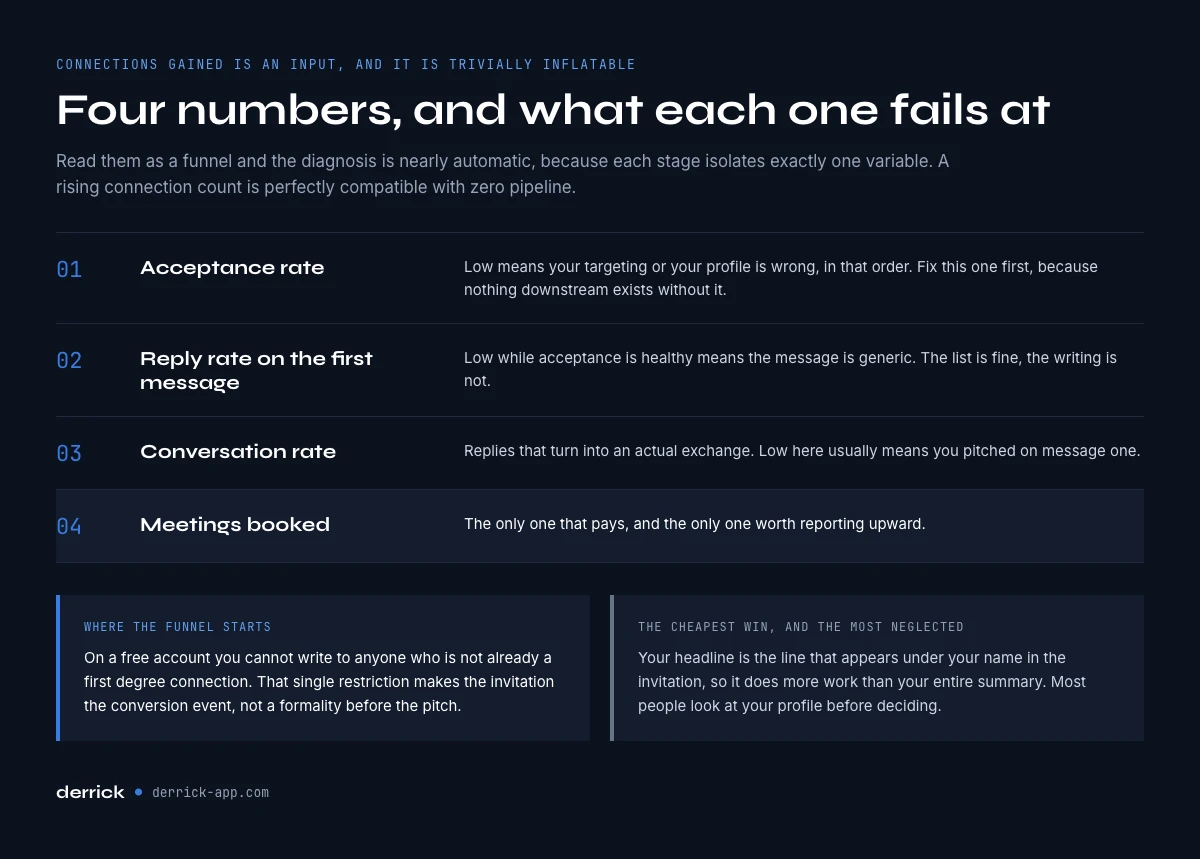
Most LinkedIn prospecting is measured on the wrong number, which is connections gained. Connections are an input, they are trivially inflatable, and a rising connection count is compatible with zero pipeline.
Four numbers tell you what is actually happening, and each one fails in a diagnosable way.
- Acceptance rate. Low means your targeting or your profile is wrong, in that order. This is the first number to fix, because nothing downstream exists without it.
- Reply rate on the first message. Low with a healthy acceptance rate means the message is generic. The list is fine, the writing is not.
- Conversation rate. Replies that turn into an actual exchange. Low here usually means you pitched on message one.
- Meetings booked. The only one that pays, and the only one worth reporting upward.
Read them as a funnel and the diagnosis is nearly automatic, because each stage isolates one variable. If you want the wider set of outbound metrics that this fits inside, our guide on outbound sales covers the full motion.
When LinkedIn prospecting needs Sales Navigator
There is a real threshold, and it is worth naming rather than pretending the free account scales forever.
Sales Navigator is the paid prospecting tier of LinkedIn, and it lifts the free ceilings described above in a set order. Search first: more filters, including seniority, company headcount and years in role, and far more results per search. Lists second: saved leads and accounts, with alerts when someone changes job. Messaging last: InMail credits to reach people outside your network, which matter less than they sound, because a good invitation still does better than a cold InMail.
Upgrade when your target list is genuinely larger than a few hundred accounts and the free filters cannot express your segment. That is a specific condition, not a feeling. If your definition needs headcount bands, seniority levels or years in role to be expressed at all, free search cannot represent it and you are compensating with manual effort every single week.
Do not upgrade because your acceptance rate is low, because your messages are not landing, or because prospecting feels slow. None of those are search problems, and a better search tool fixes none of them. We ran the arithmetic on the consumer tiers in our guide on whether LinkedIn Premium is worth it, and the short version is that the quota, not the price, is what most buyers actually hit.
The point where Sales Navigator pays is the one named above: a segment the free filters cannot express, at a volume where you would otherwise rebuild the same search by hand every week. Below that point, the free LinkedIn prospecting workflow in this guide takes you further for nothing. We do not walk through the filters here; our step-by-step Sales Navigator guide does that, and the Sales Navigator hub gathers the rest, plans included. Whichever tier you use, Derrick treats the results the same way: Import LinkedIn Leads from a Sales Navigator search sends them to the web app or a sheet at 1 credit per profile, exactly like a regular search.
LinkedIn prospecting tools: what each one is for
Most lists of LinkedIn prospecting tools mix four different jobs, which is why they are so hard to compare. Choose by the job first, the brand second.
| Job | What the tool does | Where Derrick fits |
|---|---|---|
| Build the list | Turns a LinkedIn or Sales Navigator search into rows you can work on | Import LinkedIn Leads, 1 credit per profile, in the web app or Google Sheets |
| Qualify the list | Fills in job title, company, size and location, flags who is still in role | Enrich Leads, 1 credit per profile; Company Hiring Signal, 1 credit per company |
| Find contact details | Finds a work email for the people you will also reach by email | Email Finder, 5 credits per email found, on paid plans |
| Send the sequence | Runs invitations, messages and emails on a schedule | Not a Derrick job: a sequencer such as La Growth Machine or lemlist, which Derrick pushes the finished list to |
Derrick covers the first three jobs. The web app does it with nothing to install, the Google Sheets sidebar suits a list that already lives in a sheet, the Derrick MCP server lets you ask Claude or ChatGPT for the same steps in a chat, and the REST API runs them inside your CRM or an automated workflow. The LinkedIn imports go through your own LinkedIn session, connected once with the Derrick Chrome extension. The email step is the one place the free plan stops: Email Finder needs a paid plan, starting with Standard at €20 a month, while the 100 free credits a month cover the import and the enrichment on a first batch.
For the sending side, keep the tool on the same rule as the rest of this guide: it should send at a human pace, and only to rows that went through qualification. The tool that sends is never the tool that decides who to write to.
Automated LinkedIn prospecting: what you can hand off, and what you cannot
Tools that send invitations and messages from your account are fast, and that is exactly the problem: LinkedIn watches the pace of actions per account and restricts the ones that move faster than a person. We separated the official limits from the observed ones in our page on LinkedIn limits. The practical rule that follows: outreach stays manual, because it carries both the judgement and the risk.
What you can hand off without putting your account at risk is everything that happens away from LinkedIn: getting a results list into a sheet, completing the profiles, sorting, deduplicating, prioritising. With Derrick, Import LinkedIn Leads brings the profiles of a LinkedIn search into the web app or Google Sheets at 1 credit per profile, then Enrich Leads completes each row at 1 credit per profile, and the free plan's 100 monthly credits let you test on a first batch. The same step runs from the Derrick MCP server if you would rather ask Claude or ChatGPT, and from the REST API to plug it into your CRM. The Derrick web app does it without a spreadsheet, with nothing to install.
Is automated LinkedIn prospecting against LinkedIn's rules?
Automating actions on LinkedIn itself is. The LinkedIn User Agreement rules out bots and other unauthorized automated methods to access the service, add contacts or send messages, and accounts that act faster than a person get restricted. Derrick does not send invitations or messages from your account: it works on the list, which is the part you were going to put in a spreadsheet anyway.
The mistakes that sink prospecting on LinkedIn
- Prospecting before the profile is ready. Most people look at your profile before accepting. A headline that does not say who you work for costs acceptances on every invitation.
- Selling in the connection note. The note is there to get the acceptance, not the meeting. A pitch at that stage gets declined.
- Sending everyone the same message. A message with nothing specific to the person reads as a broadcast and gets treated like one.
- Measuring nothing. Without acceptance and reply rates, you cannot tell whether the problem is the targeting, the note or the message.
- Automating outreach on your personal account. It is the shortcut that loses the account, and the whole channel with it. Automate the list, not the conversation.
Key takeaways: the whole guide in eight lines
- A free account is a genuine constraint, not a crippled demo. Search volume is the ceiling that binds first, and precision is the answer to it.
- Define the target in writing before you search, including a trigger. Demographics alone produce lists you cannot act on.
- The connection request is the conversion step, not a formality. Acceptance rate is the first number to fix.
- Separate list-building, qualification and writing into three blocks. Mixing them is what makes people quit in week two.
- Measure acceptance, reply, conversation and meetings. Connections gained tells you nothing.
- Upgrade when your segment cannot be expressed in free filters. Not because outreach feels slow.
- Start from signals when you can: a job change, a hiring post or a comment on a post gives you a reason to write that a search alone never does.
- Pick LinkedIn prospecting tools by job: list building, qualification, contact details and sending are four different tools, and the sender never decides who gets written to.
LinkedIn prospecting fails far more often from unclear targeting and unsustainable process than from a missing subscription. Fix the definition, split the work into blocks, and let the tooling absorb the part that is genuinely repetitive, which is turning a column of profile URLs into a table you can decide from. The part that requires judgement stays yours, and it is the only part that was ever worth your time.
Frequently asked questions
Can you prospect on LinkedIn without Sales Navigator?
What limits will I hit first on a free LinkedIn account?
How many connection requests should I send per week?
What should the first message say after someone accepts?
Is posting on LinkedIn better than direct outreach?
What metrics should I track for LinkedIn prospecting?
When is it worth paying for LinkedIn Premium or Sales Navigator?
How do you keep LinkedIn prospecting sustainable?
Keep reading
Continue exploring this cluster


The State of B2B Marketing Performance 2026: Benchmarks Report
Read →

Account-Based Marketing (ABM): Definition, Techniques, Examples
Read →

Inbound vs Outbound Marketing: Differences, When to Pick Each
Read →

B2B Lead Generation: Strategies, Tools, Tips in 2026
Read →