B2B buyer persona: the two-column card for every role in the buying committee
Build a B2B buyer persona in two columns: what you can verify in the data, what you must ask. Template, 3 examples, 7 questions and a free builder.


What is a B2B buyer persona?
A B2B buyer persona is a short profile of one type of person who takes part in buying what you sell to businesses: their role, what they are measured on, what pushes them to act and what they check before they say yes. It is semi-fictional in the sense that it describes a type of person rather than one individual. It should not be invented: every line of it should come either from data you can check or from conversations with real buyers. The short definition lives in our glossary entry on the persona; this guide is about building one that a sales or marketing team can actually use.
Two things make a B2B buyer persona different from a consumer buyer persona. The first is that the purchase is rarely made by one person. A company buys through a group, and each member of it deserves a buyer persona: someone who signs, someone who will use the product, someone who advises, sometimes someone who argues for you internally. One account therefore calls for several buyer personas, one per role. The second is that the person buys with the company's money, against the company's goals. Their personal tastes matter far less than what their manager will ask them about next quarter.
That second point is why a B2B buyer persona so often ends up useless. A card that says "Marketing Mary, 38, likes yoga and podcasts, drinks oat milk" tells a seller nothing about how to open a conversation or what proof to bring. The fields that help are professional: the title, the scope of the job, the numbers the person is judged on, the event that made them start looking, the criteria they will use to compare options, and the part they really play in the decision.
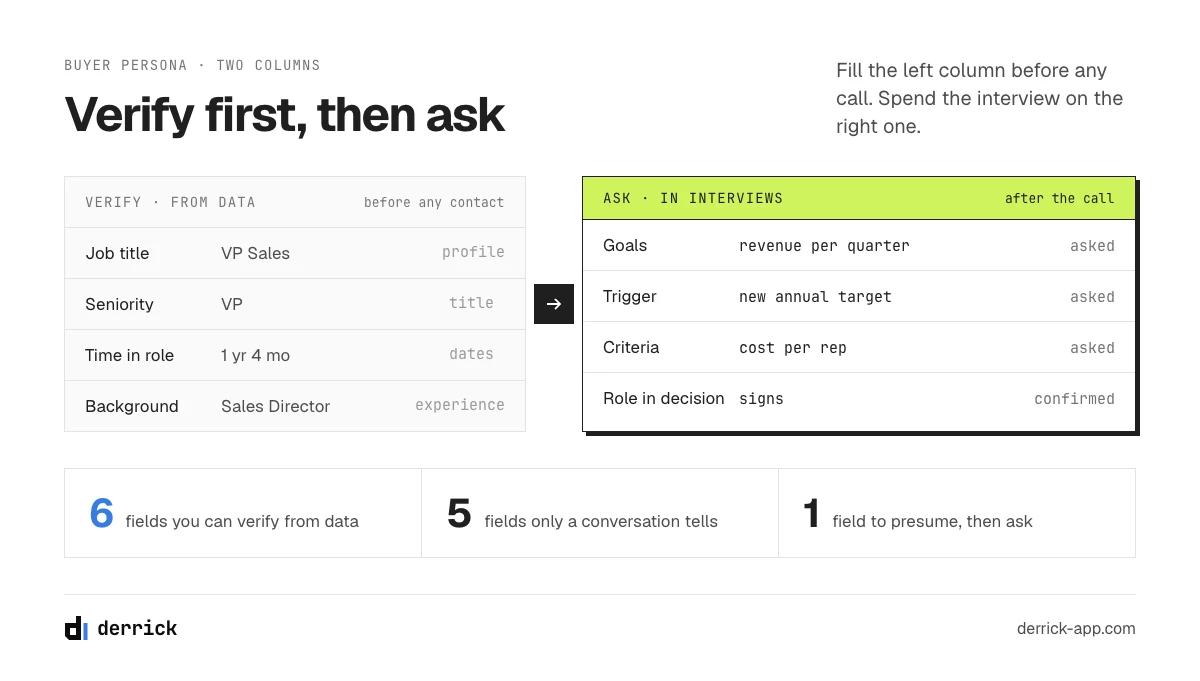
This guide organises those fields in two columns. The left column holds what you can verify without disturbing anyone: the title, the function, the seniority, how long the person has held the role, their background. The right column holds what only a conversation will tell you: the goals, the triggers, the criteria and the real role in the decision, which the title only lets you presume. Most buyer persona guides mix the two, then end on "run interviews". Keeping them apart tells you what to prepare before you ever pick up the phone, and what to spend the interview on.
Persona, ICP, target audience: which is which
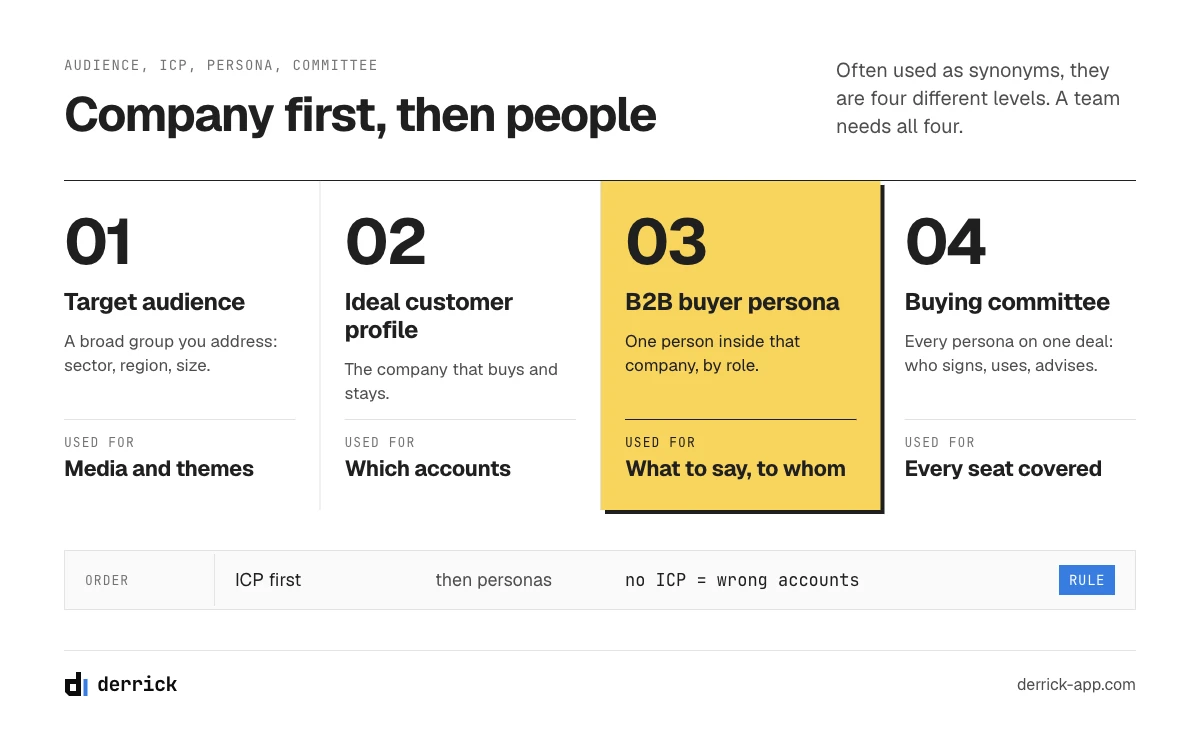
Buyer persona, ICP and target audience get used as if they were the same thing. They describe three different levels, and a team needs all three.
| Describes | Typical fields | Used for | |
|---|---|---|---|
| Target audience | A broad group you address | Sector, region, company size, broad job family | Media buying, content themes |
| Ideal customer profile (ICP) | The company that buys and stays | Industry, headcount, geography, stack, growth signals | Choosing which accounts to target |
| B2B buyer persona | A person inside that company, by role | Title, function, seniority, goals, triggers, criteria, role in the decision | What to say, to whom, with which proof |
| Buying committee | The set of personas on one deal | Who signs, who uses, who advises, who can block | Covering every seat of an account |
The order matters: first the company, then the people inside it. A B2B buyer persona written without an ICP describes people at companies you should not be selling to. The full comparison, and how to build the company profile from the deals you have won, is covered in our guide to the ideal customer profile in sales. Here we stay on the person.
The anatomy of a B2B buyer persona: two columns
A useful B2B buyer persona has about a dozen fields. The table sorts them by where the answer comes from. "Verify" means you can check it in data about the person before any contact. "Ask" means the answer lives in the buyer's head, and only a conversation, a call recording or a survey will bring it out.
| Field | Column | Where the answer comes from |
|---|---|---|
| Job title | Verify | The person's public profile, your CRM |
| Function (sales, finance, IT, operations...) | Verify | Read from the title and the department |
| Seniority (individual contributor, manager, head, VP, C-level) | Verify | Read from the title |
| Time in the current role | Verify | The dates on the public profile |
| Background (previous roles, previous employers) | Verify | The experience section of the profile |
| Location | Verify | The public profile |
| Goals and the numbers they are judged on | Ask | Interview: "what does a good year look like for you?" |
| Pains in the current process | Ask | Interview, call recordings, support tickets |
| Trigger: what made them start looking | Ask | Interview with recent buyers |
| Criteria for choosing a supplier | Ask | Interview, lost-deal reviews |
| Sources they trust (peers, communities, analysts, content) | Ask | Interview, onboarding survey |
| Real role in the decision | Presume, then ask | The title suggests it; the deal history and the interview confirm it |
Three remarks on this table.
- The last row sits between the two columns. A "Head of Revenue Operations" is often the person who evaluates the tool, sometimes the person who signs, occasionally just the person who will maintain it. The title lets you presume the role; only the deal, or the buyer, tells you which it was. Write the presumption down as a presumption.
- Company fields stay out. Team size, open roles, tech stack and funding describe the account, not the person. They belong to the ICP. A persona that repeats them becomes a second, weaker ICP.
- The left column is cheap and the right column is expensive. An interview costs an hour of your time and an hour of a customer's goodwill. Filling the left column first means you never spend that hour asking someone what their job title is.
In the web app or Google Sheets
Fill the verifiable column from real contacts
The left column of a buyer persona is the part you can check: current title, time in the role, background, location. Import the contacts of your won deals into the web app or the Google Sheets sidebar and Derrick fills those fields for each person from their LinkedIn profile URL, so your interviews go on the questions only a buyer can answer. Your LinkedIn account connects through the Derrick Chrome extension.
- Feature
- LinkedIn Leads Profile Enrichment
- Credit cost
- 1 credit per lead enriched
The first button opens the web app (nothing to install): 1 credit per lead enriched, 100 free credits every month. The second details the feature and its cost per plan.
The four types of buyer personas in a buying committee, and the negative persona
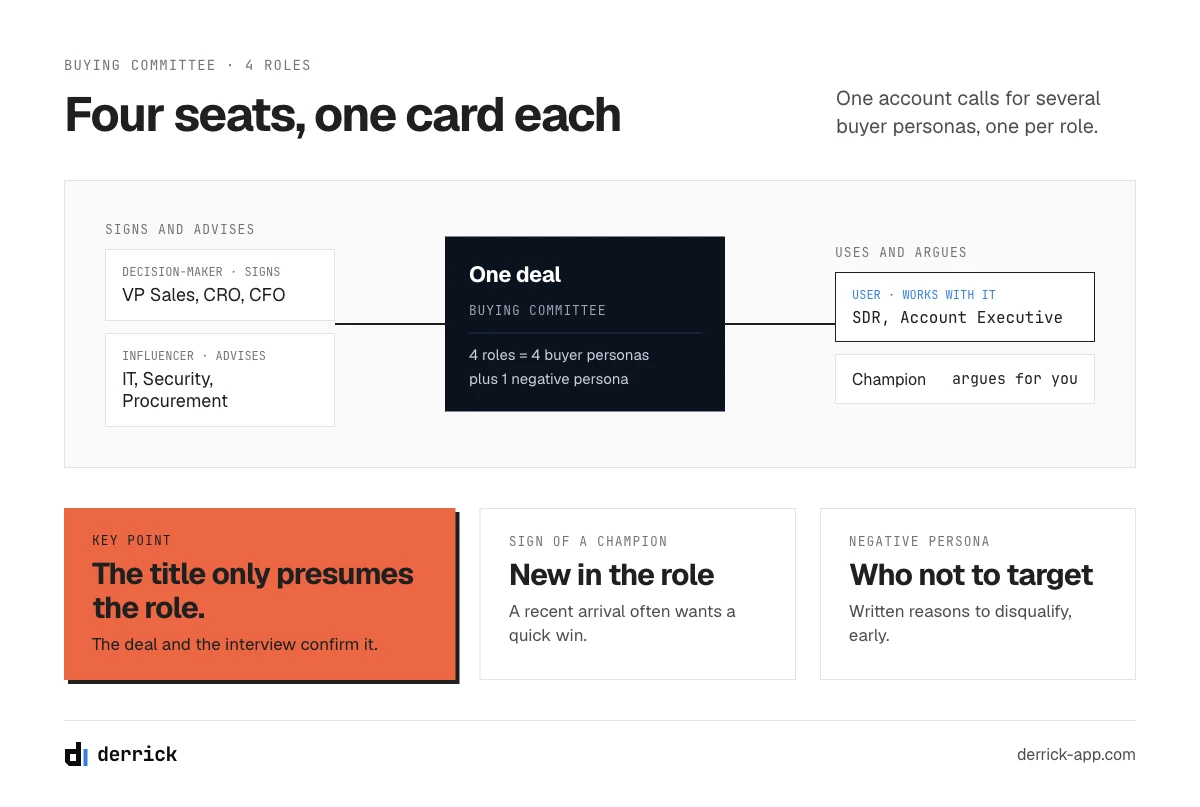
When people ask what the four types of buyer personas are, the most useful answer in B2B is the four roles a person can hold in a purchase. Each role gets its own card. For each one below: who holds it, the titles you typically see, what you can verify about them and what you will have to ask. Security and procurement are filed under the influencer card here; our buying-committee playbook counts five seats and gives the technical and security roles their own.
1. The decision-maker
Who: the person who signs, or who owns the budget line the purchase will come from. Typical titles: VP Sales, Chief Revenue Officer, Head of Marketing, CFO for cross-team purchases, the founder in a small company. Verify: title, seniority, time in the role, and whether they came from a similar job elsewhere. Ask: the number they are judged on this year, and who they rely on before signing.
2. The influencer
Who: a person whose opinion shapes the choice without signing it: IT or security, procurement, an analyst, a respected peer. Typical titles: IT Manager, Head of Security, Procurement Manager, Data or RevOps lead. Verify: function and seniority, which tell you which part of the review they are likely to own. Ask: which criteria were blocking for them, and when they were brought into the project.
3. The user
Who: the people who will work with the product every day. Typical titles: Sales Development Representative, Account Executive, Marketing Operations Specialist, Growth Marketer. Verify: title, time in the role and background, which say how experienced the team is. Ask: how they do the task today, step by step, and what would make them drop a tool. Users weigh heavily on renewal.
4. The champion
Who: the person inside the account who wants the purchase to happen and argues for it when you are not in the room, often a user or an influencer who took the project on. Typical titles: Sales Manager, Head of Growth, RevOps Manager, a newly hired leader who wants a quick win. Verify: time in the role; a recent arrival is a common profile for a champion. Ask: who pushed back internally, on what, and how they answered.
The negative persona
A negative persona describes someone you do not want to sell to, or not yet: the student downloading every template, the consultant collecting ideas for a client, the buyer at a company far too small to get value from the product. Writing it down saves marketing budget and sales time, because it gives the team explicit reasons to disqualify.
What each seat buys on, the order in which to reach them and the proof to bring are covered in our playbook on how to sell to decision makers and a buying committee.
What you can verify before any interview
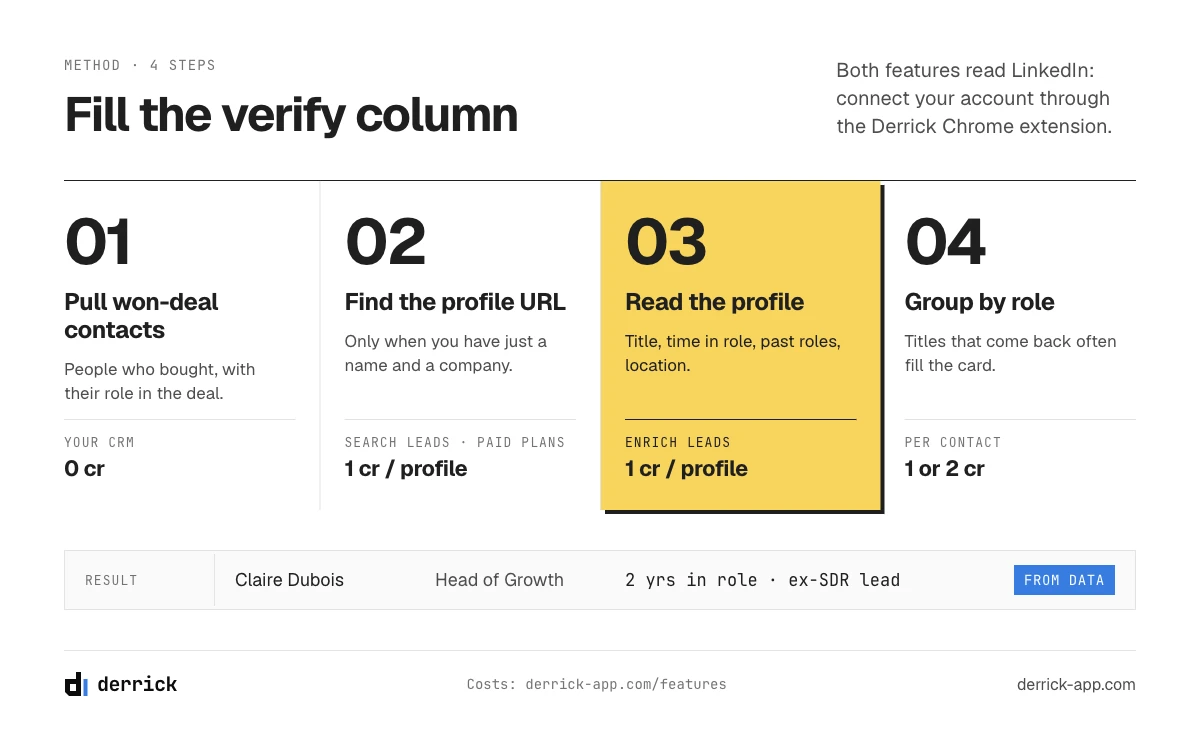
The left column of a buyer persona is built from real people you have sold to. The best starting point is the contacts who took part in deals you have already won: they are, by definition, people who bought. Pull them from your CRM with their role in each deal if your team records it. How to use those same won deals to define the target company is a separate method, described in the ICP guide; here you only need the list of people.
For each contact, you want five facts: the current title, what that title says about function and seniority, how long they have held the role, where they worked before, and where they are based. You can collect them in two ways.
- By hand. Open each public profile and copy the fields into a sheet. It works for ten contacts. At fifty, it takes an afternoon, and the fields drift because each person copies them differently.
- With an enrichment tool. You bring the list, the tool fills one column per field for every row, in the same format.
With Derrick, the chain depends on what your CRM already holds:
- You have the LinkedIn profile URL. Enrich Leads takes that URL and returns the current title, company, time in the role, past positions and location. 1 credit per profile, on the free and paid plans. One step.
- You only have a name and a company. Search Leads first finds the LinkedIn profile URL from the full name and, optionally, the company, at 1 credit per profile, on the paid plans only (from the Standard plan). Then Enrich Leads fills the fields, at 1 credit per profile. Two steps, so 2 credits per contact.
Both features read LinkedIn, so they need your LinkedIn account connected through the Derrick Chrome extension. The details of each one are on the Enrich Leads and Search Leads pages.
What that costs, in two cases. Thirty won-deal contacts whose LinkedIn URLs are already in the CRM: 30 credits, in one step, inside the 100 free credits a month. Forty contacts known only by name and company: 40 credits for Search Leads plus 40 for Enrich Leads, so 80 credits in two steps. The total fits under 100, but it still calls for a paid plan, because Search Leads is not available on the free plan. The Standard plan, at 20 euros a month for 10,000 credits, covers it many times over.
Once the column is filled, sort by title and read. Patterns show up quickly: the same three titles signing, the same function evaluating, champions who joined the company less than a year before the deal. That last kind of observation is exactly what the left column is for. Why they bought is a question for the interviews; the column tells you whom to interview for each persona, and what to ask them about.
What you must ask: 7 interview questions
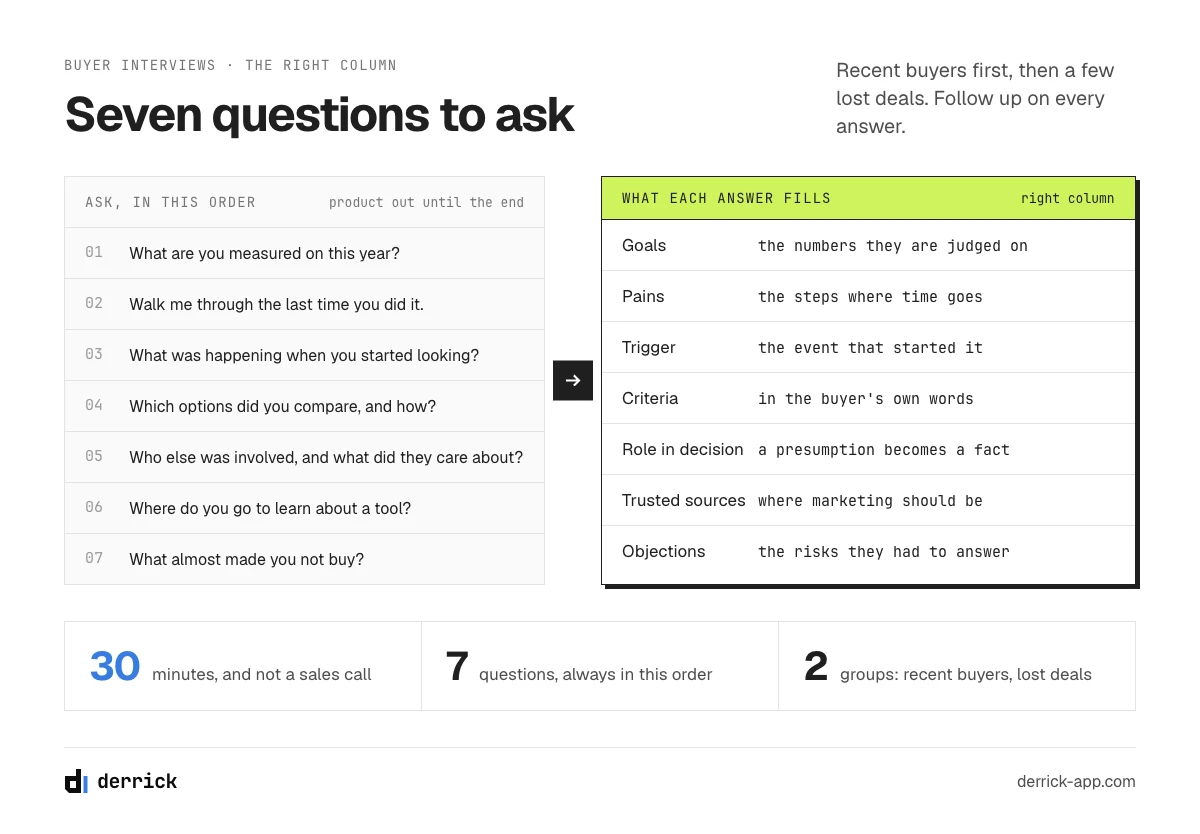
The right column of a B2B buyer persona needs conversations. Keep interviewing until the answers start to repeat. Choose who to interview from the left column: recent buyers first, because they still remember why they started looking, then a few people from deals you lost, because they tell you which criteria you failed on. Ask for thirty minutes, say it is not a sales call, and keep your product out of it until the end.
The seven questions below cover the whole right column. Ask them in this order, and follow up on every answer before moving to the next one.
- "What are you measured on this year, and how do you know it is going well?" This gives you the goals and the numbers. A decision-maker names a revenue or cost figure. A user names a recurring task.
- "Walk me through the last time you did [the task your product serves]." A real story beats an opinion. You hear the steps, the tools, and where the time goes.
- "What was happening when you started looking for a solution?" This is the trigger: a new target, a new manager, a failed quarter, a tool that stopped working, a team that doubled. Triggers are what marketing can watch for.
- "Which options did you look at, and how did you compare them?" This gives you the criteria and the consideration set, in the buyer's words, without your categories on top.
- "Who else was involved, and what did each of them care about?" This confirms the committee and each person's real role. It is the question that turns a presumption from the title into a fact.
- "Where do you go when you need to learn about a tool or a method?" Peers, communities, newsletters, analysts, search. This tells marketing where to be.
- "What almost made you not buy, or not buy from us?" The objections and the risks the buyer had to answer internally. For a lost deal, ask it the other way round.
Adapt the wording to the role. Question 1 asked to a CFO is about budget and risk; asked to a sales rep, it is about quota and time. Question 5 asked to a champion often gives you the most useful answer of the whole interview, because the champion saw every objection from the inside. The builder in part 8 rewrites the seven questions for the role you choose.
After each interview, write the answers in the right column in the person's own words, not in yours. When three interviews in a row give the same trigger or the same criterion, it goes on the card. When only one person says it, it stays in your notes.
B2B buyer persona examples
The three B2B buyer persona examples below are illustrative: they show the format for a company selling a sales data tool to mid-sized B2B software companies. They are not drawn from a real study, and the right column shows the kind of answers interviews produce; none of it is a measured result. Use them as a model of what a finished card looks like.
Example 1: the decision-maker, "the revenue leader"
| Verify (from data) | Ask (from interviews) |
|---|---|
| Title: VP Sales or Chief Revenue Officer | Measured on: new revenue per quarter and pipeline coverage |
| Function: sales. Seniority: VP or C-level | Pain: reps spend part of their week on research instead of selling |
| Time in role: often under two years at the time of the deal | Trigger: a new annual target, or a team hired faster than it can ramp |
| Background: previously a sales manager or director elsewhere | Criteria: cost per rep, time before reps use it, what the team says |
| Location: head office | Role in the decision: signs; relies on the RevOps lead's recommendation |
Example 2: the user, "the SDR who builds lists"
| Verify (from data) | Ask (from interviews) |
|---|---|
| Title: Sales Development Representative, Business Development Representative | Measured on: meetings booked per week |
| Function: sales. Seniority: individual contributor | Pain: copying data from profiles into the CRM, one tab at a time |
| Time in role: often in the first or second year | Trigger: a manager asks for more accounts per week |
| Background: first or second job, sometimes from customer support | Criteria: works where they already work, learnable in an afternoon |
| Location: often remote or in a sales hub | Role in the decision: tests, reports back; drives the renewal |
Example 3: the champion, "the RevOps lead"
| Verify (from data) | Ask (from interviews) |
|---|---|
| Title: Revenue Operations Manager, Head of Sales Operations | Measured on: data quality in the CRM, reporting accuracy |
| Function: operations. Seniority: manager or head | Pain: duplicate and outdated records that break every report |
| Time in role: varies; often brought in to fix the data | Trigger: a board report that nobody trusts |
| Background: previously in analytics, sales or marketing operations | Criteria: clean output, a clear credit cost, an API for later |
| Location: head office | Role in the decision: evaluates, writes the business case, argues for it |
Notice what these three buyer persona examples do not contain: no age, no hobbies, no invented name with a photo. Every line either comes from data you can check or from something buyers said. And the last line of each right column is a role that the title suggested and that the deal confirmed.
B2B buyer persona template, and a builder to fill it
Copy this B2B buyer persona template into a document or a sheet, one card per role. Fill the left column before any interview, the right column after.
| Field | Verify (from data) | Ask (from interviews) |
|---|---|---|
| Persona name and role | [role in the committee: decision-maker, influencer, user, champion] | |
| Titles seen | [the 3 to 5 titles that come back most often] | |
| Function and seniority | [read from the titles] | |
| Time in the role | [typical range at the time of the deal] | |
| Background | [previous roles that come back] | |
| Goals and numbers | [in the buyer's words] | |
| Pains | [the steps where time or money goes] | |
| Trigger | [the event that started the search] | |
| Criteria | [how they compared options] | |
| Trusted sources | [where they learn] | |
| Role in the decision | [presumed from the title] | [confirmed in interviews and deals] |
If you would rather start from a role and the titles you actually see in your deals, the builder below drafts the card for you: the verifiable column with the titles you enter, the questions to ask adapted to the role, and what filling the left column costs for your list.
Draft a two-column B2B buyer persona
Pick a role, paste one to five real titles, one per line. The card updates as you type.
Pick a role and enter at least one title.
Enrich Leads and Search Leads read LinkedIn: they need your LinkedIn account connected through the Derrick Chrome extension. Credits are counted per contact and per step.
How to use a B2B buyer persona
A B2B buyer persona that sits in a shared folder changes nothing. It becomes useful once it decides who you contact, and then shapes what you say and publish.
From the card to a list of people
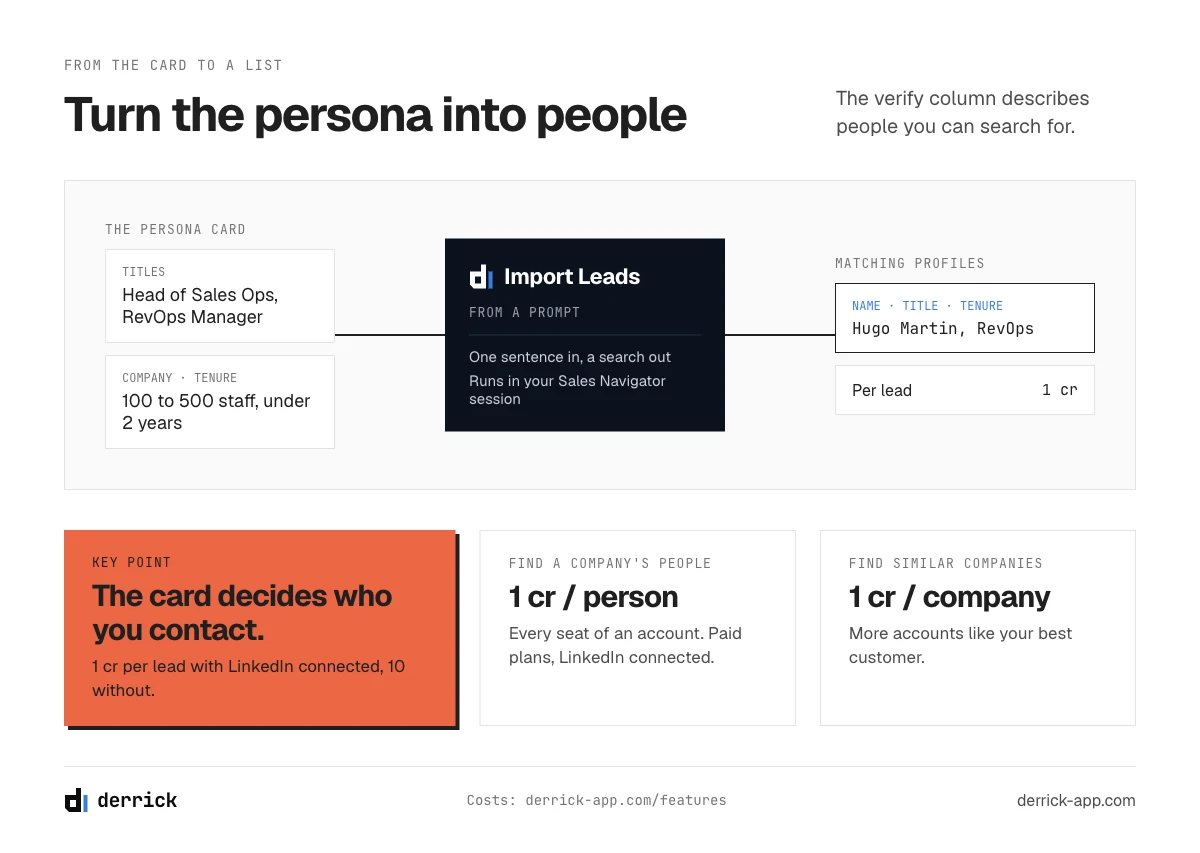
The left column describes people you can search for. Once you know that a buyer persona is, say, "Head of Sales Operations or RevOps Manager, at a software company of 100 to 500 people, in the role for less than two years", you can look for people who match, at accounts that match your ICP. Two Derrick features turn the card into a list:
- Import Leads from a Prompt: you describe the persona in one sentence and Derrick turns it into a search that runs in the Sales Navigator of your LinkedIn session, then imports the matching profiles with name, title, company, tenure, location and LinkedIn URL. 1 credit per lead with your LinkedIn account connected, 10 credits per lead without. Free and paid plans.
- Find a company's people: for an account you already target, it lists the people at the company from its LinkedIn URL, optionally filtered by function, so you can see who holds each seat of the committee. 1 credit per person imported, on the paid plans (from the Standard plan), with your LinkedIn account connected through the Derrick Chrome extension.
And if you want more accounts like your best customer before you look for people, Find Similar Companies takes one company's LinkedIn URL and returns lookalike companies, at 1 credit per company, on the free and paid plans, without needing your LinkedIn account connected. Turning those accounts and people into a clean prospect list is covered in our guide to building a prospect list.
From the card to the message
The right column gives you the opening line for each role, and our guide to account-based marketing covers how to coordinate several personas on the same account.
From the card to content
The trusted sources field tells marketing where to be. The criteria field tells it what to prove, for example with a comparison page or a cost-per-rep calculator. The trigger field tells it when to publish: at the moment someone starts looking. A persona-based marketing plan, in short, is one where every piece of content can name the persona it serves (see the glossary entries on persona-based marketing and the persona map).
Keep it current
Review the left column when your deals change, for instance after you open a new segment or change your pricing. Titles change, and a card built on the titles of two years ago will send your team after the wrong people. Re-run the enrichment on the contacts of your latest won deals, compare, and update the card. The right column moves slower; a new round of interviews once a year is usually enough, or sooner if win rates change.
Where the verifiable column comes from: the Derrick app, Sheets, Claude (MCP), API
The left column of a B2B buyer persona is the part you can collect for a whole list in one pass. Here is how the features in this guide line up with the fields:
- Title, time in the role, background, location: Enrich Leads, from the LinkedIn profile URL. 1 credit per profile, free and paid plans.
- The profile URL itself, when you only have a name: Search Leads, from the full name and company. 1 credit per profile, paid plans.
- Who else sits on the committee: Find a company's people, from the company's LinkedIn URL, filtered by function. 1 credit per person, paid plans.
- More people who match the persona: Import Leads from a Prompt. 1 credit per lead with LinkedIn connected, 10 without.
Enrich Leads, Search Leads and Find a company's people need your LinkedIn account connected through the Derrick Chrome extension, whichever surface you use them from. Import Leads from a Prompt also works without it, at 10 credits per lead.
Where to do it. The Derrick web app is the front door: import your won-deal contacts, add one column per field, nothing to install. You can also use Derrick in the Google Sheets sidebar if your list already lives in a sheet, in Claude or any MCP client to profile a handful of contacts by asking in plain language, or through the API so that every new contact in your CRM gets its left column filled automatically. MCP and API access come with the Plus plan and above.
What it costs at every size. Up to 100 contacts whose LinkedIn URL is already in your CRM fit in the free plan's 100 monthly credits, one step each. Up to 5,000 contacts known only by name fit in the Standard plan (20 euros a month, 10,000 credits), at two steps each. For a CRM of 50,000 contacts known by name, the first pass takes two steps, so 100,000 credits, which the Pro plan (175 euros a month, 100,000 credits) covers in one month; re-profiling them each quarter then starts from the URLs you already have, one step, so one credit per contact each quarter, half of Pro's monthly credits. Larger bases move to the Scale plan: 200,000 credits a month for 320 euros. The interviews, the right column, remain yours to run.
For how this persona work fits into your broader launch plan, see our guide to the go-to-market strategy.
Frequently asked questions
What is a B2B buyer persona?
What are the four types of buyer personas?
What are the three main types of B2B buyers?
How many buyer personas does a B2B company need?
What is the difference between an ICP and a buyer persona?
What data do you need to build a B2B buyer persona?
Keep reading
Continue exploring this cluster


The State of B2B Marketing Performance 2026: Benchmarks Report
Read →

Account-Based Marketing (ABM): Definition, Techniques, Examples
Read →

Inbound vs Outbound Marketing: Differences, When to Pick Each
Read →

B2B Lead Generation: Strategies, Tools, Tips in 2026
Read →