B2B email marketing: 8 campaigns by segment, and the data field that triggers each one
Plan B2B email marketing by segment: 8 campaign examples, 10 strategies, the KPIs that matter and the data field that triggers each campaign.

What B2B email marketing is, and what it is not
B2B email marketing is sending emails to professionals who agreed to hear from you, to move their company toward a purchase: welcome emails, newsletters, nurture sequences, product launches, webinar invitations, case studies and reactivation campaigns. The short definition of email marketing in general lives in our glossary. This guide covers what changes when the reader is a company rather than a consumer, and the one thing most B2B email marketing guides skip: in B2B, the segment is decided by what you know about the contact's company and role, not by what they opened last week.
One boundary before we start. Email marketing goes to people who opted in: they signed up, downloaded something, registered for an event or became customers. A first message to someone who never heard of you is cold email, a different channel with different rules, covered in our cold email guides. This page gives no cold email template and no prospecting sequence.
Is B2B email marketing still worth it?
Yes, and for a simple reason: email is the channel your buyers already use for work, every day, and the one you own. A social platform can change its algorithm and cut your reach overnight; your list stays yours. It is also one of the cheapest channels to run: the marginal cost of one more email is close to zero, and most B2B marketing teams use it as a core channel for nurturing and retention. The results, though, vary widely from one team to another. The teams at the top of the range send fewer, more relevant emails to smaller segments; the teams at the bottom send the same newsletter to everyone.
When it is not the right channel
Email marketing needs a list of people who opted in. If you have fewer than a few hundred contacts, your first job is to grow the list through content, events and your product, not to design campaigns. And if the people you want to reach have never heard of you, email marketing is not the channel yet: that is prospecting, with its own rules. For everyone else, the question is not whether to send, but to whom.
The cost that decides which group you belong to is not the sending tool. It is the data behind the segments. Take a list of 5,000 contacts at 5,000 different companies, where you know the company name but nothing else. Adding industry, headcount and country takes two steps per company with Derrick: Search Companies to find the company's LinkedIn page (1 credit) and Enrich Companies to read it (1 credit). For 5,000 companies, that is 10,000 credits, the monthly allowance of the Standard plan at 20 euros a month. Both features are also on the free plan, whose 100 credits a month cover 50 companies. Checking that the 5,000 addresses still work costs up to 5,000 more credits with Email Verification, on the paid plans.
B2B vs B2C email marketing: the four things that change
- The buyer is a committee. A B2C email convinces one person. A B2B email reaches one member of a buying committee who has to convince others. The content that works gives them something to forward: a number, a comparison, a case from their industry.
- The cycle is long. Months, not minutes. Email in B2B is less about the next click and more about staying relevant until the moment the company is ready, which is why nurture and newsletters matter more than promotions.
- The address has an expiry date. A work address dies when the person changes jobs. A B2B list decays every month, faster than a consumer list; our guide on contact management covers how fast and what to do about it.
- The timing follows the working week. B2B emails are read at work, between meetings. Tuesday to Thursday mornings in the recipient's time zone are the usual safe choice, and weekends are rarely worth it.
The list is the strategy: what you must know before you can segment
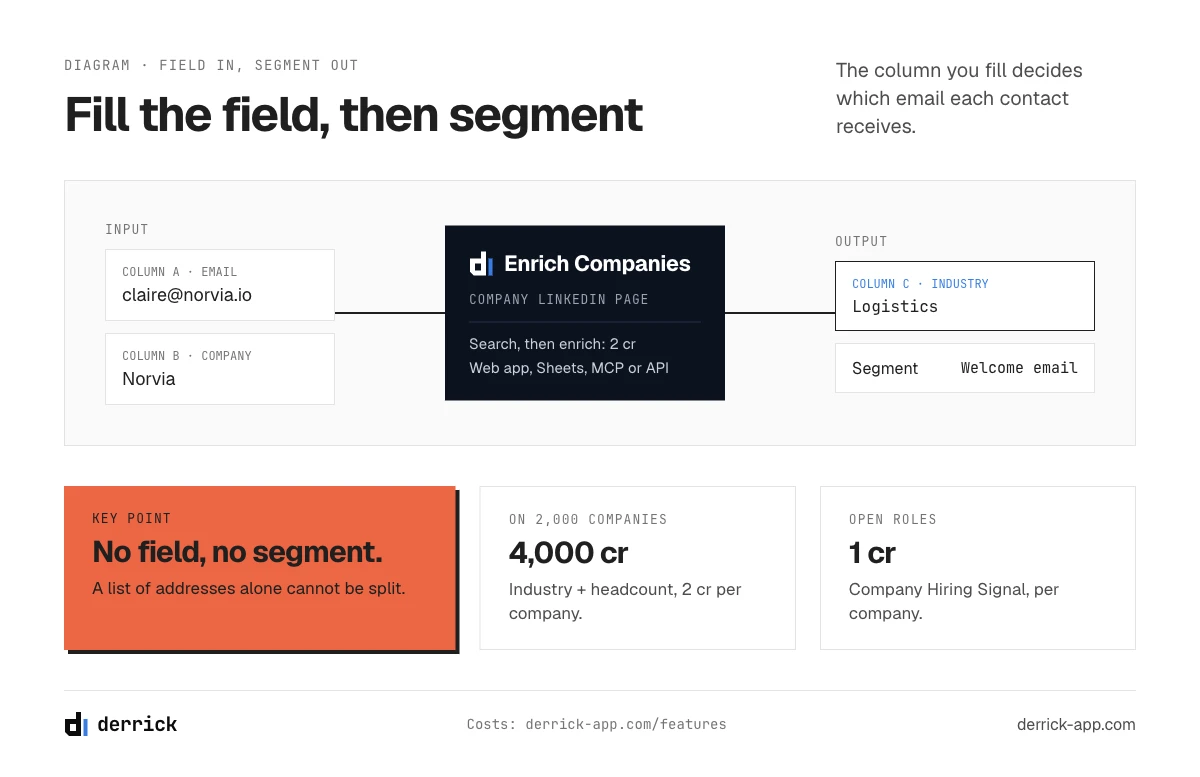
Every B2B email marketing guide says "segment your list". Few say what segmentation needs: a field. You cannot send the healthcare case study to healthcare companies if the industry column is empty. A list that holds only email addresses does not segment, however good the sending tool. Building the list itself, its sources and its upkeep, is covered in our guide on B2B database marketing. Here, one question: which field triggers which campaign, and where does it come from?
| Segment | Trigger | Campaign | Field needed | Where it comes from (availability, input, credits) |
|---|---|---|---|---|
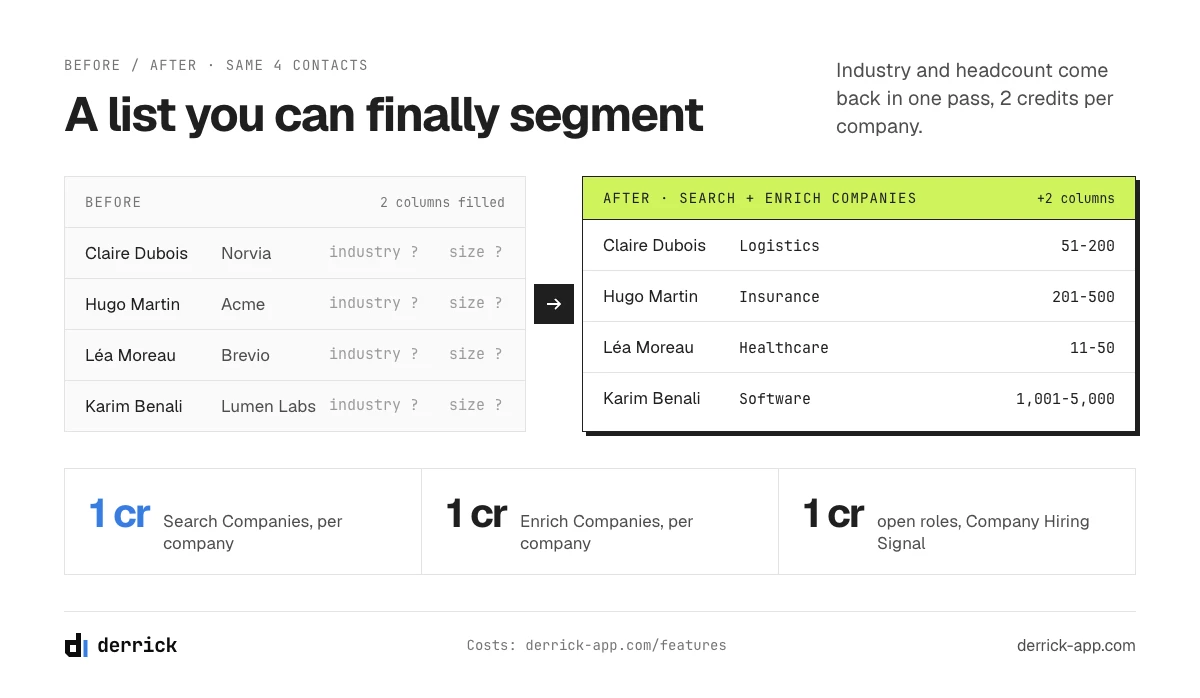
| Industry | New subscriber | Welcome by industry, case study | Industry | Search Companies then Enrich Companies (free and paid plans, company name, 1 + 1 per company) |
| Role | Monthly | Newsletter by role | Job title | Find Names and Domains (free, unlimited) then Search Leads (paid plans, 1) then Enrich Leads (free and paid, 1) |
| Company size | Quarterly | Nurture by size, upsell | Headcount | The same Search Companies then Enrich Companies pass as industry (2 per company for both fields) |
| Stack | Integration launch | Feature launch | Technologies on the website | Website Technologies (paid plans, domain, 2 per site) |
| Hiring | Roles opened | Webinar invitation | Open roles | Company Hiring Signal (free and paid, company list, 1 per company) |
| Deliverable | Before reactivation | Reactivation | Address checked | Email Verification (paid plans, 1 per email, billed per result) |
Three honest limits. First, the chains above assume your list holds the company name, which is usually true when it comes from a form or a CRM. When it holds only the address, the domain gives you a website to look at, but turning a domain into a company name is a manual step, and a gmail.com address does not resolve at all. Second, the features that read LinkedIn (Search Companies, Enrich Companies, Search Leads, Enrich Leads) need your LinkedIn account connected through the Derrick Chrome extension. Third, the role takes three steps: the first and last name read from the address, the profile found from the name and company, then the profile read for the title.
In the web app or Google Sheets
The columns your segments need, filled per row
A list that only holds email addresses cannot be segmented. From the company names already in your list, Derrick adds industry, headcount and country in the web app or the Google Sheets sidebar, one row per company, so each campaign goes to the segment it was written for.
- Feature
- LinkedIn Companies Profile Enrichment
- Credit cost
- 1 credit per company enriched
The first button opens the web app (nothing to install): 1 credit per company enriched, 100 free credits every month. The second details the feature and its cost per plan.
8 B2B email marketing examples, by segment
Most collections of B2B email marketing examples sort them by campaign type. These eight are sorted by segment: for each, the field that defines who receives it, where that field comes from and what it costs. The copy is illustrative; adapt the tone to your brand.
1. Welcome email, by industry
Subject: Welcome, and three things logistics teams do first
Thanks for signing up. Most logistics teams who join us start with one of three things: [first use case], [second], [third]. Here is a five-minute guide to the first one. Reply to this email if you want the one that fits your team.
Segment field: industry. From the company name, Search Companies then Enrich Companies, 2 credits per company. The welcome email is the one everyone opens; making it speak to their industry costs little and sets the tone for everything after.
2. Newsletter, by role
Subject: The RevOps edition: two pipeline reports worth stealing
This month for RevOps: the two pipeline reports our customers rebuild most often, with the fields behind them. Marketing readers get a different edition this month, focused on campaign attribution.
Segment field: job title. Three steps from the address: first and last name (Find Names and Domains, free), profile (Search Leads, 1 credit, paid plans), title (Enrich Leads, 1 credit). Two editions of one newsletter, one for each audience, usually beat one edition for everyone.
3. Nurture sequence, by company size
Subject: How a 40-person team set this up in an afternoon
You told us you are a small team. Here is how a company your size set things up without an admin: one owner, one afternoon, three steps. Next week, the three mistakes they avoided.
Segment field: headcount. It comes back in the same Search Companies and Enrich Companies pass as the industry, so the 2 credits per company cover both fields. A 40-person company and a 4,000-person company do not buy the same way; the nurture that speaks to one bores the other.
4. Feature launch, to accounts running the integration
Subject: Now live: the connector for the CRM you already use
Your team runs [CRM] on its website stack, so this one is for you: the new connector syncs [data] both ways, set up in ten minutes. Here is the two-minute demo.
Segment field: technologies on the website. Website Technologies, 2 credits per site, on the paid plans. It sees what is visible from the website; an internal tool may not show there. A launch sent only to accounts that can use it gets more replies and fewer unsubscribes than a launch sent to all.
5. Webinar invitation, to accounts hiring in the function
Subject: Onboarding three new SDRs this quarter?
We are running a 30-minute session on ramping new sales hires faster, with a template you can reuse. Thursday at 10:00. Worth it if you are growing the team this quarter.
Segment field: open roles. Company Hiring Signal, 1 credit per company, on the free and paid plans, no LinkedIn account needed. A company hiring in the team your webinar talks to has a reason to attend this month, not someday.
6. Case study, to the same industry
Subject: How a regional insurer cut onboarding time by a third
A short read from a company in your sector: what they changed, in what order, and the one step they would skip next time. Five minutes.
Segment field: industry, the same column as the welcome email, reused. A case study from the reader's own industry is the easiest proof to forward to the rest of the committee.
7. Reactivation, after checking the addresses
Subject: Still interested in [topic]?
It has been a while. If [topic] is still on your list, here is what changed since you last heard from us, in three lines. If not, one click and we stop writing.
Segment field: address checked. Email Verification, 1 credit per email, paid plans. Reactivation goes to the oldest part of your list, the part most likely to bounce. Check first, then send only to the addresses that still work; how to clean the rest is covered in the database marketing guide.
8. Upsell, to accounts that grew
Subject: Your team doubled. Your plan did not.
Your company has grown since you joined us. Teams your size usually move to [next plan] for [one concrete reason]. Here is what changes, and what does not.
Segment field: headcount, compared over time. Enrich Companies run again a few months after the first pass: once the company's LinkedIn URL is in your list, each new read costs 1 credit per company. The difference between the two runs is the segment.
10 B2B email marketing strategies
These ten apply whatever email marketing platform you use. Three of them come from the data layer that most email marketing advice leaves out: segmenting on company and role, verifying before reactivating, and sending launches only to the accounts that can use them.
- Segment on company and role, not on opens. Opens are unreliable in email marketing today (see the measurement section below). Industry, size and role are stable and tell you what the reader needs.
- Start with a welcome sequence. Three emails in the first two weeks: what to expect, one useful resource, one question. It sets the habit of opening.
- Send one newsletter per audience. If your readers are both marketers and sales ops, two shorter editions beat one long one.
- Give every email one job. One message, one link, one action. B2B readers scan between meetings.
- Write to be forwarded. Include the number, the chart or the case that a reader can paste into a message to their manager.
- Send launches to the accounts that can use them. A feature that plugs into a tool only matters to companies running that tool.
- Verify before you reactivate. Old addresses bounce, and bounces hurt the deliverability of every other campaign. Check the dormant segment before you write to it.
- Use a plain-text look for relationship emails. Newsletters can be designed; a nurture email that looks like it was written by a person often gets more replies.
- Make unsubscribing easy. A clear link at the bottom protects your sender reputation better than a hidden one: people who cannot leave mark you as spam.
- Measure replies and unsubscribes per segment. They tell you whether the segment was right. Opens mostly do not.
A B2B email marketing plan for your first 90 days
Strategies are easier to apply in order. Here is a sequence that works for a team starting from a list of a few thousand contacts and a sending tool, without a dedicated email marketer.
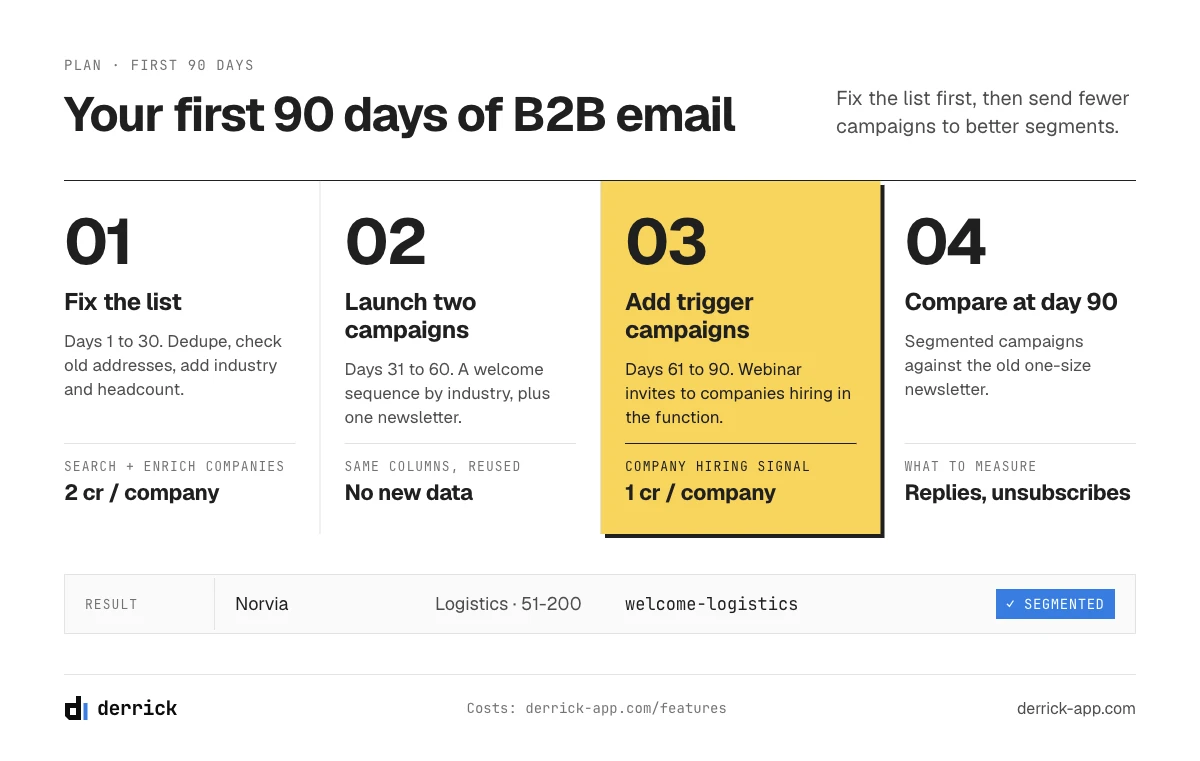
Days 1 to 30: fix the list before you write
Export the list from wherever it lives: CRM, form tool, event registrations. Remove duplicates and obvious junk. Check the addresses of anyone you have not written to in six months. Then add the two columns that unlock the most campaigns for the least effort: industry and headcount. At the end of the month you know how many contacts you have, how many are reachable and how they split by sector and size. Most teams discover that a large share of the list is either dead or impossible to segment, and it is better to learn it now than after a campaign.
Days 31 to 60: launch two campaigns, not ten
Start with the welcome sequence for every new subscriber, segmented by industry, and one newsletter. Keep the newsletter to one idea per edition and one link. Write the three welcome emails once; they will run for months. Measure replies and unsubscribes per segment from the first send, not opens. If your list mixes two audiences that need different content, such as marketing and sales operations, split the newsletter into two editions now rather than later.
Days 61 to 90: add the campaigns that need a trigger
Once the base campaigns run, add the ones that depend on a signal: the webinar invitation to accounts hiring in the function, the case study to the same industry, the launch to accounts running a given tool. These are the campaigns where data does the most work, because the segment itself is the reason to write. At day 90, compare reply and unsubscribe rates between the segmented campaigns and your old one-size-fits-all newsletter. That comparison, on your own list, is the business case for keeping the fields up to date.
Cadence, timing and deliverability for an opt-in list
How often to send
One to five emails a month is a common range for B2B email marketing, and the right number depends on the segment rather than on a rule. A rule of thumb per segment: new subscribers can take a welcome sequence of three emails in two weeks; active readers take a newsletter every two weeks or monthly; dormant contacts get one reactivation email, then silence if they do not answer. Watch the unsubscribe rate per segment: if it rises after you add a send, the segment told you the cadence is too high.
What the subject line has to do
In B2B, the subject line competes with meeting invites and internal threads. Three rules hold for most segments: say what is inside rather than teasing it, keep it short enough to read on a phone (roughly 30 to 50 characters), and name the segment when you can ("For RevOps teams", "Hiring SDRs this quarter?"). A subject that names the reader's situation is the cheapest personalization there is, and it only works if the field behind it is filled. Test two subject lines on the same segment rather than across the whole list: the difference between segments is usually larger than the difference between subjects.
When to send
Mid-week mornings in the recipient's time zone are a safe default. The better answer is your own data: test two send times on the same segment over a month and keep the one with more replies.
Deliverability
An opt-in list still lands in spam if its technical setup or its hygiene is poor. Authenticate your sending domain (SPF, DKIM, DMARC), remove hard bounces after every send, stop writing to people who never engage, and make unsubscribing easy. The full list of checks is in our deliverability checklist; it applies to marketing emails as much as to prospecting.
On consent: send marketing emails to people who agreed to receive them, and let them leave in one click. The rules depend on your country and your recipients'; the database marketing guide covers them.
A B2B email marketing cheat sheet
Starting points, to replace with your own numbers after a few sends.
| Item | Common starting point | What to watch |
|---|---|---|
| Subject line length | 30 to 50 characters | That it stays readable on a phone |
| Body length | 50 to 125 words for a relationship email | One message, one link |
| Frequency | 1 to 5 sends a month | The unsubscribe rate per segment |
| Welcome sequence | 3 emails in 2 weeks | Replies to the third email |
| Bounces | Above a few percent, check the list | The oldest segments |
| Field refresh | Every quarter, before a major campaign | Headcount and roles, which change most |
What to measure: the KPIs segmentation actually moves
Every email marketing platform reports the same five numbers by default. In B2B email marketing, they do not carry the same weight, and email marketing teams that judge on opens alone often draw the wrong conclusion.
- Open rate: less reliable than it used to be. Privacy features in mail apps pre-load images, and corporate security filters open links to check them. These non-human interactions inflate opens and clicks, especially in B2B, so an open is a weak signal.
- Click rate: better, with the same caveat for automated link scanning. Look at clicks on links that scanners rarely follow, such as a calendar booking.
- Reply rate: the clearest human signal. A segment that replies is a segment you understood.
- Unsubscribe rate: the signal that you sent the wrong thing, or too often, to that segment.
- Bounce rate: the health of the list. Above a few percent, check the addresses before the next send.
Segmentation changes the reply and unsubscribe rates first. If you segment better and only opens move, look again: it may be the scanners.
Plan your segments from the fields you own
Tick the fields your list already holds. The planner tells you which of the eight campaigns you can send today, which ones need a field you do not have yet, and what filling the missing fields would cost in credits.
Which campaigns can your list support?
Click the fields you already have. Results update as you go.
Select the fields you have.
Assumes your list holds the company name. Company-level fields are counted once per company, role and verification once per contact. Features that read LinkedIn need your account connected through the Derrick Chrome extension.
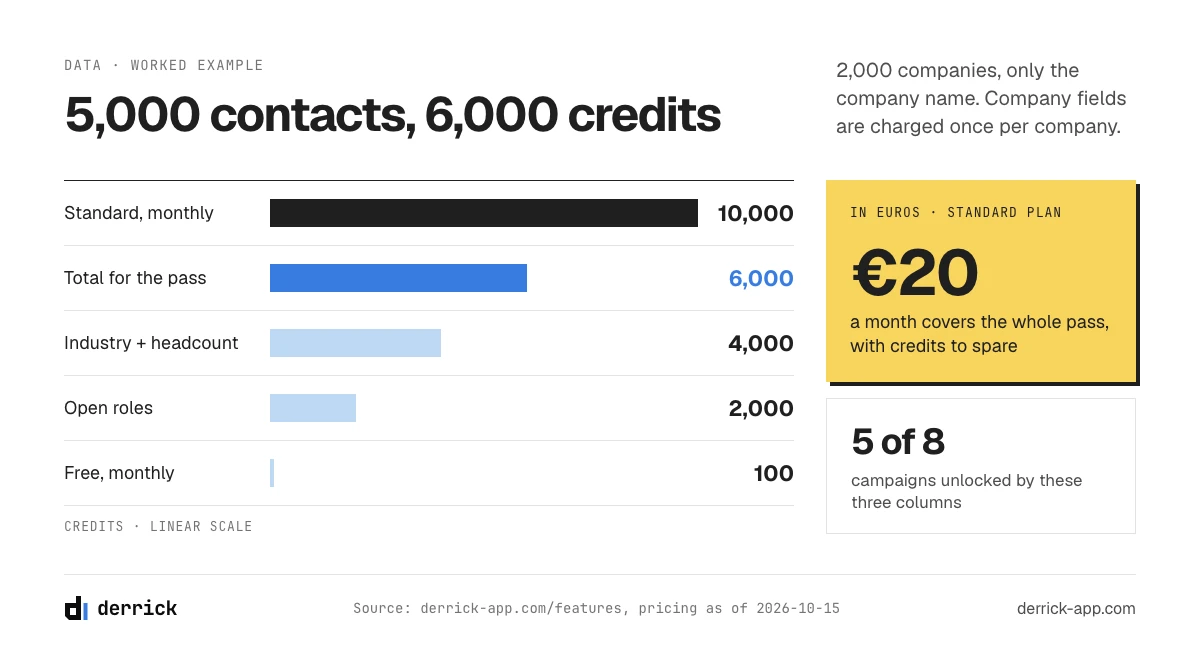
A worked example. A list of 5,000 contacts across 2,000 companies, with only the company name. Adding industry and headcount takes one pass at 2 credits per company, so 4,000 credits; open roles add 1 per company, 2,000 more. That makes 6,000 in total, all on features available from the free plan, and the Standard plan's 10,000 monthly credits cover it. With those three columns, five of the eight campaigns above become possible.
Five B2B email marketing mistakes that waste a good list
- Segmenting by opens. Building a "most engaged" segment from open data mixes real readers with security scanners. Segment by company and role, and use replies and clicks on booking links to find the engaged readers.
- Sending the launch to everyone. A feature that only matters to companies running a given tool annoys everyone else, and some of them unsubscribe. The launch is the campaign where a stack column pays for itself fastest.
- Reactivating without checking. The dormant part of the list is where dead addresses hide. A reactivation sent without verification can bounce enough to hurt the next newsletter's deliverability.
- Writing for the logo, not the person. The company decides, but a person reads. An email that speaks to the reader's role, with something they can use this week, gets forwarded; an email about your company does not.
- Letting the fields age. Headcount, roles and open positions change every quarter. A segment built a year ago describes companies that no longer exist in that shape. Refresh the columns before each major campaign.
What sits under the sending tool: the data, the content, the measurement
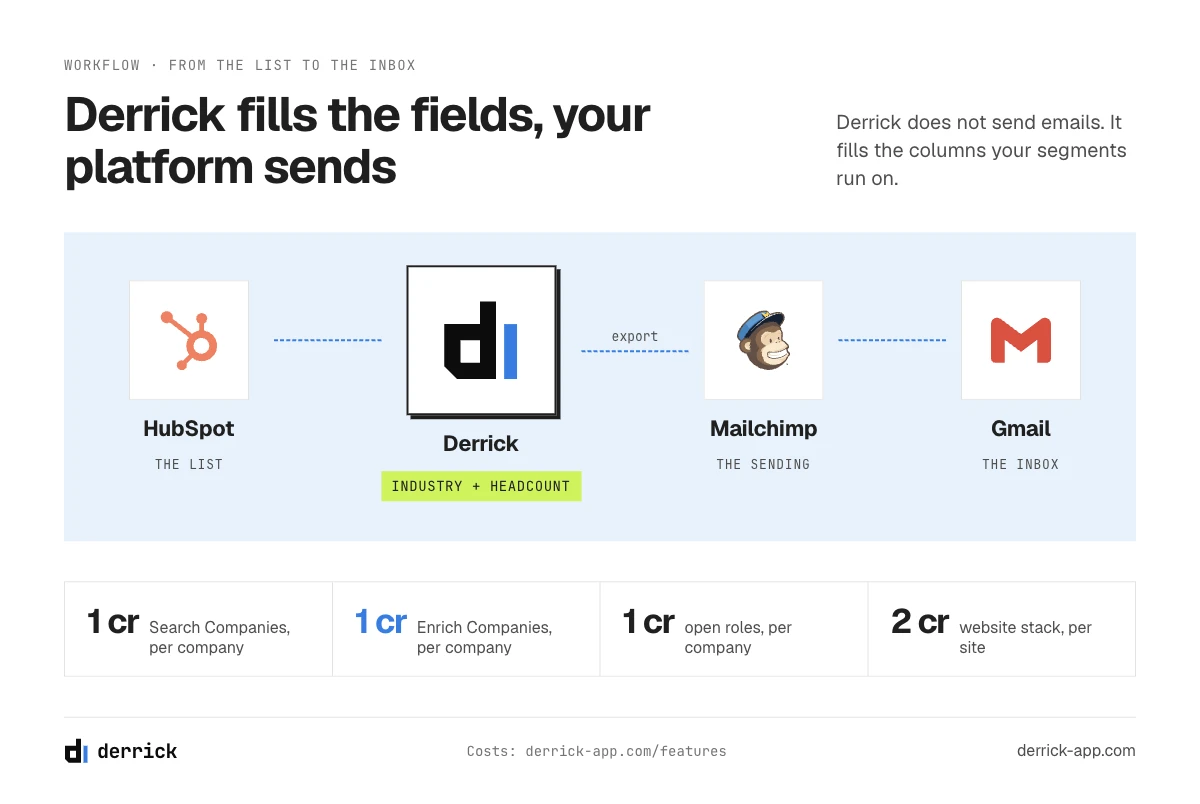
Derrick does not send emails. Your email marketing platform sends, schedules and tracks; the software that does it is compared in our guide on email sending software. Underneath the sending tool sit three things it cannot do for you: the data that defines the segments, the content written for each one, and the measurement that tells you which segment worked. Derrick covers the first.
- The Derrick web app is the default for a list: import it, add the columns your segments need, export the result to your email platform. Nothing to install.
- The Google Sheets sidebar does the same inside the spreadsheet, if your list already lives there.
- Claude or ChatGPT through the Derrick MCP fits one account at a time: before a personal email to a key contact, ask what the company does, how big it is and whether it is hiring. MCP comes with the Plus plan and above.
- The Derrick API fits the automated case: when someone signs up, a webhook calls the API, fills industry and headcount, and the contact lands in the right segment before the welcome email goes out. API access comes with the Plus plan and above, at 47.5 euros a month, and works with Zapier, Make and n8n.
If you are reaching out to people who have not opted in, that is prospecting: start with our cold email guides instead. For everything else, the order stays the same: fields first, segments second, emails third.
Frequently asked questions
Is email marketing effective for B2B?
How often should you send B2B marketing emails?
What is a good open rate for B2B email?
What is the difference between B2B and B2C email marketing?
How do you segment a B2B email list when you only have the address?
Keep reading
Continue exploring this cluster


The State of B2B Marketing Performance 2026: Benchmarks Report
Read →

Account-Based Marketing (ABM): Definition, Techniques, Examples
Read →

Inbound vs Outbound Marketing: Differences, When to Pick Each
Read →

B2B Lead Generation: Strategies, Tools, Tips in 2026
Read →