Social Selling Tools: The Five Jobs a Stack Actually Does
Social selling tools do five jobs: which one gates the others, what LinkedIn gives free, the buying order, the cost per rep. Build your first list free.


Social selling tools: the short answer
Social selling tools do five separate jobs, and almost every buying mistake comes from confusing them. A scheduling tool and a signal tracker both get filed under the same category in every roundup, but one helps you stay visible and the other tells you when to move. They are not interchangeable, and buying the wrong one first is how a stack ends up costing a few hundred euros a month while the pipeline stays flat.
The five jobs are: identify who to engage, catch the moment worth reacting to, publish so your name is familiar, engage without pitching, and record it where your pipeline lives. Most teams buy job three first, because content tools are the easiest to demo. The job that actually gates the other four is job one, and it is the one nobody sequences first.
This guide goes job by job, then gives the buying order and the arithmetic of what a stack costs per rep. If you are working on a free LinkedIn account, our guide on LinkedIn prospecting and its four ceilings covers the manual workflow underneath all of this.
What are social selling tools, and what they are not
Social selling tools are the software a sales team uses to find, warm up and convert buyers through social networks, mostly LinkedIn. A social selling platform or a piece of social selling software earns its place only if it moves a named person closer to a conversation, which is the test the rest of this guide applies job by job.
They are not social media marketing tools, even when the two get listed side by side. Broad listening and publishing suites such as Hootsuite, Sprout Social, BuzzSumo or Meltwater are built for a brand and priced for a marketing team: they track topics and mentions across networks. Social selling software is built for a rep and tracks people and accounts. Job two below comes back to this split, because it is where most teams overspend. For the method itself, our definition of social selling covers the basics in a few lines.
The four pillars usually used to describe social selling, the same ones LinkedIn scores in its Social Selling Index (a professional brand, finding the right people, engaging with insights, building relationships), map onto these jobs: the brand is job three, the right people is job one, insights are job two, relationships are job four. Job five is the one the pillars leave out, and it is the one that keeps the budget alive.
Three benefits of getting the stack right
- A warmer first contact. The message lands on someone who has already seen your name, commented on your post or been commented on by you, so the reply rate stops depending on luck.
- A reason to write this week. A trigger such as a job change or a new opening gives you an opening line that is about them, not about your product.
- Pipeline you can attribute. Once outcomes are recorded on the account, social activity shows up as deals in the CRM rather than as likes nobody can count.
The five jobs a social selling stack actually does
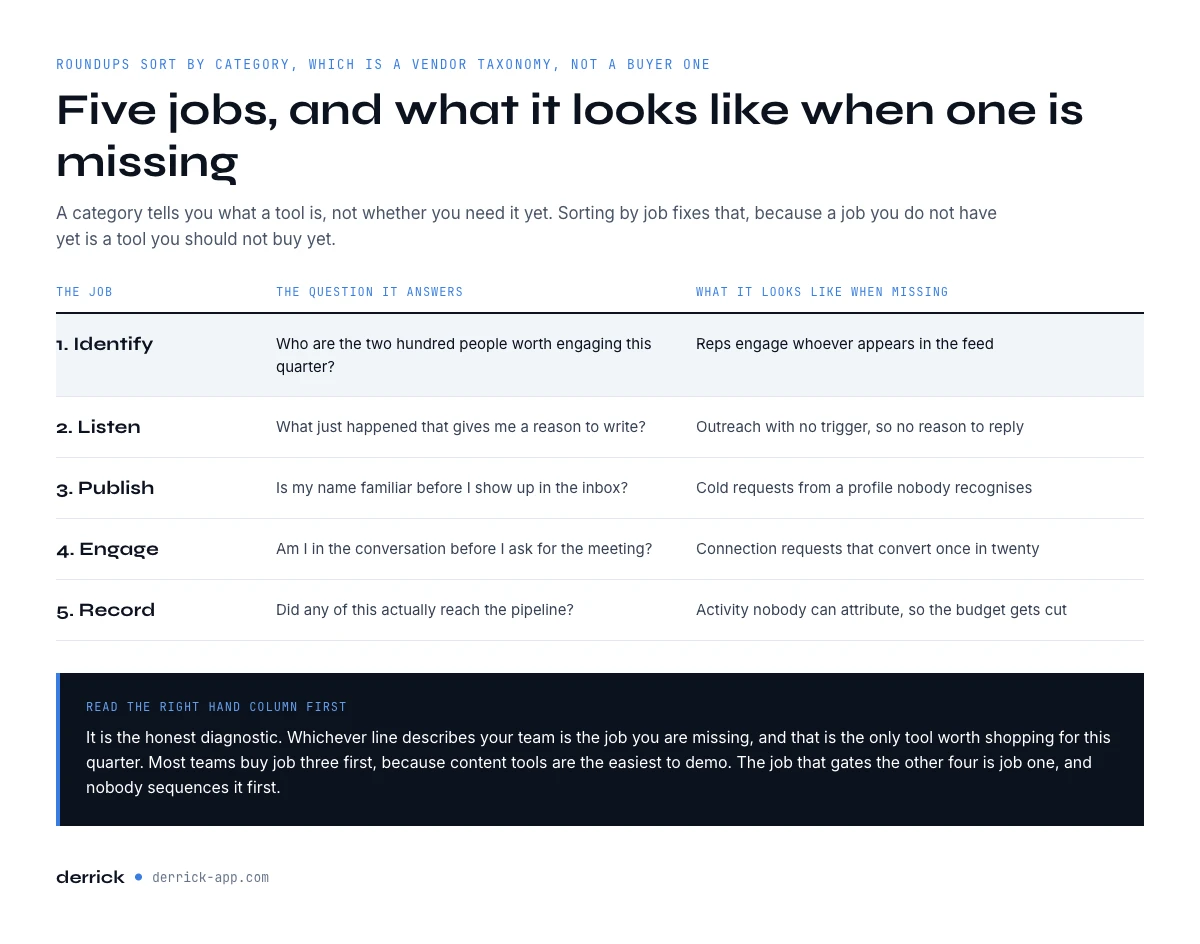
Roundups organise tools by category: engagement, content, listening, CRM. That is a vendor taxonomy, not a buyer one. It tells you what a tool is, not whether you need it yet. Organising by job fixes that, because a job you do not have yet is a tool you should not buy yet.
| Job | The question it answers | What it looks like when missing |
|---|---|---|
| 1. Identify | Who are the 200 people worth engaging this quarter? | Reps engage whoever appears in the feed |
| 2. Listen | What just happened that gives me a reason to write? | Outreach with no trigger, so no reason to reply |
| 3. Publish | Is my name familiar before I show up in the inbox? | Cold requests from a profile nobody recognises |
| 4. Engage | Am I in the conversation before I ask for the meeting? | Connection requests that convert once in twenty |
| 5. Record | Did any of this reach the pipeline? | Activity nobody can attribute, so budget gets cut |
Read the right-hand column first. It is the honest diagnostic: whichever line describes your team is the job you are missing, and that is the only tool worth shopping for this quarter.
Job one: knowing who to engage, before any tool helps
Every tool in the other four jobs assumes you already have a named list. A scheduler assumes an audience. A listening tool assumes a set of accounts to listen to. An engagement tool assumes profiles to engage. None of them produce that list, and this is the gap that roundups skip, because the tools they rank genuinely do not solve it.
A usable list is not a search result. It is a set of rows you can sort, filter, deduplicate and revisit next month, with enough on each row to decide who deserves attention: current title, seniority, company, headcount, location. Without those columns you cannot rank 400 profiles, so reps fall back on engaging whoever the feed shows them, which is a popularity filter, not a targeting one.
Two sources produce a list worth the effort. The first is a search you defined in writing before running it, exported and enriched. Our guide on how to build a prospect list covers the six steps and the real cost per thousand rows. The second is warmer and specific to social selling: the people who already engaged with a post in your space. They have shown attention, publicly, on a topic you can name.
LinkedIn Sales Navigator helps with the first source: its filters are deeper than the free search and its saved lists keep a segment in one place. It still shows the list on screen only, so the step that turns it into sortable rows is the one a social selling platform has to cover.
Job two: catching the moment worth reacting to
Social selling works on timing more than on volume. The same message lands very differently the week someone takes a new role and six months later. This is the job listening tools do: monitoring mentions, keywords, competitors and topics so that something crosses your desk while it is still fresh.
There are two families, and they are often conflated. Broad social listening tools such as Hootsuite, Sprout Social, BuzzSumo or Meltwater watch topics and brand mentions across networks. They are built for marketing, they are priced for marketing, and a two-person sales team rarely gets its money back from one. Google Alerts covers a surprising amount of the same ground for nothing.
The second family watches your accounts rather than the whole web: a job change, a funding round, a new opening on a team you sell to. These are narrower and far more actionable, because each one is a sentence you can open a message with. Derrick's Signal sits in this family and is available from the Standard plan at 20 euros a month.
The trap in this job is monitoring what you cannot act on. A keyword alert firing forty times a week that nobody opens is worse than no alert, because it trains the team to ignore the channel.
In the web app or Google Sheets
The job no tool in the roundup does
Every other layer of the stack assumes you already know who to engage. Paste a LinkedIn post URL into the web app or the Google Sheets sidebar and Derrick returns everyone who liked or commented, one person per row with their profile URL, so the identify job stops being the manual one.
- Feature
- Import LinkedIn post likes & comments
- Credit cost
- 1 credit per engager imported
The first button opens the web app (nothing to install): 1 credit per engager imported, 100 free credits every month. The second details the feature and its cost per plan.
Job three: publishing so the name is already familiar
Publishing is the job most teams buy first, and it is the easiest to over-invest in. The tools here handle drafting, scheduling, formatting and archiving: Buffer, Taplio, AuthoredUp and their peers. They save real time once you are posting several times a week. They save nothing at all if you post twice a month, which is where most sales teams actually are.
Two honest points about this job. First, its payoff is measured in quarters, not weeks: the mechanism is familiarity, and familiarity accumulates slowly. Second, it is the only one of the five jobs where doing nothing has no downside beyond a slower ramp. If your budget covers one tool this quarter, this is not the one.
What publishing does change, and this is underrated, is the quality of job one. A post that lands gives you an audience of people who engaged with a specific idea. That is a targeting signal you did not have to buy.
Employee advocacy is the team version of this job. Instead of one founder or one rep posting, several people share company content from their own profiles, which multiplies reach without multiplying ad spend, because people tend to trust a colleague's post more than a brand page. Advocacy programmes come with their own social selling software for suggesting and tracking shares. The rule is the same as for a single profile: it pays back once people actually post every week, and it is wasted on a team that posts twice a month.
Job four: engaging without turning it into a pitch
This is the job people mean when they say social selling: commenting, reacting, sending a connection request with a reason, replying to something specific. Tools here help you keep track of who you are warming, suggest comments, and stop you from letting a relationship go cold.
The measurable part is the connection request. A request sent with a specific reason, referencing something the person actually published, accepts at a very different rate from a blank one. The tool does not create that reason. Job one and job two do. What the tool does is stop you losing the thread across eighty simultaneous conversations, which is a real problem past a certain volume and no problem at all below it.
The tactic also changes with the platform. On LinkedIn, the comment on a buyer's post and the connection request with a reason are the two moves that matter, because your activity shows up in their network's feed. On X (formerly Twitter), conversations move faster and in public: a useful reply to a thread does more than a direct message, and the follow-up usually moves to email or LinkedIn once there is a reason to talk.
Once a conversation moves off the platform, you are into sequencing, which is a different category again. Our comparison of inbound and outbound motions sets out where each one belongs. For the sending itself, La Growth Machine handles multichannel sequences, and Derrick pushes enriched rows into it directly.
Job five: recording it where the pipeline lives
Social selling has a budget problem, not an effectiveness problem. The activity happens on a platform your CRM does not see, so when someone asks what it produced, the honest answer is often that nobody knows. That is how the line item gets cut.
The fix is unglamorous: the conversation, the trigger and the outcome need to land on the account record. That can be a CRM integration, or it can be a disciplined manual habit at low volume. What matters is that six months later you can say which deals started as a comment thread. Our guide on B2B database marketing covers the data-first version of this loop, and the seven sales process steps shows where the handover sits.
Derrick pushes enriched rows to La Growth Machine from the web app, and the Derrick API carries them into your CRM through Zapier, Make or N8N, so an enriched row does not stop in the spreadsheet.
The app works through your list row by row: 1 credit per engager imported.
What LinkedIn gives you free, and what social selling tools actually add
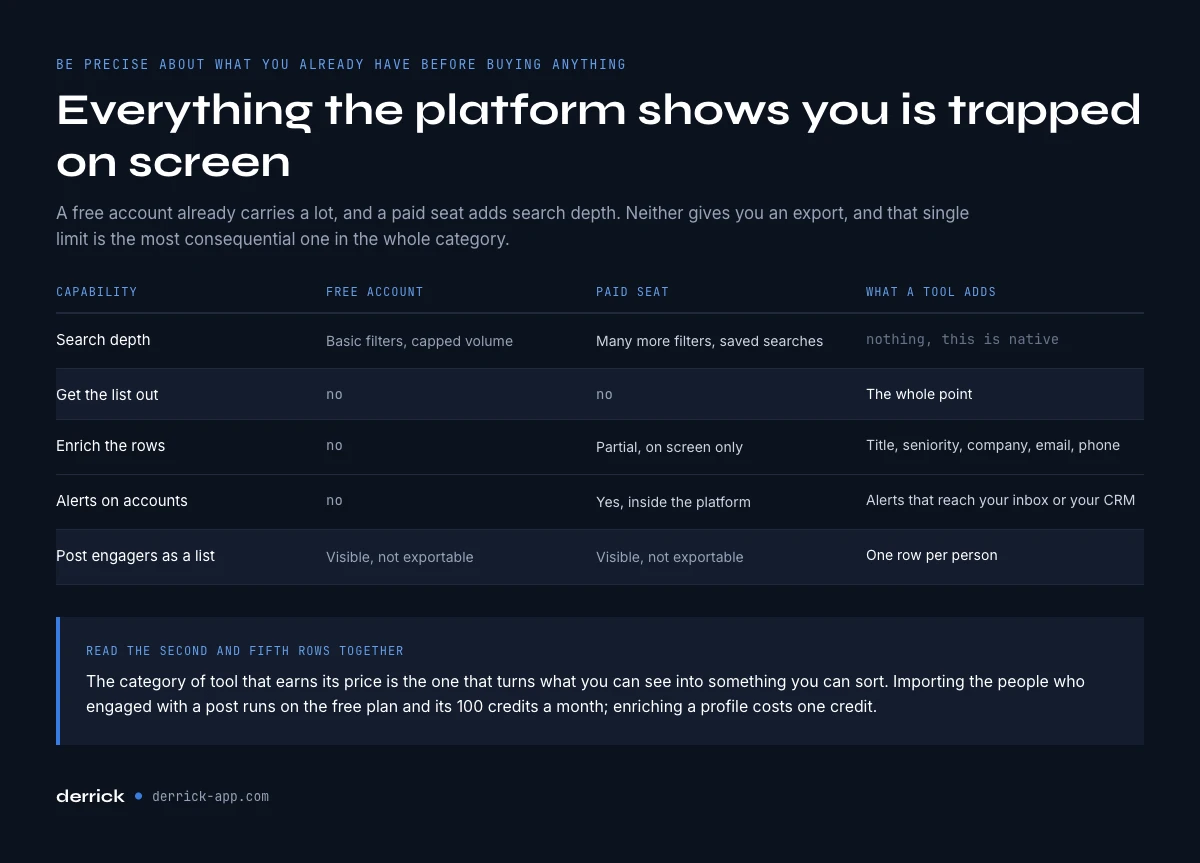
Before buying anything, it is worth being precise about what you already have. A free LinkedIn account gives keyword, location, company, industry and connection-degree filters, unlimited posting, and messaging with everyone in your first degree. LinkedIn Sales Navigator adds search depth, saved lists, alerts and InMail. Neither gives you an export, and that is the single most consequential limit.
| Capability | Free LinkedIn | Sales Navigator | What a tool adds |
|---|---|---|---|
| Search depth | Basic filters, capped volume | 40+ filters, saved searches | Nothing, this is native |
| Get the list out | No | No | The whole point |
| Enrich the rows | No | Partial, on screen only | Title, seniority, company, email, phone |
| Alerts on accounts | No | Yes, in-platform | Alerts that reach your inbox or CRM |
| Post engagers as a list | Visible, not exportable | Visible, not exportable | One row per person |
Read the second and fifth rows together. Everything LinkedIn shows you on screen is trapped on screen. The category of social selling tools that earns its price is the one that turns what you can see into something you can sort.
The order to buy social selling tools in
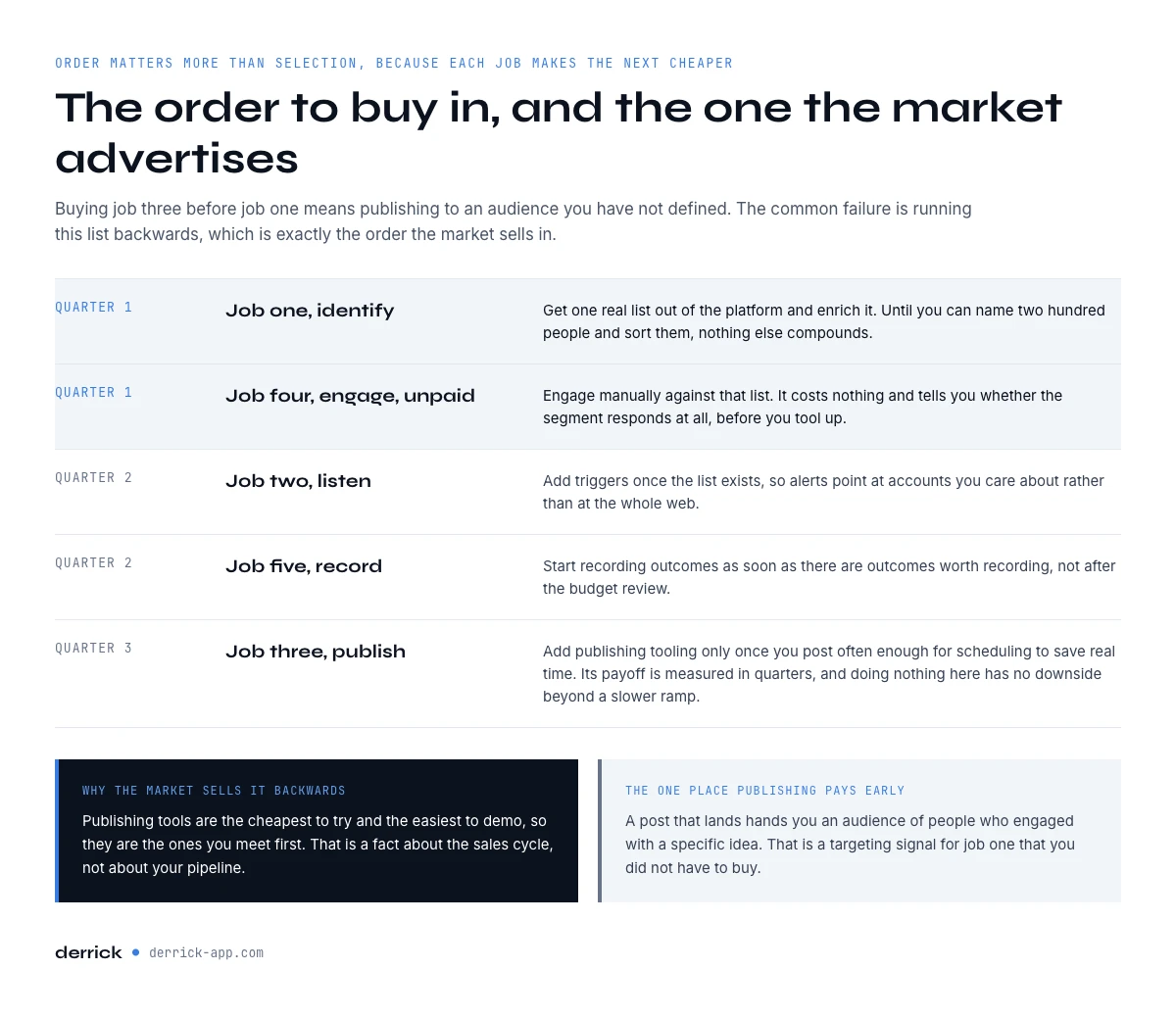
Order matters more than selection, because each job makes the next one cheaper. Buying job three before job one means publishing to an audience you have not defined. The same logic applies whether you buy one social selling platform that claims to cover everything or five separate pieces of social selling software: check which job each one does, then buy in this order.
- Quarter one, job one. Get one real list out of LinkedIn and enrich it. Until you can name 200 people and sort them, nothing else compounds.
- Quarter one, job four, unpaid. Engage manually against that list. This costs nothing and tells you whether the segment responds at all before you tool up.
- Quarter two, job two. Add triggers once the list exists, so alerts point at accounts you care about instead of the whole web.
- Quarter two, job five. Start recording outcomes as soon as there are outcomes worth recording, not after the budget review.
- Quarter three, job three. Add publishing tooling only once you are posting often enough for scheduling to save real time.
The common failure is running this list backwards, which is exactly the order the market advertises in, because publishing tools are the cheapest to try and the easiest to demo.
Social selling tools in practice: a social selling week, step by step
The five jobs are easier to judge on a real week. Here is what one rep's week looks like when the tools are bought in job order, from the first signal to the first message. The numbers are an example to adapt, not a benchmark.
- Monday, identify. A post in your space about a problem you solve has 40 people who liked or commented. Paste its URL into the Derrick web app and import them, one person per row (1 credit per engager, so 40 credits).
- Monday afternoon, sort. Enrich the 40 rows with title, seniority, company and headcount (1 credit per profile, 40 more credits). Keep the 15 who match your ideal customer. The whole step fits inside the 100 free credits of the month.
- Tuesday, listen. Check the 15 accounts for a reason to write: a new role, a funding round, an opening on the team you sell to. Two or three will have one. Signal does this watching automatically from the Standard plan.
- Wednesday, engage. Comment on something each of the 15 published recently. A real comment, about their point, with no link and no pitch.
- Thursday, connect. Send the connection requests, each one referencing the post they engaged with or the comment thread from Wednesday.
- Friday, record. Log who accepted, who replied and the trigger behind each conversation on the account record, or push the accepted contacts to La Growth Machine to continue the sequence.
Publishing does not appear until the end of the week, and on purpose: the post you write on Friday is aimed at the 15 people you now know by name. That is the order in practice, and it is why the identify layer is the one to buy first.
What a social selling stack costs per rep
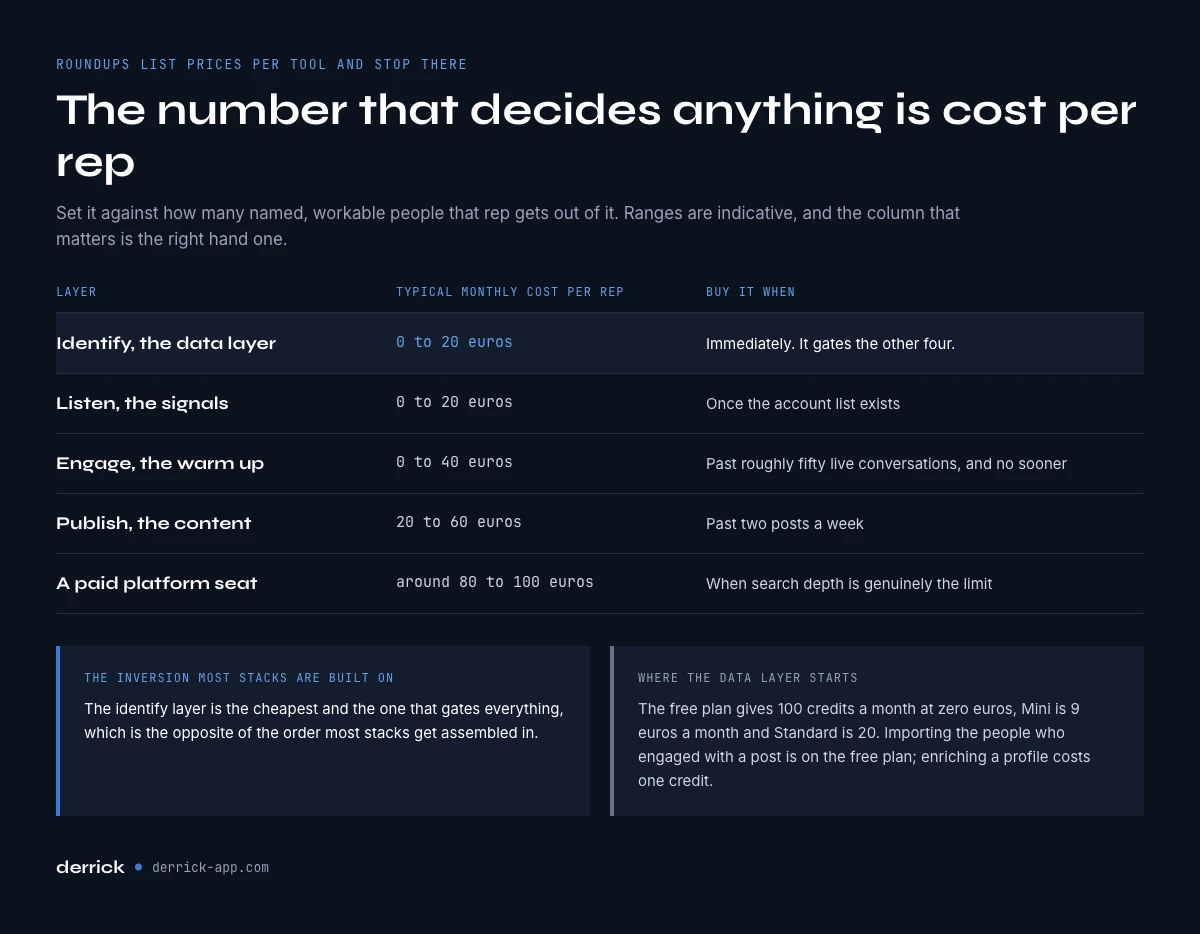
Roundups list prices per tool and stop there. The number that decides anything is the monthly cost per rep, set against how many named, workable people that rep gets out of it.
| Layer | Typical monthly cost per rep | Buy it when |
|---|---|---|
| Identify (data) | 0 to 20 euros | Immediately, it gates the rest |
| Listen (signals) | 0 to 20 euros | Once the account list exists |
| Engage (warm-up) | 0 to 40 euros | Past roughly 50 live conversations |
| Publish (content) | 20 to 60 euros | Past two posts a week |
| Sales Navigator | Around 80 to 100 euros | When search depth is genuinely the limit |
The identify layer is the cheapest and the one that gates everything, which is the opposite of how most stacks get assembled. For reference, LinkedIn Sales Navigator costs about 80 to 100 euros a month per seat, as of October 19, 2026. Derrick's free plan gives 100 credits a month at zero euros, and the first paid plan, Standard, is 20 euros a month. Importing the people who engaged with a post is on the free plan at 1 credit per engager; enriching a profile costs one credit.
Run the numbers for your own situation before shopping.
Where Derrick fits in a social selling stack
Derrick does job one, and part of job two. It does not schedule posts and it does not write your comments. What it does is turn what LinkedIn shows you into rows you can work with, at any scale: a hundred people or ten thousand, the same way.
Four entry points, chosen on the use case rather than out of habit. In the Derrick web app, with nothing to install, or in the Google Sheets sidebar, paste a LinkedIn search URL or a post URL and get one lead per row, then enrich each row with title, seniority, company and location. Through the Derrick API and its 3000+ integrations with Zapier, Make and N8N, the same enrichment runs inside a pipeline or writes straight to your CRM. Through Derrick MCP, you ask for the data from Claude, ChatGPT or any MCP-compatible assistant and get the answer in the chat.
The features that matter for this job, with their real cost: Import LinkedIn post likes and comments is on the free plan, Enrich Leads is 1 credit per profile, and Signal starts at 20 euros a month. The free plan is 100 credits a month at zero euros, which is enough to build and enrich a first real list before spending anything.
Common mistakes with social selling tools
Buying the content layer first. It is the easiest to demo and the slowest to pay back. If nothing else is in place, a scheduler just makes an undefined audience arrive on time.
Treating a search result as a list. A result you cannot sort, filter or revisit next month is not a list, and every downstream tool assumes a list.
Monitoring what you cannot act on. Alerts that nobody opens train the team to ignore the channel, which costs more than the subscription.
Measuring activity instead of outcomes. Comments posted is not a metric. Conversations that reached the pipeline is.
Buying Sales Navigator to solve an export problem. It deepens search. It does not get the list out, and that is usually the actual blocker. Our guide on outbound sales covers where each layer earns its place.
Key takeaways
- Social selling tools do five distinct jobs: identify, listen, publish, engage, record.
- Job one gates the other four, and no roundup tool solves it.
- LinkedIn shows you plenty and lets you export none of it. That gap is what a tool is for.
- Buy in job order, not in demo order: list first, engagement second, signals third, publishing last.
- The identify layer is the cheapest line in the stack, from zero euros on Derrick's free plan.
Frequently asked questions
What are social selling tools?
Which social selling tool should you buy first?
Do you need Sales Navigator to do social selling?
How much does a social selling stack cost per rep?
Can you do social selling for free?
What is the difference between social selling and cold outreach?
How do you measure whether social selling tools are working?
Is a social selling platform the same as social selling software?
Keep reading
Continue exploring this cluster


The State of B2B Marketing Performance 2026: Benchmarks Report
Read →

Account-Based Marketing (ABM): Definition, Techniques, Examples
Read →

Inbound vs Outbound Marketing: Differences, When to Pick Each
Read →

B2B Lead Generation: Strategies, Tools, Tips in 2026
Read →