Sales automation tools: the 5 tasks worth automating once the list is built
Compare the best sales automation tools by task, with entry prices: follow-ups, CRM updates, meetings, quotes and forecasts, and the hours each returns.


What are sales automation tools?
Sales automation tools are software that completes a repetitive sales task from start to finish without a person starting it: the follow-up that goes out on day three, the CRM field that fills itself, the meeting that lands in the right calendar, the quote that chases its own signature. They take work off a team. They do not decide who the team sells to.
If you want the concept rather than the tooling, our glossary explains what is sales automation in a few paragraphs. This page stays on the software itself: which tool removes which task, what it costs to start, and what each hour you get back is worth.
Best sales automation tools at a glance, by the task they remove
How we compared them. We started from the products that the current top-ranked comparisons for this search put forward, set aside the ones whose job is sourcing contact data rather than finishing a task, and kept fourteen that a small or mid-size team can run today. Each one was judged on the four questions detailed in the evaluation section below: does it write back to the CRM, does it finish the task or only raise an alert, what does the price meter run on, and can it be driven from an API, a connector or an AI assistant. Entry prices are the lowest paid tier we observed on 2026-10-20, rounded and per month. They move several times a year, so read them as an order of magnitude and check the vendor's page for your own seat count. "Quote only" means there is no public price at team size.
| Tool | Task it takes off the team | Entry price (observed 2026-10-20) |
|---|---|---|
| Derrick | Before any automation: builds the list the other tools work on (Import Leads from a Prompt, 1 credit per lead once LinkedIn is connected, 10 without), fills the missing fields (Enrich Leads, 1 credit per profile), then pushes the rows to your sequencer for free | Free plan with 100 credits a month; paid plans from €20 a month |
| La Growth Machine | Follow-up cadence across LinkedIn and email, one sequence per contact | About €60 per identity |
| lemlist | Email and multichannel follow-up sequences | About $55 per user, billed yearly |
| Instantly | Email follow-ups at volume across several sending inboxes | About $38, billed yearly |
| Outreach | Team sequencing with manager reporting on adherence | Quote only |
| Salesloft | Team sequencing and activity logging to the CRM | Quote only |
| Zapier | CRM updates triggered by events in other apps | Free plan; about $20, billed yearly |
| Make | Visual multistep workflows between CRM, spreadsheets and inboxes | Free plan (1,000 Make credits a month) |
| n8n | CRM and workflow automation, with a self-hosted option | About €20 on the cloud plan, billed yearly |
| Calendly | Booking the meeting from a link, no back and forth | Free plan; about $10 per seat |
| Chili Piper | Routing an inbound request to the right owner and booking it live | About $1,250 for a 15-seat base, billed yearly |
| Fireflies | Call transcription and meeting summaries | Free plan; paid tiers per seat |
| Gong | Call recording, deal signals and pipeline review | Quote only |
| Better Proposals | Quotes and proposals with e-signature | About $13 per user, billed yearly |
| Clari | Forecast roll-up and pipeline risk | Quote only |
Read the table by row rather than by column. Every row from the second one down is a sales automation tool that finishes one of the five tasks this page is built on, and any of them can be swapped for a rival in its row without touching the rest of the stack. The first row is different on purpose. Sequencers such as La Growth Machine, lemlist or Instantly handle the cadence well, and they only work as well as the list they send to. Building and filling that list is Derrick's job: you describe the accounts or people you want, Derrick imports them, enriches the fields your sequencer needs, and the push to La Growth Machine, lemlist, Instantly or HeyReach costs nothing. Credits are spent on the data, never on the hand-off.
Where that runs from depends on what you are doing. The Derrick web app is the main surface: nothing to install, and you can try it on the free plan with 100 credits a month. The Google Sheets sidebar does the same work inside a spreadsheet. For a sales automation platform that should run on its own, the REST API and the MCP server, which lets Claude or ChatGPT run the same imports and enrichment inside a conversation, open on the Plus plan. The Import Leads from a Prompt feature page shows the first step in detail.
Benefits of sales automation tools, counted in hours per task
The main purpose of sales automation tools, and their main benefit, is selling time given back: on our estimates, 3 to 6 hours a week per representative on follow-ups, 2 to 4 on CRM upkeep, 2 to 5 on meetings, 1 to 3 on quotes, and 1 to 2 hours of a manager's week on the forecast. Those ranges are editorial estimates from the shape of the work, not a measured benchmark, and the calculator further down lets you replace them with your own.
Taken at the low end, the numbers still add up quickly. One representative with all four individual tasks still manual loses about 8 hours a week. A team of five loses about 41 hours a week once the forecast is counted, which is close to 178 hours a month, or slightly more than one full-time person at 160 working hours. That is the figure to hold against the price column above: a stack that returns one person's worth of time for less than one person's cost has paid for itself, provided the hours go back into conversations.
Three benefits do not show up in hours and matter just as much. The first is consistency: a scheduled follow-up never forgets the contact who felt least promising, and that is often where surprises come from. The second is cleaner data, because every touch, call summary and signed quote lands on the CRM record by itself, so the forecast reads facts rather than memory. The third is speed at the end of the cycle, when a quote that goes out in minutes instead of days removes one of the places a deal used to wait. Sales automation software buys you all three only if the task was written down first, which is why the readiness check further down still applies.
What sales automation tools actually do, and where they stop
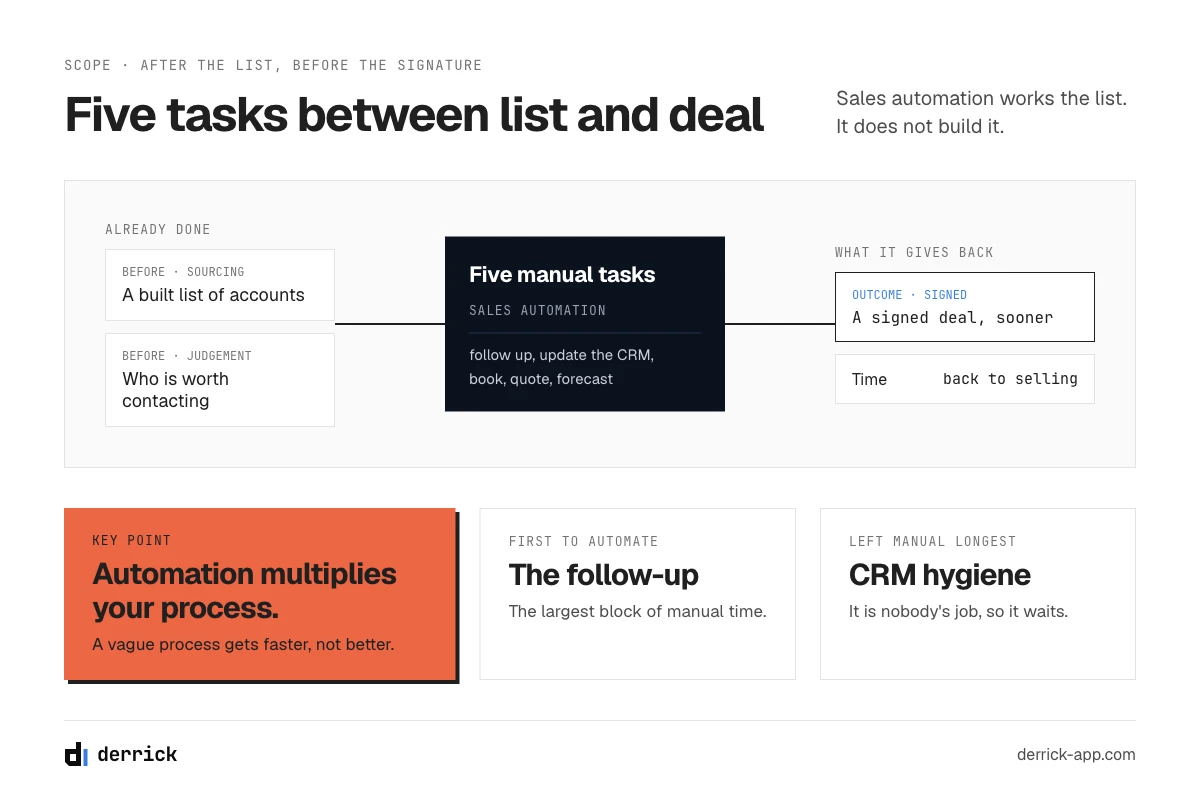
Sales automation tools take over the repetitive work that sits between a built list and a signed deal: following up on a cadence, keeping CRM records current, booking the meeting, producing and chasing the quote, and assembling the forecast. They do not find your buyers, and they do not decide who is worth contacting. That part happens before this page starts.
The distinction matters because almost every list of sales automation tools on the internet is really a list of prospecting tools. Those are useful, and we cover them elsewhere. But a team that already has a list and still loses fifteen hours a week does not have a prospecting problem. It has five manual tasks nobody has automated yet, and each one has its own category of software.
The short definition, if you need it, is in our sales automation glossary entry. This page is the operational version: what to automate, in what order, with what, and roughly what each hour you get back is worth.
One boundary to set immediately. Automation multiplies whatever process you already have. A team with a vague qualification standard that automates its follow-ups will send more messages to the wrong people, faster. Every section below assumes the process exists in someone's head and can be written down. Where it cannot, the readiness section further down is the place to start instead.
How we evaluated these sales automation tools
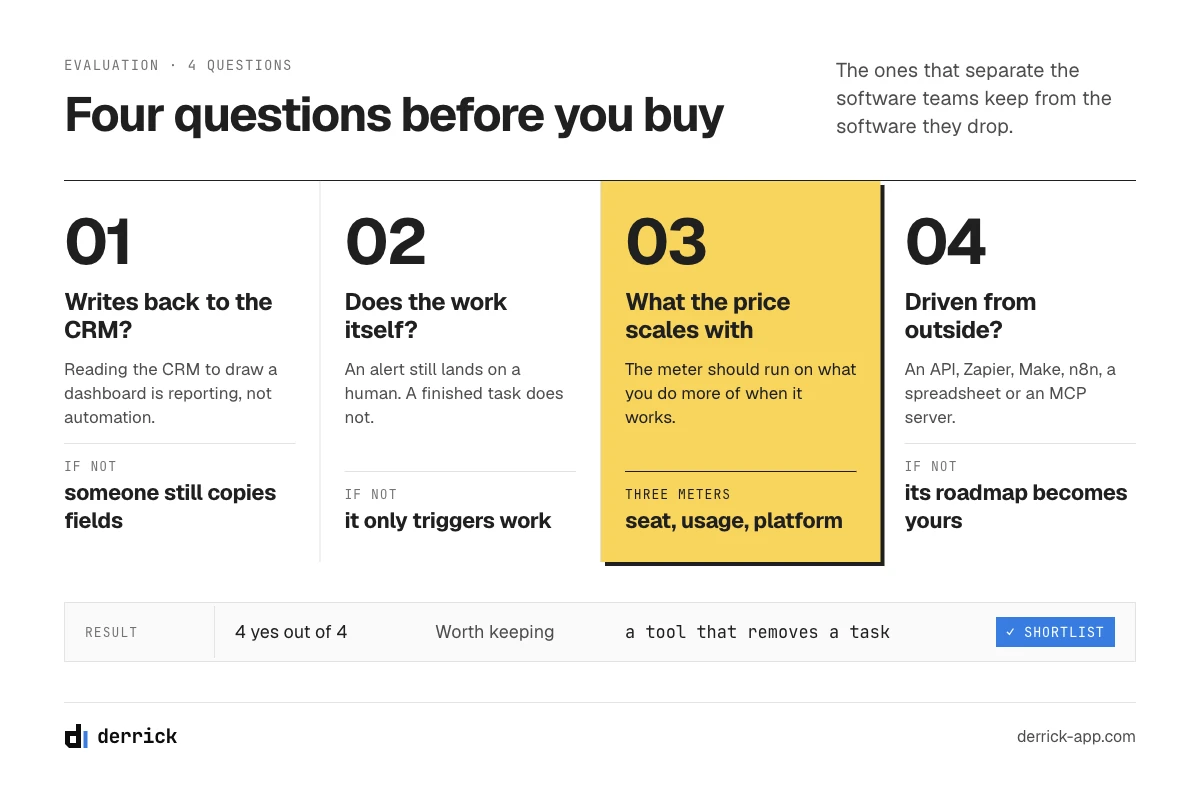
Four questions decide whether a tool belongs in a stack: does it write back to your CRM, does it do work or only trigger work, what does the pricing scale with, and can it be driven from outside its own interface. Those are the ones that separate software people keep from software people churn off after two quarters.
Does it write back to the CRM? A tool that reads your CRM and shows you a dashboard is a reporting layer. A tool that writes back, correctly, on its own, removes a task. Any category below where the tool only reads is a category where someone is still copying fields by hand, and the hours will not appear.
Does it do work, or does it trigger work? Plenty of products described as automation are conditional logic with a nice interface: if a field changes, send an alert. That is worth something, but the alert still lands on a human. The tools that actually return hours are the ones that complete a task end to end and tell you afterwards.
What does the price scale with? Three models exist, and they suit different teams. Per seat is predictable and punishes growth. Per usage, whether that is credits, records or runs, suits spiky work and makes a good month expensive. Flat platform pricing hides the cost of the seats you are not using. None is better in the abstract; what matters is whether the meter runs on the thing you do more of when the tool works.
Can it be driven from outside? An API, a Zapier or Make or n8n connector, a spreadsheet integration, or an MCP server for an AI assistant. A tool with no exit is a tool whose roadmap becomes your roadmap.
A note on prices. The table at the top gives an entry price per tool as observed on 2026-10-20; in the sections below we give the pricing model for each category instead, because seat prices on this kind of software change several times a year and most of them become quote-only above a handful of users. Take the shape from here, then get the number from the vendor for your actual seat count. As an order of magnitude, sequencing and scheduling tools publish entry tiers in the low tens of dollars per user per month, call intelligence and forecasting are typically quote-only at team size, and workflow automation is metered on runs.
Sales automation software, platform or tool: what the three words mean on a pricing page
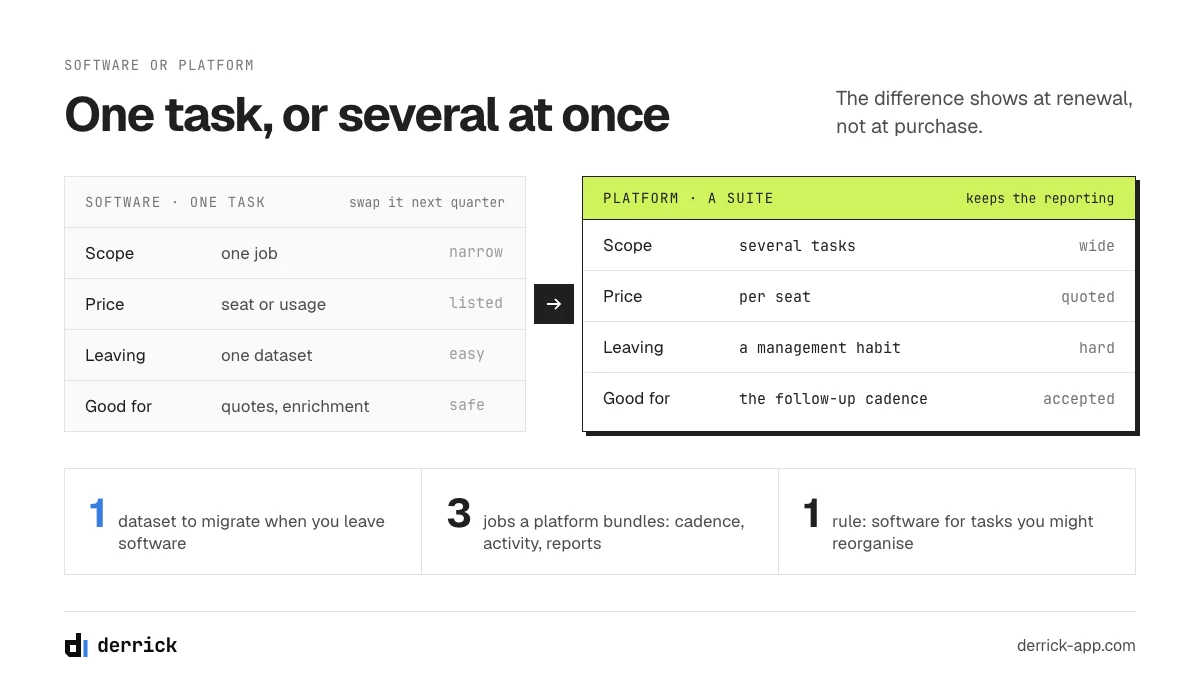
The three words are not interchangeable on a vendor's site: sales automation software usually means a single-purpose product you buy for one task, a sales automation platform means a suite that expects to own several of them plus the reporting on top, and a sales automation tool is the generic term that covers both. The distinction matters at renewal rather than at purchase.
Sales automation software is the narrow version. It does one thing, it prices per seat or per usage on that one thing, and swapping it out costs you a migration of one dataset. A scheduling product and an e-signature product are software in this sense: you could replace either next quarter without touching the rest of your stack.
A sales automation platform is the wide version. It wants your sequences and your activity data and your reporting, and its value proposition is precisely that those three sit together. That is real value, and it is also the lock: once managers read adherence numbers out of the platform, the migration cost is no longer a dataset, it is a management habit. Sequencing and revenue intelligence products are sold this way, and they are quoted rather than listed above a handful of seats for exactly that reason.
The practical rule is to buy software for tasks you might reorganise and platforms for tasks you will not. Scheduling, quoting and enrichment are safely software: their output is a calendar entry, a signed document, a filled field, and none of those cares which vendor produced it. Sequencing is where most teams accept the platform trade, because the alternative is reconstructing cadence, activity logging and reporting from three separate products.
Where this bites is the second purchase. A platform bought for one task will offer to do the next one, usually adequately, at a price that looks like nothing next to the seat you already pay. Adequately is often the right answer. It stops being the right answer when the bundled version is the reason a task never gets measured, because the number lives inside the thing being judged.
Five tasks, what removes them, and what it gives back
Five tasks account for almost all the recoverable time: following up, updating the CRM, booking and writing up meetings, quoting and signing, and forecasting. Each row below pairs a task a representative still does by hand with the software category that removes it, what the pricing meter runs on, and an order of magnitude for hours returned per representative per week. Those hour figures are our editorial estimates from the shape of the work, not a measured benchmark, and the calculator below lets you put your own numbers in.
| Task still done by hand | What removes it | Price scales with | Hours back per rep per week (estimate) |
|---|---|---|---|
| Following up on a cadence | Sequencing and engagement platforms (Outreach, Salesloft, Reply) | Seat | 3 to 6 |
| Keeping CRM records current | Enrichment on write, deduplication, workflow automation (Derrick, Zapier, Make, n8n) | Usage: records or runs | 2 to 4 |
| Booking the meeting and writing it up | Scheduling plus call recording and notes (Calendly, Chili Piper, Gong, Fireflies) | Seat | 2 to 5 |
| Producing and chasing the quote | Proposal, CPQ and e-signature (PandaDoc, DocuSign) | Seat, sometimes per document | 1 to 3 |
| Assembling the forecast | Revenue intelligence and pipeline reporting (Clari, Gong, native CRM reporting) | Seat, quote-only at size | 1 to 2, mostly a manager's |
One column deserves a word of warning before you use the table. The hours are ranges rather than points because the same task costs wildly different amounts of time depending on how many deals a representative carries: following up on twelve live conversations is an afternoon a week, following up on sixty is most of a role. Take the low end if your team runs a small number of large deals, and the high end if it runs a large number of small ones. The ranking between the rows is more stable than the absolute numbers, and it is the ranking that decides what you automate first.
Two things fall out of that table straight away. The first is that the largest single block of manual time is the follow-up cadence, which is also the task most teams automate first, correctly. The second is that CRM hygiene is the only row whose meter runs on records rather than seats, which is why it is the one task that gets cheaper per person as the team grows, and the one most often left manual because nobody owns it.
How many hours a week is your team doing by hand?
A team of five with follow-ups, CRM hygiene and meeting notes still manual is doing thirty five hours of avoidable work a week, which is most of a full-time job. Set your own team size below and tick what nobody has automated. The calculator takes the low end of each range from the table, and converts the total into hours per month and an equivalent headcount at 160 working hours a month. It runs in your browser and makes no network calls.
What is still manual, and what is it costing?
Conservative by design: each task uses the low end of its range, and the forecast row is counted once for the team rather than per representative. The figures are editorial estimates, not a measured benchmark.
How many people sell?
Which of these is still manual? Tap all that apply.
Pick a team size and at least one task.
Hours returned are not hours saved until someone decides what fills them. The last section covers how to check that they turned into meetings.
Before any of this: building the list is a different problem
Sourcing is out of scope on this page, deliberately: finding accounts and people is a different category of software with different trade-offs, and mixing the two is how these comparisons end up recommending eight products that do four different jobs. Everything below assumes the list already exists.
If that is the part you are missing, three pages cover it properly and none of them repeats this one. Our guide to lead generation tools covers the sourcing side end to end. Social selling tools covers the same job when the channel is LinkedIn rather than email. And AI prospecting tools covers the newer category that claims to do the research step for you. Come back here once the list exists.
One thing worth carrying over from those pages: the quality of the list sets the ceiling for everything on this one. Automating follow-ups to a list full of people who left the company two years ago produces bounces at scale, and the sequencing tool will be blamed for it.
If you are building that list yourself, our step-by-step guide on how to build a prospect list walks through the columns, the order of operations and the cost per row.
Follow up: the sales automation tools that own the cadence
This section is about what happens after the first message, not about sending it. The first touch is part of building and working the list, and our outbound sales guide covers that. What remains manual for most teams is the schedule of follow-ups afterwards: the third-day nudge, the second-week check, the branch when someone replies out of office, and the discipline to stop.
That schedule is the single largest block of recoverable time, and it is also the one humans are worst at. A representative with sixty live conversations will drop follow-ups, and the ones they drop are not random: they drop the ones that feel least promising, which is exactly the population where a scheduled nudge produces surprises.
What the category does. Sequencing and engagement platforms hold a multistep, multichannel schedule per contact, execute each step on time, pause the sequence on a reply, branch on conditions such as an auto-reply or a bounce, and write every touch back to the CRM as an activity. Outreach and Salesloft are the two established platforms in this space, both sold per seat and both designed around a team with managers watching adherence. Reply covers similar ground with a lighter footprint that suits smaller teams.
What to look for. Three things, in order. Does the reply detection actually stop the sequence, including on a reply that arrives at a different address or from a colleague? Does every step land in the CRM as a real activity rather than a note, so that reporting works later? And can a representative override the schedule for one contact without breaking the sequence for everyone, because they will need to.
What goes wrong. Cadence automation makes volume cheap, and cheap volume is where teams get themselves in trouble. Two guardrails are worth setting before you turn it on: a hard cap on new contacts entering sequences per sender per day, and a ceiling on touches per sequence, written down before you turn it on. Most teams who set one land between four and six, and the number matters less than the fact that somebody chose it: automation removes the natural friction that used to make you stop.
The deliverability layer sits underneath all of this and is not solved by the sequencing tool. Domain authentication, warmup and list verification decide whether any of those scheduled touches arrive at all.
Update the CRM: hygiene, duplicates and decay
This section is not about getting a new lead into the CRM. Routing a fresh lead to the right owner and writing it back is covered in our automated lead generation guide and in the sourcing chapter of our guide to the tools that build the list. This section is about the records already in there quietly going stale, which is a different failure with a different owner. Business contact data decays continuously as people change jobs, companies change domains and headcounts move, and nobody notices until a campaign bounces or a report is wrong.
This is the row that stays manual longest, for a structural reason: it is nobody's job. Following up is a representative's job and they feel the pain. Cleaning records is an operations job that has no deadline attached, so it gets done in a panic before a board meeting and then not again for six months.
What the category does. Three different things that often get bundled. Deduplication finds and merges the same company or person entered twice. Enrichment on write fills the blank fields on a record at the moment it is created or updated, so the record is complete before anyone needs it. And workflow automation, the Zapier and Make and n8n layer, connects the trigger to the action without anyone writing a service.
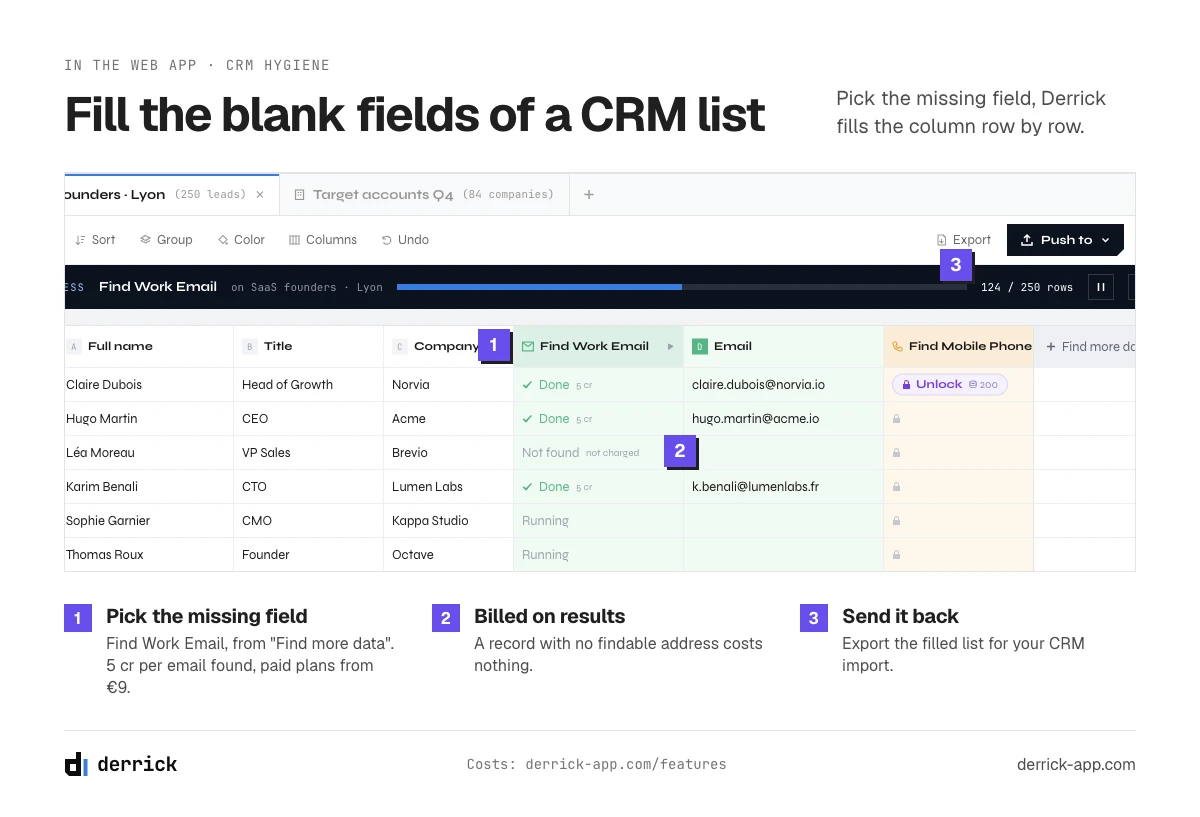
Where Derrick sits, and only here. Derrick covers the enrichment half of this row, which is the lowest entry cost in the whole table. It is not a sequencing platform and it does not try to own the other four rows: given a company domain or a LinkedIn profile, it returns the firmographic and contact fields your CRM record is missing. Enrich Companies costs 1 credit per company and Enrich Leads costs 1 credit per profile, both available on the free plan of 100 credits per month at zero euros with no card. Email Finder at 5 credits per email found sits on the paid plans from 20 euros a month and bills only when an address comes back, so a record with no findable address costs nothing. Email Verification is on the same paid plans at 1 credit per email checked.
The part that matters for a stack is where that runs from, and the three surfaces are not on the same plan. The Derrick web app and its Google Sheets sidebar are the surfaces the free plan opens, and it runs at any size, from a fifty record sample to a full column of a live list. The REST API and the Derrick MCP server, which lets an AI assistant run the same operations inside a conversation, open at the Plus plan at 47.50 euros a month. That API, plus Zapier, Make and n8n, is what puts enrichment inside an existing workflow: record created, fields filled, no human in the loop, and across those three connectors that is more than 3000 integrations. The web app serves teams who prefer to work outside a spreadsheet.
What to look for. Whether enrichment is billed on attempts or on results, because on a list with poor coverage the difference is large. Whether it writes back to the record or hands you a file. And whether you can run it on a sample of fifty records before you commit, which is the only honest way to judge coverage on your own market.
Book the meeting, and write it up
Two separate tasks get bundled here because they bracket the same event: getting the meeting into two calendars, and turning what happened in it into a record someone else can act on. Together they are the second largest block of manual time in most teams, and the cheapest to remove.
Scheduling. The back and forth to find a slot is pure waste, and a scheduling link removes it. Calendly is the common single-user answer. Chili Piper covers the harder version: routing an inbound request to the right owner by territory or account, and handing a qualified form submission straight into a live calendar rather than a queue. The difference matters only when you have more than one possible owner, which is the point at which routing rules start to be worth their configuration cost.
Notes and call intelligence. Recording and transcription tools attach a searchable record of the conversation to the opportunity, and the better ones extract the parts that matter: next steps, objections raised, competitors named, who else was in the room. Gong is the established platform on the revenue intelligence side, sold to teams and typically quoted rather than listed. Fireflies covers the lighter transcription and summary job for smaller teams.
What to look for. Whether the summary reaches the CRM by itself or waits for someone to paste it, because the second version is not automation. Whether consent and recording rules can be configured per region, which is not optional if you sell across borders. And whether the search across calls is good enough that anyone actually uses it, because an archive nobody searches is storage, not intelligence.
What goes wrong. Teams buy call intelligence for coaching, then use it only as a note taker, and pay platform pricing for a transcription feature. If nobody is going to listen to calls and give feedback, buy the transcription and skip the platform.
Send the quote, and get it signed
The quote is the task closest to revenue, and in most teams it is still a document somebody duplicates, edits by hand, exports and attaches to an email. Every step in that chain is a place a deal waits.
What the category does. Proposal and quoting software holds the template, pulls the customer and deal fields from the CRM, applies the pricing rules so a representative cannot quote something that does not exist, and sends the document with an electronic signature attached. It also tells you when the recipient opened it and how long they spent on the pricing page, which is the part sales managers actually buy it for. PandaDoc is the common answer at small and mid size, DocuSign the common answer when the signature itself is the regulated part, and full CPQ becomes relevant when your pricing has enough rules that humans get it wrong.
What to look for. Whether the fields populate from the CRM without a copy and paste, because a template with blanks to fill is a Word document with better branding. Whether approval routing exists for discounts above a threshold. And whether the signed document lands back on the opportunity automatically.
What goes wrong. Teams implement quoting software before they have agreed what the price list is. The software then encodes the disagreement, and every exception becomes a support ticket. Write the pricing rules down first, on paper, and if that takes three meetings then the software was never the problem.
Forecast: the report that fills itself
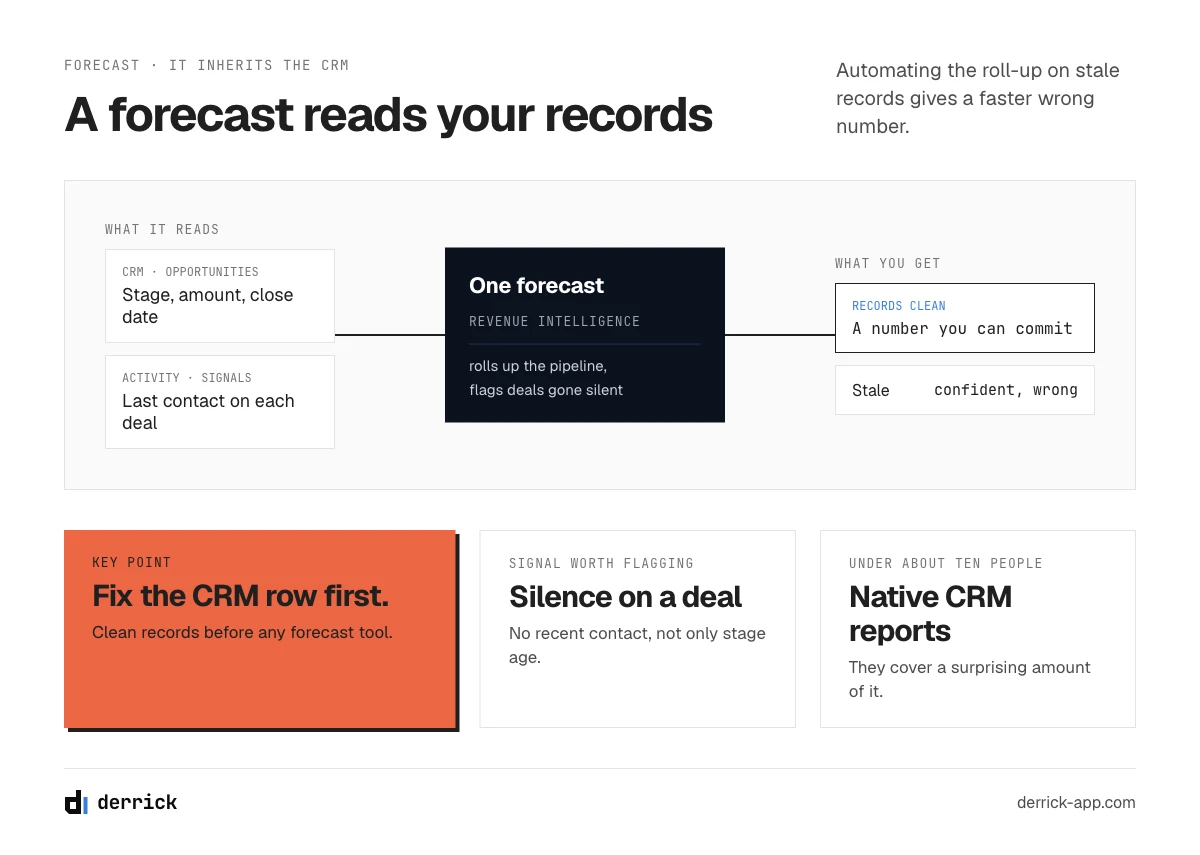
Forecasting is the one row where the hours saved are mostly a manager's, and where automation is worth less than the data underneath it. A report that assembles itself from stale opportunities is a faster way to be wrong.
What the category does. Revenue intelligence tools read the CRM plus the activity data, flag opportunities with no recent contact, compare the committed number against what the pipeline actually supports, and produce the roll-up without anyone building a spreadsheet on a Friday. Clari is the established platform for this, and Gong covers overlapping ground from the conversation side. Native CRM reporting covers a surprising amount of it for a team under about ten people.
What to look for. Whether it flags risk from real signals, such as silence on an opportunity or a single contact at the account, rather than only from stage age. Whether representatives can be made to update their own forecast inside the tool rather than in a parallel spreadsheet, which is the single behaviour that decides whether the investment works. And whether the history is preserved so that you can later ask what the forecast said eight weeks ago.
What goes wrong. This is the row where the readiness question bites hardest. A forecast tool inherits the CRM's data quality exactly, so a team with stale records and missing contacts buys an expensive and confident version of the wrong number. Fix the row above this one first.
What to automate first, and the readiness check
Automate in this order: the follow-up cadence, then CRM hygiene, then scheduling, then quoting, then the forecast. That order is not about which category is best. It is about which task is most repetitive, most writable-down, and least dependent on the ones after it.
Sales process automation is the same idea applied to the whole sequence rather than one task: each written step of your sales process triggers the next one, so a deal moves from stage to stage without a person pushing it. It only works once the process is written down and the CRM is the system of record, which is exactly what the four conditions below check.
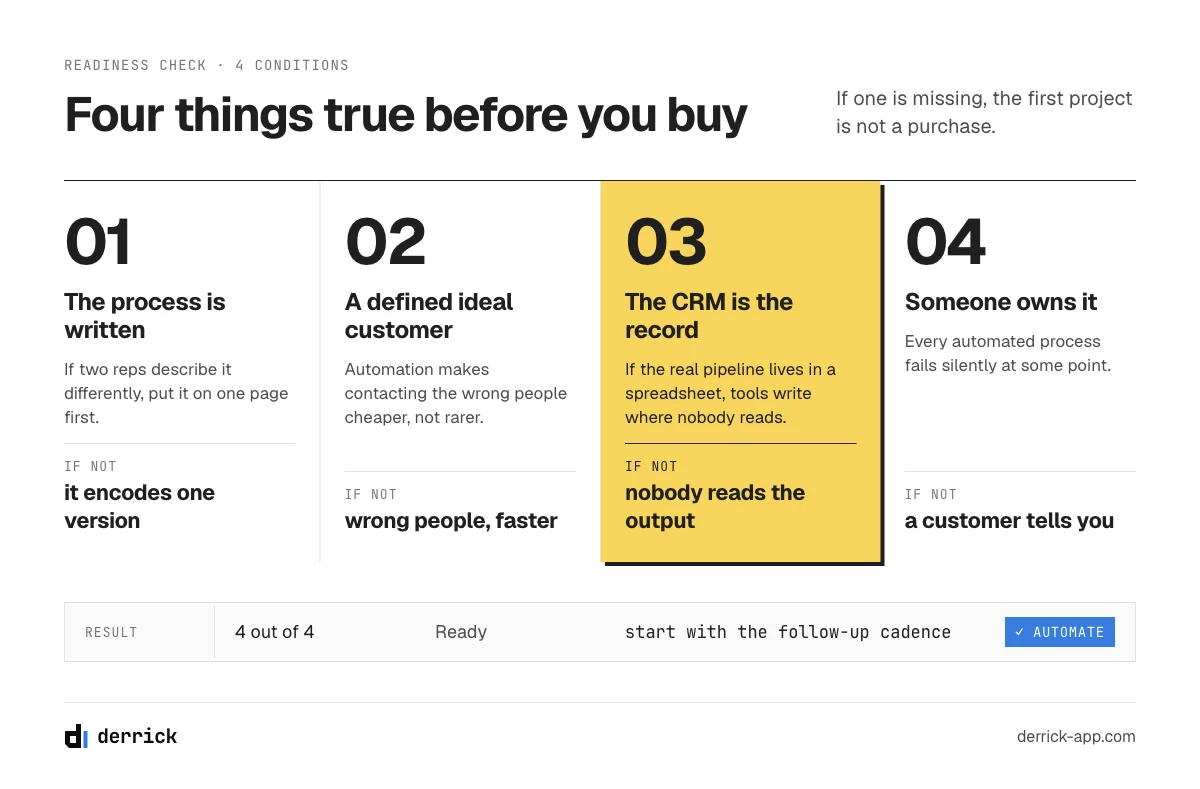
Before any of it, four things need to be true, and if they are not, the honest answer is that the first project is not a purchase.
- You can write the process down. If two representatives describe the follow-up sequence differently, automating it will encode one of their versions and hide the disagreement. Write it on one page first.
- You have a defined ideal customer profile. Automation makes contacting the wrong people cheaper, not rarer. Our guide to the ideal customer profile in sales covers how to pin that down.
- The CRM is the system of record. If the real pipeline lives in a spreadsheet, every tool below will write to a place nobody reads.
- Someone owns it. Every automated process fails silently at some point. If no name is attached to noticing, you will find out from a customer.
Where the process is what is missing rather than the software, our page on sales process steps is the better starting point, and it costs nothing.
AI sales automation: where agents help, and where a schedule still wins
AI sales automation means putting a language model inside one of the five tasks: drafting the follow-up, pulling next steps out of a call, filling a CRM field from a conversation, or flagging a deal that has gone quiet. It is useful when a wrong output costs a minute and someone reviews it, and risky when it speaks to a buyer unsupervised.
Most of the tools in the table already ship some of this. Sequencers write a first draft of a message from a few fields, call tools summarise a meeting and suggest the next step, and forecasting products score risk from activity. The newer category, AI agents, goes one step further and decides the next action itself. That is the honest line between the two: a sales automation platform executes a schedule you designed, an agent chooses what happens next.
The practical setup most teams land on is to use AI on the preparation side and keep the buyer-facing side deterministic. Research on an account, a first draft, a call summary, a list built from a plain description: all good uses. This is also where Derrick fits for AI-first teams. Through the Derrick MCP server, Claude or ChatGPT can import leads from a prompt, enrich them and push them to your sequencer inside one conversation, and every step is billed in the same credits as in the web app. The message that reaches the buyer then goes out on a schedule a person wrote and can read.
What sales automation tools cannot do, and how to measure the ones that can
Four things stay human: qualifying a genuinely ambiguous account, the conversation where the price is negotiated, the judgement call about whether to walk away, and deciding what the ideal customer profile is in the first place. Products that claim otherwise are usually automating the appearance of those things.
The current version of this argument is the AI sales agent. The honest distinction is narrow: an engagement platform executes a schedule you designed, while an agent decides the next action itself. The first is predictable and boring and works. The second is genuinely useful for research and drafting, and is unpredictable at the exact moment you would want it to be predictable, which is when talking to a real buyer. The practical position most teams land on is to use agents on the preparation side, where a wrong output costs a minute, and keep schedules deterministic on the side that touches the buyer.
One specific risk is worth naming because it is not reversible. Automating actions inside a platform you do not own, such as sending connection requests or messages from a personal LinkedIn account at volume, can get the account restricted. The account is the asset, and no time saving justifies it.
Measuring. Three numbers, in this order. Hours returned per representative per week, taken from a before and after that you actually write down rather than remember. Meetings booked per representative per month, which is where the returned hours are supposed to go. And cost per meeting, all software included, which is the only figure that tells you whether the stack is worth what it costs. If hours go up and meetings do not, the time went somewhere else, and that is worth knowing before renewal.
The CRM hygiene row is the one with the cheapest entry point. If your CRM records are the part going stale, Derrick fills them at 1 credit per company or per profile from its web app (or its Google Sheets sidebar), and the free plan gives you 100 credits per month to run it on a real sample. The REST API and the MCP server open at the Plus plan, at 47.50 euros a month. Start with the free plan, or read the rest of our B2B marketing guides first.
We also publish one email every 2 weeks with what we are measuring on outbound and data quality, including the numbers behind pages like this one. Subscribe from the homepage.
Frequently asked questions
What is the difference between sales automation and marketing automation?
Do you need a CRM before buying sales automation tools?
Will AI agents replace SDRs?
Which sales automation tools integrate with Google Sheets?
Are there free sales automation tools?
What should a small team automate first?
How do you measure whether sales automation tools are worth it?
What can be automated in sales?
Keep reading
Continue exploring this cluster


The State of B2B Marketing Performance 2026: Benchmarks Report
Read →

Account-Based Marketing (ABM): Definition, Techniques, Examples
Read →

Inbound vs Outbound Marketing: Differences, When to Pick Each
Read →

B2B Lead Generation: Strategies, Tools, Tips in 2026
Read →