How to Build a Prospect List That Survives Contact
Learn how to build a prospect list in 6 steps: copy the free template, study a real example and calculate what 1,000 rows cost before you start.


How to build a prospect list that gets replies comes down to one idea: remove rows before they cost anything. Below you get the six steps in order, a free sales prospecting list template, a real example to download and a calculator for the cost.
Most prospect lists fail long before the first email leaves. They fail at the moment someone decides that a list is a list of names. Names are the cheapest part of a row. What makes a row worth working is everything attached to it: whether the company genuinely fits what you sell, whether there is a way to reach the person, and whether the data was true recently enough to bet a send on it.
A file of 5,000 names where 900 rows are reachable and on-profile is a file of 900. The other 4,100 are cost, bounce risk, and a reply rate that will make you draw the wrong conclusion about your messaging. That is the real damage of a padded list: not the wasted budget, but the corrupted measurement.
This guide covers the six steps of building a B2B prospect list that survives contact. The fit gate that decides what gets in, the columns a usable row holds, the four ways to source rows, why deduplication comes before any spend, the billing mechanic that decides the order of enrichment and verification, what a list of 1,000 rows actually costs, and how to keep the file alive instead of rebuilding it every quarter.
What is a prospect list, and how is it different from a lead list?
A prospect list is a file of people who match your ideal customer profile but have not yet shown any interest in you, each with a confirmed way to reach them and the date it was last checked. A lead list holds people who already raised a hand: they filled a form, replied, or booked a call. Prospects make you prove relevance first.
| File | Who is in it | How they got there | What you do next |
|---|---|---|---|
| Prospect list | People who fit your ICP and never contacted you | You sourced them on purpose, against written criteria | Qualify, enrich, verify, then reach out first |
| Lead list | People who showed interest | A form, a reply, a demo request, an event scan | Respond and qualify the interest |
| Contact list | Anyone you hold details for | Accumulated over time, mixed sources | Clean it before treating any of it as either of the above |
In sales teams the same file goes by other names: a prospecting list, a sales prospecting list, a target list. The name changes, the job does not. It is the input of every outbound sequence, and its quality sets the ceiling of the reply rate long before anyone writes the first subject line.
So if you are wondering how to make a prospect list in sales when you start from nothing, the honest answer is that the list is the easy half. The hard half is deciding, before you source a single row, what makes a row worth keeping. The six steps below are built around that decision, and every one of them removes rows before they start costing money.
How to build a prospect list: the six steps in order
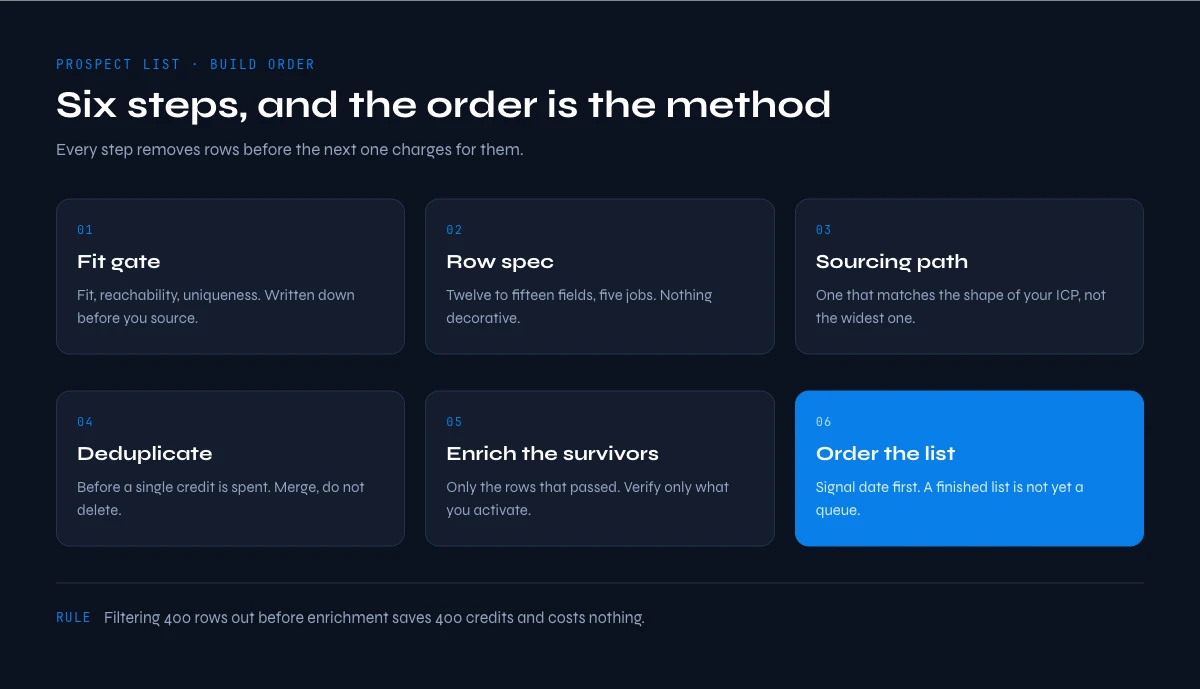
Here is the whole build in one place. Write the fit gate, pick a sourcing path, deduplicate before you spend anything, enrich only the rows that passed the gate, verify only the rows you are about to contact, then order the file by signal. Each step below is one of those six, and the order is not decorative: two of the steps are billed per row you submit, so anything you can remove for free has to be removed first.
A prospect list is a working file in which every row represents one contact who matches your ideal customer profile, carries at least one confirmed way to reach them, and records when that information was last checked. It is not a database export, it is not a bag of scraped names, and it is not a lead list. A lead has shown interest. A prospect has not.
That distinction shapes everything downstream. Because a prospect never raised a hand, the entire burden of relevance sits on your side of the table. You choose the fit, you choose the timing, you carry the cost of being wrong. This is why the build matters more here than in any inbound motion, and it is why the file sits at the centre of every outbound sales process rather than at the end of it.
The failure mode is remarkably consistent, and it is always volume. Someone needs 5,000 contacts, sources 5,000 rows, and quietly skips the qualification step because applying it would leave 1,200. The campaign then runs on 5,000, bounces on every row with no valid address, gets ignored by every row with no fit, and returns a number that tells you nothing about the message you tested. Building a list carefully is not strictness for its own sake. It protects the only measurement you have.
Step 1: write the fit gate before you source anything
Every candidate row should pass three tests before it earns a place in the file. Write them down first, because the whole value of a gate is that it is applied by a rule rather than by mood at six in the evening.
Fit. Does the company sit inside the profile you can genuinely serve? Fit is a set of observable attributes, not a feeling: industry, headcount band, country, and any structural marker that separates a buyer from a bystander. If you cannot express it as a filter you could apply to a spreadsheet column, it is not a criterion yet.
Reachability. Is there a plausible route to a human? A company row with no named person attached is a target account, not a prospect. Keep the two apart: account-level rows belong in the tiering exercise described in the account-based marketing playbook, contact-level rows belong here.
Uniqueness. Is this person already in the file, already in your CRM, or already in an active sequence? A duplicate is worse than a missing row, because it produces a second message to someone who already got the first one.
If your ideal customer profile is not written down anywhere yet, it does not belong in the list build. It belongs upstream, in the go-to-market strategy, where the choice of who you sell to is made once and then reused by everything else.
Step 2: decide what a usable row holds
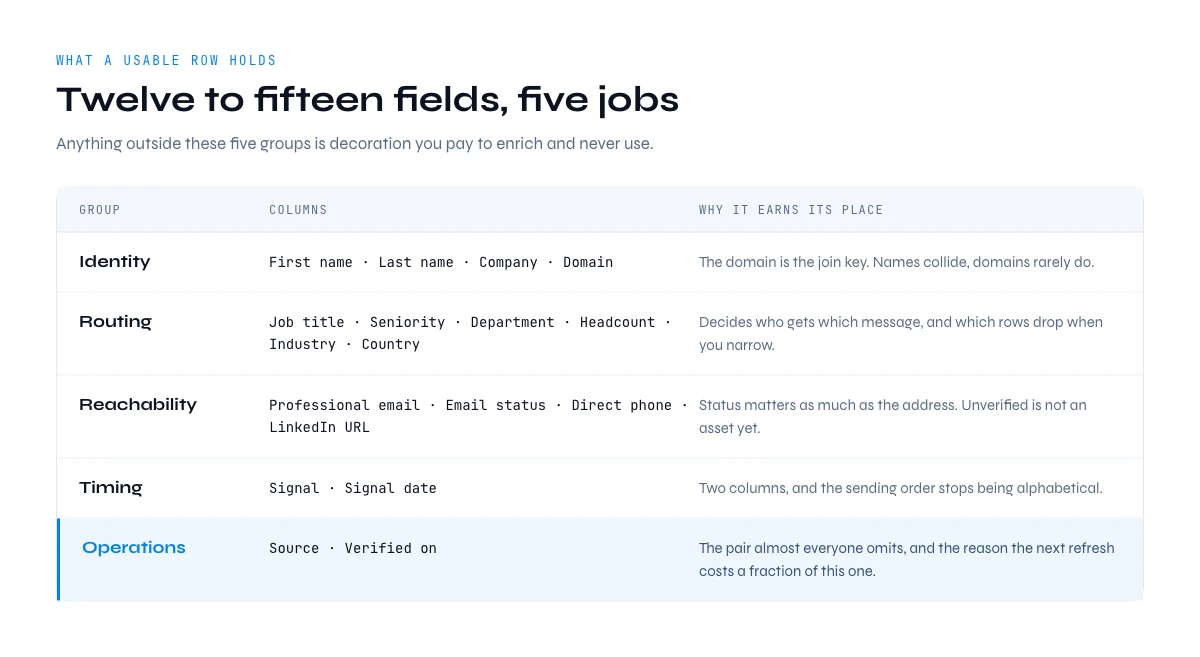
A usable prospect row holds twelve to fifteen fields grouped into five jobs: identity, routing, reachability, timing, and operations. Anything outside those five groups is decoration you will pay to enrich and never use.
| Group | Columns | Why it earns its place |
|---|---|---|
| Identity | First name, last name, company name, company domain | The domain is the join key. Company names collide and get rewritten, domains rarely do |
| Routing | Job title, seniority, department, headcount, industry, country | Decides who receives which message, and which rows get dropped when you narrow |
| Reachability | Professional email, email status, direct phone, LinkedIn profile URL | Status matters as much as the address. An unverified email and a verified one are not the same asset |
| Timing | Signal, signal date | Turns a flat list into an ordered one. Two columns, and the sequence order stops being alphabetical |
| Operations | Source, verified on | The two columns almost everyone omits, and the reason the next refresh costs a fraction of this one |
The operations pair is worth defending. Without a source column you cannot tell which sourcing path produced the rows that actually replied, so you keep funding all of them equally. Without a verified date you cannot tell fresh rows from stale ones, so the next cleaning pass has to redo the entire file instead of the part that aged. Two columns that cost nothing to fill remove most of the cost of the next cycle.
You will often see these fields grouped into four families instead of five: company data (name, domain, size, industry, location), contact data (name, title, verified email, direct phone), social data (the LinkedIn profile URL) and signals (hiring, technology, funding, news). It is the same list cut differently. What the four-family version usually forgets is our fifth group, operations, and that omission is why so many prospecting lists cannot be refreshed without starting over.
Want those columns ready-made? Copy the free B2B lead list template for Google Sheets: contact, company and status columns are already laid out, and the blue ones fill themselves with Derrick.
Sales prospecting list template: the columns to copy
A sales prospecting list template is nothing more than the header row of the file, in an order that matches how the row gets filled. Here is the one we use, with eighteen columns across the five groups above. Most teams end up using twelve to fifteen of them: drop the direct phone column if you never call, drop seniority if your ICP is a single job title.
| Group | Columns, in order | Filled at |
|---|---|---|
| Identity | first_name, last_name, company_name, company_domain | Import (step 3) |
| Routing | job_title, seniority, department, headcount, industry, country | Import, then enrichment (step 5) |
| Reachability | linkedin_url, professional_email, email_status, direct_phone | Enrichment and verification (step 5) |
| Timing | signal, signal_date | Ordering (step 6) |
| Operations | source, verified_on | Every time a row is imported or checked |
Download the prospect list template (CSV, 18 columns, empty). It opens in Excel, Numbers or Google Sheets as is. If you prefer to start from a Google Sheet with the enrichment columns already wired, the Google Sheets template linked above does the same job. And if you want to see what a filled company layer looks like, the sample file further down this page holds 70 real US B2B software companies, ready to run through the fit gate.
Two rules make the template work in practice. Never rename a column after the first import, because every later merge relies on the header matching exactly. And fill source and verified_on at the moment a row enters the file, not at the end: a prospect list without those two columns cannot tell you which path worked or which rows are stale.
In the web app or Google Sheets
Start the list from a sentence, not a blank sheet
Describe the people you are looking for in plain language and Derrick imports matching leads straight into your list, one row each, with the fields you need to qualify them. The six steps in this guide start at step three.
- Feature
- Import Leads from a Prompt
- Credit cost
- 1 credit per lead imported
The first button opens the web app (nothing to install): 1 credit per lead imported, 100 free credits every month. The second details the feature and its cost per plan.
Example of a prospecting list: 10 real companies, annotated
Templates are abstract until you see rows in them, so here is a prospect list example built from real data. The ten companies below come from a real Derrick export pulled on 9 September 2026: US B2B software companies with their domain already resolved. The ICP we applied is written first, because a prospecting list example means nothing without the gate it was filtered against: US software companies with 11 to 200 employees that sell to sales teams.
| Company | Domain | Industry (as labelled) | City | Headcount | Gate | Why |
|---|---|---|---|---|---|---|
| Perenso | perenso.com | Software Development | Denver, CO | 11-50 | Keep | Inside every filter. A clean row: the domain matches the name. |
| SETVI | setvi.com | Software Development | Philadelphia, PA | 11-50 | Keep | Inside every filter. |
| InnovA Technologies | innovallc.com | Software Development | Fort Worth, TX | 11-50 | Keep | The domain does not repeat the brand name. That is why the domain, not the name, is the join key. |
| 612 Ventures | 612ventures.com | IT Services and IT Consulting | (empty) | 11-50 | Check | A services firm with no city. The fit gate decides: if your ICP is software publishers only, it goes. |
| Advisr | advisr.com | Software Development | New York, NY | 11-50 | Keep | Its LinkedIn page uses a different handle (advisrio). Store the URL, never rebuild it from the name. |
| CPQ Experts | cpqexperts.com | IT System Design Services | San Francisco, CA | 51-200 | Keep | Inside the headcount band; the industry label is close enough to keep it. |
| addMRR | addmrr.com | Marketing Services | Seattle, WA | 2-10 | Drop | Below the headcount band, and a marketing service rather than a software company. |
| MarketTime | markettime.com | Software Development | Dallas, TX | 51-200 | Keep | Founded in 1984: age is not a filter unless you wrote it into the gate. |
| Layman Candy Company | laymandistributing.com | Software Development | Salem, OR | 51-200 | Check | Labelled software, but the name and the domain point to a distributor. Open the website before trusting a label. |
| C Squared E | csquarede.com | Business Consulting and Services | Minneapolis, MN | 0-1 | Drop | A one-person consultancy: outside the band on two filters. |
Out of ten rows, six pass, two fail and two need a human look. That ratio is typical of a company layer before qualification, and it is the reason the gate runs before any paid step: the four rows in question would have cost an enrichment credit each and produced nothing usable.
Notice what the example does not contain yet: no person, no email, no phone. This is the company half of the file. The contact half gets added only to the six rows that passed, in step 5, and that is where most of the credits go. Every column you saw in the template exists to make that second half cheaper.
Step 3: pick a sourcing path that matches your ICP
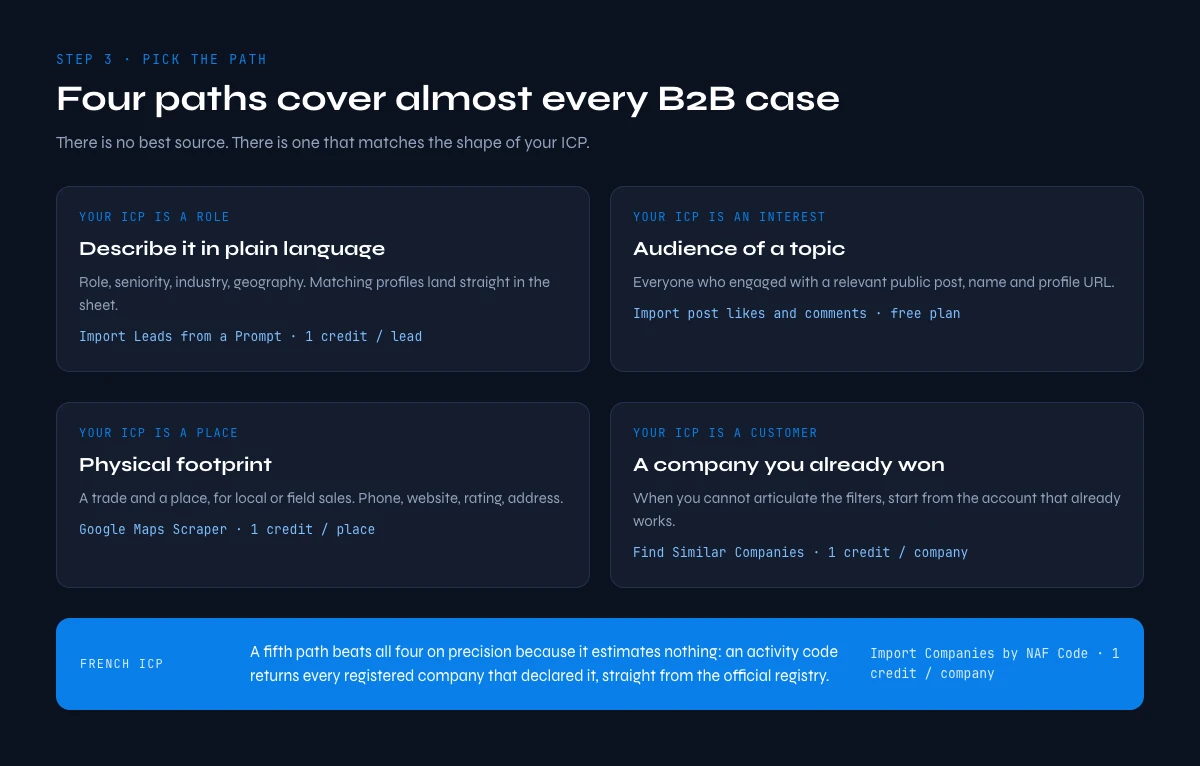
There is no single best source. There is a source that matches the shape of your ICP, and picking the wrong one is what forces people to buy volume they then have to filter away. Four paths cover almost every B2B case.
| Path | Use it when your ICP is defined by | What it returns |
|---|---|---|
| Describe it in plain language | Role, seniority, industry and geography | Matching professional profiles imported straight into your list, one credit per lead with LinkedIn connected and ten without, with Import Leads from a Prompt |
| Audience of a topic | Interest in a subject rather than a firmographic band | Everyone who engaged with a relevant public post, name and profile URL, one credit per engager on any plan including the free one, with Import post likes and comments |
| Physical footprint | A trade and a place, for local or field sales | Businesses with phone, website, rating and address, one credit per place on paid plans with the Google Maps Scraper |
| A customer you already won | Resemblance to your best account, when you cannot articulate the filters | Companies scored by similarity, one credit per company with Find Similar Companies |
For a French ICP there is a fifth path that beats all four on precision, because it does not estimate anything: an activity code returns every registered company that declared it, straight from the official registry, with headcount and address attached. That is what Import Companies by NAF Code does, at one credit per company.
Whichever path you take, stamp the source column at import. It costs a single formula and it is the only way you will ever learn which path deserves more of your budget. The wider channel question, where these paths sit relative to content, ads and referral, is covered in the B2B lead generation guide.
Two precisions on the first path, because they change the bill. Import Leads from a Prompt and Import Companies from a Prompt both work without LinkedIn connected, at 10 credits per row; connect your LinkedIn account through the Derrick Chrome extension and the same rows cost 1 credit each. If your team already lives in Sales Navigator, a saved search is a sourcing path in its own right, and our Sales Navigator guide covers the filters that keep it narrow. When you start from companies rather than people, plan one more step before enrichment: Find a company's people returns the staff of each kept company at 1 credit per person, on paid plans.
On the free plan, 100 credits a month means 100 rows imported by prompt with LinkedIn connected, or 10 without it. That is enough to test a segment, not to fill a quarter.
The app works through your list row by row: 1 credit per lead imported.
Step 4: deduplicate before you spend a single credit
Deduplication comes before enrichment, always, and the reason is arithmetic. Enrichment is priced per row you submit. Every duplicate you enrich is paid for twice and delivers one contact. Cleaning first is the cheapest cost reduction in the whole build, and it costs nothing: Find Duplicates is unlimited on every plan, including the free one.
Deduplicate on the strongest key you have, in this order. Professional email when it exists, because it is unique by construction. LinkedIn profile URL when there is no email, because one person has one profile. First name plus last name plus company domain as the fallback, which catches the common case of the same person imported twice from two different paths.
When two rows describe the same person, merge rather than delete. Sourced rows often hold complementary halves of the truth: one carries the phone, the other carries the current job title. Set a precedence rule once, most recent value wins per field, and apply it to the whole file so that the merge is reproducible rather than a series of individual judgement calls.
Then apply the fit gate from step one and delete what fails it. This is the moment where the list gets smaller and better, and it should happen while the rows are still free.
Step 5: enrich the survivors, verify only what you activate
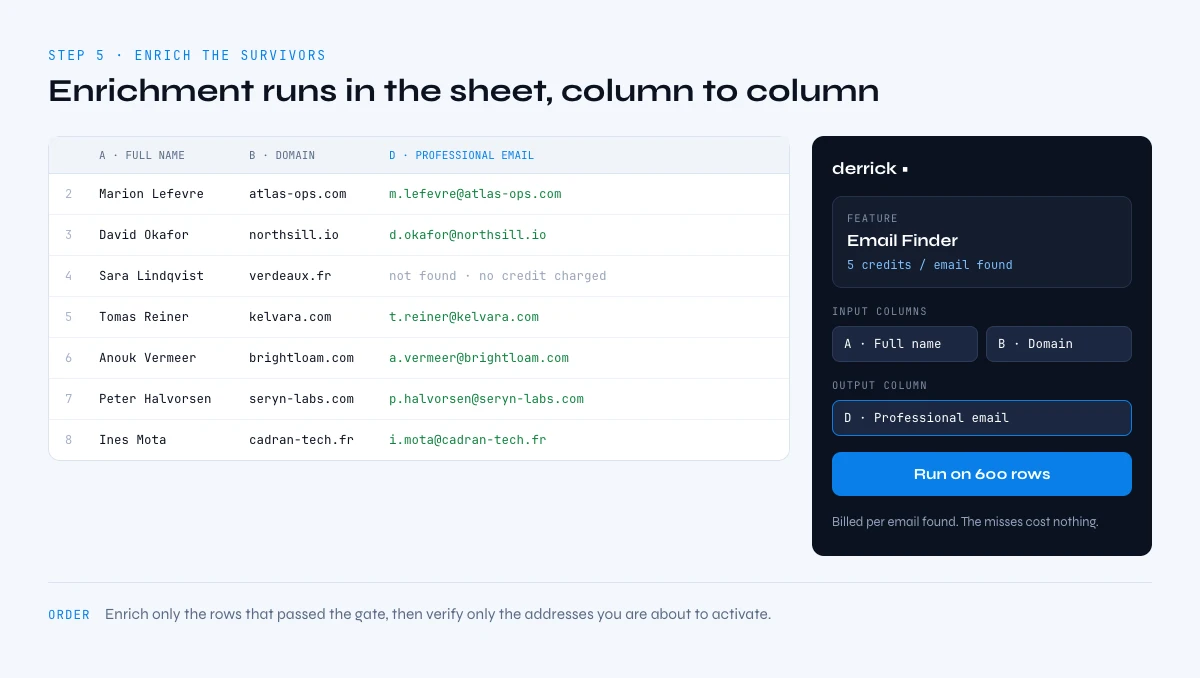
There is a billing mechanic here that decides the correct order of operations, and it is worth understanding because almost nobody builds around it. Some enrichment steps are charged for every row you submit. Others are charged only when a value is actually found.
Enrich Leads and Enrich Companies bill per row submitted, at one credit each. So you run them last in the free phase and only on rows that already passed the gate. Every row you did not filter out is a row you pay for whether it was useful or not.
Email Finder and Email Verification bill per result found, at five credits per email found and one credit per verification. That inverts the logic: you can point them at the whole qualified segment without paying for the misses. There is no reason to hand-pick which rows get an email search.
Phone Finder also bills per result found, but at 200 credits per phone. At the Standard rate of 0.002 euro per credit that is about 40 cents for a direct number, which is a good trade for the people you actually intend to call. It runs the same on fifty rows as on fifty thousand, so the only real question is which rows deserve a phone, and that is a budget call rather than a capacity one.
Verification deserves one more rule: verify at the point of use, not at the point of build. An address confirmed three months ago and never rechecked is not a verified address, it is a stale one wearing a green label. Verify the segment you are about to activate, in the week you activate it.
A word on prerequisites, so the order above does not stall halfway. Enrich Leads and Enrich Companies read LinkedIn data, so they need your LinkedIn account connected to Derrick through the Chrome extension. Email Finder, Email Verification and Phone Finder only run on paid plans, from Standard at 20 euros a month; the 100 free credits cover the import, the enrichment and the deduplication, which is exactly the part where the list gets qualified.
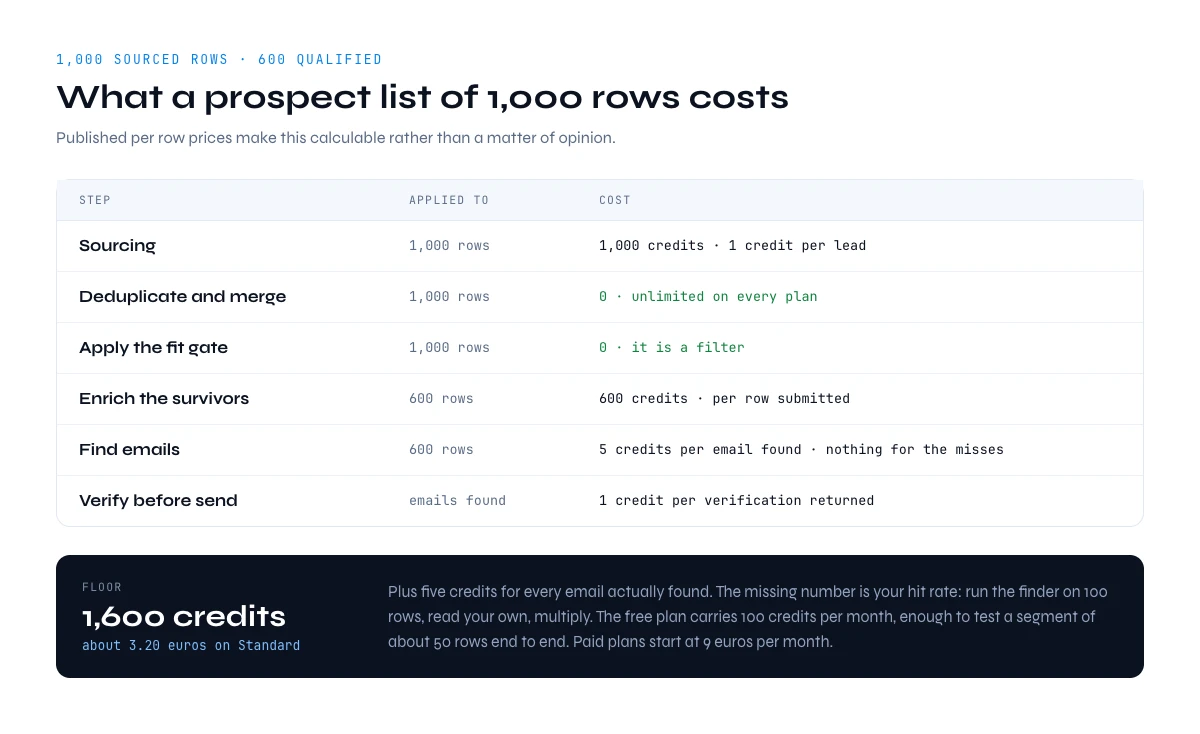
How to build a prospect list of 1,000 rows: what it costs
Published per-row prices make this calculable rather than a matter of opinion. Take 1,000 sourced rows, assume the fit gate and the merge leave 600 qualified contacts, and the build looks like this.
| Step | Applied to | Cost |
|---|---|---|
| Sourcing | 1,000 rows | 1,000 credits at one credit per lead with LinkedIn connected (10,000 without) |
| Deduplicate and merge | 1,000 rows | 0, unlimited on every plan |
| Apply the fit gate | 1,000 rows | 0, it is a filter |
| Enrich the survivors | 600 rows | 600 credits, billed per row submitted |
| Find emails | 600 rows | 5 credits per email found, nothing for the misses |
| Verify before send | Emails found | 1 credit per verification returned |
The floor is therefore 1,600 credits, roughly 3.20 euros at the Standard per-credit rate, plus five credits for each email actually found. The deliberately missing number in that table is the hit rate, because it depends on your segment and nobody honest can quote it for you in advance. Run the finder on 100 rows, read your own rate, and multiply. That measured number is worth more than any benchmark published by someone selling a list.
Two consequences fall out of the arithmetic. First, the sourcing step is often the largest single line, which is an argument for a narrow source rather than a broad one you filter afterwards. Second, the gate pays for itself immediately: filtering 400 rows out before enrichment saves 400 credits and costs nothing.
Here is the same build carried all the way to verified emails, naming the object at each line. 1,000 leads imported by prompt with LinkedIn connected: 1,000 credits (10,000 without LinkedIn connected). Deduplication and the fit gate: 0. The 600 surviving leads enriched: 600 credits. Say 400 of them get an email found: 400 times 5 is 2,000 credits, billed only on the 400 found. Those 400 emails verified: 400 credits. Total: 4,000 credits, which fits in the Standard plan at 20 euros (10,000 credits a month) with room left. The calculator below runs the same arithmetic on your own numbers.
Prospect list cost calculator
Enter the size of the list you want to build. The calculator prices each step in credits, names the object billed on every line, and returns the smallest Derrick plan that covers it. Nothing leaves your browser.
Fill the fields and press Calculate.
Email Finder, Email Verification, Phone Finder and Find a company's people only run on paid plans, from Standard. The 100 free credits a month cover imports, Enrich Leads and deduplication. The email rate is yours to measure: run the finder on 100 rows first and use your own number here.
The free plan carries 100 credits per month, which is enough to import and enrich a real test segment of about 50 rows before you commit to anything; finding and verifying emails needs a paid plan. Paid plans start at 20 euros per month, and API and MCP access open at the Plus tier at 47.50 euros per month for teams that want the same operations running outside the sheet.
Step 6: order the list before you send it
A finished list is not a queue. Sending in import order treats a company that just opened three roles in your buyer's department exactly like one that has not changed in two years, and those two rows do not deserve the same week.
Ordering needs one timing column and one date. A hiring signal is the most broadly useful for B2B, because open roles are public, dated, and directly indicate where budget just moved: Company Hiring Signal returns which companies are recruiting and for which roles, at one credit per company. Recent company news is the other cheap signal, and a technology detected on the website tells you whether you are the replacement or the addition.
Sort by signal date descending, work the top of the file first, and keep the unsignalled rows as the steady background volume rather than deleting them. You are not contacting fewer people. You are contacting the right ones in the right week, which is the whole difference between a list and a queue. Once the file is ordered, three rates tell you whether it works, and the next section shows how to read them.
How to build a prospect list you can measure: three rates
Three rates tell you whether a sales prospecting list works, and you can read all three before the first reply comes in. Usable-row rate: the share of sourced rows that passed the gate and the merge. Reachable rate: the share of usable rows with a verified email or a direct phone. Replies per 100 reachable rows: the only one that needs the campaign to run.
| Rate | How to compute it | What a low value points to |
|---|---|---|
| Usable-row rate | Rows kept after step 4, divided by rows sourced | The sourcing path is too broad for your ICP |
| Reachable rate | Rows with a verified email or phone, divided by rows kept | The segment is hard to reach by email, or the domains are wrong |
| Replies per 100 reachable rows | Replies, divided by reachable rows contacted, times 100 | The message or the timing, now that the list is ruled out |
The order of the three matters. If the usable-row rate is low, nothing downstream is worth tuning yet. If it is fine but the reachable rate is low, the problem is data, not copy. Only when both hold does a weak reply rate say something about your message. The full set of five rates we track per campaign, with the thresholds that trigger a change, is in our guide on how to prospect effectively.
How to build a prospect list or buy one: what each path costs
Buying a ready-made file looks faster, and for a one-off event list it sometimes is. For a recurring outbound motion it rarely holds up, for three reasons that show up in the first month.
- You pay per record, valid or not. A purchased file is priced on its row count. The share of rows that bounce or left the company is your problem, not the seller's.
- Nobody wrote your fit gate into it. The file matches a category, not your ICP, so you still run step 4 on it, and you have already paid for the rows you delete.
- It decays as a block. Without a source and a verified-on date per row, you cannot refresh the part that aged. Six months later you buy it again.
Built your way, the worked example above lands at 4,000 credits for 400 verified emails, so 10 credits per verified contact, 2 cents at the Standard rate of 0.002 euro per credit. Every one of those rows passed your gate and carries its source. When buying does make sense, for instance to seed a market you know nothing about yet, our guide on buying an email list covers what to check before you pay. Compliance stays simple either way: stick to professional data and honour every opt-out the day you receive it.
How to build a prospect list in the web app, in Claude or through the API
The six steps do not change with the tool, but the surface you run them on should follow how you work. Derrick runs in its web app first, with nothing to install, and the same operations are available in three other places.
| Surface | Best when | What the sourcing step looks like |
|---|---|---|
| Web app | You are building your first list or importing a CSV | Describe the leads you want, the rows land in a table you can filter and enrich |
| Google Sheets sidebar | The list already lives in a sheet and you work it by hand | Same import, rows written into your tab; deduplication runs here |
| Claude or any MCP client | You are exploring a segment in a conversation | Ask for "heads of sales at US software companies with 50 to 200 employees" and get rows back in the chat |
| REST API | The list has to rebuild itself on a schedule, or feed your CRM | One call per import, the response is the rows, ready for your own deduplication and enrichment jobs |
The API and Derrick MCP open from the Plus plan at 47.50 euros a month. That is the right level once the build runs every week: a scheduled job imports from the same prompt, deduplicates against your CRM, enriches only what is new, and the list stops being a project and becomes a feed.
Keep the prospect list fresh: how to build a prospect list you never rebuild
Treat the finished file as an asset with a maintenance schedule. Person-level fields move fastest, because people change roles: title, company and email deserve a re-check before each activation. Company-level fields move slower and a lighter rhythm is enough for headcount, industry and address.
This is where the verified-on column finally pays. With it, a refresh touches only the rows past their window, which is a small fraction of the file. Without it, every refresh is a full rebuild, and the file quietly becomes something people avoid opening.
What makes a prospect list obsolete is easy to name. People change jobs, so the title, the company and the email go stale together. Companies rebrand and move domains: in the example above, one company's LinkedIn handle still carries a former name. Headcounts cross the bands of your gate in both directions. None of this shows on the row itself, which is why the verified-on column exists: it turns "is this still true?" into a date you can sort on.
The cheapest way to stay ahead of decay is to watch for the changes instead of re-checking everything. Signal, available in Google Sheets from the Standard plan at 1 credit per signal that fires, watches your leads and accounts for job changes, funding rounds and hiring sprees, so the rows that need a refresh announce themselves. A job change is also the best timing signal you will get: the person who just moved is the one most likely to buy in their first months.
When a segment is ready, push it rather than exporting it. A CSV round trip is where column mappings drift and where the verified status silently gets left behind: Push to La Growth Machine sends qualified rows from the sheet into an audience with no export step and no per-push cost. Teams that would rather drive the same operations from code or from an assistant can use the API or Derrick MCP, both available from the Plus tier.
One last thing worth saying plainly: build the first list small. Take one segment, fifty rows, run all six steps, and measure the share of rows that turned out to be genuinely usable. That single percentage tells you whether your sourcing path, your gate and your fields are right, and it does so before you spend anything meaningful. Scaling a build that works is trivial. Scaling one that does not is how people end up with 5,000 names and 900 conversations they could have had for a fifth of the effort. If you are still deciding whether this motion is the right one at all, the inbound versus outbound comparison is the better place to start.
Frequently asked questions
What is a prospect list?
How many prospects should a list contain?
What columns does a good prospect list need?
Should I deduplicate before or after enrichment?
What does it cost to build a list of 1,000 prospects?
Is it better to buy a prospect list or build one?
How often should a prospect list be refreshed?
How do you make a prospect list in sales?
Keep reading
Continue exploring this cluster


The State of B2B Marketing Performance 2026: Benchmarks Report
Read →

Account-Based Marketing (ABM): Definition, Techniques, Examples
Read →

Inbound vs Outbound Marketing: Differences, When to Pick Each
Read →

B2B Lead Generation: Strategies, Tools, Tips in 2026
Read →