Social Selling Index (SSI): the diagnostic guide to your LinkedIn SSI score
Check your LinkedIn SSI score for free, read its four sub-scores out of 25, and find out what a good Social Selling Index is and how to raise it.


Social Selling Index: the short answer
Your Social Selling Index is a score out of 100 that LinkedIn recalculates daily from four categories of your own behaviour, each worth 25 points. It is a mirror, not an engine. It tells you which of the four habits you are neglecting, and nothing at all about whether your pipeline is healthy.
That distinction is what most guides skip. They explain the four pillars, tell you to post more and connect more, and stop. This one gives you a diagnostic instead: how to read your four sub-scores, which pillar is cheap to move and which is expensive, and why the pillar almost everyone under-invests in is a data problem rather than a content problem.
Three things drive everything below. First, the four sub-scores matter far more than the total, because the total hides where your deficit actually is. Second, the four pillars do not cost the same effort per point: two of them take months of consistent publishing, one of them can move in a single focused afternoon. Third, a high score is evidence that you used LinkedIn the way LinkedIn wants, which is correlated with pipeline but is not the same thing as pipeline.
How to check your LinkedIn SSI score
Go to linkedin.com/sales/ssi while signed in. The page is free and open to every LinkedIn account, whether or not you pay for Premium or Sales Navigator. You do not need a trial, and you do not need to be in a sales role. That page is the only place your LinkedIn SSI score lives: it is not shown on your public profile.
The page gives you five numbers, and this is the part worth slowing down on. There is the headline score out of 100, then a breakdown of the four pillars out of 25 each. Below that sit two rankings: your percentile within your industry, and your percentile within your own network. Those two rankings are context, not targets. Your network percentile in particular is almost meaningless, because it compares you to the people you chose to connect with.
The score refreshes daily and moves slowly. If you change your behaviour today, expect to see movement over one to two weeks, not overnight. That lag is the single most common reason people conclude that a tactic "did not work" when they simply measured too early.
| What the SSI page shows | Scale | How much attention it deserves |
|---|---|---|
| Total Social Selling Index | 0 to 100 | Low. It is an average that hides your actual gap. |
| Four pillar sub-scores | 0 to 25 each | High. This is the only actionable part of the page. |
| Industry percentile | Top X% | Medium. Useful as a rough calibration once. |
| Network percentile | Top X% | Low. You selected the comparison group yourself. |
| Historical trend line | Rolling | Medium. Direction beats absolute value. |
Who can see your SSI score?
You can, on linkedin.com/sales/ssi while signed in. The SSI score is not displayed on your public profile. LinkedIn lets you share it with your network if you choose to, and it does not document any way for someone else to look up your score.
How often does your SSI score update?
Daily. LinkedIn recalculates it every day, but it moves slowly because it reflects your activity over time. Give a change of habit one to two weeks before judging it, and compare readings month to month rather than day to day.
Can my SSI score go down?
Yes. The score reflects recent activity, so a pillar drifts down when you stop the behaviour behind it, for example when you stop searching and saving leads or stop commenting. A drop usually means a dropped habit, not a penalty.
How the four SSI pillars are scored
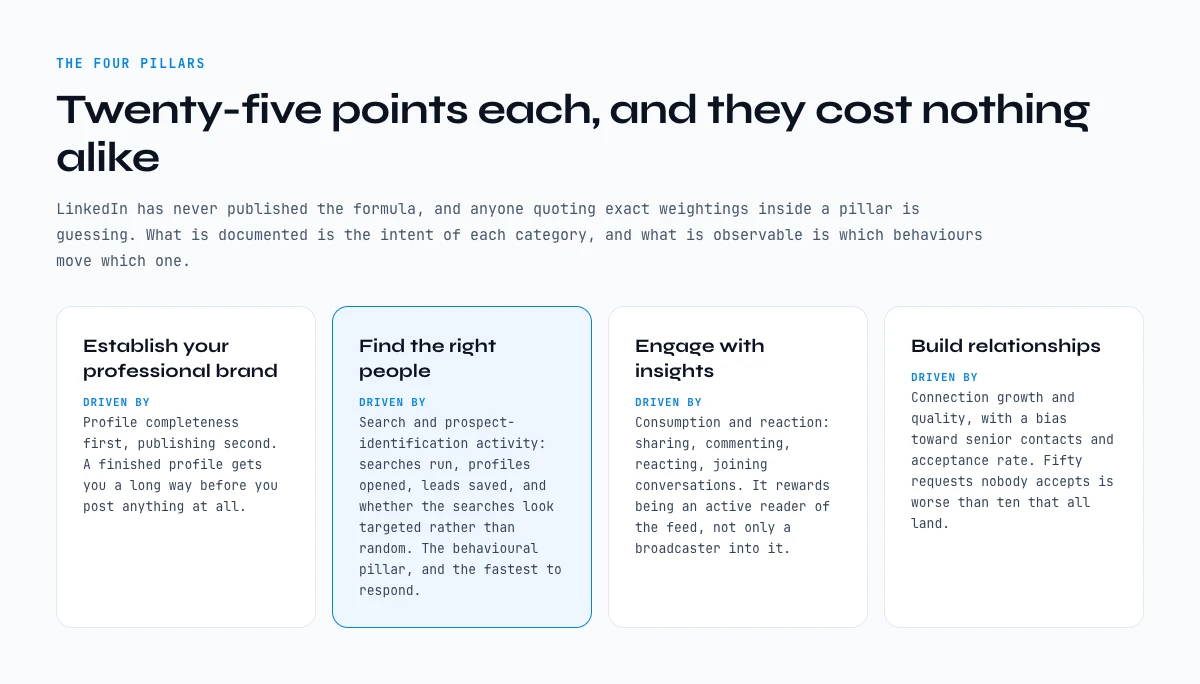
LinkedIn has never published the formula, and anyone who tells you the exact weightings inside a pillar is guessing. What is documented is the name and intent of each of the four categories, and what is observable is which behaviours move which pillar. Here is the honest version.
Establish your professional brand
Driven by profile completeness first and publishing activity second. A finished profile with a real photo, a specific headline, a filled-out experience section and a handful of endorsements gets you a long way on this pillar before you publish anything at all. Beyond that, it rewards posting and the engagement your posts earn.
Find the right people
Driven by search and prospect-identification activity: how much you use LinkedIn search, how many profiles you view, how many leads you save, whether your searches look targeted rather than random. This is the behavioural pillar, and it is the one that responds fastest.
Engage with insights
Driven by consumption and reaction: sharing, commenting, reacting to other people's content, joining conversations in groups. It rewards being an active reader of the feed, not only a broadcaster into it.
Build relationships
Driven by connection growth and connection quality, with a bias toward senior contacts and toward acceptance rate. Sending fifty requests that nobody accepts is worse for this pillar than sending ten that all land.
What is a good SSI score?
As a reading guide, a good SSI score sits around 45 to 65 for an active professional, with no pillar far below the others. LinkedIn publishes no official bar.
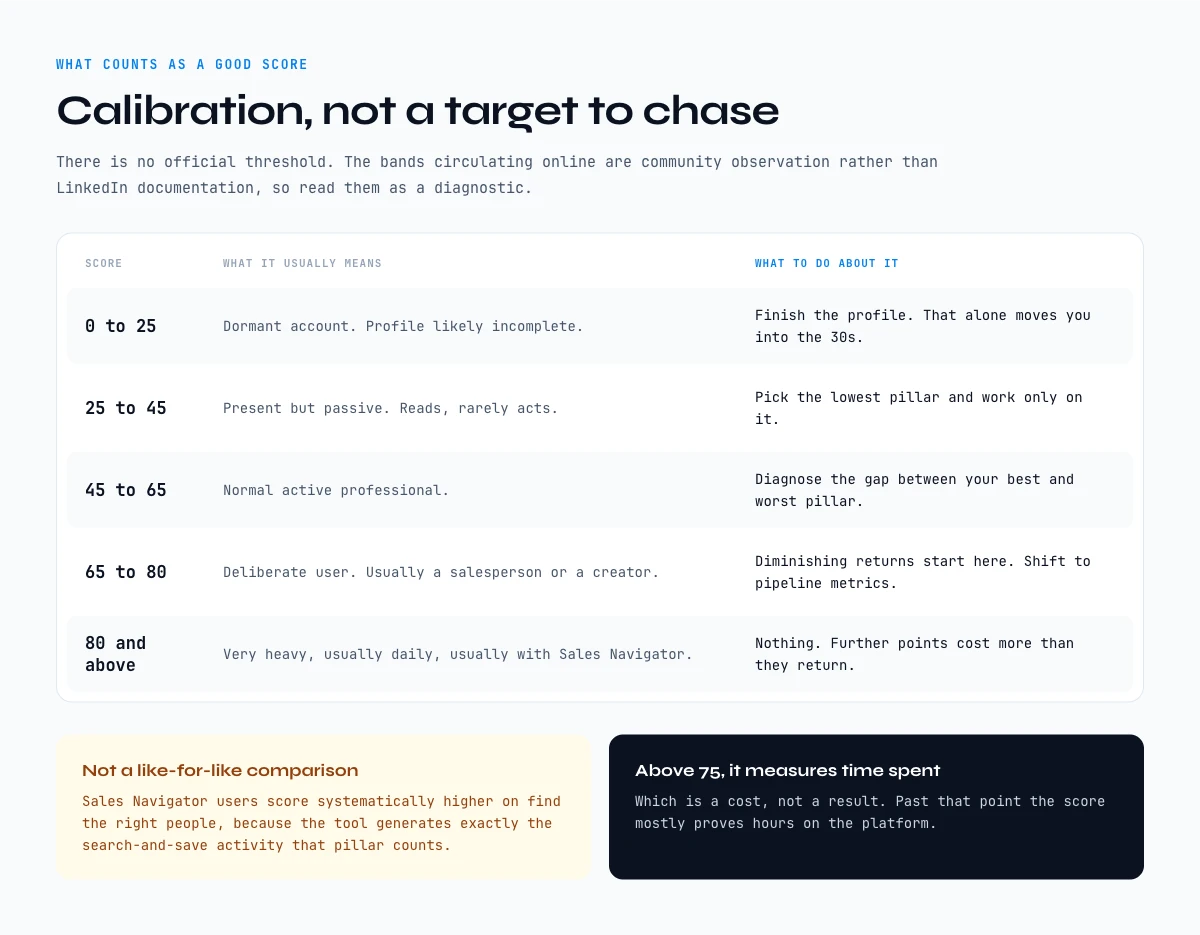
There is no official threshold, and the "good score" numbers circulating online are community observation rather than LinkedIn documentation. Treat the table below as calibration, not as a target to chase.
| Score band | What it usually means | What to do about it |
|---|---|---|
| 0 to 25 | Dormant account. Profile likely incomplete. | Finish the profile. That alone moves you into the 30s. |
| 25 to 45 | Present but passive. Reads, rarely acts. | Pick the lowest pillar and work only on it. |
| 45 to 65 | Normal active professional. | Diagnose the gap between your best and worst pillar. |
| 65 to 80 | Deliberate user. Usually a salesperson or a creator. | Diminishing returns start here. Shift to pipeline metrics. |
| 80 and above | Very heavy, usually daily, usually with Sales Navigator. | Nothing. Further points cost more than they return. |
Two caveats that matter more than the bands. Sales Navigator users score systematically higher on "find the right people" because the tool generates exactly the search-and-save activity the pillar counts, so comparing your score to a Sales Navigator user's is not a like-for-like comparison. And a score above roughly 75 mostly proves time spent on the platform, which is a cost, not a result. If you are weighing whether that subscription is worth it, we ran the arithmetic in a companion guide on whether LinkedIn Premium pays for itself.
Read your four sub-scores before you change anything
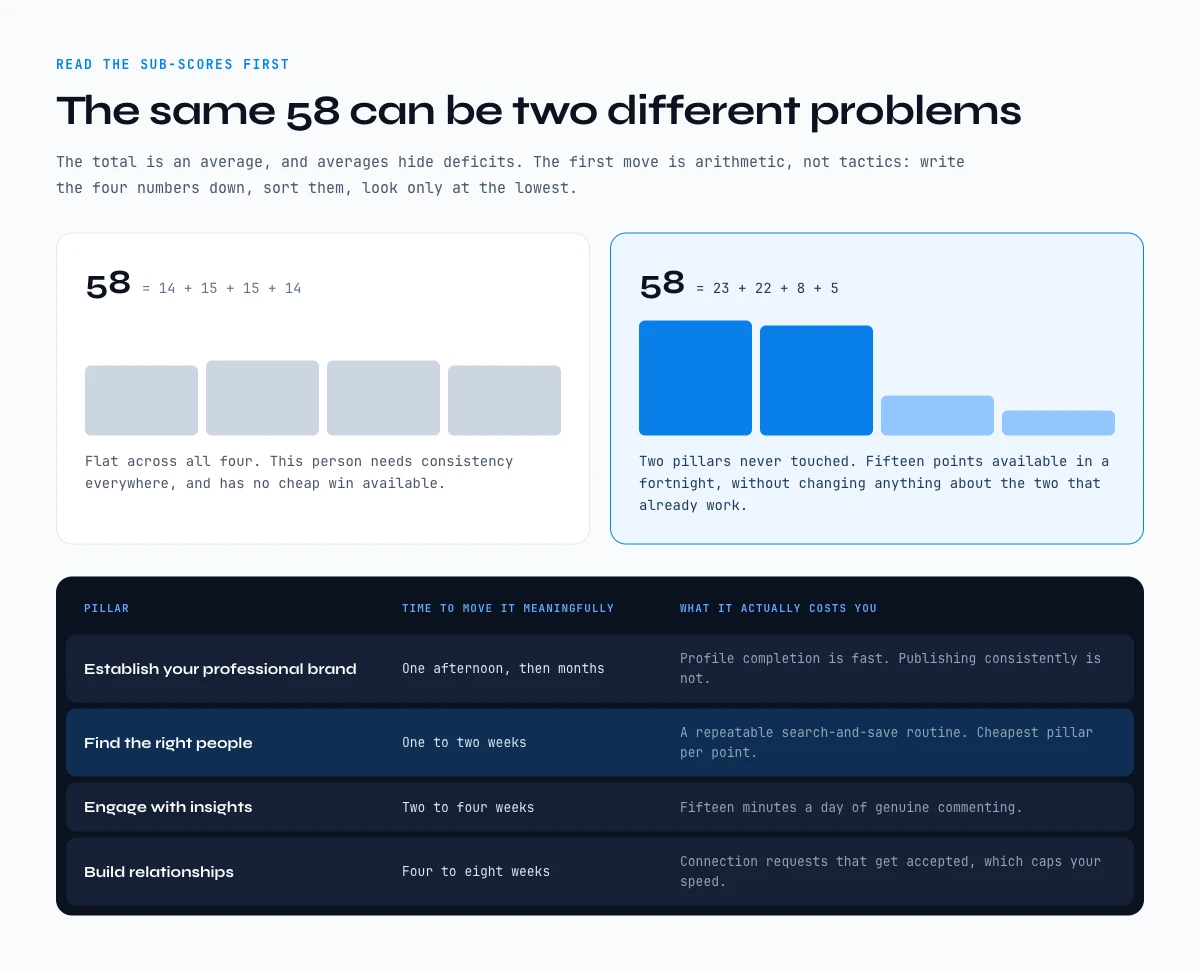
The total score is an average, and averages hide deficits. Someone at 58 with a flat 14 or 15 across all four pillars has a completely different problem from someone at 58 built out of 23, 22, 8 and 5. The first person needs consistency everywhere. The second has two pillars they have simply never touched, and can gain fifteen points in a fortnight without changing anything about the two they are already good at.
So the first move is arithmetic, not tactics. Write your four numbers down, sort them, and look only at the lowest one. Then check it against the cost table below, because the four pillars are nowhere near equally expensive to move.
| Pillar | Typical time to move it meaningfully | What it actually costs you | 30-day plan |
|---|---|---|---|
| Establish your professional brand | One afternoon, then months | Profile completion is fast. Publishing consistently is not. | Week 1: finish the profile. Publishing waits. |
| Find the right people | One to two weeks | A repeatable search-and-save routine. Cheapest pillar per point. | Weeks 1 to 4: two focused hours of search and save a week. |
| Engage with insights | Two to four weeks | Fifteen minutes a day of genuine commenting. | Weeks 2 to 4: three or four real comments a day. |
| Build relationships | Four to eight weeks | Connection requests that get accepted, which caps your speed. | Weeks 3 to 4: ten requests with a note, sent to saved leads. |
Read that table next to your own sub-scores and the decision usually makes itself. If your lowest pillar is "find the right people", you have the best possible problem, because it is the one that responds fastest and the one that overlaps most directly with work you should be doing anyway.
The last column is the 30-day version of the same idea. You do not run four programmes at once. You finish the profile in week one because it is cheap, you start the search-and-save routine that same week because it responds fastest, and you only add the slower pillars once the first two have become habits. Check your SSI score at the start and at the end of the month, not every morning.
Track your SSI score over time
The SSI page keeps a trend line, but it is short and it says nothing about what you changed. A dated line once a month does the job better: the date, the total, the four sub-scores, and one sentence on what you did differently since the last reading. Five numbers and a note, two minutes on linkedin.com/sales/ssi.
Then add one column LinkedIn will never show you: how many of the profiles you saved that month became people you could actually contact. That column is the link between your LinkedIn SSI and results. If the "find the right people" sub-score climbs while that column stays flat, you are searching more without building anything usable. The score only lives on LinkedIn's page, so this tracking stays manual. Keep it that small and you will keep doing it.
"Find the right people" is a data problem, not a content problem
Here is where nearly every SSI guide goes quiet. For three of the four pillars the advice writes itself: finish your profile, post more, comment more, connect more. For "find the right people" the advice usually degrades into "use LinkedIn search more", which is true and useless.
The pillar measures prospect identification. Concretely, it rewards running searches that look intentional, opening the profiles those searches return, and saving the ones that fit. Which means it is not asking you to be more visible. It is asking you to do targeting work. That is a list-building activity, and list-building is a data workflow.
The practical consequence is that the fastest legitimate route to this pillar is also the most useful thing you can do for your quarter: define who you are actually trying to reach, in writing, then work through that definition on LinkedIn one segment at a time. A rep who spends two focused hours a week searching by job title, seniority and company size, opening the profiles that match and saving them, will move this pillar and end up with a real prospect list. A rep who "uses search more" at random will move the pillar less and end up with nothing.
Sales Navigator makes this pillar easier because its filters are built for exactly this kind of search, and our Sales Navigator guide walks through the ones worth using. If you are still choosing the rest of your stack, our roundup of social selling tools sorts them by the job they actually do, so you only pay for the part of the workflow you are missing.
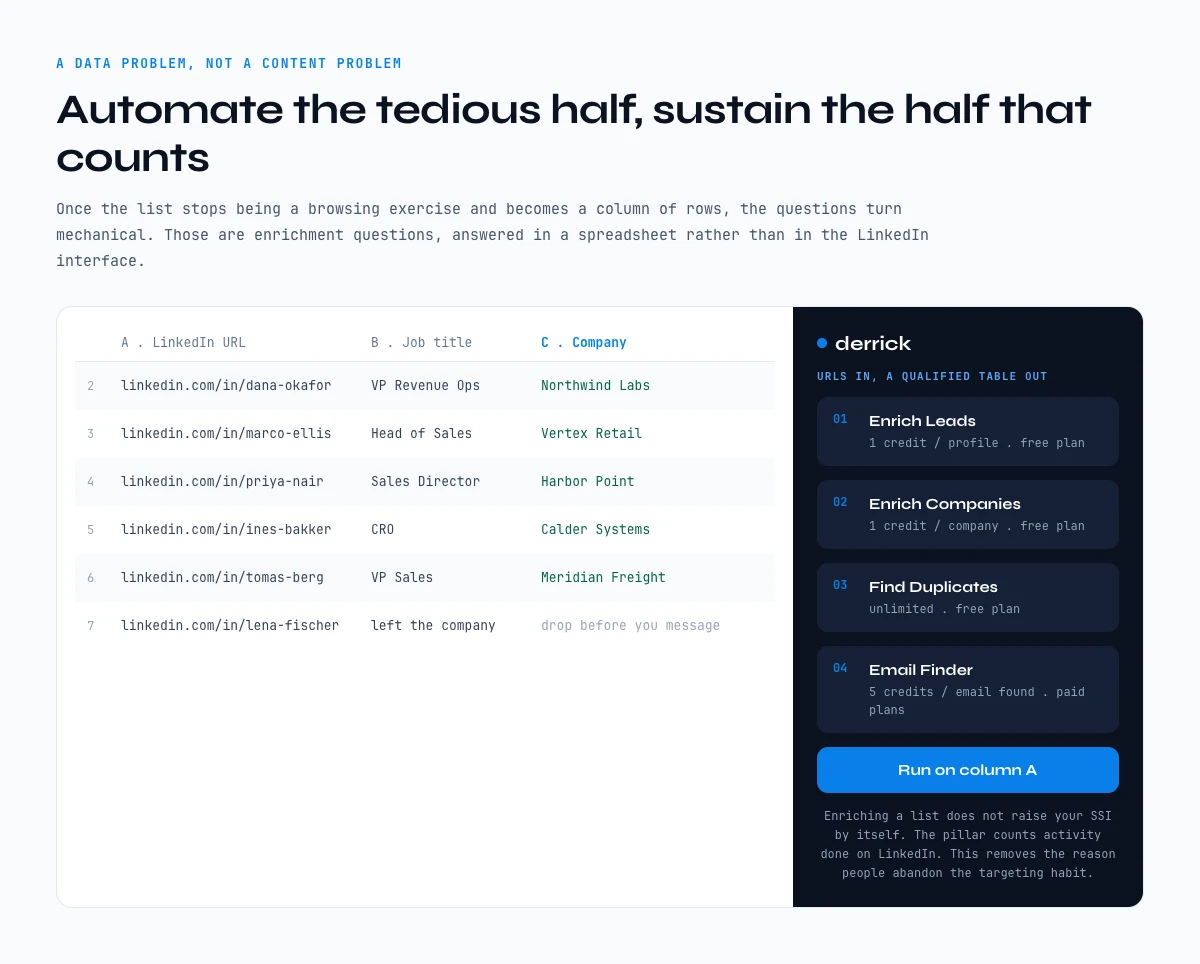
Where this connects to tooling is at the point the list stops being a browsing exercise and becomes a column of rows. Once you have a hundred profile URLs, the questions become mechanical: which of these people are still in the role the profile claims, what is the company size now, which ones are worth a message. Those are enrichment questions, and they are answered in a spreadsheet rather than in the LinkedIn interface. Derrick runs in its web app, and also as a Google Sheets sidebar, so a column of LinkedIn URLs becomes a table of job titles, companies and locations with Enrich Leads, at 1 credit per profile, and the free plan comes with 100 credits a month at no cost. If you do not have the URLs yet, our guide on how to find a LinkedIn URL covers the routes that work in bulk. If your search already lives in Sales Navigator, Import LinkedIn Leads turns the result page into rows at 1 credit per profile, and from the Plus plan the same work runs from Claude or ChatGPT through the Derrick MCP.
One honest caveat, because it matters. Enriching a list in a spreadsheet does not itself raise your SSI, because the pillar counts activity performed on LinkedIn. What it does is remove the reason people abandon the targeting habit in the first place, which is that manual profile-by-profile research is tedious enough that nobody sustains it for more than a week. Automate the tedious half and the half that counts becomes sustainable.
The app works through your list row by row. 100 free credits every month.
Moving the professional brand pillar
This pillar has a cheap half and an expensive half, and it is worth being clear about which is which before you commit a quarter to content.
The cheap half is profile completeness, and it is genuinely a single afternoon of work. A real photo, a banner, a headline that says what you do for whom rather than your job title, a summary written in the first person, every role filled in with actual descriptions, skills listed, a handful of endorsements. Most people leave five or six of those blank and then wonder why the pillar sits at 12. Our guide on writing a LinkedIn headline covers the single field with the most leverage here, since it is the one that shows up in every search result and every comment you leave.
The expensive half is publishing. It rewards posting regularly and it rewards the engagement your posts earn, which means it is a months-long commitment with a real opportunity cost. Before you sign up for that, be honest about whether you want the pillar or whether you want the audience. If you want the audience, publish. If you only want the pillar, finish the profile and spend your remaining effort on the pillar in Part 06, which is cheaper per point by a wide margin.
Moving the engage with insights pillar
This is the pillar that rewards being a reader rather than a broadcaster, and it is the one people ignore because it produces no visible artefact of their own.
The behaviour that moves it is commenting, and specifically commenting in a way that adds something. Reacting is counted but weakly. A one-word "Great post" is a reaction with extra steps. Three or four substantive comments a day on posts from people in your market is the whole tactic, and fifteen minutes is enough time to do it.
There is a targeting angle here that most people miss. The people commenting on posts in your market are, by definition, active accounts who care about your topic, which makes them a better-qualified audience than a cold search result. If you want to work that systematically rather than by scrolling, Derrick can pull the likers and commenters of a given post into the web app or a sheet with Import LinkedIn post likes and comments, which is available on the free plan. You still do the commenting yourself, on LinkedIn, because that is what the pillar counts. The tool decides where to spend the fifteen minutes.
Moving the build relationships pillar
The slowest of the four, because it depends on other people accepting. You control the sending, not the outcome, and the pillar weights acceptance and seniority rather than raw volume.
Three things move it. Send requests with a note, because acceptance rates are consistently higher with context than without. Send them to people with a plausible reason to accept, which usually means someone you share a group, an employer or a recent interaction with. And target seniority deliberately, because a connection with a decision-maker in your market is weighted more heavily than a lateral connection.
The failure mode is volume. Firing off a hundred generic requests a week suppresses your acceptance rate, which is the thing the pillar actually reads, and it puts you within reach of LinkedIn's own invitation limits. Fewer, better-targeted requests beat more of them, which is a rare case of the pillar and good practice pointing in the same direction. If seniority is what you are targeting, knowing the current job title before you send is the difference between a relevant note and a guess, and our guide on extracting job titles from profile URLs covers doing that across a list rather than one at a time.
What the Social Selling Index does not measure
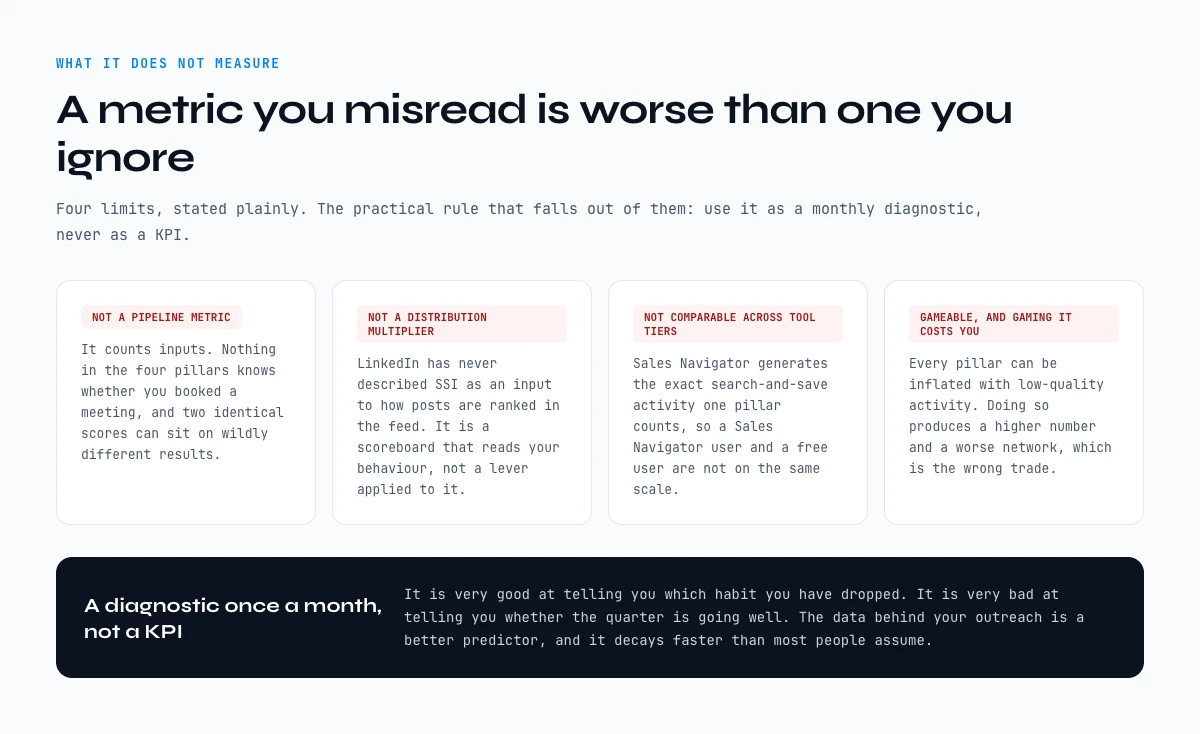
Four limits, stated plainly, because a metric you misread is worse than one you ignore.
- It is not a pipeline metric. It counts inputs. Nothing in the four pillars knows whether you booked a meeting, and two people with identical scores can have wildly different results.
- It is not a distribution multiplier. LinkedIn has never described SSI as an input to how your posts are ranked in the feed. It is a scoreboard that reads your behaviour, not a lever applied to it.
- It is not comparable across tool tiers. Sales Navigator generates the exact search-and-save activity that one pillar counts, so a Sales Navigator user and a free user are not on the same scale.
- It is gameable, and gaming it costs you. Every pillar can be inflated with low-quality activity. Doing so produces a higher number and a worse network, which is the wrong trade.
The practical rule that falls out of this: use SSI as a diagnostic once a month, not as a KPI. It is very good at telling you which habit you have dropped. It is very bad at telling you whether the quarter is going well. The data behind your outreach is a better predictor, and it decays faster than most people assume, which we measured in our LinkedIn profile data decay report.
LinkedIn's own position in 2026: from Social Selling Index to AI
LinkedIn has changed the way it talks about its own score. The official SSI page is now framed as a move from SSI to AI, and it says plainly that a high SSI score does not always reflect how effective a salesperson is, nor line up with measurable sales outcomes. That is the company that built the metric saying what Part 10 of this guide argues.
It does not mean the score is gone. When we checked on 12 October 2026, the "Get your SSI score" link still led to linkedin.com/sales/ssi, the page still showed the four pillars, and it was still free. What moved is the emphasis: LinkedIn now puts AI-assisted selling in Sales Navigator at the front, and the SSI becomes a secondary signal.
For you, the practical reading has not changed. Use your LinkedIn SSI to spot the habit you dropped, then judge the month on something closer to revenue. The most direct bridge between the two is the pillar this guide keeps coming back to: the right people, found and actually reachable. A higher "find the right people" sub-score with a list you can contact is progress. A higher sub-score with nothing to contact is just activity.
Reading SSI across a sales team
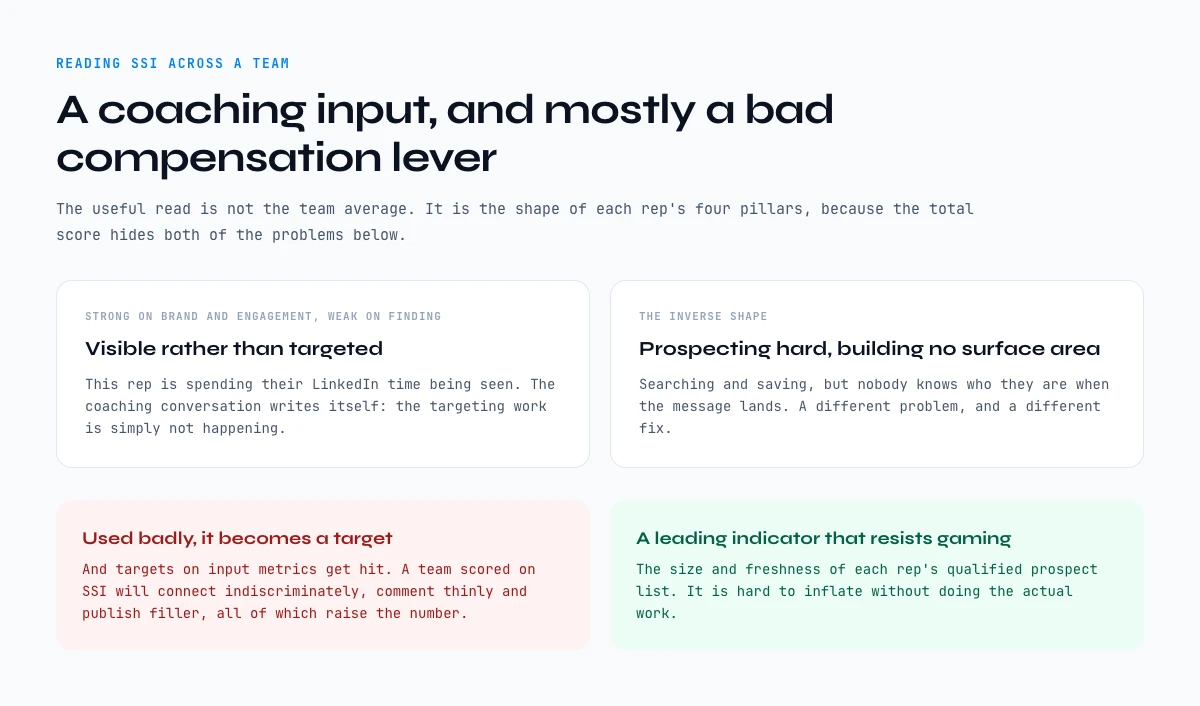
Managers reach for SSI because it is one of the very few LinkedIn numbers that is visible, comparable and free. That makes it tempting to put on a dashboard, and mostly a mistake to put on a compensation plan.
Used well, it is a coaching input. The useful read is not the team average, it is the shape of each rep's four pillars. A rep whose first and third pillars are strong and whose second is weak is spending their LinkedIn time being visible rather than being targeted, and the coaching conversation writes itself. A rep with the inverse shape is prospecting hard and building no surface area. Those are two different problems, and the total score hides both.
Used badly, it becomes a target, and targets on input metrics get hit. A team scored on SSI will connect indiscriminately, comment thinly and publish filler, all of which raise the number. If you want a single leading indicator that resists gaming, the size and freshness of each rep's qualified prospect list is a better one, because it is hard to inflate without doing the actual work.
Who should track SSI, and who should not
Track it if LinkedIn is a real prospecting channel for you: account executives and SDRs who source there, founders who sell themselves, and the managers coaching either group. For them the four sub-scores are a cheap monthly check on the habits that feed the pipeline.
Skip it if your deals do not start on LinkedIn. Inbound-only reps, account managers working a fixed book of clients, and anyone selling to buyers who barely use the platform will raise their SSI score without improving anything that matters. For them, the better number is already in the CRM.
Key takeaways on the Social Selling Index
- The Social Selling Index is four behavioural scores out of 25, refreshed daily, readable free at linkedin.com/sales/ssi. The total is an average that hides your actual deficit.
- Write down the four sub-scores, sort them, and work only on the lowest. That single step beats every generic "how to improve your SSI" checklist.
- The four pillars cost very different amounts per point. Profile completion is an afternoon. Publishing is months. Targeting is one to two weeks and is the cheapest real gain available.
- "Find the right people" is a data and targeting problem, not a content problem. The activity that moves it is the same activity that builds a usable prospect list.
- Do not compare your score to a Sales Navigator user's, do not treat it as a pipeline metric, and do not put it on a compensation plan.
- Above roughly 75, further points cost more than they return. Switch your attention to the quality of the list you are working.
- LinkedIn itself now says a high SSI score does not always line up with sales results. Log it monthly and pair it with the number of saved profiles you can actually reach.
The Social Selling Index is a good habit tracker and a poor scoreboard. Read it once a month, fix the lowest pillar, and ignore the total. And if the lowest pillar turns out to be the targeting one, treat that as good news: it is the fastest to move, and the work it asks for is a prospect list you needed anyway. Start by collecting the profile URLs, then enrich the column rather than opening tabs one by one.
Frequently asked questions
What is the Social Selling Index?
Where can I check my SSI score?
What is a good Social Selling Index score?
Does a high SSI improve the reach of my LinkedIn posts?
Which SSI pillar is the fastest to improve?
Do you need Sales Navigator to have a good SSI?
Should a sales manager track SSI across the team?
Does using an enrichment tool raise my Social Selling Index?
Keep reading
Continue exploring this cluster


LinkedIn Profile Data Decay Report 2026: How Fast B2B Profile Data Goes Stale
Read →

How to Find a LinkedIn URL: Complete Guide for Professionals and Prospectors
Read →

LinkedIn Headline 2026: Character Limit + Examples That Work
Read →

How to Find Country from LinkedIn Profile URL: 3 Proven Methods
Read →