LinkedIn Premium Connection Request Limit: What Paying Actually Changes
There is no separate LinkedIn Premium connection request limit. See what sets your weekly cap, how to raise it and the route that skips the queue entirely.


You upgraded, you hit send on the twenty-fifth invitation of the day, and LinkedIn told you to come back next week. The obvious conclusion is that you bought the wrong plan. The less obvious one, and the correct one, is that you bought a plan that was never going to change this particular number.
There is no separate linkedin premium connection request limit. LinkedIn's own help pages state that all members, Basic and Premium alike, are subject to the same invitation restrictions. Premium buys you reach, visibility and messaging. It does not buy you a bigger invitation allowance, and no tier of it does.
The short version: the weekly invitation cap is set by how your account behaves, not by what you pay. It sits around 100 to 200 invitations a week for a healthy account, it drops when your acceptance rate falls, and the only durable ways to raise it are to send fewer and better invitations, or to stop routing your outreach through the invitation queue entirely.
Is there a LinkedIn Premium connection request limit at all?
Not as a separate number, no. This is the single most useful thing to understand before you spend anything, because the assumption that Premium unlocks a bigger invitation quota is what sends people shopping for the wrong upgrade.
LinkedIn publishes the rule plainly in its own help centre: the invitation restrictions apply to all members, and holding a Premium subscription does not exempt you from them. The restriction, when it fires, typically lasts a week. What Premium changes is the message that can travel with an invitation, not the number of invitations you may send.
That distinction matters more than it sounds. Free accounts are limited in how many invitations they can personalise; Premium removes that particular ceiling, which is a real benefit and gets misread constantly as "Premium gives me more invitations". It gives you better invitations, in the sense that each one can carry a note. The counter that stops you at the end of the week is untouched.
What LinkedIn actually says, and what it deliberately does not
LinkedIn confirms three things and refuses to confirm a fourth, and the gap is where most of the confusion lives.
It confirms that invitation limits exist, that they apply to every account type including Premium, and that withdrawing pending invitations will not lift a restriction once it has been applied. What it never publishes is the number itself, or the formula that produces it.
That silence is deliberate and it is not unreasonable: a published threshold is a threshold that gets automated against. The practical consequence for you is that every specific figure you will read on this subject, here included, is an observation of behaviour rather than a documented rule. Treat the numbers in the next section as a well established range, not as a contract.
The real LinkedIn Premium connection request limit, in numbers
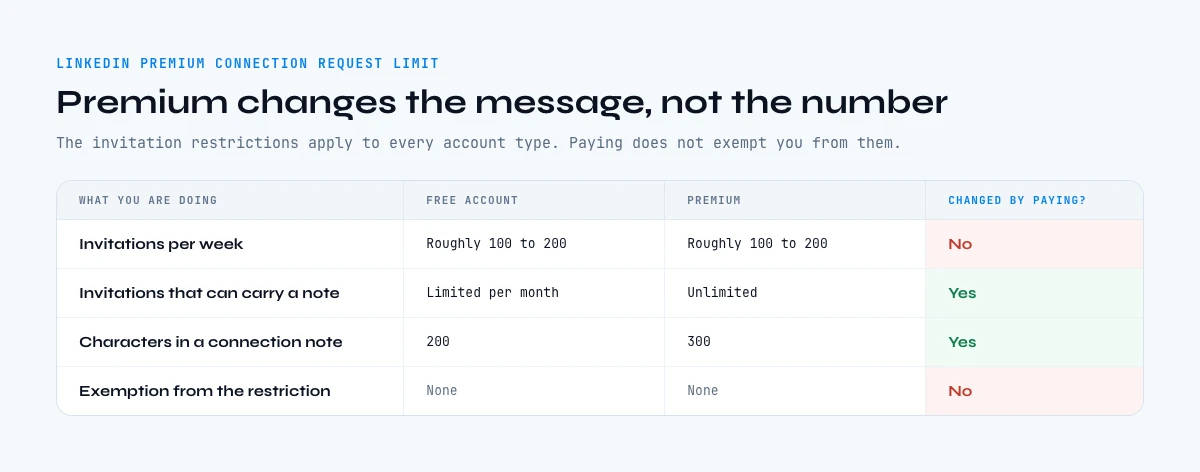
The consistently observed figures cluster tightly. A healthy account, whether Premium or not, sends somewhere between 100 and 200 invitations per week before the counter intervenes, which works out to a comfortable 15 to 30 per day. A brand new account sits well below that, and an account with a poor acceptance record can find itself capped far lower.
| What you are doing | Free account | Premium | Changed by paying? |
|---|---|---|---|
| Invitations per week | Roughly 100 to 200 | Roughly 100 to 200 | No |
| Invitations that can carry a note | Limited per month | Unlimited | Yes |
| Characters in a connection note | 200 | 300 | Yes |
| InMails to people you are not connected to | None | Monthly allowance by tier | Yes |
| Profile views per day | Several hundred | Higher ceiling | Yes |
| Commercial search use | Capped monthly | Lifted | Yes |
| Total connections on the account | 30,000 | 30,000 | No |
Read the last column, and the shape of the purchase becomes clear. Premium is an unlock on messaging and search. On the two hard ceilings that actually bound a prospecting motion, the weekly invitation count and the 30,000 connection cap, it changes nothing at all. Our breakdown of what LinkedIn Premium really costs per month puts numbers on the other side of that trade.
What actually sets your weekly cap
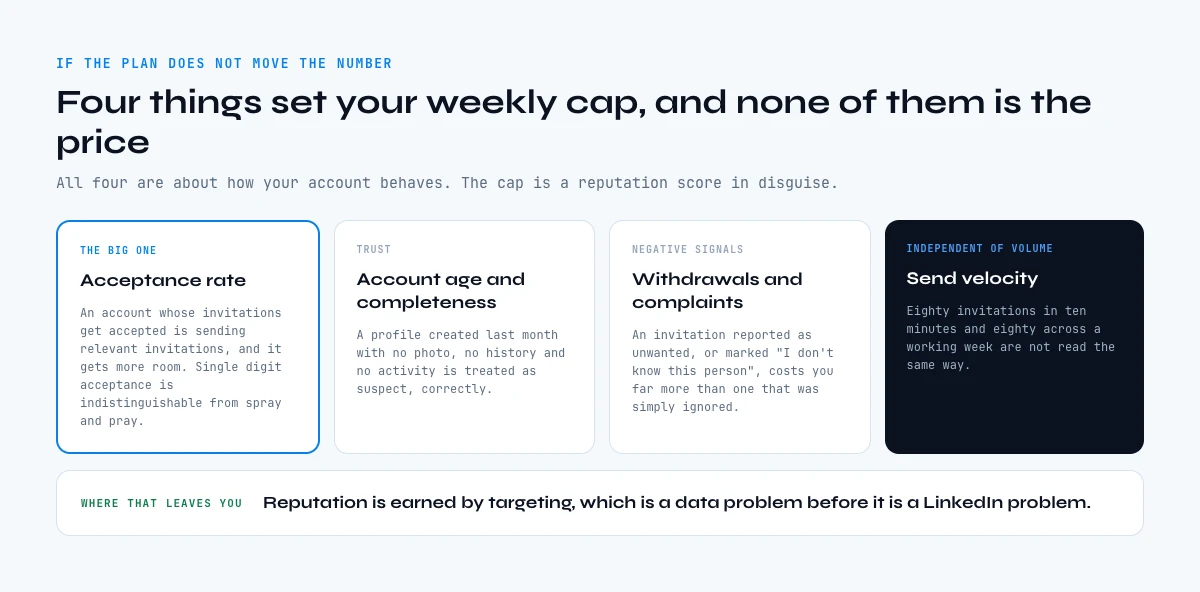
If the plan does not move the number, something else does. Four things appear to, and all four are about how your account behaves rather than what it pays.
- Acceptance rate. The big one. An account whose invitations are accepted is an account sending relevant invitations, and it gets more room. An account sitting at single digit acceptance is, from the platform's point of view, indistinguishable from spray and pray.
- Account age and completeness. A profile created last month with no photo, no history and no activity is treated as suspect, correctly.
- Withdrawal and complaint signals. Invitations reported as unwanted or marked "I don't know this person" cost you far more than an ignored one.
- Send velocity. This matters independently of volume: eighty invitations in ten minutes and eighty across a working week are not read the same way.
None of these are published, all of them are consistent with what any platform would build, and all four point at the same conclusion. The cap is a reputation score in disguise, and reputation is earned by targeting, which is a data problem before it is a LinkedIn problem.
Why the LinkedIn Premium connection request limit is not your real ceiling
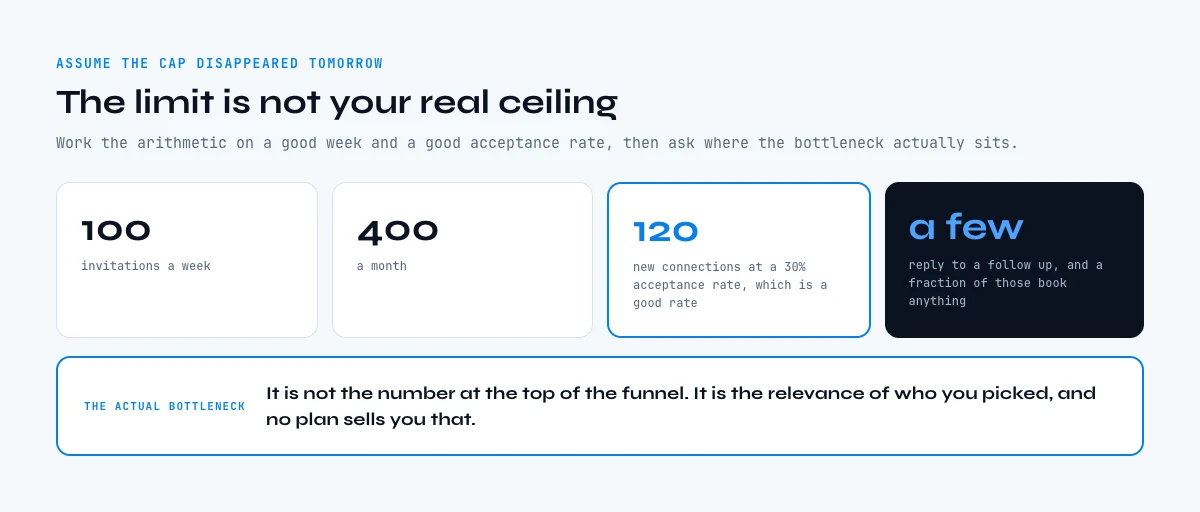
Assume the cap disappeared tomorrow. Would your pipeline change? For most teams the honest answer is no, and that is the more interesting problem.
Work the arithmetic. A hundred invitations a week is 400 a month. At a 30% acceptance rate, which is a good rate, that is 120 new connections. Of those, a fraction reply to a follow-up, and a fraction of that fraction books anything. The bottleneck is not the number at the top of the funnel. It is the relevance of who you picked, and no plan sells you that.
Worse, invitations are the slowest possible way to start a conversation. You send a request, you wait days for an acceptance that may never come, and only then may you write a proper message. Every other channel lets you make your case immediately. The invitation queue is a permission system you have voluntarily placed between yourself and a first sentence.
This is where most teams misdiagnose. They feel the ceiling, they assume the fix is a bigger allowance, and they buy a plan. The fix is almost always fewer, better targeted invitations, plus a second route that does not queue at all.
Pending invitations, and why they quietly lower your cap
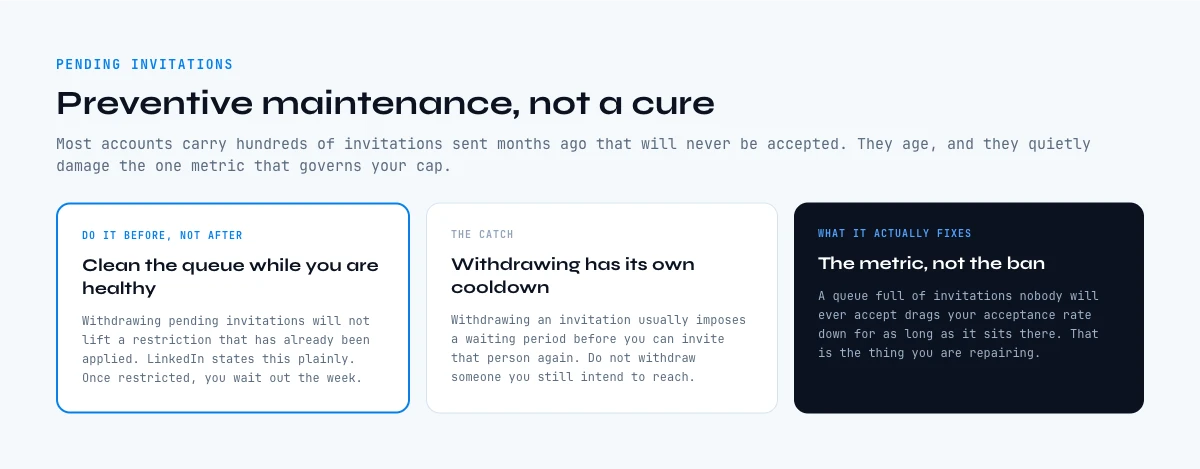
Most accounts carry hundreds of invitations that were sent months ago and will never be accepted. They sit there, they age, and they quietly damage the one metric that governs your cap.
Cleaning them is worth doing, with a caveat that LinkedIn itself states: withdrawing pending invitations will not lift a restriction that has already been applied. Withdrawal is preventive maintenance, not a cure. Once you are restricted, you wait out the week.
Two further details are worth knowing. Withdrawing an invitation usually imposes a waiting period before you can invite that person again, so do not treat it as a reset button on a specific target. And a mass withdrawal in one sitting is itself an unusual behaviour pattern; spreading it over several days is the safer habit.
The rule that follows is simple. If an invitation has been pending for more than a month, it is not going to be accepted, and it is costing you. Clear a batch weekly, and treat the size of your pending pile as the health indicator it actually is.
How many conversations 100 invitations actually buy
Before deciding that the cap is your problem, price it. The calculator below turns a weekly send volume and an acceptance rate into the only number that matters, which is how many people you will actually be able to talk to at the end of the month.
Invitation ceiling: what your weekly limit is really worth
Pick what you send in a week and how often it is accepted. The output is your monthly reach through the invitation queue, and what the same effort returns outside it.
Pick a weekly volume and an acceptance rate to see your real monthly reach.
A month is counted as 4 weeks. The reply assumption is deliberately generous at 15% of accepted connections, which is above what most sequences achieve.
Raising the cap the legitimate way
Since the cap tracks behaviour, the levers are behavioural. None of them are clever, and all of them work slowly, which is why they are unpopular.
Send to people who have a reason to accept. That means a shared context you can name in the note: the same event, the same customer problem, a post they wrote. Invitations to strangers with a generic line are the ones that get ignored, and ignored invitations are what pull the number down.
Keep the note specific and short. You have 300 characters on Premium, and the temptation is to fill them. The accepted ones are usually two sentences: why you, why now.
Spread the sending across the week rather than emptying the tank on Monday. Warm the profile before scaling: a complete page, recent activity and a headline that says what you do all raise acceptance on their own, and our guide to reading and raising your Social Selling Index covers the measurable side of that. The rest of the profile data toolkit sits on our LinkedIn profile hub, and if you are assembling the list from URLs rather than from a search page, start with how to find a LinkedIn URL.
And target from data rather than from a search page. Knowing that a person changed roles two months ago, or that their company just started hiring for the problem you solve, turns a cold invitation into an obvious one. Enrich Leads pulls the full profile detail for a list at 1 credit per profile, and it is billed per row whether or not the row returns anything. The free plan's 100 monthly credits therefore cover a first batch of 100 profiles, which is enough to see how many of the people on your list still hold the job you think they do.
What to do when you hit the LinkedIn Premium connection request limit
- Do not create a second account. It is the fastest route to losing both, and it solves a one week problem with a permanent one.
- Accept the week. The restriction typically lasts about seven days and there is no support ticket that shortens it, since withdrawing pending invitations does not lift it either. Use the time on the part of the job that was always the constraint: cleaning the list, checking that the people on it are still in the roles you think they are, and writing better notes for when the counter resets.
- Keep working the network you already have. Existing first degree connections are unaffected by an invitation restriction, and most accounts have several hundred connections they have never spoken to. Following up with thirty of them is a better week than the eighty invitations you could not send.
- Come back lower. When the counter resets, return at a lower volume than the one that triggered the block. Going straight back to the number that got you restricted is how a one week restriction becomes a recurring one.
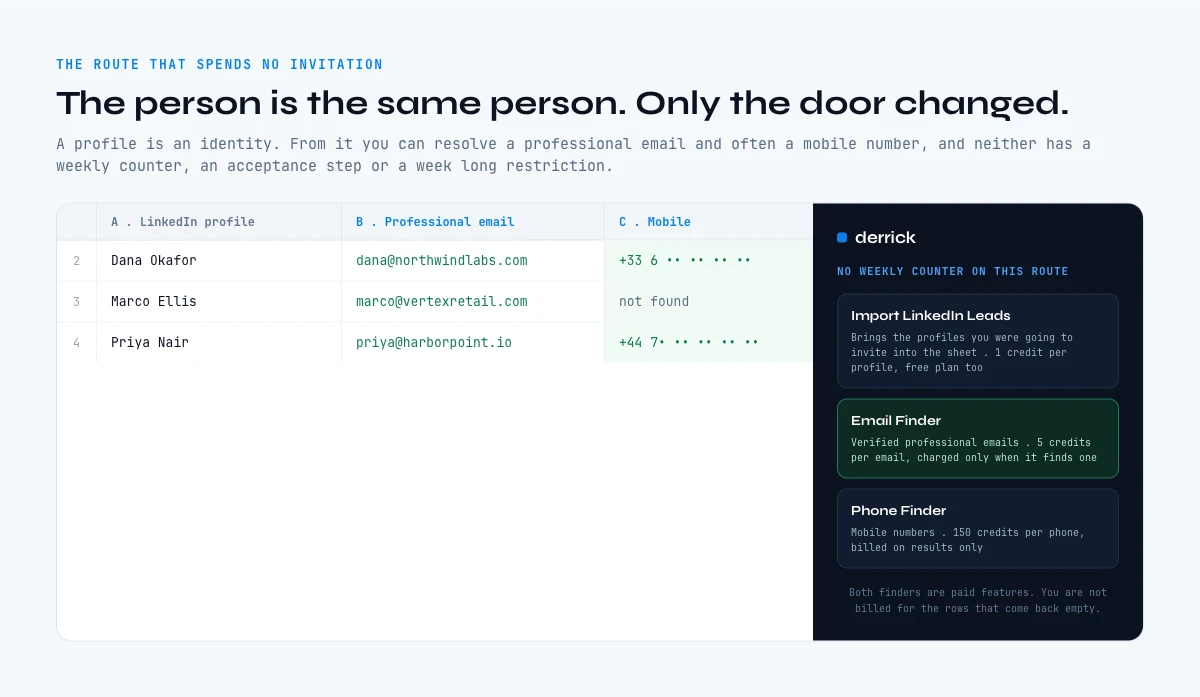
The route that does not spend an invitation at all
The invitation queue is one channel. It is not the only way to reach the person, and treating it as such is what makes the weekly cap feel fatal.
A LinkedIn profile is an identity. From that identity you can resolve a professional email address and, in many cases, a mobile number, and neither of those routes has a weekly counter, an acceptance step or a restriction that lasts a week. The person is the same person. Only the door changed.
Concretely: export or import the profiles you were going to invite, then resolve them. Import LinkedIn Leads brings a list in at 1 credit per profile on the free plan. Email Finder returns verified professional emails at 5 credits per email and only charges when it finds one. Phone Finder returns mobile numbers at 200 credits per phone, billed the same way, on results only. Both of those are paid features, not part of the free allowance, so treat the free plan as the place to qualify a list and a paid plan as the place to resolve it.
The honest framing is that this is a complement, not a replacement. Some conversations genuinely belong on LinkedIn, and a warm connection is worth more than a cold email. But a channel with a hard weekly ceiling should never be your only one, and the ceiling is precisely the reason to build the second route before you need it. If the work belongs in a pipeline rather than in the web app or a spreadsheet, the same lookups run through the API and the Derrick MCP from any compatible assistant.
One boundary worth stating: none of this involves automating LinkedIn actions or working around a restriction. Sending invitations faster than the platform allows is a good way to lose the account. Reaching the same people through a different channel is ordinary prospecting.
Is Premium worth buying for anything else?
Sometimes, and the answer depends on which ceiling is actually hurting you. If you are blocked on invitations, Premium changes nothing and you should not buy it for that. If you are blocked on searching, because a free account runs into the commercial use limit halfway through the month, Premium removes that wall and the purchase makes sense.
InMails are the other genuine unlock, with the caveat that they are metered rather than unlimited and that the allowance renews monthly. Whether that allowance is worth the subscription is arithmetic, not opinion, and our page on the break-even test for LinkedIn Premium runs it.
Two adjacent things are worth pricing at the same time. Sales Navigator sits above Premium and solves search and list building rather than invitations, so it has the same blind spot on the weekly cap. And official programmatic access is its own conversation entirely, covered in our notes on what LinkedIn API access really costs, where the short answer is that no tier gives you what most teams assume it does.
Where this leaves you
There is no premium invitation allowance to buy. The weekly cap is a reputation number, it responds to acceptance rate and sending behaviour, and the restriction that follows lasts about a week regardless of what you pay or how many pending invitations you withdraw.
Which turns the question around. Instead of asking how to send more invitations, ask how many of the ones you sent last month were worth sending. If the answer is uncomfortable, the fix is a shorter list of better qualified people, and a second channel that does not queue.
Start with the list you already have. Check whether those people are still in the roles you think, sort the ones with a real reason to hear from you, and reach them by whichever door is open. The free plan includes 100 credits per month, so at 1 credit per profile that check covers a first batch of 100 people, which is usually enough to see how much of your invitation budget was going to the wrong list.
Frequently asked questions
Does LinkedIn Premium increase the connection request limit?
How many connection requests can you send per week?
What decides your weekly invitation cap?
Does withdrawing pending invitations lift the restriction?
Does Sales Navigator raise the connection request limit?
Can you contact someone on LinkedIn without sending an invitation?
Is it safe to automate connection requests to get around the limit?
What is the maximum number of LinkedIn connections?
Keep reading
Continue exploring this cluster


LinkedIn Profile Data Decay Report 2026: How Fast B2B Profile Data Goes Stale
Read →

How to Find a LinkedIn URL: Complete Guide for Professionals and Prospectors
Read →

LinkedIn Headline 2026: Character Limit + Examples That Work
Read →

How to Find Country from LinkedIn Profile URL: 3 Proven Methods
Read →