How to Validate a LinkedIn Profile URL (Format Rules and Bulk Cleanup)
A valid LinkedIn profile URL follows a strict format. Learn the rules, spot the variants that break tools, and clean a whole list before you enrich it.


Before you enrich a list of LinkedIn profiles, scrape one, or push a link into your CRM, the link has to actually be a profile URL. It sounds obvious, yet a column of "LinkedIn URLs" pasted from a saved search, an event export, and three teammates' spreadsheets is almost never clean. Half of them are company pages, a handful are Sales Navigator links that nothing else can read, and a few are broken. A valid LinkedIn URL such as linkedin.com/in/jane-doe is the only kind most tools can work with, so knowing what counts as valid, and how to clean a list down to it, is the quiet step that decides whether the rest of your workflow runs or stalls.
What a valid LinkedIn profile URL actually looks like
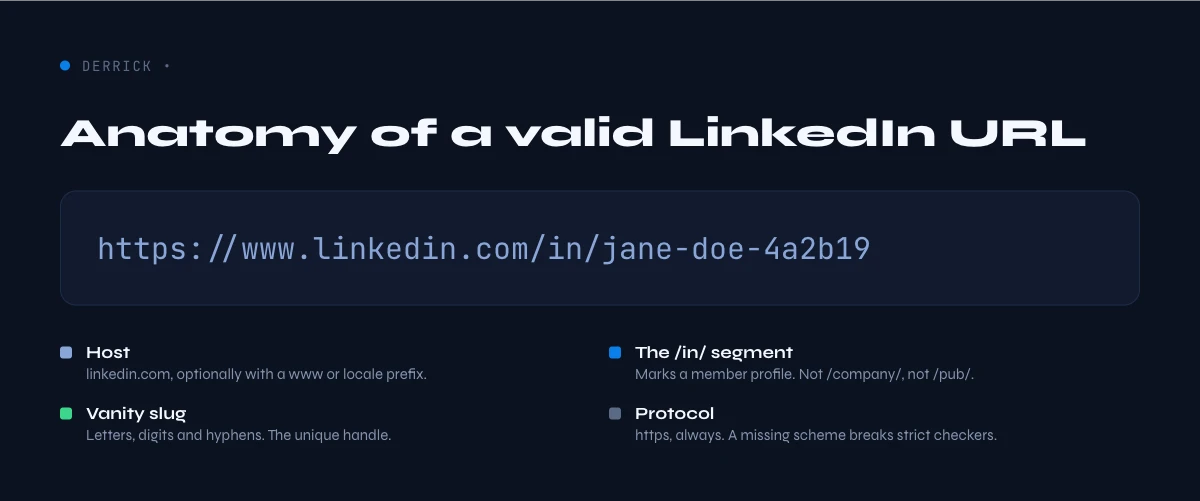
A valid LinkedIn profile URL is a public web address in the form https://www.linkedin.com/in/your-custom-name. The part after /in/ is the public identifier, also called the vanity slug or custom URL. That is the whole anatomy: the scheme, the linkedin.com host, the /in/ path that marks it as a member profile, and the slug that points at one specific person.
Two things make a profile URL special compared to any other LinkedIn link. First, the /in/ path: it is reserved for member profiles, so it is the single most reliable signal that a link is a person and not a company or a post. Second, the slug is stable but editable - the owner can change it, which is why an old link sometimes stops resolving. If you only have a name and need to recover the live link, that is a different job covered in our guide on how to find a LinkedIn URL.
The rules a custom URL has to follow
LinkedIn lets members customize the slug, but inside strict limits. A valid custom URL is between 3 and 100 characters and uses only letters, numbers, and hyphens. No spaces, no symbols, no underscores in the canonical public form, and it cannot contain the word "linkedin". Most real slugs are a first and last name plus a few digits when the name was taken, for example /in/jane-doe-4a7b.
That tight character set is useful when you validate at scale, because a slug full of encoded spaces (%20), trailing punctuation, or query junk is a sign the row was copied badly rather than that the person does not exist. You usually want to repair the formatting before you decide a link is dead.
Profile URL versus everything else on linkedin.com
The single biggest reason a "LinkedIn URL" fails is that it is not a profile URL at all. Everything below lives on the same domain, so a naive check that only looks for "linkedin.com" passes all of them, and then the enrichment quietly returns nothing for most of the rows.
| URL pattern | What it points at | A profile URL? |
|---|---|---|
/in/slug | A member's public profile | Yes - this is the one |
/company/name | A company page | No |
/sales/lead/... or /sales/people/... | A Sales Navigator lead view | No - Sales Nav only |
/posts/... or /feed/update/... | A post or activity | No |
lnkd.in/xxxx | A shortened redirect link | Not until resolved |
The practical move is to split a mixed column by path before anything else: keep the /in/ rows for profile enrichment, route the /company/ rows to company data, and set the rest aside. A Sales Navigator link in particular needs a different handling path, and a company page is a cue to switch to pulling the current company rather than person-level fields.
In the web app or Google Sheets
The practical validity test
Format rules catch typos; they do not tell you whether the profile still exists. Running the enrichment on the column does: a URL that returns no fields is the one to review, and it shows up as an empty row.
- Feature
- LinkedIn Leads Profile Enrichment
- Credit cost
- 1 credit per lead enriched
The first button opens the web app (nothing to install): 1 credit per lead enriched, 100 free credits every month. The second details the feature and its cost per plan.
The variants that are still valid (and trip up strict checkers)
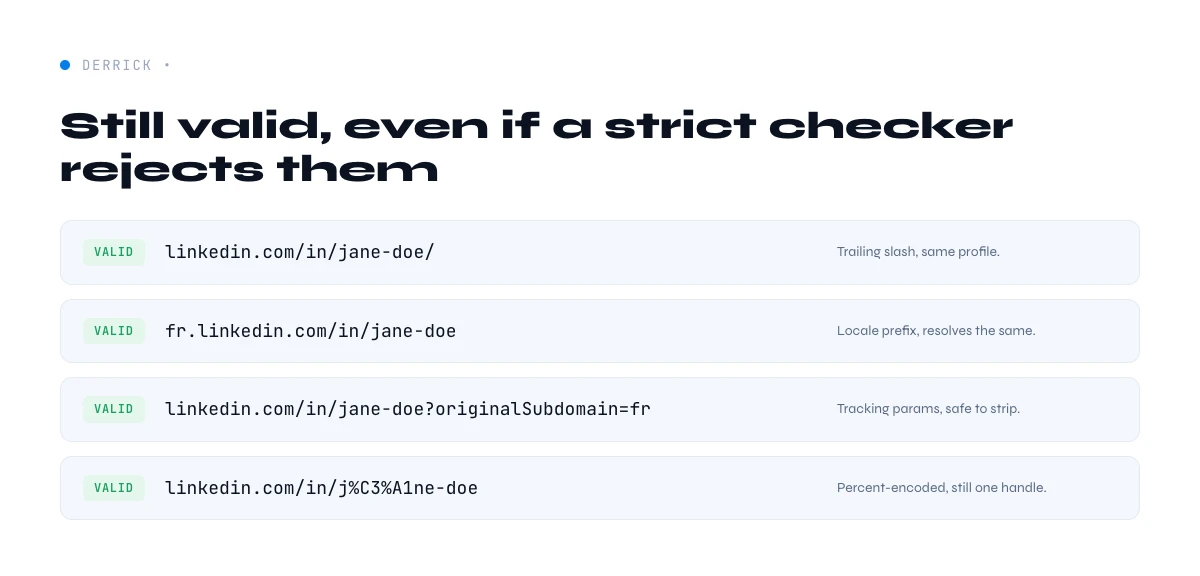
A URL can look unusual and still be perfectly valid. If your validation rule is too strict, you will throw away good rows. These all resolve to a real profile:
- Country subdomains. Members in some regions get a link like
fr.linkedin.com/in/...oruk.linkedin.com/in/.... The two-letter prefix is geography, not an error. We dig into what that prefix does and does not tell you in the guide on finding the country from a profile. - Mobile forms. Links such as
m.linkedin.com/in/...orlinkedin.com/mwlite/in/...are the mobile-rendered versions of the same profile. - Scheme and www. The
https://and thewww.are both optional in practice.linkedin.com/in/jane-doeandhttps://www.linkedin.com/in/jane-doepoint at the same person. - Trailing slash and query string. A
/at the end or a tail of tracking parameters (?utm_source=...,?original_referer=...) does not change the profile. It is noise you can safely strip.
Because of all this, the right way to handle a list is not to reject the odd-looking ones, but to normalize them: lowercase the host, drop the query string, unify the subdomain, and keep the /in/slug core. After normalization, a deduplicate pass collapses the same person written five ways into one clean row.
Why one bad URL quietly costs you
An invalid or mis-typed URL rarely throws a loud error. It just returns an empty cell, and empty cells add up. If a tenth of a 5,000-row list is company pages or broken links, that is 500 rows that look enriched but are not, 500 prospects silently dropped from a campaign, and a deduplication key (the URL) that no longer matches your CRM. Validating up front is cheaper than chasing blanks afterward, and it keeps the URL usable as the unique identifier that ties a record across your sheet, your enrichment, and your CRM.
The app works through your list row by row: 1 credit per lead enriched.
How to check a single URL by eye
For one link, validation takes a few seconds. Confirm it contains /in/, not /company/ or /sales/. Strip any ? and everything after it. Open it: a valid profile loads a person, a dead slug shows a "this page doesn't exist" message, and a company page is obvious on sight. If it 404s but you trust the name, the slug was probably changed and you re-find the current one. That manual check is fine for a prospect or two and hopeless for a list, which is the next section.
How to validate and clean a whole list before you enrich it
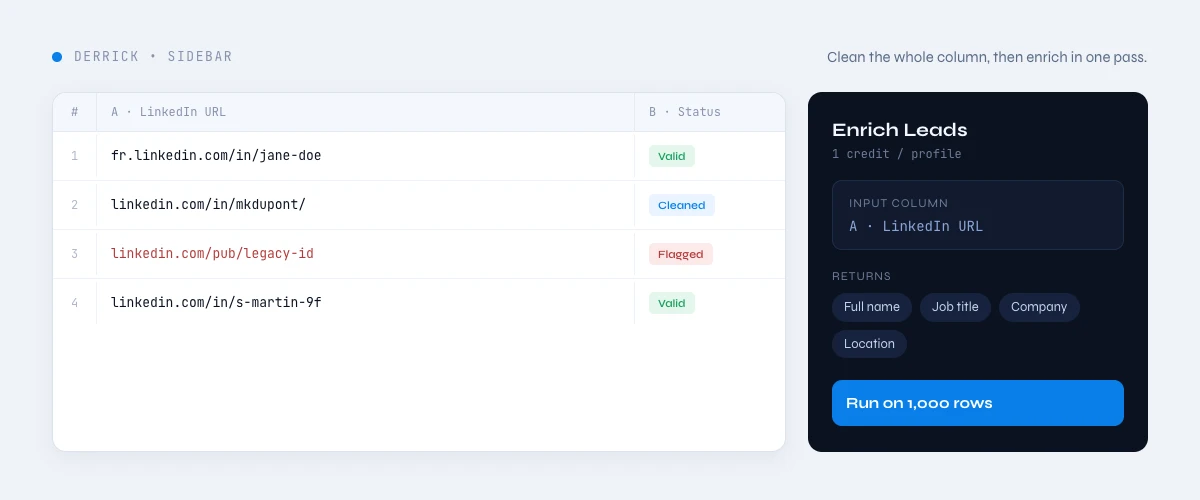
The path most sales and ops teams need is bulk: you have a column of URLs of mixed quality and you want a clean, enrichable list out the other side. Derrick is built for this, in its web app or as a Google Sheets sidebar. You paste the URLs into a column, and instead of fighting with formulas, you run the enrichment from the web app or the sidebar: it reads each profile row by row (in Google Sheets, through your own LinkedIn session via the Derrick Helper Chrome extension) and writes the profile fields into new columns. The rows that come back full are valid, live profiles; the rows that come back empty are your shortlist of company pages, stale slugs, and Sales Navigator links to handle separately.
The relevant feature is Enrich Leads, which costs 1 credit per profile and runs even on the free plan - the FREE plan gives you 100 credits per month with no card required. If you are starting from a search instead of a list of URLs, Search Leads builds the people list first, also at 1 credit per profile. Because the per-profile cost is flat and credits roll over on paid plans, the exact same cleanup-then-enrich workflow handles 100 rows or 100,000 rows without switching tools. Derrick fills columns in its web app or its Google Sheets sidebar, not with a =FORMULA() trick, which is why it holds up on a real list instead of choking on the first awkward URL.
A useful side effect of running the list through enrichment is that validation and value arrive in the same pass. You are not only confirming that a URL resolves, you are getting the job title, company, location, and other fields back at the same time, so a clean list and an enriched list become the same artifact. There is no separate validation step to run, pay for, and reconcile against the data later. The rows that fail to return anything are, by definition, the rows you could not have used in a campaign anyway, which is exactly the set you want surfaced before you send rather than after. Validating and enriching in one move is what turns URL hygiene from a chore into a step you barely notice.
A worked example: 1,000 messy URLs into a clean column
Say you merged three exports into one sheet and ended up with 1,000 rows that are supposedly LinkedIn URLs. First you normalize: lowercase the domain, strip query strings and trailing slashes, and unify country subdomains so fr.linkedin.com/in/jane and www.linkedin.com/in/jane read as the same person. A dedupe pass on the cleaned URL drops the 80 duplicates, leaving 920. You split by path: 60 are /company/ pages and 20 are Sales Navigator links, so you move those 80 aside, leaving 840 genuine /in/ profiles. You point the enrichment, in the web app or the sidebar, at that column and run it. At 1 credit per profile it costs 840 credits, and the rows that come back empty (private profiles, a few stale slugs) become a tidy 30-row list you re-find or skip. You started with a guess and ended with a verified, deduplicated, enrichable list, all inside the spreadsheet you already segment in.
Why a URL comes back invalid, and how to fix it
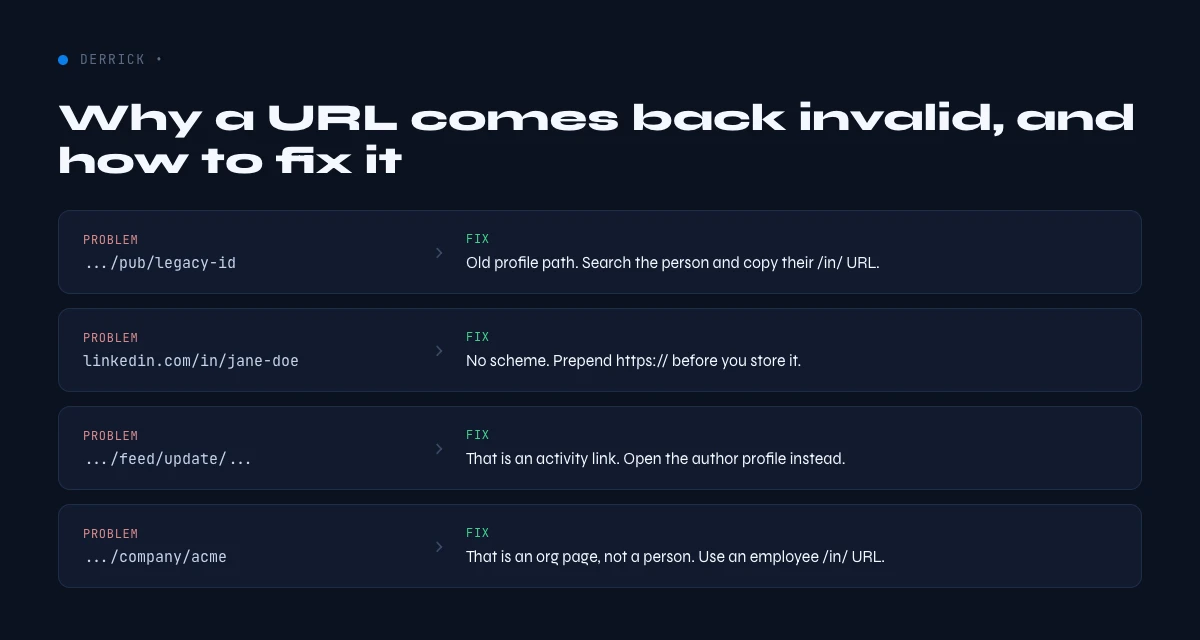
No list is perfect, and it helps to know why a row fails so you can react instead of assuming the data is gone.
- It is not a profile. Company pages, posts, and Sales Navigator links are the most common offenders. Re-route them by path rather than discarding them.
- The slug changed. People edit their custom URL, so an old link 404s even though the person is active. Re-find the current URL and re-validate.
- It is a shortlink.
lnkd.inredirects have to be resolved to the real/in/address before any tool can read them. - Encoding noise. A slug with
%20or stray punctuation is usually a copy error. Repair the formatting before you call it dead. - The profile is private. Some members restrict their profile; there is nothing to read, and that itself is a signal worth keeping in a separate bucket.
Sort the failures, fix the cheap ones (encoding, shortlinks, normalization), and treat the genuinely private or missing rows as a small known-unknown rather than a problem with the whole batch.
Is checking and storing LinkedIn URLs allowed?
A public profile URL and the professional fields behind it are business data, and using them for B2B prospecting in the European Union generally rests on legitimate interest rather than consent, as long as you stay transparent and honor opt-outs. Two habits keep you on the right side of the line. How you read matters: working through your own logged-in session at a measured pace is very different from anonymous proxy farms hammering the site against its terms. What you keep matters: store the URL and the professional fields you actually use to qualify, document why, and delete on request. This is not legal advice and rules vary by region, so check your own obligations, but validating and storing a profile URL to decide whether someone is a relevant business contact is an everyday, defensible practice when done cleanly.
Which approach should you pick?
For one link, eyeball the pattern and open it. For a list, do not hand-check hundreds of rows: normalize the formatting, dedupe on the cleaned URL, split by path, and let a bulk enrichment confirm which profiles are live while it fills the fields you need. The same logic that decides whether a URL is valid - is it /in/, is the slug well formed, does it resolve - is exactly what a bulk pass applies for you across thousands of rows. Once the list is clean, the next step is usually pulling the fields you prospect on, like the job title or the headline, from the profiles you just validated.
Use the picker below to see which extraction fits your data and volume, then start with the column of URLs you already have.
Try Derrick free in the web app or in Google Sheets - 100 credits per month, no card required.
Frequently asked questions
What is a valid LinkedIn profile URL?
Are country subdomains like fr.linkedin.com valid?
Why does my LinkedIn URL come back as invalid?
How do I validate a list of LinkedIn URLs at scale?
Can I check LinkedIn URLs in Google Sheets?
Is a www. or https:// required for a valid LinkedIn URL?
Keep reading
Continue exploring this cluster


How to Find a LinkedIn URL: Complete Guide for Professionals and Prospectors
Read →

LinkedIn Headline 2026: Character Limit + Examples That Work
Read →

How to Find Country from LinkedIn Profile URL: 3 Proven Methods
Read →

How to Find City from LinkedIn Profile URL: Complete 2026 Guide
Read →