Is LinkedIn Premium worth it? Run the numbers before you pay
Is LinkedIn Premium worth it in 2026? Work out your real cost per InMail, divide by your reply rate, and get a verdict for job search, sales or recruiting.


Is LinkedIn Premium worth it? The short answer
Whether LinkedIn Premium is worth it comes down to one number: how many people you need to reach cold every month, and what a reply from one of them is worth to you. Premium buys visibility and a small monthly allowance of messages. It does not buy contact data. If your bottleneck is reaching more people than your quota allows, no tier fixes that.
That single sentence is the part most reviews skip. They list features, quote a price, and end on "it depends on your goals". This guide gives you the arithmetic instead, then a test that produces an actual answer.
Three findings drive everything below. First, the honest way to price Premium is per message sent, not per month. Second, the quota, not the price, is what most people hit. Third, no Premium tier at any price hands you a verified email address or a phone number, which is the thing most buyers assume they are getting.
What you are actually buying at each tier
LinkedIn sells four consumer-facing subscriptions, and they solve four different problems. Buying the wrong one is the most common way people conclude that Premium was a waste of money.
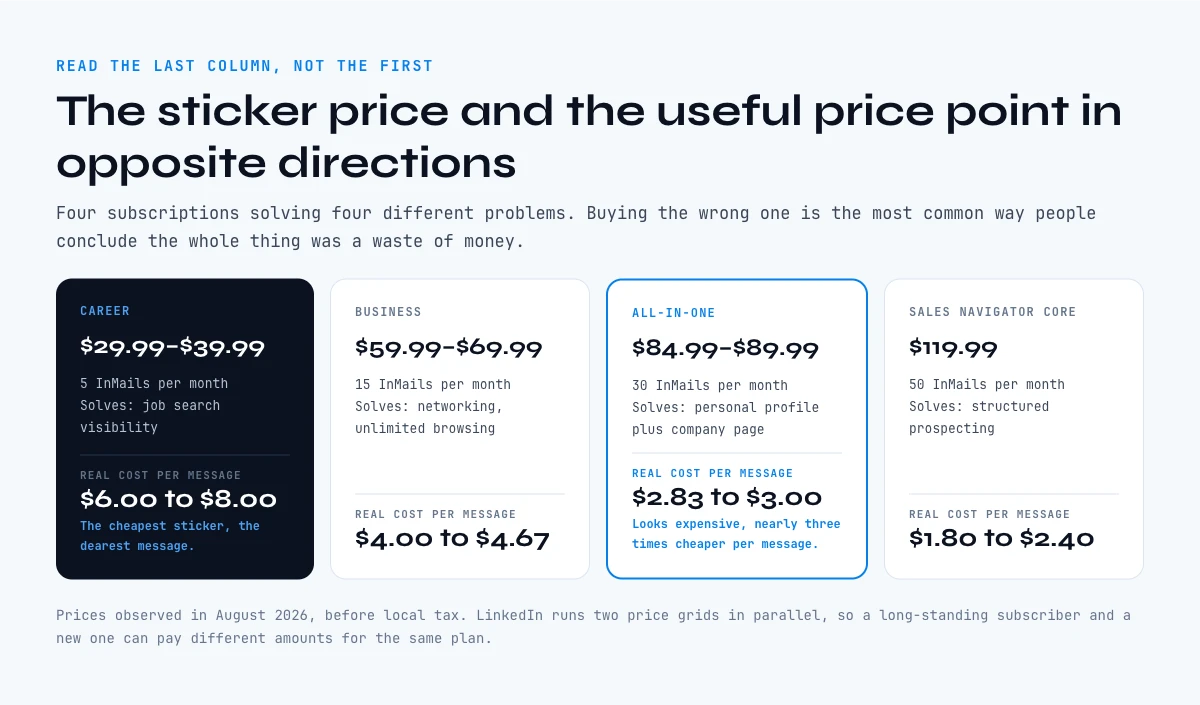
| Plan | Monthly (observed) | InMails included | Real cost per message | Solves |
|---|---|---|---|---|
| Premium Career | $29.99 to $39.99 | 5 per month | about $6.00 to $8.00 | Job search visibility |
| Premium Business | $59.99 to $69.99 | 15 per month | about $4.00 to $4.67 | Networking, unlimited browsing |
| Premium All-in-One | $84.99 to $89.99 | 30 per month | about $2.83 to $3.00 | Personal profile plus company page |
| Sales Navigator Core | $119.99 ($89.99 annual) | 50 per month | about $1.80 to $2.40 | Structured prospecting |
Prices observed in August 2026, before local tax. LinkedIn runs two price grids in parallel, so a long-standing subscriber and a new one can pay different amounts for the same plan. The full breakdown, including annual billing and how to cancel, sits in our companion guide on how much LinkedIn Premium costs.
Read the fourth column rather than the second. Career looks like the cheap option at $29.99 and is in fact the most expensive way to send a message on LinkedIn, at roughly $8.00 apiece. All-in-One looks expensive and is nearly three times cheaper per message. The sticker price and the useful price point in opposite directions.
Is LinkedIn Premium worth it for job seekers?
For an active job search, yes, as a short course rather than a standing subscription. The features that matter during a search are applicant insights, the ability to message a hiring manager outside your network, and salary context going into a negotiation. All three are worth something in the eight weeks you are actually searching and worth nothing in the ten months you are not.
The trap is the annual plan. Annual billing looks like the sensible discount and quietly turns a two-month need into a twelve-month cost. If you are searching, buy month to month, and put a reminder in your calendar for day 28.
The second trap is treating the badge as the product. A Premium badge does not make a recruiter open your profile. What is written in the profile does. Before paying anything, fix the field that gets read first: our guide to the LinkedIn headline and its character limit covers the one line that appears in every search result, every message preview and every notification.
Verdict for job seekers: worth it during an active search, on monthly billing, with a date to cancel. Not worth it as background insurance while employed.
Is LinkedIn Premium worth it for sales and prospecting?
For prospecting, Premium Business is usually the wrong purchase, and this is the single most expensive mistake in this article. It is bought because it is the next tier up and it sits next to Career in the checkout. It is not a prospecting product.
Fifteen InMails a month is the whole story. A seller working a modest patch runs through fifteen touches in the first ten days of the month, then spends the remaining three weeks with a subscription that does nothing they could not do free. The quota is a hard ceiling. It does not stretch, and unused credits do not accumulate forever.
If prospecting is the reason you are considering a subscription, the honest comparison is not Career against Business. It is Premium against Sales Navigator pricing, which ships fifty InMails a month and the search filters that make a target list buildable in the first place.
Even then, a seat solves the finding half and leaves the reaching half open. A Sales Navigator search returns people you can see and cannot email. That gap is where budgets actually go.
Verdict for sales: Premium Business is the wrong tool. Compare Sales Navigator against your own outbound volume, and plan for the contact data separately, because no LinkedIn subscription includes it.
In the web app or Google Sheets
Check what you actually need the subscription for
The break-even test in this article depends on what you do with the searches. If the answer is exporting them, Derrick imports the results of a LinkedIn search into the web app or Google Sheets, one lead per row, and its free plan needs no card.
- Feature
- Import LinkedIn Leads (regular & Sales Navigator)
- Credit cost
- 1 credit per lead imported
The first button opens the web app (nothing to install): 1 credit per lead imported, 100 free credits every month. The second details the feature and its cost per plan.
Is LinkedIn Premium worth it for freelancers and founders?
Freelancers sit in the awkward middle, and this is where the generic advice fails hardest. You are not running a hundred-touch outbound motion, so Sales Navigator is oversized. You are also not job hunting, so Career is aimed at the wrong problem.
The question that settles it is what one new client is worth. If a single retained client covers a year of Business in one invoice, the subscription is rounding error and the only real question is whether you will use it. If your average engagement is small and your pipeline comes from referrals, a paid tier changes nothing, because referrals do not arrive by InMail.
A useful rule: pay for reach when reach is genuinely your constraint. If you can name five people this month you needed to contact and could not, the subscription has a job. If you cannot name them, you are buying a feeling of progress.
Is LinkedIn Premium worth it for recruiters and students?
For recruiters, Premium Business is again the near miss. It lacks the sourcing filters and the pipeline view that make sourcing work at any volume, and its fifteen messages split badly across several open roles. Recruiter Lite is the product designed for the job, and it should be compared against your cost per candidate contacted, not against Business.
For students, the answer is usually no, with one exception. LinkedIn Learning is the part of the bundle that survives scrutiny for someone early in a career, and some universities already provide equivalent access at no cost. Check that before paying. The rest of the bundle, profile views and InMail, assumes a network you have not built yet, and a badge does not substitute for one.
The app works through your list row by row: 1 credit per lead imported.
The break-even test: what one reply has to be worth
Here is the calculation nobody publishes, and it takes thirty seconds.
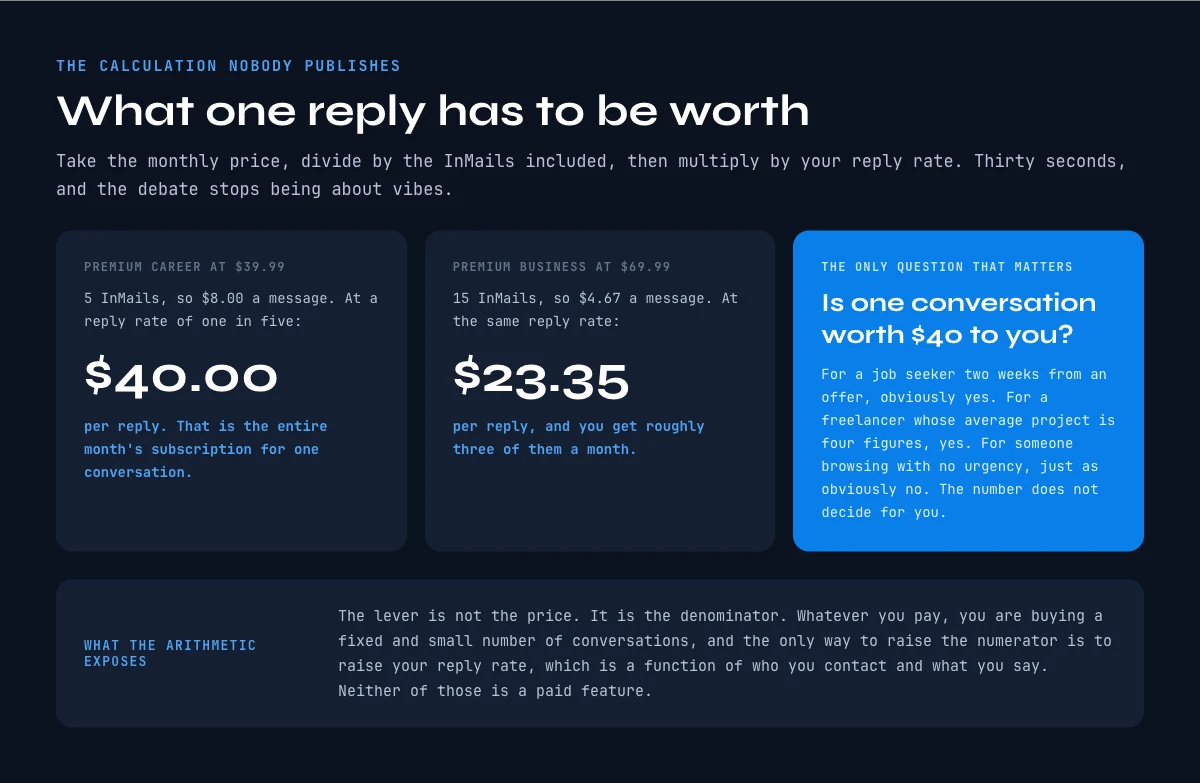
Take your plan's monthly price and divide it by the InMails included. That is your cost per message sent, the fourth column in the table above. Now apply your own reply rate. If one message in five gets an answer, your cost per reply is five times your cost per message.
On Premium Career at $39.99, five InMails is $8.00 a message. At a one-in-five reply rate, a single reply costs $40.00. That is the entire month's subscription for one conversation. On Premium Business at $69.99, fifteen InMails is $4.67 a message, so a reply costs about $23.35 and you get roughly three of them a month.
Now ask the only question that matters: is one conversation worth $40 to you? For a job seeker two weeks from an offer, obviously yes. For a freelancer whose average project is four figures, yes. For someone browsing opportunities with no urgency, just as obviously no. The number does not decide for you, but it stops the debate from being about vibes.
Notice what the arithmetic exposes. The lever is not the price. It is the denominator. Whatever you pay, you are buying a fixed and small number of conversations, and the only way to increase the numerator is to raise your reply rate, which is a function of who you contact and what you say, neither of which is a paid feature.
What no Premium tier includes at any price
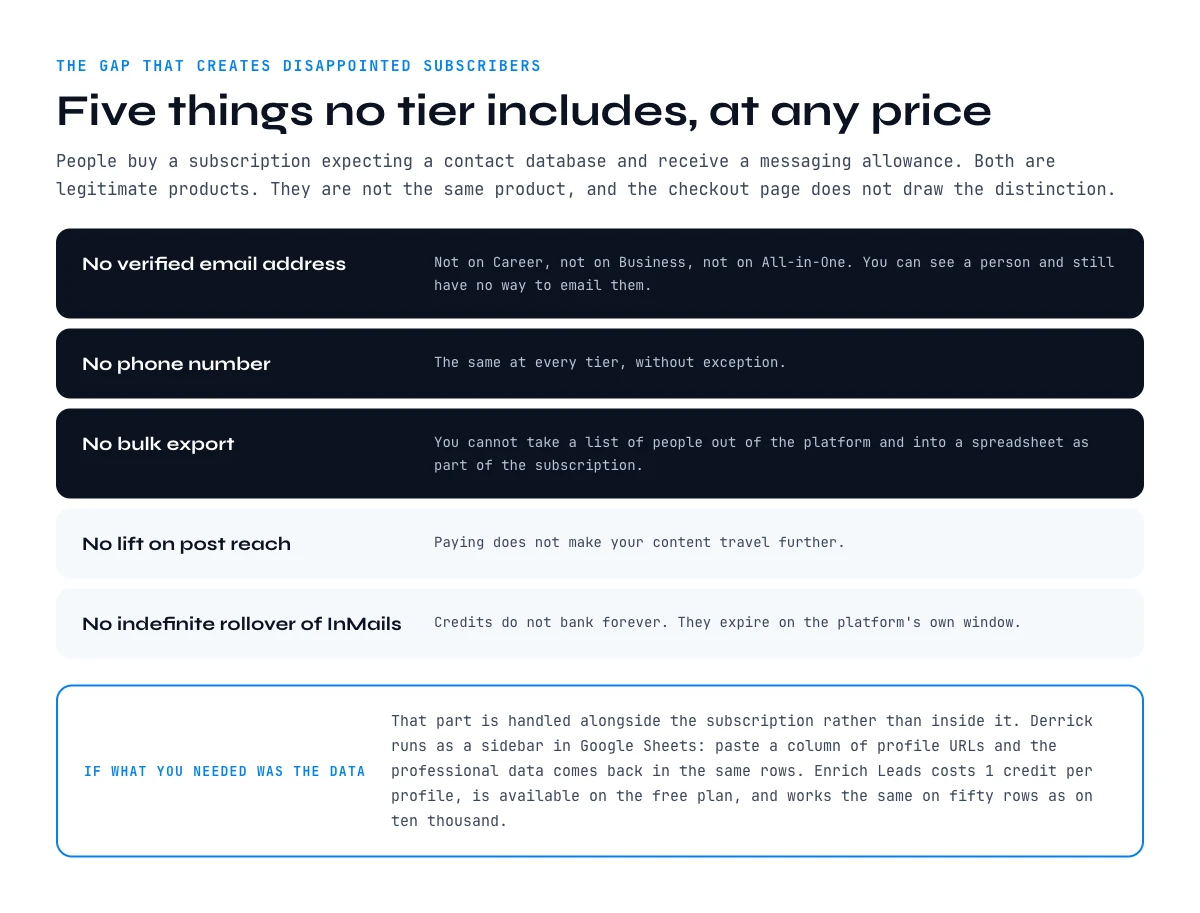
This is the gap that turns a satisfied subscriber into a disappointed one, and it is worth being blunt about.
- No verified email address. Not on Career, not on Business, not on All-in-One. You can see a person and still have no way to email them.
- No phone number. Same at every tier.
- No bulk export. You cannot take a list of people out of LinkedIn and into a spreadsheet as part of the subscription.
- No lift on post reach. Paying does not make your content travel further.
- No rollover of unused InMails beyond LinkedIn's own expiry window. Credits do not bank indefinitely.
Those five lines explain most of the disappointment in forum threads about Premium. People buy a subscription expecting a contact database and receive a messaging allowance. Both are legitimate products. They are not the same product, and the checkout page does not draw the distinction for you.
If what you actually needed was the data, that part is handled alongside the subscription rather than inside it. Derrick runs in its web app, and also as a Google Sheets sidebar: you paste or import a column of LinkedIn profile URLs and the professional data comes back in the same rows, including the current company and the job title behind each profile. Enrich Leads costs 1 credit per profile and is available on the free plan as well as the paid ones, and it works the same on fifty rows as on ten thousand.
What the free account already does, and what it does not
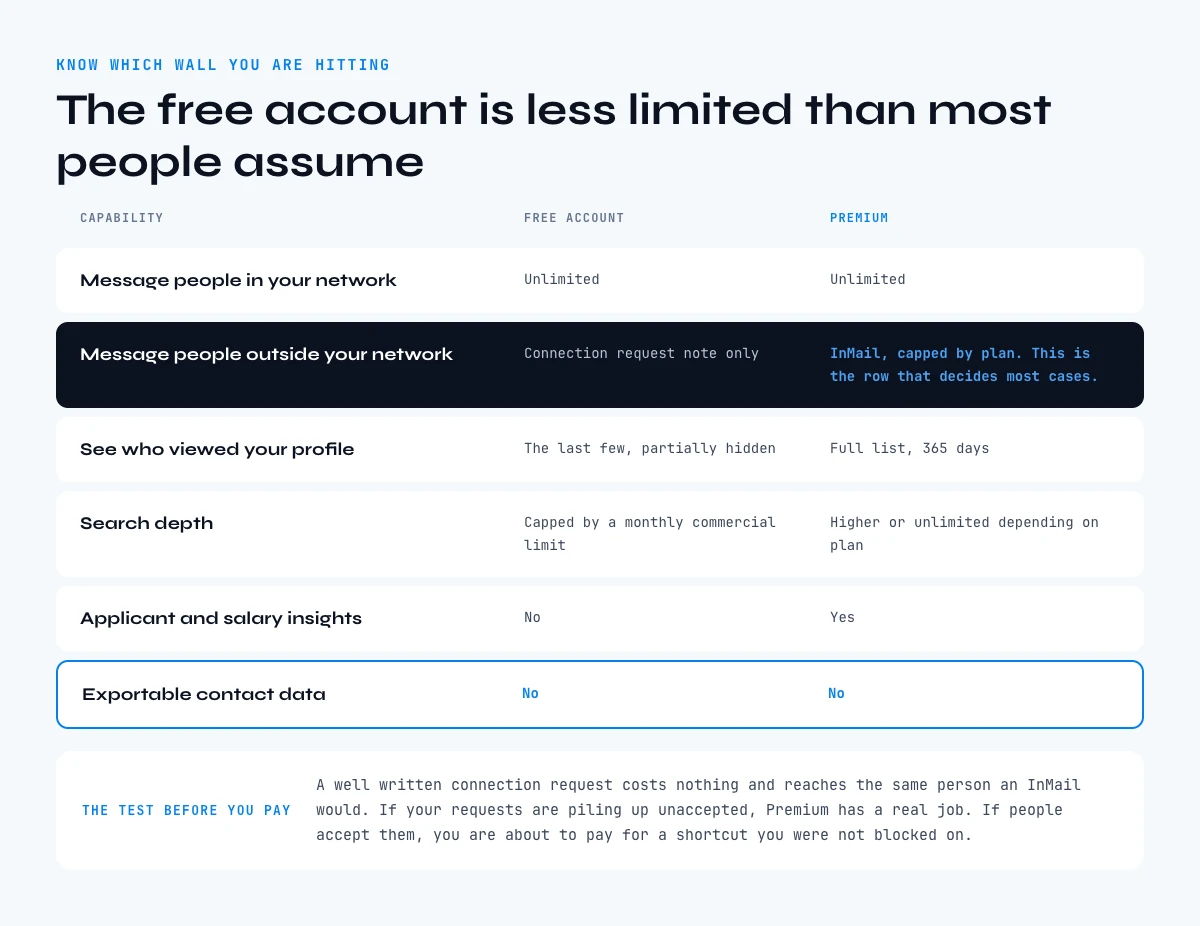
Before paying, it is worth knowing exactly which wall you are hitting, because the free account is less limited than most people assume.
| Capability | Free account | Premium |
|---|---|---|
| Message people in your network | Unlimited | Unlimited |
| Message people outside your network | Connection request note only | InMail, capped by plan |
| See who viewed your profile | Last few, partially hidden | Full list, 365 days |
| Search depth | Capped by a monthly commercial limit | Higher or unlimited depending on plan |
| Applicant and salary insights | No | Yes |
| Exportable contact data | No | No |
The row that decides most cases is the second one. A well written connection request costs nothing and reaches the same person an InMail would, with a lower ceiling on volume but a comparable outcome. If your rejected connection requests are piling up, Premium has a real job. If people accept them, you are about to pay for a shortcut you were not blocked on.
The last row is the one to remember: it says No in both columns. Sales Navigator does not change it either, which is why its free version and its paid seats end at the same place on that specific question.
Run the 30-day trial as an experiment, not a subscription
Almost every review ends with "try the free trial". That is not advice, it is a shrug. A trial only tells you something if you decide in advance what would count as a result.
Do it like this. Before you activate anything, write down one number you expect to move and the threshold that would justify the spend. Something falsifiable: "three replies from people outside my network" or "two qualified conversations". Not "more visibility".
Then spend the quota deliberately in the first three weeks rather than saving it. An unspent InMail at day 30 is a data point you did not collect, and hoarding them is the most common way a trial produces no information at all.
On day 28, compare the number to the threshold. Above it, keep the plan and re-run the same test next quarter. Below it, cancel. The decision takes two minutes because you made it before you were emotionally invested in the sunk cost.
One practical note: set the reminder for day 28, not day 30, and cancel from a desktop browser. Trials that were started through a mobile app store are managed there, not in LinkedIn's own settings, which is where most accidental renewals come from.
The four-question decision test
If you want the answer without the reading, the tool below asks what you are trying to do, how many people you need to reach, and what you need at the end of it. It returns a verdict rather than a list of considerations.
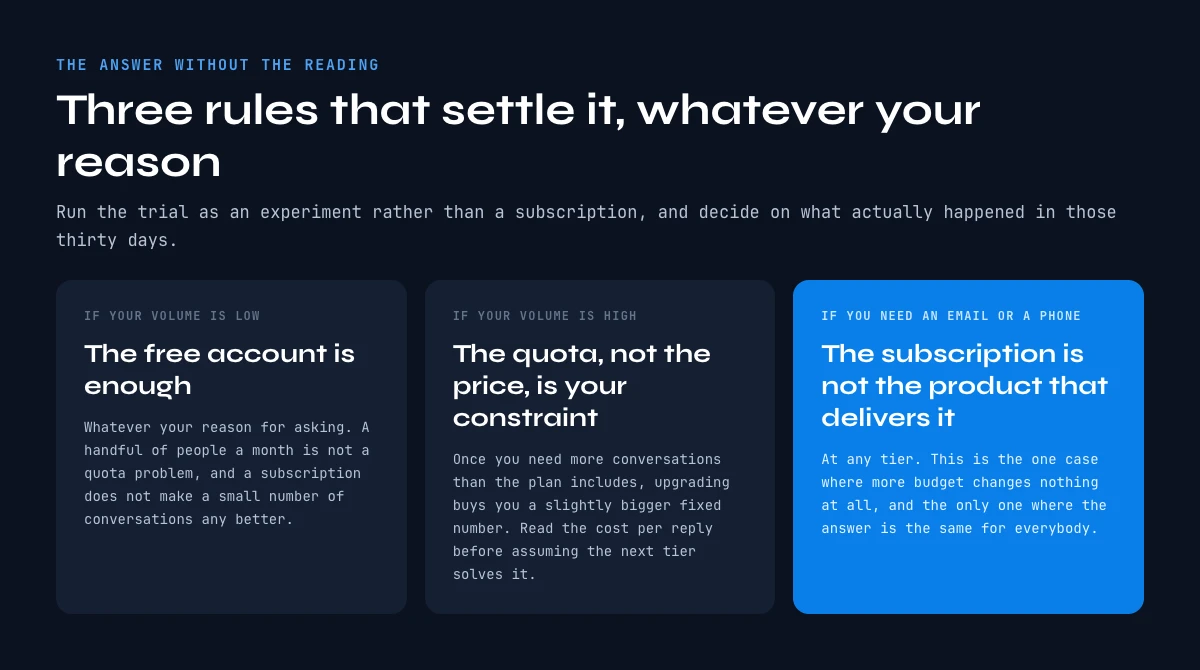
The logic is the same one this guide has been building. Low volume means the free account is enough, whatever your reason. High volume means the quota, not the price, will be your constraint. And if what you need at the end is a verified email or a phone number, the subscription is not the product that delivers it, at any tier.
Key takeaways on whether Premium pays off
- Price Premium per message sent, not per month. Career is the most expensive way to send a message on LinkedIn at roughly $8.00 apiece; All-in-One is nearly three times cheaper.
- Divide by your own reply rate to get a cost per conversation, then ask whether one conversation is worth that. That is the whole decision.
- For an active job search, buy monthly and set a cancel date. For prospecting, Premium Business is the wrong purchase; compare Sales Navigator instead.
- The constraint is almost always the quota, not the price. Paying more for Premium does not lift it.
- No tier includes a verified email, a phone number or a bulk export. If that is what you needed, it is a separate job, and it is one you can start on the free plan with 100 credits a month.
Premium is a reasonable purchase for a narrow set of situations and a poor one for the rest. The reviews that say "it depends" are not wrong, they are just unfinished. It depends on your volume, your reply rate and what you need at the end, and now you have the numbers for all three. If your answer to the last one was contact data, start with a list of profiles and the LinkedIn URLs behind them, then enrich the column rather than paying by the message.
Frequently asked questions
Is LinkedIn Premium worth it in 2026?
Is LinkedIn Premium worth it for job seekers?
Does LinkedIn Premium actually help you get a job?
Is LinkedIn Premium Business worth it for sales?
What does LinkedIn Premium not include?
Is the LinkedIn Premium free trial worth using?
Can you get LinkedIn Premium benefits for free?
Should you cancel LinkedIn Premium after your job search?
Keep reading
Continue exploring this cluster


LinkedIn Profile Data Decay Report 2026: How Fast B2B Profile Data Goes Stale
Read →

How to Find a LinkedIn URL: Complete Guide for Professionals and Prospectors
Read →

LinkedIn Headline 2026: Character Limit + Examples That Work
Read →

How to Find Country from LinkedIn Profile URL: 3 Proven Methods
Read →