LinkedIn Sales Navigator Cost in 2026: Plans, Per-Seat Math, and the Real Cost Per Lead
LinkedIn Sales Navigator cost in 2026: Core $119.99, Advanced $159.99, the annual seat total and the real cost per exported lead. Compare before you buy.


The LinkedIn Sales Navigator cost looks simple on the plan page and turns messy the moment you multiply it by a team, add a year of billing, and count what you still have to buy to actually use the leads. This guide lays out the 2026 numbers tier by tier, does the per-seat math most pricing posts skip, and shows the real cost per usable lead once you factor in getting your data out of the tool.
How much does LinkedIn Sales Navigator cost?
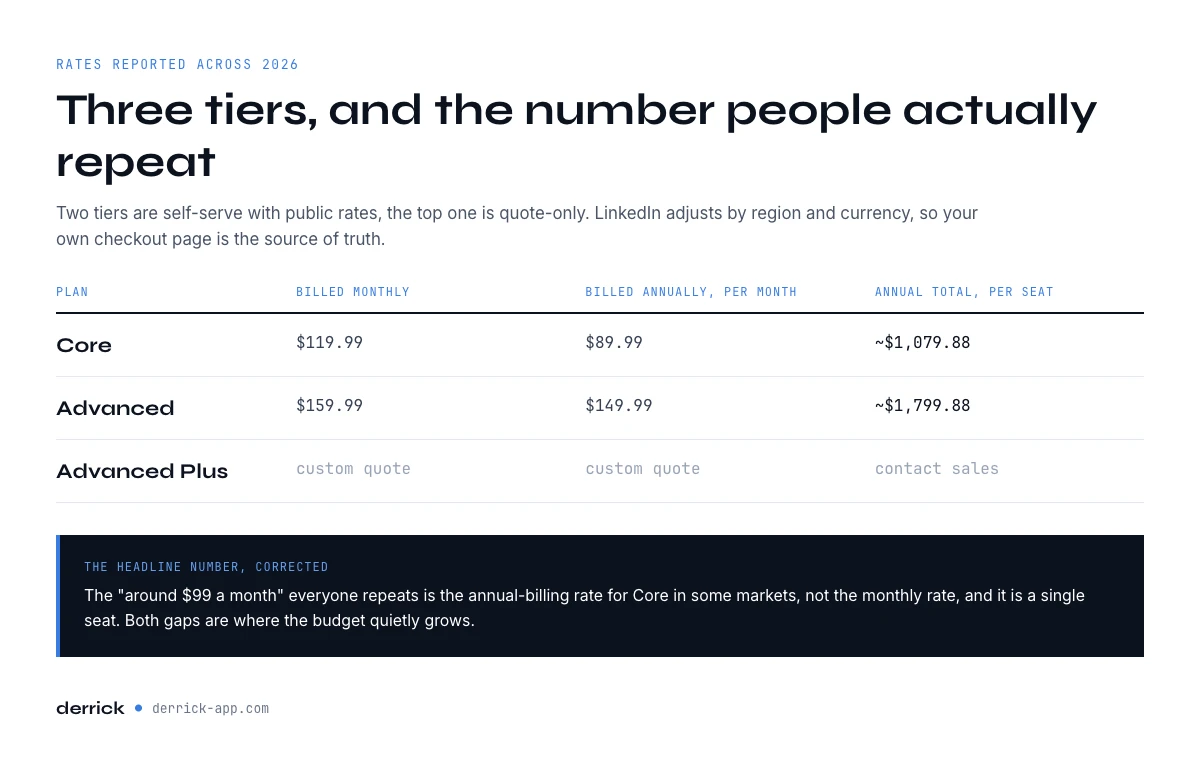
Core is $119.99 per seat a month, or $1,079.88 a year. Advanced is $159.99, or $1,799.88 a year. Advanced Plus is quote-only. Prices as listed by LinkedIn in October 2026.
| Plan | Billed monthly | Billed annually (charged up front) | Annual, per month (calculated) | What it adds |
|---|---|---|---|---|
| Sales Navigator Core | $119.99 | $1,079.88 | ~$89.99 | 50+ lead and account search filters, lists, alerts, 50 InMails a month |
| Advanced | $159.99 | $1,799.88 | ~$149.99 | Team seat management and central billing, buyer intent, TeamLink, Smart Links, team reporting |
| Advanced Plus | Custom quote | Custom quote | Not published | Deep CRM integration (Salesforce, HubSpot, Microsoft Dynamics, Oracle) and a dedicated account team |
Sales Navigator sells in three tiers. Two are self-serve with public rates, and the top one is sold through LinkedIn's sales team. All three include 50 InMail credits a month. The free trial only covers the two self-serve plans, Core and Advanced.
The third column is a calculation, not a rate LinkedIn bills. Annual billing takes the whole year in one payment, and dividing it by twelve gives roughly $89.99 for Core and $149.99 for Advanced. LinkedIn itself presents annual billing as a 25% saving on Core and about 6% on Advanced, so the discount that matters sits on the entry plan. Sales Navigator pricing is set per currency and region, so your own checkout page stays the source of truth. The full grid lives on LinkedIn's official plan comparison page.
Is there a free version of Sales Navigator?
No. There is no free plan, only a free trial on Core and Advanced, open to members who hold no paid LinkedIn subscription and have not used a LinkedIn trial in the past 365 days. How to run it without wasting days is covered in our Sales Navigator free trial guide.
What each plan includes: Core, Advanced, and Advanced Plus
The tier you pick should follow the job, not the discount. Here is what actually separates them.
Sales Navigator Core is the individual seller plan: advanced lead and company search with 50+ filters, unlimited search within fair-use limits, custom lists, saved searches with alerts, Account IQ and Lead IQ summaries, and the 50 monthly InMails. If one rep is building and working their own pipeline, Sales Navigator Core covers it. It is also the plan where annual billing cuts a quarter off the monthly rate.
Advanced adds the team layer: TeamLink to surface warm paths through colleagues, Smart Links to share tracked content, CRM highlights, and admin reporting. If you run a squad and want shared context, Advanced is the real floor, not Core.
Advanced Plus is the enterprise tier, and it has no public price. LinkedIn positions Advanced Plus for sales teams that run an integrated CRM: Salesforce, HubSpot, Microsoft Dynamics or Oracle stay current through real-time sync, leads and contacts are created in the CRM straight from Sales Navigator, and a dedicated account team handles onboarding and training when the contract goes through a sales rep. You only reach for Advanced Plus when Sales Navigator has to write back into a system of record at scale.
Why Advanced Plus is quote-only
With Advanced Plus you are not buying a seat, you are buying an integration. Its price moves with three things: how many seats you license, which CRM the sync has to reach and how deep it goes, and how much onboarding the account team runs. There is no self-serve checkout and no free trial on this tier. You request a demo and receive a quote. Any monthly figure you read for Advanced Plus is a guess, which is why this page does not print one. To budget it, start from the Advanced annual price as a floor and treat Advanced Plus as Advanced plus the cost of the CRM project.
One tier confuses buyers: LinkedIn Premium Business sits below Sales Navigator at a lower monthly rate, and some teams assume it is a cheaper version of the same thing. It is not. Premium Business gives you who-viewed-your-profile data and a handful of InMails, but none of the advanced search filters, lead lists, or alerts that make Sales Navigator a prospecting tool. If targeting depth is why you are here, Premium Business will not replace Core, and paying for it first is usually money spent twice.
New to the tool itself? Start with our Sales Navigator free trial walkthrough so you spend the 30 days testing search quality, not hunting for buttons, then move into the full Sales Navigator prospecting guide. If your prospecting hinges on filtering entire markets, the company search guide shows how far the account filters actually reach.
LinkedIn Sales Navigator cost vs LinkedIn Premium Business
Half the people typing this question are really asking a cheaper one: do I need Sales Navigator at all, or is a Premium Business seat enough? LinkedIn answers it on its own comparison page, and the gap is narrower than the price gap suggests on two counts and much wider on a third.
On messaging, Premium Business ships 15 InMail credits a month against 50 a month on every Sales Navigator tier. That is the ratio to hold on to: you are buying roughly three times the messaging allowance, not ten times. On search, Premium Business gives you what LinkedIn calls limited search filters, while Sales Navigator opens 50+ advanced lead and account search filters. That is the real reason the seat costs what it costs. Filters like seniority, headcount growth, job change in the last 90 days and technology signals are what turn a list of names into a segment worth calling.
The third difference is the one nobody puts on a comparison table: neither seat exports. Premium Business will not give you a verified email, and neither will Sales Navigator. Whichever one you buy, the contact data still has to come from somewhere else, so factor that line into both budgets before you compare them.
The practical rule: if you prospect a defined segment and rebuild the list every month, the filters justify the Sales Navigator cost. If you send fifteen messages a month to people you already know by name, Premium Business does the job and the difference stays in your budget.
LinkedIn Sales Navigator cost for a team: the per-seat math nobody quotes
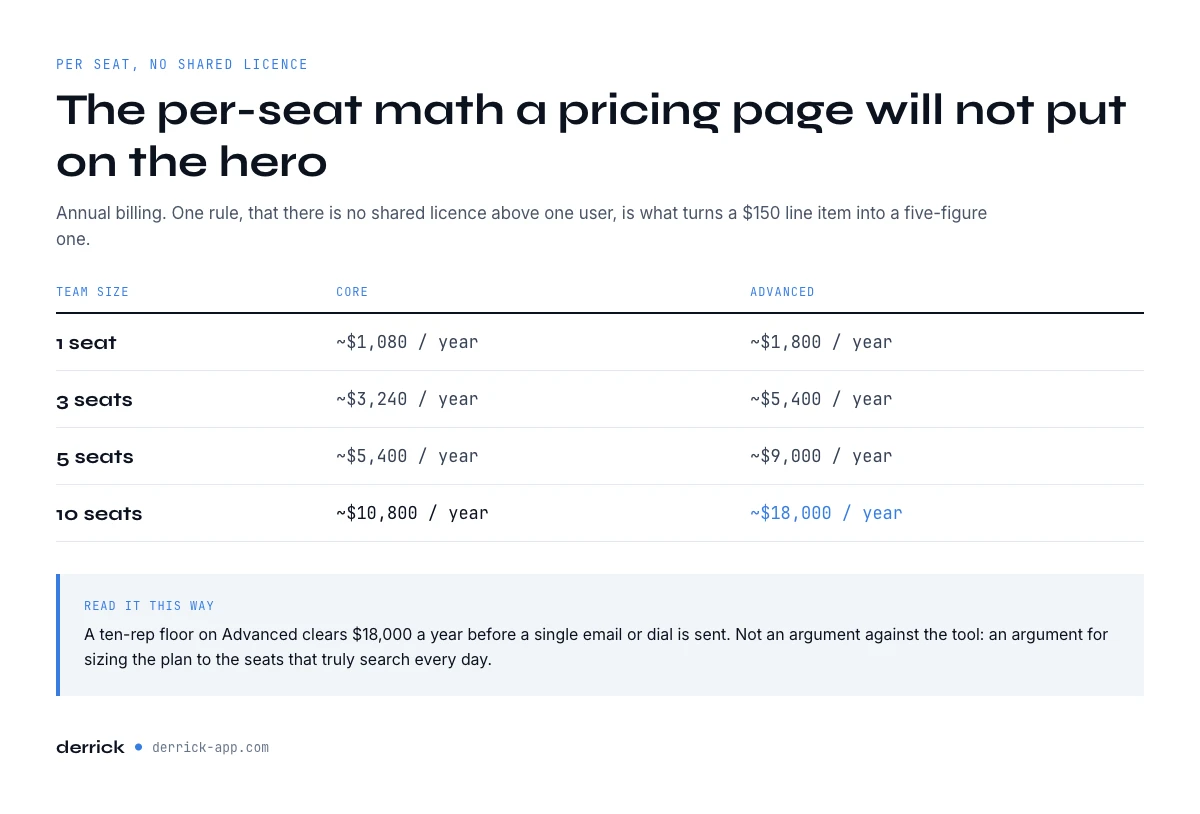
Sales Navigator is per seat, and above one user there is no shared license. That single rule is what turns a $150 line item into a five-figure one. The table below is the part a Sales Navigator pricing page will not put on the hero.
| Team size | Core, annual billing | Advanced, annual billing |
|---|---|---|
| 1 seat | ~$1,080 / year | ~$1,800 / year |
| 3 seats | ~$3,240 / year | ~$5,400 / year |
| 5 seats | ~$5,400 / year | ~$9,000 / year |
| 10 seats | ~$10,800 / year | ~$18,000 / year |
A ten-rep sales floor on Advanced clears $18,000 a year before a single email or dial is sent. That is not an argument against the tool. It is an argument for knowing what the seat actually buys you, and what it does not, so you can size the plan to the seats that truly search every day rather than defaulting everyone to Advanced.
Monthly vs annual billing: where the discount actually is
The annual commitment is the single biggest lever on the sticker price. On Core, monthly billing runs about $119.99 while annual billing drops the effective rate to roughly $89.99, close to a 25% cut. On Advanced the gap is narrower, around $159.99 monthly against $149.99 on annual.
The trade is flexibility for savings. Annual billing locks the seat for twelve months, so it fits a stable team with a proven use case. If you are still validating whether reps will live in the tool, start month to month or ride the 30-day trial first, then convert to annual once usage is real. Paying annually for a seat that goes cold in month three is the most common way teams overspend on Sales Navigator.
In the web app or Google Sheets
Cost per lead depends on what you keep
A per-seat price divided by leads only works if the leads leave the tool. Derrick imports the search results into the web app or Google Sheets as rows, which is what makes the cost per lead in this article a number you can compute.
- Feature
- Import LinkedIn Leads (regular & Sales Navigator)
- Credit cost
- 1 credit per lead imported
The first button opens the web app (nothing to install): 1 credit per lead imported, 100 free credits every month. The second details the feature and its cost per plan.
The 30-day trial: where the first surprise charge comes from
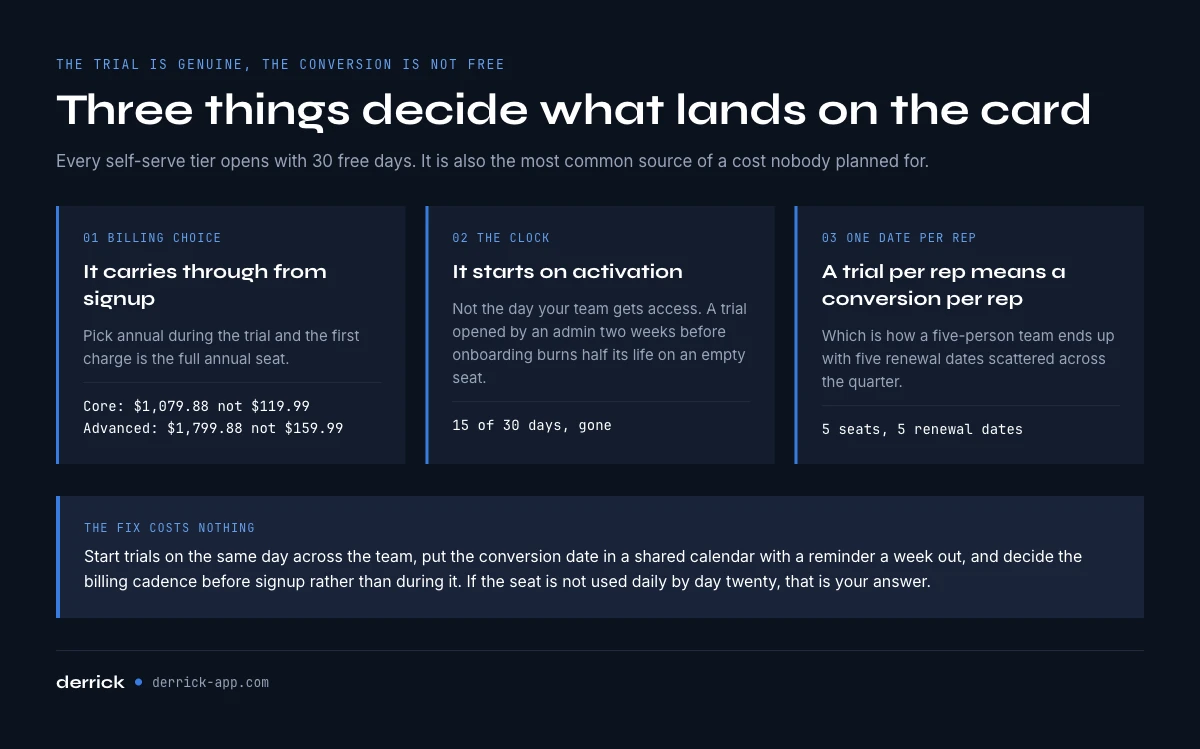
Core and Advanced, the two self-serve tiers, open with a 30-day free trial (Advanced Plus has none), and it is a genuine trial. It is also the single most common source of a Sales Navigator cost nobody planned for, because of how the trial converts.
Three things decide what lands on the card. First, the billing choice you made at signup carries through: pick annual during the trial and the first charge is the full annual seat, not a month. On Core that is a one-line $1,079.88 instead of $119.99, and on Advanced $1,799.88 instead of $159.99. Second, the clock starts the day you activate, not the day your team gets access, so a trial started by an admin two weeks before onboarding burns half its life on an empty seat. Third, a trial per rep means a conversion date per rep, which is how a five-person team ends up with five renewal dates scattered across the quarter.
The fix costs nothing: start trials on the same day across the team, put the conversion date in a shared calendar with a reminder a week out, and decide the billing cadence before signup rather than during it. If the seat is not being used daily by day twenty, that is your answer on whether to let it convert.
LinkedIn asks for a card at signup and emails a reminder seven days before the trial ends. Treat that email as the decision point: cancel before the last day and nothing is charged, let it run and the billing choice you made at signup applies.
How to buy, downgrade or cancel Sales Navigator
Buying. Core and Advanced are bought online from your LinkedIn account, either straight away or at the end of a free trial. From a desktop you can buy up to five Advanced licenses yourself, and a single license can also be bought in the LinkedIn mobile app on iOS or Android. Once the first license is active, the account's full admin adds and assigns the other seats. Larger teams, and every Advanced Plus contract, go through LinkedIn's sales team.
Cancelling. You can cancel at any time, but the cancellation takes effect at the end of the period you already paid for. On a monthly plan the seat runs to the end of the current month. On an annual plan it runs to the end of the paid year, and LinkedIn's published policy describes no pro-rata refund of the remaining months. That is the real price of committing annually too early.
Downgrading. Moving a seat from Advanced to Core is a plan change, not a cancellation. LinkedIn's public pricing page documents cancellation but not downgrades, so check in your account's billing settings when the change applies before you count on the saving. The safe assumption is the next renewal date, which is why teams that right-size once a year schedule it a month before renewal.
Is the LinkedIn Sales Navigator cost worth it in 2026?
For most B2B teams, yes, on one condition: the seat pays for itself in search quality, not in features you never open. Sales Navigator is the deepest self-serve database of professional targeting filters available, and the alerts on job changes and account activity are genuinely useful triggers. That is what the price buys.
What the price does not buy is exportable, campaign-ready data. Sales Navigator deliberately keeps you inside its interface. It shows you a lead, but it does not hand you a verified email, a direct dial, or a clean row you can drop into a sequence. That gap is where the sticker price stops telling the whole story, and it is the same gap for every rep on every seat.
The cost a Sales Navigator pricing page never shows: getting your data out
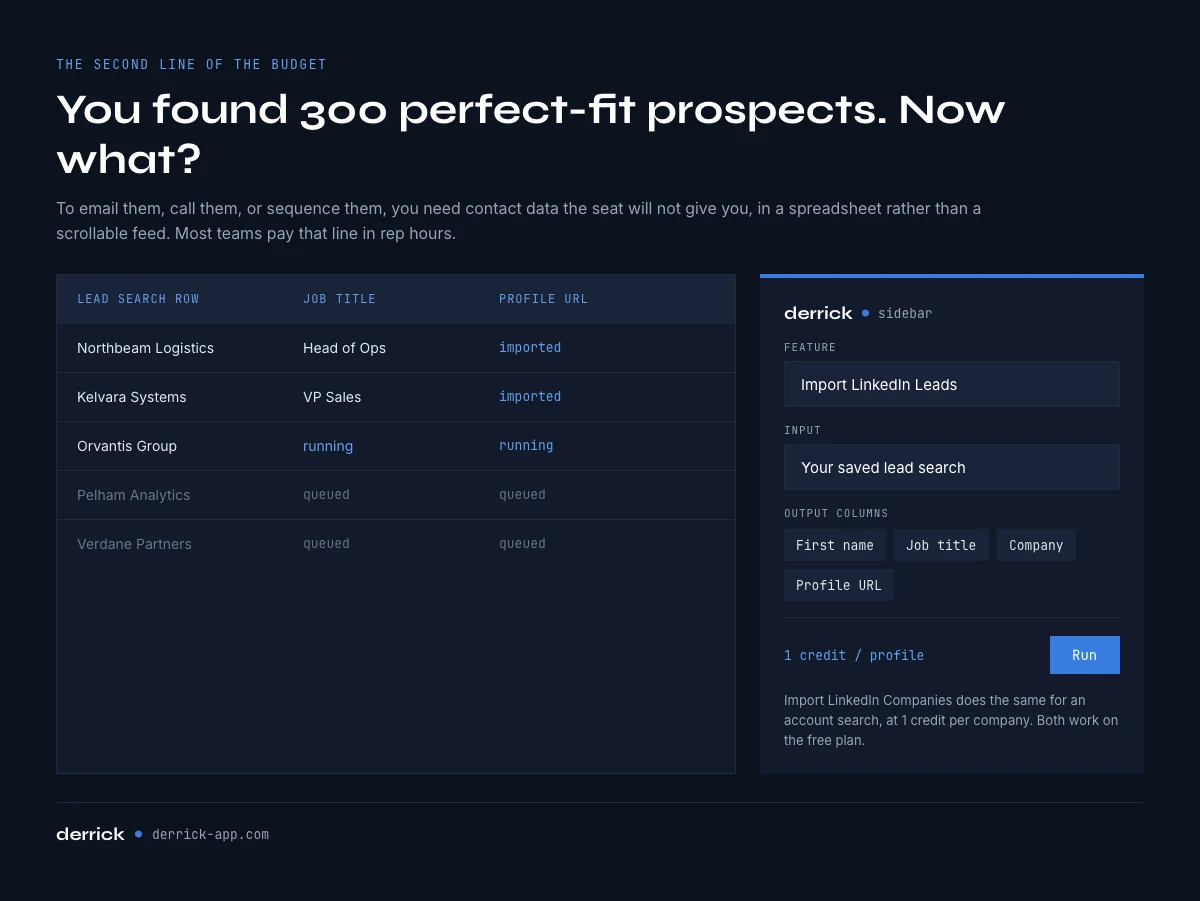
You found 300 perfect-fit prospects. Now what? Inside Sales Navigator you can save them to a list and send 50 InMails a month. To email them, call them, or push them into a sequence, you need contact data the tool will not give you, and you need it in a spreadsheet, not a scrollable feed.
This is the real second line of your Sales Navigator budget, and most teams pay it in rep hours: someone copy-pastes names, guesses email patterns, and cleans a list by hand. The faster path is to export the search and enrich it in bulk. Derrick reads your Sales Navigator lead lists and searches straight from its web app or a Google Sheets sidebar, no formulas to write, and appends verified data row by row. See the full export to Google Sheets workflow, or if your team is technical, the Sales Navigator scraper in Python covers the code route.
Two Derrick features map directly onto Sales Navigator output. Import LinkedIn Leads pulls a Sales Navigator lead search into rows at 1 credit per profile, and Import LinkedIn Companies does the same for an account search at 1 credit per company. Both work on the free plan. Prefer to describe your target in words instead of building the search? Import Leads from a Prompt generates the list from a plain-English brief at 1 credit per lead when your own Sales Navigator account is connected, or 10 credits per lead without it.
How to cut your real cost per lead
Cost per lead, not cost per seat, is the number that decides whether Sales Navigator pays off. Four moves pull it down without downgrading your search:
- Right-size the tier. Give Advanced only to reps who use TeamLink and reporting. Put solo prospectors on Core. On a ten-person floor that split alone can save thousands a year.
- Commit annually once usage is proven. The 25% Core discount is free money if the seat is genuinely active. Validate on the trial, then lock it.
- Stop paying for exports in rep time. A rep who spends an hour a day hand-copying leads costs far more than the seat. Move that step to a bulk import and enrich pass.
- Enrich only what you will contact. Import the whole list at 1 credit a row to get it into a sheet, then spend heavier lookups only on the accounts that clear your filters.
Who should think twice before buying a seat
Not every team needs Sales Navigator, and a few should hold off. If your addressable market is a few hundred named accounts you already know, the advanced search that justifies the seat is wasted, and a lighter contact tool plus a list you maintain by hand may cover you. If reps will not log in daily, a seat becomes shelf-ware fast, and per-seat billing punishes low usage harder than most tools. And if you are pre-revenue and testing a motion, the 30-day trial plus a bulk-enrichment tool can validate the channel before you commit a cent. The seat is worth it when search depth and account alerts feed a pipeline that reps work every day. Short of that, the math tips the other way.
LinkedIn Sales Navigator cost for a small business or a solo seller
For a founder selling alone or a team of two or three, the question is not which tier is best. It is whether one Sales Navigator Core seat pays for itself. At $119.99 a month, or $1,079.88 a year, the seat has to bring in enough meetings to cover about a thousand dollars of yearly spend before anything else.
Three signs it does: you sell to a market you can describe with filters (industry, headcount, seniority, region) rather than a list of names; you will open the tool most working days; and you need job-change and account alerts as triggers, because nobody else is watching accounts for you. Three signs it does not: your buyers are a few dozen accounts you already know, your deals come from referrals, or nobody has time to work the leads the search turns up.
A small team rarely needs Advanced. What it adds (team seat management, central billing, TeamLink across colleagues, team reporting) pays off when several reps share accounts. With two sellers, two Core seats on monthly billing keep the commitment low while you prove usage, and you switch to annual once the seats are used daily. The money saved on the tier is better spent on the step the seat does not cover: turning a saved search into rows you can actually contact, which the next sections price out.
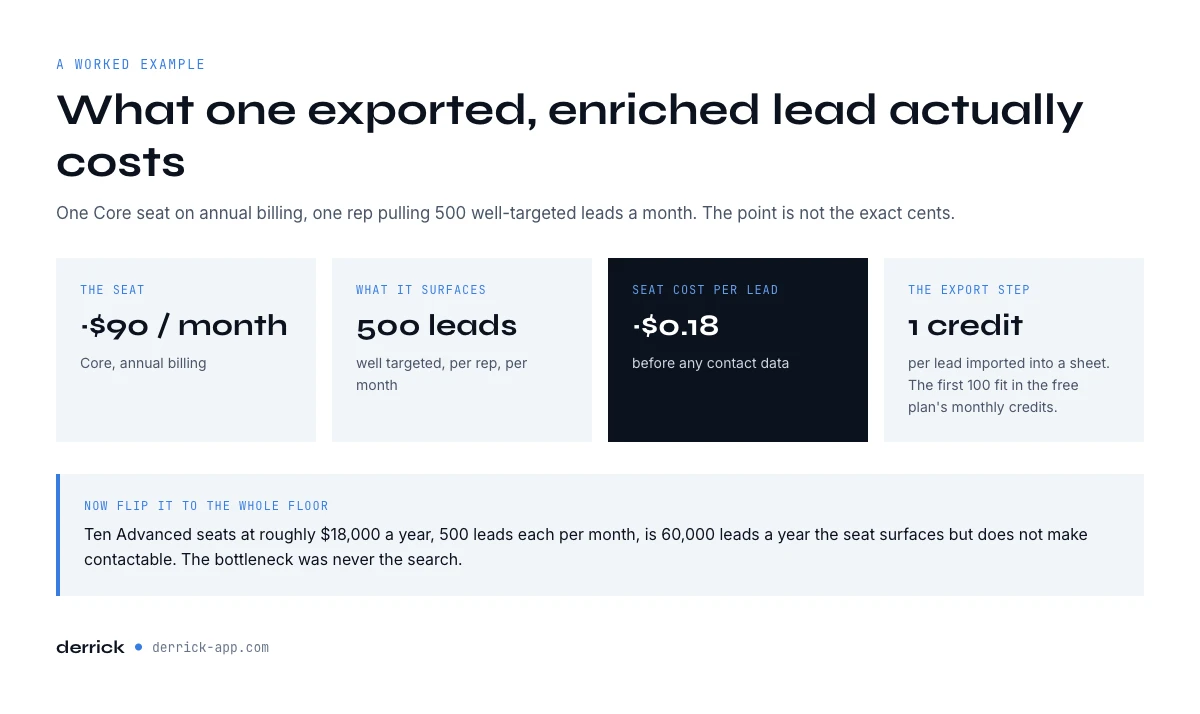
A worked example: what one exported, enriched lead costs
Say a Core seat on annual billing costs roughly $90 a month, and a rep pulls 500 well-targeted leads a month from it. That seat cost alone is about $0.18 per lead, before contact data. Import those 500 leads into the Derrick web app or a sheet at 1 credit each, and the first 100 fit inside the free plan's 100 monthly credits at no cost; beyond that, credits on a paid plan start at 20 euros a month for the Standard plan. The point is not the exact cents. It is that the export-and-enrich step is a rounding error next to the seat, while doing it by hand quietly doubles the true cost of every lead in rep hours.
Now flip it to the whole floor. Ten Advanced seats at roughly $18,000 a year, working 500 leads each per month, is 60,000 leads a year the seat surfaces but does not make contactable. The bottleneck was never the search; it was turning what search found into rows a campaign can use. Whether you get there through the Derrick web app, a Google Sheets sidebar or the Python route, moving that step off rep desks is the single change that makes an expensive seat look cheap on a per-lead basis.
Want the benchmark data behind team-level prospecting output? Our 2026 Sales Navigator prospecting report breaks down what high-performing teams actually get out of a seat.
Four ways to work the data once the seat is paid for
The seat is a research surface. Turning what it shows you into rows you can call, sequence and report on happens outside LinkedIn, and how you do it changes the cost per lead more than the tier you picked. Derrick covers that step through four doors, and the right one depends on what you are doing rather than on what you already have installed.
- Working online, with nothing to install. The Derrick web app imports and enriches the leads from your saved search in a browser, for teams who would rather not work in a spreadsheet.
- A list to enrich, in a spreadsheet. The Google Sheets sidebar is the shortest path when the output is a list: paste the profile URLs from your saved search, run Import LinkedIn Leads at 1 credit a profile, and the columns fill in place.
- A question asked inside an AI client. The MCP server plugs Derrick into Claude, ChatGPT and any other MCP client, so "pull the head of revenue for these forty accounts and tell me which ones are hiring" runs as a conversation instead of a spreadsheet session. Useful when the shape of the answer is not a list yet.
- A workflow that has to run without you. The REST API is the door when the enrichment belongs inside a CRM sync, a nightly job or an automation: every lookup available in the web app and the sidebar is available as an endpoint, so a lead created in the CRM gets its company data before a rep ever opens it.
The point for your budget: the Sales Navigator seat is fixed, but the extraction step is not. Pick the door that matches the job and the same seat produces more usable rows for the same money.
Reading the fine print on LinkedIn Sales Navigator cost
A few details catch teams off guard. Per-seat pricing has no volume break on the self-serve tiers, so ten Core seats simply cost ten times one seat. InMail credits do not roll over indefinitely, and the 50-a-month allowance is the same on every tier, so upgrading does not buy you more messages. The 30-day trial on Core and Advanced is genuinely free but converts to paid automatically unless you cancel, which is where surprise first charges come from. And the quote-only Advanced Plus tier varies widely with seat count and CRM-sync needs, so the only real way to price it is to talk to sales.
Key takeaways on Sales Navigator pricing in 2026
Sales Navigator pricing in 2026 runs about $89.99 to $119.99 a month per seat for Core (the low end is annual billing, the high end is monthly) and about $149.99 to $159.99 for Advanced, with Advanced Plus by quote. The per-seat model, not the tier, is what drives the real bill: a ten-rep team on Advanced is around $18,000 a year. Annual billing is the biggest lever on the sticker, worth roughly 25% on Core. And the cost the plan page hides is data extraction: the seat shows you leads, but you still need verified contact data in a spreadsheet to work them. Import and enrich that data in bulk instead of by hand, and the export step costs pennies while the manual alternative doubles your true cost per lead.
Ready to make your seat pay off? Start with Derrick free and turn every Sales Navigator search into a working, enriched list.
Frequently asked questions
How much does LinkedIn Sales Navigator cost in 2026?
Is LinkedIn Sales Navigator pricing per seat?
What is the difference between Sales Navigator Core and Advanced?
Does Sales Navigator give you email addresses and phone numbers?
Is Sales Navigator worth the price?
How can I lower my Sales Navigator cost per lead?
Is Sales Navigator worth more than LinkedIn Premium Business?
Can I cancel Sales Navigator anytime?
Keep reading
Continue exploring this cluster


The State of LinkedIn Sales Navigator Prospecting 2026: Benchmark Report
Read →

How to Use LinkedIn Sales Navigator for B2B Prospecting
Read →

How to Get Sales Navigator for Free on LinkedIn?
Read →

How to do a Boolean Search on LinkedIn Sales Navigator: Tutorial, Tips, Tricks
Read →