LinkedIn Sales Navigator Industries List
The LinkedIn Sales Navigator industries list: 20 families, all 145 second-level industries, the OR rule, and how to check a sector before you sequence.


Every page that ranks for this query does the same thing. It pastes the list and stops. The list is the easy part. The hard part is that the industry attached to a company on LinkedIn was picked by that company, from a dropdown, at some point in the past, and nobody has checked it since.
So this guide gives you the taxonomy in the shape it actually has, a tree rather than four hundred flat lines, with every second-level entry named. Then the four things that decide whether a segment is worth working on: what the 149-industry migration broke, what ticking several boxes does, how lead search and account search diverge, and how to spot a flattering label before anyone enters a sequence.
The short version, checked against the official reference on 27 July 2026: the V2 taxonomy holds 434 active industries under 20 top-level families, nested up to six levels deep, against 149 in the flat list it replaced. Selecting a parent silently returns its children too. Selecting several industries is an OR, never an AND. And the value is self-reported, so treat it as a strong hint about a company rather than a fact about it.
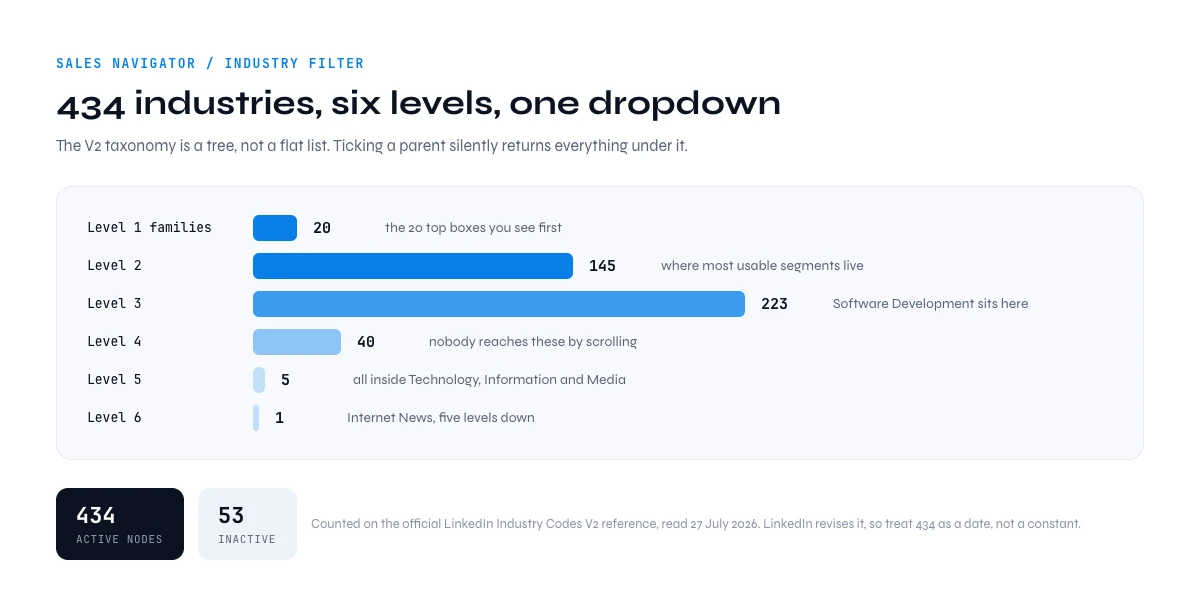
The LinkedIn Sales Navigator industries list, family by family
The filter is not a flat list, it is a tree with 20 branches. Version 2, the one Sales Navigator uses today, holds 434 active entries over six levels: 20 at the top, 145 at the second, 223 at the third, 40 at the fourth, 5 at the fifth and one at the sixth. A further 53 nodes are marked inactive.
Those numbers have a source and a date, the least you should ask of a reference page. They are counted from the official LinkedIn Industry Codes V2 table on Microsoft Learn, read on 27 July 2026, and every label below is copied from it rather than rewritten. LinkedIn revises the reference, so 434 is the count on that date, not a constant.
This page reads that tree through the Sales Navigator filter: what you can tick, how the branches behave, where the filter misleads you. If you want the nomenclature on its own, every code and every label without the filter around it, the complete LinkedIn industry list is the reference page for that.
The 20 families and every second-level industry
The complete second level: the 145 industries sitting directly under a family, each shown with its numeric industry ID and the size of its branch. The branch totals add up to 434.
| Top-level family (industry ID) | Second-level industries (all 145) | Nodes in the branch |
|---|---|---|
| Accommodation Services (2190) | Food and Beverage Services; Hospitality | 9 |
| Administrative and Support Services (1912) | Collection Agencies; Events Services; Facilities Services; Fundraising; Office Administration; Security and Investigations; Staffing and Recruiting; Telephone Call Centers; Translation and Localization; Travel Arrangements; Writing and Editing | 18 |
| Construction (48) | Building Construction; Civil Engineering; Specialty Trade Contractors | 12 |
| Consumer Services (91) | Civic and Social Organizations; Household Services; Non-profit Organizations; Personal and Laundry Services; Philanthropic Fundraising Services; Religious Institutions; Repair and Maintenance | 19 |
| Education (1999) | E-Learning Providers; Higher Education; Primary and Secondary Education; Professional Training and Coaching; Technical and Vocational Training | 12 |
| Entertainment Providers (28) | Artists and Writers; Museums, Historical Sites, and Zoos; Musicians; Performing Arts and Spectator Sports; Recreational Facilities | 21 |
| Farming, Ranching, Forestry (201) | Farming; Forestry and Logging; Ranching and Fisheries | 7 |
| Financial Services (43) | Capital Markets; Credit Intermediation; Funds and Trusts; Insurance | 20 |
| Government Administration (75) | Administration of Justice; Economic Programs; Environmental Quality Programs; Health and Human Services; Housing and Community Development; Military and International Affairs; Public Policy Offices; Space Research and Technology | 27 |
| Holding Companies (1905) | No child. One flat entry | 1 |
| Hospitals and Health Care (14) | Community Services; Hospitals; Individual and Family Services; Medical Practices; Nursing Homes and Residential Care Facilities | 22 |
| Manufacturing (25) | Apparel Manufacturing; Appliances, Electrical, and Electronics Manufacturing; Chemical Manufacturing; Climate Technology Product Manufacturing; Computers and Electronics Manufacturing; Fabricated Metal Products; Food and Beverage Manufacturing; Furniture and Home Furnishings Manufacturing; Glass, Ceramics and Concrete Manufacturing; Leather Product Manufacturing; Machinery Manufacturing; Medical Equipment Manufacturing; Oil and Coal Product Manufacturing; Paper and Forest Product Manufacturing; Plastics and Rubber Product Manufacturing; Primary Metal Manufacturing; Printing Services; Sporting Goods Manufacturing; Textile Manufacturing; Tobacco Manufacturing; Transportation Equipment Manufacturing; Wood Product Manufacturing | 91 |
| Oil, Gas, and Mining (332) | Mining; Oil and Gas | 8 |
| Professional Services (1810) | Accounting; Advertising Services; Architecture and Planning; Business Consulting and Services; Design Services; Engineering Services; IT Services and IT Consulting; Legal Services; Photography; Research Services; Services for Renewable Energy; Veterinary Services | 42 |
| Real Estate and Equipment Rental Services (1757) | Equipment Rental Services; Real Estate | 8 |
| Retail (27) | Food and Beverage Retail; Online and Mail Order Retail; Retail Apparel and Fashion; Retail Appliances, Electrical, and Electronic Equipment; Retail Art Dealers; Retail Art Supplies; Retail Books and Printed News; Retail Building Materials and Garden Equipment; Retail Florists; Retail Furniture and Home Furnishings; Retail Gasoline; Retail Health and Personal Care Products; Retail Luxury Goods and Jewelry; Retail Motor Vehicles; Retail Musical Instruments; Retail Office Equipment; Retail Office Supplies and Gifts; Retail Recyclable Materials & Used Merchandise | 21 |
| Technology, Information and Media (1594) | Media & Telecommunications; Technology, Information and Internet | 41 |
| Transportation, Logistics, Supply Chain and Storage (116) | Airlines and Aviation; Freight and Package Transportation; Ground Passenger Transportation; Maritime Transportation; Pipeline Transportation; Postal Services; Rail Transportation; Truck Transportation; Warehousing and Storage | 16 |
| Utilities (59) | Electric Power Generation; Electric Power Transmission, Control, and Distribution; Natural Gas Distribution; Water, Waste, Steam, and Air Conditioning Services | 17 |
| Wholesale (133) | Wholesale Alcoholic Beverages; Wholesale Apparel and Sewing Supplies; Wholesale Appliances, Electrical, and Electronics; Wholesale Building Materials; Wholesale Chemical and Allied Products; Wholesale Computer Equipment; Wholesale Drugs and Sundries; Wholesale Food and Beverage; Wholesale Footwear; Wholesale Furniture and Home Furnishings; Wholesale Hardware, Plumbing, Heating Equipment; Wholesale Import and Export; Wholesale Luxury Goods and Jewelry; Wholesale Machinery; Wholesale Metals and Minerals; Wholesale Motor Vehicles and Parts; Wholesale Paper Products; Wholesale Petroleum and Petroleum Products; Wholesale Photography Equipment and Supplies; Wholesale Raw Farm Products; Wholesale Recyclable Materials | 22 |
Three branches behave unlike the others, and the shape matters more than the labels:
- Holding Companies has nothing underneath it: one flat entry, no children. Close to useless as a segment, since a holding that wants to be found files itself under its main operating business instead.
- Wholesale is completely flat. Its 21 entries have no children, so parent and child mean the same thing.
- Manufacturing is the widest: 22 entries at the second level, 90 nodes in total. One checkbox, and not a small one.
Technology, Information and Media, the deepest branch
This is the family where most B2B software targeting happens, and the only one that runs all six levels down: every fifth-level node and the single sixth-level node belong to it. It is the one line above that earns its full expansion, because the wrong node here is the most expensive mistake on this page. All 41 entries:
- Media & Telecommunications
- Book and Periodical Publishing
- Book Publishing
- Newspaper Publishing
- Periodical Publishing
- Broadcast Media Production and Distribution
- Cable and Satellite Programming
- Radio and Television Broadcasting
- Movies, Videos and Sound
- Animation and Post-production
- Media Production
- Movies and Sound Recording
- Sound Recording
- Sheet Music Publishing
- Telecommunications
- Satellite Telecommunications
- Telecommunications Carriers
- Wireless Services
- Book and Periodical Publishing
- Technology, Information and Internet
- Data Infrastructure and Analytics
- Blockchain Services
- Business Intelligence Platforms
- Climate Data and Analytics
- Information Services
- Internet Publishing
- Business Content
- Online Audio and Video Media
- Internet News
- Blogs
- Libraries
- Internet Publishing
- Internet Marketplace Platforms
- Social Networking Platforms
- Software Development
- Computer Games
- Mobile Gaming Apps
- Computer Networking Products
- Data Security Software Products
- Desktop Computing Software Products
- Embedded Software Products
- Mobile Computing Software Products
- Computer Games
- Data Infrastructure and Analytics
Two things follow. Software Development sits at the third level, so ticking Technology, Information and Media to reach software vendors also collects newspaper publishers, satellite telecom carriers and radio broadcasters. And Internet News, the single sixth-level node, is five levels down: nobody arrives there by scrolling.
Why these labels are in English
The interface translates them into the language of your account, but the canonical strings are English, and so are the values most exports return. There is no published French reference list either: Microsoft ships a French version of that page and it keeps the English labels too. Services financiers and Financial Services are one node, not two. Across languages or tools, match on the numeric industry ID rather than on the string.
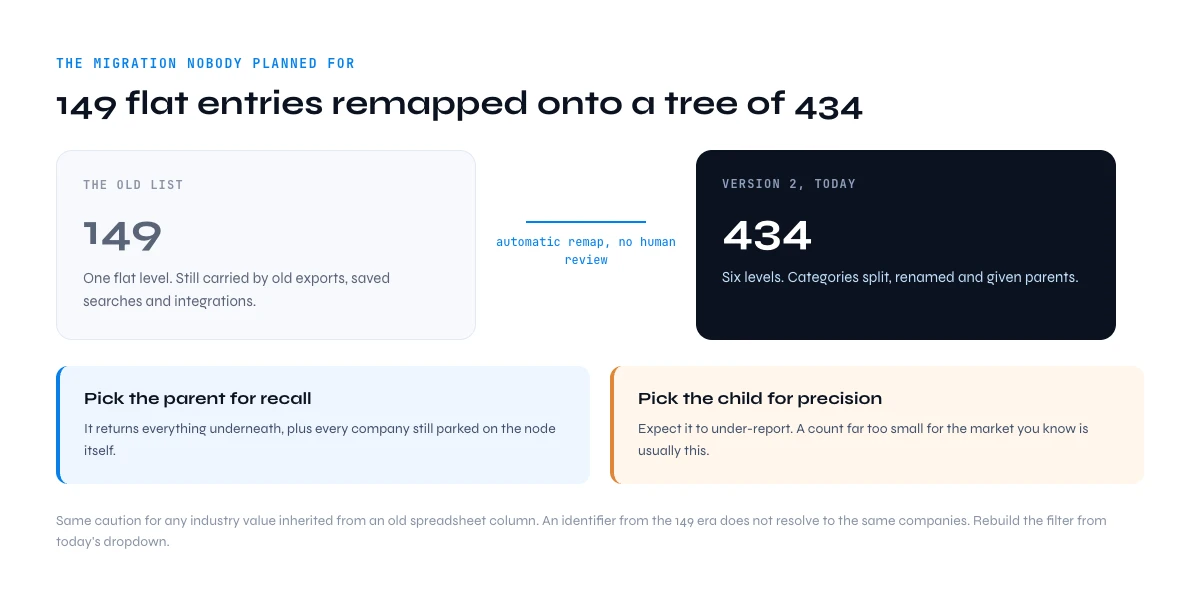
Why the LinkedIn Sales Navigator industries list has 434 entries and not 149
The taxonomy people remember, and that older exports, saved searches and integrations still carry, held 149 industries. Version 2 replaced it with 434. That is not a cosmetic renaming: categories were split, renamed and given parents, and a flat list became a hierarchy.
What matters for prospecting is the migration. LinkedIn re-mapped existing company pages automatically, and an automatic mapping from a flat list of 149 onto a tree of 434 cannot be precise. Plenty of companies ended up parked on a parent node rather than on the child that describes them. The kind of case you meet: a firm that would have been one obvious entry in the old list now sits on any of several nodes, depending on when someone last opened its page settings.
The working rule falls straight out of that. Pick the parent for recall: it returns everything underneath plus everything still parked on the node itself. Pick the child for precision, and expect it to under-report, because the companies that never revisited their page are not in it. A granular industry returning a number far too small for the market you know is usually this, not a market that does not exist.
Same caution for any industry value inherited from an old tool or an old spreadsheet column: an identifier from the 149 era does not resolve to the same companies as its modern-looking equivalent. Rebuild the filter from today's dropdown.
In the web app or Google Sheets
Turn a branch of the tree into accounts
Picking the right industry family is only useful if the result leaves the interface. Derrick imports the companies from a Sales Navigator company search into the web app or Google Sheets, one per row, with their firmographic fields.
- Feature
- Import LinkedIn Companies (regular & Sales Navigator)
- Credit cost
- 1 credit per company imported
The first button opens the web app (nothing to install): 1 credit per company imported, 100 free credits every month. The second details the feature and its cost per plan.
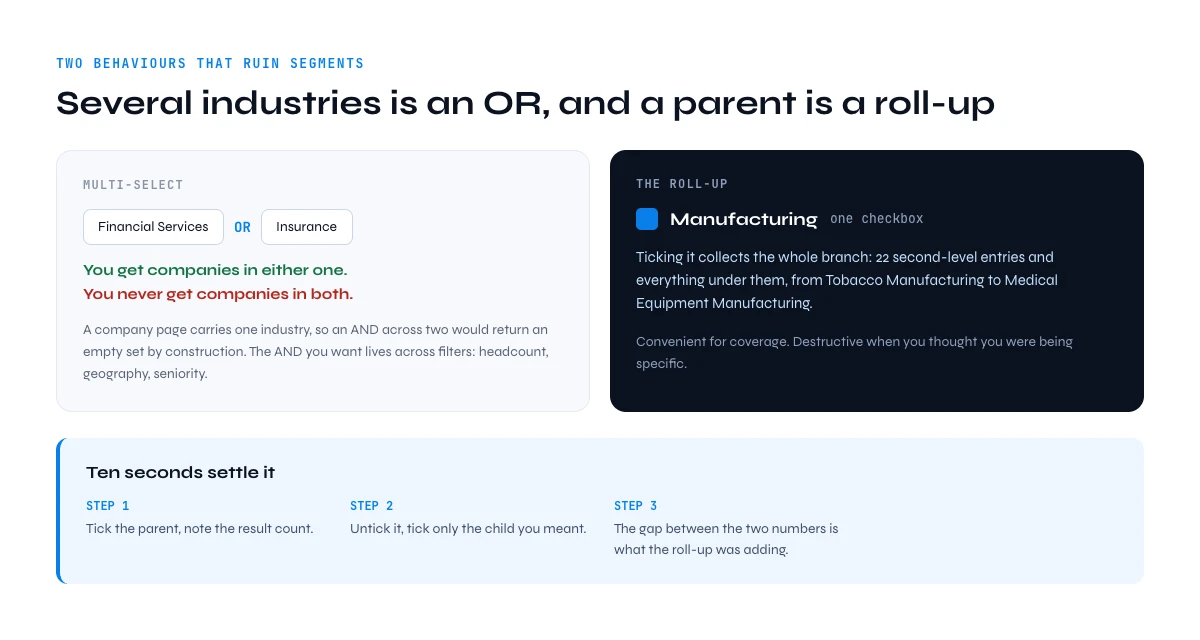
Selecting several industries: OR, never AND
Multi-select in the industry filter is an OR. Pick Financial Services and Insurance and you get companies in either one, never companies in both. That is not a limitation to engineer around: a LinkedIn company page carries one industry, so an AND across two industries would return an empty set by construction. The AND you are after lives across filters, where industry with headcount, geography and seniority narrows properly.
The second behaviour is the roll-up, and it is the one that quietly ruins segments. Ticking a parent includes every descendant: convenient for coverage, destructive when you thought you were being specific. Manufacturing is one checkbox carrying 90 nodes. Ten seconds settle it. Tick the parent, note the result count, untick it, tick only the child you meant, note the count again. The gap between the two numbers is what the roll-up was adding.
When the taxonomy cannot express what you mean, the text filters can. Free-text targeting with operators is often sharper than any node in a dropdown: industry for the coarse cut, operators on titles and keywords for the fine one.
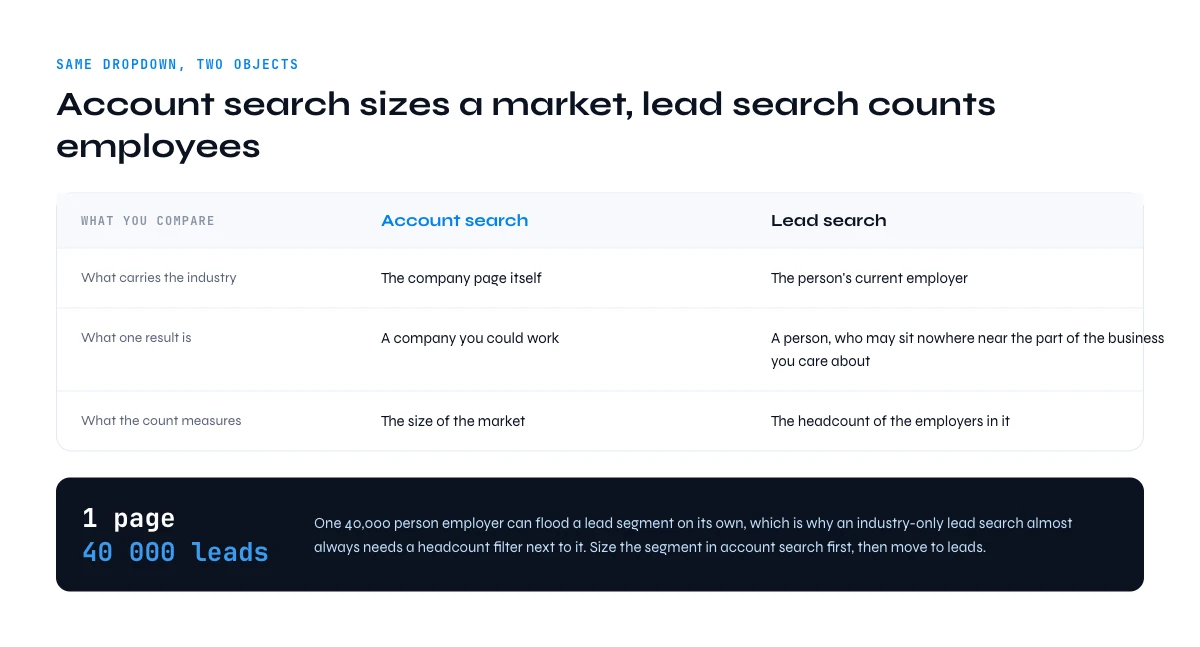
Lead search or account search: the same list, two different objects
The dropdown is identical in both searches. What comes back is not.
| What you are comparing | Account search | Lead search |
|---|---|---|
| What carries the industry | The company page itself | The person's current employer |
| What one result is | A company you could work | A person, who may sit nowhere near the part of the business you care about |
| What the count measures | The size of the market | The headcount of the employers in it: one 40,000-person page contributes 40,000 leads |
One consequence dominates: a single large employer can flood a lead segment, which is why an industry-only lead search almost always needs a headcount filter next to it. Size a segment in account search first, then move to leads. The rest of the account-side playbook, lookalikes and exclusions included, is in our guide to company search on LinkedIn.
The industry is self-declared, and that is the real catch
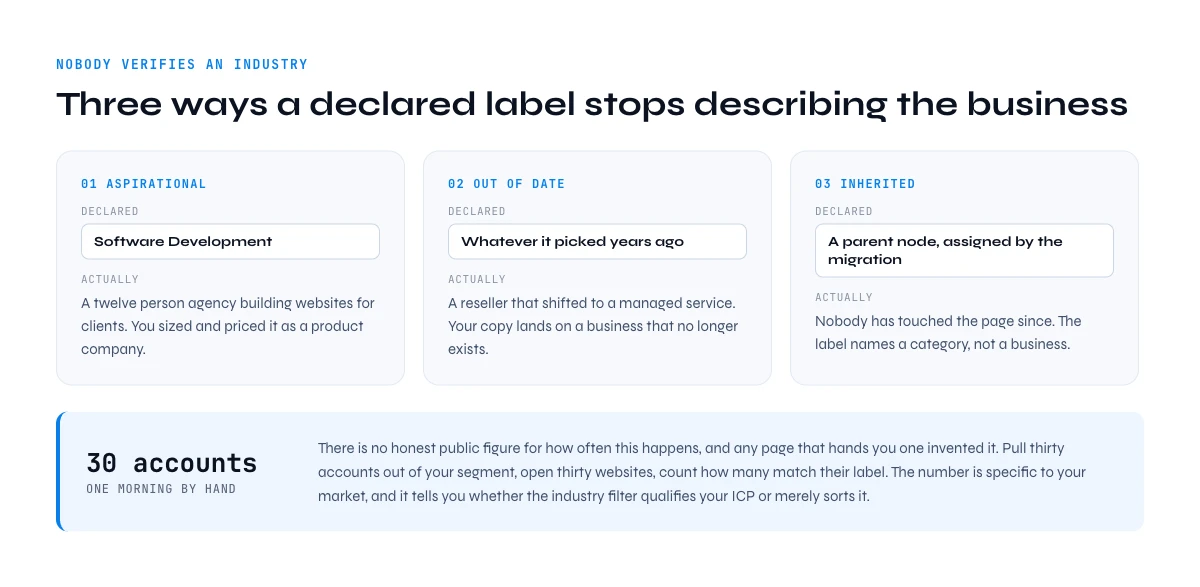
Nobody at LinkedIn verifies an industry. Someone opened the page settings, scanned a dropdown, picked the closest thing and moved on. That value then survives pivots, acquisitions and changes of business model, because nothing ever forces a review. Three failure shapes come up again and again.
- Aspirational. A twelve-person agency that builds websites for clients declares Software Development, because that is the identity it wants to project. Your segment now holds a services business you sized and priced as a product company.
- Out of date. The label was chosen years ago and the company moved on. A reseller that shifted to a managed service still shows whatever it picked when the page was created, and the copy you write from that label lands on a business that no longer exists.
- Inherited. The company never chose anything recent at all. The migration assigned it a parent node, nobody has touched the page since, and the label describes a category rather than a business.
There is no honest public figure for how often this happens, and any page that hands you one invented it. Measure it on your own sample instead: pull thirty accounts out of a segment, open thirty websites, count how many match their label. By hand that is a few minutes an account, so budget a morning. The number is specific to your market, and it tells you whether the industry filter qualifies your ICP or merely sorts it.
How to check a declared industry before you sequence
Four signals settle most cases, and all four can be collected in bulk rather than tab by tab.
- What the website sells. The homepage headline reveals a product or a service faster than any label does. A pricing page with plans and a signup is a product company. A contact form, case studies and a team page is a services company.
- Who the company employs. The mix of job titles is the hardest thing to fake. A declared software company with no engineers is an agency. A declared consultancy with forty engineers may genuinely be building something.
- Headcount against the claim. Some industries carry a plausible size range. A declared bank with nine employees is a fintech, a broker or a holding shell, but it is not a bank, and the sequence you would write for a bank will not land.
- What the site runs on. The technology on the domain separates a real software vendor from a reseller more reliably than any dropdown does.
That is the morning above, for thirty accounts. For a thousand it stops being a question of patience.
How do you check an industry segment at scale?
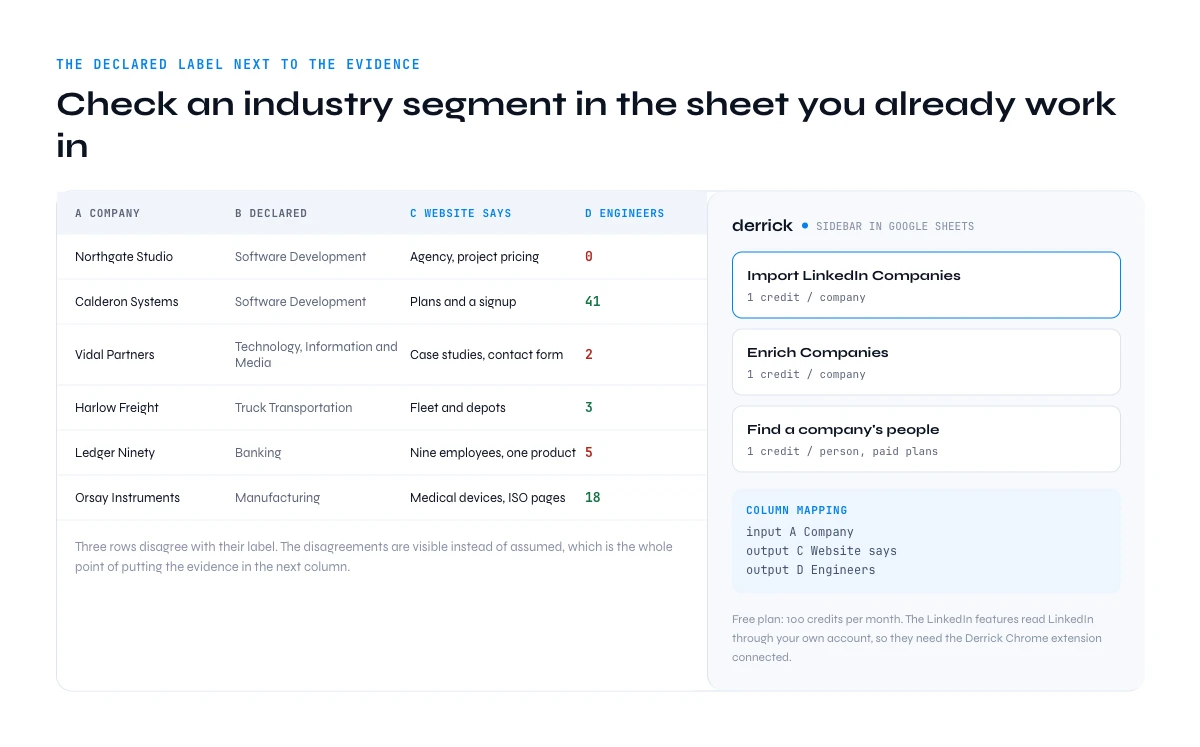
The filter gives you a screen. What you need is a table: the declared industry in one column, the evidence in the next, so the disagreements become visible instead of assumed.
Derrick runs in its web app, and also as a Google Sheets sidebar, so this happens in the app or in the sheet you already work in. Import LinkedIn Companies pulls a Sales Navigator account list into the sheet at 1 credit per company, on the free plan. Enrich Companies adds the company-level data at 1 credit per company, also on the free plan, which is what lets you sit the declared industry next to what the company actually looks like. Import LinkedIn Leads does the same for a lead list at 1 credit per profile.
Then the headcount and title test, the one that settles the aspirational cases. Derrick's Find a company's people returns the people at an account at 1 credit per person, on the paid plans. Forty engineers or zero engineers answers the Software Development question on its own.
One honest prerequisite. Every LinkedIn feature listed here reads LinkedIn through your own account, so it needs the Derrick Chrome extension connected, and that is separate from your plan: the Derrick free plan includes 100 credits per month and still needs the connection. The same data is reachable through the Derrick API and Derrick MCP, which both start on the PLUS plan at 47.50 euros.
The export route is in our guide to exporting Sales Navigator leads to Google Sheets, and if you are weighing the seat against your volume, our breakdown of Sales Navigator pricing does the per-lead maths.
Five mistakes with the LinkedIn Sales Navigator industries list
- Treating the industry as a qualifier. It is a sorting hint, not a verified attribute. Qualification happens afterwards, on your own evidence.
- Picking only the granular child. Companies still parked on the parent node are invisible to it. Check the parent count first.
- Expecting AND from a multi-select. Several industries is a union, and it widens the set. Narrow with headcount, geography and seniority instead.
- Running an industry-only lead search. One large employer can account for most of your results.
- Reusing an industry value from an old export. The 149-industry era does not map cleanly onto 434 nodes. Rebuild the filter from the dropdown you have today.
One last thing that is in no list, including this one. The taxonomy is a filing system built for LinkedIn's own reporting, not a market map built for your ICP. A usable segment is almost always a parent node minus the companies that do not belong, plus the ones that filed themselves somewhere else, and that arithmetic runs on evidence rather than on a dropdown. Where the industry filter sits in the wider prospecting workflow is covered in our Sales Navigator guide.
Frequently asked questions
How many industries are in the LinkedIn Sales Navigator industries list?
What are the 20 top-level LinkedIn industries?
Which LinkedIn industry branch is the deepest?
Does selecting several industries in Sales Navigator mean AND or OR?
Does picking a parent industry include its sub-industries?
Why does a company show the wrong industry on LinkedIn?
Are the LinkedIn industry labels available in French?
How do you check a company's real industry at scale?
Keep reading
Continue exploring this cluster


The State of LinkedIn Sales Navigator Prospecting 2026: Benchmark Report
Read →

How to Use LinkedIn Sales Navigator for B2B Prospecting
Read →

How to Get Sales Navigator for Free on LinkedIn?
Read →

How to do a Boolean Search on LinkedIn Sales Navigator: Tutorial, Tips, Tricks
Read →