Sales Navigator Free Trial: 30 or 60 Days Free, and What You Keep After
Start the LinkedIn Sales Navigator free trial: 30 days, or 60 with a referral. Learn the rules, auto-renewal, a 30-day plan and how to keep your leads.


The Sales Navigator free trial gives you the full product for 30 days, and a referral link from an existing subscriber gives you 2 months. Both require a credit card, both convert to a paid plan automatically, and both leave you with exactly one problem on day 31: the lead lists you built live inside Sales Navigator and there is no export button.
This page gives you the official rules first, then the two ways in, a week-by-week plan for the month, the auto-renewal, the plan you move to, and how to leave with your list still in your hands.
How to start a Sales Navigator free trial, in short:
- Open the official Sales Navigator page on linkedin.com and click Try for free.
- Choose Core or Advanced, the two plans that come with a free trial.
- Enter a valid credit card. Nothing is charged while the trial runs.
- Write down the renewal date, one month later, and cancel at least one day before it if you do not want to pay.
You are eligible if you do not already pay for a LinkedIn Premium or Sales Navigator subscription and have not used a LinkedIn free trial in the past 12 months. LinkedIn adds that availability varies by plan and by region, so the offer on your own account is the one that counts.
The Official Rules of the Sales Navigator Free Trial
Five rules govern every trial, and they come from LinkedIn itself rather than from a blog. They are worth reading before you click anything, because four of them decide whether you get charged.
- A card is required. LinkedIn states that you must enter a valid credit card to start the trial. Nothing is debited while the trial runs.
- One trial, then a 12-month wait. If you cancel a free Premium trial, you are not eligible for another free trial for at least 12 months. This applies across LinkedIn products, not just Sales Navigator.
- It converts automatically. At the end of the trial the subscription becomes a paid plan unless you cancel before the last day.
- No plan switching during the trial. You cannot move between Premium plans for free while the trial is running, so the plan you pick on day 1 is the plan you test.
- Length varies. LinkedIn says trial length may vary based on region or promotional terms, and that not all members qualify. Thirty days is the common case, not a contractual guarantee.
Source: the official LinkedIn Premium free trial help page, read on 22 September 2026. When a blog and that page disagree, that page wins.
How to Start a LinkedIn Sales Navigator Free Trial, Step by Step
The standard path takes about four minutes and starts on LinkedIn's own site, never on a third-party link.
Step 1: open the official Sales Navigator page
Go to the Sales Solutions section of LinkedIn Business and click Try for free. If you searched for it, check that the domain in your address bar is linkedin.com before you type anything.
Step 2: pick the plan you actually want to test
Two plans can be tried for free, and a third is sold after a demo:
- Core: for sellers who prospect on their own. Advanced search with more than 50 filters, saved leads and lead lists, alerts, Smart Links and 50 InMail credits a month.
- Advanced: for sales teams. Adds TeamLink, Buyer Intent signals, the Relationship Map, AI insights on accounts and leads, team reporting and central billing.
- Advanced Plus: for teams running a partner CRM. Adds advanced CRM integration, and is sold after a demo rather than through the free trial.
Because you cannot switch plans mid-trial, choose the one whose features you need to judge. Testing Advanced tells you whether the team features earn their difference; testing Core tells you whether the search alone is worth a monthly subscription.
Step 3: enter the card and note the cancel date
The card is verification, not payment. The moment the trial starts, put the day before the end date in your calendar. Most of the complaints about this trial come from people who meant to cancel and lost the date, not from people who decided to pay.
Step 4: cancel at least one day before the renewal date
Cancellation happens in your LinkedIn subscription settings. Two details from LinkedIn's help pages change how you should time it. The trial auto-renews on the billing date, one month after it started, so you need to cancel at least one day before. And ending the trial early removes your access to the premium features immediately. Cancelling on day 2 removes the billing risk, but it also ends your trial on day 2.
What the trial actually includes
The trial is the full plan, not a demo mode. On Core that means unlimited advanced searches with the full filter set, saved leads and lead lists with alerts on job changes and company news, the monthly allowance of InMail credits, and the browsing experience outside your normal LinkedIn commercial-use limit. On Advanced you add shared lists, team collaboration and TeamLink.
Two things are not included, and they matter more than the feature list. There is no export: Sales Navigator shows you the leads, it does not hand them over as a file. And there is no grace period on the data, so a list that is still inside the tool on the last day is a list you no longer have on the next one.
That is why the timing of the cancellation matters as much as the date itself. Cancel too early and your access stops with it; cancel too late and the card is charged. The order that works is simple: build the list, take it out, then cancel at least one day before the renewal date.
Does the Sales Navigator Trial Auto-Renew? How to Cancel Before You Are Charged
Yes, it renews on its own. LinkedIn's help center says the free trial auto-renews into a paid subscription on the billing date, one month after the trial started, and that you should cancel at least one day before that date to avoid the charge.
Three details from the same help pages decide whether that charge takes you by surprise:
- The reminder depends on where you signed up. If you started the trial on LinkedIn.com, LinkedIn sends a reminder to your primary email address before the trial ends. A trial started in the Android app gets no reminder email, while the iOS app sends one before the renewal.
- Cancelling early ends access at once. LinkedIn states that if you end the trial early, you immediately lose access to the premium features. There is no "cancel now, keep using it until day 30" on this trial.
- A failed card does not cancel anything. If the payment fails at renewal, LinkedIn gives you five days to update your billing details before the account drops back to a free Basic account. Letting the card fail is not a way to cancel.
Put together, the safe routine fits in four lines. On day 1, write the renewal date in your calendar with an alert two days before it. By the end of week 2, have your lead lists out of the tool. Then cancel from your subscription settings on any day after the export and at least one day before the renewal. Finally, check in your settings that the subscription now shows as cancelled.
The help pages do not describe a refund for a missed date, so treat the cancellation deadline as the real one. Sources: LinkedIn's Sales Navigator free trial help article and its page on the Premium free trial, both read on 20 October 2026.
In the web app or Google Sheets
Keep the results after the trial ends
A trial gives you access for a month; it does not give you a list afterwards. Derrick imports the search results into your own list, in the web app or in Google Sheets, as rows, which stay yours once the trial is over.
- Feature
- Import LinkedIn Leads (regular & Sales Navigator)
- Credit cost
- 1 credit per lead imported
The first button opens the web app (nothing to install): 1 credit per lead imported, 100 free credits every month. The second details the feature and its cost per plan.
How to Get 2 Months Free: The Referral Program
LinkedIn runs an official referral program inside Sales Navigator, and it is the only documented way to get more than the standard trial. It is not a trick and it does not involve a second account.
An existing subscriber opens the Gift icon in the upper-right corner of Sales Navigator, which leads to the Referral hub, and sends a referral link. Anyone who signs up through that link receives their first 2 months of Sales Navigator free. Each link works once and is unique to the person it was sent to.
The conditions are strict, and they are the same rules as the standard trial rather than a way around them. A subscriber can refer up to 15 first-degree connections, and each of them must:
- not already subscribe to Sales Navigator,
- not have used a LinkedIn.com free trial, on any product, in the past 12 months,
- not have another active LinkedIn Premium subscription, including Premium Career, Premium Business or Recruiter Lite.
The offer can only be redeemed once per member account. Source: the official Sales Navigator Referral program FAQ, read on 22 September 2026.
The practical consequence is simple. If you already used any LinkedIn trial this year, a referral link will not help you, and no article claiming otherwise changes the eligibility check. If you have not, asking one connection who already pays for Sales Navigator is the difference between 30 and 60 days.
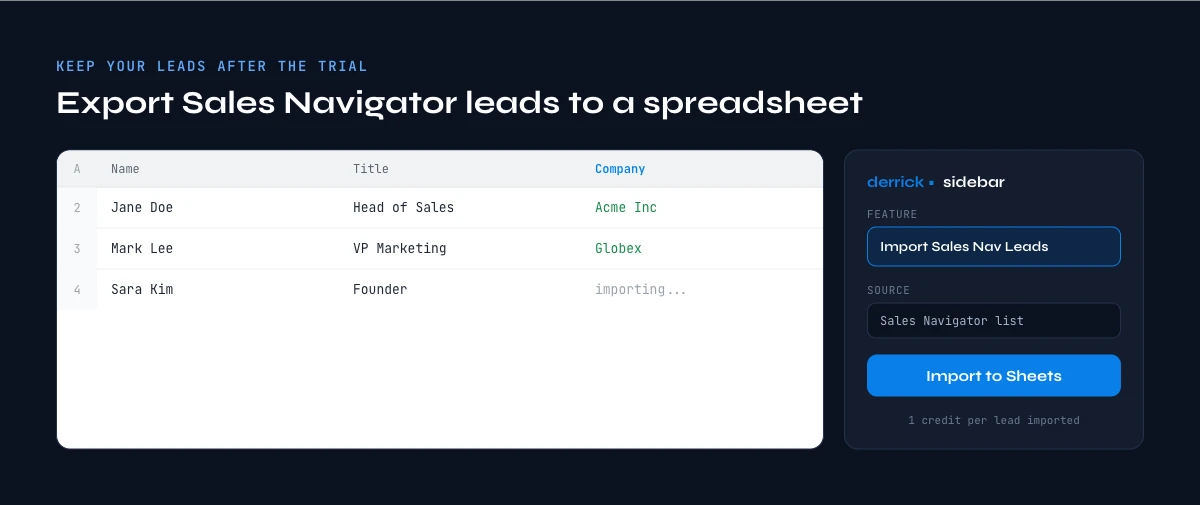
The app works through your list row by row: 1 credit per lead imported.
The Sales Navigator Free Trial, Week by Week: A 30-Day Plan
A trial spent browsing produces nothing. A trial spent building one list produces an asset you still own in six months. Here is the version that works, week by week.
Week 1: define the target and save the search. Write your ICP down in one sentence, then translate it into filters: headcount, industry, geography, seniority, function. Run it, look at the first fifty results, and fix the filters until those fifty are people you would genuinely contact. A Boolean search in the keyword field is what turns a broad filter set into a precise one. Save the search so it keeps running.
Week 2: build the lists and take the data out. Move the qualified results into lead lists, then export them while you still have access. This is the week that decides whether the trial leaves anything behind, and it is the one most people postpone.
Week 3: enrich and contact. With the rows in a sheet, add what Sales Navigator does not give you, starting with a verified work email, and start the outreach. Doing this during the trial is what turns a product evaluation into pipeline.
Week 4: measure and decide. Count replies against the hours spent, then choose: cancel, continue monthly, or commit annually for the discount. Whatever you decide, your list is already outside the tool.
Trial yield calculator: what a 30-day trial leaves you with
Estimate how many leads you can realistically take out of the trial, and what enriching them costs in Derrick credits. Everything runs in your browser and nothing is sent anywhere.
Import LinkedIn Leads costs 1 credit per profile and works on the free plan. Email Finder costs 5 credits per email found, nothing for a miss, and is available on paid plans only, so the free plan's 100 monthly credits cover the import step and not the email step.
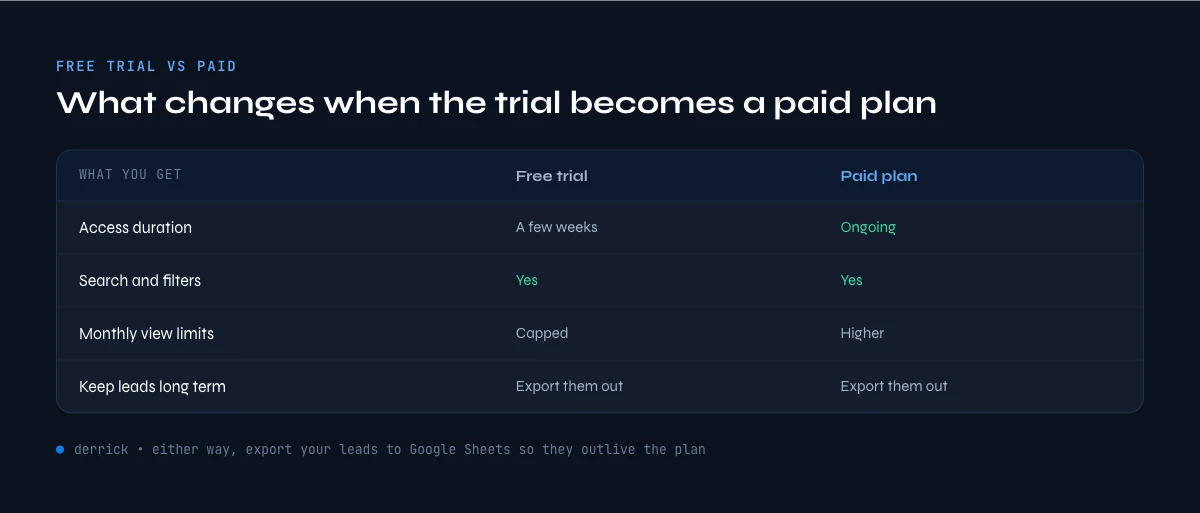
Sales Navigator Free Trial vs Paid: What Changes
The trial is not a stripped-down version. For 30 days you get the full Core or Advanced feature set. The real difference is what happens when it ends.
| What you get | Free trial | Paid subscription |
| Advanced search filters | Full access | Full access |
| Saved leads and lead lists | Full access | Full access |
| InMail credits | Included for the period | Renewed every month |
| Duration | 30 days, or 60 via a referral link | Ongoing while you pay |
| Cost | 0, card required for verification | Billed monthly or yearly |
| Data kept after it ends | Lost unless you export it | Stays in your account |
Price is the one row this table leaves out, on purpose. LinkedIn changes its rates several times a year, so we track them on a single page: the full LinkedIn Sales Navigator cost breakdown, plan by plan, monthly and annual. This page stays on the trial itself.
Which Plan After the Trial: Core, Advanced or Advanced Plus
The trial ends with a choice between three plans, and the right one depends on how you sell rather than on the size of the discount. Here is what each one adds, from LinkedIn's compare-plans page read on 20 October 2026.
| Plan | Built for | What it adds | Free trial |
|---|---|---|---|
| Core | Sellers who prospect alone | Advanced search with 50+ filters, saved leads and accounts, alerts, Smart Links, Message Assist, 50 InMail credits a month | Yes |
| Advanced | Sales teams | Everything in Core, plus TeamLink, Buyer Intent signals, the Relationship Map, AI account and lead insights, team reporting and central billing | Yes |
| Advanced Plus | Teams on a partner CRM | Everything in Advanced, plus advanced CRM integration, lead and account creation in the CRM, custom ROI reporting and dedicated support | No, sold after a demo |
A simple rule works for most readers. If you prospect alone and the trial showed that search and saved lists are what you actually used, Core is the plan. If two or more people work the same accounts, TeamLink and the shared Relationship Map are what you are paying for, and Advanced earns its difference. Advanced Plus only makes sense once your CRM is the system of record and you want Sales Navigator writing into it.
We keep the price of each plan, monthly and annual, in one place so it stays current: read our Sales Navigator pricing guide before you commit. Whatever you choose, the leads you exported during the trial stay yours, and that part does not depend on the plan.
Discounts and the Limits Worth Knowing
There are exactly two discounts worth planning around, and one myth worth dropping.
Annual billing is the reliable one: LinkedIn prices the yearly commitment below twelve monthly payments, paid in one go, and the gap is much wider on Core than on Advanced. If the trial convinced you, this is where the money is.
Regional and promotional terms are the second: LinkedIn states plainly that trial length varies by region and promotion, which is why some people see offers others do not. There is nothing to do here except check what your own account is offered.
The myth is the second account. Creating another LinkedIn profile with a different email and card to restart a trial breaks LinkedIn's terms, is detected through payment and login signals, and risks a restriction on the account you actually use for work. A restricted profile costs far more than a month of Core. We used to describe that workaround on this page; it does not belong here, and it is gone.
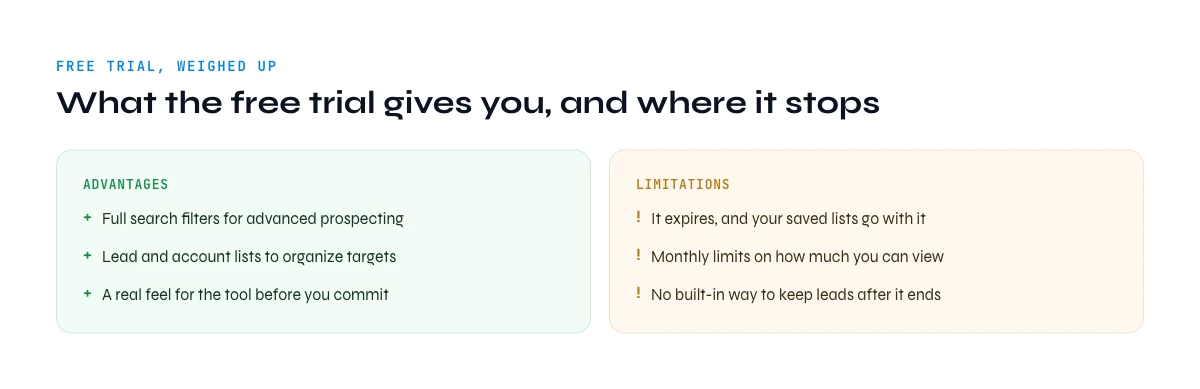
The limits of the trial itself are short and honest: a valid card is required, the period is one-time, billing starts automatically if you miss the date, the filters take a few days to master, and nothing you build inside the tool survives the expiry unless you exported it.
Export Your Leads Before Day 30 and Keep Them
A free month is plenty of time to build targeted searches and lead lists. The problem is what comes next: when the trial ends, those lists are locked inside Sales Navigator with no export button. This is the gap Derrick closes, and it is the only reason this page ends where it does.
Derrick reads your Sales Navigator searches and lead lists and turns them into a list you own, in the web app or in a spreadsheet, one row per lead. Import LinkedIn Leads pulls each profile into the sheet at 1 credit per profile, and it works on the free plan: 100 credits a month, no card. Once the rows are yours, Email Finder adds a verified work email at 5 credits per email found and nothing for a miss, on a paid plan from 20 euros a month.
The same work runs on the surface that fits you. The web app is the front door: nothing to install, you paste the search and the list appears. The Google Sheets sidebar does the same job when your list already lives in a spreadsheet. The MCP server answers the question directly inside Claude or another AI client when you only need one contact. The REST API puts the same enrichment inside your own pipeline or CRM. Pick the door, the credits are the same. The LinkedIn imports run through your own LinkedIn session, connected once with the Derrick Chrome extension.
Run this in week 2, not on day 29. A list exported calmly is a list you can still use when the trial is a memory, and it is the difference between having tested Sales Navigator and having got something out of it.
Frequently asked questions
How do I get LinkedIn Sales Navigator for free?
Can I get a Sales Navigator free trial if I have had one before?
How do I get 2 months of Sales Navigator free?
Do I need a credit card for the Sales Navigator free trial?
What happens when the Sales Navigator trial ends?
Can I cancel on day 29 and keep my leads?
Does the free trial include InMail credits?
Which plan should I choose after the Sales Navigator free trial?
Keep reading
Continue exploring this cluster


How to Use LinkedIn Sales Navigator for B2B Prospecting
Read →

How to do a Boolean Search on LinkedIn Sales Navigator: Tutorial, Tips, Tricks
Read →

How to Search for Companies on LinkedIn: Complete 2026 Guide
Read →![Smart Links in Sales Navigator: Features & Tips [Tutorial 2026], guide Derrick, Sales Navigator](/thumbs/sn/smart-links.webp)

Smart Links in Sales Navigator: Features & Tips [Tutorial 2026]
Read →