Sales Navigator Scraper in Python: How to Extract Leads Without Breaking Your Account
Sales Navigator caps every search at 2,500 leads and never returns an email. The Python route, its real cost, and the no-code path compared. Start free.


Sales Navigator is where you find the right people. It is not where you keep them. There is no export button, no CSV download, no public endpoint you can point at a saved search, so the moment a list needs to leave the platform someone suggests writing a scraper in Python. That instinct is reasonable. It is also the version of the problem with the most moving parts.
This guide covers what a scraper can actually reach inside Sales Navigator, the hard ceilings LinkedIn puts on every search, the Python code path step by step, the two routes that skip the code entirely, and the honest maintenance cost once LinkedIn ships a UI change. By the end you will know which of the four methods matches your volume, your deadline and your appetite for risk.
What a Sales Navigator scraper actually does
A scraper is any piece of software that opens your Sales Navigator session, reads the results a page renders, and writes them somewhere you control. Nothing more mysterious than that. It does not have privileged access, it does not query a hidden database, and it cannot see a single field your own seat cannot see.
Three surfaces are worth extracting. Lead search results, the output of your filters. Saved lead lists, the stable snapshots you built by hand. Account lists, the company side of the same graph, which behaves differently enough that searching for companies on LinkedIn deserves its own filters. Everything else, notes, tags, InMail history, is either locked to the session or worthless outside it.
The part people get wrong is the destination. A scrape is not a deliverable. It gives you who to contact, structured as rows, and it stops exactly there. A name, a title and a company do not start a conversation. The list becomes a pipeline only after it is enriched with the contact data the platform withholds, verified, and deduplicated against what you already own.
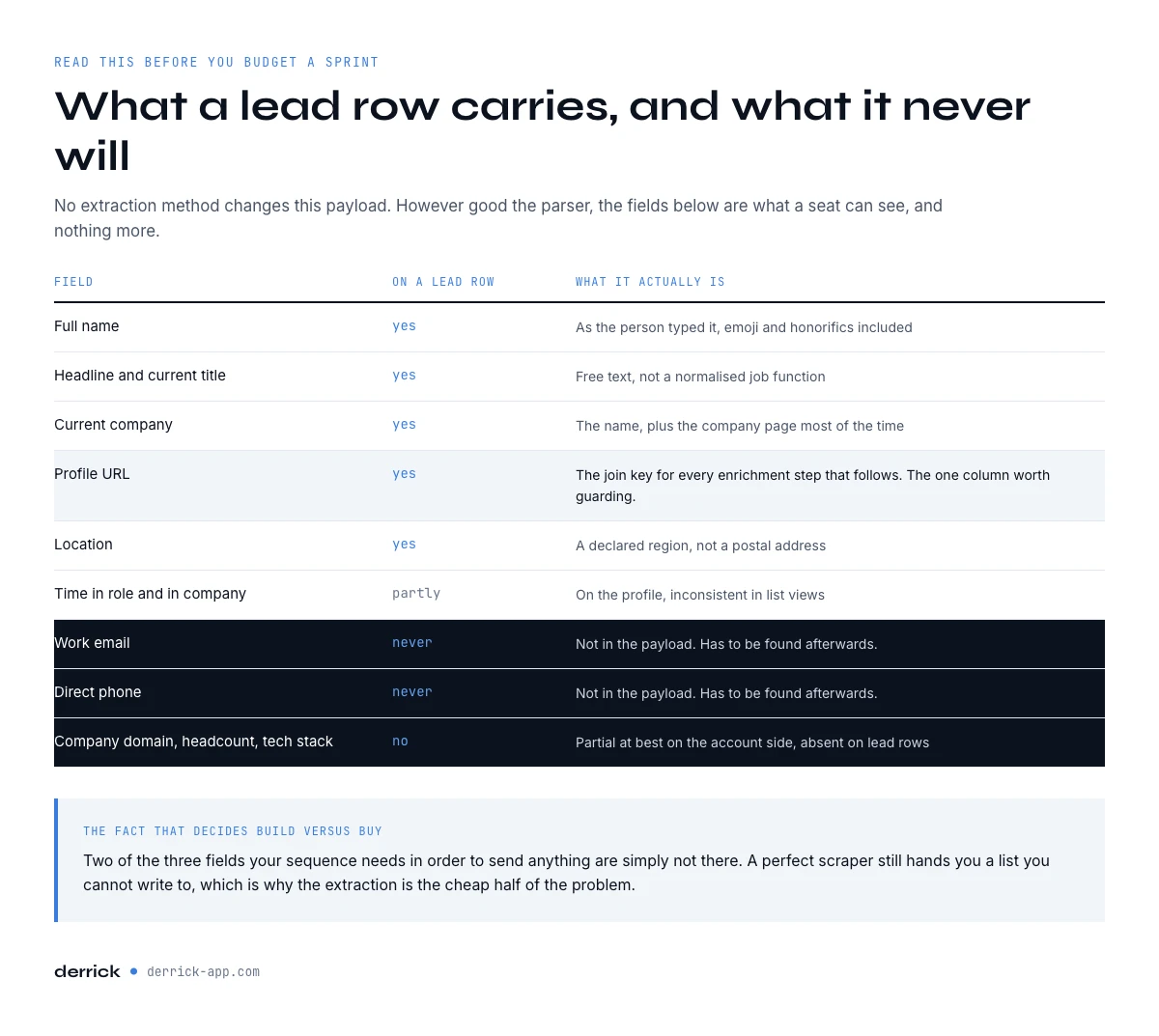
What Sales Navigator returns, field by field
Before choosing a method, be precise about the payload. This is what a lead row reliably carries, and what it never does, whichever extraction route you take.
| Field | Available on a lead row | Notes |
|---|---|---|
| Full name | Yes | As typed by the person, emoji and honorifics included. |
| Headline and current title | Yes | Free text, not a normalized job function. |
| Current company | Yes | Company name, plus the LinkedIn company page most of the time. |
| Profile URL | Yes | The join key for every later enrichment step. |
| Location | Yes | Declared region, not a postal address. |
| Time in role and in company | Partly | Shown on the profile, inconsistent in list views. |
| Work email | No | Never returned. Has to be found afterwards. |
| Direct phone | No | Never returned. Has to be found afterwards. |
| Company domain, headcount, tech stack | No | Partial at best on the account side, absent on lead rows. |
Read that table twice before you budget a sprint. Two of the three fields your sequence actually needs to send anything are simply not in the payload, no matter how good the extraction is. That single fact decides most of the build versus buy question further down.
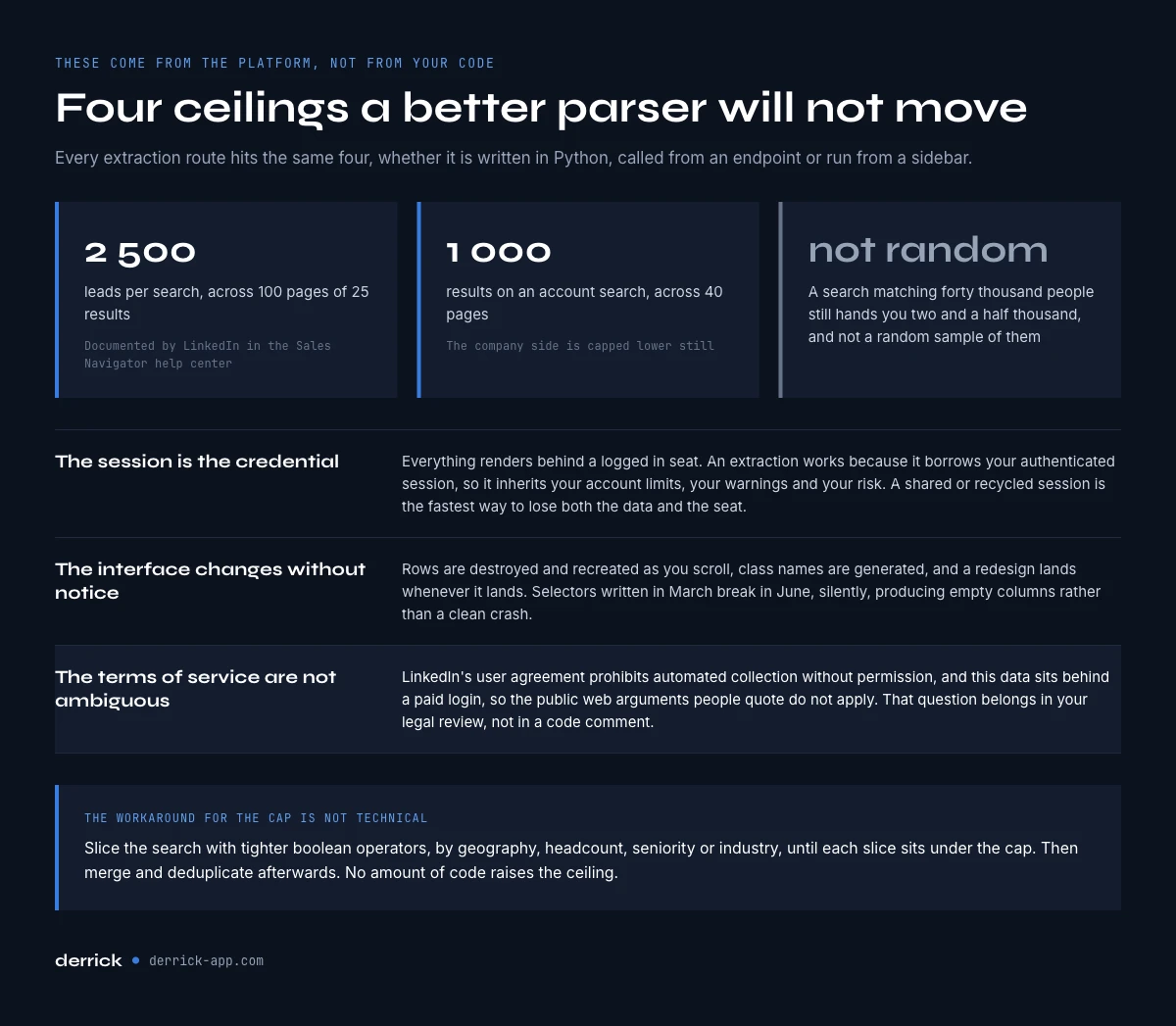
The ceilings every Sales Navigator scraper hits
These limits come from the platform, not from your code. A better parser will not move them.
2,500 leads per search, across 100 pages of 25 results. LinkedIn documents this in its own Sales Navigator help center, and account search is capped lower still, at 1,000 results across 40 pages. A search that matches 40,000 people still hands you 2,500 of them, and the ones you get are not a random sample. The workaround is not technical: you slice the search with tighter boolean operators, by geography, headcount, seniority or industry, until each slice sits under the cap, then merge and deduplicate afterwards.
The session is the credential. Everything renders behind a logged-in seat. A scraper works because it borrows your authenticated session, which means it inherits your account limits, your warnings and your risk. A shared or recycled session is the fastest way to lose both the data and the seat.
The interface changes without notice. Sales Navigator is a single-page application with virtualized lists: rows are destroyed and recreated as you scroll, class names are generated, and a redesign lands whenever LinkedIn ships one. Selectors written in March break in June, silently, usually producing empty columns rather than a clean crash.
The terms of service are not ambiguous. LinkedIn's user agreement prohibits automated data collection without permission, and Sales Navigator data sits behind a paid login, so the public-web arguments people quote do not apply to it. Extracting your own saved lists is a different posture from harvesting the whole graph, but the policy question belongs in your legal review, not in a code comment.
Through the Derrick API
The call that does not break on a layout change
The four methods here all carry the same maintenance cost. If the goal is data in your own system, the Derrick API returns structured fields from an HTTP call, with no selector to update when a page moves.
- Feature
- Derrick API
- Credit cost
- Included
The first button opens the web app, where your account and key live. API and MCP access starts on the PLUS plan. The second details the surface.
Method 1: writing a Sales Navigator scraper in Python
The classic build uses a browser automation library, because the data only exists after JavaScript has run. Requests plus BeautifulSoup will hand you an empty shell: there is no server-rendered HTML to parse.
The shape of the job is always the same. Load your session cookie into a driver, open the search URL, wait for the result container, scroll to force the virtualized rows to render, read each card, click through to page two, repeat, and flush rows to CSV as you go so a crash at page 60 does not cost you the first 59.
from selenium import webdriver
from selenium.webdriver.common.by import By

driver = webdriver.Chrome()
driver.get("https://www.linkedin.com")
driver.add_cookie({"name": "li_at", "value": SESSION_COOKIE, "domain": ".linkedin.com"})

for page in range(1, 101):                      # 100 pages max, by design
    driver.get(f"{SEARCH_URL}&page={page}")
    scroll_to_bottom(driver)                    # virtualized list: no scroll, no rows
    for card in driver.find_elements(By.CSS_SELECTOR, LEAD_CARD):
        write_row(parse(card))                  # flush per page, never at the end
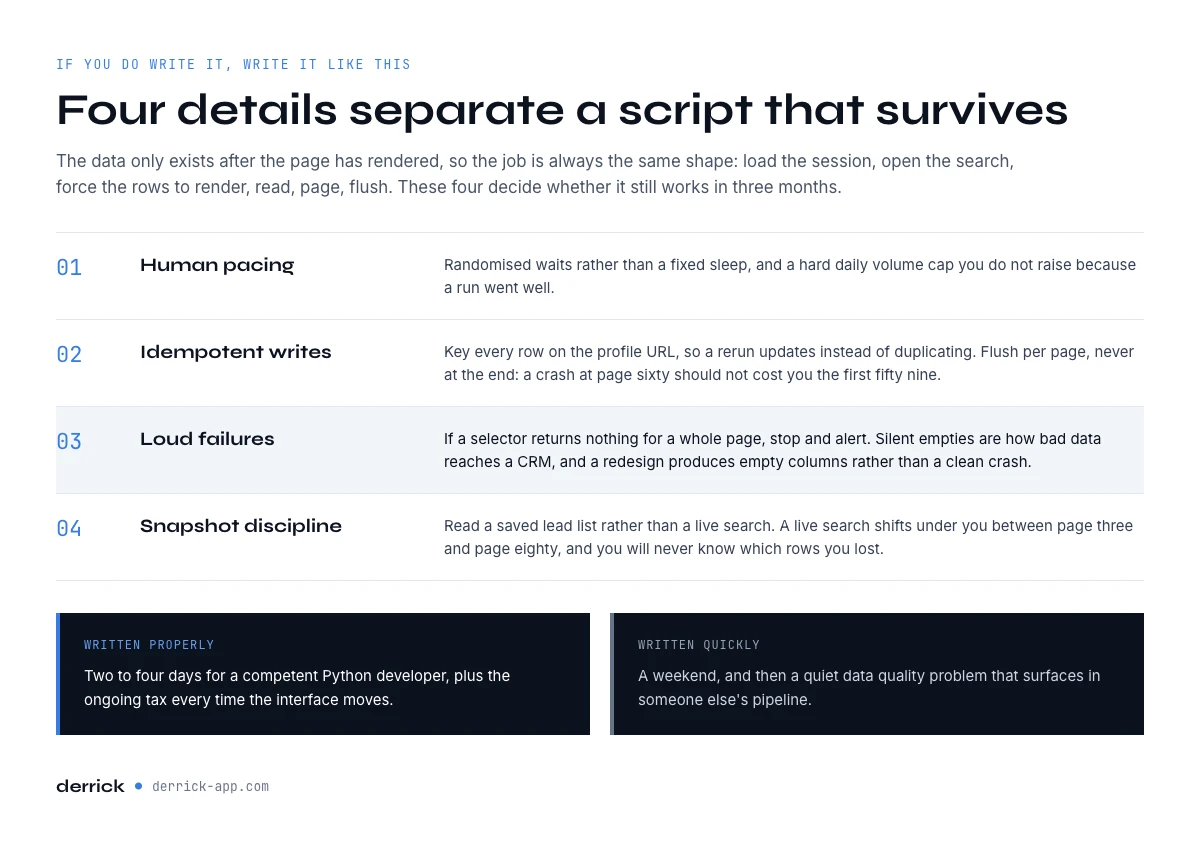
Four details separate a script that survives from one that does not. Human pacing: randomized waits, not a fixed sleep, and a hard daily volume cap. Idempotent writes: key rows on the profile URL so a rerun updates instead of duplicating. Loud failures: if a selector returns nothing for a full page, stop and alert, because silent empties are how bad data reaches a CRM. Snapshot discipline: scrape a saved lead list rather than a live search, since a live search shifts under you between page 3 and page 80.
Written properly, this is two to four days of work for a competent Python developer, plus the ongoing tax covered in section 10. Written quickly, it is a weekend and then a quiet data quality problem.
Method 2: the internal endpoint route
Open the network tab while you page through a search and you will see the interface calling internal JSON endpoints. The temptation is immediate: skip the browser, call the endpoint, parse clean objects. Teams take this path every year.
It is cleaner for exactly as long as it works. Those endpoints are internal, undocumented and unversioned. Each call has to carry a token derived from your session, so you are still tied to a live seat. Payload shapes change without a changelog, and because the requests no longer look like a person browsing, they are the easiest pattern to flag. The failure mode is worse than a broken selector too: you rarely get an error, you get a shape you no longer parse correctly.
If a maintained interface is what you want, the honest version of that wish is a supported API with a contract behind it, which is what section 7 covers.
Method 3: importing into Google Sheets, no code at all
Most teams that ask for a scraper do not want a scraper. They want the rows in a spreadsheet by Thursday. That is a different problem, and it does not need a repository.
Derrick runs in its web app, and also as a Google Sheets sidebar. You point Import LinkedIn Leads (Sales Navigator) at a saved lead list or a search, and it writes one row per lead into the sheet, at 1 credit per profile, available from the free plan. The company side has its own import at 1 credit per company, and if you would rather describe the target than build filters, Import Leads from a Prompt takes a plain-language description and brings back the matching profiles at 1 credit per lead.
The comparison that matters is not features against features. It is Thursday against a sprint. There is nothing to deploy, nothing to babysit when LinkedIn redesigns a card, and the same import handles 50 rows or 10,000 without a second architecture. The free plan gives you 100 credits per month, which is enough to run a real list end to end before deciding anything.
Method 4: API, integrations and MCP for pipelines and agents
Python developers usually do not want a spreadsheet, they want the data inside a pipeline. That is a legitimate requirement, and it is exactly where a homemade scraper is the wrong tool: you would be maintaining a fragile extraction layer inside a system that needs to be predictable.
The API. Derrick exposes its enrichment endpoints from the Plus plan at 47.50 euros per month, so a script calls a documented, versioned interface instead of parsing someone else's markup. Your code keeps the orchestration, retries and storage; the brittle part is not yours to maintain.
Integrations. With 3000+ integrations through Zapier, Make and N8N, the enrichment step can be triggered by a CRM event, a form submission or a scheduled job, with no glue service to host.
MCP. Derrick MCP puts the same data behind an AI assistant: from Claude Desktop, ChatGPT or any MCP compatible client, an agent asks for the enrichment it needs and gets a structured answer in the conversation. It starts at 47.50 euros per month on the Plus plan. For an agentic workflow, that is a far better contract than a Selenium script running in a container at 3 a.m.
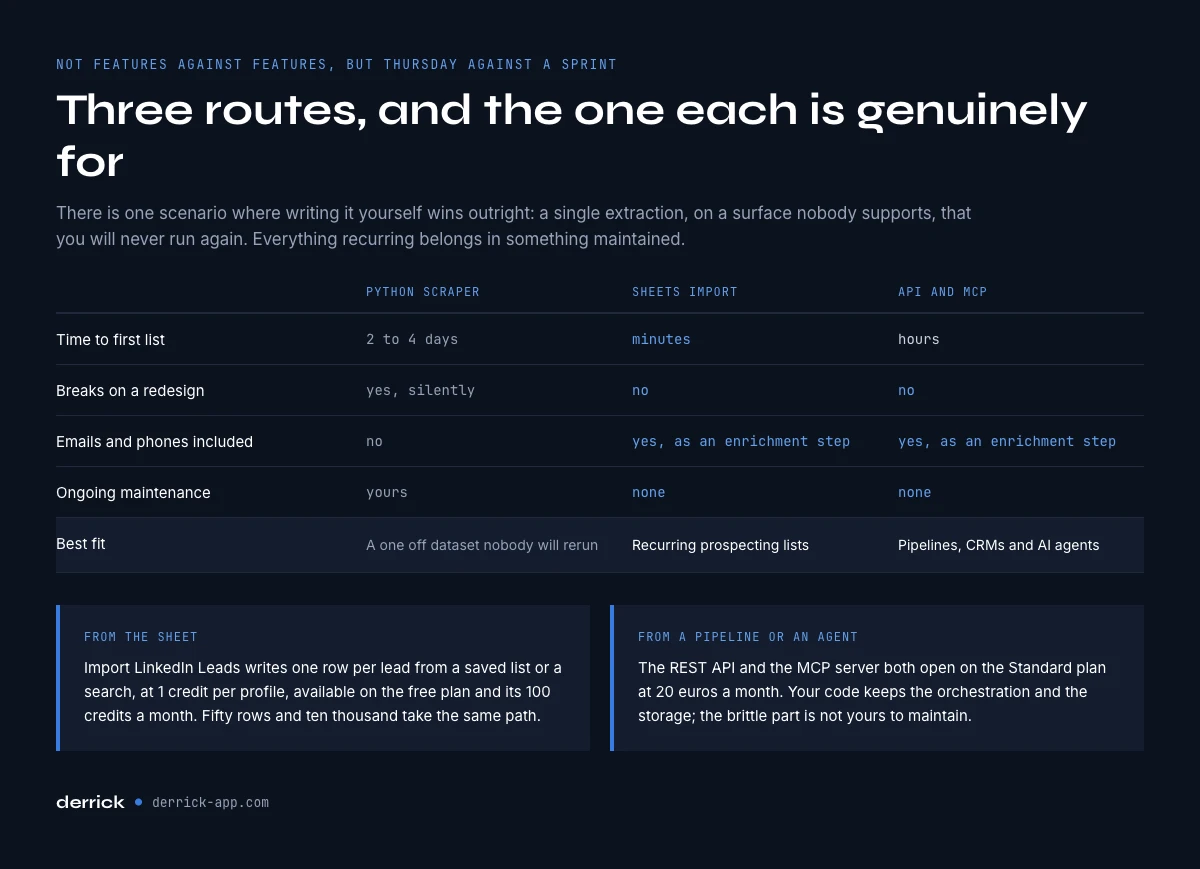
Sales Navigator scraper versus the no-code path: the decision table
| Python scraper | Sheets import | API and MCP | |
|---|---|---|---|
| Time to first list | 2 to 4 days | Minutes | Hours |
| Breaks on a LinkedIn redesign | Yes, silently | No | No |
| Emails and phones included | No | Yes, as an enrichment step | Yes, as an enrichment step |
| Ongoing maintenance | Yours | None | None |
| Best fit | A one-off dataset nobody will rerun | Recurring prospecting lists | Pipelines, CRMs and AI agents |
There is one scenario where writing it yourself genuinely wins: a single extraction, on a surface nobody else supports, that you will never run again. Everything recurring belongs in a maintained tool, for the same reason nobody writes their own PDF parser twice.
After the extraction: enrich, verify, deduplicate
Whatever produced your rows, the sheet in front of you is still a list of names. Three steps turn it into something a sequence can use, and all three run from the same place, in the web app or the sidebar.
Enrich the profile. Enrich Leads takes the profile URL and fills in the structured profile data at 1 credit per profile, available from the free plan.
Find the contact points. Email Finder returns a professional email at 5 credits per email found, and Phone Finder returns a direct number at 200 credits per phone found. Both are paid features, from the Standard plan at 20 euros per month, and both charge on results rather than attempts. Email Verification checks an address at 1 credit per email before you burn a domain reputation on a bad list.
Clean the file. Find Duplicates removes the overlap that slicing a capped search always creates, with no credit cost. Do this before enrichment, not after, so you never pay twice for the same person.
Run in that order and a 2,000 row extraction becomes a sequenceable list in an afternoon, with a bounce rate that will not get your domain filtered. Our own 2026 prospecting benchmark puts numbers on why this step is not optional: an exported list decays as fast as the people on it change jobs, and re-verification at the source is what keeps it worth sending.
What a homemade Sales Navigator scraper really costs
The build estimate is the part everyone gets right. The maintenance is the part that decides.
| Cost line | What it looks like in practice |
|---|---|
| Initial build | 2 to 4 developer days for pagination, parsing, retries and CSV output. |
| Selector maintenance | Half a day to two days each time the interface changes, unpredictable timing. |
| Silent data loss | Empty columns that reach the CRM before anyone notices. The expensive failure. |
| Account risk | The seat that runs the script is the seat you prospect from. |
| Still missing | Emails and phones, which need an enrichment step regardless. |
Put a real hourly rate on the second and third lines and the arithmetic stops being close. A developer day costs more than a year of the Standard plan, and the scraper still hands you a list without a single email in it. That is not an argument against Python: it is an argument for spending your Python on the parts nobody else can build for you, and letting a maintained tool own the fragile boundary with a platform you do not control.
If you are starting today, do it in this order. Tighten the search with better filters so it sits under the cap, save it as a lead list so the snapshot is stable, import that list into a sheet, enrich and verify what came back, then deduplicate. If any of those steps is new to you, the complete Sales Navigator guide covers the prospecting side of the same workflow. Once that round trip feels routine on thirty leads, the same motion runs on ten thousand without changing shape, which is precisely what a homemade scraper never manages to promise.
Frequently asked questions
Can you legally scrape Sales Navigator?
How many leads can a Sales Navigator scraper extract per search?
Does a Sales Navigator scraper return emails and phone numbers?
Which Python library works best for scraping Sales Navigator?
Is there an official Sales Navigator API for exporting leads?
What is the fastest way to get Sales Navigator leads into Google Sheets?
Can an AI agent pull Sales Navigator data directly?
Keep reading
Continue exploring this cluster


The State of LinkedIn Sales Navigator Prospecting 2026: Benchmark Report
Read →

How to Use LinkedIn Sales Navigator for B2B Prospecting
Read →

How to Get Sales Navigator for Free on LinkedIn?
Read →

How to do a Boolean Search on LinkedIn Sales Navigator: Tutorial, Tips, Tricks
Read →