LinkedIn Profile Scraper: the 10 Best LinkedIn Scrapers of 2026 Compared (Pricing, Limits & Fields)
Compare 10 LinkedIn profile scraper tools in 2026: the fields each one returns, ban exposure by architecture, real cost per usable row, and how to pick.


Last updated: 2026-09-19
A LinkedIn profile scraper is a tool that extracts public profile and company data - names, job titles, emails, phone numbers, employee counts, tech stacks - from LinkedIn URLs at scale. According to the Salesforce State of Sales 2025 report, sales teams spend roughly 70% of their time on non-selling tasks, and prospect research is the single biggest cost center inside that 70%. A scraper turns hours of manual copy-paste into minutes of automated enrichment.
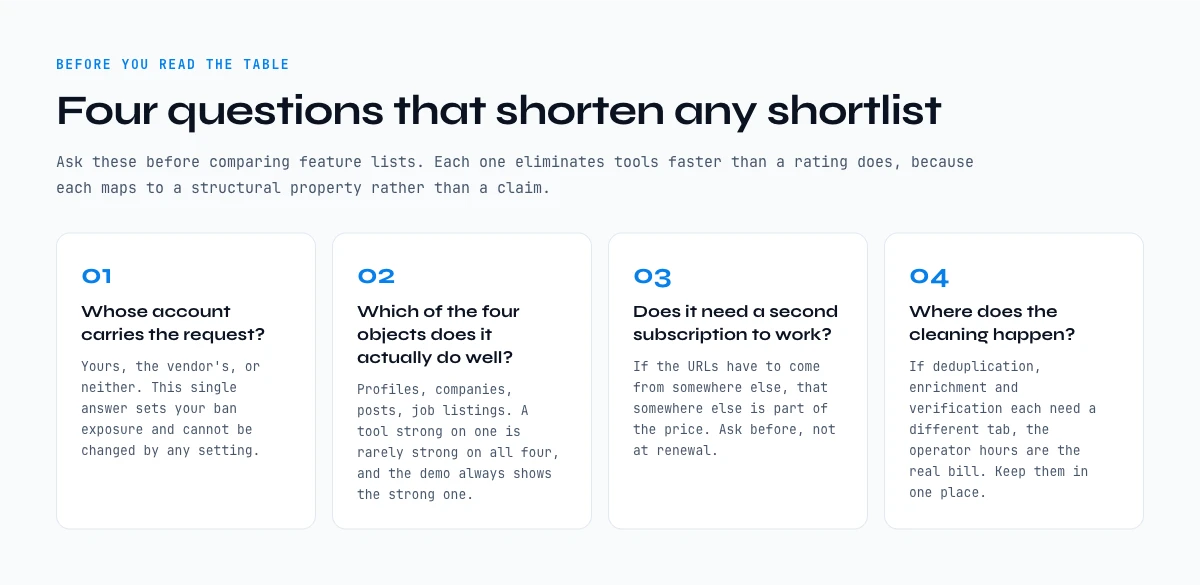
Picking the best LinkedIn scraper comes down to three things: which fields it returns, where the data lands, and what it costs once you count the hours. This guide compares the 10 LinkedIn scrapers we see most often in real B2B stacks, ranked by how cleanly they fit a typical prospecting workflow. We tested them on the same 500-row sample list, looked at pricing transparency, output quality, and where each one breaks down. No affiliate links. No paid placements.
If you want the full methodology before picking a tool, including APIs vs scrapers vs Chrome extensions, the legal landscape, and the workflow questions that actually decide your method, start with our complete linkedin data extraction guide, then come back to this comparator.
Why use a LinkedIn profile scraper in 2026
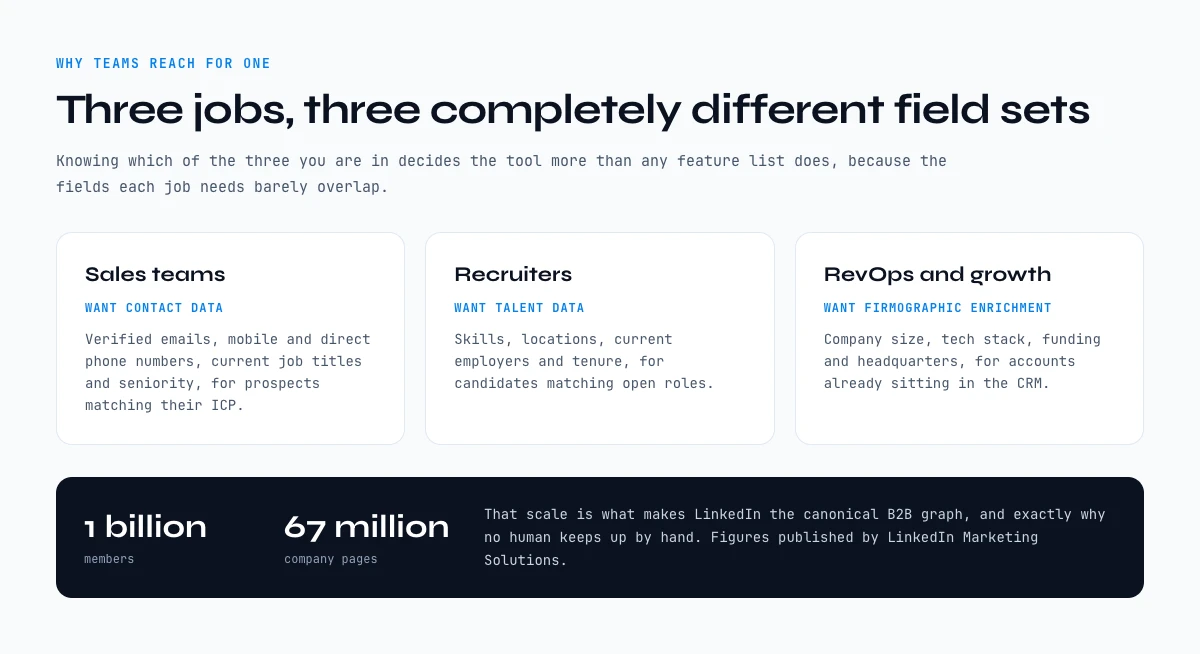
LinkedIn now hosts more than 1 billion members and ~67 million company pages, according to LinkedIn Marketing Solutions. That scale is what makes it the canonical B2B graph - and exactly why no human can keep up by hand. Three jobs push teams toward a scraper.
Sales teams need contact data. They want verified emails, mobile and direct phone numbers, current job titles, and seniority for prospects matching their ICP. Recruiters need talent data. They want skills, locations, current employers, and tenure for candidates matching open roles. RevOps and growth teams need firmographic enrichment. They want company size, tech stack, funding, and headquarters for accounts already in the CRM.
HubSpot's State of B2B Marketing benchmarks indicate that leads enriched with firmographic and contact data convert at roughly 3× the rate of unenriched leads. The economics are simple: scraping is cheap, manual research is not.
How we ranked the best LinkedIn scraper options
Every tool below was scored on the same five criteria. We avoided proxies for quality (logo count, "G2 leader" badges) and focused on what teams actually feel in week 2 of using a tool.
Output quality. On a 500-URL sample, what percentage of rows return a complete enrichment? Across our test runs, the floor was ~55% (basic profile-only tools) and the ceiling was ~92% (Derrick + Apify + Bright Data on standard public profiles).
Pricing transparency. Is the pricing on the public site, or do you need to talk to sales? Tools requiring a demo for entry-level pricing got penalized.
Workflow fit. Where does the data land? CSV download, dashboard, native Google Sheets, API, MCP, or Zapier-style workflow? The further from where you actually work, the more friction you eat.
Builder access. Does the tool offer a public API and AI-native surfaces (MCP) so engineering teams can wire it into n8n, Make, Zapier, or Claude Desktop? Tools locked to a SaaS dashboard score lower.
Real cost at volume. Sticker price is misleading. We computed cost per 1,000 enrichments on each tool's most popular plan.
Top 10 LinkedIn scrapers compared
| Tool | Where it runs | Entry price | Best for | Public API / MCP |
|---|---|---|---|---|
| Derrick | Google Sheets (native) | €20/mo | Sales + RevOps inside Sheets | ✓ API + MCP |
| PhantomBuster | Cloud dashboard | $69/mo | No-code automation chains | API only |
| Apify | Cloud / API / actors | $39/mo | Engineering teams | ✓ API + actors |
| Evaboot | Cloud (Sales Nav focus) | $29/mo | Sales Navigator exports | No public API |
| Captain Data | Cloud workflows | ~$399/mo | Mid-market ops teams | API only |
| Wiza | Cloud + extension | $83/mo | Sales Navigator email finder | API only |
| Lix | Chrome extension | $39/mo | Solo prospectors, light volume | No public API |
| Bright Data | API / proxies | ~$500/mo | Engineering at scale | ✓ API only |
| Skrapp | Cloud + extension | $49/mo | Email-first prospecting | API only |
| Lemlist | Outreach platform | $59/mo | Outreach + light enrichment | API only |
Pricing reflects each vendor's published entry tier as of April 2026. Final cost varies with volume; we recommend modeling cost per 1,000 enrichments on your own usage curve.
1. Derrick - web app and native Google Sheets scraper
Derrick App runs in its web app, and also as a Google Sheets sidebar AND ships a public API plus a native MCP endpoint (Claude Desktop, ChatGPT, any MCP-compatible AI). You paste a column of LinkedIn profile or company URLs, pick the data points you want (50+ available, including emails, phone numbers, employee count, tech stack, funding), and Derrick fills the columns. With 34,000+ active users and credits that roll over forever on paid plans, it's the most natural fit for teams who already work in Sheets - and the most flexible for builders who want to pipe enrichment into n8n, Make, Zapier, or any custom script.
Strengths: web app with nothing to install, native Sheets, open API + native MCP, rollover credits, transparent pricing from $9/mo, free tier with 100 credits. Weaknesses: it is built around lists you enrich, in the web app, in the spreadsheet or via the API, rather than around scheduled crawls in a cloud dashboard.
2. PhantomBuster
PhantomBuster pioneered the "Phantom" model: pre-built automation scripts that run on the cloud. Strong for chaining multiple actions (search → scrape → enrich → push to CRM). The cookie-based authentication means you connect your LinkedIn session, which carries account risk if you push limits. Pricing starts at $69/mo for 10 hours of execution; heavy users tend to land on the $159/mo Pro plan.
3. Apify
Apify is the engineering-first option. It hosts community-built and official "actors" (scrapers) you can run via API or schedule. The LinkedIn actors are well-maintained and handle proxies internally. Best when you have a developer in the loop and need raw output piped into a pipeline. Entry pricing at $39/mo, but heavy use can climb past $200/mo quickly.
4. Evaboot
Evaboot is the specialist for Sales Navigator exports. Paste a Sales Nav search URL, get a clean CSV with verified emails. Narrow but excellent at its job. Less useful if you're not already living inside Sales Navigator.
5. Captain Data
Captain Data targets mid-market ops teams that want a workflow builder rather than a one-shot scraper. Robust connectors and good for teams running the same enrichment job weekly. Pricing starts around $399/mo, so it's not the budget option.
6. Wiza
Wiza specializes in pulling verified emails out of Sales Navigator searches. Similar territory to Evaboot but with a stronger Chrome extension. Entry plan at $83/mo for 100 credits is steep on a per-lead basis if you're scaling.
7. Lix
Lix is a Chrome extension popular with solo prospectors and consultants. Easy to learn, low ceiling. Good for people enriching 50-200 leads a month. Falls over at higher volumes.
8. Bright Data
Bright Data is enterprise-grade scraping infrastructure: residential proxies, scraping APIs, datasets. Powerful but the entry point is not for SMBs - expect a sales conversation and contracts in the $500-$5,000/mo range.
9. Skrapp
Skrapp is primarily an email-finding tool that scrapes LinkedIn as a side feature. If your goal is "give me the email," Skrapp is fine. If you want firmographics, tech stack, or richer enrichment, look elsewhere.
10. Lemlist
Lemlist is an outreach platform with a built-in scraping/enrichment layer. The scraping is light but tightly integrated with the email sequencing. If you want a single tool for "find + email," Lemlist is reasonable. If you want best-in-class scraping, it isn't.
What a LinkedIn profile scraper actually extracts, field by field
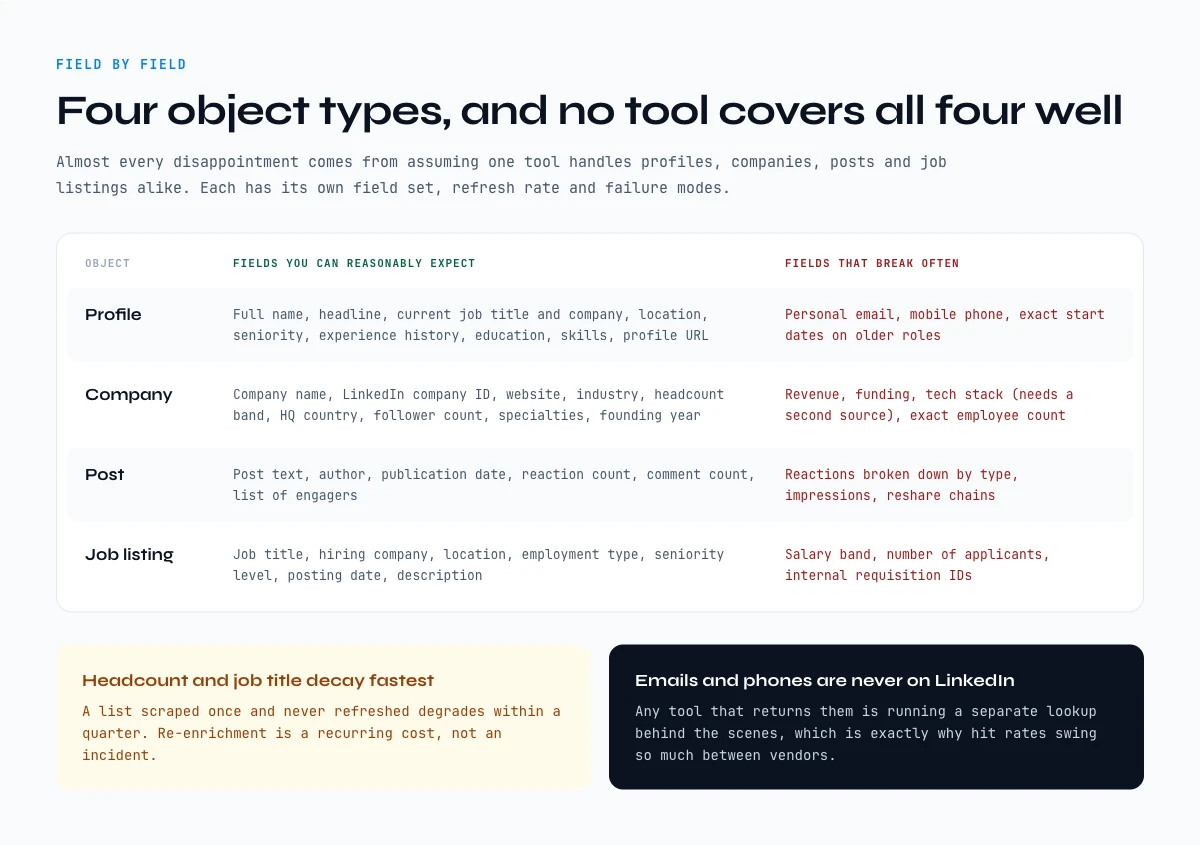
A LinkedIn scraper returns four different object types, and almost every disappointment comes from assuming one tool covers all four. Profiles, companies, posts and job listings each have their own field set, their own refresh rate, and their own failure modes.
| Object | Fields you can reasonably expect | Fields that break often |
|---|---|---|
| Profile | Full name, headline, current job title, current company, location, seniority, experience history, education, skills, profile URL | Personal email, mobile phone, exact start dates on older roles |
| Company | Company name, LinkedIn company ID, website, industry, headcount band, HQ country, follower count, specialties, founding year | Revenue, funding, tech stack (needs a second source), exact employee count |
| Post | Post text, author, publication date, reaction count, comment count, list of engagers | Reactions broken down by type, impressions, reshare chains |
| Job listing | Job title, hiring company, location, employment type, seniority level, posting date, description | Salary band, number of applicants, internal requisition IDs |
Two consequences worth planning for. First, headcount and job title are the two fields that decay fastest, so a list scraped once and never refreshed degrades within a quarter. Second, emails and phone numbers are never on LinkedIn: any tool that returns them is running a separate lookup behind the scenes, which is why hit rates vary so much between vendors. Our email finder comparison breaks down that second step on its own.
If you only need one field repeatedly, a full scrape is overkill. Targeted extractions like pulling company info from a profile URL are cheaper and far less fragile.
In the web app or Google Sheets
Judge the workflow, not the feature list
The useful comparison is what happens after the extraction. With Derrick, the results land in the web app or in Google Sheets as rows and the enrichments run in the same file, so there is no export step between capture and work.
- Feature
- Import LinkedIn Leads (regular & Sales Navigator)
- Credit cost
- 1 credit per lead imported
The first button opens the web app (nothing to install): 1 credit per lead imported, 100 free credits every month. The second details the feature and its cost per plan.
Cookie, API or native: the three LinkedIn scraper architectures
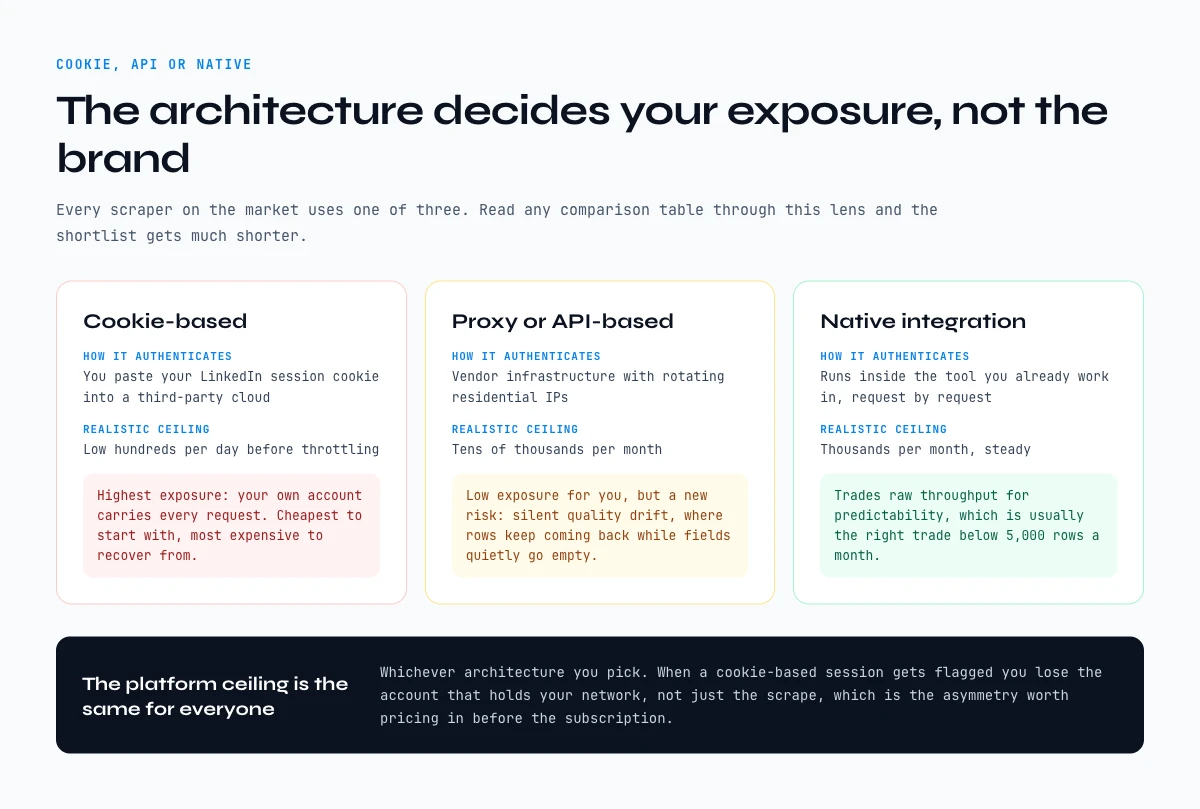
Every LinkedIn scraper on the market uses one of three architectures, and the architecture decides your ban exposure far more than the brand name does. Read the comparison table above through this lens and the shortlist gets much shorter.
| Architecture | How it authenticates | Account exposure | Realistic ceiling | Who it suits |
|---|---|---|---|---|
| Cookie-based | You paste your LinkedIn session cookie into a third-party cloud | Highest: your own account carries every request | Low hundreds per day before throttling | One-off campaigns, no-code operators |
| Proxy / API-based | Vendor infrastructure with rotating residential IPs | Low for you, but output quality swings with proxy health | Tens of thousands per month | Engineering teams with a pipeline |
| Native integration | Runs inside the tool you already work in, request by request | Low, because volume is paced by the operator | Thousands per month, steady | Sales and RevOps working in spreadsheets |
Cookie-based tools are the cheapest to start with and the most expensive to recover from. When a session gets flagged, you lose the account that holds your network, not just the scrape. Proxy-based tools move that risk off your account but hand you a new one: silent quality drift, where rows keep coming back but fields quietly go empty. Native integrations trade raw throughput for predictability, which is usually the right trade below 5,000 rows a month.
Whichever architecture you pick, the platform-side ceilings are the same for everyone. We documented the real numbers in our guide to LinkedIn scraping limits, and the safest starting posture is described in the Chrome extension workflow.
Quick comparison: top 3 vs Derrick
| Tool | Price | Where it runs | API / MCP | Credits | Free tier |
|---|---|---|---|---|---|
| PhantomBuster | $69/mo | Cloud dashboard | API only - no MCP | ✗ Don't roll over | ✗ No free plan |
| Apify | $39/mo | Cloud / API / actors | API + actors - no MCP | ~ Pay-as-you-go | ~ Limited trial |
| Evaboot | $29/mo | Cloud (Sales Nav focus) | No public API | ✗ Expire monthly | ~ Limited trial |
| ✦ Derrick | €20/mo | ✓ Native Google Sheets | ✓ Open API + native MCP | ✓ Roll over forever | ✓ 100 free credits, no card |
The app works through your list row by row: 1 credit per lead imported.
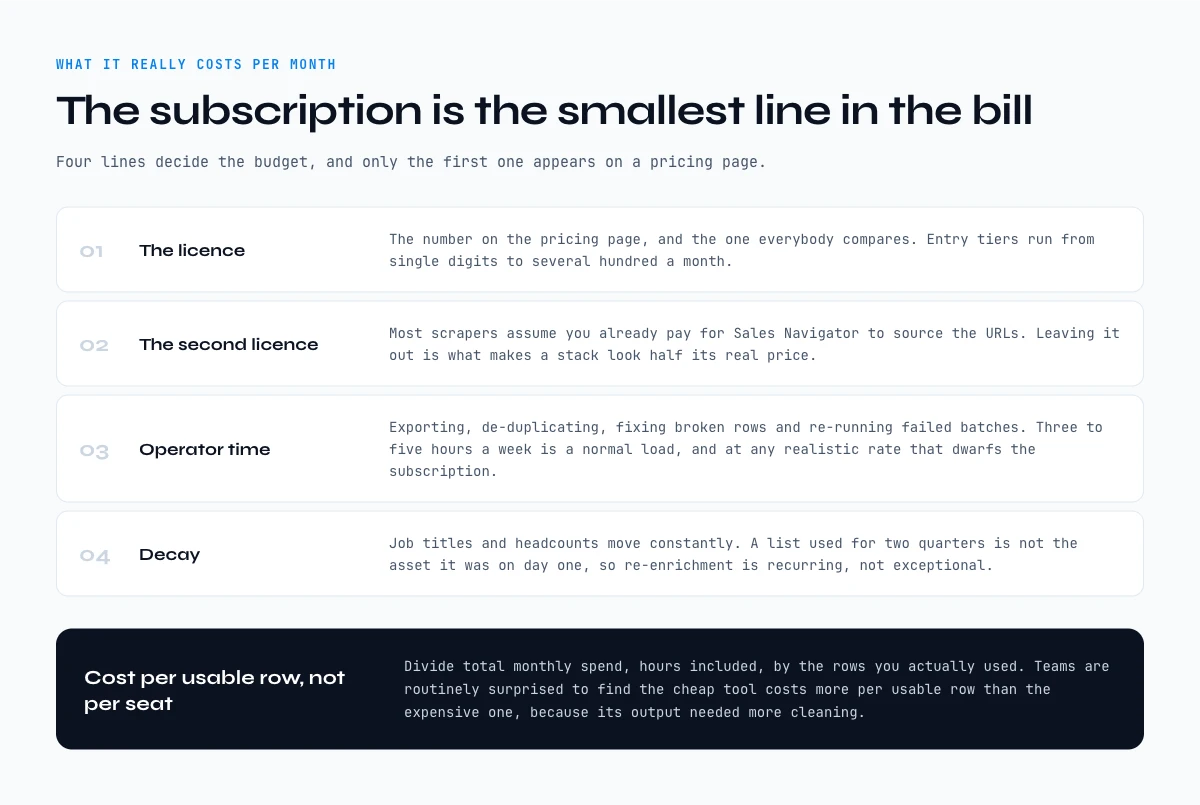
What the best LinkedIn scraper really costs per month
Subscription price is the smallest line in the bill. The three costs that actually decide your budget are the licence, the operator hours, and the re-scraping you do because the first list went stale.
- The licence. Entry tiers across this comparison run from single digits to several hundred per month. That is the number on the pricing page, and it is the one everybody compares.
- The second licence. Most scrapers assume you already pay for Sales Navigator to source the URLs. Budget it, because leaving it out is what makes a stack look half its real price.
- Operator time. Exporting, de-duplicating, fixing broken rows and re-running failed batches is where the hours go. Three to five hours a week is a normal load for a team scraping steadily, and at any realistic loaded rate that dwarfs the subscription.
- Decay. Job titles and headcounts move constantly. A list scraped once and used for two quarters is not the same asset it was on day one, so re-enrichment is a recurring cost, not an incident.
The practical test: divide your total monthly spend, including hours, by the number of rows you actually used. Teams are routinely surprised to find the cheap tool costs more per usable row than the expensive one, because its output needed more cleaning. That is also the argument for keeping enrichment where the cleaning already happens, which for most sales teams means the spreadsheet.
Use the picker above if you want a shortcut: it maps your monthly volume and use case onto the three actions that matter at your scale, and points to the guide worth reading first.
How to choose a LinkedIn profile scraper for your workflow
When should I use a LinkedIn scraper instead of Sales Navigator alone?
Sales Navigator is excellent at finding the right people. It's terrible at letting you take that data anywhere else. The moment you want emails, phone numbers, or 200 leads in a CRM, you need a scraper layered on top. A practical rule: any list above ~30 leads is worth automating.
How do I avoid getting my LinkedIn account banned?
The biggest single risk factor is using your real LinkedIn cookie with a tool that doesn't manage rate limits well. Two safer paths: pick a tool that doesn't ask you to paste your LinkedIn cookie into a third-party cloud (Derrick, Bright Data, Apify in API mode), or use a dedicated secondary LinkedIn account for scraping that's separate from your professional one. Note that any LinkedIn scraper will still need you to have a LinkedIn or Sales Navigator account to source URLs and lists in the first place - the goal is to minimize how much of your session ends up in someone else's hands.
What's the realistic cost per enriched lead?
Across the 10 tools, cost per fully enriched lead in 2026 ranges from roughly €0.01 (Derrick at scale) to $0.40+ (lower-volume Wiza/PhantomBuster setups). Engineering-grade options like Bright Data can be cheaper per row at very high volumes but carry a fixed-cost floor. We've seen teams pay 5× more than necessary because they picked a per-action billing model when their actual workload was burst-y rather than steady.
Can I scrape LinkedIn without writing any code?
Yes. Derrick (in the web app or in Google Sheets), PhantomBuster (cloud workflows), Lix (Chrome extension), and Lemlist all run no-code. Apify and Bright Data require some technical comfort. Captain Data sits in between with a workflow builder. If you want to bridge no-code and AI, Derrick's MCP endpoint also lets you drive enrichment from Claude Desktop or ChatGPT in plain English, no code required.
Why do my scraping results sometimes return blank fields?
Three common causes. First, the prospect's LinkedIn profile is private or has key fields hidden - there's nothing to extract. Second, the company page on LinkedIn is incomplete (small or new companies often skip industry, size, or website). Third, the scraper itself failed silently (rate limit, expired cookie, broken proxy). Quality tools surface these failures explicitly. Less mature tools just return blanks.
What to do after you scrape LinkedIn
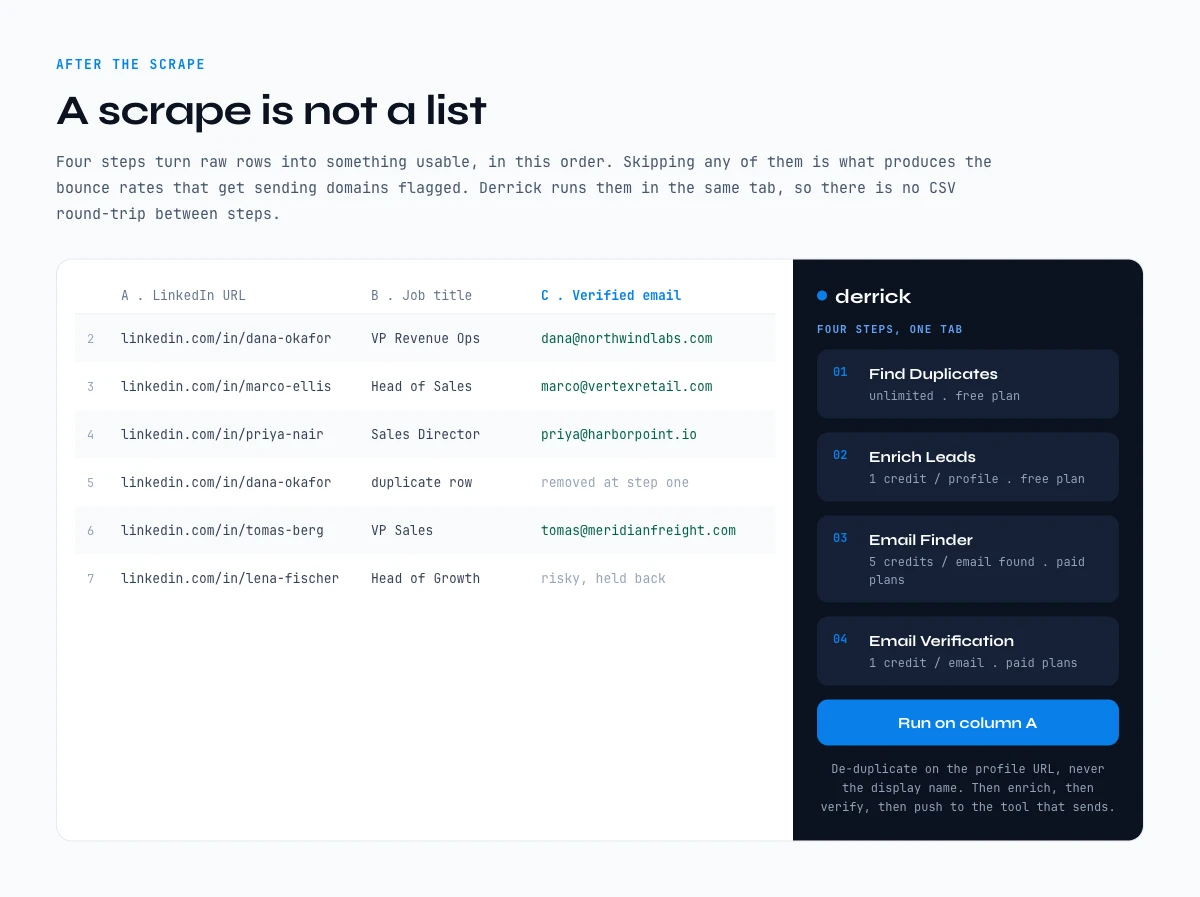
A scrape is not a list. Raw LinkedIn rows become usable in four steps: de-duplicate, enrich, verify, then push to the tool that sends. Skipping any of them is what produces the bounce rates that get sending domains flagged.
- De-duplicate on a stable key. Use the LinkedIn profile URL or company ID, never the display name. The same person appears three times across two exports more often than you would expect.
- Enrich the missing fields. Emails, phone numbers and firmographics come from a second lookup, not from the scrape itself. Run it on the deduplicated list so you are not paying twice for the same row.
- Verify before you send. An unverified email list is a deliverability problem waiting to happen. Verification is cheap compared to rebuilding a domain reputation.
- Push to the sending tool. Enrichment and sending are different jobs. Keep the clean list in one place, then export it into whichever sequencer or CRM your team already runs.
This is the part where a native Google Sheets workflow pays off: the deduplication, the enrichment and the verification all happen in the same tab, so there is no CSV round-trip between steps. Derrick fills the columns in place with Enrich Leads for profile data and Enrich Companies for firmographics, both available on the free plan at 1 credit per row. Our LinkedIn to Google Sheets guide walks through the full pipeline, and the scraper API guide covers the same flow for engineering teams.
Try Derrick free: 100 credits per month, no card required, and run this workflow on your own list before committing to any stack.
One guide every 2 weeks, no spam: the email capture just below this article is where we send new LinkedIn scraping teardowns as we publish them.
LinkedIn profile scraper vs company scraper: which one your pipeline needs
A LinkedIn profile scraper and a company scraper answer two different questions, and picking the wrong one is the most common reason a scraping project stalls after week two. A profile scraper works at the person level: it reads a profile URL and returns the human, their current title, their tenure, their location, their skills and the identifiers you need to reach them. A company scraper works at the account level: it reads a company page and returns headcount, industry, locations, growth signals and the shape of the org.
The test is simple. If your next action is addressed to a person (a message, a call, a sequence), you need profile data. If your next action is a decision about a list (which accounts to open, which segment to prioritise, which territory to staff), you need company data. Teams that buy a profile scraper to build a target account list end up with 4,000 rows of individuals and no way to roll them up, and teams that buy a company scraper to run outreach end up with a clean account list and nobody to contact.
| Question you are answering | Which scraper | Typical fields returned | What it feeds |
|---|---|---|---|
| Who is this person and how do I reach them? | Profile scraper | Full name, headline, current title, company, tenure, location, profile URL, then email and phone on a separate lookup | Sequences, calls, connection requests, CRM contact records |
| Is this account worth my time? | Company scraper | Legal name, domain, headcount band, industry, HQ, funding and hiring signals | Territory planning, ICP scoring, account lists, routing rules |
| Who works at these 300 accounts? | Both, in that order | Company first to qualify, then profiles inside the qualified accounts only | Account-based outbound where you only pay to enrich what survived the filter |
The third row is the one that decides your bill. Running a profile scraper across every employee of every account on your list is how a 100-row experiment turns into a 9,000-row invoice. Qualify at the company level first, keep the accounts that match, and only then go down to the people. Inside Derrick that is two separate steps you control row by row: Enrich Companies at 1 credit per company to qualify the account, then Enrich Leads at 1 credit per profile on the survivors only. Both are available on the free plan, which carries 100 credits per month, so a two-step qualification on a small test list costs you nothing but the credits you actually spend.
Contact details sit one level further out, and they are deliberately not part of the profile payload: finding a verified professional email is Email Finder at 5 credits per email found, and a direct phone number is Phone Finder at 200 credits per number found. Both are paid features, both bill only when they return something, and both exist as separate steps precisely so that you never pay for a contact lookup on a row you would have disqualified anyway.
Run a LinkedIn profile scraper without maintaining one: spreadsheet, API or MCP
Most of what breaks in a LinkedIn profile scraper is not the extraction, it is the maintenance. Selectors move, a login flow changes, a proxy pool degrades, and the script that worked in March returns empty strings in September without raising an error. That is the real cost of the open-source route: the code is free, the week you spend every quarter repairing it is not. The alternative is to consume profile data as a service, and there are four ways to do that depending on where you actually work.
| Where you work | The surface to use | What a run looks like | Best when |
|---|---|---|---|
| A list of profile URLs in a spreadsheet | Google Sheets extension | Paste the URLs in a column, open the Derrick sidebar, pick the enrichment, watch the columns fill row by row | You already live in a sheet and want the output next to your existing columns |
| A question you are asking an AI assistant | MCP server | Connect Derrick to Claude, Claude Code, ChatGPT or any MCP client, then ask for the profile in plain language | The research is conversational and the answer feeds a document, not a database |
| A pipeline, a CRM or an internal app | REST API | One authenticated call per profile, structured JSON back, wired into your own job queue | Enrichment has to happen on an event (a new signup, a new deal, a nightly sync) |
| A browser, with no spreadsheet in sight | Web app | Upload or paste a list, run the same enrichments online | Available now, nothing to install: the online workspace for people who do not want a spreadsheet at all |
Whichever door you use, the payload is the same, which matters more than it sounds: a profile enriched from the sidebar and a profile enriched from the API return the same fields with the same names, so a workflow that starts as a manual sheet can become a scheduled API job without anyone rewriting the mapping. A single profile lookup returns a structured record along these lines:
{
  "linkedin_url": "https://www.linkedin.com/in/example-profile/",
  "first_name": "Dana",
  "last_name": "Whitfield",
  "headline": "VP RevOps at Northwind Logistics",
  "current_title": "VP Revenue Operations",
  "company_name": "Northwind Logistics",
  "company_linkedin": "https://www.linkedin.com/company/northwind-logistics/",
  "location": "Chicago, Illinois, United States",
  "seniority": "VP",
  "tenure_months": 27
}
Two things are worth noticing in that record. The first is that it contains no email and no phone: those come from separate, paid lookups, and keeping them out of the profile payload is what stops a bulk profile run from silently becoming an expensive contact run. The second is tenure_months, which is the kind of field that decides an outreach angle far more reliably than a headline does. Someone 3 months into a VP RevOps seat is rebuilding a stack; someone 27 months in is defending one. Same job title, opposite message.
If you are picking between the open-source route and a managed one, the honest decision rule is the volume of profiles per month multiplied by how much a wrong field costs you. Below a few hundred profiles a month with low stakes, a script you maintain is perfectly reasonable. Above that, or anywhere the output feeds a CRM that other people trust, the maintenance is the product. Our Python scraping guide walks through the DIY path honestly, including what you will be signing up to maintain, and the scraping API guide covers the managed path end to end.
Is LinkedIn scraping legal?
Scraping public LinkedIn data is generally permitted in the United States under the hiQ Labs v. LinkedIn 9th Circuit ruling (2019, reaffirmed 2022), which held that public profile data is not protected by the Computer Fraud and Abuse Act. LinkedIn's Terms of Service do prohibit automated scraping, which is a contractual matter rather than a criminal one. Practically, this means most teams scrape via tools that minimize their direct exposure (no personal account, respectful rate limits) and treat the contractual risk as part of doing business. GDPR adds a separate constraint when processing EU residents' data - you need a lawful basis (typically legitimate interest for B2B prospecting) and an honest opt-out path.
None of this is legal advice. Talk to counsel if you're scraping at scale, especially across EU data subjects.
Frequently asked questions
What is the best free LinkedIn scraper in 2026?
Can I scrape Sales Navigator search results?
How fast is a LinkedIn scraper?
Do LinkedIn scrapers find email addresses?
Will LinkedIn detect that I'm using a scraper?
What's the difference between a LinkedIn scraper and a B2B database?
Does Derrick offer an API or MCP endpoint?
What data can a LinkedIn scraper not extract?
Keep reading
Continue exploring this cluster


Best LinkedIn Scraper Chrome Extensions 2026: 12 Tools Compared (Workflow, Risk, Pricing)
Read →

LinkedIn Scraper MCP: How to Pull LinkedIn Data Straight Into Claude (2026 Guide)
Read →

How to Extract Company Info from LinkedIn Profile URL: Complete 2026 Guide
Read →

How to Export Members of a LinkedIn Group (with Emails) - 2026 Tutorial
Read →