How to Find a Company's LinkedIn Page from Its Name
Find any company's LinkedIn page from its name: the search bar, Google operators, and how to resolve names to verified LinkedIn URLs in bulk in Sheets.


The LinkedIn company URL is the single most useful identifier in B2B prospecting. Once you have it, everything else about a company becomes reachable: its headcount, its industry, its description, its people, and its decision makers. But you rarely start with the URL. You start with a name in a CRM field, a line in a spreadsheet, or a logo on a slide. This guide shows you how to go from that raw company name to a verified LinkedIn page, both for a single lookup and for a list of hundreds.
LinkedIn lists more than 67 million company pages (LinkedIn, 2024), so the name you are searching almost certainly has a page. The hard part is not whether it exists, it is matching the right one and capturing the exact URL without opening twenty tabs.
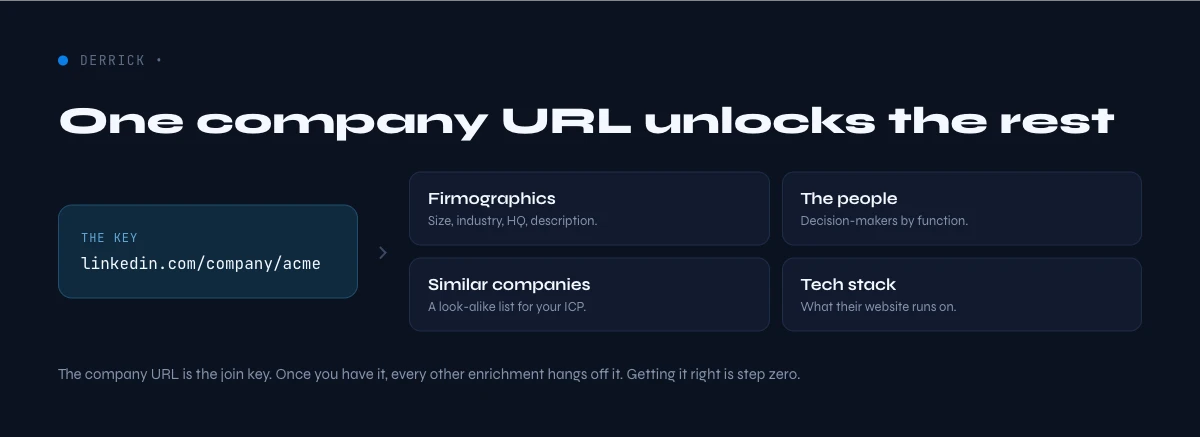
Why the LinkedIn company URL is the key that unlocks the rest
Think of the LinkedIn company URL as a primary key. On its own it looks like a simple web address, but it resolves an ambiguous name ("Acme", "Acme Corp", "ACME Inc.") to one canonical entity. That resolution is what makes the rest of your research possible.
With the verified URL in hand you can pull the employee count, read the company description, identify the right contact email, and build a list of similar companies for account-based targeting. Skip this step and every later lookup inherits the ambiguity: you enrich the wrong Acme, email the wrong office, and your reply rates quietly drop.
This is why sales teams treat the LinkedIn URL as the anchor field in their data model. It is stable, it is unique, and it maps one-to-one to a company. Names do not.
There is a compounding effect worth naming. A messy name field costs you a few seconds on the first lookup, but that cost repeats every time anyone on the team touches the record. Multiply a five-second disambiguation by a 500-account list and three teammates, and you have lost the better part of a day to a problem the URL solves once. Capturing the canonical page early is the highest-leverage cleanup you can do to a prospect list, and it is why experienced operators resolve URLs before they enrich anything else.
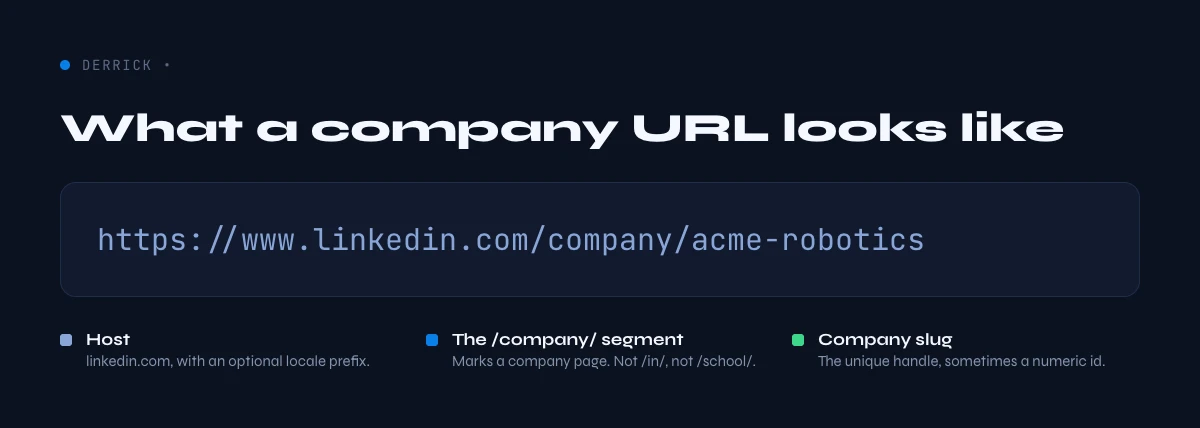
What a LinkedIn company URL actually looks like
Before you go hunting, learn to recognize a good URL. Every company page on LinkedIn follows one canonical format:
https://www.linkedin.com/company/{handle}
The {handle} is a unique, human-readable slug the company chose, such as google, stripe, or acme-corp. A few things to know:
- The handle is not always the company name. A firm called "Acme Corporation" might use the handle
acme,acmecorp, or a legacy handle from a past rebrand. - Numeric IDs also work. You will sometimes see
linkedin.com/company/1234567. That numeric form is the internal company ID and it always redirects to the canonical handle. If you need that number for an API integration, see the guide on the LinkedIn company ID. - Ignore the tracking noise. URLs copied from the app often carry query strings like
?originalSubdomain=fror/about/. Trim everything back to/company/{handle}before you store it.
Storing the clean, canonical form matters because two different-looking URLs can point to the same page. Normalizing them prevents duplicate rows in your CRM later.
In the web app or Google Sheets
Company name in, LinkedIn page out
This is the lookup that unblocks every other enrichment in this silo. Give Derrick the company name or domain in a column and it returns the matching LinkedIn page on the row, for the whole list.
- Feature
- Company LinkedIn Finder
- Credit cost
- 1 credit per company found
The first button opens the web app (nothing to install): 1 credit per company found, 100 free credits every month. The second details the feature and its cost per plan.
Method 1 - Search LinkedIn directly by name
The most obvious method is also the most reliable for a single company. It works whether or not you are logged in, though logged-in results are richer.
Step 1. Type the company name into the LinkedIn search bar at the top of any page.
Step 2. Click the Companies filter (or press Enter and choose "Companies" from the results tabs). This strips out people, posts, and jobs so you only see company pages.
Step 3. Match on the signals, not just the name. When several companies share a name, use the logo, the industry, the location, and the follower count to pick the real one. A global brand will have hundreds of thousands of followers; a local namesake will have a few hundred.
Step 4. Open the page and copy the URL from your browser bar, then trim it to the canonical form described above.
Manual search is accurate but slow, and it does not scale. Resolving fifty company names this way is an afternoon of tab-juggling, and it is exactly the kind of repetitive lookup that invites copy-paste errors.
Method 2 - Use a Google site search operator
Google often indexes LinkedIn company pages faster and cleaner than LinkedIn's own logged-out search. The trick is the site: operator, which restricts results to one domain and one path.
Search for:
site:linkedin.com/company "Acme Corporation"
The quotes force an exact-phrase match on the name, and the site: path keeps you on company pages only (not personal profiles). The first organic result is usually the canonical page. This method has three advantages:
- It works without a LinkedIn login and without burning your daily search quota inside the app.
- Google's snippet shows the industry and location, so you can disambiguate before you click.
- You can add qualifiers, for example
site:linkedin.com/company "Acme" Paris software, to pin down the right entity when the name is generic.
The limitation is the same as Method 1: it is a one-at-a-time workflow. Google will also rate-limit aggressive automated querying, so this is a manual tactic, not a bulk one.
Method 3 - Work back from the website or an employee profile
Sometimes the name alone is too ambiguous, but you have an extra clue: the company's website domain, or the name of someone who works there.
From the website. Most companies link their LinkedIn page in the footer of their homepage. Open the site, scroll to the bottom, and look for the LinkedIn icon. This is the single most authoritative source, because the company itself placed the link.
From an employee. If you know one person at the company, open their LinkedIn profile and click their current employer under the Experience section. That link goes straight to the official company page. This is a handy fallback when the company name is common but the person is not.
From an email domain. If all you have is a work email like jane@acme.com, the domain is a strong lead. Search the bare domain (acme.com) on Google alongside the site: operator, or drop the domain into an enrichment tool that maps domains to company pages. The domain rarely lies, because a company controls its own email, so this route resolves fast even when the display name is generic or heavily abbreviated.
Both routes are reliable for one target, but notice the pattern: every manual method trades accuracy for time. The moment you have more than a handful of companies, you need a different approach.
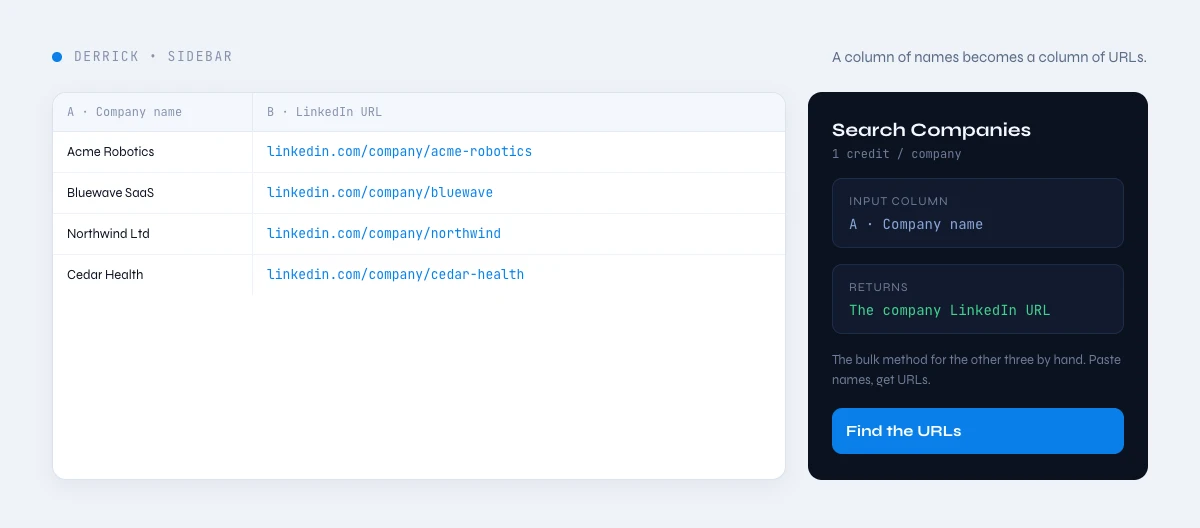
Method 4 - Resolve names to LinkedIn URLs in bulk with Derrick
When you have a list of company names - a conference attendee export, a target account list, a stack of business cards typed into a sheet - searching each one by hand is not an option. This is where an enrichment tool earns its place.
Search Companies is a Derrick feature that finds a company's LinkedIn URL from its name. Derrick runs in the web app or in the Google Sheets sidebar, so you work in the spreadsheet you already have rather than learning a new dashboard. You put company names in one column, run the function, and Derrick returns the matched LinkedIn company URL next to each row.
How it works, step by step:
- Open a list in the Derrick web app, or your Google Sheet, with a column of company names.
- Open the Derrick web app or its Google Sheets sidebar and pick the Search Companies function.
- Point it at your names column and run it. Derrick resolves each name to its LinkedIn company URL, matching on the company entity rather than a naive text search.
- Review the results. When a match is uncertain, Derrick tells you in plain language so you can spot-check rather than trust a silent guess.
Search Companies costs 1 credit per company and is available on the free plan as well as paid plans. The free plan includes 100 credits per month, which is enough to resolve a real starter list before you decide to scale. Because Derrick works at any volume, the same function that handles ten names handles ten thousand, so your workflow does not change as your lists grow.
Once every name is resolved, the URL becomes the anchor for the next step. You can chain it straight into Enrich Companies to pull headcount, industry, and description in the same sheet, or into Find Similar Companies to expand a proven account into a lookalike list.
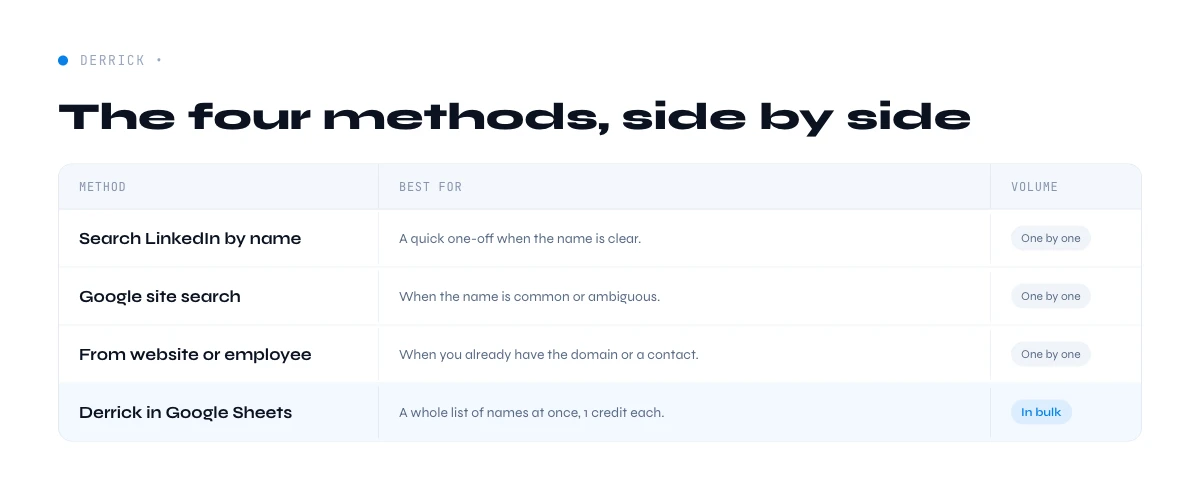
The four methods compared
Each method has a sweet spot. The right choice depends on how many companies you are resolving and how much you trust the name you started with.
| Method | Best for | Speed at scale | Accuracy |
|---|---|---|---|
| LinkedIn search bar | A single known company | Slow (one at a time) | High, if you match on signals |
| Google site: operator | A single ambiguous name | Slow (one at a time) | High, snippet aids disambiguation |
| Website or employee | When the name is too common | Slow (manual) | Very high (company-verified link) |
| Derrick Search Companies | A list of names, any size | Fast (whole column at once) | High, with an uncertainty flag |
The pattern is clear: manual methods win on a single stubborn lookup, and a spreadsheet function wins the moment you have a list. Most teams use both - the search bar for a one-off, the web app or the sidebar for the weekly target list.
Common mistakes and what to do once you have the URL
Mistake 1: grabbing the first result blindly. Generic names ("Apex", "Vertex", "Nova") have dozens of pages. Always confirm with a second signal - the location, the industry, or the website in the About tab - before you save the URL.
Mistake 2: saving the messy URL. A URL with /about/, a language subdomain, or a tracking string will fragment your data. Normalize to linkedin.com/company/{handle} so the same company never appears twice.
Mistake 3: confusing a Showcase page with the main page. Large companies run Showcase pages for product lines. These look like company pages but represent a sub-brand. For firmographic data, always anchor on the primary company page.
Mistake 4: doing it by hand at scale. The single biggest time sink in prospecting is resolving names one browser tab at a time. If you catch yourself doing this for more than five companies, move the job into the Derrick web app or a spreadsheet.
Mistake 5: trusting the match without a verification pass. Automated matching is fast, but no method is perfect on messy input. Build a five-second verification habit: for a sample of rows, open the returned page and confirm the industry and location line up with what you expected. A tool that flags its own uncertainty makes this easy, because you only check the rows it was unsure about instead of all of them. That single habit is the difference between a list you trust and one that quietly poisons your reply rates.
Once you have a clean, verified URL, the LinkedIn page becomes a launchpad. From there you can measure company size to segment your list, read the description to personalize outreach, identify the company's sector to match it against your ICP, and pull the contact email to actually reach someone. The URL is step one of a chain, and getting it right makes every later step land.
Ready to stop copy-pasting company names into search bars? See how Derrick resolves names to LinkedIn URLs in the web app or in a spreadsheet you already use.
Frequently asked questions
What does a LinkedIn company URL look like?
How do I find a company's LinkedIn page from just its name?
Can I find LinkedIn URLs for a whole list of companies at once?
Why do two different company names return the same LinkedIn page?
What is the difference between a company page and a Showcase page?
Is finding a company's LinkedIn URL free?
Keep reading
Continue exploring this cluster


The State of LinkedIn Company Data 2026: How Reliable Is the Firmographic Layer?
Read →

LinkedIn Company Followers: How to Identify and Leverage Them for B2B Prospecting
Read →

LinkedIn Company Hashtags: The Complete Guide to Maximizing Your B2B Visibility
Read →

LinkedIn Company Tagline: Definition, Creation, and B2B Prospecting Use Cases
Read →