LinkedIn Company Hashtags: The Complete Guide to Maximizing Your B2B Visibility
How to find, use and track LinkedIn company hashtags, now the Specialties field. Extract any company's Specialties in bulk, free in the Derrick web app.


LinkedIn company hashtags have become a strategic lever for improving your visibility with qualified prospects. But since 2024, LinkedIn has replaced page hashtags with "Specialties" (also called Specialisms), fundamentally changing how company pages optimize their discoverability.
If you manage a LinkedIn company page and want to generate more B2B leads, understanding this shift and knowing how to leverage it is now essential. This guide explains everything: what company hashtags are, how to use them strategically, and most importantly, how to automatically find them to analyze competitors or enrich your databases.
Do LinkedIn Company Pages Still Have Hashtags in 2026?
Short answer: no hashtag field anymore. A company page now carries up to 20 Specialties (keywords, no # sign) and up to 3 hashtags for Trending employee content. Hashtags still work inside posts.
Here is what is true today, in one list you can check against your own page:
- Specialties: up to 20 terms, written without the # sign, edited in the page's Details section. They replaced the old page hashtags in 2024.
- Trending employee content: a super admin can add up to 3 hashtags so that employee posts using them show up on the page's Life or What we do tab. Changes take about 6 hours to go live, and capitalization doesn't matter (#XYZ and #xyz are the same tag), per LinkedIn Help.
- Posts, articles and comments: hashtags are still clickable and searchable. Most guides land on 3 to 5 per post.
- Following hashtags: gone. You can't follow a hashtag from your profile anymore.
- Hashtag analytics: page analytics report posts, not hashtags. You measure a hashtag by comparing the posts that carry it.
So when people search for a company's hashtags, what they usually need is two things: the Specialties of that page, and the tags its team keeps using in posts. The rest of this guide covers both, on your page and on any page you want to study.
What Are LinkedIn Company Hashtags and Why Did They Change?
Defining LinkedIn Hashtags
LinkedIn hashtags are keywords preceded by the # symbol that categorize your content on the platform. They work as thematic tags that allow users to discover your posts even if they're not part of your direct network.
For instance, when Sarah, a marketing manager at a SaaS startup, publishes a post with #MarketingAutomation, that content becomes discoverable by all professionals who follow that hashtag or search for that topic on LinkedIn.
The 2024 Change: From Hashtags to Specialisms
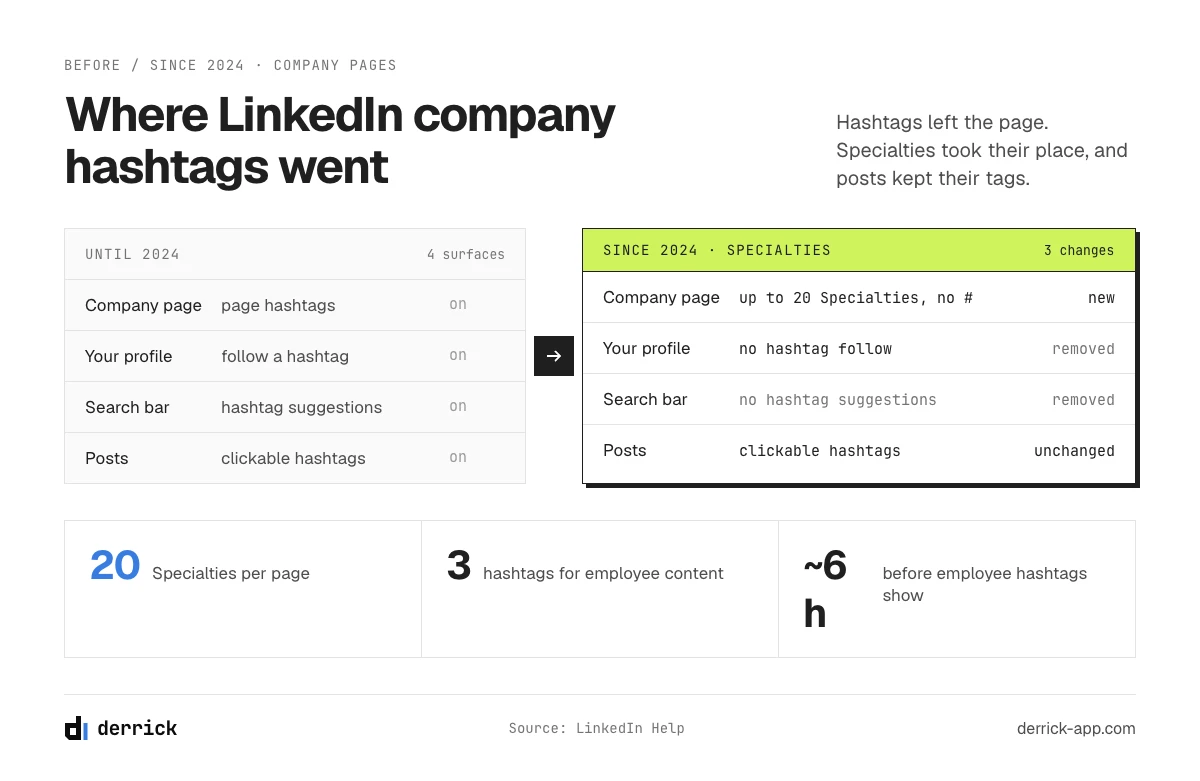
In 2024, LinkedIn made a major change: company page hashtags were replaced by "Specialisms" (shown as Specialties on many pages). This evolution reflects a strategic shift in LinkedIn's algorithm, which now prioritizes keywords and semantic relevance over simple hashtag following.
What changed:
- Hashtags can no longer be directly added to your company page
- You can't follow hashtags from your profile anymore
- Hashtags disappeared from search bar suggestions
- Instead, LinkedIn lets you add up to 20 "Specialisms" that work as keywords
What stayed the same:
- You can still use hashtags in your posts
- Hashtags remain clickable and searchable
- Hashtags still make a post findable through hashtag search and the hashtag feed
Why This Change Matters for B2B Companies
LinkedIn says it has more than 1 billion members. Your company page is where many of them check you before they reply to a sales email, so the words it carries matter. Since hashtags left the page, those words are the Specialties.
For Alex, a Sales Ops Manager at a tech scale-up, understanding these changes means optimizing his company page to be found by the right decision-makers at the right time. Specialisms become strategic signals sent to LinkedIn's algorithm to categorize your expertise and position you in the right conversations.
How Specialisms (Former Hashtags) Work on LinkedIn Company Pages
Where to Find Specialisms on Your Page
To access your company page Specialisms:
- Log into your LinkedIn company page
- Click the "Edit page" pencil icon
- Select "Details" from the sidebar menu
- Scroll to the bottom of the page
- You'll find the "Specialisms" section
Important: This section doesn't display the # symbol before terms, but it works exactly like former hashtags. Your specialisms help your page appear in relevant searches and be discovered by your target audience. To dive deeper into optimizing your LinkedIn presence, see how the other fields of a company page work in our LinkedIn company data guide.
How Specialisms Work in LinkedIn's Algorithm
Specialisms act as semantic markers for LinkedIn's algorithm. Here's how they influence your visibility:
1. Expertise Categorization When you add "social media marketing," "brand design," or "data enrichment" as specialisms, LinkedIn understands your business domain and can suggest you in corresponding searches.
2. Search Results Appearance A user searching for "data enrichment tools" will potentially see your page if you've added "data enrichment" in your specialisms, even if they're not connected to your network.
3. Algorithmic Recommendations LinkedIn uses your specialisms to recommend your content to users interested in these topics, even if you don't necessarily use these terms as hashtags in your posts.
Technical Limitations to Know
20 Specialisms Maximum: Unlike hashtags in posts, you're limited to 20 specialisms per page. You need to choose them strategically.
No # Symbol Required: In the Specialisms section, you simply write the term without #. LinkedIn handles the association automatically.
Instant Modification: Unlike your page's historical hashtags that were fixed, you can modify your specialisms anytime to adjust your strategy.
Trending Employee Content: The 3 Hashtags a LinkedIn Company Page Can Still Set
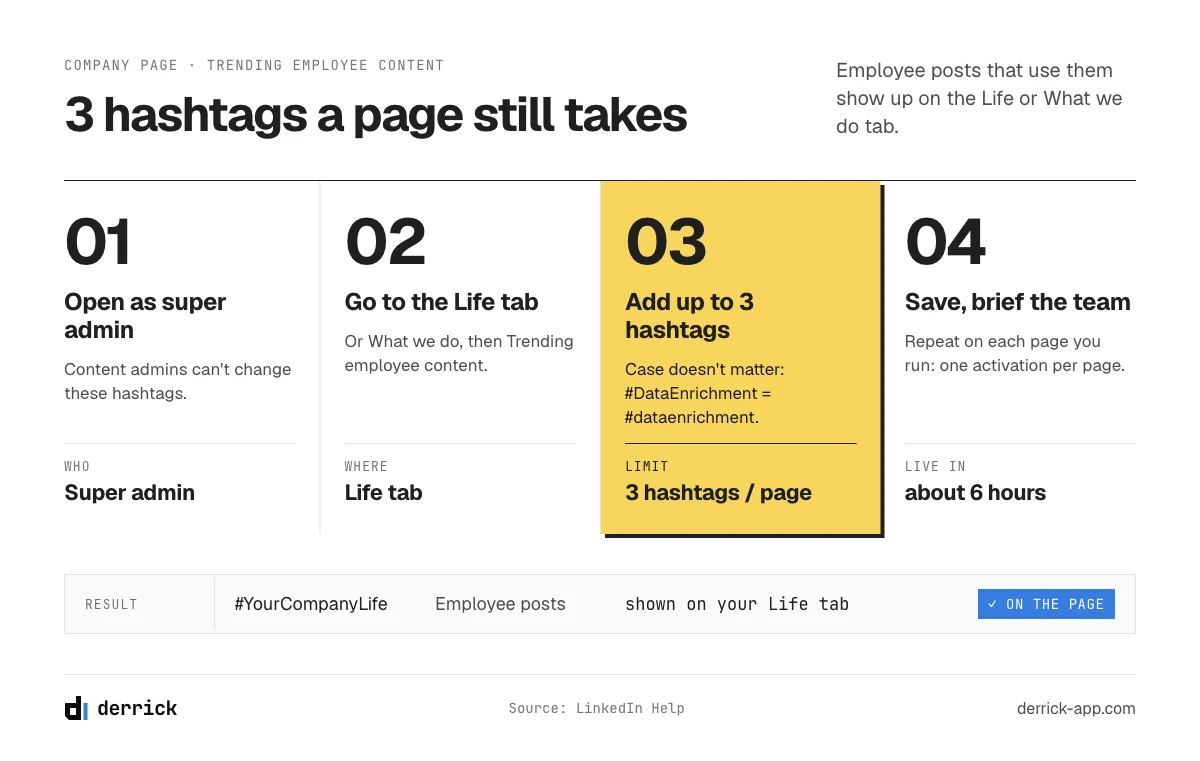
This is the one place where a company page still takes real hashtags. It doesn't tag the page. It pulls in what your employees post.
What Trending Employee Content Does
You pick up to 3 hashtags. When employees publish posts that use them, LinkedIn surfaces those posts on the page, in the Trending employee content area of the Life or What we do tab. For a candidate or a buyer, that is social proof from real people, not from the brand account.
How to Set It Up, Step by Step
- Open your company page as a super admin. Content admins can't change these hashtags.
- Go to the Life tab (or What we do), then to the Trending employee content section.
- Add up to 3 hashtags. Case doesn't matter, so #DataEnrichment and #dataenrichment count as one.
- Save, then wait. LinkedIn says changes take about 6 hours to show.
- Repeat on each page if you run several pages (one per country or per brand). The same hashtag can be used on several pages, but it has to be activated on each one separately.
Source for the limits above: the official LinkedIn Help article on Trending employee content hashtags, which also explains how to combine hashtags with OR and AND logic across department pages.
Which 3 Hashtags to Pick
Pick tags your team would use anyway. One branded tag (#YourCompanyLife), one tag tied to what you sell, one tag tied to the culture you want to show. If nobody on the team posts with them, the section stays empty, and an empty section looks worse than no section. Brief the team once, give them the three tags in writing, and check the tab two weeks later.
Why LinkedIn Hashtags Remain Essential for Your B2B Strategy
Despite the shift to Specialisms for company pages, hashtags remain a powerful tool in your LinkedIn publications. Here's why they're still indispensable in 2026.
What Hashtags Actually Do for Engagement
There's no public figure you can trust on how much engagement a hashtag adds: LinkedIn doesn't publish one, and the numbers that circulate aren't reproducible. What a hashtag does for sure is make a post findable by people who search or browse that tag, outside your network. Whether that turns into engagement for you is something you measure on your own posts.
Emily, a Growth Marketer at a lead generation agency, tests it that way: she alternates posts with a broad (#Marketing) plus niche (#B2BLeadGen) mix and posts without tags, then compares views over a month.
Hashtags as a Competitive Intelligence Tool
An often overlooked use of hashtags: analyzing your competitors' content strategy. By identifying which hashtags your competitors use on their page and in their posts, you can:
- Discover topics they consider strategic
- Identify market niches they're targeting
- Analyze their marketing positioning
- Spot active LinkedIn communities in your sector
Jessica, Head of Marketing at a fintech startup, regularly uses this method to benchmark her content strategy against her 10 main competitors. She discovered that several competitors were positioning themselves on #OpenBanking, a hashtag she'd neglected.
Visibility Beyond Your Direct Network
LinkedIn has more than 1 billion members. Without hashtags, your content remains primarily visible to your first and second-degree network. With relevant hashtags, you become discoverable by any professional searching for those topics.
Mike, an SDR at a B2B software company, adds 3 targeted hashtags to each post: a broad one (#SalesProspecting), a niche one (#B2BSaaSGrowth) and a brand one (#TechForSales). He then checks where his new connection requests come from, to see whether the tags bring people from outside his network.
How to Find a Company's Hashtags on LinkedIn: Methods and Tools
Identifying hashtags a company uses can provide valuable insights into their content strategy and positioning. Let's see how to proceed effectively.
Manual Method: Direct Page Analysis
Step 1: Access the Company Page Go to the LinkedIn page of the company you want to analyze. Scroll to the "About" section of the page.
Step 2: Identify Specialisms Under the company's general information, you'll find "Specialisms" listed. These are the equivalents of former page hashtags.
Step 3: Analyze Recent Posts Browse through the company's recent publications. Hashtags used typically appear at the end of posts and are clickable. Note the hashtags that recur most frequently.
Limitations of this method:
- Time-consuming if analyzing multiple competitors
- Impossible to scale (20+ companies)
- No historical hashtag data
- Unstructured data, difficult to analyze
To go deeper into LinkedIn data extraction techniques, check out our comparison of the 10 best LinkedIn scraping tools.
Automated Method: Preparing the Company List with Derrick
For marketing teams, sales ops, or growth marketers who need to regularly analyze dozens or hundreds of companies, manual extraction quickly becomes impossible. That's where automation comes in.
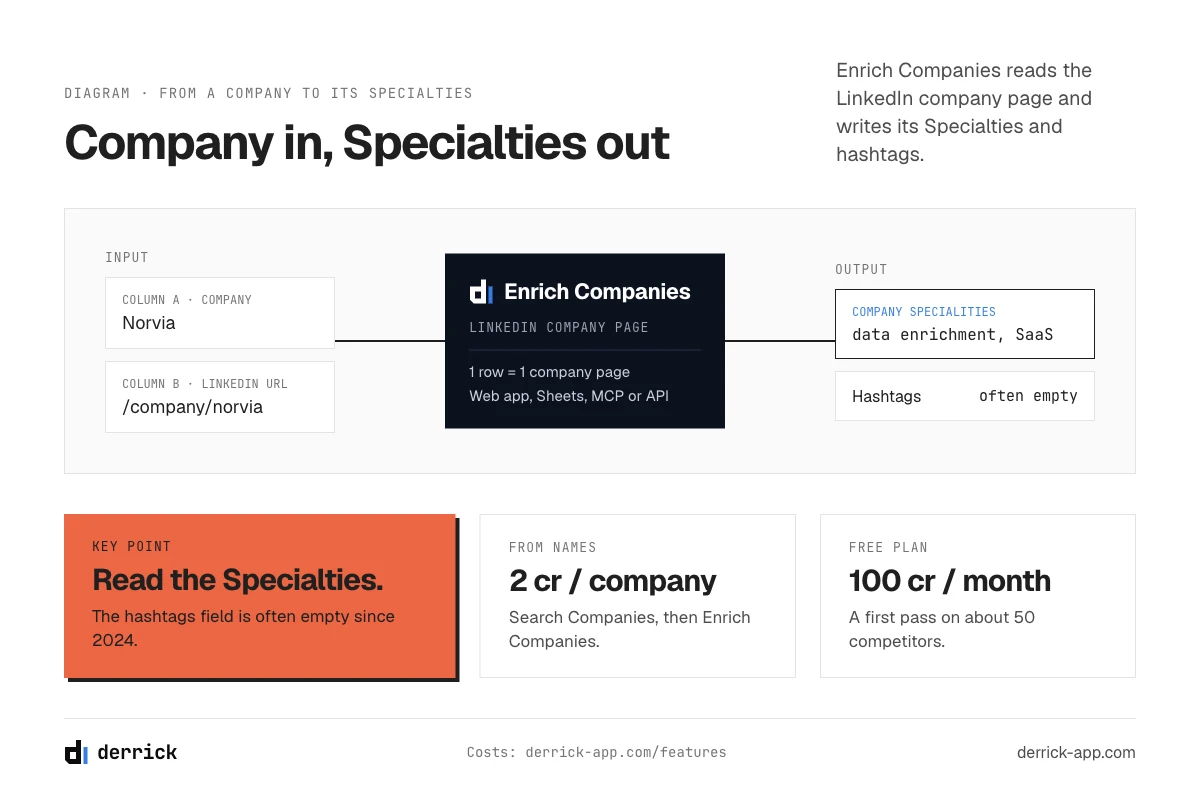
Derrick's company workflows automate the groundwork, in the web app or in Google Sheets: they resolve each contact email, company name or website to the right LinkedIn company page and enrich it with firmographics. Enrich Companies also returns two columns per company page: its Specialties and its associated hashtags (often empty since 2024).
Features to reach each company page:
| Starting Data | Derrick Feature | Use Case |
|---|---|---|
| Contact email | Find Names & Domains by Email, then Search Companies | You have a lead list with emails |
| Company name | Search Companies | List of companies to analyze |
| Company website | Search Companies (from the domain) | Customer database with domains |
| LinkedIn company URL | Enrich Companies | Sales Navigator export |
| LinkedIn profile URL | Enrich Leads (current company), then Enrich Companies | Profile list to enrich |
| Lead email | Find Names & Domains by Email, then Search Companies | Prospect base to qualify |
To dive deeper into using Sales Navigator for prospecting, check out our complete LinkedIn Sales Navigator guide.
Real-world usage example:
Mark, a Growth Marketer at an agency, needs to analyze the content strategy of 50 competing SaaS companies. Here's his workflow with Derrick:
- He compiles the list of 50 companies in the Derrick web app or in Google Sheets (name or LinkedIn URL)
- He resolves each name to its LinkedIn company page with Search Companies
- He runs Enrich Companies, which returns each page's Specialties and associated hashtags in two columns, and reads recent posts for the tags the team actually uses
- Mark analyzes the most used hashtags to identify trending topics
- He adapts his own hashtag strategy accordingly
This workflow saves him the lookup work and gives him a data-driven market overview. To discover all available enrichment workflows, explore our complete catalog of Derrick workflows.
Competitor Hashtag Analysis: What to Look For
Once you've collected your data, here's how to leverage it strategically:
1. High-Potential Niche Hashtag Identification Look for hashtags used by multiple competitors but with less than 100,000 followers. These are often highly engaged niches where you can position yourself effectively.
2. Trending Hashtag Detection If multiple competitors simultaneously start using a new hashtag, it's a signal of an emerging trend in your sector.
3. Sector Community Mapping Hashtags reveal LinkedIn communities where your competitors are active. Joining these conversations can give you access to qualified prospects.
4. Positioning Benchmarking Hashtag analysis shows how your competitors position themselves. Do they use more technical (#DataScience) or business (#DigitalTransformation) hashtags? This reveals their target audience. This approach fits into a broader B2B data enrichment strategy to better understand your market.
The app works through your list row by row. 100 free credits every month.
How to Extract a Company's LinkedIn Specialties and Hashtags at Scale
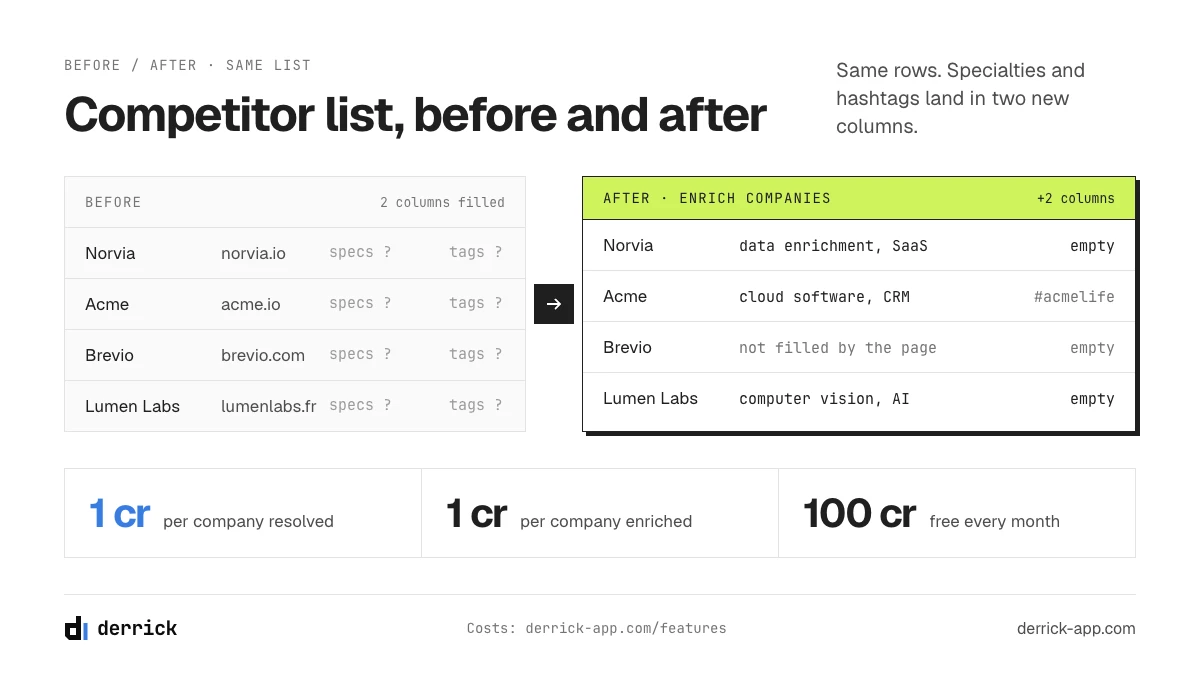
The manual method works for five companies. For fifty, you want the fields in a table. Derrick's Enrich Companies feature returns two columns for each LinkedIn company page: Company specialities and Company associated hashtags. It costs 1 credit per company.
What You Actually Get Back
Expect the Specialties column to be the useful one. Since the 2024 change, the associated hashtags field is empty on many pages: LinkedIn simply stopped asking pages for hashtags. The Specialties field is where companies now describe what they do, in their own words, next to the company tagline and the longer company description.
| Column | What it contains | How to use it |
|---|---|---|
| Company specialities | The comma-separated Specialties typed by the page admin | Map how competitors position themselves, find the terms your market uses |
| Company associated hashtags | Hashtags still attached to the page, often empty since 2024 | Read it when it's filled, don't build a process on it |
| Industry, size, description, tagline, followers | The rest of the page's public fields, in the same run | Segment the list by LinkedIn industry before you read the Specialties |
The Workflow in the Derrick Web App
- Open the Derrick web app and paste or import your list of companies. Nothing to install.
- If you only have names, run Search Companies first to get each LinkedIn company URL (1 credit per company). The method is detailed in our guide to finding a company LinkedIn URL from its name.
- Run Enrich Companies on the URL column (1 credit per company). Both features need your LinkedIn account connected through the Derrick Chrome extension.
- Split the Specialties column into one term per row, count the terms, and sort. The terms that come back on 5 or more competitors are your market's vocabulary. The ones nobody uses yet are open ground.
- No competitor list yet? Start from your best customer and pull similar companies on LinkedIn, then run the same steps.
Starting from names, that's 2 credits per company. The free plan's 100 credits a month covers a first pass on about fifty competitors, no credit card needed.
Same Data in Sheets, Claude or Your Own Code
The web app is the default. If your list already lives in a spreadsheet, the same two features run from the Google Sheets sidebar. If you'd rather ask a question in a chat ("what Specialties do these 10 companies share?"), Claude and any MCP client can call Derrick directly. And if the enrichment has to run without a human, the REST API does it from a script or a Zapier, Make or N8N workflow. MCP and API access start on the Plus plan.
Best Practices for Using Hashtags on Your LinkedIn Company Page
Now that you understand how hashtags work and how to analyze competitors', let's move to optimizing your own strategy.
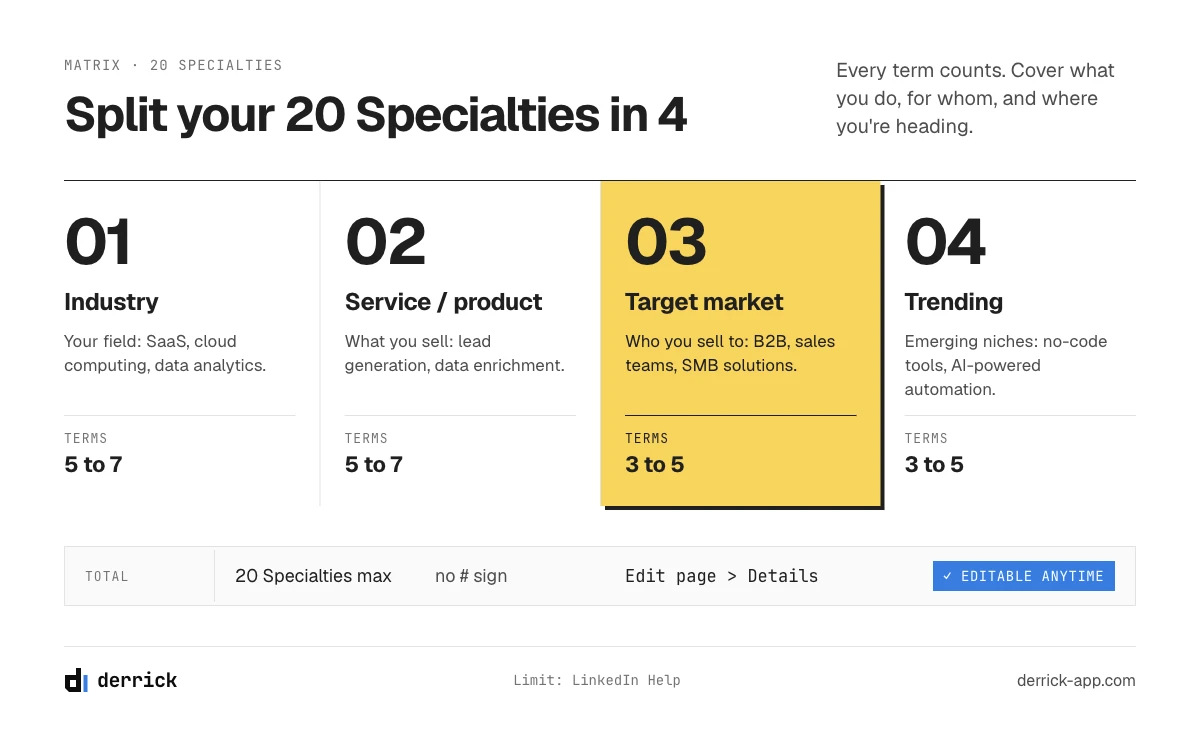
Choosing Your 20 Specialisms Strategically
With a limit of 20 specialisms per company page, every choice counts. Here's an effective selection matrix:
1. Industry Specialisms (5-7 terms) Define your industry clearly and comprehensively.
- Tech example: "SaaS", "cloud computing", "data analytics", "artificial intelligence"
- Marketing example: "digital marketing", "content marketing", "marketing automation"
2. Service/Product Specialisms (5-7 terms) Describe precisely what you offer.
- Example: "lead generation", "data enrichment", "sales prospecting", "CRM integration"
3. Target Market Specialisms (3-5 terms) Indicate who you're addressing.
- Example: "B2B", "enterprise software", "SMB solutions", "sales teams"
4. Trending/Differentiating Specialisms (3-5 terms) Position yourself on emerging niches or your competitive advantages.
- Example: "no-code tools", "GDPR compliance", "AI-powered automation"
Hashtag Strategy in Your Posts: The Winning Mix
For your regular LinkedIn publications, the common practice, and where most LinkedIn guides land, is between 3 and 5 hashtags per post. LinkedIn itself doesn't publish a hard number. More than that risks diluting your message and appearing spammy.
The 3-1 Formula (recommended):
- 2 broad hashtags (large audience): #Marketing, #Sales
- 1 niche hashtag (qualified audience): #B2BLeadGen
- 1 brand hashtag (optional): #YourCompany
Example applied to Derrick: A Derrick post about data enrichment could use:
- #DataEnrichment (broad)
- #SalesProspecting (broad)
- #GoogleSheetsTips (niche)
- #DerrickApp (brand)
This combination maximizes both reach (broad hashtags) and relevance (niche hashtags).
Where to Place Your Hashtags in a Post
End-of-Post Placement (recommended): This approach keeps your main message clear and professional. Hashtags appear after your content, without interrupting reading.
We just launched our new LinkedIn enrichment feature!
Paste a list of companies, get their Specialties in one run.

#DataEnrichment #LinkedInProspecting #SalesAutomation
Text-Integrated Placement: You can also integrate hashtags naturally into your sentences, particularly useful for trending hashtags.
#ArtificialIntelligence is revolutionizing B2B prospecting.
Here's how we use it to automatically qualify your leads.
Golden Rule: Whatever your approach, use Pascal case (#DigitalMarketing rather than #digitalmarketing) to improve readability and accessibility for screen readers.
Avoiding Common Mistakes
Mistake 1: Using Overly Generic Hashtags Avoid: #Business, #Success, #Marketing (too broad, content drowns). Prefer: #B2BMarketing, #SaaSGrowth, #LeadGeneration (targeted, qualified audience)
Mistake 2: Repeating the Same Hashtags Without Analysis Rachel, a Social Media Manager, systematically used the same 3 hashtags on all her posts for 6 months. When she finally compared her posts, 2 of those hashtags brought almost nothing. She replaced them with tags found through competitor analysis and kept tracking.
Mistake 3: Neglecting Niche Hashtags in Favor of Big Hashtags Hashtags with millions of followers potentially generate more views, but your content disappears within minutes. Niche hashtags (10K-100K followers) offer better engagement rates because the audience is more targeted and active.
Mistake 4: Never Testing or Adjusting Treat your hashtags as continuous experimentation. Test different combinations, track performance in LinkedIn Analytics, and adjust your strategy accordingly.
Where Hashtags Still Work on LinkedIn: Posts, Articles, Comments and Pages
Hashtags work in what you publish, not on the page itself. Here is the map, surface by surface:
| Where | Hashtags? | What to do |
|---|---|---|
| Posts (personal and company) | Yes, clickable and searchable | 3 to 5 tags, at the end or woven into the text |
| Articles and newsletters | Yes, in the text you write when sharing them | Treat the share like a post: same 3 to 5 tags |
| Comments | Yes, but rarely useful | 1 or 2 at most, only when the tag adds context |
| Company page About section | No hashtag field | Fill the 20 Specialties, without the # sign |
| Company page Life or What we do tab | Up to 3, for Trending employee content | Super admin only, about 6 hours to go live |
| Your profile | Hashtag following was removed | Use the Skills section and your headline for keywords |
A tag's page still exists. Any hashtag has a feed at linkedin.com/feed/hashtag/[tag], which is the quickest way to see who uses it and how often.
How to Analyze Your Hashtag Performance and Optimize Your Strategy
Using hashtags is just a first step. To truly optimize your LinkedIn visibility, you need to measure, analyze, and adjust continuously.
Using LinkedIn Analytics for Company Pages
LinkedIn provides native analytics for company pages that give you valuable insights into your hashtags.
To access them:
- Go to your company page
- Click "Analytics" at the top
- Select the "Content" tab
- Analyze individual posts to see their performance
Key metrics to track:
Impressions: How many times your post was viewed. An effective hashtag significantly increases this number by exposing your content beyond your immediate network.
Engagement Rate: The percentage of people who interacted (like, comment, share) relative to impressions. A high engagement rate (> 3%) with a hashtag indicates excellent fit with your audience.
Clicks: How many people clicked on your post to learn more. Hashtags that generate many impressions but few clicks likely target the wrong audience.
Audience growth: impressions and engagement tell you how a post performed; follower growth tells you whether the strategy compounds. The same reading applies to the people you target: knowing a prospect's follower and connections count shows whether your specialisms are reaching accounts with an audience of their own, which are the ones worth engaging first.
Visitor Demographics: LinkedIn shows you who visits your page. If your hashtags attract unqualified profiles (wrong sector, wrong seniority), adjust them.
Why LinkedIn Analytics Won't Show You Hashtag Results
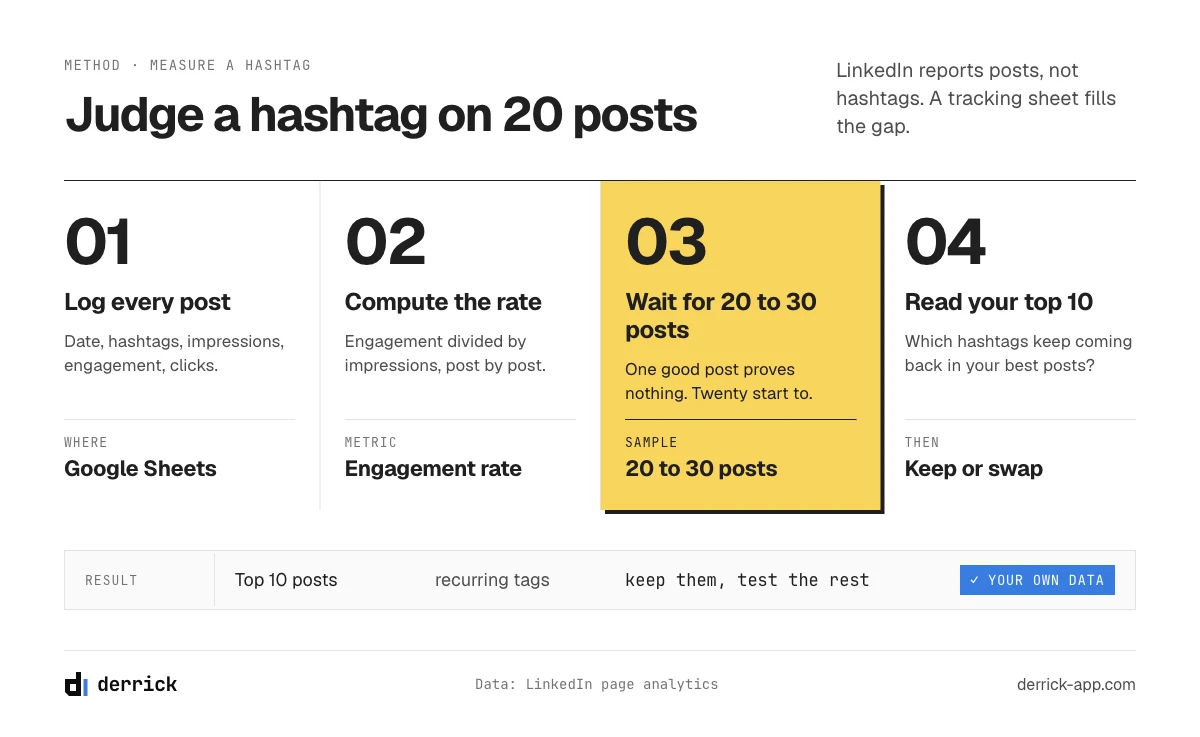
LinkedIn page analytics report on posts: impressions, reactions, clicks, follower growth. There's no report that groups results by hashtag. So the honest way to judge a hashtag is to compare your own posts that carry it with the ones that don't, over enough posts for the gap to mean something. One good post proves nothing. Twenty start to.
Identifying Your Best-Performing Hashtags
Post-by-Post Tracking Method:
Create a tracking table in Google Sheets with:
- Post date
- Hashtags used
- Impressions
- Engagement
- Clicks
- Engagement rate (engagement / impressions)
After 20-30 posts, analyze:
- Which hashtags recur most often in your top 10 performing posts?
- Are there hashtags that consistently generate more engagement?
- Do certain hashtags attract better quality traffic (measurable via qualified connection requests or messages)?
Real example:
John, content manager at a SaaS platform, noticed in his sheet that posts tagged #ProductivityTools got more comments than posts tagged #SaaS. He swapped one for the other and kept the sheet running for 3 more months to confirm it wasn't a fluke.
External Tools to Go Further
Beyond LinkedIn native analytics, several tools enable deeper analysis:
Hootsuite: Content planning with AI hashtag suggestions and multi-post analytics
Sprout Social: Comparative hashtag analysis and performance tracking over time
Brand24: Real-time hashtag monitoring and anomaly detection in mentions
These paid tools are particularly suitable for marketing teams managing multiple company pages or requiring regular client reports.
LinkedIn Hashtags and GDPR: What You Need to Know
When collecting and analyzing company LinkedIn hashtags, you must remain aware of the legal framework, particularly in Europe with GDPR.
What's Permitted
Public Data Analysis: Hashtags visible on company pages and in public LinkedIn posts are public data. You can collect and analyze them without GDPR compliance issues.
B2B Database Enrichment: If you use a tool like Derrick to enrich company data from a contact email, you remain within "business data processing for B2B purposes," based on legitimate interest.
Precautions to Take
Limited Retention: Don't store collected hashtags indefinitely. Define a relevant retention period (for example 12 months for competitive analysis).
Clear Purpose: Collect hashtags for a specific purpose (competitive intelligence, optimizing your own strategy) and don't use this data for other purposes.
Data Security: If you centralize this data in a spreadsheet or database, ensure it's secured and accessible only to authorized people.
No Sensitive Personal Data: Focus on hashtags and company data. Avoid crossing this information with sensitive personal data of individuals.
In practice, for most B2B marketing uses (content strategy analysis, sector trend identification, optimizing your own page), using company hashtags poses no GDPR compliance issues. Just keep these best practice principles in mind.
Advanced Strategies: Creating and Promoting Your Own Brand Hashtags
Beyond using existing hashtags, creating your own brand hashtags can become a powerful lever for visibility and tracking.
When to Create a Brand Hashtag
For a Specific Marketing Campaign Launching a new product, webinar series, or event? Create a dedicated hashtag to group all related content.
Example: #DerrickAIWeek for a week of AI-in-prospecting content.
To Unite Your Community A brand hashtag allows your customers, partners, and ambassadors to share their experiences and create user-generated content.
Example: Laura, founder of an automation platform, created #GrowWithAutomation. Her customers use it to share their results, creating a snowball effect of social proof.
To Track Your Thought Leadership Content If you regularly publish educational content, a proprietary hashtag facilitates archiving and discovery.
Example: #SalesInsightsWeekly for a weekly LinkedIn newsletter.
How to Promote Your Brand Hashtag
Step 1: Use It Consistently Add your brand hashtag to ALL your company posts for at least 3 months to create a habit.
Step 2: Encourage Your Employees to Use It Employee advocacy is the best amplifier. Ask your colleagues to include the hashtag when talking about the company or sharing your content.
Step 3: Incentivize Your Community In your posts, explicitly invite your audience to use the hashtag:
"Using Derrick? Share your results with #DerrickWins!"
Step 4: Create a Mini Content Hub LinkedIn lets you see all posts containing a specific hashtag via URL: linkedin.com/feed/hashtag/[your-hashtag]
Share this link in your communications (newsletter, email signature) so people discover the entire conversation around your brand.
Measuring Your Brand Hashtag ROI
Tracking metrics:
- Number of posts using your hashtag (monthly evolution)
- Number of unique users who used it
- Average engagement on posts containing the hashtag
- Total impressions generated by the hashtag
Chris, Growth Lead at a fast-growing startup, launched #B2BGrowthHacks and logs four numbers at the end of each month:
- Posts using the tag, and the share written by people outside the company
- Cumulative impressions of those posts
- Leads he can trace back to a post with the tag
- Whether the tag starts showing up in prospects' own posts
The brand hashtag became a marketing asset in its own right, generating organic visibility without advertising budget.
Conclusion: Make LinkedIn Hashtags a Competitive Advantage
LinkedIn company hashtags have evolved, but their strategic importance for B2B companies has never been greater. With more than 1 billion members on the platform, the words your page and your posts carry decide who finds you.
Key takeaways:
- Company pages now use "Specialisms" (maximum 20) rather than direct hashtags
- A page can still set up to 3 hashtags for Trending employee content
- Hashtags still work in posts: 3 to 5 is the usual range, measured on your own posts
- The winning formula: 2 broad hashtags + 1 niche hashtag per post
- Analyzing your competitors' hashtags reveals strategic opportunities
- Derrick's Enrich Companies returns the Specialties of every page on your list, so you can analyze your market at scale
Whether you're a Growth Marketer, Social Media Manager, or Sales Ops, integrating a data-driven hashtag strategy into your LinkedIn approach will transform your results. Start by auditing your sector's 10-20 main competitors, identify the most recurring hashtags, and adjust your own strategy accordingly.
Your LinkedIn visibility shouldn't be left to chance. With the right tools and strategy, you can systematically appear in front of your target prospects and transform LinkedIn into a true B2B lead generation engine.
Frequently asked questions
Do hashtags still work on LinkedIn in 2026?
How many hashtags should I use in my LinkedIn posts?
What's the difference between hashtags and Specialisms on LinkedIn?
How can I find hashtags used by my competitors on LinkedIn?
Should I use English or French hashtags to reach an international B2B audience?
Are brand hashtags worth it for a small business?
What are Trending employee content hashtags on LinkedIn?
How do I export the Specialties of a list of companies?
Keep reading
Continue exploring this cluster


LinkedIn Company Followers: How to Identify and Leverage Them for B2B Prospecting
Read →

LinkedIn Company Tagline: Definition, Creation, and B2B Prospecting Use Cases
Read →

LinkedIn Company ID: How to Find and Use It for B2B Prospecting
Read →

How to Find Company Employee Count: 5 Proven Methods for Sales Teams
Read →