How to Find a Company's Website from Its Name
Find any company's official website from its name, LinkedIn page, or email: four proven methods, plus how to enrich a whole list of names in Google Sheets.


You almost never start a prospecting task with a company's website in hand. You start with a name in a CRM field, a logo on a slide, a badge scanned at a trade show, or a work email like jane@acme.com. The official domain is the field that unlocks the rest: it is how you reach the company, how you enrich it, and how you dedupe it. This guide shows you how to go from a raw company name (or a LinkedIn page, or an email) to the verified website, both for a single lookup and for a list of hundreds.
The website is a stronger identifier than the display name because a company controls its own domain. Two firms can share a name; they cannot share a domain. That is why experienced operators capture the website early and anchor their data on it.
Why the company website is the anchor field, not a nice-to-have
Think of the domain as a primary key for a company. A name like "Acme", "Acme Corp", or "ACME Inc." is ambiguous and changes with rebrands. The domain acme.com is stable, unique, and machine-readable. Once you have it, everything downstream gets easier.
With the verified website you can find the right contact email, read the company description, pull the employee count, and resolve the company to its LinkedIn page. Skip the domain and every later step inherits the ambiguity: you email the wrong office, enrich the wrong Acme, and your reply rates quietly slip.
There is a compounding cost to a missing domain. A blank website field costs a few seconds on the first lookup, but that cost repeats every time anyone touches the record. Multiply a short manual search across a 500-account list and three teammates, and you have burned the better part of a day on a problem the domain solves once. Capturing the canonical website early is one of the highest-leverage cleanups you can do to a prospect list.
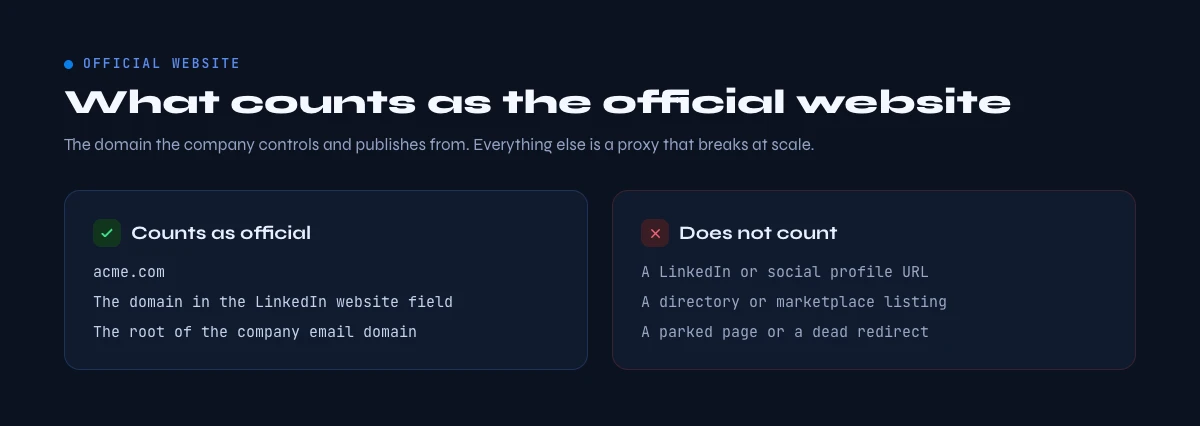
What counts as the "official" website (and what does not)
Before you go hunting, learn to recognize the right domain. Not every URL tied to a company is the one you want to store.
- The corporate root domain is the goal. Store
acme.com, notacme.com/careers,blog.acme.com, or a campaign landing page. Trim to the bare root so the same company never appears twice. - Watch for regional and vanity domains. A firm may run
acme.co.uk,acme.de, andgetacme.comat once. Pick the primary corporate domain (usually the one the LinkedIn page and the email addresses use) and keep it consistent across your list. - Ignore aggregator and social pages. A Crunchbase entry, a Facebook page, or a marketplace listing is not the website. The official domain is the one the company itself controls.
- Beware of parked or holding domains. Some names resolve to a registrar parking page or a shell holding-company site. If the page has no real content, it is not the operating domain; keep looking.
Storing the clean, canonical root matters because two different-looking URLs can point to the same company. Normalizing them prevents duplicate rows in your CRM later.
In the web app or Google Sheets
The domain, which everything else needs
The website is the key most enrichments take as input, and a list of company names does not have it. Derrick returns the domain with the company profile, which turns the name column into a workable list.
- Feature
- LinkedIn Companies Profile Enrichment
- Credit cost
- 1 credit per company enriched
The first button opens the web app (nothing to install): 1 credit per company enriched, 100 free credits every month. The second details the feature and its cost per plan.
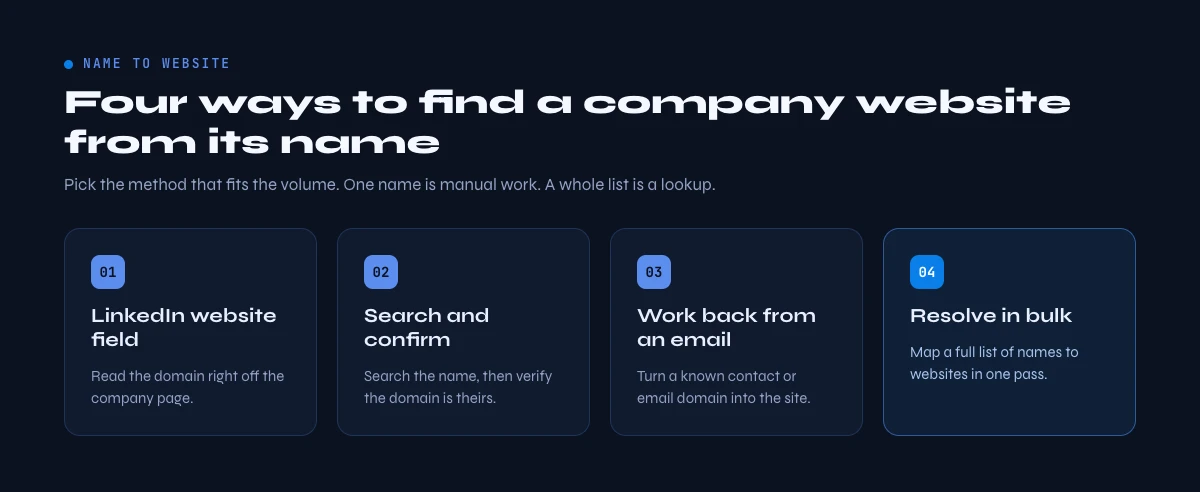
Method 1 - Read the website field on the LinkedIn company page
If you already have (or can quickly find) the company's LinkedIn page, this is the fastest single lookup. LinkedIn shows the official domain the company itself entered.
Step 1. Open the company page. If you only have the name, type it into the LinkedIn search bar and click the Companies filter, or run a site:linkedin.com/company "Acme Corporation" search on Google. Match on the logo, industry, location, and follower count to confirm you have the right one.
Step 2. Click the About tab. Inside the company details block, next to the industry and headquarters, you will find the Website row.
Step 3. Copy the domain and trim it to the root. LinkedIn sometimes stores a tracked or deep URL, so cut it back to acme.com before you save.
This is authoritative because the company placed the link itself. There is one edge case worth knowing: some large organizations run several LinkedIn pages, one primary company page and separate Showcase pages for product lines or regions. The Showcase pages sometimes point at a product microsite rather than the corporate root, so when you see more than one page for the same brand, take the website from the primary company page, not a Showcase. The catch with the whole method: if the page has no website listed, or you have fifty companies to check, you need one of the methods below.
Method 2 - Search the name and confirm the domain
When you only have a name, a plain search usually surfaces the site, but you must confirm you have the real one rather than a namesake or a reseller.
Search for the exact name in quotes: "Acme Corporation", and add a qualifier when the name is generic, for example "Acme" software Paris. Then confirm the domain with two quick checks:
- Cross-check against LinkedIn or the email domain. If people at the company use
@acme.com, the website is almost certainlyacme.com. The email domain rarely lies, because the company controls its own mail. - Load the page and read the footer. The real corporate site names the company, links its LinkedIn and social pages, and carries legal or contact details. A thin affiliate page or a parked domain will not.
You can also guess the obvious domain (companyname.com) and load it, but never store a guess without the confirmation step. Guessing fails more often than people expect: the obvious .com may be owned by an unrelated squatter, the company may sit on a country domain like .io or .fr, or a rebrand may have moved it to a name that has nothing to do with the one you searched. Treat a guess as a hypothesis to verify, never as an answer. The limitation is the same as Method 1: it is a one-at-a-time workflow that does not survive contact with a real list.
Method 3 - Work back from an email or a person
Sometimes the name is too common, but you have an extra clue.
From an email domain. A work email like jane@acme.com hands you the domain directly: strip everything before the @ and you have acme.com. Load it to confirm it is the operating site and not a mail-only or holding domain. This is the fastest route of all when you have the email but not the name spelled the way the company writes it.
From a person's LinkedIn profile. Open the profile, click the current employer under Experience to reach the official company page, then read the website in the About tab. Handy when the company name is common but the person is not.
From the website back to the company. The reverse is also useful: given a domain, you can resolve it to the LinkedIn page and the full firmographic profile, which is how enrichment tools tie a raw domain to a company entity. The domain is the hinge that connects the two directions.
Every manual method trades accuracy for time. The moment you have more than a handful of companies, you need a different approach.
Method 4 - Resolve names to websites in bulk with Derrick
When you have a list of company names - a conference export, a target account list, a stack of scanned cards typed into a sheet - checking each one by hand is not an option. This is where an enrichment tool earns its place.
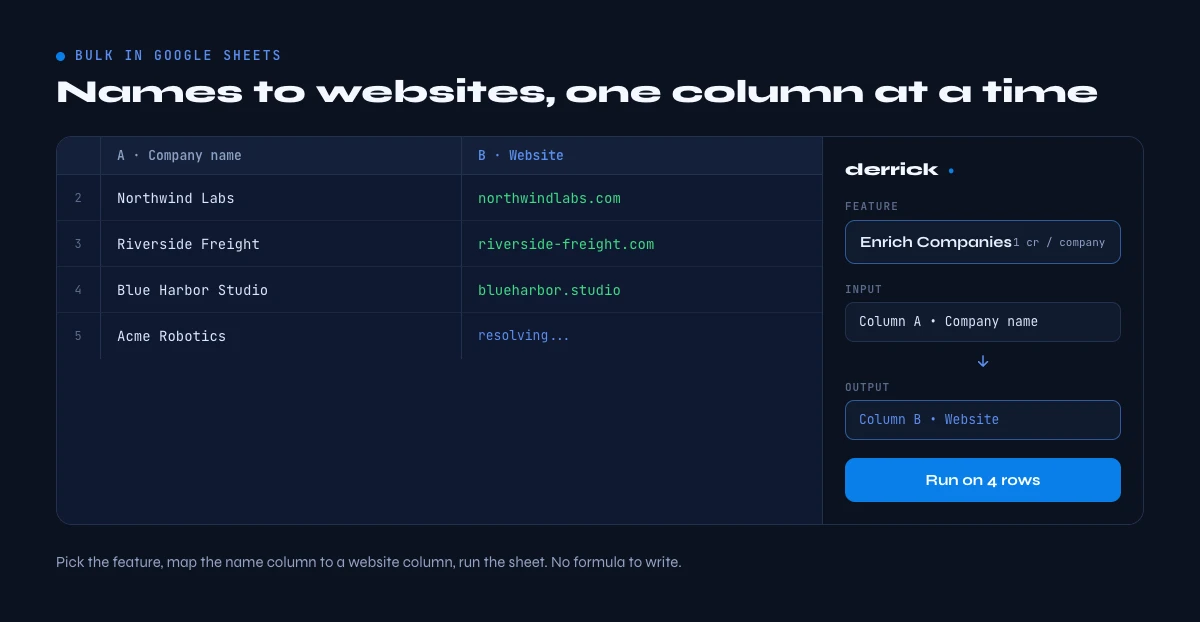
Enrich Companies is a Derrick feature that returns a company's firmographic profile, including the official website, from its name or LinkedIn URL. Derrick runs in the web app or in the Google Sheets sidebar, so you work in the spreadsheet you already have rather than learning a new dashboard. You put company names in one column, run the function, and Derrick returns the website (plus industry, headcount, and description) next to each row.
How it works, step by step:
- Open a list in the Derrick web app, or your Google Sheet, with a column of company names or LinkedIn URLs.
- Open the Derrick web app or its Google Sheets sidebar and pick the Enrich Companies function.
- Point it at your names column and run it. Derrick resolves each name to the company entity and returns its website alongside the other firmographic fields.
- Review the results. When a match is uncertain, Derrick tells you in plain language so you can spot-check rather than trust a silent guess.
Enrich Companies costs 1 credit per company and is available on the free plan as well as paid plans. The free plan includes 100 credits per month, which is enough to enrich a real starter list before you decide to scale. Because Derrick works at any volume, the same function that handles ten names handles ten thousand, so your workflow does not change as your lists grow.
If you only need the LinkedIn URL first, Search Companies resolves a name to its verified LinkedIn page; from there Enrich Companies fills in the website and the rest of the profile in the same sheet.
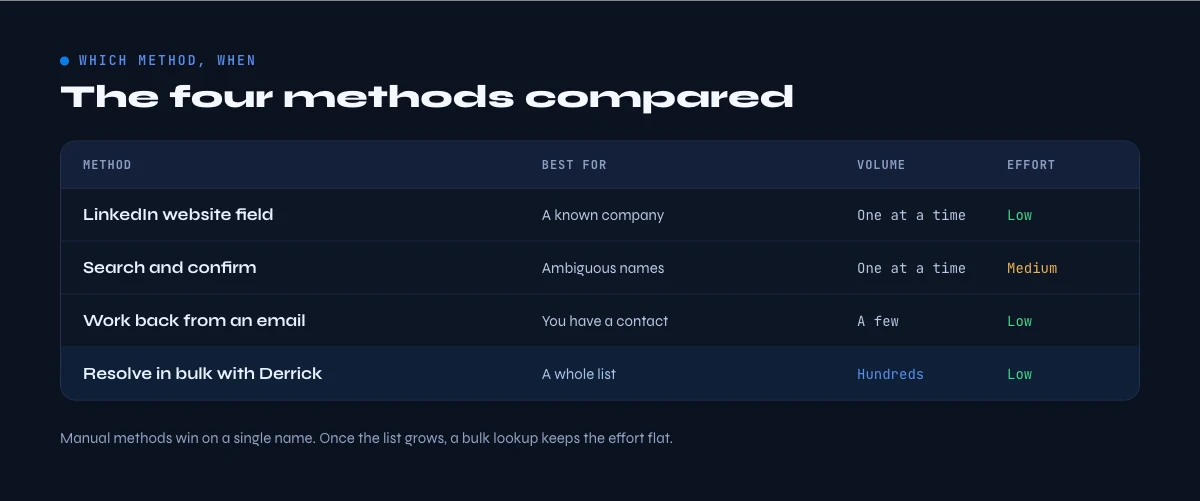
The four methods compared
Each method has a sweet spot. The right choice depends on how many companies you are resolving and how much you trust the name you started with.
| Method | Best for | Speed at scale | Accuracy |
|---|---|---|---|
| LinkedIn About tab | A single known company | Slow (one at a time) | Very high (company-entered) |
| Name search + confirm | A single ambiguous name | Slow (one at a time) | High, if you confirm the footer |
| Email or employee | When the name is too common | Slow (manual) | Very high (domain rarely lies) |
| Derrick Enrich Companies | A list of names, any size | Fast (whole column at once) | High, with an uncertainty flag |
The pattern is clear: manual methods win on a single stubborn lookup, and a spreadsheet function wins the moment you have a list. Most teams use both - the About tab for a one-off, the web app or the sidebar for the weekly target list.
Common mistakes and what to do once you have the website
Mistake 1: storing a deep link or a subdomain. A URL with /careers, a blog. subdomain, or a tracking string will fragment your data. Normalize to the bare root acme.com so the same company never appears twice.
Mistake 2: grabbing the first search result blindly. Generic names ("Apex", "Vertex", "Nova") return resellers, namesakes, and parked domains. Always confirm with a second signal - the email domain, the LinkedIn About tab, or the site footer.
Mistake 3: trusting a parked or holding domain. A page with no real content is not the operating site. Check for actual company content before you save it.
Mistake 4: doing it by hand at scale. The single biggest time sink in prospecting is resolving names one browser tab at a time. If you catch yourself doing this for more than five companies, move the job into the Derrick web app or a spreadsheet.
Mistake 5: skipping the verification pass. Automated matching is fast, but no method is perfect on messy input. For a sample of rows, open the returned domain and confirm the company name and location line up. A tool that flags its own uncertainty makes this easy: you only check the rows it was unsure about instead of all of them.
Once you have a clean, verified website, it becomes the launchpad for the rest of your research. From there you can measure company size to segment your list and pull the employee count to prioritize it. The domain is step one of a chain, and getting it right makes every later step land.
Ready to stop copy-pasting company names into search bars? See how Derrick turns a column of names into verified websites in the web app or in a spreadsheet you already use.
Frequently asked questions
How do I find a company's website from its LinkedIn page?
How do I find a company's website from just its name?
Can I find websites for a whole list of companies at once?
What is the difference between a company's root domain and a landing page?
How do I get a company's website from an email address?
Is finding a company's website free?
Keep reading
Continue exploring this cluster


The State of LinkedIn Company Data 2026: How Reliable Is the Firmographic Layer?
Read →

LinkedIn Company Followers: How to Identify and Leverage Them for B2B Prospecting
Read →

LinkedIn Company Hashtags: The Complete Guide to Maximizing Your B2B Visibility
Read →

LinkedIn Company Tagline: Definition, Creation, and B2B Prospecting Use Cases
Read →