How to Find a Company's Description and Location from Its Website
Get a company's description and location from its domain: read the website, cross-check LinkedIn, or enrich a whole list in the web app or in Google Sheets. Start free.


A company's website carries two firmographic signals that most enrichment stops short of: what the business actually does, and where it operates from. This guide shows how to pull both, from a single domain, cleanly enough to use in a CRM or a sequence.
You have a list of domains. You need more than a name next to each one. You need a one-line read on what the company does, and a location precise enough to route the account to the right rep, filter by region, or open a message that does not sound generic. Both live on or behind the website. The trick is getting them the same way every time, at the scale your list demands.
This is the firmographic half of website extraction. Its sibling guide, pulling contacts and social profiles from a website, covers the "how to reach them" half. Here we cover the "who they are and where they sit" half.
What "description" and "location" actually mean here
These two fields are looser than they look, and mixing up their variants is the most common reason an enriched list turns out unusable.
Description is free text. It is the About paragraph, the homepage hero line, the meta description in the page source. It answers "what does this company sell, and to whom." It is distinct from the industry category, which is a fixed label you can read in our company industry lookup guide. A description is a sentence; an industry is a bucket.
Location has at least three flavours, and they are not interchangeable:
- Headquarters: the main operating office. This is usually what you want for territory routing. Getting the country right is its own topic, covered in how to find a company's headquarters country.
- Registered (legal) address: what a government registry holds. Often an accountant's office or a holding shell, not where anyone works.
- Operating locations: every office, warehouse, or store. Useful for local outreach, noisy for account-level firmographics.
Decide which one your workflow needs before you extract. Pulling a registered address when you wanted the operating HQ is not a small error, it points your rep at the wrong city.
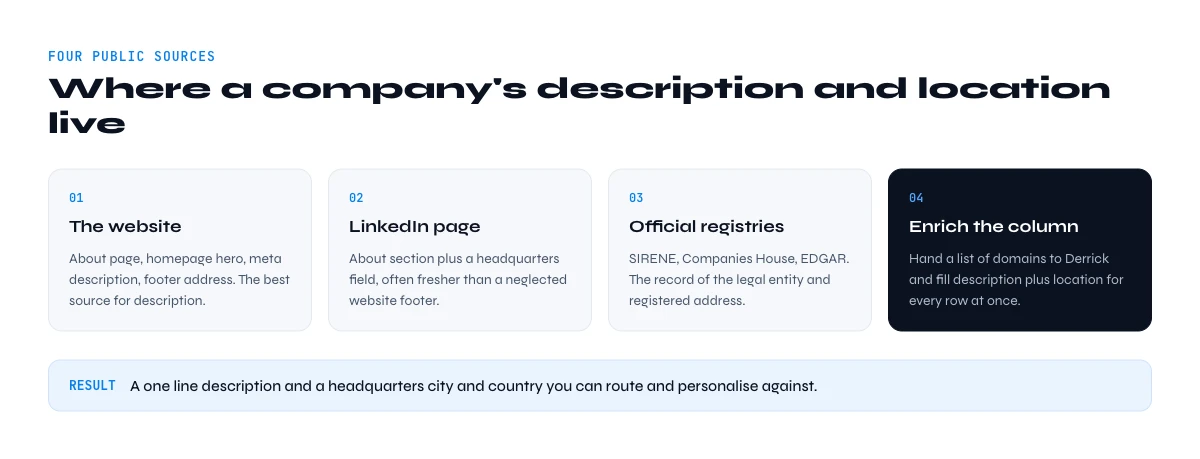
Method 1: Read the website directly
The website is the primary source, and for description it is usually the best one, because the company wrote it about itself.
Four places on a site carry the signal:
- The About or Company page: the description in the company's own words. Take the first two sentences; the rest is usually mission-statement filler.
- The homepage hero and meta description: the sharpest one-line positioning, written to convert. View the page source and read the
<meta name="description">tag for a pre-compressed summary. - The footer and Contact page: the operating address, phone, and often the legal entity name.
- Structured data: many sites embed a schema.org
Organizationblock in the page source, withdescription,address, andlocationas machine-readable fields. When it is there, it is the cleanest possible extract, because it is already parsed.
Manual reading works for a handful of accounts. It breaks the moment your list runs to hundreds of domains, because someone has to open each tab, find the right paragraph, and paste it into the right cell without drifting. That is the wall this method hits, and it is why the later methods exist.
Method 2: The LinkedIn company page
Every company page on LinkedIn carries an About section and a headquarters field, both maintained by the company. For description and HQ location, it is a strong second source, and often more current than a neglected website footer.
To go from a domain to the right company page, resolve the domain to the company first, as in finding a company name from a domain, then open its LinkedIn page. The About tab gives you a written description; the sidebar gives you the headquarters city and country plus, sometimes, a list of locations.
LinkedIn's limit is the same as the website's: it is a per-company, manual read. It is a good cross-check for one account, not a way to process a list.
Method 3: Official registries for the legal address
When you need the registered address specifically, and the legal entity behind a brand, official registries are the source of record. France's SIRENE database, the UK's Companies House, and the SEC's EDGAR system in the US all expose a company's registered address and legal name for free.
Registries are authoritative for the legal address and useless for description, they hold no marketing text. Use them to confirm the entity and its registered location, not to learn what the company does. And remember the registered address is frequently not the operating HQ.
In the web app or Google Sheets
Read the site once, per row
Opening each website to copy the positioning is the slow part. Derrick crawls the page from your list and returns its text content in a column, so the description and the location come back for the whole list in one pass.
- Feature
- Website Crawler
- Credit cost
- 2 credits per call
The first button opens the web app (nothing to install): 2 credits per call, available from the STANDARD plan. The second details the feature and its cost per plan.
Method 4: Enrich the whole list from the domain
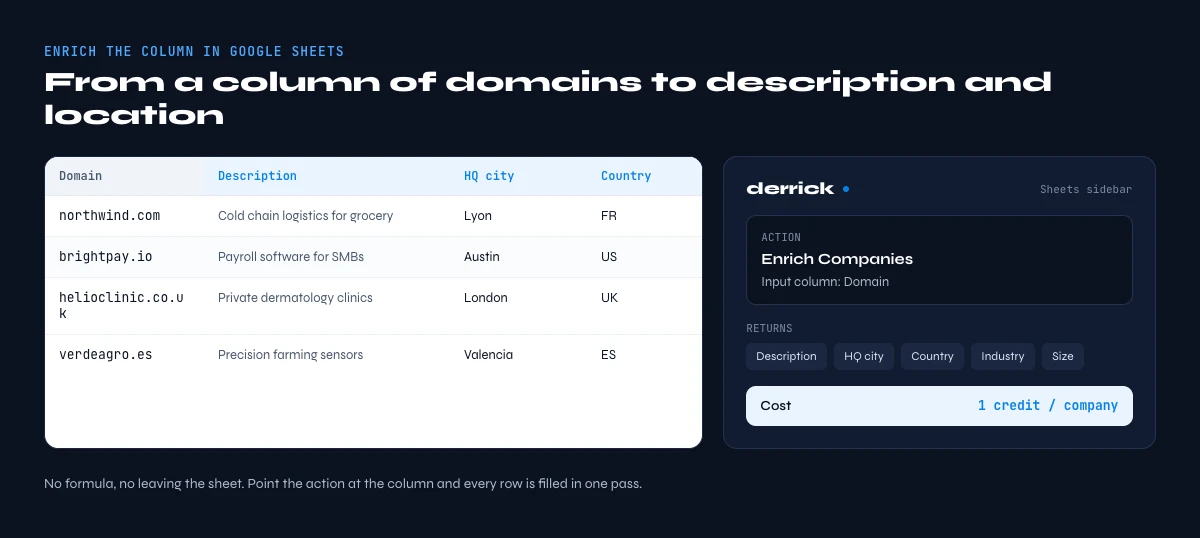
Once your list is longer than you want to click through, the workflow inverts: instead of visiting each site, you hand the column of domains to an enrichment step that returns description and location for every row at once.
Derrick's Enrich Companies action does exactly this, in the Derrick web app or from a sidebar inside Google Sheets. You point it at your column of domains or company names, and it fills in the firmographic fields, description, location, industry, size, and more, row by row, without you writing a formula or leaving the sheet. It runs at 1 credit per company, and it is available on the free plan, so a list of a hundred accounts costs a hundred credits and stays inside the 100 credits per month the free plan includes.
Because Derrick reads across multiple public sources rather than a single site, it fills the gaps a lone website leaves, a company with a thin About page still resolves to a usable description and location. And it scales the same way whether you are enriching ten rows or ten thousand: the sidebar does not care about volume, and neither does your workflow.
If your enrichment lives in code rather than a sheet, the same data is available through the Derrick MCP, so an AI agent or a script can request a company's description and location from a domain directly. That path starts on the PLUS plan, at €47.50 per month.
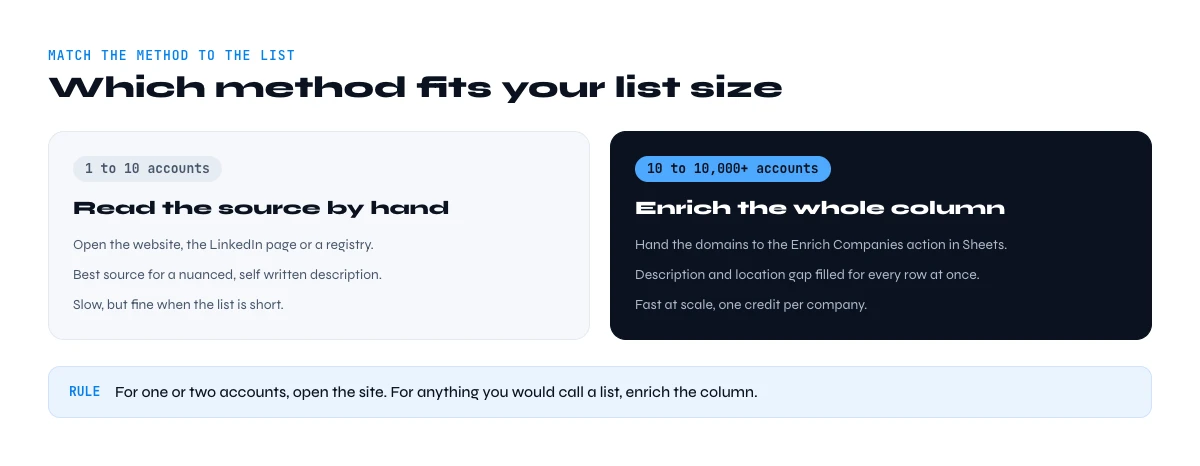
Which method fits your list size
| Method | Best for | Gives description | Gives location | Speed at scale |
|---|---|---|---|---|
| Read the website | 1 to 10 accounts | Yes, best source | Operating HQ | Slow, manual |
| LinkedIn company page | Cross-checking one account | Yes | HQ city and country | Slow, manual |
| Official registries | Legal entity and address | No | Registered address | Slow, one lookup |
| Enrich Companies in the web app or Sheets | 10 to 10,000+ accounts | Yes, gap-filled | HQ, gap-filled | Fast, whole column |
The honest read: for one or two accounts, open the site. For anything you would call a list, enrich the column. The manual methods are not more accurate, they are just slower, and they drift the moment a human is copy-pasting the hundredth About paragraph.
A worked example, start to finish
Say you have 400 domains from a webinar signup and you want, for each, a one-line description and an HQ location so you can route them by region and personalise the follow-up.
- Import the 400 domains into the Derrick web app, or drop them into a Google Sheets column.
- Run Enrich Companies on that column, in the web app or from the Derrick sidebar.
- New columns appear: description, headquarters city and country, industry, size. 400 rows, one pass, 400 credits.
- Filter by country to split the list across your regional reps.
- Use the description to open each sequence with a line that proves you know what the company does.
What would have been a day of tab-switching becomes one enrichment run. And the description field is what turns a cold list into a warm one, a message that names what the company actually sells reads as researched, not blasted.
Common pitfalls to avoid
- Registered address vs operating HQ: the registry address is often a filing agent. If your rep needs to know which city to work, that is the operating HQ, not the legal one.
- Holding companies and brands: a domain may resolve to a brand whose legal entity is a parent with a different name and address. Confirm the entity when the money is on the line.
- Multi-location firms: a company with 30 stores has 30 locations and one HQ. For firmographics you want the HQ; for local outreach you want the branch.
- Stale About text: a website last touched three years ago describes a company that may have pivoted. Cross-check the description against the LinkedIn About when the account matters.
- Over-long descriptions: a full About page is not a description. Compress to one or two sentences, or the field is unusable in a CRM.
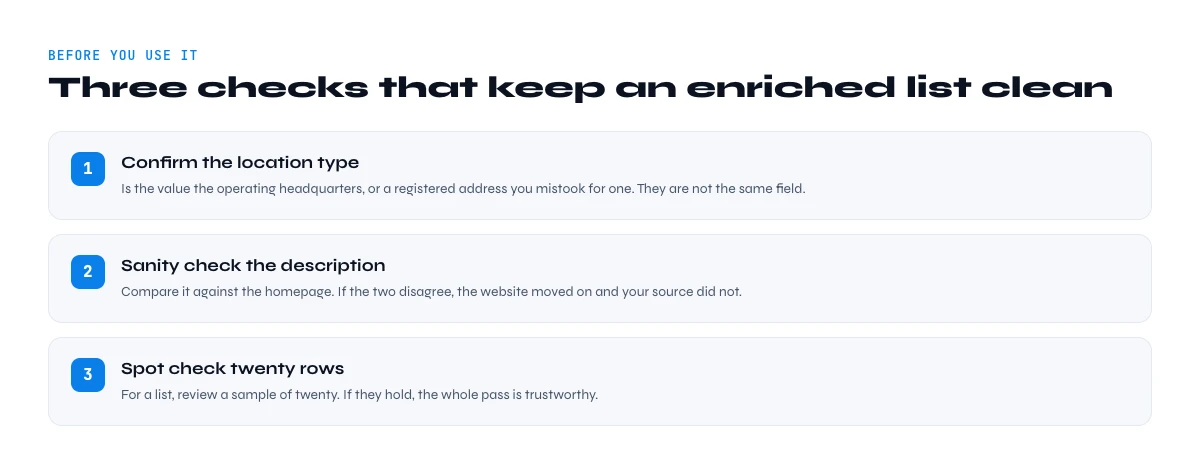
Verifying before you use it
Two quick checks keep an enriched list clean. First, confirm the location type: is the value you captured the operating HQ, or a registered address you mistook for one. Second, sanity-check the description against the homepage, if the two disagree, the website moved on and your source did not. For a list, spot-check twenty rows; if they hold, the pass is trustworthy.
Description and location as a personalisation signal
These two fields do more than sit in a CRM. They are the raw material of a message that does not read like a blast.
A description gives you the opening line. "I saw you help mid-market retailers cut returns" lands because it proves you read what the company does, not just its name. A generic hook, by contrast, tells the reader you enriched nothing. The description is the difference between the two, and it is why pulling it well is worth the step.
Location does the routing and the relevance. It splits a list across regional reps, it lets you reference a market or a timezone, and it filters out accounts outside your territory before anyone wastes a touch on them. A company's HQ city, used sparingly, is also a small trust signal in a first line.
Neither field earns its keep if it is stale or wrong, which is why the verification step is not optional. A confident wrong description is worse than a blank one: it makes your outreach sound informed and misinformed at once.
The fields worth capturing per account
When you enrich for description and location, capture them in a shape you can actually use downstream. A short, consistent schema beats a rich, messy one.
- Description: one or two sentences, trimmed from the About page or meta tag, not the full paragraph.
- HQ city and country: two separate fields, so you can filter and route on country alone.
- Location type: a flag for whether the value is an operating HQ or a registered address, so no one confuses them later.
- Source and date: where the value came from and when, so a stale field is visible at a glance.
Enriching from the domain in one pass gives you these columns cleanly. Derrick's Enrich Companies returns description, headquarters, industry, and size side by side, so the schema falls out of the workflow instead of being assembled by hand. To round out the account picture with related firmographics, pair it with the company revenue lookup and the founding year guide.
When the website gives you nothing
Some sites are dead ends. A single-page brochure with no About section, a holding page, a site in a language your team does not read, or a business that lives on social profiles rather than a real site. Manual reading returns a blank on all of these, and a blank cell is where enriched lists quietly lose coverage.
This is exactly where reading across multiple public sources beats reading one site. When the website is thin, the description and location can still come from the company's LinkedIn page, an official registry, or a directory listing, and an enrichment step that checks several of them returns a value where a single-source read would have given up. The result is fewer blank rows, which for a large list is the difference between a usable dataset and a patchy one.
From a domain to a usable company profile
Description and location are the two fields that turn a bare domain into an account you can route and personalise against. Read the website for one or two; enrich the column for a list. Either way, decide which location you actually mean before you start.
Try Derrick free with 100 credits per month and enrich a column of domains into descriptions and locations, in the web app or without leaving Google Sheets.
Frequently asked questions
How do you get a company description from just a domain?
What is the difference between a company's headquarters and its registered address?
Can you extract a company's location from its website structured data?
How much does it cost to enrich a list of companies with description and location?
What is the fastest way to add description and location to hundreds of domains?
Is a website or LinkedIn more reliable for a company's description?
Keep reading
Continue exploring this cluster


The State of B2B Company Data 2026: Firmographic Decay & What Stale Records Cost
Read →

How to Find a Company's Founding Year (5 Methods, 2026)
Read →

How to Find Company Headquarters Country: Complete Guide
Read →

Company Industry Lookup: How to Find Any Business Industry Instantly
Read →