How to Find a Company Name from a Domain
Find the real company behind any domain in 2026: the website, WHOIS, LinkedIn, and business registries, plus a workflow to resolve a full list, in the web app or in Sheets.


You have a domain and nothing else: a website URL sitting in a spreadsheet cell, an email address whose domain you do not recognize, a referral traffic source you want to identify. The question is simple, the answer often is not: which company actually owns this?
The gap matters. A domain is a brand surface, not a legal identity. The company behind example.com might trade under a different name, belong to a parent group, or hide behind a holding company. This guide covers the five methods that reliably turn a bare domain into the real company name in 2026, from the thirty-second manual check to the bulk workflow, in a web app or in Google Sheets, that resolves a list of hundreds at once.
First, know which name you are looking for
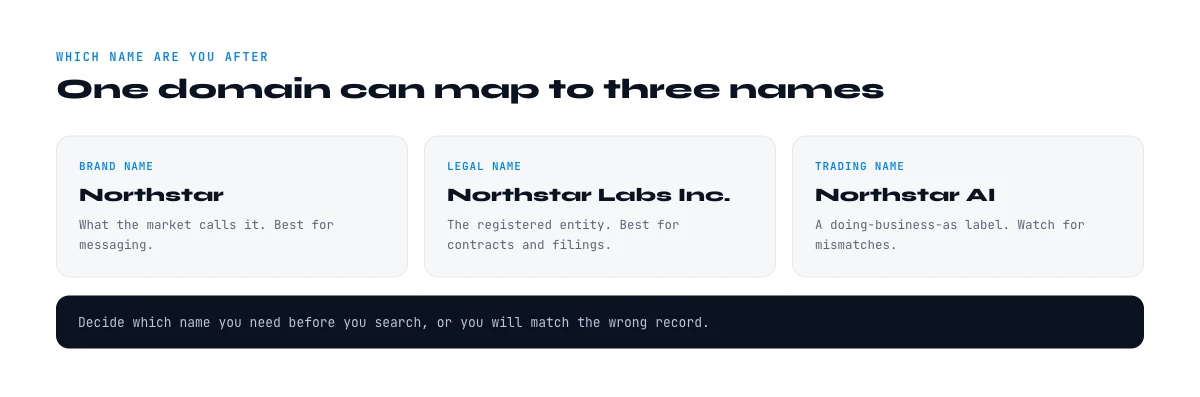
Before you hunt, be clear on what counts as an answer. A single domain can map to several different names, and picking the wrong one pollutes your data.
- The brand or trading name is what customers see: the logo in the header, the name in the footer. It is usually what you want for prospecting and personalization.
- The registered legal entity is the name filed with a business registry, often with a suffix like Inc, Ltd, GmbH, or SAS. This is what you need for contracts, invoicing, and compliance checks.
- The parent or group name matters when the domain belongs to a subsidiary. The brand may be small while the group behind it is large, which changes how you score the account.
These three are frequently different. A product site can carry a punchy brand while the legal entity is a bland holding company two levels up. Decide up front which one your use case needs, then read every source below with that target in mind. For account scoring you usually want the brand plus the group; for legal or billing work you want the exact registered entity.
Method 1: read the website itself
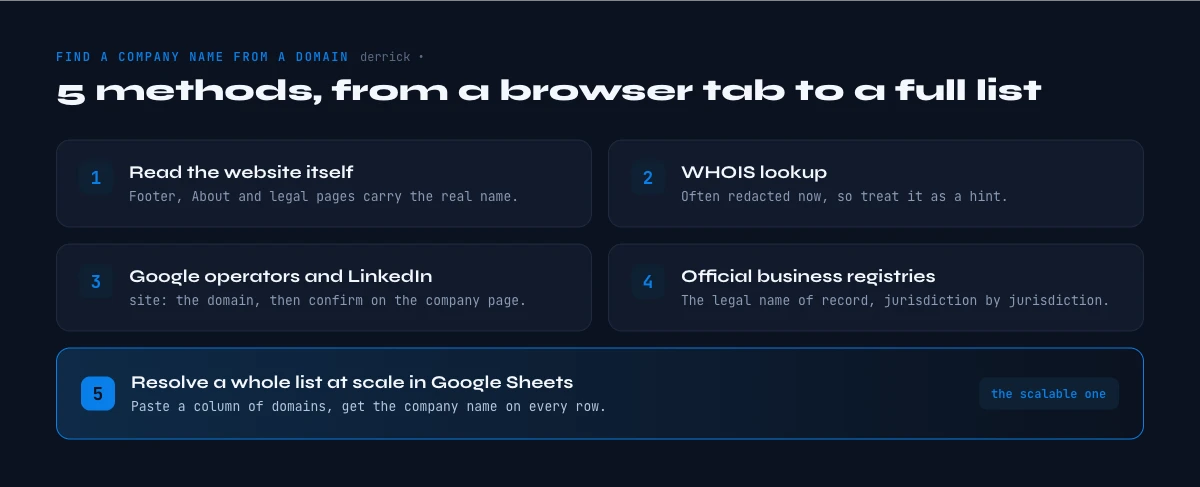
The fastest source is the site sitting behind the domain. Companies are legally required, in most jurisdictions, to identify themselves somewhere on their own pages, so the answer is often one click away.
- The footer copyright line. Scroll to the bottom of the homepage. The line that reads something like copyright 2026 Acme Technologies Inc almost always names the legal entity, suffix included.
- The legal, terms, or privacy page. Terms of service and privacy policies name the contracting entity in the first paragraph, because they have to. This is the single most reliable manual source for the registered name.
- The imprint or legal notice. Sites operating in Europe, and German sites in particular, publish an imprint (Impressum) or mentions legales page that states the company name, registration number, and address by law.
- The about page. Good for the brand story and the parent group, less precise on the exact legal suffix.
This method fails in two cases: a landing page with no footer or legal links, and a site that trades under a brand while the legal entity is buried. When the page itself does not give you a clean answer, move to a data source that does. If you also need the emails and social handles attached to that same site, a dedicated email and social extraction step pulls all of it in one pass.
In the web app or Google Sheets
From a bare domain to the identified company
A column of domains is not a list of accounts. Derrick matches each domain to the company and returns its LinkedIn page and legal name in your list, which is the input every other enrichment in this silo needs.
- Feature
- Company LinkedIn Finder
- Credit cost
- 1 credit per company found
The first button opens the web app (nothing to install): 1 credit per company found, 100 free credits every month. The second details the feature and its cost per plan.
Method 2: WHOIS lookup, and why it often disappoints
WHOIS is the public registration record for a domain. Every domain has one, and it can list a registrant organization, which is exactly the company name you want. Run a WHOIS query on the domain and read the organization field.
The catch, and it is a big one in 2026, is privacy redaction. Since GDPR came into force, most registrars mask registrant details behind a privacy service by default, so the organization field frequently reads REDACTED FOR PRIVACY or shows the privacy provider instead of the real company. WHOIS still works well for older domains, larger companies that register in their own name, and country-code domains with lighter privacy rules, but treat a blank result as normal rather than a dead end.
Two refinements help. First, the registration and expiry dates in the same record tell you how established the domain is, which is a useful firmographic signal on its own. Second, when the organization is masked, the technical or administrative contact domain sometimes leaks the real owner, especially for companies that self-host their DNS. WHOIS is worth thirty seconds, but do not build a workflow on it alone.
The app works through your list row by row: 1 credit per company found, nothing is billed without a result.
Method 3: Google search operators and LinkedIn
When the record is masked, the open web usually knows the answer. Two moves cover most cases.
Google with an operator. Search the bare domain in quotes, or use the site operator to force Google to surface pages from that domain and read the title tags and knowledge panel. A query like the domain plus the word company, or a search for the domain on a professional network, tends to return the registered name in the first few results. Google's own knowledge panel, when it appears, names the entity and its parent directly.
LinkedIn company page. LinkedIn is the strongest single source for matching a domain to a company, because company pages list their website explicitly. Search the domain or the brand, open the company page, and you get the official name, the industry, the headcount band, and the headquarters in one view. From there, a location and profile check and an industry classification are already answered on the same page, which is why LinkedIn is the pivot point for the scale workflow below.
A quick reliability habit pays off here: whichever source you land on, confirm the name against a second one before you trust it. A footer that says one thing and a LinkedIn page that says another usually means a rebrand, an acquisition, or a domain that outlived the company that registered it. When the website, the search result, and the LinkedIn page all agree, you have a name you can act on. When they diverge, that disagreement is itself a signal worth reading, because it often points to the parent group you actually want to score the account against.
The limit of both is manual effort. One domain takes a minute, which is fine. A list of three hundred domains, each needing a search, a click, and a copy paste, is a half-day of tab juggling that also drifts in quality as attention fades. That is the exact problem the last method solves.
Method 4: official business registries
When you need the exact registered entity rather than the brand, go to the source of legal truth: the national business registry. These are authoritative, but they are keyed on the company name or a registration number, not on the domain, so you usually reach them after one of the methods above has given you a candidate name to confirm.
- France. The SIRENE database maintained by INSEE ties every establishment to its SIREN identifier, and the commercial court registry holds the filed accounts. Once you have a candidate name, SIRENE confirms the exact legal entity, its activity code, and its address. This is also where a founding year lookup is fully reliable rather than estimated.
- United Kingdom. Companies House lists every registered company with its number, status, and registered office, searchable by name for free.
- Rest of the EU and US. National registers across the EU are reachable through the Business Registers Interconnection System, and US entities appear in state-level Secretary of State databases, which vary by state.
Registries give you certainty on the legal name, but they will not take a raw domain as input. Use them as the confirmation layer, not the discovery layer.
Method 5: resolve a whole list at scale in Google Sheets
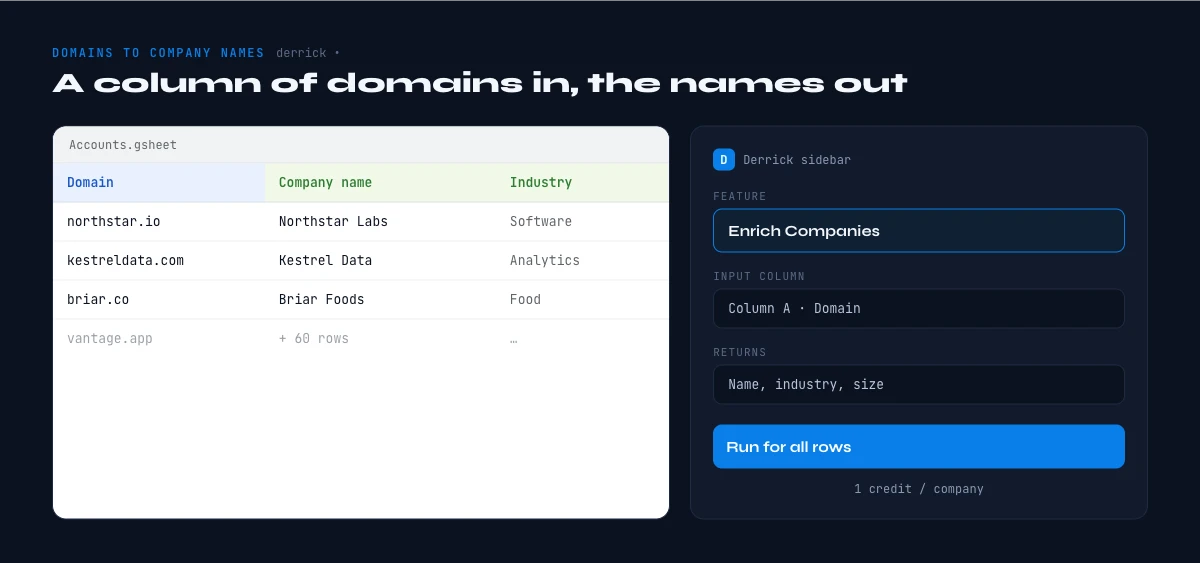
Everything above works for one domain. The moment you have a column of them, an imported lead list, a set of referral sources, a spreadsheet of event registrants who typed only a work email, the manual methods break down. The fix is to run the same logic in bulk, in the Derrick web app or inside a spreadsheet.
Here is the two-step workflow with Derrick in Google Sheets (the same two steps run in the web app, with nothing to install):
- Turn each domain into a LinkedIn company page. Paste your domains and run Email & Social Extractor from Website, which reads each site and returns its social profiles, including the LinkedIn company URL, alongside any public emails. This step runs on paid credits, at 2 credits per line, because it fetches and parses the live page.
- Turn each LinkedIn page into a named, verified company. Run Enrich Companies on that LinkedIn URL to pull the official company name plus the full firmographic layer: industry, headcount, headquarters, and more. Enrich Companies costs 1 credit per company and is on the free plan, which includes 100 credits per month, so you can name and enrich 100 companies before paying anything.
If you start from the other direction, a candidate name rather than a domain, Search Companies does the reverse move, finding a company's LinkedIn URL from its name at 1 credit per company, which is handy for confirming that the name you found on the website matches a single, real LinkedIn entity.
| Method | Best for | Main limit |
|---|---|---|
| Website footer and legal page | One domain, exact legal name | Fails on bare landing pages |
| WHOIS lookup | Older domains, self-hosted DNS | Privacy redaction blanks most records |
| Google and LinkedIn | Matching a domain to a brand fast | Manual, does not scale to a list |
| Official registry | Confirming the exact legal entity | Keyed on name, not on the domain |
| Google Sheets at scale | Hundreds of domains at once | Needs a LinkedIn page to resolve |
One honesty note that protects your data hygiene: a domain does not always map cleanly to one company, and no tool should pretend otherwise. A shared platform domain, a parked page, or a personal site will not resolve to a business, and Derrick returns a clean blank rather than a guess in those cases. What it does give you, reliably, is the named company plus its firmographics for every domain that genuinely belongs to a business, and it scales the same way whether you are resolving ten domains or ten thousand.
From a name to a usable record
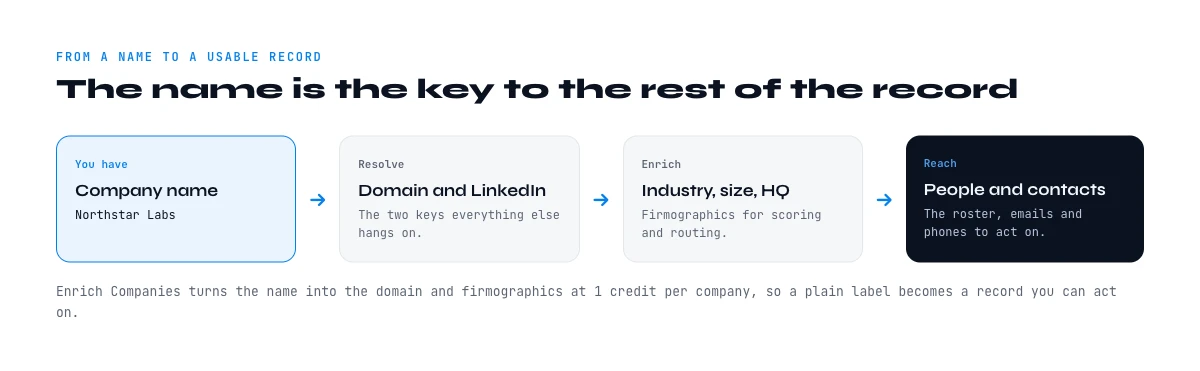
A company name on its own is a starting point, not a finished record. Once you have resolved the domain, the useful next fields are the ones that let you score and route the account: the industry, the size band, the headquarters country, and, when it matters, an estimated revenue. The advantage of resolving names through a LinkedIn company page is that all of those arrive in the same pass, so you go from a bare domain to a segmentable account in one enrichment rather than five separate lookups. The method you reach for should match the job in front of you: a single domain rewards the thirty-second website check, while a list rewards the spreadsheet workflow that never gets tired or sloppy. Read the website first, fall back to WHOIS and the open web, confirm the legal entity in a registry when precision matters, and run the whole thing in a spreadsheet the moment your list grows past a handful.
Frequently asked questions
What is the fastest way to find the company behind a domain?
Why does a WHOIS lookup often not show the company name?
Can I find a company name from just an email address?
How do I turn a whole list of domains into company names?
Is the brand name the same as the legal company name?
Which official registry confirms a company's legal name?
Keep reading
Continue exploring this cluster


The State of B2B Company Data 2026: Firmographic Decay & What Stale Records Cost
Read →

How to Find a Company's Founding Year (5 Methods, 2026)
Read →

How to Find Company Headquarters Country: Complete Guide
Read →

Company Industry Lookup: How to Find Any Business Industry Instantly
Read →