How to Find a Company's CEO from a Company Name or Domain
Find any company's CEO from its name or domain: website, LinkedIn and filings for one account, automated enrichment in the web app or in Sheets for a full list. Start free.


Knowing who runs a company changes how you sell to it. The CEO, or the closest decision-maker below them, sets budgets, signs off on tools, and decides whether your outreach ever reaches a real conversation. Yet most prospecting lists arrive with a company name and a domain and nothing else, which leaves you guessing at who to actually contact.
This guide walks through how to go from a bare company name or domain to a confirmed CEO name, for a single account or for a list of hundreds. You will see the free manual methods, when each one breaks down, and how to turn the whole thing into a repeatable step inside the web app or a spreadsheet.
Quick answer: To find a company's CEO from its name or domain, check the leadership or About page on the company website, then confirm on the company's LinkedIn page by filtering employees on executive titles. For public companies, the CEO is named in regulatory filings. For a single account this takes a few minutes; for a list beyond 30 or 40 companies, automated enrichment in the Derrick web app or in Google Sheets returns the leadership names in one pass, filtered by job function, without any Sales Navigator seat.
| What you start from | What you can get back | Where it comes from | Cost with Derrick |
|---|---|---|---|
| Company name | The company LinkedIn URL | Search Companies | 1 credit per company, available on the free plan |
| Company name or domain | Firmographics: industry, headcount, country, website | Enrich Companies | 1 credit per company, available on the free plan |
| Company LinkedIn URL | Leadership names and job titles, filtered by function | Find a company's people | 1 credit per person returned, paid plans from 20 euros per month |
| A person's name plus their company | A verified professional email | Email Finder | 5 credits per email found, paid plans only |
| A person's LinkedIn profile | A direct or mobile phone number | Phone Finder | 200 credits per phone found, paid plans only |
| An email you already hold | A deliverability verdict before you send | Email Verification | 1 credit per email, paid plans only |
| A company website | Emails and social profiles published on the site | Email & Social Extractor from Website | 2 credits per line, paid plans only |
Every one of these charges only when a result comes back, so a company with no reachable executive costs you nothing on the finder steps. The free plan carries 100 credits per month, and two of the steps above run on it: resolving a company and enriching its firmographics. Everything that names or reaches a person (the people lookup, the email, the phone, the verification) sits on the paid plans, which start at 20 euros per month for 10,000 credits.
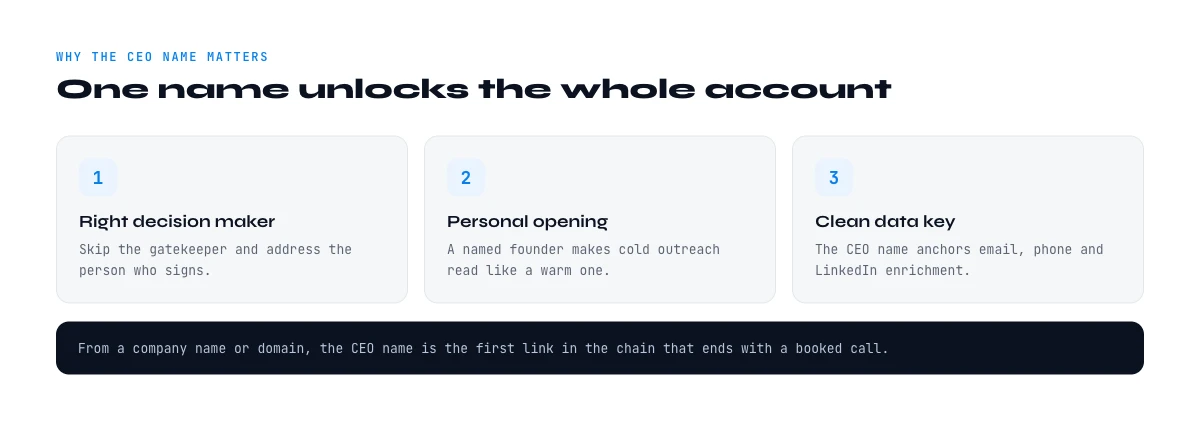
Why the CEO name is worth the effort
Worked examples make the shape of the answer obvious: who runs Microsoft, who runs NVIDIA, who runs Salesforce. Each profile names the person, their tenure, who they report to, and the rest of the leadership around them.
In smaller companies, under roughly 200 employees, the CEO or founder is often the real buyer for sales, marketing, and data tooling. Reaching them directly shortens the cycle because there is no gatekeeper to convince first. In larger organizations the CEO is rarely the day-to-day buyer, but their name still anchors your account map: once you know who sits at the top, the VP and director layer underneath becomes far easier to place.
The CEO name also unlocks the rest of your contact research. With a verified full name you can build the likely email pattern, look up a direct line, and personalize a first message that does not read like a template. It is the pivot point between firmographic data, such as the company's industry or its revenue band, and the people data you need to actually reach out.
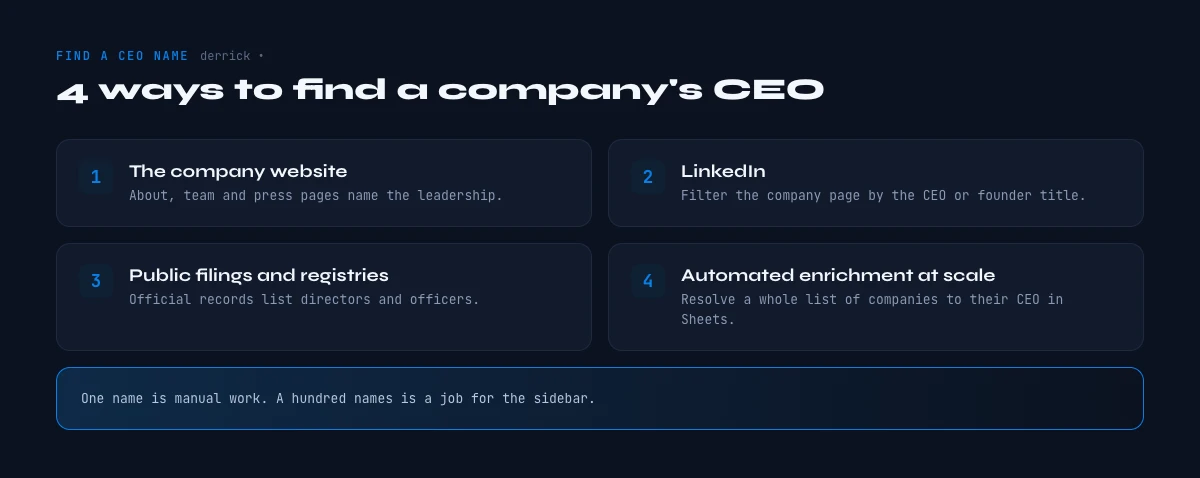
Method 1: The company website
The fastest free source is the company's own site. Look for a page labeled Team, Leadership, About, Management, or Our Story. Well-run companies keep these pages current because they double as recruiting and trust signals, so the CEO is usually named with a title and a short bio.
When there is no obvious leadership page, a targeted search operator does the work for you. In Google, type site:company.com CEO to surface any page on that domain mentioning the title, or site:company.com "chief executive" to catch the spelled-out variant. Press releases, careers pages, and investor sections often name the CEO even when the main navigation hides it.
Two cautions. First, titles drift: some founders call themselves CEO, others use Managing Director, President, or simply Founder, and a few companies run a co-CEO structure. Second, About pages go stale after leadership changes, so treat the website as a strong first signal, not a final answer, and confirm on a second source before you send anything.
Method 2: LinkedIn
LinkedIn is the most current source for who holds a title right now, because the executives themselves keep it updated. Open the company's LinkedIn page, click the People tab, and filter or search on titles such as CEO, Chief Executive, Founder, or President. The person listing that title at that company is your answer, and you get their profile URL in the same step, which you will want later.
If you only have a domain, you first need the right LinkedIn company page. Search the company name, confirm the match by comparing the website and location, and open the People tab from there. This is also the moment to decide whether you want just the CEO or the wider leadership bench, because the same view lets you map the whole leadership team in one pass.
The limit of the manual LinkedIn route is time. Confirming one CEO takes a minute or two. Doing it for a list of 200 accounts, one page at a time, is an afternoon of clicking, and search throttling starts to slow you down well before you finish.
Method 3: Public filings and registries
For publicly traded companies, the CEO is a matter of public record. Regulatory filings name the chief executive and other officers, and those documents are authoritative because they carry legal weight. Annual reports and investor relations pages restate the same names in a friendlier format.
For private companies, national business registries list company directors and legal representatives, though the person filed as director is not always the operational CEO. This route is slower and varies by country, but it is the most reliable way to confirm leadership for regulated or older companies where the website says little. It pairs naturally with checking where the company is headquartered, since the right registry depends on the country of incorporation.
In the web app or Google Sheets
Resolve the person behind the title, in bulk
Finding one CEO by hand is easy; doing it for two hundred accounts is the actual problem. Give Derrick the company and the role you are after, and it returns the matching LinkedIn profile in the row, ready to enrich further.
- Feature
- Lead LinkedIn Finder
- Credit cost
- 1 credit per lead found
The first button opens the web app (nothing to install): 1 credit per lead found, available from the STANDARD plan. The second details the feature and its cost per plan.
Google search operators that surface a leadership name
Before paying for anything, a handful of search operators will name the chief executive of a surprising share of companies, especially mid-market firms that publish a team page but do not rank it well. These work from the domain alone, which is exactly the situation most prospecting lists put you in.
site:example.com "chief executive"restricts the search to the company's own pages and catches the formal title even when the team page calls it something else.site:example.com (ceo OR founder OR "managing director" OR owner)covers the title variants in one pass rather than four searches.site:example.com filetype:pdf "board of directors"reaches annual reports and investor decks, where the leadership list is usually complete and dated."example.com" "ceo" -site:example.comlooks for the name in press coverage and interviews instead of on the company site, which is how you catch a recent appointment the website has not caught up with.site:linkedin.com/in "example" "chief executive officer"surfaces the profile directly, which is useful when the company page hides its people.
Operators are free and instant, and they fail in a predictable way: they find a name, not a current name. A press release from three years ago ranks just as well as this morning's team page. Treat whatever they return as a candidate to confirm, never as the answer, and check it against the methods below before it lands in a sequence.
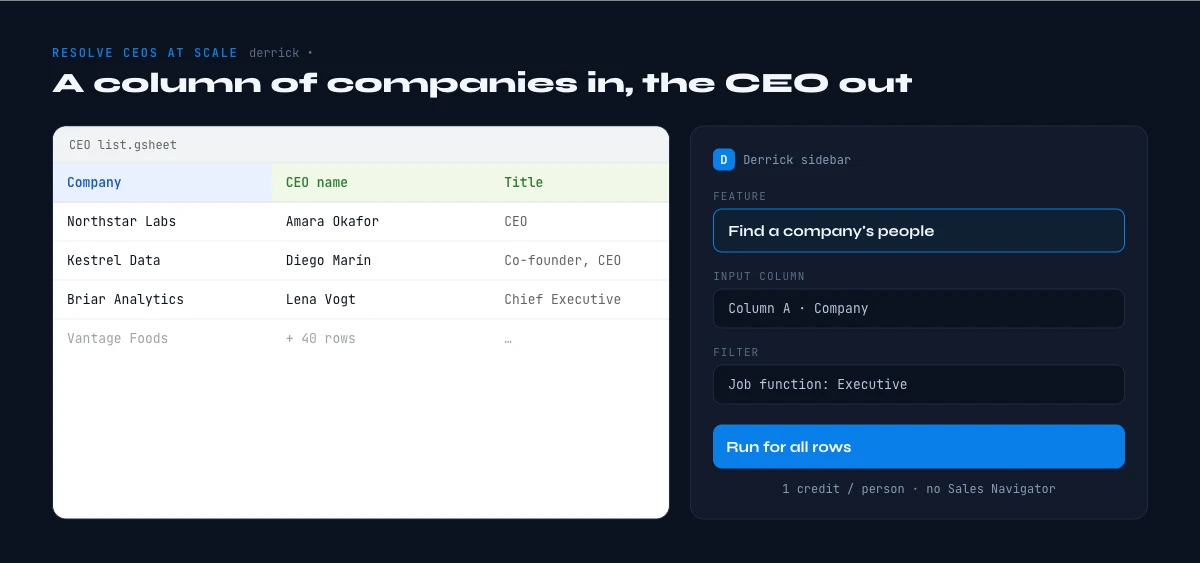
Method 4: Automated enrichment at scale
The manual methods are fine for a handful of accounts. Past that, the pattern is always the same repetitive loop: take a company, find its page, filter on the executive title, copy the name, repeat. That loop is exactly what enrichment automates.
Derrick runs in its web app, where you import your list with nothing to install, and inside Google Sheets from a sidebar next to your data, so you can keep working in the spreadsheet you already have rather than exporting and re-importing lists. Starting from a column of company names or domains, the flow has two clean steps.
First, Search Companies resolves each company name to its LinkedIn URL, at 1 credit per company, which gives you a stable identifier to work from even when several businesses share a similar name. Then Find a company's people lists the staff of each company, current and former, and you filter that list by job function to keep only the executive layer, at 1 credit per person returned. There is no Sales Navigator seat involved, which is what makes it practical to run across an entire list at once.
If you would rather describe who you want in plain language, Import Leads from a Prompt lets you write something like "the CEO of each company in this list" and pulls the matching profiles straight into your list, at 1 credit per lead. And when you want the full company record alongside the leadership, Enrich Companies fills in the firmographic fields from the LinkedIn page at 1 credit per company. Every plan, including the free plan at 100 credits per month, uses the same credit system, so you can test the flow on a small list before scaling it.
Run it from your stack: the Derrick API and MCP
The spreadsheet is only one way in. When "find the CEO" needs to live inside a pipeline rather than a sheet, the same enrichment runs through four doors, and you pick the one that matches where the question is being asked.
- The web app, for the same lookups with nothing to install and without writing a request.
- The Google Sheets extension, when you already hold a list in a sheet and want a column filled next to it.
- The REST API, when the lookup belongs inside a workflow: a new account lands in the CRM, the leadership field fills itself, nobody opens a tab. Through the API and the 3000+ integrations that sit on top of it, including Zapier, Make and N8N, the step is triggered by the event rather than by a person.
- Derrick MCP, on the paid plans, when the question is asked in plain language inside Claude, Claude Code, ChatGPT or any MCP-compatible assistant. You describe the company, the assistant calls Derrick, the leadership name comes back in the conversation with the profile attached.
The API workflow, from a business name and a domain to a named CEO
This is the sequence behind the question people most often ask of this page, written out as the steps a pipeline actually runs. Each step is one call, and each one charges only if it returns something.
- Resolve the company. Send the business name, or the domain, and get back the company's LinkedIn URL and its firmographics. One credit per company, and it is the step that turns a messy CRM string into a stable identifier the rest of the chain can use.
- Pull the people, filtered by function. Send that company URL with the executive function filter rather than an exact title string. One credit per person returned. Filtering on function is what catches a Managing Director or a Managing Partner that a title match on "CEO" would silently miss.
- Take the name and the title. The response carries both, so your pipeline can rank candidates itself: a single Founder on a twelve-person company is a safer answer than one of four people carrying "Director" at a company of two thousand.
- Add the contact details, if the workflow needs them. The email step takes the person plus the company and returns a verified professional address at 5 credits per email found. The phone step takes the profile and returns a direct line at 200 credits per phone found. Both are on the paid plans rather than the free one.
- Write it back. The response is JSON, so the CRM field, the sheet cell or the assistant's answer all read from the same payload. Nothing is re-keyed by hand, which is where leadership data usually goes stale.
Costed end to end for one company: 1 credit to resolve it, 1 credit for the executive it returns, 5 more if you want the email, 200 more if you want a phone number. For a hundred companies where you only need the names, that is roughly 200 credits, which is a fraction of the 10,000 credits the 20 euro per month STANDARD plan carries. Whether you prefer a sheet, an API call, or a prompt in your AI assistant, the underlying data and the credit cost stay the same, so Derrick fits the way you already work rather than forcing a new one.
Which method fits your list size
The right method depends almost entirely on how many companies you are working through and how fresh the data needs to be.
| Method | Best for | Speed at scale | Freshness |
|---|---|---|---|
| Company website | 1 to 10 accounts | Slow, one site at a time | Can be stale after changes |
| LinkedIn People tab | 1 to 30 accounts | Slow, throttling kicks in | Most current source |
| Public filings | Regulated or public firms | Slow, country by country | Authoritative, updated on filing |
| Automated enrichment | 30 to thousands | One pass, minutes not days | Pulled live from LinkedIn |
A simple rule: below about 30 companies, the manual mix of website plus LinkedIn is fast enough and free. Above that, the copy-paste loop stops being worth your time, and running the two-step enrichment across the whole column pays for itself in the first list.
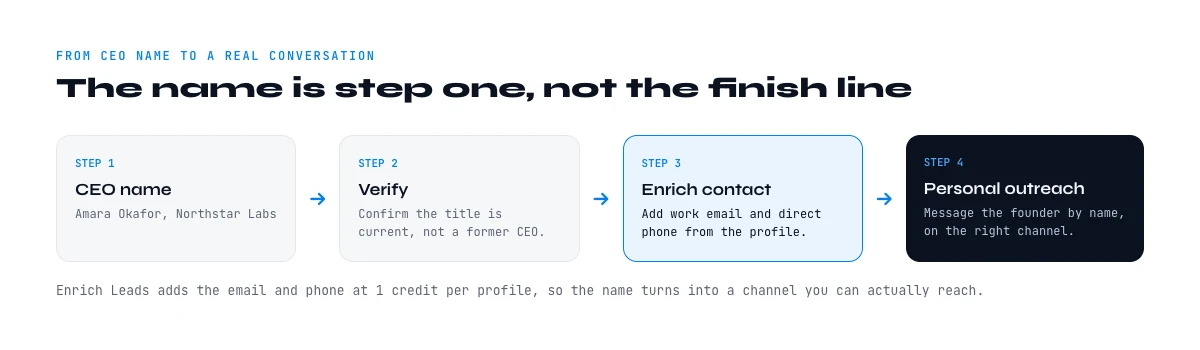
From a CEO name to a CEO email and phone number
A name is rarely the finish line. The reason most people look up a chief executive is to reach one, and the gap between "I know who runs this company" and "I can put something in front of them" is where prospecting lists usually die. The chain has three links, and each one has a failure mode worth knowing before you spend credits on it.
Link one: the email
Corporate email addresses follow a small number of patterns, and once you know a company's pattern you can construct the rest of its directory from names alone. The common ones are firstname.lastname@, firstinitiallastname@, firstname@ and, in older firms, lastname@. Guessing the pattern from a single known address at the company is free and works often enough to be worth trying on one account.
It stops being worth it the moment you have a list. Guessing produces addresses that look right and bounce, and a bounced executive address costs more than the credit you saved, because it damages the sending domain that the rest of your outreach depends on. A multi-source lookup returns an address that has been checked rather than assembled: Email Finder charges 5 credits per email it actually finds, and Email Verification gives you a deliverability verdict on addresses you already hold for 1 credit each. Both sit on the paid plans, which start at 20 euros per month.
Link two: the phone number
Executive phone numbers are the scarcest field in B2B data, and the honest expectation is partial coverage rather than a full column. A switchboard number reaches a gatekeeper; a direct line or a mobile reaches the person. Phone Finder returns direct and mobile numbers at 200 credits per phone found, charged only on a hit, which is the pricing that matters on a field where misses are common. If your play depends on a call rather than an email, run the phone step on a shortlist you have already qualified rather than on the whole list.
Link three: what the company publishes itself
Plenty of smaller companies put a real address on their own site, in a contact page, a legal notice or a press kit. Extracting emails and social profiles straight from the website costs 2 credits per line and is often the fastest route for owner-run businesses, precisely the ones whose people are hardest to find on professional networks. It also returns the social profiles, which is what lets you confirm you have the right person before you write to them.
One caution that applies to the whole chain: a generic inbox is not a shortcut. Writing to info@ or contact@ to reach a chief executive works about as often as calling the switchboard and asking to be put through, which is to say occasionally, and never at scale. Use the generic address to confirm a pattern, not as the destination.
From CEO name to a real conversation
A name on its own does not start a deal. Once you have the CEO confirmed, the natural next steps are building the email pattern the company uses, finding a direct phone line where it matters, and writing a first message that references something specific about the account rather than a generic opener. Because the enrichment flow already returns the profile URL alongside the name, you carry a clean identifier into each of those steps instead of starting your research over.
Keep the leadership data current, too. Executive turnover is high, and a CEO name that was right six months ago may point to someone who has already moved on. Re-running the same enrichment step on your key accounts on a schedule keeps the list honest without any extra manual work.
Common pitfalls to avoid
A few mistakes turn up again and again. Confusing the founder with the current CEO is the most common, especially in companies that have taken outside funding and brought in a professional chief executive while the founder stayed on in another role. Treating a co-CEO structure as a single person is another, since you may need to reach both. And trusting a single stale source, usually an old About page, sends personalized outreach to someone who left, which reads worse than no personalization at all. Cross-referencing two sources, typically the website and LinkedIn, resolves nearly all of these before they cost you a reply.
Titles to watch for beyond CEO
The label "CEO" is not universal, and filtering only on those three letters can hide the real decision-maker. In many European and privately held companies the top operational role is Managing Director. In partnerships, professional services, and some agencies it is Managing Partner. Family-owned businesses often list an Owner or a President who holds the equivalent authority. Founder-led startups sometimes show only Founder or Co-Founder even when that person runs everything.
When you filter a company's people by job function rather than by an exact title string, you catch all of these variants at once, because the executive function groups them together regardless of the exact wording each company chose. That is the practical reason function-based filtering beats keyword matching on a large list: you stop missing the Managing Director who is, in every way that matters, the CEO you were looking for. If the leadership picture is unclear, pulling the founding year and ownership context alongside the names often tells you whether you are looking at a founder-run company or a later-stage business with a hired chief executive.
Two families of title are missed most often, and both show up constantly in real prospecting lists. In owner-operated and franchise businesses the person with the authority is frequently an Owner, a Principal, or an Operating Manager, and none of those strings contain "chief" or "executive". In larger or non-English organisations the equivalent may be filed as Director General, Head of Operations, Gérant, or Geschäftsführer. If your filter is a title string, every one of these is invisible; if your filter is the executive function, they all come back in the same pass.
The practical rule when you are unsure which of several names is the decision-maker: read the title against the headcount. On a company of fifteen, a Founder or an Owner runs it. On a company of two thousand, "Head of Operations" is a functional lead and the chief executive is someone else entirely. Pulling headcount alongside the leadership names, in the same enrichment pass, is what lets a pipeline make that call without a human looking at each row.
A worked example, start to finish
Say you have a list of 150 mid-market SaaS companies, each with a name and a website, and you need the CEO for each. Manually, you would open 150 LinkedIn pages, filter each on executive titles, copy 150 names, and lose the better part of a day, with search throttling stretching it further.
The enrichment version is one setup, then a wait. You point Search Companies at the name column to attach each LinkedIn URL, then run Find a company's people on that column with the job function set to the executive layer. The sheet fills with the leadership names and profile URLs while you do something else. What was a day of clicking becomes minutes of processing, and because the profiles come with URLs attached, you move straight into building emails or mapping the wider org without a second round of research.
Verifying a CEO name before you use it
Whichever method produced the name, a thirty-second check protects your credibility. Confirm the person still lists the company as their current employer, since a profile can lag a departure. Watch for a co-CEO setup, where two names share the role and reaching only one leaves half the decision uncovered. And sanity-check the seniority: a very large enterprise will not be run by someone with a two-year tenure and a small following, so if that is what you see, you have probably caught a namesake or a regional lead rather than the group chief executive. These checks take moments and stop the kind of error that makes a personalized message land worse than a generic one. As a habit, note the date you confirmed each name, so that when you revisit the account later you know exactly how much to trust the record you already have.
Ready to turn a column of company names into a leadership list without the copy-paste loop? Try Derrick free with 100 credits per month and run the flow on your next list.
Frequently asked questions
How do I find a company's CEO if I only have the domain?
Is the founder always the CEO?
What is the most current source for a CEO name?
How do I find CEO names for a large list of companies?
How much does automated CEO enrichment cost?
How do I keep a CEO list accurate over time?
How do I find a CEO's email address and phone number, not just their name?
Can I find company leadership from a domain through an API rather than a spreadsheet?
Keep reading
Continue exploring this cluster


The State of B2B Company Data 2026: Firmographic Decay & What Stale Records Cost
Read →

How to Find a Company's Founding Year (5 Methods, 2026)
Read →

How to Find Company Headquarters Country: Complete Guide
Read →

Company Industry Lookup: How to Find Any Business Industry Instantly
Read →