Company Enrichment: What You Send, What You Get Back
Company enrichment explained field by field: which input resolves which field, by what method, at what cost, and what to do when a lookup comes back empty.


Search for company enrichment and you get two kinds of page: an API product page that lists 250 fields without telling you how to use one, and a help centre article that only works if you already live inside a particular CRM. Neither answers the question people actually have, which is field-level and boringly practical: I have a domain, how do I get the industry, and what do I do when it comes back empty.
This guide is that answer. It maps each company field to the input it can be resolved from, the method that resolves it, what it costs, and how it fails. It is written to be used with a list open in front of you, and it shows a real enriched record and a sample file of enriched companies you can download.
Company enrichment: the short answer
Company enrichment is the process of taking a thin company record, usually just a domain or a name, and filling in the fields you need: legal identity, industry, size, revenue, headquarters, founding year, leadership, technology, news. It is the account-level counterpart to lead enrichment, which works on people.
In practice, you send a company's LinkedIn page, or its name matched to that page first, and you get back its name, website, industry, headcount and headcount range, founding year, headquarters address and follower count. With Derrick's Enrich Companies, that costs 1 credit per company on the free and paid plans, with your LinkedIn account connected through the Derrick Chrome extension.
The critical thing to understand is that enrichment is not one lookup. Each field has its own source, its own resolution path and its own failure mode. Revenue for a private European company and revenue for a listed US company are not the same problem, and no single match rate describes both.
Three properties decide whether an enrichment workflow succeeds:
- The input you start from. A domain resolves more reliably than a company name, because names are ambiguous and domains are unique.
- The field you want. Identity fields resolve at high rates. Revenue and headcount for private companies do not.
- The geography. Legal identity is excellent in countries with an open registry and patchy where there is none.
Example: one company in, one company record out
Here is a real row, enriched on 9 October 2026 from a single input column. Nothing in it was typed by hand: it is what Enrich Companies returned.
| Field | Value returned |
|---|---|
| Input: LinkedIn company URL | linkedin.com/company/datadog |
| Company name | Datadog |
| Website | datadoghq.com |
| Industry | Software Development |
| Headcount | 10,270 (declared range: 1001-5000) |
| Founding year | 2010 |
| Headquarters | 620 8th Ave, New York, NY 10018, US |
| LinkedIn followers | 593,502 |
| Specialities | SaaS, APM, Log Management, Cloud, DevOps, Monitoring and 6 more |
Two details in that row are worth a second look. The headcount and the headcount range disagree: the range is what the company declared on its page, the count is how many people list it as their employer, and that gap is the self-declared field problem covered further down. And there is no revenue in the record, because a company page does not publish one, which is why revenue gets its own treatment in this guide. The full JSON response of the same call sits on our company data API page.
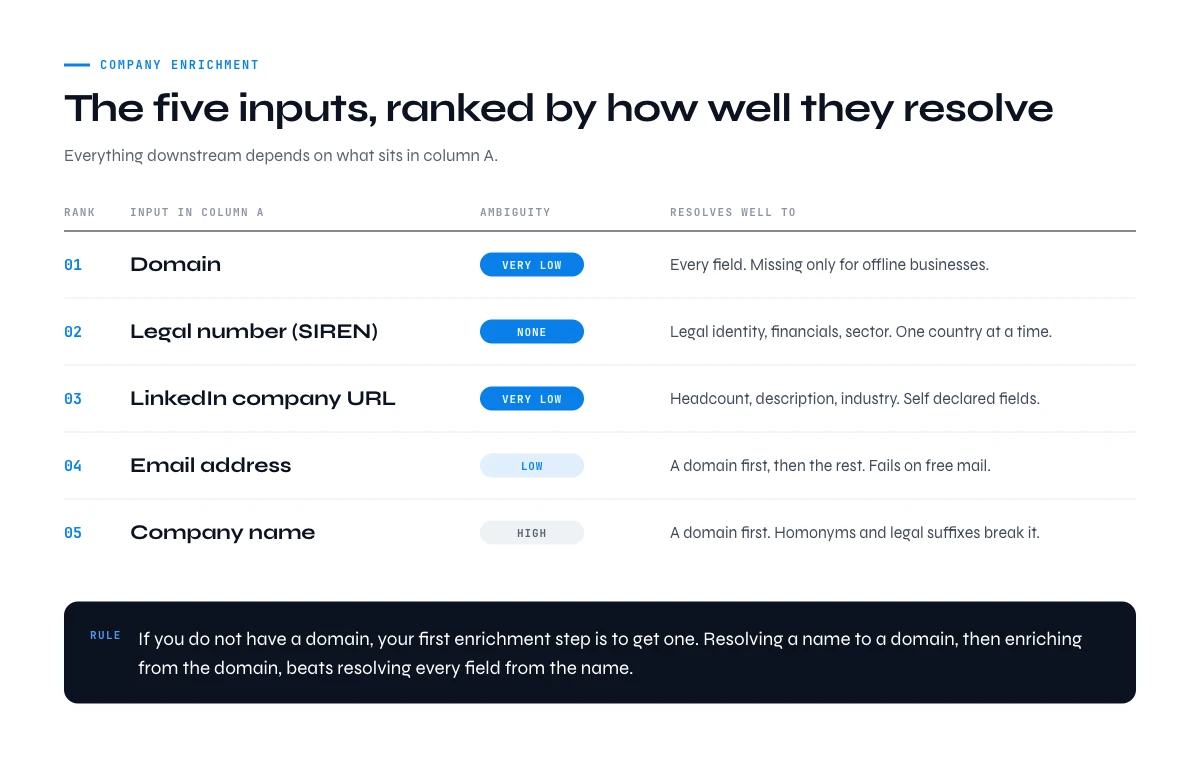
The five inputs company enrichment starts from
Everything downstream depends on what you have in column A. These are the five realistic starting points, ordered by how well they resolve.
| Input | Ambiguity | Resolves well to | Main weakness |
|---|---|---|---|
| Domain | Very low | Everything | Missing for offline businesses |
| Legal number (SIREN, company number) | None | Legal identity, financials, sector | One country at a time |
| LinkedIn company URL | Very low | Headcount, description, industry | Self-declared fields |
| Company name | High | Domain, then everything else | Homonyms, legal suffixes, subsidiaries |
| Email address | Low | Domain, then everything else | Fails on free mail domains |
The practical rule that follows: if you do not have a domain, your first enrichment step is to get one. Resolving a name to a domain first and then enriching from the domain consistently beats trying to resolve every field from the name directly. Reconciling a name to a domain is its own small discipline, mostly because of the legal suffixes and subsidiary names that break naive matching.
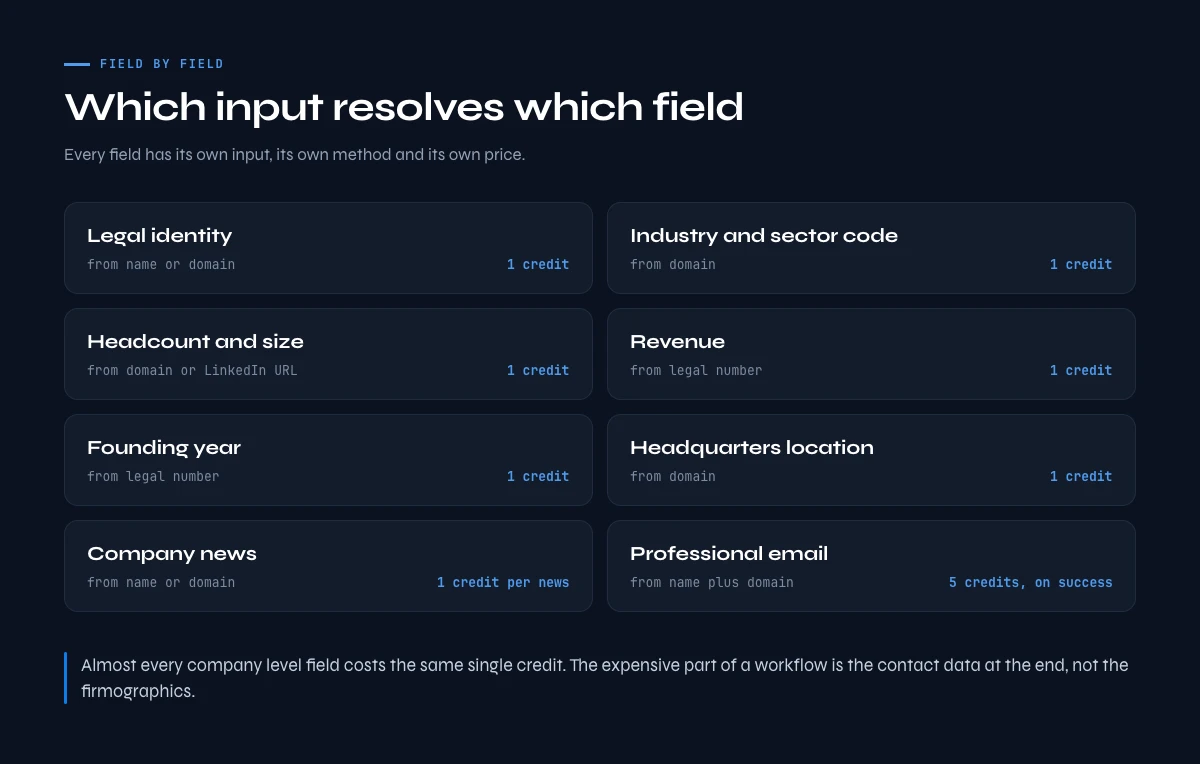
Field by field: what you can resolve, and how
This is the table the API product pages do not give you. Each row is a field, the input it resolves best from, the method, and what it costs in Derrick credits.
| Field | Best input | Method | Derrick cost |
|---|---|---|---|
| Legal identity (SIRET, SIREN) | Name or domain | Official registry match | 1 credit per company |
| Industry and sector code | Domain | Classification from site and registry | 1 credit per company |
| Headcount and size | Domain or LinkedIn URL | Profile and registry blend | 1 credit per company |
| Revenue | Legal number | Filed accounts, else estimate | 1 credit per company |
| Headquarters location | Domain | Registry plus site signals | 1 credit per company |
| Founding year | Legal number or domain | Registry, else archive signals | 1 credit per company |
| Description | Domain | Site and profile extraction | 1 credit per company |
| Similar companies | Domain | Lookalike resolution | 1 credit per company |
| Company news | Name or domain | News retrieval | 1 credit per news item |
| Decision maker profile | LinkedIn URL | Profile enrichment | 1 credit per profile |
| Professional email | Name plus domain | Multi-source lookup | 5 credits, billed on success |
Two things are worth reading off that table. Almost every company-level field costs the same single credit, which means the expensive part of a workflow is rarely the firmographics: it is the contact data at the end. And the billing model differs by field. Enrich Companies bills per request row, while Email Finder bills only when an address is actually found, so a list with poor coverage costs less than the row count suggests.
Identity fields: name, domain and legal number
Identity is the foundation, and it is the only group where you should expect near-complete resolution. Get it wrong and every downstream field is attached to the wrong company.
Legal identity is the strongest key that exists, because it comes from a government registry rather than an inference. In France that is the SIREN for the legal entity and the SIRET for each establishment, and the distinction matters more than people expect: a company with fourteen branches has one SIREN and fourteen SIRETs, so joining on SIRET silently multiplies your rows. Our guide on the SIRET number, its format and what it breaks in a database goes through the validation rules and the join traps.
Sector classification sits alongside identity because it is usually issued with it. In France the NAF code is assigned at registration, which makes it far more reliable than an industry label someone typed into a profile. We maintain the full NAF code list, all 88 divisions and 732 sub-classes for exactly this reason.
Derrick's SIRET and SIREN enrichment resolves a French company from a name or domain to its official identifiers at 1 credit per company, and is available on the free plan.
In the web app or Google Sheets
One input column, the firmographic fields filled
This guide maps which field comes from which input. In practice, you put a company LinkedIn URL or a domain in one column and Derrick writes the rest of the row: name, industry, headcount band, location, description.
- Feature
- LinkedIn Companies Profile Enrichment
- Credit cost
- 1 credit per company enriched
The first button opens the web app (nothing to install): 1 credit per company enriched, 100 free credits every month. The second details the feature and its cost per plan.
Firmographic fields: industry, size, revenue and founding year
These are the fields people mean when they say company enrichment, and they are also where match rates fall off a cliff without anyone announcing it.
Industry has a subtlety worth naming: there is the official sector code from the registry and there is the self-declared industry on a company profile, and they frequently disagree. The registry code is what the company registered as; the profile label is what it wants to be seen as. For segmentation, decide which one you mean before you build the filter. Our guide on finding any business industry works through both and when each is right.
Revenue is the hardest firmographic in the set, and the reason is structural rather than technical. Listed companies publish. Private companies in countries with mandatory filing publish, sometimes years late. Private companies elsewhere do not publish at all, so every number you see is an estimate derived from headcount and sector. That is not a flaw in any particular tool: the data does not exist. The right move is to treat revenue as a band rather than a figure, which our guide on finding a company's revenue sets out method by method.
Founding year looks trivial and is not, because there are several defensible answers for the same company: incorporation date, trading start, and the date the current legal entity was created after a restructuring. If your scoring model rewards young companies, that ambiguity is doing real damage silently.
People, location and signal fields
Company enrichment does not stop at the company. Most workflows need at least one human attached to the account, and increasingly a reason to call this week rather than next quarter.
Leadership. Finding the CEO or a named executive from a company name or domain is a distinct resolution problem, and it degrades fast below a certain company size where the registry lists a director who no longer runs anything day to day. Our guide on finding a company's CEO from its name or domain covers the cross-checks.
Headquarters and location. The trap here is that a company has a registered address, an operational headquarters and often several offices, and these are different fields that get flattened into one column. For territory assignment that flattening is exactly what breaks.
Signals. News, funding and hiring turn a static record into a reason to reach out. Derrick's Google News Scraper returns company news at 1 credit per news item as a paid feature, and Find Similar Companies expands a proven account into a lookalike list at 1 credit per company on the free plan.
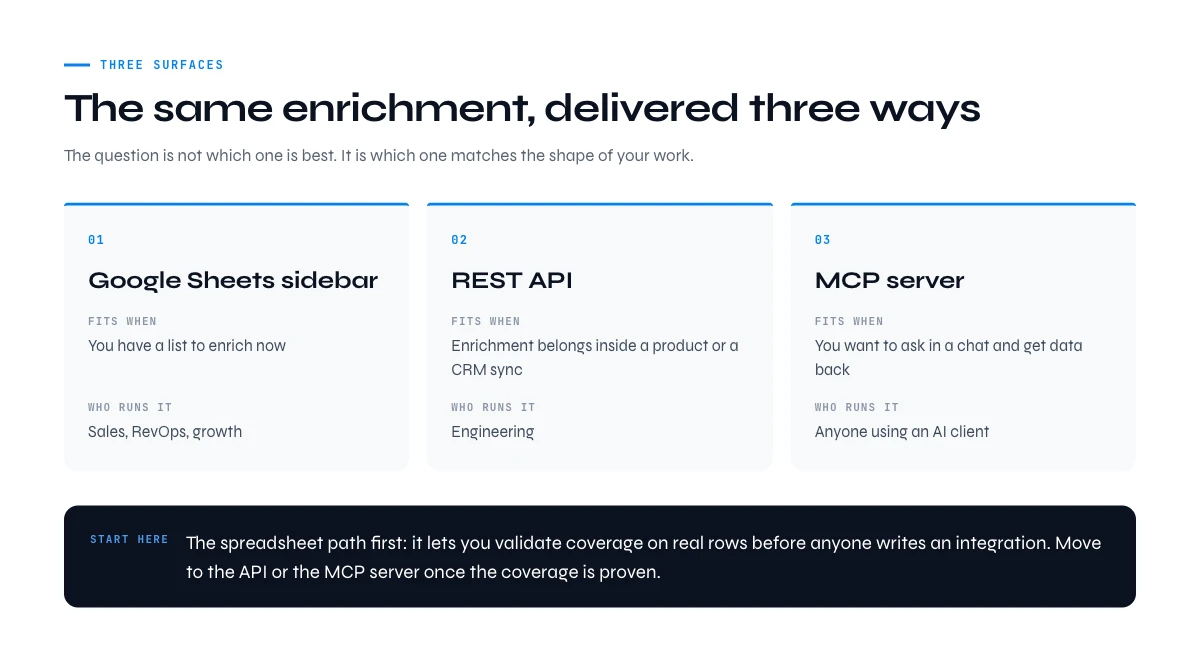
Company enrichment tools: a web app, a spreadsheet, an API or an MCP server
The same company enrichment can be delivered four ways, and picking the wrong surface is a common source of wasted effort. The question is not which is best, it is which matches the shape of your work.
| Surface | Fits when | Who runs it |
|---|---|---|
| Web app | You have a list to start from now: import it as a CSV, nothing to install | Sales, RevOps, growth |
| Google Sheets sidebar | Your list already lives in a spreadsheet | Sales, RevOps, growth |
| REST API | Enrichment belongs inside a product or a CRM sync | Engineering |
| MCP server | You want to ask in a chat and get data back | Anyone using an AI client |
The web app or the spreadsheet is where most teams should start, because it lets you validate coverage on real rows before anyone writes an integration. You import the list as a CSV in the web app, or open it in Google Sheets, pick Enrich Companies in the sidebar, map the input column, and the values fill in beside each row. The demo near the top of this page shows that run on five companies.
The API path is the right answer when enrichment has to happen without a person present: a new signup being enriched at creation, a CRM record refreshed on a schedule, a scoring job running nightly. That is the intent behind most searches for a company data API, and it is a different requirement from enriching a list once.
The Derrick MCP server, available from 47.50 euros per month on the Plus plan, covers the third case: you ask a question in Claude or another MCP client and get the enriched data back in the conversation, without moving to another tool.
Company enrichment API
When enrichment has to run inside your own product or pipeline, the company enrichment API takes the same input and returns the same record as JSON: one authenticated request per company with your API key, called from a back end, a scheduled job, or a no-code tool such as Zapier, Make or N8N. API access starts on the Plus plan at 47.50 euros per month. The request, the full response and the field list are on our company enrichment API page, and the reference lives in the API documentation.
Bulk company enrichment from a CSV
For a list of a few hundred or a few thousand companies, the fastest route is the file you already have. Import the CSV into the Derrick web app, with nothing to install, or open the same list in Google Sheets and run Enrich Companies from the sidebar on the column of LinkedIn company URLs. Each row is filled in place, and rows without a match stay visible instead of disappearing. If the list only has names, run Search Companies first to get each company's LinkedIn page at 1 credit per company, then enrich. The workflow is the same on 50 rows or 50,000.
Enriching company records in your CRM
CRM company records decay quietly: headcount moves, a headquarters changes, a rebrand changes the website. There are two clean ways to refresh them. The API route updates records as they are created or on a schedule. The file route exports the companies, enriches the file and imports it back. Either way, enrich partially: write only into fields that are empty or that you have decided to overwrite, and never replace what a rep typed by hand with a self-declared value from a profile. Keep a "last enriched" date on each record so the next run knows what is stale.
What teams use company enrichment for
The fields only matter for what they let you decide. Five uses account for most company enrichment work:
- Lead scoring. Industry, headcount and founding year are the inputs most fit scores run on. Without them, a score describes the person rather than the account.
- Lead routing. Headquarters country and headcount band decide which rep or team gets an inbound lead, in minutes rather than after someone looks it up.
- Segmentation. Splitting a market by size band and industry is what turns a list into campaigns that say something specific to each segment.
- Target account lists. Enriching a list of named accounts confirms which ones match your ideal customer profile before anyone spends a week on them.
- AI agents. An assistant connected to the Derrick MCP server can enrich a company in the middle of a conversation, for a meeting brief or an account summary, without anyone opening a spreadsheet.
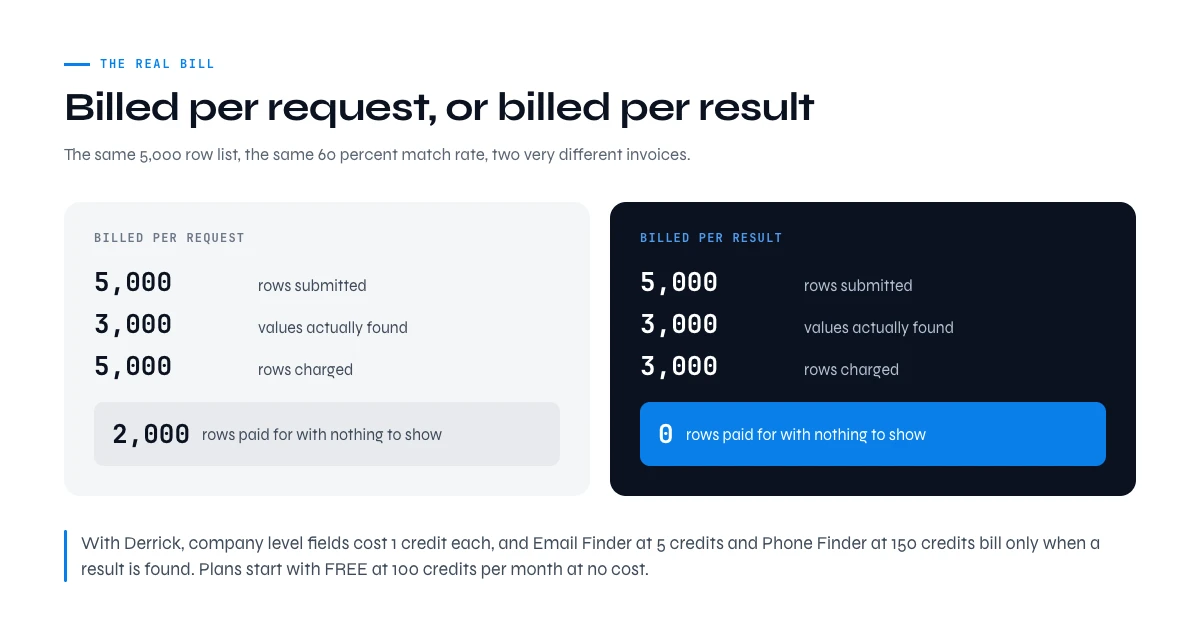
What company enrichment costs, field by field
Cost in enrichment is not the sticker price, it is the price multiplied by how often you pay for nothing. Two questions decide your real bill.
Are you billed per request or per result? Per-request billing charges for the attempt whether or not a value comes back. Per-result billing charges only on success. At a 60 percent match rate on a 5,000 row list, that difference is 2,000 rows you either pay for or do not.
Do unused credits carry over? Enrichment demand is lumpy. A model that resets your balance monthly punishes exactly the pattern most teams have.
Derrick's plans start with FREE at 100 credits per month at no cost, then STANDARD at 20 euros, PLUS at 47.5 euros and PRO at 175 euros per month. Company-level fields cost 1 credit each, so a 500 company list enriched with firmographics, legal identity and similar companies is 1,500 credits. Email Finder at 5 credits and Phone Finder at 200 credits bill only when a result is found.
Use the calculator below to put your own numbers against that before you commit to anything.
Estimate your own enrichment cost
Work out your company enrichment cost
Pick the fields you need and how many companies are in your list. You get the credit cost per row and for the whole list, using Derrick's published per-field pricing.
Pick at least one field and a list size to see your cost.
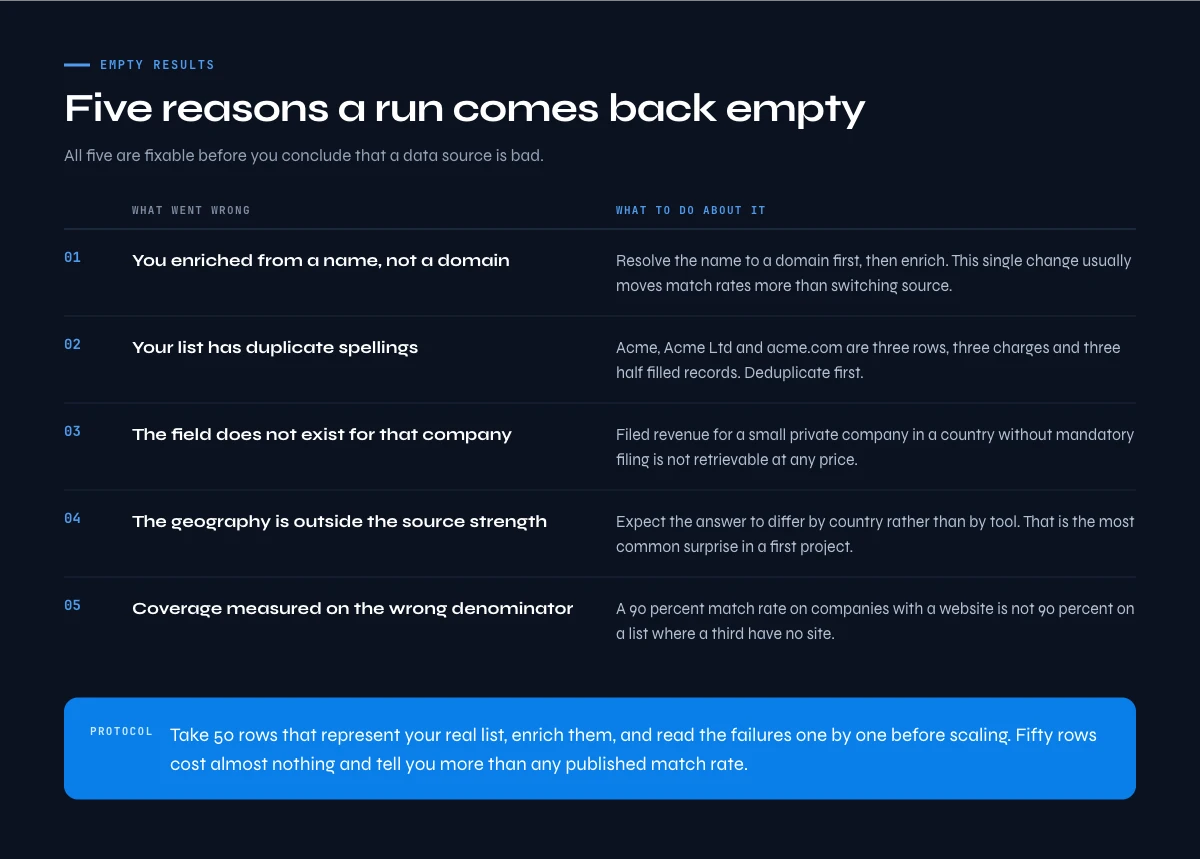
Why an enrichment run comes back empty, and what to do about it
Most disappointing enrichment runs fail for one of five reasons, and all five are fixable before you conclude that a data source is bad.
- You enriched from a name instead of a domain. Names are ambiguous. Resolve to a domain first, then enrich. This single change usually moves match rates more than switching provider.
- Your list has duplicates under different spellings. The same company as "Acme", "Acme Ltd" and "acme.com" is three rows, three charges and three partially filled records. Deduplicate first.
- You are asking for a field that does not exist for that company. Filed revenue for a small private company in a country without mandatory filing is not retrievable at any price.
- Your geography is outside the source's strength. A dataset built on United States coverage will underperform on European small businesses, and the reverse is equally true.
- You measured coverage on the wrong denominator. A 90 percent match rate on companies with a website is not 90 percent on a list where a third have no site.
The practical protocol: take 50 rows that represent your real list, enrich them, and read the failures one by one before scaling. Fifty rows costs almost nothing and tells you more than any published match rate, because it is measured on your data rather than someone's benchmark.
If your list spans several countries, expect the answer to differ by country rather than by tool. That is the single most common surprise in a first enrichment project.
Key takeaways on company enrichment
- Company enrichment is not one lookup. Every field has its own input, method, cost and failure mode.
- The domain is the best input. If you start from a name, resolve to a domain first and enrich from there.
- Identity fields resolve near-completely. Revenue and headcount for private companies are estimates, and treating them as figures rather than bands creates false precision.
- Most company-level fields cost 1 credit with Derrick. The expensive part of a workflow is contact data, not firmographics.
- Choose the surface that matches the work: the web app or a sheet for a list, an API for a pipeline, an MCP server for a conversation.
Company enrichment is less about finding a source that knows everything and more about knowing which field you can trust, from which input, at what cost. The free plan gives you 100 credits per month to run that test on your own list before deciding anything.
Frequently asked questions
What is company enrichment?
What is the best input to start company enrichment from?
Which company fields are hardest to enrich?
Should I use a spreadsheet, an API or an MCP server for enrichment?
How much does company enrichment cost with Derrick?
Why did my enrichment return so many empty fields?
How fresh is company enrichment data?
Can I enrich a company without its domain?
Keep reading
Continue exploring this cluster


The State of B2B Company Data 2026: Firmographic Decay & What Stale Records Cost
Read →

How to Find a Company's Founding Year (5 Methods, 2026)
Read →

How to Find Company Headquarters Country: Complete Guide
Read →

Company Industry Lookup: How to Find Any Business Industry Instantly
Read →