
Top 10 Best Professional Email Enrichment Tools to Optimize Your B2B Prospecting in 2026
Email enrichment tools turn a partial record into a verified professional email. The three axes that decide which one fits: how many sources are queried, whether verification is a separate step, and whether you pay per lookup or only per result found. Derrick bills per result: 5 credits to find an email, 1 to verify it, so a verified address costs 6 credits, roughly 0.011 EUR on the PRO plan, from the web app, Google Sheets, an MCP client or the API.

Find email addresses from what you already have
Why this cluster matters
What you'll learn
Email finders are commodities - until you compare their hit rate, bounce rate, and cost per verified email at volume. The same lead can cost €0.05 with one provider and €0.40 with another, with a 20-point delta on accuracy. This cluster cuts through the marketing claims to the actual delivery rates.
For who · BDRs, SDRs, Cold Email Marketers, Growth Engineers
Try Derrick's email finder →- How email finders actually work (web scraping, pattern matching, third-party DBs, SMTP probing)
- Catch-all servers : what they are, why they break verification, how to handle them
- Real-time vs cached emails - the freshness tradeoff
- Bounce checkers vs email verifiers - they're not the same
- Finding emails from a name + company, from a LinkedIn URL, from a website
- Multi-source lookup: why combining several sources raises email coverage
All guides · 27
All 27 guides in this cluster
Find20


Lead Email Finder: The Complete Guide to Finding Your Prospects' Emails
Find prospects' professional emails from name + company. The 5 reliable methods + accuracy benchmarks. Read the guide →

How to Find a Company Website: Complete 2026 Guide
From email or company name to website URL - methods, tools, what works at scale. Read the guide →

Find Company Name & Website from Email: 4 Methods (2026, Tested)
Reverse-lookup: from any pro email to company name + website. The 4 methods compared on accuracy and speed. Read the guide →

How to Find a LinkedIn Profile by Email Address: 5 Methods (2026)
Turn any email into the matching LinkedIn profile. 5 methods, from a free Google X-ray trick to a bulk Google Sheets workflow, with real match rates. Read the guide →

How to Find a Founder's or CEO's Email
Identify the decision-maker behind a company name, then find and verify the founder's or CEO's email. 5 methods plus a Google Sheets workflow. Read the guide →

How to Find Someone's Email from a LinkedIn Profile
Turn a LinkedIn profile URL into a verified work email: the free manual routes, the reliable finder route, real hit rates and a bulk Google Sheets workflow. Read the guide →

Email Finder API
How Derrick's email finder API returns verified professional emails over REST and MCP, what it costs, and how to run the same lookup at scale. Read the guide →

LinkedIn Email Finder Tools: The Buyer's Guide to Choosing One
The four categories of LinkedIn email finder tools, the criteria that matter, and how to pick one for your workflow. Read the guide →

How to Find CFO Email Addresses for B2B Sales (2026)
Why the CFO is a distinct buyer, where finance-exec emails live, and how to build a verified CFO email list at scale in Google Sheets. Read the guide →

Executive Email Addresses: How to Find Them (2026)
Executive inboxes follow the same patterns as everyone else's, but they are filtered harder and verified less often. The five methods that work, the verification step, and what it costs at scale. Read the guide →

Company Email Address: Generic vs Named, and How to Find Each
A company has two kinds of email address, and they are not interchangeable. Where the generic one lives, how the named one is derived, the eight formats that cover most domains, and the workflow at list scale. Read the guide →

Sales email sequence: structure, cadence and what to send
How many emails a sales sequence should hold, how far apart to space them, what job each message does, and why the data underneath decides the reply rate before the copy ever does. Read the guide →

How to Buy an Email List (and What It Really Costs)
What you actually receive, the four gaps that shrink a bought file, the arithmetic of cost per usable contact, the legal reality by jurisdiction, and when building beats buying. Read the guide →

Email Scraper: What It Returns and Why Lists Bounce (2026)
Scraper versus finder, the four sources, why scraped lists bounce, and the six-check cleanup that makes one sendable. Read the guide →

Local Business Email Addresses: How to Find Them (2026)
Local business email addresses start from a geography and a category, never from a company name. The three exposure tiers, the businesses with no website at all, and the cost per usable address. Read the guide →

Architects Email Addresses: How to Find Them (2026)
Resolve the firm, then the named person, then the address. Public sources, the five roles that buy, verification and the real cost per usable row. Read the guide →

Lawyers Email List: How to Build a Verified One (2026)
Resolve the firm, then the named attorney, then the address. Bar rosters, the five roles that buy, catch-all verification and the real cost per usable row. Read the guide →

Medical Email Database: How to Build a Verified One (2026)
Resolve the practice, then the named clinician, then the address. The free provider register, primary taxonomy, the five buying roles, catch-all verification and the real cost per usable row. Read the guide →

Bulk Email Finder: What Decides Your Match Rate (2026)
The four steps behind every batch, why the input file decides the match rate, and what to do with the rows that come back empty. Read the guide →

How to Find Someone's Email Address by Name: Tool and 5 Methods
Start from a person's name and company: a free generator of the 8 candidate addresses, the 5 methods ranked by cost and reliability, how to verify before sending, where free methods stop, and what a lookup costs per email found. Read the guide →Verify7


Valid Email Finder: How to Find and Verify Valid Professional Emails
What makes an email 'valid' - syntax, MX, SMTP, deliverability. Tools to verify at scale. Read the guide →

Catch-All Email: How to Detect and Manage Them in B2B Prospecting
Catch-all = domain accepts any email. Why they're risky, how to detect, when to send anyway. Read the guide →

Bounce Email Checker: Hit 99% Inbox Rate (2026 Methods)
Reduce bounce rate to <2% - the 5 checks to run before any campaign + warmup tactics. Read the guide →

Real-Time Email Verification: Definition, How It Works, and Why It Matters in 2026
Real-time verification = at form submit, before saving. How it works, when to use, ROI vs batch. Read the guide →

Cold Email Benchmarks 2026: Reply, Open & Bounce Rates by Industry
2026 cold email benchmarks by industry: reply, open, bounce and inbox placement, plus the data lever that moves them. Read the guide →

Email Verification API
How an email verification API checks an address, what every status should trigger in your code, what it costs per address, and how to run the same check from Sheets or an AI agent. Read the guide →

Disposable Email Checker: Free Tool and How It Works
A free in-browser checker for throwaway addresses, the three detection methods behind it, and the difference between disposable, catch-all, role and free webmail. Read the guide →The feature on video
Email Finder
Find your prospects’ verified emails, from the Derrick app, Google Sheets, your AI assistant or the API.
Try Derrick's email finder →Professional email enrichment is the backbone of modern B2B prospecting: turning a half-empty contact list into a set of verified, deliverable addresses you can actually campaign against. This guide ranks the ten email enrichment tools worth knowing in 2026, but it does not pretend they are interchangeable. One of them runs in a web app with nothing to install, or inside the spreadsheet where your list already sits, finds and verifies emails in the same view, and charges you only when it actually returns a result. That is Derrick, and it is where we start.
Comparison Table of the Best Email Enrichment Tools in 2026
Scores are our editorial assessment for a typical B2B sales or growth team that runs enrichment at real volume. Pricing bands are indicative only. Derrick prices are exact and public; the others move their tiers often, so treat their bands as a signal and check each vendor's own page before you commit.
| Tool | Score | Pricing | Built around |
|---|---|---|---|
| Derrick | 9.5/10 | €20 - €320/mo, exact & public (free plan, no card) | Teams who want find + verify in one place, in a web app or in Google Sheets |
| Apollo | 8.6/10 | $$ mid-market | All-in-one sales database and sequencing |
| ZoomInfo | 8.3/10 | $$$$ enterprise, annual | Large orgs needing deep firmographics |
| Hunter.io | 8.1/10 | $ entry | Simple domain search for small teams |
| Findymail | 7.9/10 | $$ mid | LinkedIn / Sales Navigator prospecting |
| Snov.io | 7.7/10 | $$ mid | Marketing teams wanting finder + drip |
| Voila Norbert | 7.4/10 | $$-$$$ | Developers wanting an API |
| Clearbit | 7.2/10 | $$$$ enterprise | Salesforce-heavy automation |
| LeadIQ | 7.0/10 | $$$ | SDR/BDR capture into CRM |
| Lusha | 6.8/10 | $ entry | Individual prospectors on a browser extension |
The rest of this guide explains why the ranking looks the way it does, starting with the tool that wins it, then covering the other nine briefly, and finishing with the methodology, cost math, and compliance you need to choose well.
How We Evaluated These Email Enrichment Tools
Every score in the table comes from the same five criteria, weighted by what costs a sales team money when it goes wrong. Email enrichment is judged on the address you can actually send to, so the heaviest weights sit on accuracy and on cost per verified email, not on database size.
| Criterion | Weight | What we look at |
|---|---|---|
| Accuracy after verification | 30% | Share of returned addresses that pass a verification check, not the share of rows that return something. |
| Cost per verified email | 25% | Price of one usable address once misses, minimums and seats are counted. Billing per result found scores higher than billing per attempt. |
| Coverage on your own accounts | 20% | How many people on your list get an address, tested on a sample you pick, not on a vendor demo list. |
| Where the tool runs | 15% | Whether enrichment happens where the list already lives (a spreadsheet, an AI assistant, an API call) or needs an export and a re-import. |
| Free tier and entry price | 10% | What you can test before paying, stated in credits or lookups, and the first paid step. |
Two things are deliberately left out. Raw database size is a vendor claim nobody can audit from outside, and the number of integrations matters less than whether the one you use is native. To rerun the evaluation on your own data, the one-week protocol further down gives you the exact steps.
1. Derrick - Find and Verify Emails in the Web App or Google Sheets
Derrick is a B2B data enrichment tool. You import your list in its web app, or open its sidebar next to the Google Sheets tab you are already working in, point it at a column of names, domains or LinkedIn URLs, and it fills the next columns with professional emails, verification status, phone numbers and company data. There are no formulas to memorise: the enrichment fills the same grid your list already lives in.
That placement is the whole point. Most enrichment tools ask you to leave your working file, run a job in their dashboard, then re-import the results and reconcile them by hand. Derrick collapses that loop. Because it runs where your data is, an analyst who knows nothing beyond a spreadsheet can build a full enrichment workflow on their own.
The email features, with exact credit costs
Derrick prices in credits, and every plan shares the same per-credit rate, so cost is predictable. The email-side features are:
- Email Finder - finds a professional email from a name and company or domain. 5 credits per email, and it only charges when it actually returns an address, so failed lookups are free.
- Email Verification - checks deliverability so your list stays clean and your bounce rate low. 1 credit per email.
- Email & Social Extractor from Website - pulls emails and social profiles straight off a company website. 2 credits per line.
- Find Names & Domains by Email - splits an address back into its name parts and domain. Unlimited and free.
Email enrichment rarely stops at the address. The same web app and sidebar also run Enrich Leads (1 credit per profile), Enrich Companies (1 credit per company) and Phone Finder (200 credits per phone), so one pass can return the email, the verified status, the company data and the direct line without leaving your list.
How the email lookup works
Derrick uses a multi-source lookup: for each row it checks several signals and pattern-matches the most likely professional address, then confirms it against a live deliverability check before it hands anything back. You get a verified email, not a guess. Because Email Finder is billed per result found, you are never charged for the rows it cannot resolve, which keeps the effective cost of a usable list honest.
A concrete example makes the model clear. Say you drop 1,000 named prospects into a sheet and Derrick resolves 720 of them. You are billed 5 credits for each of those 720 emails (3,600 credits), and nothing for the 280 it could not find. Verify all 720 at 1 credit each (720 credits) and you have spent 4,320 credits on a fully qualified, verified list. At the Pro rate (€0.00175 per credit) that is about €7.56 for 720 deliverable contacts, with the misses costing zero. You can watch the credit counter move as each column fills, so there is never a surprise on the invoice.
Pricing, in full and in euros
- Free: 100 credits every month, €0, no card required.
- Standard: 10,000 credits, €20/month.
- Plus: 25,000 credits, €47.5/month.
- Pro: 100,000 credits, €175/month.
- Scale: 200,000 credits, €320/month.
The per-credit rate falls as the plan grows, down to €0.0016 on Scale. On Pro (€0.00175 per credit) an email found (5 credits) costs about €0.0088 and a verification (1 credit) €0.00175. There is no separate seat licence and no annual contract. Email Finder and Email Verification start on the Standard plan: the 100 free credits each month cover the rest of the catalogue, such as Enrich Leads at 1 credit per profile, not email finding.
Who it fits
Derrick suits SMEs, startups and agencies who want one tool that scales from a handful of rows to lists in the tens of thousands without changing how they work. It scales cleanly at both ends: small teams start on Standard, high-volume operators drop to the Scale floor of €0.0016 per credit. The add-on lives in the Google Workspace world, so a team running entirely on Excel desktop is better served by the web app, the REST API or the MCP server.
Email Enrichment Tools in One Answer: What They Do, What They Cost, What They Return
Email enrichment tools take a partial record, a name plus a company, a LinkedIn URL, or a bare domain, and return a professional email address plus the attributes around it. They differ on three axes that decide everything else: how many sources they query, whether they verify before returning, and whether you pay per lookup or only per result found.
- Input accepted: full name plus company domain is the highest-yield input. A LinkedIn profile URL is the second. A company domain alone returns generic addresses, not a named person.
- Billing model: pay-per-lookup charges every attempt, including the misses. Pay-per-result charges only when an address comes back. Derrick's Email Finder is per result found, at 5 credits per email.
- Verification: finding and verifying are two different operations. Derrick's Email Verification is a separate step at 1 credit per email, so a found-and-verified address costs 6 credits.
- Unit economics: on the PRO plan, one credit is 0.00175 EUR, so a verified email lands near 0.011 EUR. On the STANDARD plan at 20 EUR per month, it is near 0.012 EUR. The free plan gives 100 credits per month; Email Finder and Email Verification are paid features, from STANDARD upward.
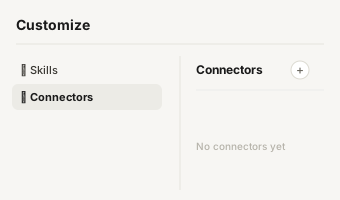
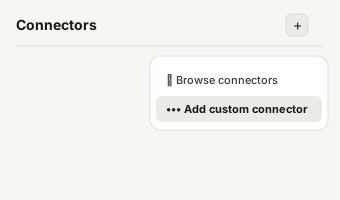
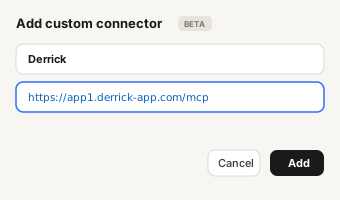
- Surface: the same enrichment runs from the Derrick web app, from a Google Sheets sidebar, from an MCP client such as Claude or ChatGPT, and from the REST API. Pick the surface by workflow, not by preference: a list to enrich belongs in the web app or in Sheets, a one-off question belongs in a chat client, a CRM pipeline belongs on the API.
What to Do When You Have No Name, No Email and No Phone
This is the hardest starting point, and it has a defined sequence. You are not looking for the email first; you are looking for the person.
- Resolve the company. From a domain, a brand name or a Google Maps listing, get to a canonical company record with its LinkedIn page and legal identity.
- Find the right person inside it. Search staff members by role rather than by name. A job title plus a company is enough to identify a decision maker without knowing who they are.
- Enrich the profile, which returns the full name, the current title and the tenure. Only now do you have the input an email finder needs.
- Find the email from the name plus the domain, then verify it as a separate operation before it enters a sequence.
Skipping straight to step 4 with no name is the single most common reason an enrichment run comes back empty. The tool is not failing; it is being asked a question that has no answer.
Email Verification and SMTP Checks: What a Verification Result Actually Means
Verification answers one question: will this mailbox accept a message today. It is not a quality score and it does not tell you whether the person will reply.
- Syntax and domain checks discard malformed addresses and domains with no mail exchanger record. Cheap, instant, and they catch a surprising share of a scraped list.
- Mailbox-level checks establish whether the specific address exists on that server. This is the step that separates a real verification from a guess.
- Catch-all domains accept every address sent to them, so no verifier can confirm an individual mailbox behind one. An honest tool returns "accept-all" rather than a false positive, and you treat that address as a calculated risk.
- Role addresses such as contact@ or info@ are valid but route to a shared inbox. They are useful for support, rarely for outbound.
- Freshness matters more than any published accuracy figure: an address verified six months ago and left in a CRM is an unverified address. Verify at send time, not at import time.
What Email Enrichment Actually Is
Email enrichment is the process of completing a contact record with a valid professional email address, using the fragments you already hold: a full name, a company, a domain, or a LinkedIn profile. It is distinct from buying a static list. Enrichment works from your own target accounts and returns addresses tied to the specific people you want to reach, which is why it produces far more relevant campaigns than a bought database.
A complete enrichment record usually pairs three things: the address itself, a verification verdict that says whether it is deliverable, and supporting context such as job title, company size or sector. The address without the verdict is a liability, because sending to unverified emails is the fastest way to damage your domain reputation. That is why the strongest tools, Derrick included, treat finding and verifying as one motion rather than two products.
Email enrichment vs data enrichment tools. Email enrichment is one layer of a wider category. Data enrichment tools fill any missing field on a record, from company size and industry to tech stack and hiring signals; email enrichment tools specialise in the one field outbound depends on, the deliverable address. Most round-ups that rank for data enrichment tools treat the email as a sub-case, which is why they rarely talk about verification. If your gap is company data rather than addresses, the data enrichment guides are the better starting point.
How Multi-Source Email Lookup Finds an Address
When you ask a tool for the email of a named person at a company, it does not simply guess first.last@domain and hope. A good multi-source lookup combines several signals: known address patterns for that domain, public professional data, and pattern inference from verified addresses at the same company. The candidate address is then passed through a deliverability check before it is returned.
The quality difference between tools comes down to two things: how many independent signals they can cross-reference, and whether they verify before they bill. Derrick does both, and because it only charges Email Finder credits when a result comes back, the incentive is aligned with your outcome rather than with the number of attempts. When a lookup does return a pattern match it cannot fully confirm, verification flags it so you can decide rather than discovering it at send time.
Verification and Deliverability: The Half Most Tools Skip
Finding an email is only useful if it lands. Every enriched list decays: people change jobs, domains get retired, catch-all servers accept anything and deliver nothing. Verification is what separates a list you can send to from one that will get you blocked. A clean list protects your sender reputation, keeps your bounce rate under the thresholds inbox providers watch, and preserves the deliverability of every future campaign from that domain.
Derrick's Email Verification runs at 1 credit per address and can be applied to a whole column in one pass, so verifying a freshly enriched list costs a fraction of finding it. Two related patterns deserve their own attention: catch-all domains that accept every address, and real-time verification for the moment of send.
In practice, a verification result sorts every address into one of a few buckets: deliverable, undeliverable, or risky or unknown (which is where catch-all domains land). The discipline is simple. Send with confidence to the deliverable ones, drop the undeliverable ones before they ever bounce, and decide case by case on the risky bucket rather than blasting it. A bounce rate held low, ideally in the low single digits, is what keeps a domain in good standing with inbox providers, and that reputation compounds: every clean campaign makes the next one land better, while one dirty send can set you back for weeks.
The Other Nine Email Enrichment Tools, at a Glance
Each of the following does one part of the job well. None of them puts find, verify and enrich in the same view the way Derrick does, which is why they sit below it, but they are worth knowing for the cases they suit.
Apollo
An all-in-one sales platform with a large contact database and built-in sequencing. It suits mid-size teams that want prospecting and outreach in one place, and are happy to work in Apollo's own interface rather than their spreadsheet.
ZoomInfo
An enterprise data platform covering deep firmographics and intent signals. Priced accordingly, with annual contracts, so it fits large organisations rather than lean teams.
Hunter.io
Simple, focused domain search and verification. A comfortable entry point for freelancers and small teams whose needs stop at finding a few addresses per domain.
Findymail
Specialises in LinkedIn and Sales Navigator enrichment with a delivery guarantee. A good fit if your entire motion runs off LinkedIn lists.
Snov.io
Combines an email finder with drip campaigns and light LinkedIn automation, aimed at marketing teams who want finder and sender bundled.
Voila Norbert
A developer-leaning option with a solid API and bulk processing, best when you need custom integrations rather than a ready-made interface.
Clearbit
Automatic enrichment and visitor de-anonymisation, tightly bound to Salesforce and Marketo. Built for tech companies with enterprise budgets.
LeadIQ
Contact capture from LinkedIn into the CRM, designed around the SDR and BDR workflow and the sequences that follow.
Lusha
A browser extension that surfaces contact data on LinkedIn. Easy to start with for individual prospectors, though accuracy varies by region and advanced features are limited.
Building a Workflow With Email Enrichment Tools in Google Sheets
Here is the workflow Derrick is built for, end to end, without switching tools. It runs the same way in the Derrick web app, with nothing to install; this version uses the Google Sheets sidebar:
- Start with what you have. A column of full names and companies, or domains, or LinkedIn URLs. Even a partial list works.
- Find the emails. Run Email Finder across the column. It fills a new column with professional addresses and skips (free) the rows it cannot resolve.
- Verify in the same pass. Run Email Verification so every address carries a deliverability verdict before it ever reaches your sequencer.
- Enrich the context. Add company data, job titles and, where useful, direct phone numbers with Enrich Companies and Phone Finder.
- Send to your CRM. The sheet is now a clean, qualified, campaign-ready list you can sync out.
The same five steps run whether the sheet has 50 rows or 50,000. That is the practical meaning of "scales at both ends": you do not switch tools when the volume grows.
Cost per Valid Email: The Math That Decides at Volume
Headline monthly prices hide the number that actually matters: what does one verified, usable email cost you? Because Derrick bills Email Finder only on a result found, the rows that fail add nothing, so the effective cost is the price of the emails you keep, not the emails you attempted.
On the Pro plan the per-credit rate is €0.00175, and it goes down to €0.0016 on Scale. A found email is 5 credits, so roughly €0.0088 each; a verification is 1 credit, so €0.00175 each. Find and verify together land near one cent per fully qualified contact. Tools that charge per lookup attempt, or bundle seats and annual commitments, tend to look cheaper on the sticker and cost more per usable address once you account for misses and minimums. When you compare, normalise everything to cost per verified email and the ranking tends to settle.
Test Any Email Enrichment Tool in One Week
A vendor demo proves nothing about your list. The only email enrichment test worth running uses 100 rows of your own accounts and measures the same three numbers on every tool: found, verified, and cost per verified email.
- Day 1, build the sample. Pick 100 contacts you would really prospect, with first name, last name and company domain. Mix company sizes and countries so the sample looks like your pipeline, not like a showroom.
- Day 2, run the find step. Send the same 100 rows to each tool. In Derrick, Email Finder costs 5 credits per email found and nothing on a miss, so 100 rows with 70 addresses found use 350 credits, which fits inside the Standard plan (€20, 10,000 credits). The free plan does not include Email Finder.
- Day 3, verify everything. Run every returned address through the same verifier, whichever tool found it, so accuracy is measured with one ruler. In Derrick, Email Verification is 1 credit per email, so 70 more credits.
- Days 4 and 5, compute the three numbers. Found rate (addresses returned out of 100), verified rate (valid out of returned), and cost per verified email (what you paid divided by valid addresses). A tool that returns 90 addresses of which 60 are valid loses to one that returns 75 of which 70 are valid.
- Days 6 and 7, test the workflow. Push the verified rows to where they will be used: your CRM, your sending tool, a colleague's sheet. Count the manual steps. The tool that saves an export and a re-import often saves more than its price difference.
Derrick runs the whole protocol from its web app or from Google Sheets, from the Derrick MCP server when you would rather ask Claude or ChatGPT to process the sample, or from the REST API when the test lives in a script. The web app is the route for teams who want the same test without a spreadsheet.
How to Choose Your Email Enrichment Tool
By ecosystem. If you want nothing to install, the Derrick web app is the natural fit. If your team works in Google Sheets, its sidebar enriches the list where your data already is. A Salesforce-centric enterprise may lean toward Clearbit or ZoomInfo for their native automation; a pure LinkedIn motion may add Findymail or LeadIQ.
By volume. Under a thousand emails a month, an entry tool covers you, though Derrick's Standard plan (€20 for 10,000 credits, up to 2,000 emails found) covers that range with room to spare. Between one and ten thousand, Derrick, Apollo and Snov.io are all in play. Above ten thousand, the deciding factor is cost per verified email, where Derrick's Pro and Scale rates (€0.00175 and €0.0016 per credit) set the bar.
By job to be done. If you need find and verify in one clean pass without leaving your list, that is exactly what Derrick was built to do. If you need a full outbound suite with a sender built in, an all-in-one platform may earn its extra cost. Match the tool to the job, and do not pay for a database and a sequencer if all you needed was clean addresses.
GDPR and Compliance
Email enrichment for B2B prospecting is legitimate under GDPR when you have a lawful basis, respect the recipient's rights, and keep your data accurate and current. Practically, that means enriching only the accounts you have a genuine business reason to contact, honouring opt-out and deletion requests promptly, and re-verifying periodically so you are not holding stale records. Verification is not only a deliverability tool, it is a data-hygiene one: a list you keep clean is a list you can defend. Whichever tool you pick, treat compliance as part of the workflow, not an afterthought bolted on at the end.
Trends Shaping Email Enrichment Tools in 2026
AI-assisted matching. Modern tools increasingly score the probability that an address is valid and suggest likely variants, which raises hit rates and cuts the verification you have to do by hand.
Answer engines and GEO. Buyers now ask AI assistants "what is the best email finder for Google Sheets?" as often as they type it into a search bar. Tools with clear, structured, well-explained pages get cited in those answers, which is a growing acquisition channel of its own.
Multichannel by default. Enrichment no longer stops at email. Phone numbers, LinkedIn profiles and engagement signals are becoming part of the same record, which is why running find, verify and enrich in one place, as Derrick does, is increasingly the efficient path rather than a nice-to-have.
Common Mistakes That Kill Enrichment ROI
The tool matters less than the habits around it. These are the mistakes that quietly waste budget and burn sender reputation:
- Sending without verifying. An enriched address is a candidate, not a confirmed contact. Skipping verification is the fastest route to bounces and a blocked domain.
- Paying per attempt instead of per result. If your tool bills every lookup, your misses cost as much as your hits. Tools that charge only on a result found, like Derrick's Email Finder, keep the money tied to outcomes.
- Ignoring catch-all domains. A catch-all server accepts every address and delivers few, so it inflates your "found" count with contacts you cannot reach. Detect and quarantine them before they distort your metrics.
- Enriching a list you will never re-verify. Data decays every month as people change jobs. A one-off enrichment with no refresh cadence is stale within a quarter.
- Buying a suite when you needed clean addresses. Paying for a database and a sequencer when the job was find-and-verify is the most common way teams overspend. Match the tool to the job.
Avoid these five and almost any tool on this list performs better; combine avoiding them with a find-and-verify workflow that lives where your list lives, and the cost per usable contact drops to about a cent.
Conclusion
Ten tools, one clear recommendation for most teams. If you want to find, verify and enrich professional emails without switching apps or learning formulas, Derrick gives you the whole motion in one place, in its web app or in Google Sheets, at transparent euro pricing, with a free tier that actually works and a per-credit floor that stays cheap at scale. The enterprise names still make sense for enterprise needs, and the specialists still suit their niches, but for the everyday job of turning a list of names into clean, deliverable addresses, Derrick is where to start.
Additional Resources
Every way to find email addresses
Pick the value you already have on the left, and the one you need on the right.
Email Finder
Start enriching your list in 30 seconds
Free for 100 credits/month. No credit card.
Install the add-on and enrich your lists without leaving your spreadsheet.
Install in Google Sheets →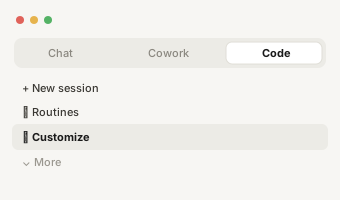
https://app1.derrick-app.com/mcp Call the same enrichment endpoints straight from your own stack or workflow.
Read the API docs →